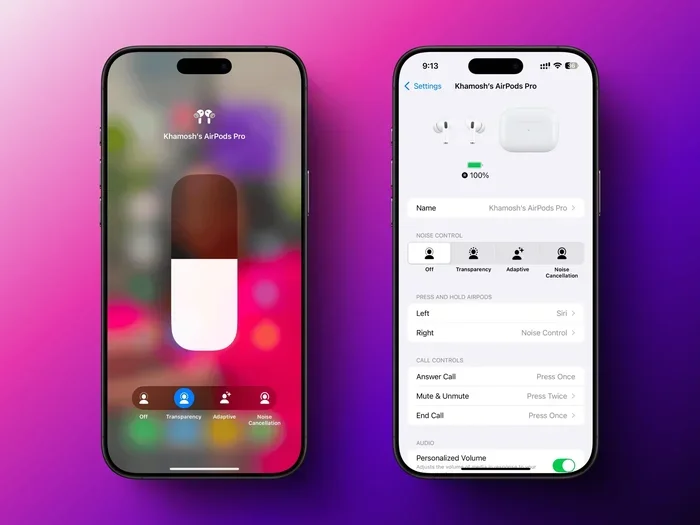
Featured image for AirPods noise cancellation feature
Image source: lifehacker.com
Not all AirPods have noise cancellation—only certain models do. AirPods Pro (all generations), AirPods Max, and AirPods 4 (with ANC) feature Active Noise Cancellation. Standard AirPods (1st through 3rd generation) and AirPods 4 (base model) do not. You can check your model in your iPhone’s Settings under Bluetooth to see exactly what features your earbuds support.
Imagine you’re sitting on a noisy subway, and suddenly, the world goes quiet. The rumble fades, the chatter disappears, and all that’s left is your favorite song in crystal-clear detail. That’s the magic of noise cancellation—and it’s one of the most loved features in modern earbuds.
If you’re reading this, you’re probably wondering whether your own AirPods can pull off that same trick. Maybe you just bought a pair, inherited some from a friend, or you’re staring at the small printed text on the charging case and feeling a little lost. Don’t worry—you’re not alone. Thousands of people search “do my AirPods have noise cancellation” every single month, and the answer isn’t always obvious.
The truth is, Apple’s AirPods lineup has grown significantly over the years. Some models cancel noise like a dream, while others don’t cancel a thing. Some even sit in a middle ground with clever features that adapt to your surroundings. In this guide, we’ll walk you through everything you need to know in plain, friendly language—no tech jargon overload, no confusing diagrams. By the end, you’ll know exactly what your AirPods can do and how to get the most out of them.
Key Takeaways
- Noise cancellation is model-specific: Only AirPods Pro (1st, 2nd, and 3rd gen), AirPods Max, and AirPods 4 with ANC support active noise cancellation—standard AirPods do not.
- Two types exist: Active Noise Cancellation (ANC) uses microphones and anti-noise waves, while Transparency Mode lets outside sound in deliberately.
- Easy to check your model: Go to Settings > Bluetooth, tap the “i” next to your AirPods name, and view the “Model” number to identify your exact version.
- Adaptive Audio is the new standard: AirPods Pro 2 and AirPods 4 (ANC) introduced Adaptive Audio, which blends ANC and Transparency automatically based on your environment.
- Battery impact matters: Using ANC can reduce listening time by roughly 30–60 minutes per charge compared to Transparency or off modes.
- Firmware updates can change features: Apple sometimes adds or improves noise-canceling capabilities through software updates, so keep your AirPods updated.
- You can test if it’s working: Put your AirPods in, play no music, and you should notice a “pressure” sensation or a sudden hush of background noise if ANC is active.
📑 Table of Contents
- What Exactly Is Noise Cancellation, and How Does It Work?
- Which AirPods Models Have Noise Cancellation?
- How to Check If Your Specific AirPods Have Noise Cancellation
- How to Turn Noise Cancellation On and Off
- Tips to Get the Best Noise Cancellation Experience
- Frequently Asked Questions About AirPods Noise Cancellation
- Final Thoughts: Finding the Perfect Quiet in Your AirPods
What Exactly Is Noise Cancellation, and How Does It Work?
Before we figure out whether your AirPods have it, let’s quickly break down what noise cancellation actually is. Think of it like this: imagine you’re pushing a friend on a swing. They swing forward, then backward. Now imagine someone pushing at the exact same moment your friend swings backward. The two forces cancel each other out, and the swing stops.
Noise-canceling headphones work the same way—but with sound. Tiny microphones on your AirPods listen to the noise around you. Then, the earbuds create a second sound wave that’s the exact opposite of the outside noise, called an “anti-noise” wave. When the two waves meet, they cancel each other out, leaving you with beautiful silence (or just your music, if you’re playing something).
Active Noise Cancellation (ANC) vs. Passive Noise Isolation
There’s a key difference here that often confuses people. Active Noise Cancellation (ANC) uses microphones, processors, and speakers to electronically remove noise. Passive Noise Isolation simply blocks noise physically—like putting your hands over your ears. Even basic earbuds can give you a little passive isolation if they fit snugly.
True ANC is the high-tech version, and it’s much more effective against low, droning sounds like airplane engines, air conditioners, or subway rumble. Apple’s ANC is considered some of the best in the industry, and reviews consistently rate AirPods Pro among the top noise-canceling earbuds available.
What About Transparency Mode?
Transparency Mode is the opposite of ANC. Instead of blocking outside sound, it actively lets it in—using those same microphones. It’s like having a transparent window in your earbuds. Why would you want that? So you can hear traffic when crossing the street, listen for your flight announcement, or have a quick chat without taking your earbuds out. AirPods with ANC also include Transparency Mode, and on newer models, there’s even an “Adaptive Audio” feature that blends the two automatically.
Did You Know? The science behind noise cancellation was first discovered in the 1930s and was originally developed for pilots and aviation workers. It wasn’t until decades later that it became small and affordable enough to fit into consumer earbuds like AirPods.
Which AirPods Models Have Noise Cancellation?
Here’s the big question, and we’ll answer it clearly. Out of all the AirPods Apple has ever sold, only certain models include Active Noise Cancellation. Let’s go through them one by one so you can figure out exactly what you have.
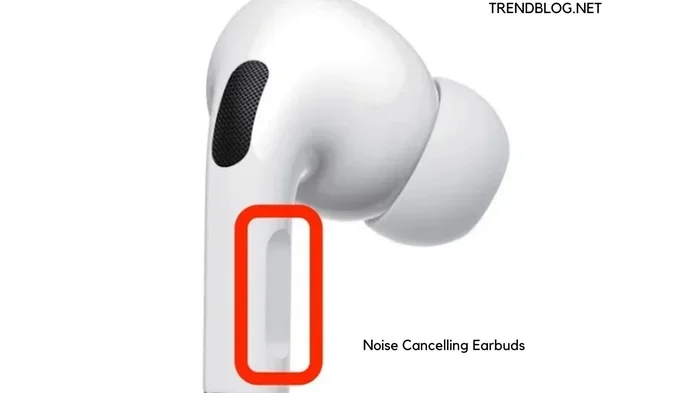
Visual guide about AirPods noise cancellation feature
Image source: trendblog.net
AirPods Pro (1st Generation) – Released October 2019
The original AirPods Pro were the first AirPods to feature Active Noise Cancellation. They introduced the now-iconic silicone tip design, which not only improves comfort but also creates a better seal for noise cancellation. They also include Transparency Mode, which was a brand-new feature at the time.
AirPods Pro (2nd Generation) – Released September 2022
The second-generation AirPods Pro brought big improvements. Apple claimed they offered “up to 2x more Active Noise Cancellation” than the previous generation. They also introduced Touch controls on the stem, Adaptive Transparency, and Personalized Spatial Audio. They use the H2 chip, which makes the noise cancellation smarter and more efficient.
AirPods Pro (3rd Generation… wait, just kidding!) – Latest Models in 2024
As of early 2026, the AirPods Pro lineup currently includes the AirPods Pro 2, but Apple is expected to release new versions periodically. The key thing to remember is that any AirPods with “Pro” in the name have Active Noise Cancellation—that’s been true since the very first generation.
AirPods Max – Released December 2020
AirPods Max are Apple’s over-ear headphones, and yes, they have premium Active Noise Cancellation. They use eight microphones for noise cancellation and are considered among the best noise-canceling over-ear headphones on the market. They also feature Transparency Mode and, more recently, Adaptive Audio via firmware updates.
AirPods 4 – Released September 2024
The AirPods 4 came in two versions: a base model and a higher-tier version with Active Noise Cancellation. This is the first time Apple offered noise cancellation in the standard AirPods line (not the Pro line). The ANC version of AirPods 4 also includes Transparency Mode and Adaptive Audio, making it a more affordable alternative to the Pro models.
AirPods 1, 2, and 3 – No Noise Cancellation
The standard AirPods (1st generation from 2016, 2nd generation from 2019, and 3rd generation from 2021) do not have Active Noise Cancellation. They rely entirely on passive noise isolation, which means they block some sound simply by being in your ears—but they won’t electronically cancel airplane noise or busy cafe chatter.
Quick Reference:
- Has ANC: AirPods Pro (1st & 2nd gen), AirPods Max, AirPods 4 (ANC version)
- No ANC: AirPods 1, 2, 3, AirPods 4 (base version)
How to Check If Your Specific AirPods Have Noise Cancellation
If you’re not 100% sure what model you own, don’t worry. There are a few quick ways to find out, and you don’t need to be a tech wizard to figure it out.
Method 1: Check Your iPhone Settings
This is the easiest and most reliable method. Here’s what to do:
- Open the Settings app on your iPhone or iPad.
- Tap on Bluetooth.
- Find your AirPods in the list of connected devices.
- Tap the small “i” (information) button next to them.
- Look for the Model Number. It will start with “A” followed by numbers, like A2083 or A2968.
Once you have that number, you can quickly search Apple’s support website or just Google “AirPods model A2xxx” to find out exactly what you have. For example, A2083 is AirPods Pro 1, while A2968 is AirPods 4 with ANC.
Method 2: Look at the Design
The shape of your AirPods can give you a huge clue. If they have silicone ear tips that fit inside your ear canal, they’re most likely AirPods Pro—they have ANC. If they have a hard plastic design that just rests in your outer ear (no silicone tips), they’re standard AirPods and probably don’t have ANC. AirPods Max are obviously over-ear headphones, so those are easy to spot.
Method 3: Check the Charging Case
AirPods Pro cases are typically shorter and wider than standard AirPods cases. The AirPods 4 ANC version has a case with a small built-in speaker on the bottom for Find My alerts. Standard AirPods 4 cases don’t have this speaker.
Method 4: Try the Control
If your AirPods support ANC, you should be able to long-press the stem (or use the “Noise Control” option in Control Center) to switch between Noise Cancellation, Transparency, and Off. If you don’t see those options, your AirPods don’t have ANC.
Did You Know? Apple sells more than 100 million AirPods every year, making them the most popular wireless earbuds in the world. With so many people using them, it’s no wonder “do my AirPods have noise cancellation” is such a common search question.
How to Turn Noise Cancellation On and Off
Once you’ve confirmed your AirPods have ANC, you’ll want to know how to actually use it. There are a few different methods, and they all do the same thing.
Using Your iPhone or iPad
The simplest way is through your device:
- Swipe down from the top-right of your screen to open Control Center (on newer iPhones).
- Press and hold the volume slider.
- You’ll see three options: Noise Cancellation, Transparency, and Off.
- Tap the one you want.
Using the AirPods Stem
On AirPods Pro and AirPods 4 (ANC), you can press and hold the force sensor on the stem to switch between noise control modes. By default, it switches between Noise Cancellation and Transparency, but you can customize this in Settings > Bluetooth > [Your AirPods] > Press and Hold.
Using a Mac
If your AirPods are connected to a Mac, click the Bluetooth icon in the menu bar, choose your AirPods, and select the noise control mode you want. You can also find these options in the Sound settings.
Using Apple Watch
While listening to audio on your Apple Watch, tap the AirPlay icon (the triangle with circles) and choose your noise control mode from there.
Tips to Get the Best Noise Cancellation Experience
Just having noise-canceling AirPods isn’t enough—you need to use them properly to get the full benefit. Here are some tried-and-true tips from audio enthusiasts and everyday users.
Get the Right Ear Tip Fit
This might be the single most important tip. If your AirPods Pro or AirPods 4 ANC aren’t sealed properly in your ears, the noise cancellation won’t work well. Apple includes multiple ear tip sizes (XS, S, M, L) in the box. Try each size and see which one feels snug without being uncomfortable. A good seal means the ear tips should feel like they’re gently sealing your ear canal.
Apple even includes an “Ear Tip Fit Test” in the Settings. Go to Settings > Bluetooth > [Your AirPods] > Ear Tip Fit Test to check if your current tips are doing a good job.
Keep Your AirPods Clean
Dust, earwax, and debris can clog the microphones and speakers, which directly impacts noise cancellation performance. Use a soft, dry, lint-free cloth to wipe them down regularly. For the silicone tips, you can remove them and rinse them with water (just make sure they’re completely dry before putting them back).
Update Your Firmware
Apple occasionally releases firmware updates that can improve noise cancellation performance or add new features. To update your AirPods, put them in their case, connect the case to power, and keep your iPhone nearby with Wi-Fi turned on. The updates happen automatically in the background.
Try Adaptive Audio
If you have AirPods Pro 2 or AirPods 4 ANC, make sure you try Adaptive Audio. This feature uses your environment to automatically decide how much noise cancellation you need. Walking past a construction site? It ramps up ANC. Having a quick chat with a cashier? It switches to Transparency. It’s like having a smart assistant that manages your audio for you.
Use Conversation Awareness
Another newer feature is Conversation Awareness, which automatically lowers your music and turns on Transparency when it detects you’re talking to someone. It then turns everything back up when the conversation ends. Super useful for coffee shop runs or quick questions at the airport.
Charge Them Regularly
Did You Know? Noise cancellation uses extra battery power. Tests show that using ANC continuously can reduce your AirPods’ listening time by 30 to 60 minutes compared to using them with ANC off. So if you’re going on a long flight, consider turning ANC off when you don’t need it to save battery.
Frequently Asked Questions About AirPods Noise Cancellation
Let’s wrap up by answering some of the most common questions people ask about AirPods and noise cancellation.
Can noise cancellation damage my hearing?
No, ANC is perfectly safe. It doesn’t emit any harmful frequencies. In fact, noise cancellation can actually protect your hearing because you don’t have to crank up the volume to drown out background noise. Many users listen at lower, safer volumes when ANC is on.
Can I use noise cancellation without playing music?
Absolutely! Many people use ANC just to create a quiet environment for focus, meditation, or sleep. You can have ANC on with nothing playing, and your AirPods will simply silence the world around you.
Does noise cancellation block voices?
ANC is great at blocking low, constant sounds like airplane engines, fans, and traffic. However, it’s not as effective at blocking sudden, sharp sounds like people talking nearby. For voices, a combination of ANC and loud music works best. Transparency Mode, on the other hand, is specifically designed to let voices through.
Will noise cancellation work on Android devices?
Yes, but with limitations. The Active Noise Cancellation hardware works on any device, but the controls and switching between modes (like Transparency) require an Apple device to set up. On Android, you can use a third-party app like “AirPods Toggle” or “MaterialPods” to change modes.
What’s the difference between noise cancellation and Transparency Mode?
Think of them as opposites. Noise Cancellation blocks outside sound so you can focus on your audio. Transparency Mode lets outside sound in so you can stay aware of your surroundings or have conversations without removing your AirPods.
Can noise cancellation stop working over time?
Yes, in some cases. If your AirPods get physically damaged, exposed to water, or have clogged microphones, ANC performance can drop. Regular cleaning and proper care usually prevent this. If you notice a sudden drop in performance, contact Apple Support—there may be a hardware issue.
Which AirPods have the best noise cancellation?
The AirPods Pro 2 (and any newer “Pro” version) generally offer the best noise cancellation in the in-ear category, while AirPods Max are best for over-ear. If you want great ANC at a lower price, the AirPods 4 ANC version is a solid choice.
Final Thoughts: Finding the Perfect Quiet in Your AirPods
So, do your AirPods have noise cancellation? Hopefully, you now have a clear answer. If you own AirPods Pro (any generation), AirPods Max, or the AirPods 4 ANC version, you’re in luck—you’ve got some of the finest noise-canceling technology in the world right in your ears. If you have the base AirPods 4, AirPods 1, 2, or 3, you don’t have ANC, but you still get great passive noise isolation and excellent sound quality.
The beauty of Apple’s AirPods lineup is that there’s truly something for everyone. Whether you’re a frequent flyer looking to silence engine roar, a student trying to focus in a noisy dorm, or just someone who loves their music without distractions, there’s an AirPods model that fits your life and budget.
Take a moment today to check your model, update your firmware, and explore those control center settings. You might discover a feature you’ve never used before—and once you try real noise cancellation, it’s hard to go back. Here’s to quieter moments, clearer calls, and music that finally sounds the way the artist intended. Happy listening!