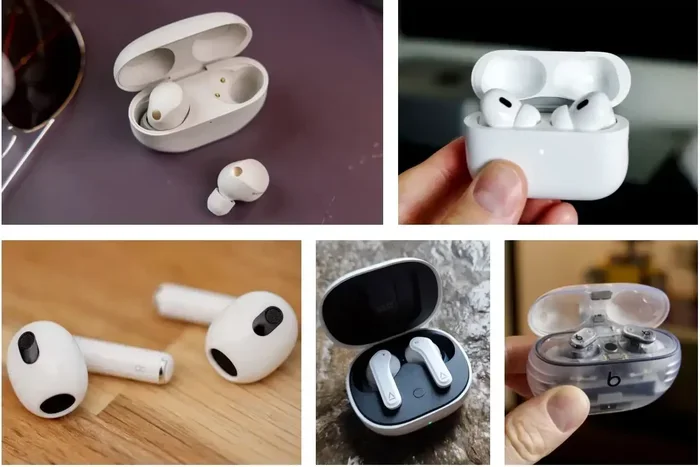
Featured image for wireless earbuds with iPhone
Image source: macworld.com
Yes, non-Apple wireless earbuds work with iPhone seamlessly through Bluetooth technology. Any earbuds with Bluetooth connectivity can pair with your iPhone, regardless of brand. While you may miss some Apple-exclusive features like spatial audio with head tracking, you’ll enjoy full audio playback, microphone functionality, and most modern features at often better prices.
Picture this: you just got a shiny new iPhone, and now you’re wondering if you absolutely need to buy AirPods to match. Here’s some great news that might save you serious money. Any wireless earbuds with Bluetooth will work with your iPhone. That’s right, whether you’re eyeing Samsung Galaxy Buds, Sony WF-1000XM5s, Bose QuietComfort Earbuds, or even those $20 earbuds from Amazon, your iPhone will happily connect to all of them.
Think of it like this. Your iPhone speaks many languages, and Bluetooth is one universal language it uses to chat with wireless earbuds. AirPods are like having a conversation with someone who grew up in the same neighborhood as your iPhone. They understand each other perfectly, including some inside jokes. Non-Apple earbuds are like talking to a friend from another town. You can still have a great conversation about all the important stuff, but you might miss a few local references and shared experiences.
Over 100 million wireless earbuds shipped globally in 2023, and only a fraction of those were AirPods. This massive market exists because Bluetooth works across all devices. In this guide, we’ll break down everything you need to know about using non-Apple wireless earbuds with your iPhone, what features you’ll get, what you’ll miss, and how to make the most of your listening experience.
Key Takeaways
- Universal Bluetooth Compatibility: All Bluetooth-enabled wireless earbuds work with iPhone, including Samsung, Sony, Bose, Jabra, and budget brands.
- Missing Apple-Exclusive Features: Non-Apple earbuds won’t support features like automatic ear detection, seamless iCloud switching, and Find My precision tracking.
- Full Basic Functionality: You get complete audio playback, microphone calls, voice assistant access, and music controls on any Bluetooth earbuds.
- Pairing is Simple: Connect through Settings > Bluetooth, just like pairing AirPods, with most earbuds connecting in under 30 seconds.
- Better Value Options: Many non-Apple earbuds offer superior battery life, sound quality, or noise cancellation at lower price points than AirPods.
- Codec Considerations: iPhones support AAC and SBC Bluetooth codecs, so look for earbuds with AAC support for optimal audio quality.
- App Dependencies: Some advanced features require manufacturer apps, which work fine on iPhone but need separate downloads and updates.
📑 Table of Contents
- How Wireless Earbuds Connect to iPhone: The Bluetooth Basics
- What Features Work and What Don’t with Non-Apple Earbuds
- Choosing the Best Non-Apple Earbuds for iPhone: What to Look For
- Top Non-Apple Wireless Earbuds That Excel with iPhone
- Step-by-Step Guide: Maximizing Your Non-Apple Earbuds on iPhone
- Common Questions and Troubleshooting
- Making the Final Decision: AirPods vs. Non-Apple Earbuds
How Wireless Earbuds Connect to iPhone: The Bluetooth Basics
Let’s start with the foundation. Your iPhone uses Bluetooth to communicate with wireless earbuds. This is the same technology that powers your wireless speakers, car audio systems, and even some smart home devices. Bluetooth is a universal standard, which means any device with Bluetooth can theoretically talk to any other Bluetooth device.
What Bluetooth Version Does iPhone Use?
Modern iPhones (iPhone 8 and newer) support Bluetooth 5.0 or higher. The iPhone 15 series introduced Bluetooth 5.3 support. This matters because newer Bluetooth versions offer better range, faster connection speeds, and improved battery efficiency. When you buy non-Apple earbuds, check what Bluetooth version they use. Matching or exceeding your iPhone’s version ensures the best performance.
Here’s a simple way to think about it. Bluetooth versions are like highway lanes. Bluetooth 5.0 and above are like having multiple fast lanes with no speed limit. Older versions are like a single lane with some traffic. Your data, in this case your music and calls, travels faster and more smoothly on the newer versions.
The Pairing Process Made Simple
Connecting non-Apple earbuds to your iPhone is refreshingly straightforward. Here’s the step-by-step process:
- Step 1: Put your earbuds in pairing mode (usually by holding a button or opening the case)
- Step 2: Open Settings on your iPhone and tap Bluetooth
- Step 3: Look for your earbuds in the list of available devices
- Step 4: Tap the name to connect
- Step 5: Wait for the confirmation, and you’re done
The whole process typically takes less than 30 seconds. Some newer earbuds even support Google Fast Pair, though this is more common on Android devices. iPhone uses its own streamlined pairing process that’s just as quick.
What Features Work and What Don’t with Non-Apple Earbuds
Here’s where things get interesting. While basic functionality works perfectly across all Bluetooth earbuds, there are some Apple-specific features you’ll miss out on. Let’s break this down clearly so you know exactly what to expect.
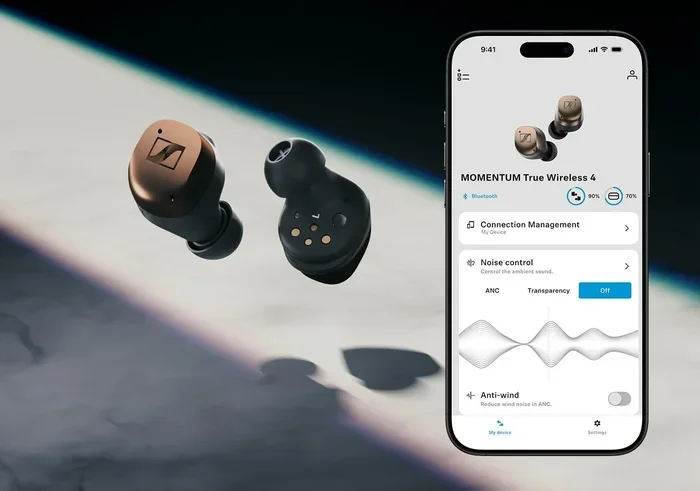
Visual guide about wireless earbuds with iPhone
Image source: cultofmac.com
Features That Work with Any Bluetooth Earbuds
Audio playback is universal. Whether you’re streaming Spotify, Apple Music, YouTube, or podcasts, your non-Apple earbuds will deliver sound without any issues. Phone calls work perfectly too. The built-in microphones in most wireless earbuds handle calls clearly, and your iPhone will automatically route audio to your earbuds when connected.
Voice assistant access remains fully functional. You can still say “Hey Siri” and have your iPhone respond through your non-Apple earbuds. The Siri integration works through your iPhone, not the earbuds themselves, so compatibility isn’t an issue here.
Music controls like play, pause, skip, and volume adjustments work on most earbuds. The specific button or touch controls vary by brand, but the functions themselves are universal. Battery indicators also appear in your iPhone’s status bar or within specific manufacturer apps, showing you how much juice is left.
Apple-Exclusive Features You’ll Miss
Now for the features that require Apple’s special sauce. Spatial Audio with head tracking is probably the biggest one. This technology creates a theater-like sound experience where audio seems to come from your iPhone even when you turn your head. It only works with AirPods and Beats products that have the Apple H1 or W1 chip.
Automatic ear detection is another convenient feature. When you remove an AirPod, your music automatically pauses. Place it back in your ear, and music resumes. Most non-Apple earbuds don’t have this seamless integration with iOS.
Seamless device switching across Apple devices is huge for people deep in the Apple ecosystem. Start a podcast on your iPhone, then pick up your iPad, and the audio automatically transfers. Non-Apple earbuds require manual Bluetooth switching between devices.
Find My integration with precision tracking works beautifully with AirPods through Apple’s Find My network. You’ll see exactly where your earbuds are on a map, with directions to their location. Some non-Apple earbuds have their own find-my-earbuds features through their apps, but they don’t leverage Apple’s vast network.
Audio Sharing lets you and a friend listen to the same audio from one iPhone using two pairs of AirPods. This requires Apple’s W1, H1, or H2 chip and only works with AirPods and select Beats products.
Choosing the Best Non-Apple Earbuds for iPhone: What to Look For
Now that you know non-Apple earbuds work great with iPhone, how do you pick the right ones? Several factors matter more than others when matching earbuds to your iPhone.
Bluetooth Codec Support: The Secret to Great Audio
Codecs are like translators for your music. They compress audio for Bluetooth transmission, then decompress it on the receiving end. iPhone supports two main codecs: SBC (Subband Codec) and AAC (Advanced Audio Codec). AAC delivers better sound quality at similar bitrates, so you’ll want earbuds that support AAC for the best experience on iPhone.
Did you know that many Android-focused earbuds prioritize aptX or LDAC codecs? These work fine on iPhone but fall back to SBC, which means you’re not getting the best possible sound quality. Always check that your non-Apple earbuds support AAC for optimal iPhone performance.
Battery Life Considerations
Battery life varies dramatically across wireless earbuds. Budget options might offer 4-5 hours per charge, while premium models can deliver 8-12 hours. The charging case extends total listening time to 20-40+ hours before needing an outlet. For most people, 6-8 hours per charge hits the sweet spot for all-day use.
Here’s a practical tip. If you commute and work out, you probably need at least 6 hours of battery life. If you mostly use earbuds for short sessions throughout the day, 4-5 hours is plenty.
Sound Quality and Driver Size
Driver size matters, but bigger isn’t always better. Most wireless earbuds use drivers between 6mm and 13mm. Premium earbuds often use multiple drivers or advanced materials like beryllium or bio-cellulose for improved sound. Look for earbuds with good reviews focusing on the sound profile you prefer, whether that’s bass-heavy, balanced, or vocal-focused.
Active Noise Cancellation (ANC)
ANC technology has improved dramatically. The best non-Apple earbuds now match or exceed AirPods Pro in noise cancellation. Sony’s WF-1000XM5 and Bose’s QuietComfort Ultra Earbuds are frequently cited as having superior ANC compared to AirPods Pro. If noise cancellation is important to you, definitely explore these options.
Water and Sweat Resistance
For workouts or outdoor use, look for at least an IPX4 rating. This means the earbuds can handle splashes of water and sweat. Higher ratings like IPX5 or IPX7 offer even better protection. AirPods Pro have an IPX4 rating, so matching or exceeding this is a good benchmark.
Top Non-Apple Wireless Earbuds That Excel with iPhone
While this isn’t an exhaustive list, these brands consistently deliver excellent iPhone compatibility and user satisfaction.
Premium Options Worth the Investment
Sony WF-1000XM5 sits at the top of many recommendation lists. These earbuds offer industry-leading noise cancellation, exceptional sound quality with LDAC support (though iPhone uses AAC), and comfortable fit. Battery life reaches 8 hours with ANC on, and the case provides an additional 16 hours.
Bose QuietComfort Ultra Earbuds deliver Bose’s legendary noise cancellation in a true wireless form factor. The sound signature is balanced and detailed, with comfortable all-day wear. They support AAC codec for high-quality iPhone audio streaming.
Sennheiser Momentum True Wireless 4 appeals to audiophiles with its detailed, natural sound. Battery life extends to 7 hours per charge, with aptX Adaptive support (falls back to AAC on iPhone) and premium build quality.
Mid-Range Champions
Samsung Galaxy Buds Pro 3 offers surprising quality at a reasonable price. Sound is punchy and fun, ANC is effective, and integration with iPhone is smooth through the Galaxy Wearable app. Battery life reaches 6-7 hours with ANC enabled.
Jabra Elite 10 provides excellent call quality, making it perfect for business users. Multipoint Bluetooth lets you connect to your iPhone and laptop simultaneously, with seamless switching between devices.
Nothing Ear (2) brings style and substance with a transparent design, good sound quality, effective ANC, and a reasonable price point. The companion app works well on iPhone for customization and firmware updates.
Budget-Friendly Options That Don’t Disappoint
Anker Soundcore Liberty 4 punches well above its price with solid sound, decent ANC, and 9-hour battery life. For budget shoppers, this is hard to beat.
JLab Go Air Pop costs under $25 yet delivers reliable performance for casual listening. Battery life hits 8+ hours per charge, and the fit works for most ears.
SoundPEATS Mini Pro offers surprisingly good ANC and sound quality for under $50. It’s a fantastic entry point for people new to wireless earbuds.
Step-by-Step Guide: Maximizing Your Non-Apple Earbuds on iPhone
Once you’ve chosen your earbuds, follow these tips to get the most out of them with your iPhone.
Optimizing Audio Quality
First, make sure your iPhone is using the AAC codec. Go to Settings > Accessibility > Audio/Visual > Bluetooth Audio Codec. You’ll see options for AAC and SBC. Select AAC for the best quality. Note that this setting isn’t available on all iPhone models and iOS versions, but when present, it makes a noticeable difference.
Next, experiment with the EQ settings. Open Settings > Music > EQ and try different presets like “Bass Booster,” “Electronic,” or “Treble Booster” to find what sounds best with your new earbuds. Some earbud manufacturer apps also include customizable EQ settings with more granular control.
Managing Battery Life
Disable features you don’t need to extend battery life. For example, turning off ANC when you don’t need it can add 2-3 hours of listening time. Some earbuds have an app setting to disable touch controls, which can prevent accidental activation that drains battery.
Keep your earbuds and case charged. Lithium-ion batteries last longer when you don’t let them fully drain regularly. Try to recharge when they hit 20% rather than waiting until they’re dead.
Customizing Controls and Gestures
Most non-Apple earbuds come with a companion app that lets you customize what the touch controls or buttons do. Through the app, you can set your preferences for play/pause, track skipping, volume control, and voice assistant activation. Take 10 minutes to set this up after buying new earbuds, and you’ll have a much better experience.
Using Siri with Non-Apple Earbuds
Siri works through your iPhone’s microphone and speakers, not the earbuds themselves. However, you can access Siri by either saying “Hey Siri” or pressing the designated button on your earbuds. Some earbuds let you customize which button triggers Siri through their app.
Here’s a neat trick. If your earbuds have a button that normally calls your phone’s default voice assistant, you can change your default assistant to Siri in iOS Settings. Go to Settings > Siri & Search, and you can set Siri as your default assistant even for third-party earbud buttons.
Common Questions and Troubleshooting
Even though non-Apple earbuds work seamlessly with iPhone, you might occasionally hit snags. Here are solutions to common issues.
Connection Drops and Audio Stutters
If you experience audio cutouts, try these fixes. First, make sure your earbuds have a clear line of sight to your iPhone. Bluetooth struggles with walls and large metal objects between devices. Second, check for interference. Wi-Fi routers, microwaves, and other Bluetooth devices can cause issues. Third, update your earbuds’ firmware through the manufacturer app, as updates often fix connectivity bugs.
Sometimes “forgetting” the device and re-pairing solves persistent issues. Go to Settings > Bluetooth, tap the “i” next to your earbuds, and select “Forget This Device.” Then pair them again from scratch.
Microphone Quality During Calls
Some people notice that AirPods offer better call quality than non-Apple earbuds. This is because Apple optimizes the microphone processing specifically for AirPods. However, premium brands like Jabra, Bose, and Sony have excellent microphone quality that rivals or exceeds AirPods. Budget earbuds often have mediocre mics, so if call quality matters, invest in higher-end options.
Latency Issues for Gaming and Video
Bluetooth introduces slight delay, called latency, between your iPhone and earbuds. For video watching, this usually isn’t noticeable because apps compensate. For gaming, latency can be more apparent. If you’re a serious mobile gamer, look for earbuds with gaming modes that reduce latency to under 60ms.
Did you know that AirPods have particularly low latency with iPhones due to the H1/H2 chip optimization? Non-Apple earbuds might show slightly more delay, though most modern options are quite good for casual gaming.
Battery Drain When Not in Use
Your earbuds shouldn’t drain significantly when not in use if they’re properly seated in their charging case. If you notice battery drain, make sure the case is charged and the earbuds are seated correctly with charging contacts touching. Clean the contacts with a dry cotton swab if they look dirty.
Bluetooth on your iPhone uses minimal battery, so having Bluetooth on all day for your earbuds won’t noticeably impact your phone’s battery life. Modern Bluetooth 5.0+ is very efficient.
Making the Final Decision: AirPods vs. Non-Apple Earbuds
So should you buy AirPods or go with non-Apple earbuds? The answer depends on what matters most to you.
When AirPods Make Sense
AirPods are the right choice if you’re deeply invested in the Apple ecosystem, use multiple Apple devices, and value seamless switching and integration. The convenience of features like spatial audio, automatic ear detection, and Find My integration might justify the premium price for Apple enthusiasts.
AirPods also make sense if you frequently take calls and value Apple’s noise reduction during calls. The H1 and H2 chips provide excellent call quality in various environments.
When Non-Apple Earbuds Win
Choose non-Apple earbuds if sound quality is your top priority. Many audiophiles prefer brands like Sennheiser, Sony, and Bose for their superior audio engineering. You can often get better sound quality at the same price point as AirPods.
Non-Apple earbuds also make sense for better noise cancellation. Sony and Bose currently lead the industry in ANC technology, surpassing even AirPods Pro in some independent tests.
If budget matters, non-Apple earbuds offer tremendous value. You can find excellent earbuds under $100 that perform nearly as well as $250 AirPods Pro for most use cases.
For specialized needs like swimming (look at waterproof bone conduction earbuds), running (consider sport-specific designs), or specific sound signatures, non-Apple brands often provide more specialized options than Apple’s one-size-fits-all approach.
The Bottom Line
Non-Apple wireless earbuds absolutely work with iPhone, and in many cases, they offer better value, sound quality, or features than AirPods. You’re not locked into buying AirPods just because you have an iPhone. The iPhone is platform-agnostic when it comes to Bluetooth audio, which is great news for your wallet and your listening preferences.
Start by identifying what features matter most to you. Sound quality? Noise cancellation? Battery life? Price? Then explore the options in your budget. Read reviews from trusted sources, and if possible, try before you buy. Many electronics stores have demo units you can test.
Remember that the “best” earbuds are the ones that sound great to your ears, fit comfortably, and meet your daily needs. Whether that’s AirPods, Sony, Bose, or a budget brand, the freedom to choose is one of the best things about the modern wireless audio market.
Your iPhone is a powerful music device, and it deserves great earbuds. Now you know that you have an entire world of options beyond just AirPods. Happy listening!