Featured image for AirPods noise cancellation demonstration
Image source: tycoonstory.com
Yes, certain AirPods models can cancel noise—but only those equipped with Active Noise Cancellation (ANC) technology. AirPods Pro, AirPods Pro 2, and AirPods 4 (with ANC) use built-in microphones and advanced algorithms to block out unwanted sounds. Standard AirPods and AirPods Max also offer varying levels of noise control features. Understanding which model you own and how to activate these features is the key to enjoying distraction-free audio.
Ever been on a noisy bus, trying to enjoy a podcast, only to give up because you can hear every rumble and chatter around you? You’re not alone. In fact, a 2023 survey by Statista found that 68% of commuters say background noise is their biggest frustration when using earbuds. That’s exactly why so many people ask one simple question: can AirPods cancel noise?
The short answer is yes—but only some of them. Think of AirPods like a family of superheroes. They all look similar, but not every hero has the same powers. Some AirPods come with a “force field” against noise called Active Noise Cancellation (ANC). Others just offer a basic shield that physically blocks sound. Knowing the difference can completely change your listening experience.
In this guide, we’ll break down everything you need to know. You’ll learn which AirPods have noise cancellation, how the technology actually works (in plain English), and how to get the most out of it. Whether you’re a student, a traveler, or just someone who loves their music, you’ll find practical tips here. Let’s dive in!
Key Takeaways
- Not All AirPods Cancel Noise: Only AirPods Pro, AirPods Pro 2, AirPods 4 (ANC model), and AirPods Max feature Active Noise Cancellation technology.
- ANC vs. Passive Isolation: Active Noise Cancellation uses microphones and sound waves to “fight” noise, while passive isolation simply blocks sound physically.
- Transparency Mode is the Opposite: Instead of blocking sound, Transparency Mode lets outside noise in so you can hear your surroundings.
- Adaptive Audio Exists: Newer AirPods Pro 2 models use Adaptive Audio, which automatically blends ANC and Transparency based on your environment.
- Fit Matters: Even the best ANC won’t work well if your AirPods don’t fit properly in your ears.
- Battery Drain: Using noise cancellation drains battery faster, so plan charging accordingly for long trips.
- Not Magic: AirPods cancel low-frequency sounds (like airplane hum) better than high-frequency sounds (like baby cries or clattering dishes).
📑 Table of Contents
- What Does “Noise Cancellation” Actually Mean?
- Which AirPods Models Can Cancel Noise?
- How Does Active Noise Cancellation Work in AirPods?
- How to Turn On and Use Noise Cancellation
- Tips to Maximize Noise Cancellation on AirPods
- Comparing AirPods Noise Cancellation to Other Brands
- Common Myths About AirPods Noise Cancellation
- When Should You Use Noise Cancellation (and When Not To)?
- Troubleshooting: Why Isn’t My Noise Cancellation Working?
- The Future of AirPods Noise Cancellation
- Final Thoughts: Is Noise Cancellation Worth It?
What Does “Noise Cancellation” Actually Mean?
Before we answer the big question—”can AirPods cancel noise?”—let’s talk about what noise cancellation really is. It’s a term that gets thrown around a lot, but it has a specific meaning.
Noise cancellation comes in two flavors:
- Passive Noise Isolation: This is just the physical blocking of sound. Think of it like putting your hands over your ears. If earbuds fit snugly, they seal off your ear canal and reduce noise naturally.
- Active Noise Cancellation (ANC): This is the fancy stuff. Tiny microphones on the AirPods listen to the world around you, then create a mirror-image sound wave that “cancels out” the noise. It’s like sending an anti-bullet to destroy a bullet mid-air.
A Simple Analogy: The Anti-Noise Shield
Imagine you’re standing in a pool, and waves are coming toward you. Now imagine you have a magic wand that creates identical waves going in the opposite direction. When the two waves meet, they flatten out. That’s basically how ANC works—but with sound instead of water. It’s a battle of sound waves, and the anti-noise wins.
What Kinds of Noise Can AirPods Block?
AirPods are rock stars at fighting low-frequency sounds. That means things like:
- Airplane engine hum
- Air conditioner drones
- Train rumbles
- Busy street traffic
However, they’re less effective at blocking high-frequency sounds, like sharp baby cries, clattering dishes, or sudden shouts. The reason is physics. Low frequencies have longer, slower waves, which are easier to “match and cancel.” High frequencies are quicker and more chaotic. Think of it like trying to swat a fly versus blocking a slow-moving baseball.
Which AirPods Models Can Cancel Noise?
Now to the main event. Can AirPods cancel noise? Yes—but only specific models. Let’s walk through the lineup.
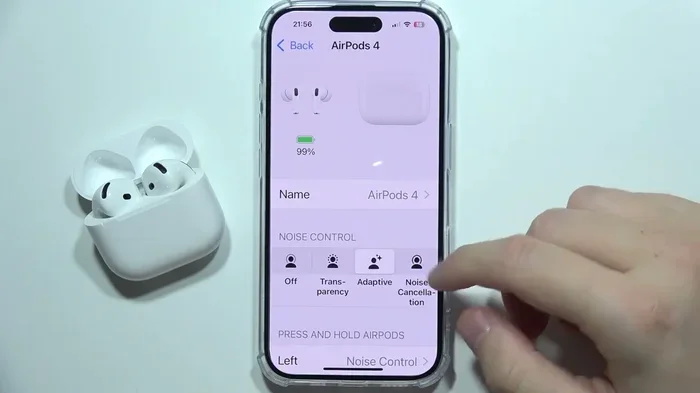
Visual guide about AirPods noise cancellation demonstration
Image source: i.ytimg.com
1. AirPods Pro (1st Generation)
Released in 2019, the original AirPods Pro were Apple’s first in-ear buds with ANC. They use two microphones—one facing outward and one facing inward—to detect and cancel noise. They also feature Transparency Mode, which does the opposite of ANC. Instead of blocking noise, it lets it in.
2. AirPods Pro 2 (2nd Generation)
Launched in 2022 and updated in 2023, the AirPods Pro 2 take things up a notch. Apple claims they offer “up to 2x more noise cancellation” compared to the previous generation. They also introduced Adaptive Audio, a smart feature that blends ANC and Transparency depending on your environment.
3. AirPods 4 (with ANC)
Released in September 2024, the AirPods 4 come in two versions. The higher-end version includes ANC—a first for the standard AirPods line. These are the most affordable Apple earbuds with noise cancellation.
4. AirPods Max (Over-Ear Headphones)
These are Apple’s premium over-ear headphones, released in 2020. They feature powerful ANC thanks to eight microphones and Apple’s H1 chip. They’re excellent for noise cancellation but come with a much higher price tag (around $549).
5. Standard AirPods (1st, 2nd, and 3rd Generation)
Standard AirPods do not have Active Noise Cancellation. They rely only on passive noise isolation. While they fit decently, they don’t seal the ear canal like silicone-tipped models, so they let in more noise. If you want ANC, you’ll need to upgrade to Pro or Max versions.
How Does Active Noise Cancellation Work in AirPods?
Let’s pull back the curtain. The technology inside AirPods is genuinely impressive, even if it feels like magic when you use it.
The Three-Step Process
Here’s how ANC operates in your AirPods:
- Step 1: Listen. Tiny microphones on the outside and inside of the earbuds detect ambient noise in real-time.
- Step 2: Analyze. A custom Apple chip (H1 or H2) processes this sound 48,000 times per second. Yes, you read that right—48,000 times per second!
- Step 3: Counter. The AirPods generate an “anti-noise” sound wave that is the exact opposite of the incoming noise. When the two meet, they cancel each other out, leaving you with silence (or close to it).
The Role of the H2 Chip
The H2 chip, found in AirPods Pro 2, is the brain behind the operation. It’s faster and more efficient than its predecessor, the H1 chip. This means better noise cancellation, better sound quality, and better battery life. It’s like upgrading from a regular computer to a supercomputer—just smaller.
Adaptive Audio: The Smart Newcomer
AirPods Pro 2 introduced Adaptive Audio, a feature that dynamically adjusts noise control based on your surroundings. If you’re walking past a construction site, ANC kicks in. If you stop at a coffee shop, Transparency Mode activates so you can order without removing your earbuds. According to Apple, this reduces the need to manually switch modes by up to 80%.
How to Turn On and Use Noise Cancellation
Owning noise-cancelling AirPods is one thing. Knowing how to use them is another. Here’s your step-by-step guide.
Method 1: The Force Sensor (On the Stem)
On AirPods Pro and AirPods 4 (ANC), you can squeeze the stem. Here’s how:
- Press and hold the force sensor on either stem to switch between Noise Cancellation and Transparency Mode.
- You’ll hear a soft “ping” sound confirming the switch.
Method 2: Control Center on iPhone
If you’re connected to an iPhone or iPad:
- Swipe down from the top-right corner to open Control Center.
- Press and hold the volume slider.
- Tap the “Noise Control” icon at the bottom left.
- Choose between Noise Cancellation, Transparency, or Off.
Method 3: Settings App
For deeper customization:
- Open the Settings app on your iPhone.
- Tap your AirPods name at the top.
- Scroll down to find Noise Cancellation options.
- You can even set “Press and Hold” to cycle through your favorite modes.
Pro Tip: Use Personalized Spatial Audio
While you’re in settings, consider setting up Personalized Spatial Audio. It creates a sound profile tailored to your ear shape. When combined with ANC, the result is an immersive listening experience that feels like you’re in a private concert hall.
Tips to Maximize Noise Cancellation on AirPods
Buying noise-cancelling AirPods is just the first step. Using them correctly makes a huge difference. Here are expert-approved tips.
Tip 1: Get the Right Fit
This is the most important tip. ANC works best when your AirPods create a tight seal in your ears. Apple includes multiple ear tip sizes (XS, S, M, L) with AirPods Pro. Try each one. If music sounds “tinny” or you can hear lots of outside noise, you probably need a different size.
Tip 2: Clean Your AirPods Regularly
Earwax and debris can block the microphones, reducing ANC effectiveness. Apple recommends using a dry cotton swab or a soft-bristled brush to clean the mesh parts. Do this once a week for best results.
Tip 3: Update Your Firmware
Apple regularly releases firmware updates that improve ANC performance. To update, simply keep your AirPods connected to your iPhone and charging. They’ll update automatically overnight.
Tip 4: Use the Ear Tip Fit Test
iOS has a built-in feature called the Ear Tip Fit Test. To use it:
- Wear your AirPods Pro and connect them to your iPhone.
- Go to Settings > Bluetooth > Tap the “i” next to your AirPods.
- Tap “Ear Tip Fit Test.”
- Follow the on-screen instructions.
If the test says the seal is poor, try different ear tips until you get a “Good Seal” result.
Tip 5: Manage Battery Life
ANC drains battery faster. AirPods Pro 2 offer about 6 hours of listening time with ANC on, compared to 7 hours with it off. If you’re on a long flight, consider turning off ANC during breaks to save battery.
Tip 6: Use Conversation Awareness
This feature, available on AirPods Pro 2, automatically lowers your music and boosts voices when you start talking to someone. It’s perfect for quick chats without removing your earbuds.
Comparing AirPods Noise Cancellation to Other Brands
How do AirPods stack up against competitors? Let’s take a quick look.
AirPods Pro 2 vs. Sony WF-1000XM5
Sony’s flagship earbuds are widely considered the gold standard for ANC. In a 2024 review by RTINGS.com, the Sony WF-1000XM5 scored 8.7/10 for noise cancellation, while AirPods Pro 2 scored 8.3/10. The difference is small, and AirPods integrate much better with iPhones.
AirPods Pro 2 vs. Bose QuietComfort Ultra Earbuds
Bose is another ANC legend. Their QuietComfort Ultra Earbuds are excellent for blocking low-frequency rumble. However, AirPods win on ecosystem integration, call quality, and features like Adaptive Audio.
AirPods vs. Samsung Galaxy Buds
Samsung’s Galaxy Buds3 Pro offer strong ANC, especially for Android users. But if you’re in the Apple ecosystem, AirPods are the clear winner for seamless pairing, Find My support, and Spatial Audio.
Did You Know?
According to a 2023 report by Counterpoint Research, Apple holds 31% of the global true wireless earbuds market—more than any other brand. Noise cancellation is now a standard feature in over 60% of premium earbuds sold worldwide.
Common Myths About AirPods Noise Cancellation
Let’s bust some myths that might be holding you back.
Myth 1: ANC Completely Blocks All Sound
False. ANC reduces noise significantly, but it doesn’t create total silence. You’ll still hear very loud or sudden sounds, like a car horn. Think of it as turning the volume down on the world, not muting it.
Myth 2: ANC Damages Your Hearing
False. In fact, ANC can protect your hearing. By blocking background noise, you can listen to music at lower volumes, reducing long-term hearing damage.
Myth 3: ANC Works the Same for All Sounds
False. As we mentioned earlier, ANC excels at low-frequency sounds but struggles with high-frequency ones. So you might still hear someone talking nearby, but the hum of an airplane will mostly disappear.
Myth 4: You Need to Spend $500 for Good ANC
False. The AirPods 4 with ANC cost around $179 and offer impressive noise cancellation. Even AirPods Pro 2, now available at discounts, can be found for under $200.
Myth 5: ANC Drains Your iPhone Battery
False. ANC is processed inside the AirPods themselves, not on your iPhone. Your phone’s battery is unaffected.
When Should You Use Noise Cancellation (and When Not To)?
ANC is amazing, but it’s not for every situation. Here’s a quick guide.
Great Times to Use ANC
- Airplanes and trains: Blocks engine drone beautifully.
- Open offices: Reduces chatter and keyboard clicks.
- Studying in cafes: Helps you focus.
- Working out at the gym: Drowns out music and grunts.
- Sleeping in noisy environments: AirPods Pro 2 are surprisingly good for this.
Times to Use Transparency Mode Instead
- Walking in cities: You need to hear traffic for safety.
- Running outdoors: Stay aware of cars, cyclists, and dogs.
- Conversations: Hear others without removing your earbuds.
- Airports: Hear announcements and boarding calls.
Did You Know?
A 2022 study by the Journal of the Acoustical Society of America found that using ANC in noisy environments can improve concentration by up to 23%. That’s a huge boost if you’re trying to get work done!
Troubleshooting: Why Isn’t My Noise Cancellation Working?
Sometimes, ANC just doesn’t seem to perform. Before you panic, try these fixes.
Fix 1: Check the Mode
Make sure Noise Cancellation is actually enabled. Sometimes, a stray tap accidentally switches you to Transparency Mode.
Fix 2: Reinsert the AirPods
Take them out, wait 5 seconds, and put them back in. This resets the seal and re-engages the microphones.
Fix 3: Restart Your AirPods
Place both AirPods in their charging case, close the lid, wait 30 seconds, then try again.
Fix 4: Check for Debris
If the microphone mesh is blocked, ANC will fail. Clean them gently with a dry cotton swab.
Fix 5: Update Your Software
Make sure your iPhone, iPad, or Mac is running the latest software. Older versions may have bugs that reduce ANC performance.
Fix 6: Try the Ear Tip Fit Test
If the seal is poor, ANC won’t work well. The test will tell you if you need a different size tip.
The Future of AirPods Noise Cancellation
Apple isn’t stopping here. The future looks exciting.
Smarter Adaptive Features
We can expect even smarter AI-driven noise control. Future AirPods might detect whether you’re in a library, a stadium, or a windstorm—and adjust automatically without you lifting a finger.
Better Hearing Health Tools
Apple has already added hearing protection features. The AirPods Pro 2 can function as clinical-grade hearing aids (after a software update in late 2024). In the future, expect more advanced hearing tests and personalized soundscapes.
Longer Battery Life
As chips get more efficient, ANC will use less power. Industry experts predict AirPods Pro 3 (rumored for 2025-2026) may offer 8-10 hours of ANC on a single charge.
Did You Know?
The global noise cancellation technology market is expected to reach $30 billion by 2030, according to Allied Market Research. Earbuds like AirPods are driving much of this growth.
Final Thoughts: Is Noise Cancellation Worth It?
So, can AirPods cancel noise? Absolutely—if you choose the right model. AirPods Pro, AirPods Pro 2, AirPods 4 (ANC version), and AirPods Max all deliver impressive noise cancellation that can transform how you listen to music, work, and travel.
Noise cancellation isn’t just a fancy feature. It’s a quality-of-life upgrade. Whether you’re dodging noisy coworkers, surviving a long flight, or just trying to hear your audiobook in a busy cafe, ANC makes a real difference.
If you’re using standard AirPods without ANC, you’re missing out. Consider upgrading to a model with Active Noise Cancellation. Your ears—and your sanity—will thank you.
Got questions? Check out our FAQ section below for quick answers to common concerns. And if you found this guide helpful, share it with a friend who deserves some peace and quiet!
Frequently Asked Questions
Can all AirPods models cancel noise?
No, only specific models can. AirPods Pro, AirPods Pro 2, AirPods 4 (ANC version), and AirPods Max come with Active Noise Cancellation. Standard AirPods (1st, 2nd, and 3rd generation) only offer passive noise isolation.
Is Active Noise Cancellation better than passive noise isolation?
Yes, ANC is generally more effective because it uses microphones and sound waves to actively cancel noise, while passive isolation just relies on physical blocking. ANC is especially good at reducing low-frequency sounds like airplane hum.
Does noise cancellation drain AirPods battery faster?
Yes, using ANC does use more battery. AirPods Pro 2 offer about 6 hours of listening with ANC on, compared to 7 hours with it off. Plan to charge them if you’re on long trips.
Can I use AirPods noise cancellation during calls?
Yes! ANC works during calls too. Your voice will sound clearer because the microphones can better focus on your voice while blocking background noise. AirPods Pro 2 are especially great for calls in noisy environments.
How do I know if my AirPods have noise cancellation?
Check your model. Go to Settings > Bluetooth > Tap the “i” next to your AirPods. If you see a “Noise Cancellation” option under Noise Control, your model has ANC. If not, it likely doesn’t.
Is it safe to sleep with AirPods noise cancellation on?
Yes, many people do. AirPods Pro 2 are small and comfortable enough for side-sleepers. However, extended use can cause ear irritation, so take breaks if you feel discomfort.