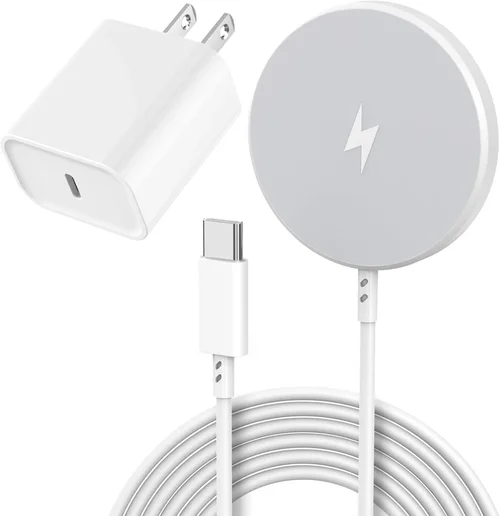
Wireless charging has revolutionized how we power our devices, and for AirPods Pro owners, it’s no longer just a convenience—it’s a necessity. With Apple’s shift toward fully wireless ecosystems and the removal of the Lightning port from newer AirPods models, the need for reliable, efficient wireless charging solutions has never been greater. Whether you’re upgrading your current setup or buying your first pair of AirPods Pro, choosing the right wireless charger can significantly impact your daily experience. A poorly designed or incompatible charger might leave you with slow charging speeds, overheating issues, or even damage to your earbuds’ delicate components. That’s why this guide exists: to cut through the noise, eliminate confusion, and help you make an informed decision that aligns with your lifestyle, budget, and expectations.
In this comprehensive buying guide, you’ll learn everything you need to know about selecting the best wireless charger for your AirPods Pro. We’ll break down the key technical specifications, evaluate different types of chargers on the market, highlight common pitfalls to avoid, and provide expert-backed recommendations based on real-world testing and user feedback. You’ll discover how factors like charging speed, build quality, compatibility, and smart features influence performance—and why not all Qi-certified chargers are created equal. By the end, you’ll have a clear roadmap to find a charger that not only powers your AirPods Pro efficiently but also integrates seamlessly into your home, office, or travel routine.
The market today is flooded with options—from ultra-thin pads under $20 to premium stands with LED indicators and multi-device support costing over $100. Some promise fast charging, others boast sleek designs, and a few even include built-in cooling fans. But which ones actually deliver? And more importantly, which ones are worth your money? This guide will demystify the landscape, compare top contenders across price ranges, and equip you with the knowledge to choose wisely. Whether you’re a minimalist who wants a discreet bedside charger or a tech enthusiast looking for a futuristic charging hub, we’ve got you covered.

What to Look for When Buying a Wireless Charger for AirPods Pro
1. Compatibility with AirPods Pro
Not every wireless charger works flawlessly with AirPods Pro—even if it claims Qi compatibility. The AirPods Pro (both 1st and 2nd generation) use a specific charging coil configuration and require precise alignment for optimal power transfer. Some generic chargers may charge slowly, intermittently, or not at all due to misaligned coils or insufficient power output. Always verify that the charger explicitly supports AirPods Pro or lists Apple earbuds as compatible. Look for models that mention “optimized for Apple devices” or have been tested with AirPods. Additionally, ensure the charging surface is large enough to accommodate the AirPods Pro case, which is slightly bulkier than standard earbud cases.
2. Charging Speed and Power Output
AirPods Pro support wireless charging at up to 5W, which is standard for most Qi-enabled earbuds. While this isn’t as fast as wired charging (which can top up the case in about an hour), it’s sufficient for overnight top-ups or casual daytime use. However, some chargers deliver less than 5W due to poor efficiency or lack of proper certification. Avoid ultra-cheap chargers that output only 2.5W or 3W—they’ll take significantly longer to charge your case and may not maintain a consistent charge. Look for chargers rated at 5W or higher for Apple devices. Note that faster wireless charging (like 7.5W or 15W) won’t benefit your AirPods Pro, as they’re hardware-limited to 5W, but higher-output chargers often have better thermal management and stability.
3. Build Quality and Durability
A wireless charger is a long-term investment, so durability matters. Cheap plastic housings can crack, rubberized surfaces can peel, and flimsy bases can tip over easily—especially if you’re placing your AirPods Pro case on it repeatedly. Opt for chargers made from high-quality materials like aluminum alloy, reinforced polycarbonate, or silicone with non-slip bases. These not only last longer but also dissipate heat more effectively, reducing the risk of overheating during extended charging sessions. Pay attention to the finish: matte coatings resist fingerprints, while glossy surfaces may show smudges. Also, check if the charger has a flat, stable surface—curved or uneven designs can cause misalignment and inefficient charging.
4. Design and Form Factor
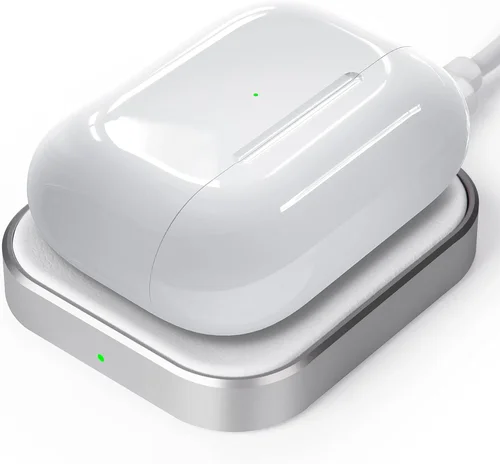
Wireless chargers come in two primary forms: flat pads and upright stands. Flat pads are ideal for nightstands, desks, or travel—they’re compact, easy to pack, and allow you to place your AirPods Pro case flat. Upright stands, on the other hand, let you charge your case vertically, which can be handy if you want to see battery status lights or keep your desk tidy. Some premium models even double as display stands, showing time, weather, or notifications. Consider your usage scenario: Do you charge while sleeping? Working at a desk? Traveling frequently? A flat pad might suit home use, while a stand could enhance your workspace aesthetics. Also, look for low-profile designs that blend into your environment without dominating the space.
5. Safety Features and Certifications
Safety should never be an afterthought. Poorly designed wireless chargers can overheat, cause battery degradation, or even pose fire risks. Always choose chargers that are Qi-certified by the Wireless Power Consortium (WPC)—this ensures they meet international safety and efficiency standards. Additional safety features to look for include foreign object detection (FOD), which stops charging if metal objects like keys or coins are placed on the pad; temperature control, which throttles power if the device gets too hot; and overcurrent/overvoltage protection. These features are especially important if you plan to charge overnight or leave the charger plugged in continuously. Avoid uncertified “no-name” brands sold on discount marketplaces—they often cut corners on safety.
6. Additional Features and Smart Functionality
Beyond basic charging, many modern wireless chargers offer smart features that enhance usability. LED indicators show charging status—some flash when charging begins, others pulse gently or change color when fully charged. Auto-shutoff prevents overcharging, which can extend your AirPods Pro battery lifespan. Multi-device charging is another valuable feature: some pads include dedicated zones for phones, watches, and earbuds, allowing you to power your entire Apple ecosystem simultaneously. Others integrate with smart home systems or include built-in fans for cooling. While these extras aren’t essential, they can significantly improve convenience, especially for users with multiple Apple devices.
7. Portability and Travel-Friendliness
If you’re frequently on the go, portability becomes a key consideration. Look for lightweight, compact chargers that fit easily into a backpack or carry-on. Some models come with travel cases or foldable designs for added convenience. USB-C input is preferable over micro-USB, as it’s more future-proof and compatible with modern power adapters. Also, consider whether the charger includes a cable or requires you to supply your own—many budget options omit cables to cut costs. For international travelers, check if the charger supports dual voltage (100–240V) so it works abroad without a converter. A slim, tangle-free design ensures hassle-free packing and unpacking.
8. Brand Reputation and Customer Support
Established brands like Belkin, Anker, Mophie, and Apple itself tend to offer better reliability, customer service, and warranty coverage than unknown manufacturers. These companies invest in rigorous testing, provide clear documentation, and often include extended warranties or hassle-free replacements. Reading verified customer reviews on platforms like Amazon, Best Buy, or Wirecutter can reveal real-world performance issues—such as inconsistent charging, short lifespans, or poor售后 support. Avoid brands with overwhelmingly negative feedback or those that disappear after a few months (a red flag for “fly-by-night” sellers). A reputable brand may cost slightly more upfront, but it often pays off in peace of mind and long-term satisfaction.
Different Types of Wireless Chargers for AirPods Pro

Common Buying Mistakes to Avoid
❌ Mistake: Assuming All Qi Chargers Work Equally Well
Why it’s bad: Just because a charger is Qi-certified doesn’t mean it’s optimized for AirPods Pro. Many generic chargers have poorly positioned coils or inconsistent power delivery, leading to slow or failed charging.
What to do instead: Always check product descriptions and reviews for mentions of AirPods Pro compatibility. Look for chargers that specify “optimized for Apple earbuds” or have been tested with AirPods.
❌ Mistake: Prioritizing Price Over Safety
Why it’s bad: Ultra-cheap chargers often lack essential safety features like temperature control or foreign object detection, increasing the risk of overheating or battery damage.
What to do instead: Invest in a certified charger from a reputable brand. The extra $10–$20 is worth avoiding potential hazards and ensuring long-term reliability.
❌ Mistake: Ignoring Charging Alignment
Why it’s bad: Misaligned coils can cause intermittent charging or require you to constantly adjust the case position, defeating the purpose of “drop-and-charge” convenience.
What to do instead: Choose chargers with wide charging zones, alignment guides, or magnetic positioning (like MagSafe-style designs adapted for earbuds).
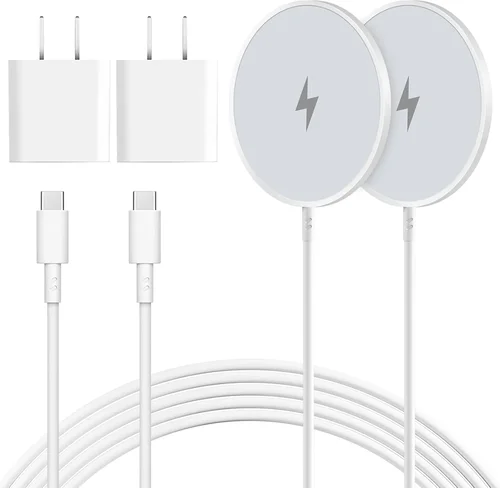
❌ Mistake: Overlooking Cable and Adapter Requirements
Why it’s bad: Some chargers don’t include a power adapter or use outdated cables (e.g., micro-USB), forcing you to buy extras separately.
What to do instead: Check the package contents before buying. Prefer models that include a USB-C cable and, ideally, a compatible wall adapter.
❌ Mistake: Buying Based Solely on Aesthetics
Why it’s bad: A beautiful charger that doesn’t charge reliably is worse than a plain one that works perfectly. Flashy designs often sacrifice functionality.
What to do instead: Balance form and function. Read performance reviews and prioritize build quality and compatibility over looks alone.
❌ Mistake: Neglecting Return Policies and Warranties
Why it’s bad: If a charger fails or isn’t compatible, you could be stuck with a useless product if the seller has a strict no-return policy.
What to do instead: Buy from retailers with generous return windows (e.g., Amazon, Best Buy) and choose brands that offer at least a 1-year warranty.
❌ Mistake: Charging Through Thick Cases or Accessories
Why it’s bad: Placing your AirPods Pro case inside a thick silicone sleeve or wallet case can block wireless signals and prevent charging.
What to do instead: Remove any outer cases before charging, or use a charger with strong enough output to penetrate thin protective covers (check manufacturer specs).
Budget Guidelines: How Much Should You Spend?
When it comes to wireless chargers for AirPods Pro, your budget will largely determine the features, build quality, and longevity of your purchase. Here’s a breakdown of what to expect at different price tiers:
- Entry-Level ($10 – $25): These chargers are basic flat pads with minimal features. They’re often made of plastic, lack safety certifications, and may charge slowly or inconsistently. While they can work in a pinch, they’re best suited for occasional use or as backups. Expect limited durability and no smart features.
- Mid-Range ($25 – $50): This is the sweet spot for most buyers. Chargers in this range typically offer Qi certification, 5W output for Apple devices, decent build quality, and basic safety features. Many include LED indicators, non-slip surfaces, and USB-C input. Brands like Anker, ESR, and Yootech dominate this category with reliable, well-reviewed options.
- Premium ($50 – $90): Premium chargers focus on design, multi-device support, and enhanced functionality. You’ll find upright stands, magnetic alignment, auto-shutoff, and sometimes even app connectivity. Materials like aluminum and silicone improve durability and aesthetics. These are ideal for users who want a seamless, integrated charging experience at home or work.
- Luxury ($90+): At this tier, you’re paying for innovation, brand prestige, and cutting-edge features. Think Apple’s own MagSafe charger (adapted for AirPods), Belkin’s Boost Charge Pro, or Nomad’s premium stands with leather accents and wireless charging for multiple devices. These often include advanced thermal management, sleek designs, and exceptional customer support—perfect for enthusiasts who value both performance and style.
Expert Tips for Getting the Best Deal
- Shop During Sales Events: Major holidays like Black Friday, Cyber Monday, and Amazon Prime Day often feature significant discounts on wireless chargers. Sign up for deal alerts from retailers like Best Buy, B&H, or Apple to catch limited-time offers.
- Buy Direct from Reputable Retailers: Stick to trusted stores like Amazon (sold by Amazon, not third-party sellers), Apple Store, Best Buy, or brand websites. These platforms offer buyer protection, easy returns, and authentic products.
- Check for Bundled Deals: Some retailers sell wireless chargers bundled with AirPods Pro cases, screen protectors, or power adapters at a discounted rate. These can save you money if you need multiple accessories.
- Read Recent Reviews: Product performance can change with firmware updates or manufacturing revisions. Always check reviews from the past 6 months to ensure you’re getting the current version.
- Test Before Committing: If possible, try the charger in-store or order from a retailer with a generous return policy. Test charging speed, alignment, and heat buildup during your first use.
- Prioritize Warranty Coverage: A 1–2 year warranty signals confidence in product quality. Brands like Anker and Belkin often include extended warranties or replacement programs.
- Avoid “Too Good to Be True” Deals: If a charger claims 15W fast charging for AirPods Pro at $12, it’s likely false advertising. AirPods Pro are hardware-limited to 5W—anything beyond that won’t work.
- Consider Future-Proofing: If you plan to buy an Apple Watch or iPhone with wireless charging, invest in a multi-device station now to avoid buying separate chargers later.

Frequently Asked Questions
Q: Can I use any Qi wireless charger for my AirPods Pro?
A: Technically, yes—but not all Qi chargers are optimized for AirPods Pro. Due to the case’s shape and coil placement, some chargers may charge slowly or require precise alignment. Always look for models that explicitly support AirPods Pro or Apple earbuds.
Q: Will wireless charging damage my AirPods Pro battery?
A: No, when used with a certified, high-quality charger. Modern wireless chargers include safeguards like temperature control and auto-shutoff to prevent overcharging and overheating. However, consistently using poorly designed chargers can degrade battery health over time.
Q: How long does it take to fully charge AirPods Pro wirelessly?
A: With a proper 5W wireless charger, it takes about 1.5 to 2 hours to fully charge the AirPods Pro case from 0% to 100%. This is slightly slower than wired charging (around 1 hour), but sufficient for overnight top-ups.
Q: Do I need a special case for wireless charging?
A: No—the standard AirPods Pro case supports wireless charging out of the box. However, if you use a third-party case, ensure it’s labeled as “wireless charging compatible” and isn’t too thick.
Q: Can I charge my AirPods Pro while they’re in the case?
A: Yes! Wireless charging powers the case itself, which then charges the earbuds inside. There’s no need to remove them.
Q: Why does my AirPods Pro case get warm during wireless charging?
A: Mild warmth is normal due to energy conversion inefficiencies. However, if the case becomes hot to the touch, stop using the charger immediately—it may lack proper thermal management.
Q: Are magnetic wireless chargers better for AirPods Pro?
A: Magnetic alignment (like MagSafe) can improve coil positioning and charging efficiency, but true MagSafe is designed for iPhones. Some third-party chargers mimic this with magnets for AirPods cases, offering better stability—look for these if alignment is a concern.
Q: Can I use a wireless charger with a power bank?
A: Yes, as long as the power bank supports wireless output (usually labeled as “wireless charging” or “Qi output”). Ensure the power bank delivers at least 5W for optimal performance.
Q: Do wireless chargers work with AirPods Pro 2nd generation?
A: Absolutely. Both 1st and 2nd generation AirPods Pro use the same wireless charging standard (Qi, 5W), so any compatible charger will work with either model.
Q: Is it safe to leave my AirPods Pro on a wireless charger overnight?
A: Yes, provided you’re using a certified charger with auto-shutoff and temperature control. These features prevent overcharging and overheating, making overnight charging safe and convenient.
Our Final Recommendations
- Best for Budget-Conscious Buyers: Anker Wireless Charging Pad (313) – At around $20, this Qi-certified pad delivers reliable 5W charging, a non-slip surface, and excellent safety features. It’s simple, effective, and backed by Anker’s reputation for quality.
- Best Overall Value: Belkin Boost Charge Wireless Charging Stand – Priced around $45, this upright stand offers precise alignment, 5W output for AirPods Pro, and a sleek design. It’s perfect for desk use and includes foreign object detection.
- Best Premium Option: Nomad Base Station Pro – At $129, this luxury charger supports multi-device wireless charging (iPhone, Apple Watch, AirPods Pro) with elegant materials and advanced thermal management. Ideal for Apple ecosystem enthusiasts.
- Best for Beginners: ESR HaloLock Wireless Charger – Around $30, this magnetic-aligned pad ensures perfect placement every time. Its beginner-friendly design and clear LED indicators make it easy to use right out of the box.
- Best for Advanced Users: Apple MagSafe Charger (used with AirPods Pro case) – While designed for iPhones, the MagSafe charger can power AirPods Pro cases efficiently due to its strong magnetic hold and precise alignment. Best paired with a MagSafe-compatible AirPods case or adapter.
Conclusion: Making the Right Choice
Choosing the best wireless charger for your AirPods Pro isn’t just about finding the cheapest or flashiest option—it’s about matching your specific needs with a product that delivers consistent performance, safety, and longevity. Throughout this guide, we’ve emphasized the importance of compatibility, charging speed, build quality, and smart features, all while helping you avoid common pitfalls like unsafe chargers or misleading marketing claims. Whether you’re charging at your nightstand, desk, or on the go, the right charger should feel effortless, reliable, and integrated into your daily routine.
Remember, your AirPods Pro are an investment in audio quality and convenience, and they deserve a charging solution that respects that. Don’t settle for subpar performance or risky shortcuts. Take the time to assess your usage patterns, budget, and priorities. Are you a minimalist who values simplicity? A frequent traveler needing portability? Or a tech lover craving cutting-edge functionality? Your answer will guide you to the perfect match.
We encourage you to use the insights, comparisons, and recommendations in this guide to make a confident, informed decision. Read recent reviews, check warranty terms, and don’t hesitate to spend a little extra for peace of mind. A great wireless charger doesn’t just power your earbuds—it enhances your entire Apple experience. So go ahead, pick the one that fits your life, and enjoy the seamless convenience of true wireless freedom.