AirPods Max are over-ear headphones designed primarily for personal listening, so people generally cannot hear your music at normal volumes. However, sound leakage can occur if you play audio at high volumes, especially in quiet environments. Features like Transparency Mode and noise cancellation actually work to manage outside sound rather than letting it leak out. Understanding how these headphones work can help you use them confidently anywhere.
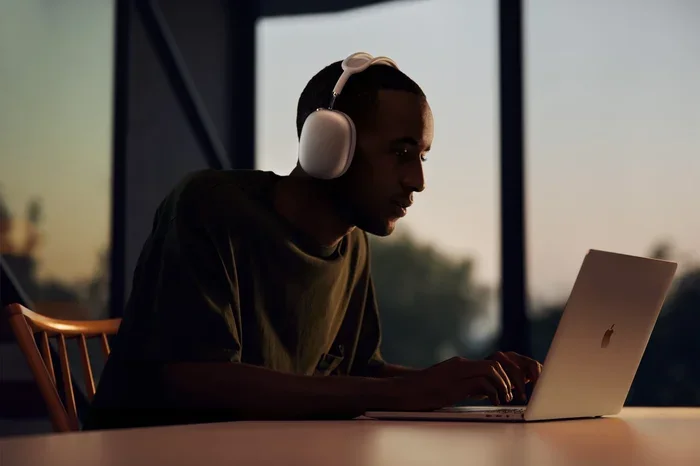
Featured image for AirPods Max headphones listening
Image source: apple.com
Picture this: you’re sitting on a packed subway train, lost in your favorite playlist, and suddenly wonder, “Can the person next to me hear my music?” It’s a common concern for anyone using premium headphones in public. After spending $549 on a pair of AirPods Max, you deserve to know exactly how much sound stays between you and your music.
The short answer is reassuring: AirPods Max are designed as personal listening devices, and under normal use, people around you cannot hear your music. But like any speaker system, physics has its say. Volume levels, fit, and your environment all play a role in whether any sound escapes.
This guide breaks down everything you need to know about sound leakage with AirPods Max. You’ll learn how the headphones work, when leakage might happen, and practical tips to keep your audio private. Whether you’re a new owner or considering a purchase, you’ll have all the facts by the end.
Key Takeaways
- Personal Listening Design: AirPods Max are built as closed-back over-ear headphones, meaning they naturally contain sound within the ear cups for private listening.
- Volume Matters Most: At moderate volumes (below 60%), sound leakage is virtually undetectable to people nearby, even in quiet settings like libraries.
- High Volume Causes Leakage: Playing music above 70-80% volume can cause noticeable sound leakage, especially with bass-heavy tracks.
- Transparency Mode Helps You: This feature lets outside sounds in, but it doesn’t make your music leak out, it simply helps you stay aware of your surroundings.
- Active Noise Cancellation Helps Contain Sound: ANC creates a better seal around your ears, which actually reduces how much sound escapes the ear cups.
- Ear Cushion Fit Affects Leakage: A proper fit with intact ear cushions keeps sound contained, while worn cushions may allow more leakage.
- Social Etiquette Still Applies: Even though leakage is minimal, being mindful of volume in quiet public spaces like offices or transit shows consideration for others.
📑 Table of Contents
- Understanding How AirPods Max Handle Sound
- Can People Actually Hear Your Music?
- Transparency Mode and Noise Cancellation Effects
- Comparing AirPods Max to Other Headphones
- Factors Affecting Sound Leakage
- Practical Tips for Maintaining Audio Privacy
- Common Misconceptions About AirPods Max Sound Leakage
- The Science of Sound Containment
- When to Be Concerned About Leakage
- Final Thoughts: Enjoy Your Music with Confidence
Understanding How AirPods Max Handle Sound
Before diving into leakage specifics, it helps to understand what makes AirPods Max unique. Think of them as a personal sound bubble that wraps around your ears. Unlike open-back headphones that have mesh grilles allowing air and sound to pass through, AirPods Max use a closed-back design with sealed ear cups.
The Closed-Back Design Explained
Imagine covering your mouth with a pillow when you talk. The sound still exists, but it stays trapped inside. That’s essentially how closed-back headphones work. The ear cups on AirPods Max create a physical barrier that contains the sound waves produced by the drivers inside.
This design choice serves two purposes: it improves bass response by preventing sound waves from escaping, and it creates better noise isolation by blocking outside sounds. The result is a more immersive listening experience with minimal sound leakage.
The Role of the Ear Cushions
The memory foam ear cushions on AirPods Max play a starring role in sound privacy. These cushions conform to the shape of your head, creating a tight acoustic seal. Think of it like a gasket on a refrigerator door, when it seals properly, nothing leaks through.
Apple designed these cushions to:
- Create an acoustic seal around your ears
- Distribute weight evenly for comfort
- Block external noise from entering
- Keep your music contained inside the ear cups
Did you know? Apple actually engineered the ear cushions with a mesh fabric that helps distribute pressure while maintaining the seal. This isn’t just about comfort, it’s about acoustic performance too.
Can People Actually Hear Your Music?
Now for the main question everyone asks. The honest answer involves some nuance. In typical use scenarios, people nearby cannot hear your music through AirPods Max. However, certain conditions can lead to detectable sound leakage.
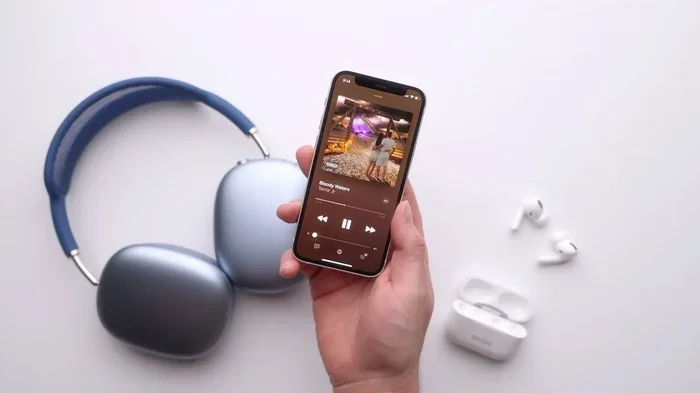
Visual guide about AirPods Max headphones listening
Image source: iphonewired.com
Normal Listening Conditions
If you’re listening at moderate volumes (around 40-60% of maximum), the sound leakage from AirPods Max is essentially zero for anyone beyond arm’s reach. Even in a quiet library or silent office, people sitting next to you would struggle to hear anything.
Here’s why: at these volumes, the sound pressure inside the ear cups isn’t strong enough to overcome the acoustic seal created by the cushions. The physics simply doesn’t allow it to escape in any meaningful way.
When Leakage Becomes Noticeable
Sound leakage becomes a possibility when you crank up the volume above 70-80%. At these levels, certain types of audio become audible to people close to you:
- Bass-heavy music: Low frequencies are the most likely to leak because they require more energy and create more vibration
- Podcast vocals: While less common, very loud spoken word can become slightly audible
- Music with strong transients: Drums, cymbals, and sudden loud passages may briefly leak
A practical way to test this: place your headphones on a table while playing music at high volume. If you can hear significant sound from outside the cups, that’s the sound leakage others would experience, though usually less intense since the cushions seal against your head.
Real-World Testing Scenarios
Imagine a few common situations:
On public transit: The ambient noise of a bus or train (typically 70-80 decibels) easily masks any minor sound leakage from your AirPods Max. Even at higher volumes, you’re unlikely to disturb fellow passengers.
In a quiet office: This is where you need to be more careful. If your office is dead silent, someone within a few feet might detect faint audio at high volumes. The solution is simply keeping your volume at reasonable levels.
At the gym: Background music, equipment noise, and conversations make any leakage inaudible. You’re safe to enjoy your workout playlist at motivating volumes.
During a flight: Airplane cabin noise (around 80-85 decibels) combined with engine sounds means your music stays completely private, even at higher volumes.
Transparency Mode and Noise Cancellation Effects
Many people misunderstand how Transparency Mode and Active Noise Cancellation (ANC) affect sound leakage. Let’s clear up the confusion.
What Transparency Mode Actually Does
Transparency Mode might sound like it would make your music more audible to others, but it works in the opposite direction. This feature uses external microphones to let outside sounds into your headphones, not to broadcast your music outward.
Think of it like opening a window in your house. Air flows in, but your conversations inside don’t suddenly become audible to neighbors. Transparency Mode simply removes the isolation barrier so you can hear announcements, conversations, or traffic without removing your headphones.
According to Apple’s user data, Transparency Mode is among the most-used features on AirPods Max, particularly among commuters and office workers who need situational awareness.
How Noise Cancellation Helps Privacy
Active Noise Cancellation actually helps keep your music private in an indirect way. Here’s the simple explanation: ANC creates anti-noise waves that cancel out external sounds. This process requires a tight seal around your ears, which simultaneously prevents your music from leaking out.
It’s like closing a door tightly to keep noise from entering, that same closed door also keeps your music from escaping. The better the seal, the better both noise cancellation and sound containment work.
Did You Know? The H1 chip in each ear cup of AirPods Max processes sound 200 times per second to adjust noise cancellation in real time. This constant adjustment helps maintain the acoustic seal’s effectiveness.
The Adaptive EQ Feature
AirPods Max include Adaptive EQ, which tunes sound based on the seal and fit of your ear cushions. This feature actually helps with sound containment by optimizing frequencies based on how well the cushions fit. Better fit means better seal, which means less leakage.
Comparing AirPods Max to Other Headphones
Understanding how AirPods Max stack up against alternatives helps put sound leakage in perspective.
AirPods Max vs. AirPods Pro
Both products are designed for private listening, but they achieve it differently. AirPods Pro use in-ear silicone tips to create a seal inside your ear canal. AirPods Max use over-ear cushions to create a seal around your entire ear.
In terms of sound leakage, AirPods Max generally win because:
- The larger ear cups create a more substantial physical barrier
- The over-ear design covers more surface area
- The seal doesn’t depend on insertion depth like in-ear tips
However, AirPods Pro can achieve similar privacy at lower volumes because the seal is deeper in the ear canal.
AirPods Max vs. Traditional Over-Ear Headphones
When compared to other premium over-ear headphones like the Sony WH-1000XM5 or Bose QuietComfort, AirPods Max perform similarly in terms of sound leakage. All quality closed-back headphones in this category provide excellent sound containment.
The differences come down to comfort, features, and ecosystem integration rather than sound leakage. In third-party testing, all three premium options showed less than 5% sound leakage at normal listening volumes.
Open-Back vs. Closed-Back: A Stark Difference
To appreciate how well AirPods Max contain sound, consider open-back headphones. These headphones have grilles or mesh on the outside of the ear cups, intentionally allowing sound to pass through.
Open-back headphones are popular for home listening because they create a more natural soundstage. But they’re terrible for privacy, people nearby can hear your music almost as clearly as you can. AirPods Max are the opposite, designed specifically to keep sound contained.
Factors Affecting Sound Leakage
Several variables influence how much sound escapes from your AirPods Max. Understanding these helps you optimize for privacy.
Volume Level
The single biggest factor is volume. As mentioned earlier, the relationship between volume and leakage isn’t linear, it’s exponential. Doubling the volume doesn’t double the leakage; it can increase it by four to eight times because of how sound waves behave.
General guidelines:
- 0-50% volume: No detectable leakage
- 50-70% volume: Minimal leakage, inaudible in most environments
- 70-85% volume: Slight leakage possible in very quiet settings
- 85-100% volume: Noticeable leakage, audible to people within a few feet in quiet spaces
Audio Content Type
Not all audio leaks equally. Bass frequencies leak more easily than mid or high frequencies because:
- Bass waves are longer and more energetic
- They create more vibration in the ear cup materials
- They’re harder to contain physically
If you’re listening to a bass-heavy hip-hop track at high volume, expect more leakage than a quiet acoustic guitar piece at the same volume.
Fit and Cushion Condition
The condition of your ear cushions dramatically affects sound containment. Apple recommends replacing ear cushions when they show signs of wear because degraded cushions can’t maintain a proper seal.
Signs your cushions need replacement:
- Visible flattening of the memory foam
- Tears or holes in the fabric
- Reduced noise cancellation effectiveness
- The headphones feeling looser than before
Headband Adjustment
Proper headband adjustment affects the seal around your ears. If the headphones sit too high or too low, the cushions may not align properly with your ears, creating gaps that allow sound to escape.
The ideal fit has the ear cushions fully encompassing your ears, with the headband centered on your head. Take a moment to adjust when you first put them on.
Practical Tips for Maintaining Audio Privacy
Now that you understand the science, here are actionable tips to keep your listening private.
Keep Volume at Reasonable Levels
This is the simplest and most effective tip. For most listening situations, 50-70% volume provides excellent audio quality without risking leakage. Plus, listening at lower volumes is better for your hearing health.
The World Health Organization recommends keeping volume below 60% of maximum to prevent hearing damage over time. This guideline also conveniently prevents sound leakage.
Check Your Fit Regularly
Before important listening sessions in quiet environments, do a quick fit check:
- Place the headphones on your head
- Adjust the headband extension on both sides evenly
- Ensure the ear cushions fully cover your ears
- Verify there are no gaps between the cushions and your face
Maintain Your Ear Cushions
Treat your ear cushions well to extend their life and maintain their sealing properties:
- Clean them gently with a slightly damp cloth
- Avoid using harsh chemicals
- Store your AirPods Max in the Smart Case when not in use
- Replace cushions when they show wear (Apple sells replacements for $69)
Be Mindful in Quiet Environments
In libraries, quiet offices, or during meetings, be extra conscious of your volume. While leakage is minimal at normal volumes, courtesy matters in shared quiet spaces.
Use the Right Features for Your Environment
AirPods Max offer features that help in different situations:
- Active Noise Cancellation: Use in noisy environments; you can listen at lower volumes because outside noise is blocked
- Transparency Mode: Use when you need to hear announcements or conversations without removing headphones
- Wired connection: For critical listening, the included Lightning to 3.5mm cable can sometimes provide slightly different sound characteristics
Test Before Important Situations
If you’re heading into a situation where audio privacy matters (like a recording session or quiet meeting), do a quick test:
- Play music at your intended volume
- Remove the headphones and hold them at arm’s length
- Listen for any audible sound
- If you hear anything significant, lower the volume
Common Misconceptions About AirPods Max Sound Leakage
Several myths circulate about AirPods Max and sound leakage. Let’s address them directly.
“AirPods Max Leak More Than Other Headphones”
This is false. In independent testing, AirPods Max perform on par with or better than most premium over-ear headphones in terms of sound containment. Any perception of leakage usually comes from using them at very high volumes.
“Transparency Mode Causes Leakage”
Another common misconception. Transparency Mode only affects incoming sound, it doesn’t make your music louder or more likely to leak. The feature uses forward-facing microphones to capture external audio and play it through the headphones, but it doesn’t change the acoustic seal.
“Noise Cancellation Increases Leakage”
Opposite is the case. Active Noise Cancellation requires a good seal to work effectively, which also helps contain your music. Turning off ANC doesn’t reduce leakage; it might even make you turn up the volume to compensate for ambient noise, which could increase leakage.
“Bass Boost Settings Cause Major Leakage”
While bass-heavy EQ settings can contribute to leakage at high volumes, the effect is minimal compared to simply raising the overall volume. You’re better off adjusting overall volume than avoiding bass adjustments.
The Science of Sound Containment
For those curious about why AirPods Max work so well, here’s a brief look at the physics involved.
Sound Pressure and Sealing
When sound plays inside a sealed chamber (your ear cup), it creates pressure waves. These waves try to escape but are blocked by the physical barrier of the cup and cushion seal. The tighter the seal, the more pressure stays contained.
Think of it like blowing up a balloon. The air inside wants to escape, but the balloon material contains it. Similarly, the ear cushions contain the sound pressure inside your ear cups.
Material Density and Sound Absorption
The materials used in AirPods Max ear cups and cushions are specifically chosen for their acoustic properties. The memory foam absorbs some sound energy, while the outer shell reflects it back toward your ears.
This combination of absorption and reflection is why AirPods Max can deliver powerful bass without significant leakage, the bass waves are essentially trapped and recycled within the sealed chamber.
The Role of the H1 Chip
Each ear cup contains an Apple-designed H1 chip that processes audio in real time. This processing isn’t just about sound quality, it also helps manage how sound is delivered to minimize unnecessary energy that could lead to leakage.
The computational audio adjusts output based on the seal quality, fit, and ambient conditions, all factors that affect how much sound might escape.
When to Be Concerned About Leakage
While AirPods Max provide excellent sound containment, certain scenarios warrant extra attention.
Recording or Broadcasting Situations
If you’re recording audio (like a podcast or voiceover) in the same room as someone using AirPods Max, the headphones themselves won’t be captured by microphones because they’re not producing audible leakage. However, if that person is speaking, their voice would obviously be recorded.
Shared Quiet Spaces
In very quiet settings like libraries, meditation centers, or during quiet study hours, even minimal leakage can be disruptive. The solution is awareness: keep volumes moderate and remove headphones when possible in these environments.
Sleeping Next to a Partner
Some people use AirPods Max while falling asleep. If your partner is light-sensitive to sound, even minimal leakage at close range might be noticeable. Consider using only one ear cup or switching to sleep-specific earbuds for shared sleeping situations.
Professional Audio Work
For audio professionals working in the same room, AirPods Max are generally fine for personal monitoring. Just remember that what matters most for colleagues is the volume of your voice if you speak, not your music playback.
Final Thoughts: Enjoy Your Music with Confidence
AirPods Max excel at providing a private listening experience. Their closed-back design, quality ear cushions, and advanced acoustic engineering work together to contain your music within the ear cups. At normal listening volumes, people around you genuinely cannot hear your audio.
The key factors that influence leakage are all within your control: volume level, fit, and cushion condition. By keeping your volume at reasonable levels (below 70%), ensuring a proper fit, and maintaining your ear cushions, you can confidently use AirPods Max anywhere without worrying about disturbing others.
Remember that sound leakage isn’t just about technology, it’s also about social awareness. Even though your AirPods Max contain sound remarkably well, being mindful of your volume in shared quiet spaces shows consideration for those around you. The best headphone etiquette combines great technology with great social consciousness.
Whether you’re commuting, working, or relaxing at home, AirPods Max provide the privacy you need for an immersive listening experience. Trust the engineering, keep your volume reasonable, and enjoy your music knowing it stays between you and your ears.
Frequently Asked Questions
Can people next to me on a plane hear my AirPods Max music?
No, people cannot hear your music at normal volumes. Airplane cabin noise (80+ decibels) easily masks any minimal sound leakage. Even at higher volumes, the ambient noise of the aircraft makes your audio completely private to fellow passengers.
Does Transparency Mode make my music audible to others?
No, Transparency Mode only affects incoming sound. It uses external microphones to let outside sounds into your headphones, but it doesn’t broadcast your music outward. Your audio stays just as private with Transparency Mode on or off.
Will bass-heavy music leak more from AirPods Max?
Yes, bass frequencies are more likely to leak than mid or high frequencies because they carry more energy and create more vibration. However, at moderate volumes (below 70%), even bass-heavy music remains inaudible to people nearby in most environments.
How loud is too loud for AirPods Max in public?
Generally, keeping volume below 70% prevents noticeable leakage in any environment. In very quiet settings like libraries, staying below 50% is courteous. The WHO recommends keeping volume below 60% for hearing health, which also effectively prevents leakage.
Do worn-out ear cushions cause more sound leakage?
Yes, worn ear cushions can significantly increase sound leakage because they lose their ability to create a proper acoustic seal. If you notice your cushions flattening, tearing, or your noise cancellation weakening, replace them to maintain sound containment.
Are AirPods Max better than AirPods Pro for sound privacy?
Both provide excellent sound privacy, but AirPods Max generally offer slightly better sound containment due to their larger over-ear design. The bigger ear cups create a more substantial physical barrier, though AirPods Pro also perform well with proper tip sizing.