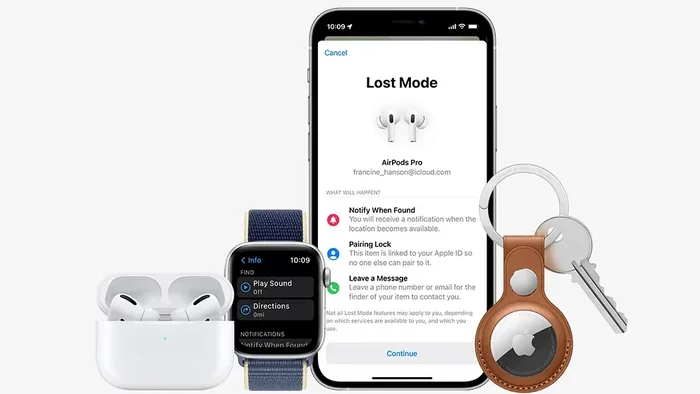
Featured image for AirPods Pro lost search
Image source: static.wixstatic.com
Yes, you can find AirPods Pro using Apple’s Find My app, which tracks their last known location and can play a sound to help locate them nearby. If your AirPods Pro are out of range, dead, or inside their charging case, Find My will still show their last connected location on a map. For best results, make sure Find My is enabled before they go missing, and act quickly since AirPods rely on Bluetooth rather than GPS for precise tracking.
Picture this: you just left your favorite coffee shop, and suddenly that sinking feeling hits your stomach. Your AirPods Pro aren’t in your pocket. They’re not in your bag either. That little voice in your head asks the dreaded question: “Can you find AirPods Pro once they’re lost?”
Good news: in most cases, yes, you absolutely can. Apple’s built-in tracking system has saved countless people from the frustration of losing their expensive earbuds. The trick is knowing exactly how the system works, what its limitations are, and what steps to take the moment you realize your AirPods Pro are missing.
This comprehensive guide will walk you through everything you need to know about finding lost AirPods Pro. We’ll cover the Find My app, sound playback features, what happens when your AirPods are dead or in their case, third-party tracking options, and practical tips to prevent losing them in the first place. Whether you’re a new AirPods Pro owner or someone who’s already lost a pair, this guide has you covered.
Key Takeaways
- Find My is essential: Apple’s Find My app is the primary tool for locating lost AirPods Pro, showing their last known location on a map.
- Play Sound works nearby: The “Play Sound” feature helps locate AirPods Pro within Bluetooth range (about 30-50 feet).
- Case matters: AirPods Pro in their charging case show their last location, not a live signal, since the case blocks Bluetooth transmission.
- Setup is crucial: Find My must be enabled and the AirPods must have connected to your iPhone at least once before you can track them.
- Limitations exist: AirPods Pro don’t have GPS, so tracking accuracy depends on being near another Apple device.
- Third-party options exist: Bluetooth trackers like AirTags or Tile can supplement Find My for better tracking.
- Quick action improves recovery: The faster you search after losing them, the better your chances of finding them.
📑 Table of Contents
- How Find My Works with AirPods Pro
- Step-by-Step Guide to Finding Lost AirPods Pro
- What to Do When AirPods Pro Are Out of Range or Dead
- Preventing Loss: Proactive Tips for AirPods Pro Owners
- Alternative Tracking Methods and Third-Party Options
- Understanding AirPods Pro Limitations and Setting Realistic Expectations
- The Future of AirPods Tracking
- Conclusion: Yes, You Can Find AirPods Pro
How Find My Works with AirPods Pro
Understanding how Apple’s tracking system works is the first step to successfully finding your missing AirPods Pro. Think of it like leaving a trail of digital breadcrumbs, but with some important limitations compared to, say, finding a lost iPhone.
The Technology Behind AirPods Tracking
Unlike your iPhone, AirPods Pro don’t have built-in GPS chips. Instead, they rely on Bluetooth technology to communicate with your Apple devices. Here’s a simple analogy: imagine your AirPods Pro are constantly shouting “I’m here!” through a Bluetooth megaphone, but the megaphone only reaches about 30-50 feet. When your iPhone hears that shout, it records the location.
When you open the Find My app, you’re not seeing a live signal from your AirPods Pro. Instead, you’re seeing the last place your iPhone successfully connected to them. This is a crucial distinction that affects how you search for them.
Requirements for Find My to Work
Before you can find your AirPods Pro using Find My, several conditions must be met. Think of these as prerequisites, like needing a key before you can open a door.
- Initial pairing required: Your AirPods Pro must have connected to your Apple device at least once before.
- Find My enabled: The Find My feature must be turned on in your settings.
- Same Apple ID: Your AirPods Pro must be linked to your Apple ID through iCloud.
- Bluetooth connection history: There must be at least one successful Bluetooth connection recorded.
Did You Know? According to Apple, over 100 million Find My sessions happen every day worldwide. This massive network of Apple devices helps create a crowdsourced location system, though AirPods Pro benefit from this less than AirTags do.
Step-by-Step Guide to Finding Lost AirPods Pro
Now that you understand the basics, let’s walk through the exact steps to locate your missing AirPods Pro. Time is of the essence here, so let’s get started immediately.
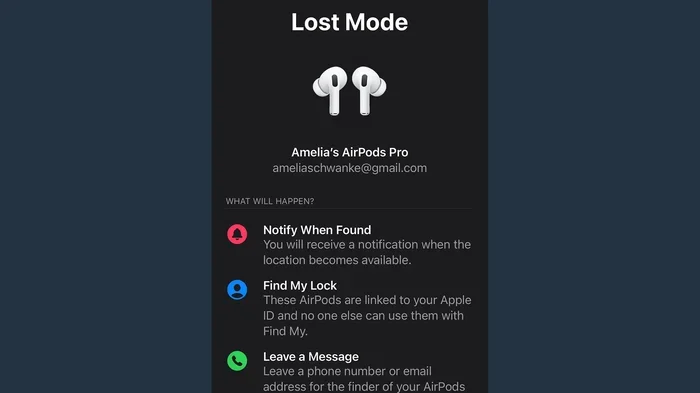
Visual guide about AirPods Pro lost search
Image source: cdn.mos.cms.futurecdn.net
Step 1: Open the Find My App
Grab your iPhone, iPad, or Mac and open the Find My app. If you’re using a computer, you can also visit iCloud.com/find. The app icon looks like a green circle with a radar-like design inside. Once you’re in, tap the “Devices” tab at the bottom of the screen.
Step 2: Select Your AirPods Pro
Scroll through your list of devices until you find your AirPods Pro. They’ll be listed by the name you gave them (or “AirPods Pro” by default). Tap on them to see their location details.
Step 3: Interpret the Location Information
The map will show you a location with a pin, but what does it actually mean? Here’s where things get interesting. The location displayed could be one of three things:
- Current approximate location: Your AirPods Pro are currently connected to a device and transmitting a Bluetooth signal.
- Last known location: Your AirPods Pro were last seen at this location when they were connected to your device.
- Offline/No location: Your AirPods Pro are out of range, in their case, or have a dead battery.
Step 4: Use the Play Sound Feature
If your AirPods Pro appear to be nearby or you see a location on the map, tap “Play Sound.” This is where the magic happens. Your AirPods Pro will emit a loud, distinct chirping sound that’s different from your regular audio. This sound is specifically designed to be heard in quiet environments.
Did You Know? The Play Sound feature gradually increases in volume over two minutes and plays for up to 30 minutes. This gives you plenty of time to search methodically through your space.
What to Do When AirPods Pro Are Out of Range or Dead
Not every lost AirPods Pro scenario is straightforward. Sometimes they’re out of Bluetooth range, the battery is dead, or they’re sitting inside their charging case. Here’s how to handle these trickier situations.
The Charging Case Problem
Here’s something most people don’t realize: AirPods Pro in their charging case don’t transmit a Bluetooth signal. The case acts like a little Faraday cage, blocking the signal. This means if you lost your AirPods Pro while they were in the case, Find My will only show you the last location before they went into the case.
Think of it like putting a letter in an envelope. The envelope protects the letter, but it also means you can’t see what’s written inside until someone opens it. Similarly, your AirPods Pro are safe in the case, but you can’t track them until they come out.
What Happens When the Battery Dies?
AirPods Pro batteries last about 4.5-5 hours of listening time. When they die, they stop transmitting Bluetooth signals entirely. Find My will display the last known location, but the information won’t update until the AirPods are charged and connected to a device again.
Strategies for Finding “Invisible” AirPods
When your AirPods Pro show a last known location but aren’t transmitting, you’ll need to use some detective skills:
- Retrace your steps: Go back to the last location shown on the map and search methodically.
- Check common spots: Look in coat pockets, between couch cushions, in car seats, and inside bags.
- Ask around: If you were in a public place, check with lost and found or staff.
- Be patient: If your AirPods Pro are in their case and eventually come within range of any Apple device signed into your iCloud, their location may update.
Preventing Loss: Proactive Tips for AirPods Pro Owners
The best way to find lost AirPods Pro is to never lose them in the first place. While no system is foolproof, these practical tips can dramatically reduce your chances of losing your expensive earbuds.
Enable Find My Before You Need It
This might sound obvious, but many people don’t check whether Find My is enabled until after they’ve lost their AirPods. Take 30 seconds right now to verify it’s on. Go to Settings, tap your name at the top, tap Find My, then Find My iPhone, and make sure everything is toggled on.
Use a Bluetooth Tracker
Since AirPods Pro have limited tracking capabilities, consider attaching a small Bluetooth tracker to the charging case. Apple’s AirTag is a popular choice, but Tile and other third-party trackers work too. These trackers have louder speakers and better range than AirPods alone.
Did You Know? AirTags use ultra-wideband technology for precise tracking within about 30 feet, while standard Bluetooth trackers typically have a range of 100-400 feet in open spaces.
Develop Smart Habits
Creating simple habits can prevent most AirPods Pro losses:
- Designate a “home”: Always put your AirPods in the same spot when you’re not using them.
- Use the case: Put AirPods back in their case when you’re done, even if you’ll use them again soon.
- Check before leaving: Do a quick pat-down before leaving any location.
- Avoid pocket storage: Don’t leave AirPods loose in pockets where they can fall out.
Alternative Tracking Methods and Third-Party Options
While Find My is Apple’s official solution, several other methods and tools can help you locate your AirPods Pro. These are worth considering, especially if you’re prone to losing things or want extra peace of mind.
Third-Party Apps
Several apps claim to help locate lost AirPods. However, most of them work similarly to Find My, relying on Bluetooth signal strength. They’re worth considering but don’t expect miracles beyond what Apple’s built-in tool provides.
Apple AirTags as a Supplement
If you frequently lose items, attaching an AirTag to your AirPods Pro case is an excellent strategy. AirTags have several advantages over built-in AirPods tracking:
- Loud speaker: AirTags can play sounds up to 80 decibels.
- Precision tracking: Ultra-wideband technology provides more accurate location data.
- Crowdsourced network: AirTags can leverage the entire Find My network of Apple devices.
- Longer battery life: AirTag batteries last about a year.
What About Android Users?
If you’re using AirPods Pro with an Android device, your tracking options are more limited. You won’t have access to Find My, but you can use third-party apps and Bluetooth scanner tools. These work by detecting the Bluetooth signal from your AirPods and estimating their location based on signal strength.
Understanding AirPods Pro Limitations and Setting Realistic Expectations
It’s important to have realistic expectations about AirPods Pro tracking. While the system works, it’s not as robust as tracking a lost iPhone. Understanding these limitations helps you search more effectively.
Why AirPods Tracking Isn’t Perfect
Several factors limit how effectively you can track AirPods Pro:
- No GPS chip: AirPods rely entirely on Bluetooth, which has limited range.
- Battery dependency: Dead AirPods can’t transmit any signal at all.
- Case interference: The charging case blocks Bluetooth signals.
- Single-point connection: AirPods typically connect to only one device at a time.
Think of AirPods Pro tracking like trying to find a friend in a crowded mall using only their voice. You can hear them when they’re close, but once they walk too far away or go into a quiet room, you lose them completely.
When to Give Up and Replace
Sometimes, despite your best efforts, AirPods Pro are truly lost. If you’ve thoroughly searched the last known location, checked with relevant businesses, and waited several days with no updates, it might be time to accept the loss and consider replacements.
Before giving up, however, try these last-resort options:
- Enable “Notify When Found”: In the Find My app, toggle this option to receive notifications when your AirPods connect to any Apple device.
- Check Apple’s replacement program: If your AirPods are under warranty or you have AppleCare+, you might qualify for discounted replacements.
- Consider AppleCare+: For future protection, AppleCare+ covers lost AirPods for a relatively small fee.
The Future of AirPods Tracking
Apple continues to improve its tracking capabilities with each AirPods generation. Recent updates and rumors suggest exciting developments that could make finding lost AirPods even easier in the future.
Upcoming Features and Improvements
Apple has been gradually expanding Find My capabilities. While AirPods Pro still don’t have GPS, future versions may include:
- Improved ultra-wideband chips: Better precision tracking similar to AirTags.
- Enhanced case tracking: Some patents suggest future cases may have their own tracking chips.
- Better battery management: Longer-lasting batteries mean more time to find lost AirPods.
- Improved sound features: Louder, more distinctive sounds for easier locating.
Did You Know? Apple’s Find My network has grown to over a billion active devices, making it one of the largest crowdsourced tracking networks in the world.
Conclusion: Yes, You Can Find AirPods Pro
So, can you find AirPods Pro? The answer is a resounding yes, with some important caveats. Apple’s Find My app provides a solid foundation for tracking your missing earbuds, showing you their last known location and playing sounds to help you locate them when they’re nearby.
The key to success is preparation. Enable Find My before you lose your AirPods, understand the limitations of Bluetooth-based tracking, and act quickly when you realize they’re missing. For extra protection, consider attaching an AirTag to your charging case and developing habits that prevent loss in the first place.
Remember that AirPods Pro tracking isn’t perfect. They don’t have GPS, the charging case blocks signals, and dead batteries mean no tracking at all. But with the strategies outlined in this guide, you’ll be well-equipped to handle the stressful situation of lost AirPods Pro.
Whether you’re reading this preventively or in the middle of an AirPods crisis, take a deep breath. You have tools at your disposal, and in most cases, you can find your AirPods Pro and get back to enjoying your music, podcasts, and calls.
Frequently Asked Questions
Can you find AirPods Pro if the case is closed?
You can only see the last known location of your AirPods Pro if they’re inside their closed charging case. The case blocks Bluetooth signals, so live tracking isn’t possible until the AirPods are removed and connect to a device. Find My will still show where they were last seen, which gives you a starting point for your search.
How accurate is Find My for AirPods Pro?
Find My shows the approximate location where your AirPods Pro last connected to your device, which can be within 30-50 feet in urban areas. The accuracy isn’t as precise as GPS tracking, but it’s usually enough to narrow down your search to a building, room, or general area.
Can you find AirPods Pro if the battery is dead?
Yes, you can still see the last known location of your AirPods Pro even when the battery is dead. However, you won’t be able to use the Play Sound feature or get live updates until the AirPods are charged and connect to a device again.
Do AirPods Pro work with Find My on Android?
AirPods Pro don’t have full Find My functionality on Android devices. You can use third-party Bluetooth scanner apps to detect their signal, but you won’t have access to Apple’s official tracking features. For full functionality, you’ll need to pair them with an Apple device.
What should I do if Find My says my AirPods Pro are at home but I can’t find them?
If Find My shows your AirPods Pro are at home, try playing the sound and walking through each room. Check common hiding spots like couch cushions, coat pockets, drawers, and laundry baskets. The Play Sound feature gradually increases in volume, so be patient and listen carefully.
Can someone else use my lost AirPods Pro?
AirPods Pro can only pair with one Apple ID at a time, so someone else generally cannot use them with their own iCloud account. They might be able to use them with another device, but they won’t be able to access your personal information or pair them permanently with their Apple ID.