Featured image for AirPods noise cancellation feature
Image source: m.media-amazon.com
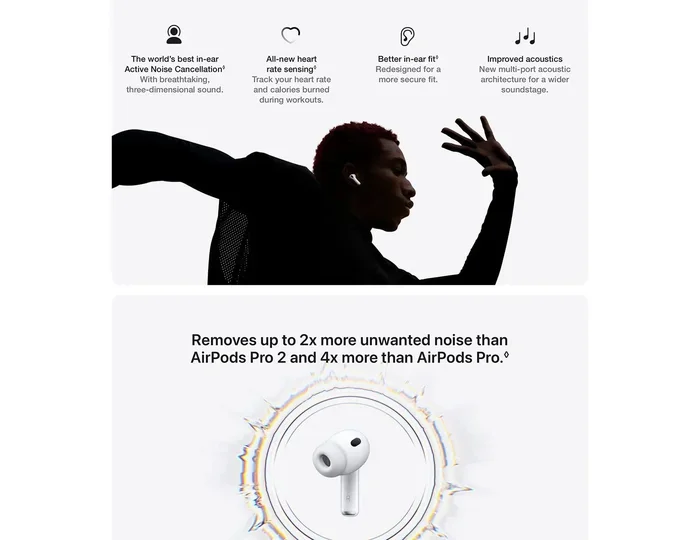
Yes, you can absolutely use noise cancelling on AirPods—but only on certain models. AirPods Pro, AirPods Pro 2, AirPods 4, and AirPods Max all feature Active Noise Cancellation (ANC) technology. Standard AirPods (1st, 2nd, and 3rd generation) do not have noise cancelling capabilities. This guide explains exactly which AirPods support noise cancelling, how to turn it on, and tips to maximize your listening experience.
Imagine sitting on a noisy airplane, desperately wanting to hear your favorite podcast without cranking the volume to unsafe levels. Or picture yourself trying to focus in a bustling coffee shop, where conversations, espresso machines, and background music create a wall of distraction. These scenarios are exactly why noise cancelling technology exists—and why so many people wonder whether their AirPods can deliver this game-changing feature.
The good news? If you own the right AirPods model, you absolutely can put noise cancelling on them. Apple has built sophisticated Active Noise Cancellation (ANC) into several of its premium earbuds and headphones. Think of noise cancelling like a bouncer at a club’s entrance—it actively blocks unwanted sounds from getting through, letting only the audio you actually want to hear pass through to your ears.
However, not every AirPod in Apple’s lineup comes with this capability. Understanding which models support noise cancelling, how to activate it, and how to get the most out of this feature can transform your listening experience. Let’s dive into everything you need to know about using noise cancelling on AirPods.
Key Takeaways
- Not All AirPods Have Noise Cancelling: Only AirPods Pro, AirPods Pro 2, AirPods 4 (with ANC), and AirPods Max feature Active Noise Cancellation technology.
- Three Listening Modes Available: AirPods with ANC offer Noise Cancellation, Transparency Mode, and Adaptive Audio for different environments.
- Easy Activation Methods: You can control noise cancelling via the AirPods stem (force sensor), Control Center on iPhone, Siri voice commands, or the dedicated button on AirPods Max.
- It Works Without an App: Noise cancelling is built into compatible AirPods—no third-party apps required to enable it.
- Battery Impact Is Real: Active Noise Cancellation consumes more battery power, so expect 20-30% less listening time when it’s enabled.
- Works Across Apple Devices: Noise cancelling functions seamlessly when connected to iPhones, iPads, Macs, and Apple TVs.
- Ear Tip Fit Matters: Proper ear tip sizing is crucial for noise cancelling effectiveness—a poor seal reduces ANC performance by up to 50%.
📑 Table of Contents
Understanding Noise Cancelling Technology in AirPods
Before we get into the practical “how-to” details, it’s worth understanding what noise cancelling actually does. Think of it as a sound-canceling superhero that uses physics to fight physics.
How Active Noise Cancellation Works
Active Noise Cancellation works on a beautifully simple principle: sound waves have peaks and valleys (like ocean waves). ANC technology uses tiny microphones to detect incoming noise, then creates “anti-sound” waves that are mirror opposites. When these opposite waves meet, they cancel each other out—like adding +5 and -5 to get zero.
Did You Know? The concept of noise cancellation was first patented in the 1930s, but it wasn’t until 1989 that Bose released the first commercial ANC headphones for pilots. Apple brought this technology to consumer earbuds when AirPods Pro launched in October 2019.
Apple’s implementation is sophisticated. The AirPods use two microphones per earbud:
- Outward-facing microphone: Detects external sound waves before they reach your ear
- Inward-facing microphone: Listens to sound inside your ear canal to catch any noise that slipped through
A custom Apple-designed H-series chip processes this information 200 times per second, generating anti-noise waves in real-time. This processing power is why older AirPods without the H1 or H2 chip cannot support ANC.
Passive vs. Active Noise Cancellation
There’s an important distinction many people miss. Passive noise cancellation simply means physically blocking sound—like putting your hands over your ears. All AirPods provide some passive isolation through their physical design, but this is very different from true ANC.
Think of it this way: Passive noise blocking is like closing a window to keep out cold air. Active noise cancellation is like having a heater that actively warms the room. The latter requires power and technology, while the former just requires a physical barrier.
Which AirPods Models Support Noise Cancelling?
This is the most critical question, and the answer determines everything else. Apple has been strategic about which AirPods include ANC, typically reserving it for premium models.
Visual guide about AirPods noise cancellation feature
Image source: appsntips.com
AirPods Pro and AirPods Pro 2
The AirPods Pro (1st generation), released in October 2019, were Apple’s first earbuds to include Active Noise Cancellation. The AirPods Pro 2, released in September 2022, improved upon this with the H2 chip, offering twice the noise cancellation effectiveness of the original model.
Did You Know? The AirPods Pro 2 can cancel up to 48,000 times more noise per second compared to the original AirPods Pro, according to Apple’s technical specifications. This translates to noticeably quieter experiences in loud environments.
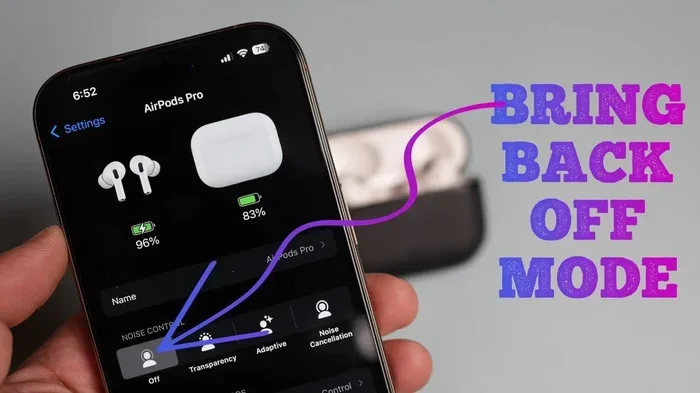
Both Pro models feature three noise control modes:
- Active Noise Cancellation: Maximum sound blocking for noisy environments
- Transparency Mode: Lets outside sounds in naturally—great for conversations or crossing streets safely
- Adaptive Audio (Pro 2 only): Intelligently blends ANC and Transparency based on your environment
AirPods 4 with Active Noise Cancellation
In September 2024, Apple made headlines by introducing ANC to the standard AirPods line for the first time. The AirPods 4 with Active Noise Cancellation (a higher-tier version of the standard AirPods 4) offers this premium feature at a more accessible price point than the Pro models.
However, there’s a caveat: The standard AirPods 4 (without ANC) does not include this feature. Apple created two versions of the same product specifically because ANC requires additional hardware and processing power.
AirPods Max
Released in December 2020, AirPods Max are Apple’s over-ear premium headphones. They include Active Noise Cancellation powered by the Apple H1 chip in each ear cup. Being over-ear headphones, they naturally block more sound passively than earbuds, and Apple combines this with ANC for impressive results.
The AirPods Max includes a unique feature: a physical noise control button on the right ear cup, unlike earbuds that rely on stem controls.
AirPods That Do NOT Support Noise Cancelling
Let’s be crystal clear about which AirPods lack this feature:
- AirPods 1st Generation (2016): No ANC capability
- AirPods 2nd Generation (2019): No ANC capability
- AirPods 3rd Generation (2021): No ANC capability
- Standard AirPods 4 (2024): No ANC capability
If you own any of these models, no software update or app can add noise cancelling to them. The required hardware simply isn’t there.
How to Turn On Noise Cancelling on AirPods
Now for the practical part—how do you actually activate noise cancelling on your compatible AirPods? Apple provides several methods, giving you flexibility based on the situation.
Method 1: Using the Force Sensor on AirPods Pro
The AirPods Pro and AirPods Pro 2 have a small flat indentation on each stem called the “force sensor.” You press it to control playback, but it also cycles through listening modes.
Here’s how:
- Press and hold the force sensor on either AirPod stem for about one second
- You’ll hear a chime indicating the mode has switched
- Continue holding to cycle through: Noise Cancellation → Transparency → Adaptive Audio (Pro 2 only)
Pro Tip: You can customize which modes the force sensor cycles through in your iPhone Settings. Go to Settings > Bluetooth > tap the “i” next to your AirPods > under “Noise Control,” select which modes you want available.
Method 2: Control Center on iPhone or iPad
This is often the easiest method when your phone is in hand:
- Swipe down from the top-right corner of your iPhone or iPad to open Control Center
- Press and hold (or long-press) the volume slider
- You’ll see three icons appear at the bottom: Noise Cancellation, Transparency, and (on supported models) Adaptive Audio
- Tap the icon for your desired mode
You’ll notice the icon highlights when active, and you’ll hear a subtle tone in your AirPods confirming the change.
Method 3: Using Siri Voice Commands
If your hands are busy or you’re wearing gloves, just ask Siri:
- “Hey Siri, turn on noise cancellation”
- “Hey Siri, switch to Transparency mode”
- “Hey Siri, turn off noise canceling”
Siri responds with a confirmation tone, and your AirPods adjust immediately. This works with all AirPods Pro models and AirPods Max.
Method 4: AirPods Max Physical Button
AirPods Max take a different approach with a dedicated noise control button on the top of the right ear cup. Pressing it switches between Active Noise Cancellation and Transparency Mode. Apple kept this design consistent with traditional over-ear headphone conventions.
Method 5: Settings App
You can also configure noise cancelling through your device’s Settings:
- Open the Settings app on your iPhone
- Tap “Bluetooth”
- Find your AirPods in the list and tap the “i” icon next to them
- Under “Noise Control,” select your preferred mode
This method is particularly useful for setting defaults—you can choose to have ANC always on when you put your AirPods in your ears.
Maximizing Noise Cancelling Performance on AirPods
Simply turning on noise cancelling isn’t enough to get the best experience. Like tuning a musical instrument, a few adjustments can dramatically improve performance.
Getting the Right Ear Tip Fit
Did You Know? Studies suggest that approximately 60% of users wear incorrect ear tip sizes, reducing ANC effectiveness by up to 50%. This single factor has the biggest impact on noise cancelling quality.
Apple includes four ear tip sizes with AirPods Pro (XS, S, M, L). The AirPods Pro 2 includes five sizes (adding XXS). Here’s how to find your perfect fit:
- The Ear Tip Fit Test: Go to Settings > Bluetooth > tap “i” next to your AirPods > select “Ear Tip Fit Test.” Your iPhone plays a brief audio test and tells you if your current tips create a good seal.
- Physical Check: Good fit means the AirPods feel secure but not uncomfortable. They shouldn’t feel loose or wiggly.
- Sound Check: With ANC on, the world should feel noticeably quieter. If you can still hear conversations clearly, try a larger tip size.
Keeping Your AirPods Clean
Dirt, earwax, and debris can block the microphones and speakers, drastically reducing noise cancelling effectiveness. Clean your AirPods weekly using a dry cotton swab for the microphone mesh and speaker grilles. Never use water or liquids directly on the devices.
Software Updates Matter
Apple regularly releases firmware updates that improve ANC algorithms. Make sure your AirPods are running the latest firmware by keeping them in their charging case near your iPhone with Wi-Fi enabled. Updates install automatically overnight when conditions are met.
Understanding What Noise Cancelling Can and Cannot Do
Managing expectations helps you appreciate ANC for what it truly excels at. Noise cancelling works best on:
- Consistent, low-frequency sounds: Airplane engines, HVAC systems, train rumbling, office hum
- Predictable background noise: Crowd murmur, café ambiance, rain
Noise cancelling is less effective on:
- Sudden, sharp sounds: Car horns, barking dogs, slamming doors
- High-frequency noises: Babies crying, whistles, shattering glass
- Human voices: Particularly nearby conversations
Think of ANC as excellent at removing the “drumbeat” of background noise but less capable of eliminating sudden, sharp sounds. For those situations, combining ANC with moderate volume on your audio content works best.
Advanced Noise Cancelling Features and Tips
Beyond basic on/off functionality, Apple’s AirPods offer sophisticated features that many users never explore.
Adaptive Audio: The Smart Middle Ground
Available on AirPods Pro 2 and AirPods 4 with ANC, Adaptive Audio is like having a smart assistant managing your noise settings automatically. It uses machine learning to detect whether you’re in a quiet office or noisy street, then seamlessly blends ANC and Transparency modes.
Real-world scenario: You’re walking from a quiet office to a busy street. Traditional ANC would either keep you isolated (potentially dangerous at crosswalks) or let everything in (annoying in noisy areas). Adaptive Audio adjusts continuously, reducing ANC when you need awareness and increasing it when you need focus.
Conversation Awareness
Another Pro 2 feature, Conversation Awareness automatically lowers your audio volume and switches to Transparency mode when you start speaking to someone. When you stop talking for a few seconds, it returns to your previous noise settings. It’s remarkably intuitive once you experience it.
Personalized Volume
This feature learns your listening preferences over time, automatically adjusting volume based on your environment. Combined with ANC, it creates a consistently optimal listening experience without manual adjustments.
Using Noise Cancelling for Calls
Here’s something many people miss: AirPods with ANC actually improve call quality in noisy environments. The microphones use noise reduction algorithms to filter out background sounds, so the person you’re calling hears you more clearly—even if you’re surrounded by traffic.
Pro Tip: When taking calls in noisy environments, keep ANC enabled. It helps you hear the caller clearly without cranking volume, which protects your hearing during long conversations.
Battery Management with ANC
Noise cancelling uses processing power, which requires battery energy. Here’s what to expect:
- AirPods Pro with ANC on: Approximately 4.5 hours of listening time (vs. 5 hours with ANC off)
- AirPods Pro 2 with ANC on: Approximately 6 hours of listening time
- AirPods Max with ANC on: Approximately 20 hours (vs. 20 hours with ANC off—virtually no impact due to larger battery)
Turn off ANC when you don’t need it to extend battery life during long days. Transparency mode uses less power than full ANC.
Troubleshooting Common Noise Cancelling Issues
Sometimes noise cancelling doesn’t work as expected. Here are solutions to common problems.
Noise Cancelling Sounds Worse Than Before
If your ANC suddenly seems less effective, try these fixes:
- Clean the microphones and ear tips: Blocked microphones can’t detect ambient noise accurately
- Try different ear tip sizes: Your ears can change shape slightly with weight fluctuations or seasonal changes
- Reset your AirPods: Hold the setup button on the case for 15 seconds until the light flashes amber, then white
- Update firmware: Ensure your AirPods are running the latest version
Noise Cancelling Won’t Turn On
If the option appears grayed out or won’t activate:
- Confirm your AirPods actually support ANC (check model number)
- Make sure both AirPods are in your ears with proper fit
- Disconnect and reconnect Bluetooth
- Restart your iPhone or connected device
Pressure Sensation in Ears
Some users experience a “pressure” or “vacuum” feeling when ANC is active—this is normal and occurs because your brain interprets the absence of certain frequencies as pressure changes. If uncomfortable, use Transparency mode occasionally, or try shorter ANC sessions to acclimate.
One AirPod Has Weaker Noise Cancelling
If one side seems less effective, it usually indicates a poor seal. Try swapping ear tips between left and right—sometimes we have slightly different ear canal sizes. The Ear Tip Fit Test can identify which specific side needs adjustment.
Conclusion
Noise cancelling on AirPods isn’t a myth or a premium add-on—it’s a real, powerful feature available on several models. If you own AirPods Pro, AirPods Pro 2, AirPods 4 with ANC, or AirPods Max, you have access to industry-leading Active Noise Cancellation that can transform how you experience audio in noisy environments.
The key is knowing which model you own and how to access the feature. Whether you use the force sensor on the stem, Control Center on your iPhone, or Siri voice commands, activating noise cancelling takes just seconds. Combined with proper ear tip fit and clean hardware, you’ll experience the quiet sanctuary these tiny devices can create.
Remember that ANC isn’t perfect—it excels at blocking consistent background noise but struggles with sudden, sharp sounds. For most everyday situations (commuting, working in cafés, focusing at home, flying), however, AirPods noise cancelling provides exceptional value that justifies the investment in compatible models.
Take a moment today to test your noise cancelling settings, try different modes in various environments, and find what works best for your lifestyle. Your ears—and your sanity in noisy spaces—will thank you.
Frequently Asked Questions
Can you put noise cancelling on regular AirPods?
No, you cannot add noise cancelling to regular AirPods (1st, 2nd, or 3rd generation, or standard AirPods 4). These models lack the necessary hardware—specifically the H1 or H2 chip and dual microphones—required for Active Noise Cancellation. Only AirPods Pro, AirPods Pro 2, AirPods 4 with ANC, and AirPods Max support this feature.
How do I know if my AirPods have noise cancelling?
Check your AirPods model number in Settings > Bluetooth > tap the “i” next to your AirPods. Models A2083, A2084, A2190, and A2191 are AirPods Pro (1st gen). Model numbers A2700, A2701, A2968, and A2969 indicate AirPods Pro 2. If you see noise control options in settings, your AirPods support ANC.
Is noise cancelling on AirPods good?
Yes, AirPods Pro and AirPods Pro 2 offer excellent noise cancelling that competes with premium brands. The AirPods Pro 2 reduces approximately twice as much noise as the original AirPods Pro. They’re particularly effective on consistent low-frequency sounds like airplane engines and office noise, though less effective on sudden sharp noises or nearby conversations.
Does noise cancelling work without an app on AirPods?
Absolutely—no third-party apps are needed. Noise cancellation is built directly into AirPods Pro, AirPods Pro 2, AirPods 4 with ANC, and AirPods Max. You control it through iOS settings, Control Center, the force sensor, Siri voice commands, or the physical button on AirPods Max. Everything works natively with Apple devices.
Does turning on noise cancelling drain AirPods battery faster?
Yes, Active Noise Cancellation uses additional processing power, which reduces battery life. AirPods Pro typically lose about 30-60 minutes of listening time with ANC on. AirPods Pro 2 provide around 6 hours with ANC versus 7 hours without. AirPods Max show minimal battery difference due to their larger battery capacity.
Can I use noise cancelling on AirPods with Android phones?
Yes, the noise cancelling hardware works regardless of your connected device. However, Android users cannot access the iOS-specific control features like Adaptive Audio or Conversation Awareness. You can still toggle between ANC and Transparency using the force sensor on AirPods Pro, but customizing settings requires an Apple device for full functionality.