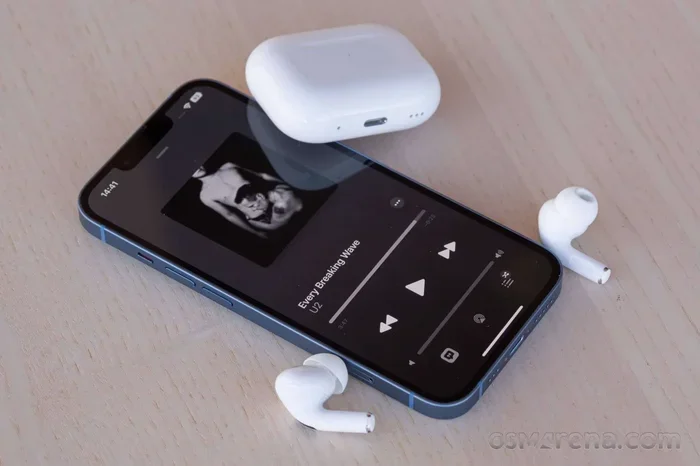
Featured image for talking on AirPods Pro phone
Image source: fdn.gsmarena.com
Absolutely, you can talk on the phone with AirPods Pro! These wireless earbuds work like a charm for phone calls, thanks to their built-in microphones and smart noise-canceling features. Whether you’re on a quick chat or a long work call, AirPods Pro deliver clear sound for both you and the person on the other end. Just pop them in, connect to your phone, and start talking—it’s that simple!
Imagine this: you’re juggling groceries, your hands are full, and your phone rings. Do you fumble to answer it? Not if you’ve got AirPods Pro! These tiny earbuds aren’t just for music—they’re a full-on calling machine. Let’s dive into everything you need to know about talking on the phone with AirPods Pro.
If you’ve ever wondered, “Can I actually take calls with these things?”—the answer is a big, resounding YES. AirPods Pro are designed to handle phone calls like a pro (pun intended). With built-in mics, noise-canceling magic, and seamless pairing, they’re like having a tiny assistant in your ears. Whether you’re at home, in a coffee shop, or walking down a busy street, AirPods Pro keep your conversations clear and hands-free.
But here’s the thing—there’s more to it than just pressing “answer.” From how the mics work to how long the battery lasts, we’ve got all the details. Think of this guide as your friendly cheat sheet to mastering phone calls on AirPods Pro. Let’s get started!
Key Takeaways
- Built-in Microphones: AirPods Pro have dual beamforming microphones that pick up your voice clearly while reducing background noise.
- Easy Connectivity: They pair instantly with iPhones and most Bluetooth devices, making call setup a breeze.
- Noise Cancellation: Active Noise Cancellation (ANC) and Transparency mode help you hear and be heard better during calls.
- Long Battery Life: You get up to 4.5 hours of talk time on a single charge, with the case extending it to 24 hours.
- Call Controls: You can answer, end, or mute calls using simple touch gestures on the earbuds.
- Cross-Device Compatibility: AirPods Pro work with Android, Windows, and other Bluetooth-enabled devices, not just iPhones.
- Clear Audio Quality: Adaptive EQ and spatial audio enhance call clarity, making conversations feel natural and immersive.
📑 Table of Contents
How AirPods Pro Handle Phone Calls
AirPods Pro are like tiny communication wizards. They come packed with features that make phone calls sound amazing. Let’s break it down.
The Microphone Magic
AirPods Pro have dual beamforming microphones. That’s a fancy way of saying they focus on your voice and ignore the noise around you. It’s like having a spotlight on your mouth, even in a crowded room. The mics work together to pick up your voice clearly while filtering out wind, chatter, and other distractions.
There’s also a third inward-facing microphone that listens to what’s happening inside your ear. This helps the AirPods Pro figure out how much of your own voice you’re hearing, so the call sounds natural—not muffled or tinny.
Active Noise Cancellation (ANC) During Calls
One of the coolest features is Active Noise Cancellation. It blocks out background noise so you can focus on the call. Picture this: you’re at a bustling airport, but to you, it sounds like you’re in a quiet library. ANC cancels out the engine hum, chatter, and announcements, letting you hear the other person perfectly.
And if you need to hear your surroundings? Just switch to Transparency mode. It’s like opening a window—you can hear the world and still chat on the phone. This is super handy if you’re walking near traffic or need to listen for announcements.
Call Quality: What to Expect
Call quality on AirPods Pro is top-notch. Apple uses advanced audio processing to make your voice sound crisp and clear. The person on the other end will hear you loud and clear, even if you’re in a noisy environment. It’s like having a professional microphone clipped to your collar—without the clip!
How to Answer and Make Calls with AirPods Pro
Using AirPods Pro for calls is as easy as pie. Here’s how to do it step by step.
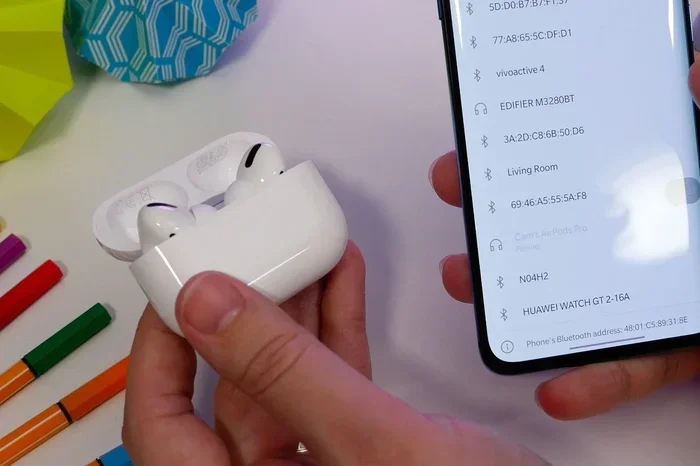
Visual guide about talking on AirPods Pro phone
Image source: ac3filter.b-cdn.net
Answering a Call
When a call comes in, you don’t need to grab your phone. Just follow these simple steps:
- Press the force sensor once on either AirPod to answer the call. The force sensor is the little flat stem on the earbud—think of it as a button.
- Press it again to end the call when you’re done chatting.
- Press twice to decline a call if you’re busy.
It’s so simple, you can do it with your eyes closed (though we don’t recommend that while walking).
Making a Call
Want to call someone without touching your phone? You can use Siri. Just say, “Hey Siri, call [name],” and Siri will dial it for you. It’s like having a personal assistant in your ear. Make sure your AirPods Pro are connected and Siri is enabled in your settings.
Switching Between Calls
If you’re on a call and another one comes in, AirPods Pro can handle it. Here’s how:
- Press the force sensor once to answer the new call and put the first one on hold.
- Press again to switch back to the original call.
This is perfect for multitaskers who don’t want to miss a beat.
Adjusting Call Volume
You can control the call volume right from your AirPods. Just say, “Hey Siri, volume up” or use the volume controls on your iPhone. Some people also use the Digital Crown (on AirPods Max) or the force sensor (on AirPods Pro) to adjust sound, but for calls, voice control or phone controls work best.
Battery Life and Charging During Calls
Nobody wants their call to die mid-sentence. Here’s what you need to know about AirPods Pro battery life during calls.
Talk Time on a Single Charge
Did you know AirPods Pro give you up to 4.5 hours of talk time on a single charge? That’s plenty for most phone calls. If you’ve got back-to-back meetings, you might need a quick top-up, but for everyday chats, the battery has you covered.
Charging with the Case
The MagSafe Charging Case is like a portable power bank for your AirPods. It holds multiple charges, giving you up to 24 hours of total talk time. Just pop your AirPods back in the case when you’re not using them, and they’ll recharge automatically. It’s as easy as putting cookies back in the jar.
Quick Charging
In a rush? A quick 5-minute charge in the case gives you about 1 hour of talk time. That’s faster than brewing a cup of coffee! So even if you forget to charge them overnight, you can still make that important call.
Battery Notifications
Your iPhone will let you know when your AirPods Pro battery is low. You’ll see a pop-up on your screen, and Siri might even announce it. So you’re never caught off guard.
Compatibility: What Devices Work with AirPods Pro for Calls?
AirPods Pro aren’t just for iPhones. They work with a bunch of devices. Let’s explore.
iPhone and iPad
AirPods Pro are designed to work seamlessly with Apple devices. Pair them once, and they’ll automatically connect to all your Apple gadgets signed in to the same iCloud account. It’s like magic—no need to pair every time. Calls on FaceTime, regular phone calls, and third-party apps like WhatsApp all work perfectly.
Android Devices
Got an Android phone? No problem! AirPods Pro work with Android via Bluetooth. You can take calls, listen to music, and use most features. However, some iOS-specific tricks (like automatic ear detection) might not work. Still, the core call functionality is solid.
Windows PCs and Macs
If you’re working from home, AirPods Pro can connect to your Mac or Windows PC via Bluetooth. They’re great for Zoom calls, Microsoft Teams, or Skype. Just pair them through your computer’s Bluetooth settings, and you’re good to go.
Other Bluetooth Devices
AirPods Pro can connect to almost any Bluetooth-enabled device, including smartwatches, tablets, and even some TVs. As long as the device supports Bluetooth audio, you’re in business.
Tips and Tricks for Better Call Quality
Want to sound like a pro on calls? Here are some easy tips.
Find the Right Fit
The better the seal in your ears, the better the microphone picks up your voice. AirPods Pro come with three sizes of silicone tips (small, medium, large). Try them all and pick the one that feels snug. A good fit also improves noise cancellation, so it’s a win-win.
Keep the AirPods Clean
Dirt and earwax can clog the microphones and affect call quality. Wipe your AirPods Pro regularly with a dry, soft cloth. Avoid getting them wet unless they’re the newer water-resistant models. A clean AirPod is a happy AirPod.
Use One AirPod at a Time
If you’re in a quiet place and want to extend battery life, use just one AirPod. The microphone still works perfectly, and you can hear the call clearly. It’s like having two batteries in one!
Stay Close to Your Phone
Bluetooth has a range of about 30 feet (10 meters). If you wander too far, the connection might drop. Stay within range for the best call quality.
Update Your Firmware
Apple regularly releases firmware updates that improve call quality and fix bugs. Make sure your AirPods Pro are up to date by keeping them in their case near your iPhone. Updates happen automatically, but it’s good to check.
Disable ANC if Needed
Sometimes, Active Noise Cancellation can make your own voice sound strange to you. If that bothers you, switch to Transparency mode or turn off ANC during calls. Find what works best for you.
Common Issues and Fixes
Even the best tech can have hiccups. Here are common AirPods Pro call problems and how to fix them.
The Other Person Can’t Hear Me
If the person on the other end says they can’t hear you:
- Make sure your AirPods are properly seated in your ears.
- Check that the microphones aren’t blocked by dirt or covers.
- Try resetting your AirPods by holding the setup button on the case until the light flashes amber, then white.
Call Sounds Muffled
If audio sounds muffled:
- Clean the speaker grilles on the AirPods.
- Try a different ear tip size for a better seal.
- Toggle ANC and Transparency mode off and on.
Bluetooth Connection Problems
If your AirPods won’t connect:
- Make sure Bluetooth is turned on.
- Restart your phone or device.
- Forget the AirPods in your Bluetooth settings and re-pair them.
Battery Draining Fast
If the battery dies quickly during calls:
- Lower the volume.
- Turn off ANC when you don’t need it.
- Keep your AirPods in the case when not in use.
Fun Facts and Stats About AirPods Pro Calls
Let’s sprinkle in some cool facts to boost your AirPods Pro knowledge.
Did You Know? Apple’s AirPods Pro use computational audio—a fancy term for using the H1 chip to process sound in real time. This is what makes calls sound so clear and natural.
Did You Know? In 2021, Apple sold over 100 million AirPods, making them one of the most popular wireless earbuds worldwide. That’s a lot of calls!
Did You Know? AirPods Pro are sweat and water-resistant (IPX4 rating), so you can take calls during a workout without worrying about damage.
Did You Know? The first-generation AirPods Pro launched in October 2019, and since then, Apple has released updated versions with even better call quality.
Conclusion
So, can you talk on the phone with AirPods Pro? Absolutely, yes! They’re not just for music—they’re a powerhouse for phone calls, video chats, and everything in between. With crystal-clear microphones, noise-canceling features, and effortless connectivity, AirPods Pro make every call feel like a breeze.
Whether you’re an iPhone loyalist or an Android fan, AirPods Pro work across devices. They’re perfect for work calls, catching up with friends, or even ordering pizza hands-free. Plus, with long battery life and quick charging, you’ll never miss an important conversation.
If you haven’t tried taking calls on AirPods Pro yet, give it a shot. You might just wonder how you ever lived without them. And if you’re already a fan, share this guide with a friend who could use a little call-quality upgrade in their life!
Frequently Asked Questions
Can you take phone calls with AirPods Pro?
Yes, AirPods Pro are fully equipped for phone calls. They have built-in microphones and support features like Active Noise Cancellation and Transparency mode to enhance call quality on any Bluetooth-connected device.
How long can you talk on AirPods Pro?
AirPods Pro offer up to 4.5 hours of talk time on a single charge. With the MagSafe Charging Case, you get up to 24 hours of total talk time, and a quick 5-minute charge provides about 1 hour of talk time.
Do AirPods Pro work for calls on Android?
Yes, AirPods Pro work with Android phones via Bluetooth. You can take calls, but some iOS-specific features like automatic ear detection or Siri may not be available.
How do I answer a call with AirPods Pro?
To answer a call, press the force sensor (the flat part of the stem) once on either AirPod. Press it again to end the call, or press twice to decline an incoming call.
Can I use AirPods Pro for work meetings on Zoom or Teams?
Yes, AirPods Pro work great for Zoom, Microsoft Teams, and other video conferencing apps. They connect to your computer via Bluetooth and deliver clear audio for both calls and meetings.
Why does my voice sound muffled on AirPods Pro calls?
Your voice might sound muffled if the microphones are dirty, the ear tips don’t fit properly, or Active Noise Cancellation is interfering. Try cleaning the AirPods, adjusting the fit, or switching to Transparency mode for clearer voice pickup.