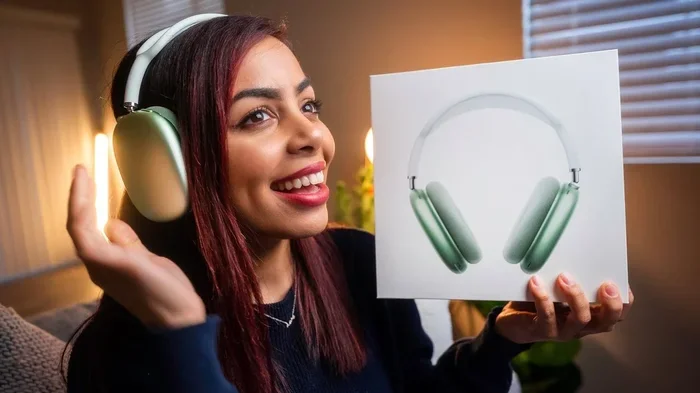
Featured image for person talking airpods max
Image source: iphonewired.com
Yes, you can absolutely talk through AirPod Max using the built-in microphones. Apple’s premium over-ear headphones feature nine microphones total, with eight dedicated to Active Noise Cancellation and three that pick up your voice for calls and Siri commands. Whether you’re on phone calls, video meetings, or chatting with Siri, AirPod Max delivers clear voice quality that rivals dedicated headsets.
Picture this: you’re walking through a busy city street, coffee in one hand, phone in the other, when suddenly your boss calls. Instead of fumbling to answer, you just speak. Your headphones pick up your voice perfectly clear, even with traffic zooming by and people chatting around you. This isn’t science fiction. This is what happens every day for AirPod Max users around the world.
The question “can you talk through AirPod Max” pops up more often than you might think. Many people buy these premium headphones for their amazing sound quality, then wonder if the microphone works just as well for talking. The short answer is absolutely yes. But there’s so much more to explore about how this feature performs, when it works best, and how to get the most out of it.
In this guide, we’ll walk through everything you need to know about using AirPod Max for conversations. From phone calls and video meetings to voice commands and recording audio, you’ll discover why these headphones are among the best communication tools Apple has ever made. Whether you’re a new owner or considering buying a pair, this article has you covered.
Key Takeaways
- Built-in Mics Work Automatically: AirPod Max has microphones ready to use for calls, video chats, and voice commands without any setup required.
- Three Voice Mics: Three of the nine total microphones are specifically designed to capture your voice while blocking out background noise.
- Beamforming Technology: The headphones use smart microphone technology that focuses on your mouth and ignores surrounding sounds during conversations.
- Siri Always Listening: You can activate “Hey Siri” hands-free to make calls, send messages, or ask questions without touching your headphones.
- Great for Video Meetings: AirPod Max work seamlessly with Zoom, FaceTime, Teams, and other popular video calling apps on Apple devices.
- Transparency Mode Helps: Switching to Transparency mode during calls lets you hear your own voice naturally, preventing the “talking with earplugs” effect.
- Battery Considerations: Talking on calls drains battery faster than just listening to music, so keep an eye on your charge level during long conversations.
📑 Table of Contents
- Understanding AirPod Max Microphone Technology
- Making Phone Calls with AirPod Max
- Using AirPod Max for Video Meetings and Conferences
- Voice Commands and Siri Integration
- Recording Audio and Using AirPod Max as a Microphone
- Troubleshooting Common Microphone Issues
- Comparing AirPod Max Microphone to Other Options
- Privacy and Security Considerations
- Battery Life and Charging Considerations
- Tips for Getting the Best Talk Experience
- Final Thoughts
Understanding AirPod Max Microphone Technology
Let’s start with the basics. AirPod Max isn’t just a pair of fancy headphones for listening to music. It’s a sophisticated communication device packed with cutting-edge technology. To understand why talking through them works so well, we need to peek under the hood and see what makes these headphones special.
The Nine-Microphone Array Explained
Here’s something that might surprise you: AirPod Max contains nine separate microphones. That’s not a typo. Nine. Most headphones have one or maybe two mics at most. Apple went all out with this design, and there’s a good reason for it.
Eight of these microphones handle Active Noise Cancellation. They listen to the world around you and create anti-noise signals to cancel out distractions. Think of it like this: if outside noise is a wave in the ocean, these mics create an equal but opposite wave that flattens everything out. The result is pure silence where you can focus on your music or calls.
The ninth microphone, along with two of the noise-cancelling mics, captures your voice. So really, three microphones work together when you talk. They’re positioned strategically near your mouth to pick up your voice clearly while rejecting everything else.
How Beamforming Technology Works
Now here’s where things get really cool. AirPod Max uses something called beamforming technology. Imagine a spotlight that only shines on your mouth and ignores everything else in the room. That’s basically what beamforming does with sound.
Multiple microphones work as a team to identify where your voice is coming from. Then they focus their attention on that specific direction. Background chatter, TV noise, keyboard clicks, coffee shop buzz—all of it gets pushed aside while your voice comes through crystal clear on the other end.
This technology has been around in high-end recording equipment for years. Apple brought it to consumer headphones in a way that’s both affordable and incredibly effective. When you’re on a call, the person listening hears your voice almost as if you were in a quiet recording studio, even when you’re not.
Did You Know? Microphone Facts
Apple spent over five years developing the microphone system for AirPod Max. The engineering team tested the headphones in dozens of real-world environments, from subway cars to windy parks. Each microphone is tuned to handle specific frequencies, which is why voices sound so natural during calls.
Another fascinating fact: the microphones recalibrate themselves about 200 times per second. This means they adapt to changing environments in real-time. Walk from a quiet office into a noisy street, and your AirPod Max automatically adjusts to keep your voice clear.
Making Phone Calls with AirPod Max
Now let’s get into the practical stuff. How do you actually use AirPod Max for phone calls? The good news is it’s incredibly simple. Apple designed these headphones to work right out of the box with minimal fuss.
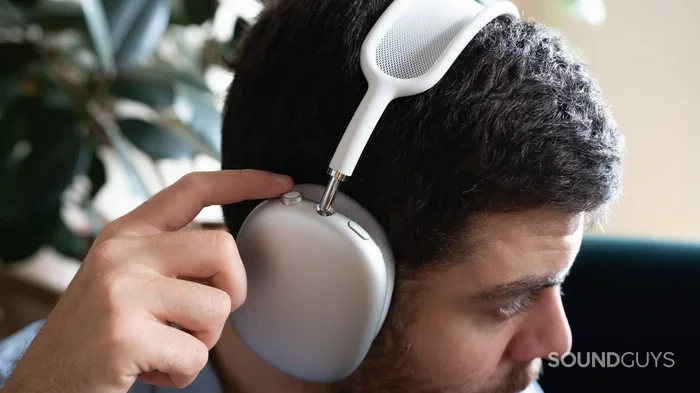
Visual guide about person talking airpods max
Image source: soundguys.com
Answering and Making Calls
When someone calls you and you’re wearing AirPod Max, you have two simple options. You can say “Hey Siri, answer the call” to accept hands-free. Or you can press the Digital Crown—the round button on the right ear cup—once to pick up the call.
To end a call, just press the Digital Crown again. It’s that straightforward. No complicated gestures to memorize. No swiping or tapping required. Apple kept things simple, which is part of what makes these headphones so user-friendly.
Want to make a call? Just say “Hey Siri, call [name]” or “Hey Siri, dial [number].” Your phone will do the rest. You can also start a call from your iPhone and it automatically transfers to your AirPod Max when you’re wearing them.
Call Quality in Different Environments
Here’s where AirPod Max really shines compared to regular earbuds. The larger size means bigger microphones positioned closer to your mouth. This translates to noticeably better voice pickup.
Quiet indoor settings: Your voice sounds natural and full. The person on the other end hears you as if you were talking directly into a high-quality headset. There’s no muffling or distortion.
Busy offices: Even with coworkers chatting nearby and keyboards clicking, AirPod Max does an excellent job separating your voice from the chaos. The beamforming technology really earns its keep here.
Outdoor environments: Wind has always been the enemy of headphone microphones. Apple built wind noise reduction into AirPod Max. The mesh covering the microphones helps block wind interference, so your voice comes through clear even on breezy days.
Crowded public spaces: Coffee shops, airports, train stations—these challenging environments are where AirPod Max proves its worth. The combination of noise cancellation for your ears and beamforming for your voice creates an excellent calling experience.
Switching Between Transparency and Noise Cancellation During Calls
One tip that many people overlook: pressing the noise control button during a call switches between Active Noise Cancellation and Transparency mode. Transparency mode lets outside sounds in, including your own voice.
This is super helpful because it prevents that “stuffed up” feeling you get when you talk with covered ears. Hearing your own voice naturally makes conversations feel more comfortable and helps you modulate your volume appropriately. Try it during your next call and notice the difference.
Using AirPod Max for Video Meetings and Conferences
The pandemic changed how we work, and video meetings became the new normal. Even as offices reopened, many people stuck with remote or hybrid arrangements. AirPod Max turns out to be an excellent tool for this new way of working.
Compatibility with Popular Platforms
AirPod Max works seamlessly with virtually every video conferencing app you can think of. Zoom, Microsoft Teams, Google Meet, FaceTime, WebEx, Slack calls—they all recognize AirPod Max as both audio input and output devices.
On Apple devices, this happens automatically. Connect your AirPod Max, open your video app, and you’re ready to go. The system handles everything in the background. On Windows PCs and Android devices, you might need to manually select AirPod Max as your microphone in the app’s settings, but the process is usually just one or two clicks.
Why AirPod Max Beats Laptop Microphones
Here’s a comparison that might shock you. The built-in microphone on your laptop or phone picks up everything: keyboard sounds, breathing, room echo, background conversations. AirPod Max’s focused microphones capture mainly your voice.
Think of it like the difference between trying to have a conversation in a crowded restaurant versus a private meeting room. Your laptop mic is the restaurant. AirPod Max is the meeting room. Which sounds better for an important work presentation?
Beyond voice quality, AirPod Max cancels noise for your ears too. So while your colleagues deal with barking dogs, construction sounds, or family members in the background, you hear them clearly through your premium headphones. This makes meetings less stressful and more productive.
Tips for Better Video Calls
Position matters. Make sure your AirPod Max is properly seated on your head. The microphones are tuned assuming the headphones are in the correct position. If you’ve pushed them back or worn them loosely, voice pickup might suffer.
Keep your firmware updated. Apple regularly releases updates that improve microphone performance and call quality. Make sure your AirPod Max is charged and connected to your iPhone or iPad periodically so updates can install automatically.
Use Transparency mode for longer calls. As mentioned earlier, hearing your own voice naturally prevents vocal fatigue. If you have back-to-back meetings, this small switch can make a huge difference in comfort.
Voice Commands and Siri Integration
Talking through AirPod Max isn’t just about calls. These headphones have Siri built right in, and she’s always ready to help. Let’s explore this powerful feature.
Activating Siri Hands-Free
AirPod Max supports “Hey Siri” voice activation. This means you don’t even need to touch your phone or the headphones to get help. Just say the magic words, and Siri responds through your headphones.
“Hey Siri, what’s the weather today?”
“Hey Siri, set a timer for 15 minutes.”
“Hey Siri, text Sarah I’ll be there in 10 minutes.”
“Hey Siri, play my focus playlist.”
The possibilities are nearly endless. Siri can send messages, make calls, set reminders, check your calendar, play music, get directions, and answer questions. All hands-free, all through your AirPod Max.
Why Voice Activation Matters
Imagine you’re cooking dinner with messy hands. Your phone is across the room. You need to convert cups to grams for a recipe. With AirPod Max on your head, just ask Siri. No need to stop what you’re doing or clean your hands.
Or picture this: you’re driving (as a passenger, of course) and need to send an urgent message. AirPod Max lets you dictate and send messages without taking your eyes off the road or your hands off the wheel. It’s safer and more convenient.
This kind of hands-free assistance used to require special car systems or expensive equipment. Now it’s in a pair of headphones you can wear anywhere.
Siri’s Voice Recognition Accuracy
Thanks to those beamforming microphones, Siri hears you clearly even in noisy environments. Apple has also improved Siri’s natural language processing over the years. You don’t need to use exact commands or robotic phrases. Just talk normally.
AirPod Max uses the H1 processor in each ear cup to handle voice recognition locally. This means your voice commands are processed on-device for privacy, and they respond faster than ever.
Recording Audio and Using AirPod Max as a Microphone
Beyond calls and Siri, can you use AirPod Max for other voice-related tasks? Absolutely. Let’s explore some creative uses.
Voice Memos and Audio Recording
The Voice Memos app on iPhone works beautifully with AirPod Max. Open the app, start recording, and your voice gets captured with impressive clarity. This is perfect for journalists, students, podcasters, or anyone who needs to capture spoken thoughts on the go.
The quality won’t match a dedicated studio microphone, but it’s far better than what most people expect from headphones. For interviews, lecture notes, or voice journaling, AirPod Max delivers solid results.
Video Recording Audio
Filming a video with your phone? Using AirPod Max as your audio source dramatically improves sound quality compared to the phone’s built-in microphone. This is great for social media content creators, vloggers, or anyone making video memories.
Just be aware that AirPod Max uses Bluetooth to transmit audio, which can introduce a tiny delay. For most video purposes, this delay isn’t noticeable. But for professional video production where audio must sync perfectly, you might need different equipment.
Live Streaming and Content Creation
Live streamers have found AirPod Max to be a reliable microphone solution. Whether you’re streaming on Twitch, YouTube Live, or Instagram, these headphones provide clear voice audio that your audience can hear easily.
Combined with their excellent sound quality for monitoring your stream’s audio, AirPod Max offers a complete solution for content creators who prioritize portability and convenience.
Troubleshooting Common Microphone Issues
Even with great technology, sometimes things don’t work perfectly. Here are solutions to common problems people face when talking through AirPod Max.
People Can’t Hear You Clearly
If callers complain about poor audio quality, the first thing to check is your fit. AirPod Max should sit squarely on your head with the ear cups fully covering your ears. The headband should rest comfortably on top of your head.
Next, make sure your AirPod Max firmware is updated. Apple has released updates specifically addressing microphone performance. Connect them to your iPhone and let any pending updates install.
Dirty microphones can also cause problems. Gently clean the microphone openings on the bottom of each ear cup with a soft, dry cloth. Avoid using water or cleaning solutions that could damage the electronics.
Microphone Not Working at All
If nobody can hear you, check that AirPod Max is selected as your audio input device. On iPhone, this happens automatically when connected. On Mac or PC, you might need to manually select AirPod Max in your sound settings.
Bluetooth connections can sometimes get confused. Try disconnecting and reconnecting your AirPod Max. If that doesn’t work, restart both your AirPod Max and the connected device.
Reset your AirPod Max if problems persist. Hold the noise control button and the Digital Crown together for about 15 seconds until the LED flashes amber, then white. After resetting, pair them again with your device.
Audio Cutting Out During Calls
Interference from other Bluetooth devices can sometimes cause audio dropouts. Try moving away from other Bluetooth gadgets, Wi-Fi routers, or microwave ovens that operate on similar frequencies.
Distance also matters. Bluetooth typically works best within 30 feet of your connected device. Walls, especially thick ones, can reduce this range. Stay reasonably close to your phone or computer for the most reliable connection.
Battery level affects performance too. If AirPod Max is running low on battery, some features including microphone quality might be reduced. Charge them up and see if the problem resolves.
Comparing AirPod Max Microphone to Other Options
How does AirPod Max stack up against alternatives? Let’s make some comparisons to help you understand where these headphones fit in the landscape.
AirPod Max vs. AirPods Pro
AirPods Pro also have excellent microphones for calls. They use similar beamforming technology and work great in most situations. However, AirPod Max’s larger size means the microphones are positioned differently and capture voice slightly differently.
For pure portability, AirPods Pro win. You can toss them in a pocket and take them anywhere. For extended calls and better overall voice quality, AirPod Max generally edges ahead, especially in noisy environments.
AirPod Max vs. Dedicated Headsets
Professional call center headsets with boom microphones still deliver the absolute best voice quality. The microphone position right in front of your mouth captures audio that even the best headphones struggle to match.
However, those headsets are single-purpose devices. AirPod Max gives you premium music listening, excellent noise cancellation, great call quality, and stylish design all in one package. For most people, that versatility wins over specialized equipment.
AirPod Max vs. Other Premium Headphones
Compared to other high-end headphones like Sony WH-1000XM5 or Bose QuietComfort, AirPod Max holds its own for voice quality. Apple has invested heavily in microphone technology, and it shows.
Where AirPod Max really pulls ahead is in Apple ecosystem integration. If you use an iPhone, iPad, or Mac, the seamless connectivity and automatic device switching make AirPod Max the clear choice for communication features.
Privacy and Security Considerations
When you’re always listening with “Hey Siri” enabled, it’s natural to wonder about privacy. Apple has built several protections into AirPod Max.
On-Device Processing
Many Siri requests are processed entirely on your device. Your voice commands don’t travel to Apple’s servers unless absolutely necessary. This means your voice data stays private and secure.
The H1 chip in each AirPod Max handles voice recognition locally. Only after Siri understands your request does anything potentially get sent to Apple’s servers for processing.
Microphone Indicators
Unlike some smart devices, AirPod Max doesn’t have a microphone that secretly records. The microphones only activate during calls, recordings, or when you explicitly invoke Siri.
When AirPod Max is in use, your iPhone shows an indicator that the microphone is active. This transparency helps you know exactly when audio is being captured.
Controlling Your Data
Apple stores some Siri interactions to improve its services, but you can opt out. Go to Settings, then Privacy, then Analytics & Improvements. Turn off “Improve Siri & Dictation” if you’d rather not contribute your voice data.
You can also delete your Siri history. Ask Siri to “delete my Siri history” or go through your iPhone settings to clear that data manually.
Battery Life and Charging Considerations
Talking through your AirPod Max uses more battery than just listening. Here’s what you need to know to keep your conversations going strong.
Talk Time vs. Listen Time
Apple rates AirPod Max for about 20 hours of listening time with Active Noise Cancellation enabled. For talk time, expect roughly 15-18 hours depending on conditions. The microphone and Bluetooth transmission use additional power during conversations.
This is still excellent battery life compared to most competitors. You can have multiple long calls throughout the day without worrying about charging.
Charging Best Practices
AirPod Max charges via Lightning cable (the older connector) on most models. The USB-C version charges even faster. A quick 5-minute charge gives you about 1.5 hours of listening or talk time.
For battery longevity, avoid letting AirPod Max drain completely before charging. Lithium-ion batteries last longest when kept between 20% and 80% charge when possible.
Store your AirPod Max in the Smart Case when not in use. This puts them in an ultra-low power state that preserves battery life over days or weeks of non-use.
Low Power Mode
When battery gets low, AirPod Max might disable some features to preserve power for basic functions. You’ll hear a tone warning you about low battery, and another when they automatically shut down.
If you have important calls coming up, charge before. Keep a Lightning or USB-C cable handy just in case.
Tips for Getting the Best Talk Experience
Let’s wrap up with some practical tips that will make your conversations through AirPod Max even better.
Find Your Perfect Fit
Adjust the telescoping headband arms so AirPod Max sits correctly on your head. The ear cups should fully cover your ears without pressing uncomfortably. A good fit improves both sound quality and microphone performance.
Keep Your AirPod Max Updated
Apple releases firmware updates that often include microphone improvements and bug fixes. Make sure your headphones stay current by connecting them to your iPhone periodically and accepting any available updates.
Learn the Controls
The Digital Crown and noise control button handle most functions. A quick press of the Digital Crown plays or pauses music. Press and hold it to summon Siri. Press once during a call to answer or hang up. Double press skips forward. Triple press goes back.
The noise control button switches between Active Noise Cancellation and Transparency mode. Mastering these simple controls makes everything more convenient.
Use One Ear at a Time for Quick Calls
Need to take a quick call but stay aware of your surroundings? AirPod Max actually works with just one ear cup placed against your ear. The microphones still pick up your voice, and you keep one ear free to hear the world around you.
Clean Your Headphones Regularly
Dirt and debris can clog microphone openings and reduce performance. Wipe down your AirPod Max weekly with a soft, dry cloth. Clean the ear cushions gently and let them air dry if they get sweaty.
Final Thoughts
Talking through AirPod Max works wonderfully well. These premium headphones pack serious microphone technology that rivals dedicated communication devices. From phone calls and video meetings to Siri commands and audio recording, AirPod Max handles voice input with impressive skill.
The combination of beamforming microphones, noise cancellation, and seamless Apple ecosystem integration creates a communication experience that’s hard to beat. Whether you’re taking an important business call, chatting with family, or asking Siri for directions, AirPod Max delivers clear, reliable voice performance.
If you’re considering AirPod Max primarily for their microphone features, you won’t be disappointed. They offer excellent voice quality that justifies their premium price. And if you already own them, take some time to explore all the talking features we’ve covered here. You might discover capabilities you never knew existed.
Remember to keep your firmware updated, maintain a good fit, and use Transparency mode for longer conversations. With these tips in mind, you’ll get the most out of every word spoken through your AirPod Max.
Frequently Asked Questions
Can you use AirPod Max for phone calls?
Yes, AirPod Max works perfectly for phone calls. The built-in microphones pick up your voice clearly, and call quality is excellent even in noisy environments thanks to beamforming technology. Simply press the Digital Crown to answer or end calls, or use “Hey Siri” for hands-free control.
Do AirPod Max have a good microphone for calls?
AirPod Max has one of the best microphone systems available in consumer headphones. With three dedicated voice microphones and beamforming technology, your voice comes through clear and natural. Most callers cannot tell you’re using headphones rather than holding your phone.
Can I use AirPod Max as a microphone on my computer?
Yes, AirPod Max connects to computers via Bluetooth and works as both audio output and microphone input. On Mac, this happens automatically. On Windows PCs, you may need to manually select AirPod Max in your sound settings as the input device.
How does the microphone work on AirPod Max?
AirPod Max uses three microphones working together with beamforming technology to capture your voice. The microphones focus on your mouth while reducing background noise. They recalibrate 200 times per second to adapt to changing environments, keeping your voice clear.
Can I use Siri hands-free with AirPod Max?
Absolutely. AirPod Max supports “Hey Siri” voice activation, allowing you to make calls, send messages, set reminders, and control music completely hands-free. The H1 chip processes voice commands quickly and accurately, even in noisy environments.
Does talking on AirPod Max drain the battery faster?
Yes, talking uses slightly more battery than just listening to music. AirPod Max delivers about 20 hours of listening time but around 15-18 hours of talk time. A quick 5-minute charge provides approximately 1.5 hours of additional use for conversations.