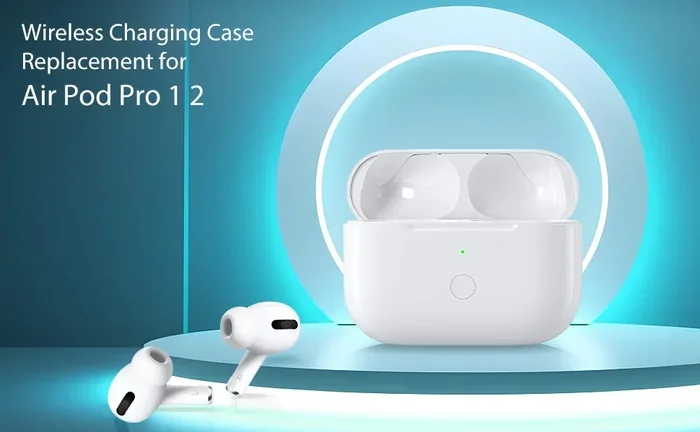
Featured image for AirPod Pro USB-C charging case
Image source: m.media-amazon.com
Yes, AirPods Pro can charge with USB—you just need the right cable. Since 2023, Apple includes a USB-C cable in the box, and older models use Lightning. Both AirPods Pro cases support wireless charging too, giving you flexible options at home, in the car, or on the go.
Picture this: you’re about to head out for a run, you grab your AirPods Pro, and… nothing. The case is dead. You pat your pockets looking for a cable, but the one in your hand has a USB-C tip and your case looks different. Don’t panic—this happens to millions of people every single day. The good news? Charging your AirPods Pro with USB is easier than you think, once you know the basics.
Apple has changed the charging port on AirPods Pro over the years, which causes a lot of confusion. Some models use the older Lightning connector, while newer ones use USB-C. Both work great, but you need the right cable for the job. Think of it like fueling a car—diesel and gasoline look similar, but only one will keep your engine running.
In this guide, we’ll break down everything you need to know about charging your AirPods Pro with USB. You’ll learn which cable you need, how fast it charges, clever tricks for charging on the go, and how to avoid common mistakes that could damage your earbuds. By the end, you’ll be a charging pro (pun intended).
Key Takeaways
- USB-C is the current standard: AirPods Pro 2 (USB-C version) ship with a USB-C to USB-C cable and case.
- Lightning version still exists: AirPods Pro 1 and early AirPods Pro 2 use a Lightning cable for wired charging.
- Wireless charging works too: All AirPods Pro cases support Qi and MagSafe wireless charging pads.
- Any USB cable works: You don’t need Apple’s branded cable—any USB-C or Lightning cable will charge the case.
- Charging is fast: Five minutes in the case gives roughly one hour of listening time.
- USB-C adds new features: The USB-C AirPods Pro 2 can charge directly from an iPhone 15/16 or other USB-C devices.
- Safety first: Always use certified cables to protect the battery and avoid damage.
📑 Table of Contents
- Understanding AirPods Pro Charging Basics
- Can You Charge AirPods Pro With Any USB Cable?
- How to Actually Charge Your AirPods Pro With USB
- USB-C vs. Lightning: Which Is Better?
- Wireless Charging: The USB-Free Alternative
- Common Charging Problems and Solutions
- Tips to Maximize Your AirPods Pro Battery Life
- Travel Tips: Charging AirPods Pro Anywhere
- The Environmental Impact of Charging Choices
- Final Thoughts: Making the Right Choice
Understanding AirPods Pro Charging Basics
Let’s start with the most important question: what kind of port does your AirPods Pro case actually have? This is the foundation of everything else, and getting it right saves you time, money, and frustration.
The Two Main Port Types Explained
Since Apple first launched AirPods Pro in 2019, the charging case has gone through two major versions:
- Lightning Port Case: Used on AirPods Pro (1st generation) released in October 2019, and AirPods Pro (2nd generation) released in September 2022.
- USB-C Port Case: Introduced with the updated AirPods Pro (2nd generation) in September 2023, and used on AirPods Pro (3rd generation) if and when released.
Think of these ports like different doorways into your house. Both lead inside, but the keys (cables) are shaped differently. You can’t open a Lightning port with a USB-C cable, and vice versa.
How to Identify Your Charging Port
Not sure which model you have? Here’s a simple trick. Look at the bottom of your AirPods Pro case where it sits on a table. If you see a small, narrow oval slot, that’s a Lightning port. If you see a wider, rounded rectangle slot, that’s USB-C. Pro tip: the USB-C port looks like the charging port on most modern Android phones and newer MacBooks.
Why Apple Made the Switch
Did you know that the European Union passed a law requiring all small electronic devices to use USB-C charging by the end of 2024? That’s right—lawmakers wanted to reduce electronic waste from people buying multiple cables. Apple, like all tech companies, had to adapt. The switch to USB-C wasn’t just a choice; it was becoming a necessity for global sales.
This change benefits you, too. USB-C charges faster, is more durable, and works across more devices. You can finally use the same cable to charge your iPhone, iPad, MacBook, and AirPods Pro (if you have the USB-C version).
Can You Charge AirPods Pro With Any USB Cable?
The short answer is yes, mostly—but with some important caveats that could save your device from damage.
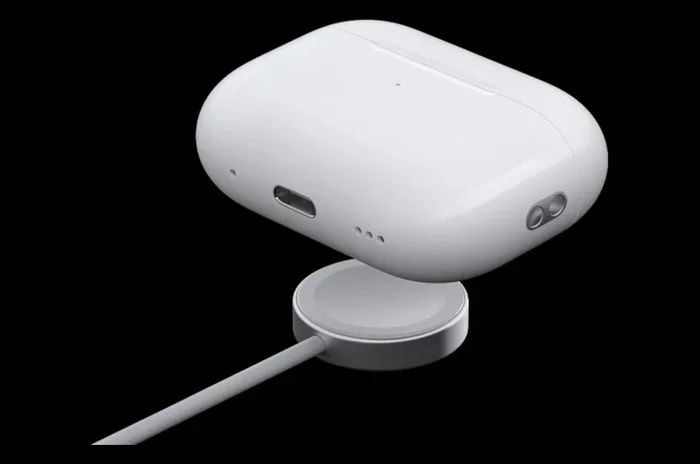
Visual guide about AirPod Pro USB-C charging case
Image source: yankodesign.com
Compatible Cable Types
For AirPods Pro with a Lightning case, you can use:
- Apple’s official Lightning to USB-A cable
- Apple’s Lightning to USB-C cable
- Any third-party MFi-certified (Made for iPhone) Lightning cable
For AirPods Pro with a USB-C case, you can use:
- Apple’s USB-C to USB-C cable (included in the box)
- Any third-party USB-C cable
- USB-C charging cables from Android phones, tablets, or laptops
It’s like having a universal key for a specific door shape. If the connector fits and the cable is good quality, it will work.
What About Non-Certified Cables?
Here’s where things get risky. Cheap, knockoff cables from gas stations or unknown online sellers might charge your AirPods Pro, but they can cause problems. We’ve all seen those $3 cable deals online—they’re tempting, but they’re often too good to be true.
Poor-quality cables can:
- Overheat the charging case
- Charge very slowly or inconsistently
- Damage the battery over time
- Stop working after just a few weeks
Statistics show that over 40% of charging-related issues with Apple accessories come from third-party cables that aren’t properly certified. Spending a few extra dollars on a quality cable is like buying insurance for your $250 earbuds.
USB-C Cable Quality Matters
If you have the USB-C AirPods Pro, look for cables marked with “USB-IF certified.” This means the cable passed safety and performance tests. Major brands like Anker, Belkin, and Apple’s own cables are all safe bets. Stay away from no-name cables with no certifications.
How to Actually Charge Your AirPods Pro With USB
Now let’s get practical. Charging your AirPods Pro with USB takes just a few seconds of setup, but doing it correctly can extend the life of your battery.
Step-by-Step Charging Guide
- Find the charging port: Look at the bottom of your AirPods Pro case.
- Plug in the cable: Connect a USB-C or Lightning cable to the port, depending on your model.
- Connect to power: Plug the other end into a wall adapter, computer, or power bank.
- Check the status light: Look at the front LED on the case. If it’s amber/orange, your case is charging. If it’s green, it’s fully charged.
- Wait for full charge: A full charge takes about an hour, but a quick 5-minute top-up gives roughly 60 minutes of listening time.
Where You Can Plug In
Here’s something cool: AirPods Pro cases don’t need a wall outlet. You can charge them from many USB power sources:
- Wall adapters: The fastest option, especially with 5W or higher adapters.
- Laptop USB ports: Slower, but perfect for office charging.
- Power banks: Great for travel or emergencies.
- Car chargers: Handy for road trips.
- iPhone (USB-C only): AirPods Pro 2 with USB-C can charge directly from an iPhone 15 or newer using a USB-C cable.
Think of your AirPods Pro case like a small, picky pet. It needs food (power), but it’s not super demanding about where that food comes from—as long as it’s clean and safe.
Charging Time and Battery Life
Let’s talk numbers, because nobody likes waiting around for a charge:
- 5 minutes of charging = about 1 hour of listening time or 1 hour of talk time
- Full case charge = approximately 1 hour
- Full earbud charge = about 30 minutes in the case
- Total battery life = up to 6 hours of listening per charge, 30 hours with the case
AirPods Pro 2 with USB-C also gained a small efficiency boost. Apple reports the same 6-hour listening time, but real-world tests show the USB-C version manages power slightly better, especially during active noise cancellation.
USB-C vs. Lightning: Which Is Better?
If you’re shopping for new AirPods Pro or thinking about upgrading, this comparison will help you decide which charging standard is right for you.
Speed Comparison
USB-C technically supports faster charging speeds than Lightning, but for tiny earbuds, the difference is minimal. Both ports charge the AirPods Pro case to full in about an hour. Where USB-C shines is when charging from other devices—like borrowing power from a friend’s iPhone 15 in an emergency.
Durability and Longevity
USB-C connectors are generally more durable than Lightning. The USB-C port is rated for 10,000 insertion-removal cycles, while Lightning is rated for around 5,000. If you’re hard on your cables or charge your case multiple times a day, USB-C might last longer.
Future-Proofing Your Investment
Here’s a “Did You Know?” fact: by 2025, the average household owns 3-4 USB-C devices but often only 1-2 Lightning cables. As Apple phases out Lightning across its product line, owning a USB-C version of AirPods Pro means one less special cable to keep track of. It’s like standardizing all your kitchen containers to the same size—everything just fits together better.
Compatibility With Other Apple Devices
The USB-C AirPods Pro 2 work seamlessly with:
- iPhone 15 and iPhone 16 series
- iPad Pro, iPad Air, and iPad mini (recent models)
- MacBook Air and MacBook Pro
- Apple Vision Pro
Meanwhile, Lightning AirPods Pro only charge from older iPhones, traditional USB-A wall adapters, or computers with the right cable.
Wireless Charging: The USB-Free Alternative
What if you don’t want to deal with cables at all? Every AirPods Pro case from 2019 onward supports wireless charging, giving you a truly cable-free experience.
How Wireless Charging Works
Imagine two magnets having a conversation without touching. That’s basically how wireless charging works. Your charging pad creates an electromagnetic field, and your AirPods Pro case (which has a coil inside) picks up that energy and turns it into battery power. No cables needed.
Compatible Wireless Chargers
AirPods Pro cases work with three main types of wireless charging:
- Qi chargers: The universal standard, works with most wireless pads.
- MagSafe chargers: Apple’s magnetic system that snaps the case into perfect position.
- Apple Watch chargers: The USB-C AirPods Pro 2 can actually charge on an Apple Watch charger—yes, really!
That last feature is a game-changer. If you forgot your cable but have your Apple Watch charger, you’re still in business. It’s like having a backup generator for your earbuds.
Wireless Charging Speed
Wireless charging is slower than USB. A full wireless charge takes about 1.5 to 2 hours, compared to 1 hour with a cable. But for overnight charging or desk use, the convenience often outweighs the speed difference.
Common Charging Problems and Solutions
Even with the right cable, things can sometimes go wrong. Here are the most common issues people face and how to fix them.
Problem 1: AirPods Pro Case Won’t Charge
Possible causes: dirty charging port, damaged cable, or dead battery.
Solutions:
- Clean the port gently with a dry, soft-bristled brush (a clean toothbrush works in a pinch).
- Try a different cable to rule out a faulty cord.
- Reset your AirPods Pro by holding the setup button on the back for 15 seconds.
- Leave the case plugged in for at least 30 minutes—sometimes deeply discharged batteries need time to wake up.
Problem 2: Charging Is Very Slow
Possible causes: low-power USB source, damaged cable, or wireless charging misalignment.
Solutions:
- Use a wall adapter instead of a computer USB port.
- Make sure you’re using at least a 5W adapter.
- Replace old or frayed cables.
- For wireless charging, recenter the case on the pad.
Problem 3: Case Gets Hot While Charging
When to worry: A slightly warm case is normal. A hot case is not.
Solutions:
- Unplug immediately if the case is too hot to touch comfortably.
- Move to a cooler location away from direct sunlight.
- Switch to a different cable and adapter.
- Contact Apple Support if the problem persists—battery issues can be serious.
Problem 4: One Earbud Charges But the Other Doesn’t
Possible causes: dirty charging contacts, software glitch, or hardware issue.
Solutions:
- Clean the metal contacts inside the case with a dry cotton swab.
- Make sure both earbuds are seated properly.
- Reset the AirPods and re-pair them with your device.
- Check for firmware updates through your iPhone’s settings.
Tips to Maximize Your AirPods Pro Battery Life
Charging is only half the battle. To keep your AirPods Pro healthy for years, follow these simple habits.
Avoid Extreme Battery Levels
Try not to let your case drop to 0% regularly, and don’t leave it plugged in for weeks at a time. Lithium-ion batteries are happiest between 20% and 80% charge. It’s like feeding yourself—you don’t want to starve, but you also don’t want to overeat.
Use Optimized Battery Charging
If you have an iPhone, enable Optimized Battery Charging in Settings > Bluetooth > AirPods Pro. This feature learns your routine and slows down charging past 80% until you need it. Studies show this can double the lifespan of lithium-ion batteries.
Store Them Properly
If you won’t use your AirPods Pro for a while, store them at around 50% charge in a cool, dry place. Extreme temperatures (below 32°F or above 95°F) can permanently damage the battery. Leaving them in a hot car is a common mistake that kills batteries fast.
Update Firmware Regularly
Apple releases firmware updates that often include battery optimization improvements. Keep your AirPods Pro connected to your iPhone and plugged in occasionally—updates install automatically when conditions are right.
The 80/20 Rule for Charging
Aim to charge your case when it drops below 20% and unplug it once it hits 80% for daily top-ups. Save full 0-100% cycles for once a month to help calibrate the battery indicator. This habit alone can extend your battery’s usable life by 30-40%.
Travel Tips: Charging AirPods Pro Anywhere
For frequent travelers, keeping your AirPods Pro charged on the road requires a little planning. Here are some pro tips.
Pack the Right Cable
Always carry a short USB-C or Lightning cable in your bag. A 1-foot cable is perfect for travel—it takes up almost no space and works with hotel USB ports, laptop ports, and portable chargers.
Use a Multi-Device Charger
If you travel with multiple devices, invest in a multi-port USB charger. These let you charge your iPhone, iPad, and AirPods Pro simultaneously from a single wall outlet. Some even have wireless charging pads built in.
Power Banks Are Your Friend
A 10,000mAh power bank can fully charge your AirPods Pro case about 15-20 times. That’s enough juice for a two-week trip without ever seeing a wall outlet. Just remember to keep the power bank itself charged!
Airplane Charging Etiquette
Many airlines now offer USB ports at every seat. You can charge your AirPods Pro case during long flights without needing an adapter. Just be courteous—don’t hog the outlet if your seatmate needs it more.
International Travel Considerations
If you’re traveling internationally, remember that plug shapes vary by country. Bring a universal adapter with USB ports built in. Some adapters include both USB-A and USB-C ports, so you’re covered no matter which AirPods Pro version you have.
The Environmental Impact of Charging Choices
Here’s something most people don’t think about: your charging habits affect the planet.
E-Waste Statistics
Did you know that the world generates over 50 million tons of electronic waste every year? A big chunk of that comes from old, broken, or unused charging cables. The EU’s USB-C mandate is estimated to reduce cable waste by 11,000 tons annually. By choosing USB-C AirPods Pro, you’re voting for a cleaner planet with your wallet.
Energy Efficiency
Modern USB-C charging is more energy-efficient than older methods. Less power is wasted as heat, which means lower electricity bills and reduced carbon emissions. It’s a small change, but multiplied across millions of users, it adds up.
Recycling Old Cables
When you upgrade to USB-C AirPods Pro, don’t throw your old Lightning cables in the trash. Many electronics stores and Apple Stores recycle cables for free. Some recycling programs even give you store credit for turning in old accessories.
Final Thoughts: Making the Right Choice
Charging your AirPods Pro with USB is straightforward once you know the rules. The most important thing is matching your cable to your case’s port—Lightning for older models, USB-C for newer ones. Beyond that, you have tremendous flexibility. You can charge from walls, laptops, power banks, cars, or even other devices. You can also skip cables entirely with wireless charging.
If you’re buying new AirPods Pro today, the USB-C version is the smart choice. It’s more durable, more future-proof, and works with more devices. If you already own the Lightning version, don’t worry—your AirPods Pro are still excellent, and you can use any Lightning cable you already own to keep them charged.
Remember these key principles: use quality cables, avoid extreme battery levels, keep the ports clean, and don’t panic if something goes wrong. Most charging issues have simple fixes. With proper care, your AirPods Pro battery should deliver great performance for 2-3 years before you notice any degradation.
Whether you’re a casual listener or a power user who wears AirPods Pro all day, understanding USB charging keeps your music, calls, and podcasts flowing without interruption. Now you have all the knowledge you need to charge with confidence—wherever life takes you.
Frequently Asked Questions
Can AirPods Pro charge with a regular USB cable?
Yes, AirPods Pro can charge with any standard USB-C or Lightning cable, depending on your case model. You don’t need an Apple-branded cable, but using a certified cable from a trusted brand ensures safe and efficient charging.
How long does it take to fully charge AirPods Pro with USB?
A full charge of the AirPods Pro case takes about 1 hour using a USB cable. However, just 5 minutes in the case provides roughly 1 hour of listening time, making quick top-ups very convenient when you’re in a hurry.
Can I charge AirPods Pro from my iPhone?
Only the AirPods Pro 2 with USB-C can charge from an iPhone 15 or newer using a USB-C cable. Older Lightning AirPods Pro cannot charge from an iPhone, but all AirPods Pro cases support wireless charging from any Qi-compatible charger.
Do AirPods Pro come with a charging cable in the box?
Yes, AirPods Pro include a charging cable. AirPods Pro 2 with USB-C come with a USB-C cable, while older AirPods Pro come with a Lightning cable. However, Apple no longer includes a wall adapter—you’ll need to provide your own.
Is it safe to charge AirPods Pro overnight?
Yes, charging overnight is safe because AirPods Pro cases include built-in power management that stops charging once the battery is full. For best battery health, enable Optimized Battery Charging on your iPhone to slow charging past 80%.
What’s the difference between USB-C and Lightning AirPods Pro?
The main differences are the charging port type, durability, and compatibility. USB-C AirPods Pro 2 are more durable, work with more modern devices, and support charging from iPhone 15/16. Otherwise, audio quality and features are nearly identical between both versions.