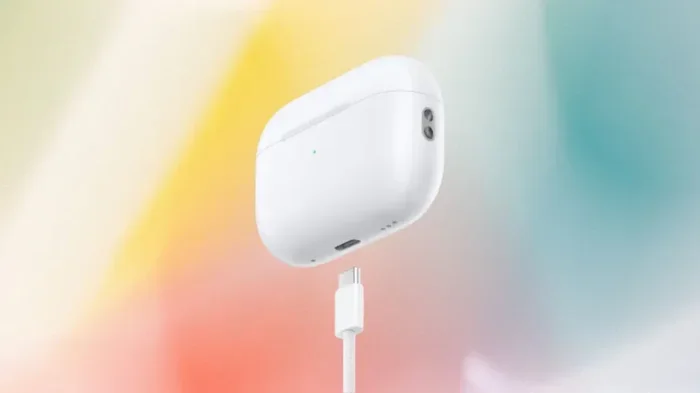
Featured image for AirPods Pro USB charging case
Image source: variety.com
Yes, AirPods Pro can absolutely be charged using USB cables, but the connection type depends on your model. AirPods Pro 2 (USB-C) features a built-in USB-C port, while the original AirPods Pro and AirPods Pro 2 (Lightning) require a Lightning to USB cable. You can also use USB power adapters, power banks, and even laptops to charge them on the go.
Let’s be honest: there’s nothing worse than reaching for your AirPods Pro only to hear that dreaded low-battery warning beep. Whether you’re about to hop on an important call or settle into your favorite playlist, a dead battery is a total buzzkill. The good news? Charging your AirPods Pro with USB is super easy once you know the basics.
Here’s something many people don’t realize: Apple made a major switch with the AirPods Pro lineup that affects how you charge them. The original AirPods Pro (and the Lightning version of AirPods Pro 2) use Apple’s proprietary Lightning connector, while the newer AirPods Pro 2 with USB-C switched to the universal standard. This means your charging method depends entirely on which model you own.
Think of USB charging like filling up a car with gas. You need the right nozzle for your tank, but once you know what fits, it’s smooth sailing. In this complete guide, we’ll walk you through everything you need to know about charging your AirPods Pro with USB, including which cable to use, how to maximize battery life, and tips to keep your earbuds powered up no matter where life takes you.
Key Takeaways
- Two Charging Standards Exist: AirPods Pro (1st gen) and Lightning-version AirPods Pro 2 use a Lightning cable, while the newer AirPods Pro 2 (USB-C) uses a USB-C cable.
- Any USB Port Works: You can charge AirPods Pro using any powered USB-A or USB-C port, including wall adapters, computers, and power banks.
- No Special Equipment Needed: The charging case includes the necessary port, so you don’t need additional accessories beyond a standard USB cable.
- Fast Charging Capabilities: A quick 5-minute charge in the case provides roughly 1 hour of listening time for AirPods Pro.
- Qi and MagSafe Compatibility: Both versions support wireless Qi charging and MagSafe, giving you multiple charging options beyond USB.
- Battery Health Matters: Using certified cables and proper charging practices can extend the lifespan of your AirPods Pro battery.
- USB-C is the Future: Apple has transitioned to USB-C across its product line, making charging simpler and more universal.
📑 Table of Contents
- Understanding AirPods Pro Charging Basics
- Yes, AirPods Pro Can Be Charged with USB: Here’s How
- USB-A vs. USB-C: Which Should You Use?
- Charging Time and Battery Life Expectations
- Alternative Charging Methods Beyond USB
- Best Practices and Tips for Charging AirPods Pro
- Troubleshooting Common Charging Issues
- The Future of AirPods Pro Charging
- Final Thoughts
Understanding AirPods Pro Charging Basics
Before we dive into the specifics, let’s cover some fundamentals. AirPods Pro don’t actually charge directly through a USB port on the earbuds themselves. Instead, the earbuds charge magnetically inside their carrying case, and the case is what connects to your USB power source. It’s like a relay race: the case gets charged first, then it charges your AirPods.
How AirPods Pro Charging Actually Works
Here’s the step-by-step breakdown of what happens when you plug in your AirPods Pro:
- The charging case receives power through its USB or Lightning port
- An internal battery stores that energy in the case
- The case’s internal charging coil transfers power to each AirPod when they’re seated inside
- Your AirPods are topped off and ready for your next listening session
This dual-layer system means you can charge the case alone, charge the AirPods alone (when they’re inside the case), or charge everything together. It’s pretty brilliant design, actually. Apple essentially gave you a portable power bank for your earbuds.
The Big Difference: Lightning vs. USB-C
In September 2023, Apple released a refreshed version of the AirPods Pro 2 that featured a USB-C charging case instead of Lightning. This was a huge deal because it aligned AirPods with the rest of Apple’s product lineup, including iPhone 15 and newer models.
To put it simply: if you bought AirPods Pro before late 2023, you likely have the Lightning version. If you bought them after that, or specifically purchased the USB-C version, you’re using the newer standard.
Yes, AirPods Pro Can Be Charged with USB: Here’s How
Now let’s get to the heart of the matter. Yes, AirPods Pro can absolutely be charged using USB cables, and you have several options depending on your model.
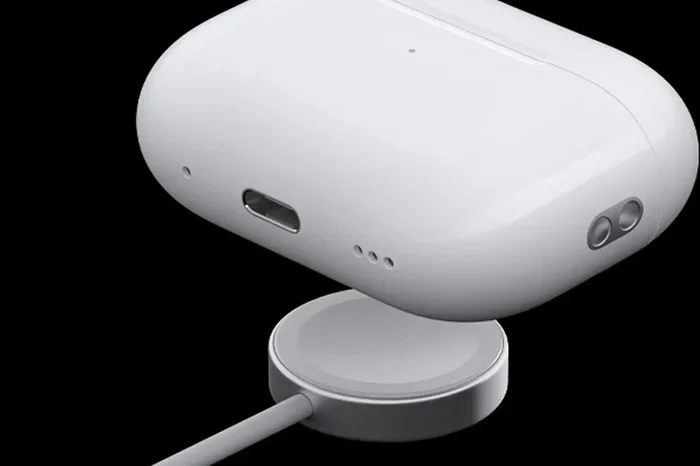
Visual guide about AirPods Pro USB charging case
Image source: macworld.com
Charging AirPods Pro 2 (USB-C Version)
The USB-C version of AirPods Pro 2 makes charging incredibly simple. This is the same connector used by most modern smartphones, tablets, and laptops, so you probably already have compatible cables lying around.
To charge your USB-C AirPods Pro:
- Locate the USB-C port on the bottom of the charging case
- Plug a USB-C cable into the port until it clicks into place
- Connect the other end to a power source (wall adapter, computer, or power bank)
- Look for the status light to confirm charging has begun
Did You Know? The USB-C version of AirPods Pro 2 can also be charged using an iPhone 15 or newer USB-C cable. This is great news for travelers who want to pack fewer cords.
Charging Original AirPods Pro and Lightning AirPods Pro 2
If you have the Lightning version, you’ll need a Lightning to USB cable. This was the standard cable shipped with iPhones for over a decade, so many people already have spares around the house, in the car, or at the office.
To charge your Lightning AirPods Pro:
- Find the Lightning port on the bottom of the charging case
- Plug in your Lightning cable until it’s firmly connected
- Connect the other end to any USB power source
- Check the status light to verify charging
The Lightning connector is reversible, so there’s no wrong way to plug it in. Apple designed it that way, which was actually revolutionary when it first launched back in 2012.
Compatible USB Power Sources
Here’s where things get really flexible. Any powered USB port can charge your AirPods Pro case. This opens up a world of possibilities:
- Wall adapters: The 5W adapter that ships with iPhones works perfectly, as do higher-wattage chargers
- Laptop computers: Both Mac and PC laptops provide enough power to charge your case
- Desktop computers: Any USB port on your desktop will do the job
- Power banks: Portable chargers are perfect for travel or emergencies
- Car chargers: Most modern vehicles have USB ports built right in
- USB hubs: If you’re using a hub at your desk, it’ll charge your case too
Think of it this way: as long as electricity is flowing through that USB cable, your AirPods Pro case is happy. The case has built-in power management that regulates how much energy it draws, so you don’t have to worry about using a “wrong” charger.
USB-A vs. USB-C: Which Should You Use?
You might be wondering about the difference between USB-A (the older, rectangular connector) and USB-C (the newer, oval-shaped connector). Both can charge your AirPods Pro, but there are some important distinctions.
Understanding USB-A
USB-A is the classic USB port you’ve probably seen on thousands of devices. It’s the rectangular connector that only fits one way, and it’s been around since the late 1990s. Many wall adapters, computers, and power banks still feature USB-A ports.
For charging AirPods Pro, USB-A works just fine. The case only needs a small amount of power (5V/1A or 5W), which is well within what any USB-A port can deliver. You won’t get the absolute fastest charging speeds, but the difference is minimal for such a small battery.
Understanding USB-C
USB-C is the modern standard, featuring a smaller, reversible connector that works either way up. It supports faster charging speeds and higher power delivery, which is why it’s become the universal connector for smartphones, laptops, and tablets.
For AirPods Pro charging, USB-C offers a slight advantage: it can deliver power more efficiently. However, since the AirPods Pro case has a relatively small battery, the difference in charging speed between USB-A and USB-C is negligible in real-world use.
Which Cable Do You Need?
The cable you need depends on your AirPods Pro model:
- AirPods Pro 2 (USB-C): You need a USB-C to USB-C cable, or a USB-C to USB-A cable if you want to connect to an older USB-A port
- Original AirPods Pro and Lightning AirPods Pro 2: You need a Lightning to USB-A cable (or Lightning to USB-C if you want to connect to a newer port)
Here’s a helpful tip: if you’re not sure which version you have, check the bottom of the charging case. A small oval port indicates USB-C, while a small rectangular port with rounded corners indicates Lightning.
Charging Time and Battery Life Expectations
Let’s talk numbers. How long does it actually take to charge your AirPods Pro, and how much listening time can you expect?
Charging Time for the Case
According to Apple’s official specifications, here’s how long charging takes:
- 15 minutes: Roughly 3 hours of listening time for AirPods Pro (1st and 2nd generation)
- 5 minutes: About 1 hour of listening time
- Full charge: Approximately 1 hour to fully charge the case from empty
These numbers are pretty impressive when you think about it. Just 5 minutes of charging buys you an hour of music, podcasts, or calls. That’s faster than brewing a cup of coffee.
Battery Life Expectations
With a fully charged case and AirPods, here’s what you can expect:
- AirPods Pro (1st generation): Up to 4.5 hours of listening time per charge, with over 24 hours total using the case
- AirPods Pro 2 (both versions): Up to 6 hours of listening time per charge, with over 30 hours total using the case
Did You Know? A 2023 survey by Statista found that 67% of wireless earbuds users consider battery life to be their top priority when purchasing. AirPods Pro’s quick charging capability is one reason why they remain so popular among commuters and travelers.
What About the Status Light?
Your AirPods Pro case features a small LED status light that tells you the charging state. Here’s what the colors mean:
- Green: Fully charged (or has more than one full charge remaining)
- Amber/Orange: Charging in progress, or less than one full charge remaining
- White (flashing): Ready to pair with a device
- No light: Either fully discharged or not connected to power
Alternative Charging Methods Beyond USB
While this article focuses on USB charging, it’s worth knowing that AirPods Pro offers other convenient options too. Having multiple ways to charge means you’ll never be stuck without power.
Wireless Charging (Qi and MagSafe)
All AirPods Pro models support Qi wireless charging, which means you can place the case on any Qi-compatible charging pad and watch it power up without any cables. It’s like magic, honestly.
The AirPods Pro 2 also supports MagSafe charging, which uses magnets to align the case perfectly with the charging pad. This eliminates the guesswork of where to place the case, ensuring optimal charging contact every time.
Charging with iPhone (Reverse Charging)
Here’s a really cool trick: if you have an iPhone 15 or newer, you can charge your USB-C AirPods Pro by connecting them directly to your iPhone with a USB-C cable. Your iPhone essentially acts as a power bank for your AirPods. This is incredibly useful in emergencies when you don’t have access to a wall outlet.
The original AirPods Pro and Lightning AirPods Pro 2 don’t support this feature due to their Lightning connector, but you can still use an adapter if needed.
Solar and Hand-Crank Chargers
For the adventurers out there, USB power banks paired with solar chargers or hand-crank generators can keep your AirPods Pro charged even in remote locations. While this isn’t the fastest method, it’s a great backup for camping trips or off-grid adventures.
Best Practices and Tips for Charging AirPods Pro
Now that you know how to charge your AirPods Pro with USB, let’s cover some best practices that will help you get the most out of your battery and extend the life of your device.
Use Certified Cables
This is the big one. Always use Apple-certified cables or cables from reputable third-party manufacturers that carry the “Made for iPhone” (MFi) badge. Cheap, uncertified cables can cause all sorts of problems:
- Slower charging speeds
- Inconsistent power delivery
- Potential damage to the charging port
- Battery degradation over time
- In rare cases, overheating or safety hazards
A good cable doesn’t have to be expensive. Brands like Anker, Belkin, and UGREEN offer certified options at reasonable prices.
Avoid Extreme Temperatures
Lithium-ion batteries (the kind in your AirPods Pro) are sensitive to temperature extremes. Apple recommends using and storing AirPods Pro in environments between 32°F and 95°F (0°C to 35°C). Charging in very hot or very cold conditions can permanently damage the battery.
Did You Know? Apple’s battery health guide states that extreme heat is one of the leading causes of premature battery aging. Avoid leaving your AirPods Pro case in a hot car or in direct sunlight while charging.
Don’t Let the Battery Fully Die
While modern lithium-ion batteries are more resilient than older battery types, repeatedly draining them to 0% can shorten their overall lifespan. Try to charge your AirPods Pro when they reach about 20% remaining.
This is similar to how your phone battery behaves. Keeping it topped up rather than fully depleting it will result in a longer overall lifespan.
Clean the Charging Port Regularly
Dust, lint, and debris can accumulate in the charging port over time, leading to poor connections and slower charging. Use a soft, dry brush (like a clean toothbrush) to gently clean the port every few weeks.
Be careful not to use anything metal or wet, as this could damage the delicate components inside the port.
Store Your AirPods Properly
When you’re not using your AirPods Pro, keep them in their case. The case itself acts as protection and ensures your earbuds stay charged. Leaving AirPods out of the case for extended periods will drain their batteries unnecessarily.
Update Your Firmware
Apple occasionally releases firmware updates for AirPods Pro that can improve battery efficiency and charging performance. These updates happen automatically when your AirPods are connected to your iPhone and charging, so keep them in the case and near your phone periodically.
Troubleshooting Common Charging Issues
Sometimes things don’t go smoothly. If your AirPods Pro aren’t charging properly via USB, here are some common issues and solutions.
AirPods Pro Not Charging at All
If your case shows no signs of life when plugged in, try these steps:
- Check the cable: Try a different USB cable to rule out a faulty cord
- Check the power source: Plug into a different USB port or wall outlet
- Clean the port: Debris in the charging port can prevent proper connection
- Reset the case: Press and hold the setup button on the back of the case for 15 seconds
- Try a different charger: Use a known-good wall adapter to rule out power issues
Slow Charging Speeds
If your AirPods Pro seem to charge slower than expected, consider these possibilities:
- You’re using a low-power USB port (like a USB hub without external power)
- The cable is damaged or low quality
- The charging port is dirty or obstructed
- The battery is very hot or very cold
Battery Drains Quickly
If your fully charged AirPods Pro are losing battery faster than expected, the issue might be:
- Active features like noise cancellation or spatial audio drain the battery faster
- Extreme temperatures are affecting battery performance
- The battery itself is aging and may need replacement
- A firmware bug that Apple might address in a future update
The Case Won’t Charge the AirPods
If your case charges fine but doesn’t seem to charge the AirPods inside, try these solutions:
- Make sure the AirPods are properly seated in the case
- Clean the metal charging contacts on the AirPods with a dry cloth
- Reset the AirPods by holding the setup button for 15 seconds
- Check for any visible damage to the AirPods or case
The Future of AirPods Pro Charging
Looking ahead, the future of AirPods Pro charging is likely to become even more convenient and universal.
USB-C is the New Standard
With Apple transitioning its entire product lineup to USB-C (thanks in part to European Union regulations), we can expect future AirPods models to continue using USB-C. This means one cable to charge your iPhone, iPad, Mac, and AirPods. Pretty convenient, right?
Improved Battery Technology
Battery technology continues to evolve, with newer lithium-ion formulations offering higher energy density and longer lifespans. Future AirPods Pro models will likely feature even longer battery life and faster charging capabilities.
Potential Wireless Improvements
While Apple hasn’t announced any major changes to wireless charging for AirPods, we can speculate that future versions might support faster wireless charging speeds or even reverse wireless charging from iPhones.
For now, USB charging remains the most reliable, fastest, and most universal way to keep your AirPods Pro powered up. Whether you’re using USB-C or Lightning, the process is straightforward and works with virtually any USB power source you have access to.
Final Thoughts
So, can AirPods Pro be charged with USB? The answer is a resounding yes, regardless of which model you own. Whether you have the original AirPods Pro with a Lightning case, the Lightning version of AirPods Pro 2, or the newer USB-C version, you have multiple options for keeping your earbuds powered up.
The key takeaways are simple: use the right cable for your model, plug into any reliable USB power source, and follow basic battery care best practices. With just 5 minutes of charging giving you an hour of listening time, you’ll never have to worry about your AirPods dying mid-workout or during an important call again.
Remember to invest in quality cables, keep your charging port clean, and avoid extreme temperatures. These small habits will help extend the life of your AirPods Pro battery and ensure you get years of reliable use from your investment.
Whether you’re a daily commuter, a remote worker, a fitness enthusiast, or just someone who loves great audio, knowing how to properly charge your AirPods Pro with USB is essential. Now you have all the information you need to keep your earbuds powered and ready for whatever the day brings.
Frequently Asked Questions
Can AirPods Pro be charged with a regular USB cable?
Yes, AirPods Pro can be charged with regular USB cables. The original AirPods Pro and Lightning-version AirPods Pro 2 use Lightning to USB cables, while the AirPods Pro 2 (USB-C) uses a USB-C cable. Both can connect to any standard USB-A or USB-C power source.
Can I charge AirPods Pro with my phone charger?
Absolutely. Any phone charger with a USB-A or USB-C port will charge your AirPods Pro case. If you have an iPhone 15 or newer with a USB-C cable, you can even charge your USB-C AirPods Pro directly from your iPhone in a pinch.
How long does it take to fully charge AirPods Pro via USB?
It takes approximately one hour to fully charge the AirPods Pro case from empty. However, a quick 5-minute charge provides about 1 hour of listening time, making fast top-ups incredibly convenient for busy lifestyles.
Can I charge AirPods Pro with a power bank?
Yes, power banks are an excellent way to charge AirPods Pro on the go. Any portable charger with a USB-A or USB-C output will work, depending on which AirPods Pro model you own. This is perfect for travel, camping, or long days away from outlets.
Is it safe to charge AirPods Pro overnight?
Yes, it’s completely safe to charge AirPods Pro overnight. The case has built-in power management that prevents overcharging. Once the battery reaches 100%, the case stops drawing power, so you can leave them plugged in without worrying about battery damage.
Do AirPods Pro charge faster with USB-C or USB-A?
The difference is negligible in real-world use. AirPods Pro cases have small batteries that don’t require high-wattage charging. Both USB-C and USB-A will fully charge your case in roughly the same time, though USB-C is slightly more efficient in terms of power delivery.