Yes, you can use noise cancellation with one AirPod on supported models, including AirPods Pro, AirPods Pro 2, AirPods 4, and AirPods 4 with Active Noise Cancellation. The feature works through the single earbud’s microphones and processing power, though performance may feel slightly different than using both AirPods together. Standard AirPods (1st, 2nd, and 3rd generation) do not support noise cancellation in any configuration.
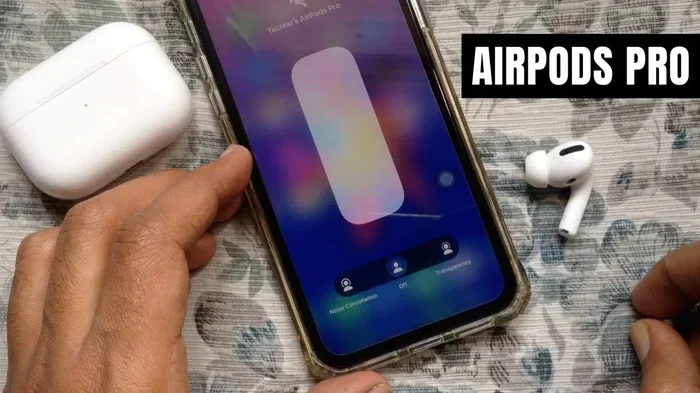
Featured image for single airpod noise cancellation
Image source: i.ytimg.com
Imagine you’re on a long flight, the engine is roaring, and you reach for your AirPods. But one bud is missing, or maybe you just prefer wearing a single earbud to stay aware of your surroundings. Suddenly, a question hits you: can I actually use noise cancellation with one AirPod?
It’s a question millions of AirPod users ask every year, especially as more people embrace single-bud listening for safety, comfort, and battery conservation. The good news? On most modern AirPods, the answer is yes. But the details matter, and not every AirPod model behaves the same way.
In this guide, we’ll break down everything you need to know about using noise cancellation with one AirPod. You’ll learn which models support it, how to enable it, what to expect from performance, and some handy tips to get the most out of your listening experience. Think of this as your friendly cheat sheet to single-ear noise cancellation.
Key Takeaways
- Single AirPod Noise Cancellation Is Possible: AirPods Pro, AirPods Pro 2, AirPods 4, and AirPods 4 with ANC support noise cancellation when wearing just one earbud.
- Microphones Handle the Work: Both inward-facing and outward-facing microphones in the AirPod analyze sound to block noise, even when only one bud is in use.
- Transparency Mode Also Works Solo: You can switch to Transparency Mode using a single AirPod to stay aware of your surroundings.
- Standard AirPods Don’t Support It: AirPods 1, 2, and 3 generations lack the hardware needed for active noise cancellation entirely.
- Battery Life Takes a Small Hit: Running ANC on one AirPod uses more battery than using it without ANC, but less than using ANC on both buds.
- Performance May Feel Different: Some users report noise cancellation feels less powerful with one ear open, since your other ear hears ambient sounds naturally.
- Adaptive Audio Requires iOS Update: Features like Adaptive Audio and Conversation Awareness need iOS 17 or later to work properly with a single AirPod.
📑 Table of Contents
- Understanding How Active Noise Cancellation Works
- Which AirPods Support Noise Cancellation with a Single Bud?
- How to Enable Noise Cancellation with One AirPod
- Performance Differences: One AirPod vs. Two
- Other Noise Control Features and How They Work Solo
- Troubleshooting Common Issues with Single AirPod Noise Cancellation
- Best Practices and Tips for Single AirPod Noise Cancellation
- Final Thoughts: Is Single AirPod Noise Cancellation Worth It?
Understanding How Active Noise Cancellation Works
Before we dive into single-AirPod use, let’s quickly understand what noise cancellation actually is. Think of it like this: when you throw a ball at a wall, it bounces back. Sound waves behave similarly, and noise-cancelling technology uses that principle to fight noise with noise.
What Is Active Noise Cancellation (ANC)?
Active Noise Cancellation, often shortened to ANC, is a technology that listens to the sounds around you and creates an “anti-noise” sound wave to cancel them out. Imagine you’re at a loud café, and someone whispers an equal-but-opposite version of the chatter directly into your ear. The two sounds collide and essentially erase each other. That’s ANC in a nutshell.
Apple first introduced ANC to AirPods with the original AirPods Pro in 2019. Since then, the technology has gotten smarter, faster, and more efficient.
The Role of Microphones in Noise Cancellation
Every noise-cancelling AirPod contains two types of microphones that work together:
- Outward-facing microphone: Detects external sounds like traffic, airplane engines, or office chatter.
- Inward-facing microphone: Listens to sounds inside your ear canal to fine-tune the cancellation in real time.
These microphones feed data to a processor inside the AirPod, which generates the anti-noise signal. The whole process happens up to 48,000 times per second, according to Apple’s technical documentation.
Passive Noise Isolation vs. Active Noise Cancellation
Here’s a distinction many people miss: passive noise isolation is simply the physical blocking of sound by the earbud’s design. Like wearing earplugs. Active noise cancellation is the electronic process of erasing sound waves. Most premium AirPods use both, but ANC is the feature that gets all the attention.
Which AirPods Support Noise Cancellation with a Single Bud?
Not every AirPod model supports noise cancellation, and even fewer support it with one earbud. Let’s walk through the lineup so you know exactly where your device stands.
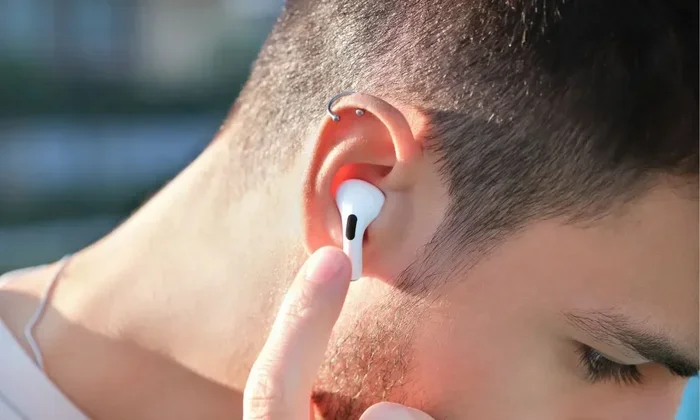
Visual guide about single airpod noise cancellation
Image source: static.beebom.com
AirPods Pro (1st Generation)
The original AirPods Pro, released in October 2019, was Apple’s first earbud with active noise cancellation. You can absolutely use ANC with just one AirPod Pro. To enable it, put in one AirPod, then press and hold the force sensor on the stem to cycle between Noise Cancellation and Transparency Mode.
AirPods Pro (2nd Generation)
The AirPods Pro 2, released in September 2022, took ANC to a new level with the H2 chip. This chip is up to twice as effective at noise cancellation as the previous generation, according to Apple. Single-bud ANC works beautifully on these, and they also support Adaptive Audio, which blends ANC and Transparency based on your environment.
AirPods 4 and AirPods 4 with Active Noise Cancellation
Apple shook up the lineup in September 2024 with the AirPods 4. The standard AirPods 4 do not have ANC. However, the AirPods 4 with Active Noise Cancellation do, and they support the feature with a single bud. This was a big deal because it brought ANC to a more affordable, open-ear design.
Standard AirPods (1st, 2nd, and 3rd Generation)
Here’s the disappointing news for some readers: standard AirPods without the “Pro” label or the newer ANC feature don’t support noise cancellation at all. Not with two buds, not with one. They’re designed for casual listening, and they rely entirely on passive sound isolation.
Did You Know? The H2 chip inside the AirPods Pro 2 processes audio 48,000 times per second, allowing it to adapt to changing noise environments almost instantly. That’s faster than a hummingbird’s wings beat.
Quick Reference: Model Compatibility
- AirPods Pro 1: ANC with single AirPod ✓
- AirPods Pro 2: ANC with single AirPod ✓
- AirPods 4 (standard): No ANC ✗
- AirPods 4 with ANC: ANC with single AirPod ✓
- AirPods 3: No ANC ✗
- AirPods 2 and 1: No ANC ✗
How to Enable Noise Cancellation with One AirPod
Turning on noise cancellation with a single AirPod is surprisingly simple. You don’t need any special apps or hidden settings. Just your iPhone, iPad, or Mac, and a compatible AirPod.
Method 1: Using the Force Sensor
This is the most common method. Pop in one AirPod, then press and hold the force sensor on the stem for about two seconds. You’ll hear a soft chime indicating you’ve switched modes. Keep pressing to cycle through Noise Cancellation, Transparency, and Off (or Adaptive Audio on supported devices).
Method 2: Through iPhone Settings
If you prefer menus over buttons, here’s the path:
- Open the Settings app on your iPhone.
- Tap on your connected AirPods at the top of the screen.
- Scroll down to Noise Control.
- Choose between Noise Cancellation, Transparency, or Adaptive Audio.
You’ll need to be wearing at least one AirPod for this menu to appear.
Method 3: Using the Control Center
On your iPhone or iPad, swipe down from the top-right corner (or up from the bottom on older devices) to open Control Center. Press and hold the volume slider, then tap the Noise Control icon at the bottom-left. Choose your preferred mode. This method works even when only one AirPod is in use.
Method 4: Using Siri
You can simply say, “Hey Siri, turn on noise cancellation,” and Siri will activate the feature on your single AirPod. This works as long as “Hey Siri” is enabled in your settings and your AirPod is connected.
Pro Tip: If you’re wearing one AirPod and the other is in the case, your iPhone may default to using the bud in your ear as the primary audio source. Make sure your settings haven’t accidentally routed audio to the case instead.
Performance Differences: One AirPod vs. Two
Now for the honest truth. Yes, noise cancellation functions with one AirPod, but does it work as well as using both? The short answer is: it’s different, not necessarily worse.
Why the Experience Feels Different
When you wear two AirPods with ANC, both ears receive anti-noise signals. Your brain combines these signals to create a cocoon of silence. With one AirPod, your other ear is still wide open to the world. So even if the AirPod in your left ear is cancelling noise perfectly, your right ear hears everything.
Think of it like this: if you’re standing under an umbrella in the rain, you stay dry on top but your feet still get wet. One AirPod with ANC is similar. You’re protected on one side, but the other ear remains exposed.
Battery Consumption
Running ANC on a single AirPod uses less battery than running it on both. According to Apple, AirPods Pro 2 with ANC on lasts up to 6 hours on a single charge. With one AirPod and ANC on, you can potentially stretch listening time even longer, though Apple doesn’t publish exact numbers for this scenario.
Situations Where Single-Bud ANC Shines
- Walking in the city: Keep one ear open for traffic and announcements while the other enjoys quieter audio.
- Working at home: Cancel noise in one ear while staying available for family conversations.
- Office settings: Focus on a call or task without completely shutting out coworkers.
- Long calls or meetings: Save battery by rotating single AirPods instead of using both.
Other Noise Control Features and How They Work Solo
Modern AirPods come packed with noise-related features that go beyond simple on/off ANC. Here’s how each behaves when you’re using a single bud.
Transparency Mode
Transparency Mode lets outside sounds in, making it sound like you’re not wearing earbuds at all. It works perfectly with a single AirPod. In fact, some people prefer Transparency Mode on one bud while leaving the other ear completely uncovered. This creates a natural blend of digital and real-world audio.
Adaptive Audio
Introduced with iOS 17 and AirPods Pro 2, Adaptive Audio automatically blends ANC and Transparency based on your environment. Walking past a construction site? ANC kicks in. Someone starts talking to you? Transparency takes over. With a single AirPod, Adaptive Audio works but adapts to sounds entering through the open ear more readily.
Conversation Awareness
This feature detects when you start speaking and automatically lowers your audio while boosting the voices in front of you. It works with one AirPod, though some users report it triggers more often when only one bud is in use, since the open ear picks up your own voice more clearly.
Personalized Volume
Personalized Volume uses machine learning to adjust your audio levels based on your environment over time. It works with one AirPod, but it learns faster when both buds are in use, simply because it gathers more data.
Did You Know? A 2023 survey by Statista found that 67% of wireless earbud users wear just one bud at least occasionally, often for safety or social reasons. Yet many don’t realize their noise-cancelling features work in single-bud mode.
Troubleshooting Common Issues with Single AirPod Noise Cancellation
Sometimes things don’t work as expected. Here are common problems and how to fix them.
Noise Cancellation Won’t Turn On
If you press and hold the force sensor and nothing happens, try these steps:
- Make sure your AirPods are updated to the latest firmware.
- Check that the AirPod is fully seated in your ear. The sensors need proper contact to activate ANC.
- Confirm your iPhone is running iOS 15.1 or later (for AirPods Pro 1) or iOS 16 or later (for AirPods Pro 2).
- Reset your AirPods by holding the setup button on the case for 15 seconds.
Audio Sounds Unbalanced
With one AirPod in, you might notice audio feels lopsided. This is normal since you’re only hearing one channel of stereo audio. To compensate, you can enable Mono Audio in Settings > Accessibility > Audio/Visual > Mono Audio. This merges left and right channels into a single feed.
Single AirPod Drains Faster Than Expected
ANC is power-hungry. If you notice one AirPod dying quickly, try turning off ANC when you don’t need it. You can also rotate AirPods, using one while the other charges in the case.
Connectivity Drops When Using One Bud
Occasionally, your iPhone may struggle to maintain a stable connection when only one AirPod is active. To fix this:
- Keep your iPhone within 30 feet of your AirPod.
- Avoid interference from other Bluetooth devices.
- Toggle Bluetooth off and back on.
- Update your device’s firmware.
Best Practices and Tips for Single AirPod Noise Cancellation
Want to get the most out of your single-bud experience? These tips will help.
Choose the Right Ear Tip Size
If you’re using AirPods Pro, getting a proper seal with the right ear tip is critical. A loose seal lets in extra noise, forcing the ANC to work harder and reducing its effectiveness. Try all the included tip sizes (XS, S, M, L) and pick the one that feels snug but comfortable.
Use the Ear Tip Fit Test
Apple includes an Ear Tip Fit Test in iOS that checks whether your tips are creating a proper seal. To run it, go to Settings > Bluetooth, tap the “i” next to your AirPods Pro, and select Ear Tip Fit Test. This works even with a single AirPod in place.
Combine ANC with Lower Volume
When using one AirPod with ANC, you may feel tempted to crank up the volume to compensate for the open ear. Resist this urge. Loud volumes can damage your hearing over time. Instead, rely on ANC to do the heavy lifting and keep your volume at safe levels (below 60%).
Rotate AirPods During Long Sessions
If you’re on a marathon work call or flight, rotate AirPods every few hours. Use the left bud until it’s low, swap to the right, and let the left one charge in the case. This keeps you listening indefinitely, especially when paired with ANC.
Keep Your AirPods Clean
Dirt and earwax can clog the microphones, reducing ANC performance. Wipe your AirPods with a soft, dry, lint-free cloth weekly. For stubborn grime, use a dry cotton swab to gently clean the microphone mesh.
Update Regularly
Apple frequently releases firmware updates that improve ANC performance. Make sure your AirPods are updated by placing them in their case, connecting them to power, and keeping them near your iPhone. Updates happen automatically when conditions are right.
Did You Know? Apple’s AirPods Pro 2 uses computational audio, meaning the H2 chip runs advanced algorithms to process sound. This is why newer AirPods handle noise cancellation better, even with a single bud.
Final Thoughts: Is Single AirPod Noise Cancellation Worth It?
Absolutely. Using noise cancellation with one AirPod is a practical, often overlooked feature that gives you the best of both worlds: focused audio on one side and environmental awareness on the other. Whether you’re commuting, working, or just enjoying some peace and quiet, single-bud ANC is a flexible option that fits modern lifestyles.
Just remember that performance varies by model. AirPods Pro, AirPods Pro 2, and AirPods 4 with ANC all support this feature beautifully. Standard AirPods don’t have ANC at all, so if noise cancellation matters to you, invest in a compatible model.
Experiment with different modes, ear tip sizes, and listening habits. With a little practice, you’ll find the perfect balance between silence and awareness. And the next time someone asks, “can I use noise cancellation with one AirPod?” you’ll have a confident, knowledgeable answer ready to go.
Frequently Asked Questions
Can I use noise cancellation with just one AirPod Pro?
Yes, you can use noise cancellation with one AirPod Pro. Simply put in one bud and press and hold the force sensor on the stem to cycle through Noise Cancellation, Transparency, and Off modes. The feature works through the single AirPod’s microphones and H1 or H2 chip.
Does single AirPod noise cancellation work as well as using both?
Single AirPod noise cancellation works technically the same way, but the experience feels different because your other ear remains uncovered. You’ll still hear ambient sounds naturally in the open ear, which can make ANC feel less powerful overall compared to using both AirPods.
Which AirPods do not support noise cancellation at all?
AirPods 1st generation, 2nd generation, 3rd generation, and the standard AirPods 4 do not have active noise cancellation. Only AirPods Pro, AirPods Pro 2, and AirPods 4 with Active Noise Cancellation support this feature, including in single-bud mode.
How do I turn on Transparency Mode with one AirPod?
Press and hold the force sensor on the stem of your AirPod until you hear a chime indicating Transparency Mode. Alternatively, open Control Center on your iPhone, press and hold the volume slider, and tap the Transparency icon. Both methods work with a single AirPod.
Does using noise cancellation with one AirPod drain the battery faster?
Yes, ANC uses more battery than listening without it. However, using ANC on one AirPod consumes less power than running it on both buds simultaneously. You can extend listening time by rotating AirPods or turning ANC off when not necessary.
Can I use Adaptive Audio with a single AirPod?
Yes, Adaptive Audio works with one AirPod on AirPods Pro 2 and AirPods 4 with ANC, provided your device has iOS 17 or later. The feature automatically adjusts between Noise Cancellation and Transparency based on your surroundings, even with a single bud in use.