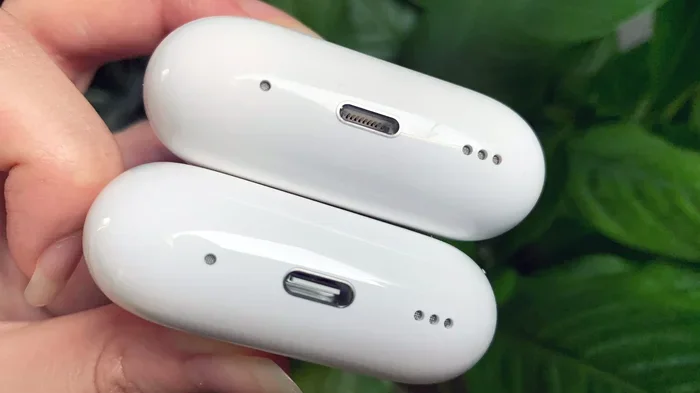
Featured image for USB-C charging AirPods Pro
Image source: cdn.mos.cms.futurecdn.net
Yes, a USB-C charger works on AirPods Pro, but only on the newer models (2nd generation with USB-C case and AirPods Pro 2nd generation). The original AirPods Pro with a Lightning case cannot use USB-C charging directly. For compatible models, any standard USB-C cable and charger will work safely. Always use certified cables to protect your battery health.
Imagine this: you’re about to head out for a jog, you grab your AirPods Pro, and you realize the battery is dead. You search frantically for a charger, and the only thing nearby is your MacBook’s USB-C cable. Will it work? Will it damage your expensive earbuds?
This is one of the most common questions AirPods Pro owners ask, especially as the world moves toward a universal charging standard. The good news is simple: yes, a USB-C charger can work on AirPods Pro, but there’s a catch. Not every AirPods Pro model has a USB-C port. If you have the right model, you’re in luck. If not, you’ll need an adapter or a different solution.
In this guide, we’ll break down everything you need to know. You’ll learn which AirPods Pro models support USB-C, how to charge them correctly, which chargers work best, and how to keep your battery healthy for years to come. By the end, you’ll feel like a USB-C charging expert.
Key Takeaways
- USB-C Compatibility Depends on the Model: Only AirPods Pro 2nd generation (2023) with USB-C case supports USB-C charging. The original AirPods Pro (2019) uses Lightning.
- Any USB-C Charger Works: You can use phone chargers, laptop chargers, or power banks as long as they have a USB-C port and reasonable wattage.
- Fast Charging Capability: USB-C AirPods Pro can get about 1 hour of listening time from just 5 minutes of charging.
- Wattage Doesn’t Matter Much: AirPods Pro only draw 5W of power, so even a 100W charger is safe because the case regulates the input.
- Wireless Charging Still Available: The USB-C AirPods Pro case also supports Qi, Qi2, and MagSafe wireless charging.
- Use Certified Cables: Cheap, uncertified cables can damage your AirPods or charge them inconsistently.
- Battery Health Tips: Avoid draining to 0%, don’t overcharge overnight regularly, and keep the case away from extreme heat.
📑 Table of Contents
- Understanding AirPods Pro Models and Their Charging Ports
- How USB-C Charging Works on AirPods Pro
- Which USB-C Chargers Work Best?
- Safety Tips for Charging AirPods Pro with USB-C
- Common Charging Problems and Solutions
- Battery Health: How to Make Your AirPods Pro Last Longer
- Comparing USB-C to Other Charging Methods
- Final Verdict: Should You Use USB-C for Your AirPods Pro?
Understanding AirPods Pro Models and Their Charging Ports
Before we dive into charging tips, let’s clear up one important thing. Not all AirPods Pro are the same. Apple has released two main versions, and they use completely different charging technologies. Think of it like how some electric cars use Tesla chargers while others use CCS connectors. Same idea, different plugs.
AirPods Pro 1st Generation (2019): Lightning Only
The original AirPods Pro launched in October 2019 came with a wireless charging case that used Apple’s Lightning connector. This is the small, narrow port you’ve seen on iPhones for years. If you own this version, you cannot plug a USB-C cable directly into your AirPods case. It simply won’t fit.
However, there’s a workaround. You can charge these AirPods using a Lightning to USB-C cable. This cable has a Lightning connector on one end (which plugs into your AirPods) and a USB-C connector on the other (which plugs into your charger). Apple actually includes this cable in the box with some iPhones, so you might already have one.
AirPods Pro 2nd Generation (2022): Lightning Case
In September 2022, Apple released the second-generation AirPods Pro. The initial version came with a Lightning charging case, just like the first generation. The charging situation was identical: you needed a Lightning cable or a wireless charger.
AirPods Pro 2nd Generation (2023): USB-C Case
Here’s the big change. In September 2023, Apple updated the AirPods Pro 2nd generation to include a USB-C charging case instead of Lightning. This was part of Apple’s broader move to standardize USB-C across all their devices, largely influenced by European Union regulations requiring a common charging standard.
The 2023 version is the model you need if you want native USB-C charging. It looks almost identical to the 2022 version, but the port on the bottom of the case is now USB-C instead of Lightning.
Did You Know? The European Union’s Common Charger Directive, passed in 2022, requires all smartphones, tablets, and headphones sold in the EU to use USB-C by the end of 2024. This is why Apple made the switch.
How to Tell Which Model You Have
Not sure which AirPods Pro you own? Here’s a quick trick:
- Look at the charging port: If it’s a small, oval-shaped connector, you have Lightning. If it’s a wider, rounded rectangular port, you have USB-C.
- Check the model number: Go to Settings > Bluetooth on your iPhone, tap the “i” next to your AirPods, and look at the model number. A2083, A2084, or A2190 indicates 1st gen. A2968, A2700, or A2968 indicates 2nd gen.
- Check the box: If you still have it, the original packaging will list the model details.
How USB-C Charging Works on AirPods Pro
Now that you know which models support USB-C, let’s talk about how the charging actually works. The good news is that it’s incredibly simple, almost like plugging a lamp into a wall socket.
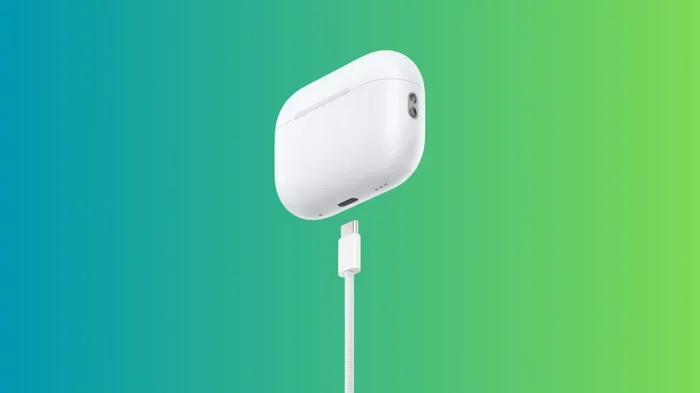
Visual guide about USB-C charging AirPods Pro
Image source: techwiser.com
The Basic Charging Process
Charging your AirPods Pro with USB-C is exactly the same as charging any other device with USB-C. You take a USB-C cable, plug one end into your AirPods Pro case, and plug the other end into any USB-C power source. That’s it. No special buttons to press, no settings to adjust.
The case has a small LED indicator on the front that tells you the charging status:
- Amber (orange) light: Your AirPods are currently charging or the battery is below 80%.
- Green light: Your AirPods are fully charged (or have more than 80% battery if you’re not charging them at that moment).
- No light: Either the case has no battery, the AirPods aren’t seated properly, or there’s a connection issue.
Charging Speed and Time
One of the best things about USB-C AirPods Pro is how fast they charge. According to Apple, you can get about 1 hour of listening time from just 5 minutes of charging in the case. This is incredibly useful when you’re in a rush.
For a full charge from empty, here’s what to expect:
- 5 minutes in the case: About 1 hour of listening time
- 15 minutes in the case: About 3 hours of listening time
- 30 minutes in the case: About 4-5 hours of listening time (close to full)
- 1 hour in the case: Fully charged
The case itself takes about 1-2 hours to fully charge via USB-C, depending on the charger you use.
Did You Know? AirPods Pro use a tiny charging circuit inside the case that regulates how much power flows in. This means even if you plug them into a super powerful 100W charger, they’ll only take what they need (about 5W). Think of it like a water faucet: even if the water pressure is huge, you can only open the tap so much.
Which USB-C Chargers Work Best?
Here’s the beautiful thing about USB-C: it’s a universal standard. Almost any USB-C charger will work with your AirPods Pro. But some are better than others in terms of speed, safety, and convenience.
Phone Chargers
Your iPhone charger (15W to 20W) is a perfect match for AirPods Pro. It provides more than enough power and is something most people already own. If you have an iPhone 15 or newer, the USB-C cable that came with your phone will also charge your AirPods Pro directly. No extra accessories needed.
iPad Chargers
iPad chargers come in different wattages, usually 20W or 30W. Both work great with AirPods Pro. The higher wattage doesn’t charge your AirPods faster (since the case only draws 5W), but it gives you flexibility to charge other devices with the same charger.
MacBook Chargers
Yes, you can charge your AirPods Pro with a MacBook charger, even the 96W or 140W versions. As mentioned earlier, the AirPods case only pulls the power it needs, so there’s no risk of damage. The only downside is that it’s overkill, like using a fire hose to water a small plant. It works, but it’s more than necessary.
Power Banks
Portable power banks with USB-C output are excellent for charging AirPods Pro on the go. Look for one with at least 10W output (5V/2A) for reliable charging. Most modern power banks easily meet this requirement.
Wireless Chargers (Bonus Option)
Even with the USB-C case, you still have wireless charging options. The AirPods Pro 2nd generation (2023) supports:
- Qi wireless charging: The universal standard found in most wireless chargers
- Qi2 wireless charging: The newer, faster version with magnetic alignment
- MagSafe charging: Apple’s magnetic charging system, which works through the case’s built-in magnets
This means you have three ways to charge: USB-C cable, Qi/Qi2 wireless pad, or MagSafe. Maximum flexibility.
What About Non-Apple USB-C Chargers?
Third-party USB-C chargers from reputable brands like Anker, Belkin, Samsung, or Google work perfectly fine with AirPods Pro. The USB-C standard ensures compatibility across brands. The only thing to avoid is no-name, ultra-cheap chargers from unknown manufacturers, as they might not have proper safety certifications.
Pro Tip: Look for chargers with “USB-IF Certified” or “Made for iPhone” (MFi) labels. These certifications ensure the charger meets safety and quality standards.
Safety Tips for Charging AirPods Pro with USB-C
While USB-C charging is generally very safe, there are a few things to keep in mind to protect your AirPods and extend their lifespan. Think of these as basic safety rules, like wearing a seatbelt in a car.
Use Quality Cables
The cable matters just as much as the charger. A damaged or low-quality cable can cause:
- Slow or inconsistent charging
- Overheating
- Damage to the charging port
- In rare cases, battery damage
Look for cables that are USB-IF certified or come from trusted brands. Apple’s own USB-C cables are reliable, but third-party options from Anker, Belkin, or Amazon Basics are also great. Replace any cable that shows signs of fraying, exposed wires, or bent connectors.
Avoid Extreme Temperatures
Heat is the enemy of lithium-ion batteries, and AirPods Pro are no exception. Avoid charging your AirPods in direct sunlight, near heaters, or in extremely cold conditions. The ideal charging temperature is between 32°F and 95°F (0°C to 35°C), according to Apple.
If your AirPods case feels hot while charging, unplug them and let them cool down. Slight warmth is normal, but excessive heat is a warning sign.
Don’t Charge in Humid Environments
While AirPods Pro are water-resistant (IP54 rating for the 2023 USB-C model), the charging case is not as resistant to water. Avoid charging in humid environments like bathrooms while showering, as moisture can damage the charging port and internal electronics.
Keep the Charging Port Clean
Dust, lint, and debris can accumulate in the USB-C port over time. This is especially true if you carry your AirPods in pockets or bags. Use a soft, dry brush (like a clean toothbrush) or compressed air to gently clean the port every few weeks. A dirty port can cause poor connections and slow charging.
Unplug When Fully Charged (Sometimes)
Modern lithium-ion batteries are smart enough to stop charging once they reach 100%, so leaving your AirPods plugged in overnight occasionally is fine. However, if you make it a daily habit, the constant trickle charging can gradually reduce battery capacity over years. If you want to maximize battery longevity, unplug once the LED turns green.
Common Charging Problems and Solutions
Even with the right equipment, you might run into charging issues from time to time. Here are the most common problems and how to fix them.
AirPods Pro Not Charging
If your AirPods Pro aren’t charging when plugged in, try these steps:
- Check the cable connection: Make sure the USB-C cable is fully inserted into both the AirPods case and the charger.
- Try a different cable: Cables can fail without visible damage. Swap in a known working cable.
- Try a different charger: The issue might be with your power source, not your AirPods.
- Clean the charging port: Debris in the port can prevent proper contact.
- Reset your AirPods: Place them in the case, hold the setup button on the back for 15 seconds until the light flashes amber, then white.
- Check for firmware updates: Outdated firmware can sometimes cause charging issues.
Slow Charging
If your AirPods Pro are charging slower than expected:
- Make sure you’re using a charger that outputs at least 5W (5V/1A). Lower-powered chargers will charge very slowly.
- Check if your cable supports proper data and power transfer. Some cheap cables are charge-only and might have lower power ratings.
- Avoid using your AirPods while they’re charging (obviously, since they need to be in the case, but make sure they’re seated properly).
Case Drains Battery Quickly
If your case is losing battery faster than it should, the case’s battery might be aging or damaged. Lithium-ion batteries naturally degrade over time. After 2-3 years of heavy use, you might notice reduced battery life. Unfortunately, the case battery is not user-replaceable, so you’d need to contact Apple Support or visit an Apple Store for service options.
LED Light Not Working
If the status light doesn’t come on when you plug in the charger, but the AirPods are still charging (you can verify this by checking the battery widget on your iPhone), the LED might be malfunctioning. This is a minor hardware issue that doesn’t affect charging functionality.
Battery Health: How to Make Your AirPods Pro Last Longer
Battery health is one of those things you don’t think about until it’s too late. Just like a car battery or a smartphone battery, the battery in your AirPods Pro will degrade over time. But with a few simple habits, you can significantly extend its lifespan.
Avoid Complete Discharge
Try not to let your AirPods or case drain to 0% regularly. Lithium-ion batteries experience more stress when fully depleted. Ideally, recharge when the battery drops to 20-30%.
Partial Charges Are Better Than Full Cycles
Interestingly, partial charging is better for lithium-ion batteries than full discharge-to-charge cycles. Charging from 40% to 80% is gentler on the battery than charging from 0% to 100%. This is a scientific fact: shallower discharge cycles mean less chemical stress on the battery.
Store at 50% Charge for Long Periods
If you don’t plan to use your AirPods for a few weeks or longer, store them at about 50% charge in a cool, dry place. Storing them at 0% can cause the battery to become deeply discharged and potentially fail. Storing them at 100% for long periods can also accelerate degradation.
Update Firmware Regularly
Apple occasionally releases firmware updates that include battery management improvements. Make sure your AirPods are running the latest firmware by keeping them connected to your iPhone and placed in their case near your phone for a while. Updates install automatically when conditions are right.
Avoid Wireless Charging in Hot Environments
Wireless charging generates slightly more heat than wired charging. If you’re charging wirelessly, make sure the charging pad and your AirPods case are in a cool, well-ventilated area. Remove any thick cases that might trap heat.
Did You Know? According to battery research from Battery University, lithium-ion batteries charged to only 80% capacity can last 2-3 times longer than those regularly charged to 100%. This is why some electric vehicles let you set a charging limit.
Comparing USB-C to Other Charging Methods
Let’s put USB-C charging in perspective by comparing it to other options. This will help you understand why USB-C is becoming the gold standard.
USB-C vs. Lightning
The main difference is the physical connector. Lightning is Apple’s proprietary connector, while USB-C is universal. In terms of charging speed, both are similar for AirPods Pro because the case’s internal charging circuit is the bottleneck, not the cable. However, USB-C offers better durability (it’s more robust) and is the future standard.
USB-C vs. Wireless Charging
Wired USB-C charging is generally faster and more efficient than wireless charging. There’s also less heat generated. However, wireless charging offers the convenience of just placing your AirPods on a pad without dealing with cables. For a quick top-up, USB-C wins. For convenience at your desk or nightstand, wireless is great.
USB-C vs. Charging with iPhone Reverse Charging
Some newer iPhones (iPhone 15 and later) can reverse-charge other devices via their USB-C port. You can technically charge your AirPods Pro by plugging them into your iPhone, but it’s very slow and drains your iPhone battery quickly. It’s a good emergency option, but not ideal for regular use.
Final Verdict: Should You Use USB-C for Your AirPods Pro?
So, can a USB-C charger work on AirPods Pro? Absolutely, as long as you have the right model. The AirPods Pro 2nd generation (2023) with the USB-C case is designed for this, and any USB-C charger will work safely and efficiently.
USB-C charging is reliable, fast, and future-proof. As Apple continues to move away from Lightning, more accessories will adopt USB-C, making this the best long-term investment. If you’re still using the original AirPods Pro with a Lightning case, you can still use USB-C chargers, but you’ll need a Lightning to USB-C cable.
The best part is that you don’t need to buy any special accessories. Your existing iPhone, iPad, or MacBook charger will do the job perfectly. Just grab a quality USB-C cable, plug it in, and you’re good to go.
Take care of your AirPods Pro by following the simple tips we covered: use good cables, keep the port clean, avoid extreme temperatures, and don’t let the battery drain completely. With these habits, your AirPods Pro will serve you well for years to come.
Now you have all the knowledge you need to charge your AirPods Pro confidently with USB-C. No more guessing, no more worrying about compatibility. Just plug in and enjoy your music.
Frequently Asked Questions
Can I use any USB-C charger to charge my AirPods Pro?
Yes, any USB-C charger from a reputable brand will work with AirPods Pro that have a USB-C case. The charging case only draws about 5W of power, so even powerful laptop chargers are safe to use. Just make sure the charger has proper safety certifications.
Do AirPods Pro 1st generation support USB-C charging?
No, the original AirPods Pro (2019) have a Lightning port, not USB-C. However, you can charge them using a Lightning to USB-C cable, which lets you connect them to any USB-C power source. This is the only way to charge them with USB-C chargers.
How long does it take to fully charge AirPods Pro with USB-C?
It takes about 1 hour to fully charge the AirPods Pro case from empty using USB-C. A quick 5-minute charge provides approximately 1 hour of listening time, making it perfect for those moments when you’re in a rush.
Is it safe to charge AirPods Pro with a laptop charger?
Yes, it’s completely safe. AirPods Pro cases have built-in charging circuits that regulate the power input, so they only draw what they need. Even a 100W MacBook charger will only deliver about 5W to your AirPods, so there’s no risk of damage.
Can I charge AirPods Pro with USB-C and use wireless charging?
Yes, the AirPods Pro 2nd generation (2023) supports both USB-C wired charging and Qi, Qi2, and MagSafe wireless charging. You can switch between methods based on your convenience without any issues or special setup required.
What should I do if my AirPods Pro aren’t charging with USB-C?
First, check that the cable is fully inserted and try a different cable or charger. Clean the charging port with a soft brush to remove debris. If the problem persists, try resetting your AirPods by holding the setup button for 15 seconds until the light flashes amber, then white.