Featured image for AirPods Pro 2 tracking app
Image source: i0.wp.com
Yes, you can track AirPod Pro 2 using Apple’s Find My app, which works through Bluetooth, Wi-Fi, and the vast network of Apple devices worldwide. The second-generation AirPods Pro introduced a major upgrade: the U1 chip in the case enables Precision Finding with directional arrows, similar to an AirTag. If your AirPods are dead, offline, or out of range, Find My can still display their last known location, giving you the best chance of recovering them.
Losing a tiny wireless earbud feels a lot like losing a sock in the dryer. One minute it is in your hand, and the next it has mysteriously vanished. If you own a pair of AirPods Pro 2, you are in luck. Apple built some serious tracking magic into these little buds. Let us walk you through everything you need to know about tracking your AirPods Pro 2, from the basics to the advanced features that make finding them almost fun.
Did you know that Apple sells over 100 million AirPods every year? With that many floating around, it is no surprise that “find my AirPods” is one of the most Googled questions for Apple users. The good news? AirPods Pro 2 are the most trackable AirPods Apple has ever made. Whether they slipped between your couch cushions, got left at the gym, or are sitting silently in a bag across town, Find My can help you track them down.
This guide will answer every question you have about tracking AirPods Pro 2. We will explain how it works, what to do when they are lost, and share tips to make sure you never lose them again. Think of this as your complete toolkit for keeping tabs on your earbuds.
Key Takeaways
- Find My is your main tool: AirPods Pro 2 integrate with Apple’s Find My network, letting you locate them on a map, play sounds, and get directions.
- Precision Finding is a game-changer: The U1 chip in the AirPods Pro 2 case allows iPhone 11 and newer users to see exact distance and directional arrows.
- Last known location matters: Even when AirPods are out of battery or offline, Find My shows where they were last connected.
- The case is also trackable: Unlike older AirPods, the Pro 2 case has its own speaker and tracking capability, even when buds are inside.
- Separation Alerts help prevent loss: You can enable notifications that warn you when you leave your AirPods behind.
- Setup is automatic: AirPods Pro 2 connect to your Apple ID the first time you pair them, no extra steps needed.
- Android users are limited: Without an Apple device, you can only use basic Bluetooth tracking, not the full Find My experience.
📑 Table of Contents
- How Does AirPods Pro 2 Tracking Actually Work?
- How to Set Up Tracking on Your AirPods Pro 2
- How to Find Lost AirPods Pro 2 Step by Step
- What Happens When AirPods Pro 2 Are Offline or Out of Battery?
- Tracking AirPods Pro 2 on Different Devices
- Pro Tips to Never Lose Your AirPods Pro 2 Again
- Common AirPods Pro 2 Tracking Questions Answered
- Final Thoughts
How Does AirPods Pro 2 Tracking Actually Work?
Tracking your AirPods Pro 2 might seem like magic, but it is actually a smart blend of technologies working together. Let us break it down so it is easy to understand.
The Find My Network Explained
Imagine a giant neighborhood watch program run by millions of Apple devices. That is essentially what the Find My network is. When you mark them as lost, your AirPods Pro 2 can send out a secure Bluetooth signal. Any nearby iPhone, iPad, or Mac can pick up that signal and anonymously relay the location to you. It is like dropping a trail of digital breadcrumbs that other Apple users help carry home.
Here is the cool part: this happens automatically and privately. The person whose device detects your AirPods never knows they helped, and your location data is fully encrypted. With over a billion Apple devices in the wild, the chances of someone being nearby to pick up that signal are pretty high, especially in cities.
The U1 Chip and Precision Finding
The AirPods Pro 2 case has a secret weapon: the U1 ultra-wideband chip. This is the same chip inside AirTags. It allows your iPhone to communicate with the case using radio waves that are far more precise than Bluetooth alone.
Think of it like this. Bluetooth is like trying to find your friend in a crowded mall by yelling their name. You might know they are there, but not exactly where. The U1 chip is more like your friend holding up a glowing sign that says “I am 12 steps ahead and slightly to the left.” That is the level of detail you get with Precision Finding.
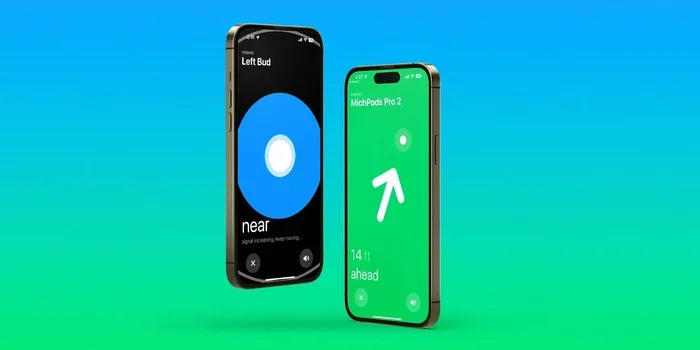
To use Precision Finding, you need an iPhone 11 or newer. When you are close to your AirPods case, your iPhone screen will show arrows, distance, and even point you in the right direction. It works indoors and outdoors, which is perfect for finding AirPods hidden under a pile of laundry or stuck under a car seat.
Bluetooth, Wi-Fi, and GPS Working in Harmony
Your AirPods Pro 2 use a mix of signals to give you the best possible location data:
- Bluetooth: The main way AirPods talk to your phone when nearby.
- Wi-Fi: Helps pinpoint your location indoors where GPS struggles.
- GPS: Used by your paired iPhone to mark the last known outdoor location.
- Ultra-Wideband (UWB): Provides super-precise, arrow-style directions when you are close.
Together, these signals create a layered system that works whether you are across the room or across town.
How to Set Up Tracking on Your AirPods Pro 2
The best part about tracking AirPods Pro 2? There is almost nothing to set up. Apple does the heavy lifting for you.
Visual guide about AirPods Pro 2 tracking app
Image source: i.ytimg.com
Automatic Pairing with Your Apple ID
When you first pair your AirPods Pro 2 with your iPhone, they are automatically linked to your Apple ID. That means they are instantly added to your Find My app without any extra steps. It is kind of like how a new credit card automatically shows up in your banking app. You do not have to do anything special.
This automatic pairing also works across all your Apple devices. So if you own an iPhone, iPad, Mac, and Apple Watch, they all sync up and can help you locate your AirPods. Pretty neat, right?
How to Enable Find My for AirPods
Even though it is automatic, it is worth double-checking that Find My is turned on. Here is how:
- Open the Settings app on your iPhone.
- Tap your name at the top to access your Apple ID settings.
- Tap Find My.
- Make sure Find My iPhone is turned on.
- Tap Find My network and make sure it is toggled on.
Once that is done, your AirPods Pro 2 will be ready to track whenever you need them.
Turning On Separation Alerts
Want a little heads-up before you leave your AirPods behind? Separation Alerts will notify you when you walk too far away from them. It is like having a friendly voice say, “Hey, did you mean to leave those behind?”
To enable this feature:
- Open Find My on your iPhone.
- Tap the Devices tab at the bottom.
- Select your AirPods Pro 2.
- Scroll down and toggle on Notify When Left Behind.
You can also set a trusted location, like your home, where alerts will not bother you. That way, you do not get spammed every time you walk to another room.
How to Find Lost AirPods Pro 2 Step by Step
Now for the moment of truth. Your AirPods are missing. Take a deep breath and follow these steps.
Step 1: Open the Find My App
Grab your iPhone and launch the Find My app. You will see a map and a list of your devices. Tap the Devices tab at the bottom, and look for your AirPods Pro 2 in the list.
Step 2: Check the Map for Last Known Location
If your AirPods are out of range or out of battery, you will see a gray dot on the map showing the last place they were connected to your phone. This is your starting point. Tap on your AirPods and then tap Directions to open Maps and navigate there.
Did you know? The last known location stays in Find My for up to 24 hours after your AirPods go offline. After that, the location data is removed for privacy.
Step 3: Use Precision Finding When You Are Close
If you are near the last known location and your iPhone is compatible, you will see a Find button. Tap it to launch Precision Finding. Follow the arrows on your screen, watch the distance counter shrink, and listen for chirping sounds. When it says you are right next to them, start looking around.
This is where the U1 chip really shines. It can tell you if your AirPods are under the couch cushion, in the next room, or even in another part of the house. No more tearing apart your entire living room.
Step 4: Play a Sound to Locate Them
If Precision Finding is not available, or if you just want to hear them, tap Play Sound. Your AirPods will emit a loud chirping noise that gets louder for two minutes. This is perfect for finding them in a noisy environment or under a pile of stuff.
For AirPods Pro 2, the case also has its own speaker. So even if the earbuds are tucked inside the case, you can still play a sound from the case itself to find it. Older AirPods did not have this feature, which is one of the biggest upgrades in the Pro 2.
Step 5: Mark as Lost When All Else Fails
If you cannot find your AirPods nearby, it is time to mark them as lost. This does two important things:
- Locks them to your Apple ID: If someone finds them and tries to pair them, they will see your contact info and message.
- Activates the Find My network: The moment another Apple device comes near your AirPods, you will get a location update.
To mark them as lost, open Find My, select your AirPods, scroll down, and tap Mark as Lost. You can add a phone number or message that will appear on the screen of whoever finds them.
What Happens When AirPods Pro 2 Are Offline or Out of Battery?
This is the part that confuses most people. What good is tracking if the AirPods are dead? Let us clear that up.
Viewing the Last Known Location
Even when your AirPods are completely dead, Find My will show you the last place they connected to your iPhone. Think of it like a snapshot of where they were last “alive.” This is often enough to jog your memory and figure out where you left them.
For example, if the map shows the coffee shop you visited three hours ago, that is a great place to start your search. You can call the shop and ask if they found a pair of AirPods.
The Find My Network Can Still Help
Even when your AirPods are offline, the Find My network can pick up their signal if they have any charge left in the case. The AirPods Pro 2 case has enough battery to broadcast a location signal for hours after the earbuds have died. So if someone finds your case, their iPhone can detect it and update the location for you. It is like a little digital “Help Me!” beacon that keeps working.
Once your AirPods are dead and the case is empty, this feature stops working. But until then, the Find My network is still on the lookout.
What If the Case Is Dead Too?
If both the earbuds and the case are completely out of battery, the last known location is your best clue. Make sure to check Find My as soon as you realize your AirPods are missing, because the location data is freshest in the first few hours.
Tracking AirPods Pro 2 on Different Devices
Most people use an iPhone, but you might be wondering about other devices. Let us cover all the bases.
Tracking on iPhone and iPad
The Find My app works the same on both devices. You can see your AirPods on the map, play sounds, and use Precision Finding on any compatible iPhone or iPad. If you have multiple Apple devices signed into the same Apple ID, they all share the same Find My data.
Tracking on a Mac
Your Mac also has access to Find My through iCloud. Open a browser, go to iCloud.com/find, and sign in with your Apple ID. You will see your AirPods on the map and can play a sound remotely. However, Precision Finding is not available on Mac since it requires the iPhone’s U1 chip.
Tracking on Apple Watch
Your Apple Watch can ping your AirPods too. Open the Find My app on your watch, select your AirPods, and tap to play a sound. It is a quick way to find them when your phone is across the room.
What About Android Users?
Here is the bad news. If you use AirPods Pro 2 with an Android phone, you lose access to Find My almost entirely. You can only use basic Bluetooth to see if they are connected to your phone. If they are out of range, you are out of luck.
Did you know? Some third-party apps claim to track AirPods on Android, but they are unreliable and often misleading. There is no official Find My app for Android, and Apple has no plans to release one. So if tracking is important to you, an iPhone is the way to go.
Pro Tips to Never Lose Your AirPods Pro 2 Again
Prevention is always better than cure. Here are some tried-and-true tips to keep your AirPods safe and sound.
Tip 1: Always Use the Case
The case is the safest place for your AirPods. When you are not using them, put them right back in the case. This keeps them charged, protected, and trackable. Plus, the case itself can be tracked independently, so you have double the protection.
Tip 2: Enable Separation Alerts
We mentioned this earlier, but it is worth repeating. Separation Alerts are a lifesaver for forgetful folks. You will get a notification before you walk too far from your AirPods, giving you a chance to turn around.
Tip 3: Attach a Bluetooth Tracker
If you are extra cautious, you can attach a small Bluetooth tracker, like a Chipolo or a third-party AirTag, to your AirPods case. This adds a backup layer of tracking, especially if you misplace the case itself. Just make sure it does not block the charging port.
Tip 4: Customize Your AirPods Name
Open Find My, tap your AirPods, and rename them to something memorable, like “John’s AirPods Pro 2.” If you ever lose them and someone finds them, a personal name makes it easier for them to return them to you.
Tip 5: Check the Map Regularly
If you tend to misplace things, make it a routine to check the Find My map once a week. It only takes a few seconds, and it helps you stay familiar with how the app works before you actually need it.
Tip 6: Use a Case with a Strap
Many third-party AirPods Pro 2 cases come with straps or clips. You can hook them to your bag or belt loop, so the case is always within reach. This simple accessory has saved countless AirPods from being left behind.
Common AirPods Pro 2 Tracking Questions Answered
Let us wrap things up by answering the most common questions people ask about AirPods Pro 2 tracking.
Can I track AirPods Pro 2 if they are in the case?
Yes! The AirPods Pro 2 case has its own speaker and U1 chip, so it can be tracked even when the earbuds are inside. This is a major upgrade over previous AirPods models.
Can someone else track my AirPods?
No. AirPods are linked to your Apple ID, and only you can see their location. If someone finds them and tries to pair them with their iPhone, they will be prompted to contact you. Your data stays private and encrypted.
How accurate is Precision Finding?
Precision Finding is accurate to within a few inches, thanks to the U1 chip. It works best within about 30 feet of your AirPods. Beyond that range, the map view takes over.
Will Find My drain my phone battery?
Find My uses very little power. It only activates when you actively search for a device. The background location updates are minimal and should not noticeably affect your battery life.
Can I track AirPods Pro 2 internationally?
Yes. Find My works in over 200 countries. As long as your AirPods come within range of any Apple device, you can get a location update, even if you are on the other side of the world.
What if my AirPods Pro 2 are stolen?
If you believe your AirPods were stolen, mark them as lost in Find My. This locks them to your Apple ID and makes them useless to anyone else. You can also report the theft to local authorities, though recovery through police is rare for small electronics.
Final Thoughts
Tracking your AirPods Pro 2 is one of the best features Apple has ever built into a pair of earbuds. With the Find My network, Precision Finding, and a trackable case, you have more ways than ever to locate your missing buds. Whether they slipped between the couch cushions or got left across town, Find My gives you the tools to recover them quickly.
The key is to set things up before you lose them. Make sure Find My is on, enable Separation Alerts, and get familiar with the app. That way, if the worst happens, you will know exactly what to do. Think of Find My as a safety net. You hope you never need it, but you will be glad it is there when you do.
Did you know that AirPods are the most popular wireless earbuds in the world? With that many pairs in circulation, losing one is almost a rite of passage. But thanks to the smart tracking features in AirPods Pro 2, you can spend less time panicking and more time enjoying your music.
So go ahead, enjoy your AirPods Pro 2 without worry. And if they ever go missing, you know exactly where to look.
Frequently Asked Questions
Can you track AirPod Pro 2 if they are dead?
Yes, you can see the last known location of your AirPods Pro 2 even when they are out of battery. Find My stores the most recent location where your AirPods connected to your iPhone, so you have a place to start your search. If the case has any charge left, the Find My network can still detect its signal.
Does AirPods Pro 2 have Precision Finding like AirTags?
Yes, AirPods Pro 2 come with Precision Finding thanks to the U1 ultra-wideband chip in the case. When you are close, your iPhone will display directional arrows, distance, and even play sounds to guide you right to them. You need an iPhone 11 or newer to use this feature.
Can I track my AirPods Pro 2 case separately?
Absolutely. The AirPods Pro 2 case has its own built-in speaker and tracking chip, so it can be located independently from the earbuds. You can play a sound from the case or use Precision Finding to track it, which is a big upgrade over previous AirPods models.
Can Android users track AirPods Pro 2?
Unfortunately, no. Android users do not have access to Apple’s Find My network and cannot track AirPods Pro 2 beyond basic Bluetooth range. If tracking is important to you, you will need an iPhone, iPad, or Mac to use the full set of features.
How far can AirPods Pro 2 be tracked?
There is no strict distance limit. As long as an Apple device is nearby, your AirPods Pro 2 can be detected, no matter how far away you are. The Find My network is global, so you can locate your AirPods even if they are in another city or country.
Can someone use my AirPods Pro 2 if I lose them?
No. AirPods Pro 2 are locked to your Apple ID, so they cannot be paired with another device without your credentials. If someone finds them and tries to connect, they will see a message asking them to return them to you.