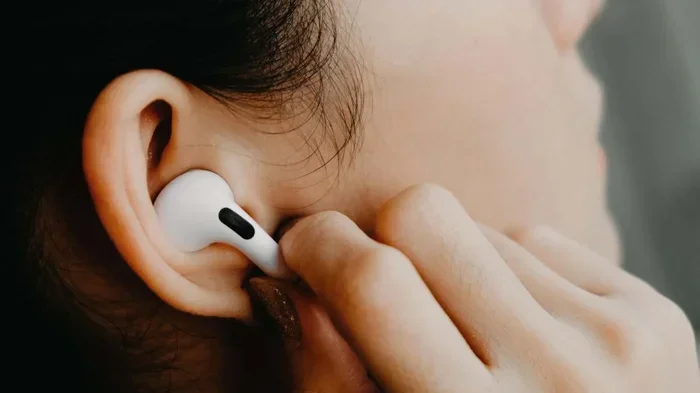
Featured image for single airpod noise cancelling
Image source: lifehacker.com
Yes, you can use noise cancelling with one AirPod, but only on AirPods Pro, AirPods Pro 2, and AirPods 4 (ANC model). Standard AirPods (1st through 3rd gen) lack active noise cancellation entirely. To enable single-bud ANC, put one earbud in your ear, open the case nearby, then press and hold the force sensor (or touch control) until you hear a chime. This single-ear ANC mode is perfect for hearing announcements, conversations, or traffic while still blocking background hum.
Imagine you’re on a noisy subway, and you only want to wear one earbud because you need to hear the announcement for your stop. Or maybe you’re at the office and want to block the hum of the air conditioner but still chat with coworkers. In these moments, you might ask yourself: “Can I use noise cancelling with just one AirPod?”
The short answer is yes, but only if you have the right model. Not every AirPod has noise cancellation built in. Standard AirPods (1st, 2nd, and 3rd generation) physically cannot cancel noise because they lack the microphones and processors needed for it. Only the Pro line and the newer AirPods 4 with ANC include this feature. If you own one of those, you’re in luck: single-ear noise cancelling is a built-in feature designed exactly for moments like these.
In this guide, we’ll explain exactly which AirPods support it, how to turn it on with one earbud, why Apple designed it this way, and what to do if it’s not working. Think of it as your complete walkthrough for getting quiet on one side only.
Key Takeaways
- Only certain AirPods support ANC: AirPods Pro, AirPods Pro 2, and AirPods 4 (with ANC) are the only models that can cancel noise at all.
- Single-bud ANC works automatically: Once you wear one AirPod, it will activate noise cancelling for that ear if it’s already set as your default mode.
- Manual toggle is easy: Press and hold the stem sensor for 2–3 seconds to switch between ANC, Transparency, and Off while wearing one bud.
- Older AirPods cannot do this: AirPods 1, 2, 3, and non-ANC AirPods 4 simply do not have the hardware for active noise cancellation.
- Battery drains faster: Using ANC on one bud uses more power than using it on two, since the processing still runs continuously.
- Firmware matters: Your iPhone or connected device must run iOS 15 or later (or equivalent) for full single-bud ANC functionality.
- Transparency Mode often pairs better: For safety in public, many users prefer Transparency Mode on one ear instead of full ANC.
📑 Table of Contents
Which AirPods Support Noise Cancellation in the First Place?
Before we dig into the “one AirPod” question, you need to know whether your AirPods even have noise cancellation. Apple sells several models, and only some of them include Active Noise Cancellation (ANC). Let’s break it down clearly.
AirPods Pro and AirPods Pro 2
These are Apple’s premium in-ear headphones. They have tiny microphones inside and outside each earbud that listen to the world around you. The processor inside then creates an “anti-noise” signal that’s the exact opposite of the sound coming in. When the two waves meet, they cancel each other out. That’s how noise cancellation works, kind of like adding a number and its negative together to get zero.
AirPods Pro (1st generation) launched in 2019, and AirPods Pro 2 launched in 2022. Both support single-bud ANC. In fact, Apple specifically designed this feature so people can stay aware of their surroundings when wearing just one earbud.
AirPods 4 with Active Noise Cancellation
Did you know Apple released a version of the standard AirPods 4 in late 2024 that includes ANC? Many people don’t realize this. The AirPods 4 come in two versions: a basic one (without ANC) and a premium one (with ANC). Only the premium model can cancel noise, and it also supports the single-bud feature.
AirPods Max
AirPods Max are the over-ear headphones. They have ANC too. You can use one ear cup at a time if you really want to, though it’s not common. The controls work the same way: press the noise control button on the right ear cup.
AirPods 1, 2, and 3 (Standard Models)
These models simply do not support noise cancellation. They use a passive seal only, meaning the silicone or plastic tip physically blocks some sound, but there’s no electronic cancellation. If you have these, the rest of this article won’t really apply, and you might consider upgrading if ANC matters to you.
Quick Compatibility Checklist
Here’s a simple way to know if your AirPods support single-bud noise cancellation:
- Yes, they support it: AirPods Pro, AirPods Pro 2, AirPods 4 (ANC model), AirPods Max
- No, they don’t: AirPods 1st gen, AirPods 2nd gen, AirPods 3rd gen, AirPods 4 (basic model)
If you are still not sure which model you have, go to Settings > Bluetooth on your iPhone, tap the “i” next to your AirPods name, and you’ll see the model number and generation listed.
How Does Noise Cancellation Work on AirPods?
Let’s break down the science in plain English, because it actually helps you understand why single-bud ANC works the way it does.
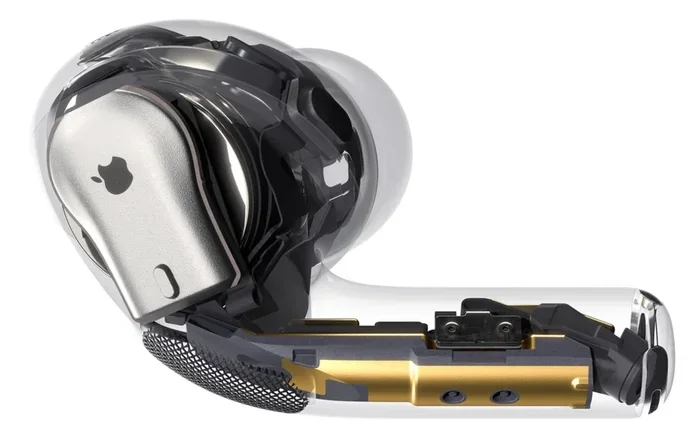
Visual guide about single airpod noise cancelling
Image source: executivetraveller.com
The Microphone Trick
Each AirPod Pro has two microphones dedicated to ANC: one facing outward (to listen to the world) and one facing inward (to listen to your ear canal). The outward mic hears, say, the drone of an airplane engine. The processor inside the AirPod instantly calculates what the “opposite” sound wave would be and plays it through the speaker. Your brain hears both waves together, and they cancel out. Poof, silence.
Think of it like this: imagine you’re pushing a child on a swing. If you push at exactly the right moment, they swing higher. But if you push at the wrong moment, they slow down. Noise cancellation works by pushing sound at the wrong moment, so it fights itself and disappears.
Why Single-Bud ANC Is Possible
Here’s the cool part. The processor is inside each AirPod. That means even if you’re only wearing one earbud, that single earbud still has a working mic, a working processor, and a working speaker. It can still listen to noise and create anti-noise. You just lose the stereo effect and the sound quality is slightly different, but the cancellation itself works fine.
Apple designed this feature on purpose. They knew people would want to use one earbud in certain situations, and they didn’t want the ANC to suddenly shut off just because you removed one bud.
How to Enable Noise Cancelling with One AirPod (Step-by-Step)
Now let’s get practical. Here’s exactly how to turn on noise cancellation while wearing just one AirPod.
Step 1: Make Sure You’re Using a Supported Model
Check the list above. If you have AirPods Pro, Pro 2, AirPods 4 (ANC), or AirPods Max, you’re good to go.
Step 2: Wear One AirPod and Leave the Other in the Case
Put one earbud in your ear. Leave the other one in the charging case. The case should be nearby (within Bluetooth range) but you don’t need to keep it open. Once the AirPod connects to your phone, it will automatically detect that only one earbud is in use.
Step 3: Trigger the Noise Control Toggle
Now, press and hold the stem of the AirPod you’re wearing. On AirPods Pro and Pro 2, this is the “force sensor,” which is the flat, indented part of the stem. Hold it for about 2–3 seconds.
You’ll hear a chime, and the noise cancellation will switch between three modes:
- Noise Cancellation: Full ANC. The world goes quiet.
- Transparency Mode: You hear everything as if you weren’t wearing earbuds at all.
- Off: No cancellation, no passthrough. Just a regular earbud.
Each long-press cycles to the next mode. Stop when you hear the chime for “Noise Cancellation.”
Step 4: Verify It’s Working
You can confirm by listening. Turn on a fan or play a YouTube video with background music. If the low hum disappears, ANC is working. You can also check your iPhone by swiping down from the top-right corner to open Control Center. Press and hold the volume slider, and you’ll see a Noise Control icon that shows which mode is active.
Alternative: Use Your iPhone or Apple Watch
If pressing the stem feels weird with one hand, you can also control ANC through:
- iPhone Settings: Go to Settings > Bluetooth, tap the “i” next to your AirPods, and switch the Noise Control option.
- Control Center: Long-press the volume slider and tap the Noise Control icon.
- Apple Watch: While playing audio, tap the AirPlay icon and choose your noise mode.
Did you know Apple added a setting in iOS 15 that lets you choose a default noise control mode for one AirPod? You can find it under Settings > Accessibility > AirPods > Noise Control. You can pick whether the single-bud mode defaults to ANC, Transparency, or Off.
Common Problems and Fixes
Sometimes single-bud ANC doesn’t work the way you expect. Here are the most common issues and how to fix them.
“It Just Won’t Turn On”
If you press and hold the stem and nothing happens, try these fixes:
- Make sure your AirPods are charged. ANC requires battery power. If your AirPod is below 10%, it might disable ANC automatically.
- Reset the connection. Go to Settings > Bluetooth, tap the “i,” and choose “Forget This Device.” Then pair them again.
- Update your firmware. Outdated firmware can cause glitches. Put your AirPods in the case, plug it in, and keep it near your iPhone overnight. Updates happen automatically.
“The Sound Quality Is Weird”
With one earbud, you lose stereo sound. Music will sound like it’s coming from one side. This is normal. There’s no fix for this; it’s just physics. If it bothers you, switch to Transparency Mode for a more balanced feel.
“Battery Drains Fast”
ANC uses extra processing power, and with one earbud doing all the work, it can drain faster than usual. A single AirPod Pro typically lasts about 4–5 hours with ANC on. If you need longer, consider turning ANC off or carrying the charging case.
“ANC Sounds Worse with One Bud”
Some users notice that noise cancellation feels “weaker” with one earbud. That’s because your brain is getting less coverage. With two earbuds, the cancellation is symmetric; with one, your open ear can still pick up some sounds. It’s not a defect; it’s expected. To improve it, try a snug ear tip fit so the seal is tight.
“Transparency Mode Is Too Loud”
If Transparency Mode feels overwhelming with one bud, you might be accidentally activating it. The long-press cycles through modes, so you might have stopped one click too far. Press and hold again to cycle to the next mode.
Why Would You Want Noise Cancelling with One AirPod?
You might wonder why anyone would use ANC with just one bud. Actually, there are tons of real-world reasons. Let’s go through them.
Staying Safe in Public
Walking down a busy street, jogging in a park, or commuting by train, you need to hear traffic, announcements, and people. Wearing one AirPod with ANC blocks the constant hum (like traffic noise) but your open ear still catches voices and warning sounds. This is the safest setup for urban environments.
Office and Coworking Spaces
If you’re in a noisy office but need to chat with a coworker, one earbud with ANC can block the chatter and AC hum while leaving your other ear free for conversation. Many remote workers swear by this setup.
Calls and Meetings
During long phone calls, using one AirPod with ANC can reduce ear fatigue. Your other ear stays open, so you can hear yourself more naturally and don’t feel “plugged in.” Plus, the mic still picks up your voice clearly.
Listening to Audiobooks or Podcasts
Some people prefer hearing voices (like podcasts) with one ear so they can also hear their surroundings. The ANC blocks background noise so the voice is clearer, but you don’t feel isolated.
Sleep and Relaxation
Some users wear a single AirPod Pro with ANC to fall asleep on planes or trains. The cancellation quiets engine drone, and the open ear stays comfortable. This is a popular travel hack.
Saving Battery
Wait, doesn’t ANC drain battery faster? Yes, but you can rotate which earbud you use. While one charges in the case, you use the other with ANC. This effectively doubles your total listening time per charge cycle.
Best Practices and Pro Tips
Here are some tips to get the most out of single-bud noise cancellation.
Pick the Right Ear Tip
A loose fit breaks the seal, which kills both sound quality and ANC. Apple includes multiple ear tip sizes with AirPods Pro. Try them all and pick the one that feels snug but comfortable. You can run the “Ear Tip Fit Test” on your iPhone to check. Go to Settings > Bluetooth > [Your AirPods] > Ear Tip Fit Test.
Clean Your AirPods Regularly
Earwax and debris block the mics, weakening ANC. Once a week, gently wipe the outside and inside of each AirPod with a dry, soft-bristled brush. Apple actually warns against using sharp objects or liquids.
Update Your Software
Apple regularly improves ANC with software updates. Make sure your iPhone, iPad, or Mac is on the latest OS. The same goes for your AirPods firmware. According to Apple’s support page, AirPods Pro 2 received ANC improvements as recently as 2023, so don’t ignore those updates.
Use Adaptive Audio (AirPods Pro 2 Only)
If you have AirPods Pro 2, you have access to “Adaptive Audio,” which automatically blends ANC and Transparency based on your environment. With one earbud, this still works and adjusts in real time. It’s a game-changer for people who move between quiet and noisy spaces.
Set Up Personalized Noise Cancellation
Apple added a feature that customizes ANC to the shape of your ear. You can find it in Settings > AirPods Pro > Personalized Noise Cancellation (where available). This optimizes the cancellation curve, which makes single-bud ANC feel more effective.
Consider Transparency Mode Instead
For many situations, Transparency Mode with one earbud is actually better than full ANC. You still hear clearly, but environmental sounds are amplified slightly. It’s like having superhuman hearing, and it’s safer for outdoor activities.
Disable ANC If You Don’t Need It
If you’re just listening to music in a quiet room, turn ANC off to save battery. With one earbud, every bit of battery life matters.
Final Thoughts
Using noise cancellation with one AirPod is not only possible; it’s a feature Apple built intentionally for real-life situations. Whether you’re commuting, working in a busy office, or just want to give your ears a break, single-bud ANC is a great tool. The key things to remember are:
- You need AirPods Pro, AirPods Pro 2, AirPods 4 (ANC), or AirPods Max.
- Press and hold the stem to cycle between ANC, Transparency, and Off.
- A snug fit and clean earbuds make ANC work better.
- Single-bud mode is best for safety and awareness in public.
If your AirPods aren’t behaving as expected, a quick reset, firmware update, or ear tip swap usually fixes the problem. And if you find yourself using one earbud a lot, consider investing in AirPods Pro 2 for the best experience, especially with features like Adaptive Audio and Personalized Noise Cancellation.
Now you know everything you need to enjoy peace and quiet, even with just one earbud in. Happy listening!
Frequently Asked Questions
Can you use noise cancelling with one AirPod?
Yes, if you have AirPods Pro, AirPods Pro 2, or AirPods 4 (ANC model). The single earbud has its own processor and microphones, so it can cancel noise on its own. Just press and hold the stem to activate ANC while wearing only one earbud.
Do all AirPods support noise cancellation?
No, only AirPods Pro, AirPods Pro 2, AirPods Max, and the AirPods 4 with ANC have this feature. Standard AirPods (1st, 2nd, and 3rd gen) and the basic AirPods 4 do not have noise cancellation hardware.
How do I turn on noise cancellation with one AirPod in?
Wear one AirPod, then press and hold the force sensor on the stem for about 2 seconds. You’ll hear a chime indicating the mode has changed. Cycle until you reach Noise Cancellation. You can also control it from your iPhone’s Control Center.
Why does my AirPod’s noise cancellation sound weaker with one earbud?
Because you’re only canceling noise for one ear, your open ear still picks up ambient sound. This is normal and not a defect. For better results, use a snug-fitting ear tip and make sure your AirPods are clean and fully charged.
Does using noise cancellation with one AirPod drain the battery faster?
Yes, slightly. The processor is always running ANC, so the single earbud uses more power than usual. Expect around 4–5 hours of listening with ANC on one AirPod Pro. Carrying the charging case helps for long days.
Is it safe to use noise cancellation with one AirPod in public?
It can be, depending on the environment. With one ear open, you’ll still hear traffic and announcements, which is great for safety. For maximum awareness, try Transparency Mode on the single AirPod so environmental sounds come through clearly.