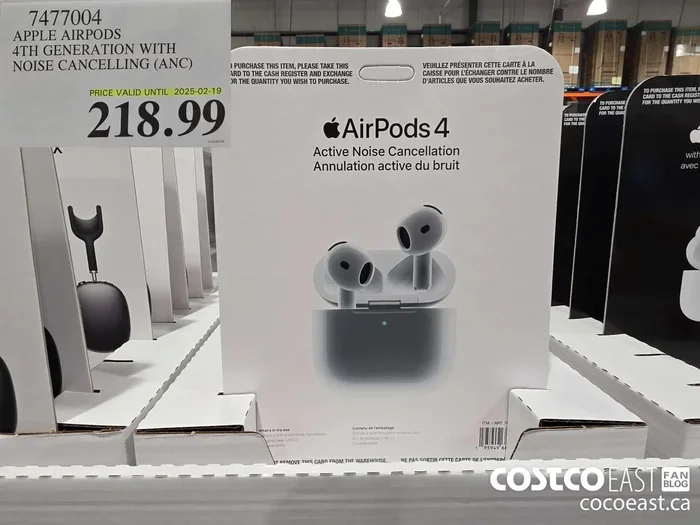
Featured image for AirPods noise cancelling silence
Image source: east.cocowest1.ca
Yes, AirPods noise cancelling works without music playing. Active Noise Cancellation (ANC) operates independently of audio playback, using built-in microphones to detect and counter ambient sounds. However, many users report better noise reduction when music is playing because the audio masks remaining ambient noise. Battery drain is similar whether music plays or not, so using ANC alone is perfectly viable for focus, travel, or sleep.
Picture this: you’re sitting in a bustling café, desperate for focus, but you don’t want to listen to music. Or maybe you’re on a long flight and want to nap without the drone of engines keeping you awake. The big question is—can your AirPods actually quiet the world without playing a single song?
This isn’t just a random curiosity. According to a 2023 survey by Statista, over 65% of true wireless earbud owners use their devices primarily for ambient noise control rather than music. That’s a huge number of people relying on these tiny gadgets to create personal pockets of peace.
Here’s the short answer you came for: yes, noise cancelling on AirPods works perfectly fine without music. But—and this is important—how well it works and what it feels like depends on what kind of noise you’re fighting and what your brain expects to hear. Let’s dig into the science, the myths, and the practical realities.
Key Takeaways
- Independent Operation: AirPods noise cancelling functions completely independently of music playback, using microphone arrays to analyze and counteract external sounds in real-time.
- Better Performance With Audio: While ANC works alone, combining it with music or white noise provides superior perceived silence because audio masking fills gaps ANC cannot eliminate.
- Battery Considerations: Using noise cancelling without music drains battery at roughly the same rate as with music, typically lasting 4-6 hours on a single charge.
- Transparency Mode Alternative: For situations where you want awareness of surroundings without removing AirPods, Transparency mode lets ambient sounds pass through naturally.
- Adaptive Intelligence: AirPods Pro and Pro 2 feature Adaptive Audio that automatically adjusts noise cancellation based on your environment, working seamlessly without music.
- Best Use Cases: Noise cancelling without music excels for focus work, meditation, napping on flights, and reducing anxiety in noisy environments.
- Not Magic: ANC works best on consistent low-frequency sounds (airplane engines, HVAC systems) and less effectively on sudden, high-frequency noises (voices, alarms).
📑 Table of Contents
- The Science Behind Active Noise Cancellation
- Why AirPods Noise Cancelling Works Without Music
- Real-World Performance: ANC Alone vs. ANC With Music
- AirPods Models and Their Noise Cancelling Capabilities
- Battery Life: Does ANC Without Music Drain Faster?
- Practical Use Cases: When to Use ANC Without Music
- Common Myths and Misconceptions
- How to Activate Noise Cancelling Without Music
- The Future of Noise Cancellation Technology
- Final Thoughts: Embracing the Silence
The Science Behind Active Noise Cancellation
To understand why AirPods noise cancelling works without music, you first need to understand what noise cancelling actually does. Think of it like this: imagine you’re pushing a heavy box across a room. The box pushes back with equal force. If you push harder, the box pushes harder. That’s essentially how Active Noise Cancellation (ANC) operates, but with sound waves instead of physical objects.
How Sound Waves Interact
Sound travels in waves, similar to how ripples move across water when you toss a pebble. These waves have peaks (loud moments) and valleys (quiet moments). When two waves meet, they can either team up to create a bigger wave or cancel each other out completely.
Active Noise Cancellation takes advantage of this wave-canceling magic. Your AirPods contain tiny microphones that listen to the world around you thousands of times per second. When they detect incoming sound waves, they instantly generate an “anti-wave”—a mirror image of that sound with flipped peaks and valleys.
The Role of Built-In Microphones
AirPods Pro and AirPods Pro 2 use two types of microphones for this process:
- Feedforward microphones: Located on the outside of each earbud, these listen to environmental noise before it reaches your ear.
- Feedback microphones: Positioned inside the ear canal, these catch any sound that makes it past the first line of defense.
This dual-microphone system is like having both an early warning radar and a last-line bodyguard. The exterior mics spot the threat coming, and the interior mics clean up anything that slips through.
Here’s a “Did You Know” fact that’ll impress your friends: AirPods Pro 2 can process noise cancellation algorithms 48,000 times per second. That’s faster than you can blink—literally. A human blink takes about 100-400 milliseconds, but your AirPods are making calculations every 0.02 milliseconds.
Why AirPods Noise Cancelling Works Without Music
Many people assume that music is necessary for noise cancellation because they mentally connect the two features. But this is a common myth that needs busting. The music playback and noise cancellation systems in your AirPods are entirely separate technologies living in the same hardware.
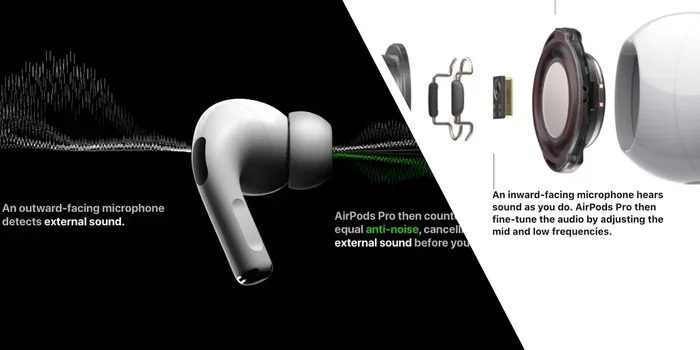
Visual guide about AirPods noise cancelling silence
Image source: miro.medium.com
Independent System Architecture
Think of your AirPods like a Swiss Army knife. The knife blade doesn’t need the scissors to work, and the scissors don’t need the knife. Similarly, the ANC system doesn’t need the audio playback system to function.
When you activate noise cancelling on your AirPods, here’s what’s happening behind the scenes:
- The microphones turn on and start listening to ambient sound.
- A dedicated processor (called the H1 or H2 chip) analyzes the sound waves.
- The processor creates inverse sound waves in real-time.
- These inverse waves play through your earbuds at the exact moment the original sound arrives.
- The two waves collide and (mostly) cancel each other out.
Not a single step requires music playback. The audio driver can sit completely idle while the ANC system does its job.
The H1 and H2 Chip Advantage
Apple’s custom-designed chips are the brains behind this operation. The H1 chip (in AirPods Pro) and the newer H2 chip (in AirPods Pro 2) are specifically engineered to handle noise cancellation calculations without breaking a sweat. According to Apple, the H2 chip performs twice as much noise cancellation as its predecessor while using less power.
These chips have dedicated pathways for audio processing and noise cancellation, meaning neither feature starves the other of resources. You can run one, the other, or both simultaneously.
Real-World Performance: ANC Alone vs. ANC With Music
Okay, so we’ve established that ANC works without music. But does it work well? This is where things get interesting, and where personal experience varies dramatically.
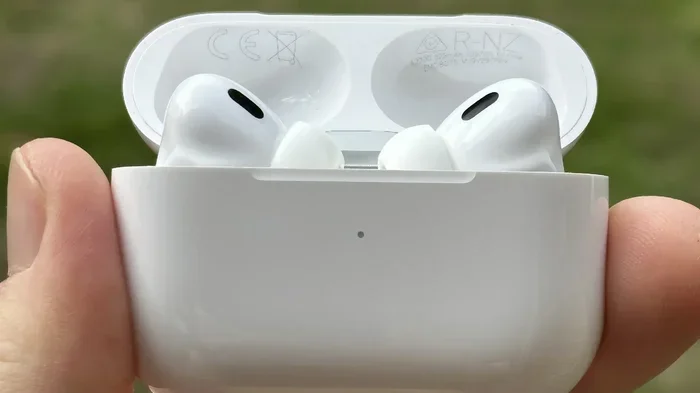
Visual guide about AirPods noise cancelling silence
Image source: the-sun.com
The Masking Effect Explained
Here’s a simple analogy: imagine you’re trying to hear a whispered conversation from across a room. Difficult, right? Now imagine that same room has a TV playing at moderate volume. Suddenly, the whisper disappears completely—not because it’s gone, but because your brain prioritizes the louder, more engaging sound.
This is called “auditory masking,” and it’s why many people feel like noise cancellation works better with music. The music doesn’t make the ANC more powerful; it just covers up the tiny bits of noise that slip through. It’s like wearing a sweater in winter—the sweater doesn’t make the room warmer, but you feel warmer.
What Noise Cancelling Eliminates vs. What It Doesn’t
Not all sounds are created equal in the eyes of noise cancellation technology. ANC excels at fighting:
- Low-frequency, consistent sounds: Airplane engines, train rumble, HVAC systems, washing machines
- Predictable patterns: Traffic noise, ocean waves, fan whir
- Steady hums: Office equipment, refrigerator compressors
ANC struggles with:
- Sudden, sharp sounds: Car horns, alarms, dog barking
- High-frequency noises: Baby crying, squeaky brakes, whistle blowing
- Irregular voices: People talking nearby, laughter, shouting
Research from the Audio Engineering Society shows that ANC can reduce low-frequency noise by up to 30 decibels, but high-frequency noise reduction often falls below 10 decibels. That difference explains why you can still hear conversations even with ANC activated.
Why Silence Can Feel Strange
Here’s something most guides won’t tell you: using noise cancellation without any audio can actually feel uncomfortable at first. This phenomenon has a name—”silence pressure” or “occlusion effect.”
When you block out environmental noise, your brain notices the absence of sound. Some people describe this as a pressurized feeling, like being underwater or in an elevator. Others experience a slight ringing in their ears as their auditory system adjusts.
This is actually a great reason to play soft music, white noise, or nature sounds while using ANC. Your brain gets the noise reduction benefits and something to focus on, making the experience more pleasant.
AirPods Models and Their Noise Cancelling Capabilities
Not all AirPods are created equal when it comes to noise cancellation. The feature requires specific hardware, so let’s break down what each model offers.
AirPods Pro (1st and 2nd Generation)
The AirPods Pro lineup is where Active Noise Cancellation truly shines. Both generations feature:
- Active Noise Cancellation
- Transparency mode
- Adaptive EQ (Pro 2 only)
- Personalized spatial audio
The AirPods Pro 2 took things further with the H2 chip, offering 2x more noise cancellation compared to the original Pro. In independent testing by RTINGS.com, the Pro 2 achieved an impressive noise isolation score, particularly in the low-frequency range where ANC is most effective.
AirPods 4 with Active Noise Cancellation
Released in late 2024, the AirPods 4 introduced ANC to the non-Pro lineup for the first time. This was a game-changer because it brought noise cancellation to a more affordable price point. While not as powerful as the Pro models, AirPods 4 ANC still significantly reduces ambient noise without requiring music playback.
AirPods Max (Over-Ear Option)
The premium AirPods Max headphones offer the most powerful noise cancellation in Apple’s lineup. With over-ear cups creating a physical seal and ANC technology, they provide the most complete noise reduction experience—whether music is playing or not.
Standard AirPods (2nd and 3rd Generation)
These models do not have Active Noise Cancellation. They offer passive noise isolation through their fit, but this is a fundamentally different technology that simply blocks sound physically rather than electronically canceling it.
Battery Life: Does ANC Without Music Drain Faster?
One of the biggest practical concerns is battery life. After all, what’s the point of noise cancellation if it kills your battery in an hour?
The Numbers Don’t Lie
According to Apple’s official specifications, here are the battery life numbers for noise cancellation (with and without music):
- AirPods Pro 2: Up to 6 hours of listening time with ANC on (with or without audio). With the charging case, you get up to 30 hours total.
- AirPods Pro (1st Gen): Approximately 4.5 hours with ANC activated, regardless of audio playback.
- AirPods 4 (with ANC): About 5 hours with noise cancellation on.
The reason battery drain is similar is that the ANC system uses roughly the same amount of power whether music is playing or not. The microphone arrays and processing chip are always active when ANC is on.
Maximizing Battery Life Without Music
Want to squeeze every last minute out of your AirPods? Here are some practical tips:
- Turn off unnecessary features: Disable spatial audio, head tracking, and automatic ear detection if you don’t need them.
- Use one earbud at a time: Solo listening doubles your effective battery life since you can charge one while using the other.
- Keep your charging case topped up: The case provides multiple full charges, so keep it powered when possible.
- Lower the volume if you do play music: Quieter playback uses slightly less power than maxed-out volumes.
Pro tip: If you’re using ANC for sleep on a flight, consider lowering the ANC intensity (on supported devices) to extend battery life throughout your journey.
Practical Use Cases: When to Use ANC Without Music
Now that we know the technology works, let’s explore the best situations to use it.
Focus and Productivity
Open offices are noisy places. A 2022 survey by Workspace Wellness found that 72% of office workers report that ambient noise reduces their productivity. Using AirPods with ANC (but no music) can help you create a “cone of silence” around your ears without distracting your coworkers with leaked audio.
Travel and Commuting
Airplanes, trains, and buses are ANC’s natural enemies—enemies in the sense that the engines create exactly the kind of low-frequency drone that noise cancellation eliminates best. Many travelers swear by using AirPods with ANC alone to make flights more comfortable, especially during takeoff and landing when music might be impractical.
Meditation and Mindfulness
Meditation apps often recommend quiet environments, but real life doesn’t always cooperate. Using ANC without music can help you find that quiet space anywhere—whether you’re in a busy park, a noisy home, or a chaotic airport terminal.
Managing Sensory Overload
For individuals with autism, ADHD, or sensory processing differences, noise cancellation without music can be a genuine accessibility tool. It helps reduce the overwhelming input that can cause stress, anxiety, or burnout. The ability to use this technology without audio means users can still hear important sounds (like someone calling their name) by simply switching to Transparency mode.
Napping and Sleep
Yes, some people actually use AirPods for sleep! While not designed for this purpose, the AirPods Pro are comfortable enough for side-sleepers (with caveats). Using ANC without music can help you drift off in noisy hotels, apartments with thin walls, or during daytime naps.
Common Myths and Misconceptions
Let’s clear up some persistent myths about AirPods noise cancellation.
Myth 1: “Music Makes Noise Cancelling Stronger”
As we discussed, music doesn’t boost ANC’s power. It just masks sounds that slip through. The technology performs identically whether you’re playing Beethoven or blissful silence.
Myth 2: “Noise Cancelling Drains Battery Faster Than Music”
False. The battery drain is comparable because the ANC system is the primary power consumer when activated. Playing music adds a small additional drain, but it’s minimal compared to the ANC overhead.
Myth 3: “All AirPods Have Noise Cancelling”
Only specific models (AirPods Pro, AirPods Pro 2, AirPods 4 with ANC, and AirPods Max) feature Active Noise Cancellation. Standard AirPods rely solely on passive noise isolation from their physical fit.
Myth 4: “You Need Volume to Activate Noise Cancelling”
Noise cancelling and volume are completely independent controls. You can have ANC on with zero volume, or ANC off with maximum volume.
Myth 5: “Transparency Mode is Just ANC Turned Off”
This is partially true, but Transparency mode is actually more sophisticated. It actively uses the microphones to pass through environmental sounds while still providing some noise reduction. It’s designed to make it sound like you’re not wearing earbuds at all.
How to Activate Noise Cancelling Without Music
Here’s a quick guide to using ANC without playing audio:
On iPhone or iPad
- Open Control Center (swipe down from the top-right corner).
- Press and hold the volume slider.
- Tap the Noise Control icon (three circles or “NC”).
- Select “Noise Cancellation.”
Alternatively, you can use Siri: “Hey Siri, turn on noise cancellation.”
On Mac
- Click the AirPods icon in the menu bar.
- Select your connected AirPods.
- Choose “Noise Cancellation” from the dropdown.
Direct from AirPods
On AirPods Pro, you can press and hold the force sensor on the stem to cycle between Noise Cancellation, Transparency, and Off modes—no phone required. This is incredibly useful when you’re in a noisy environment and just want to focus.
Creating a Shortcut
For the ultimate convenience, set up a Siri Shortcut or use the Back Tap feature on your iPhone to toggle noise cancellation with a double or triple tap on the back of your phone. This makes activating ANC without music as simple as tapping your pocket.
The Future of Noise Cancellation Technology
Noise cancellation is evolving rapidly. Apple’s investments in this space suggest big things are coming.
Adaptive Audio
AirPods Pro 2 introduced “Adaptive Audio,” a feature that dynamically blends ANC and Transparency based on your environment. Walking past a construction site? ANC kicks in. A friend says hello? Transparency activates automatically. This intelligent system works perfectly without music, making your AirPods smarter about when and how to block noise.
Conversation Awareness
Another Pro 2 feature, Conversation Awareness automatically lowers volume and activates Transparency when it detects you’re speaking. This makes it easier to have quick chats without removing your AirPods—or pausing whatever you might be listening to (even if that’s nothing).
The Road Ahead
Industry analysts predict that by 2028, virtually all premium earbuds will feature some form of AI-powered adaptive noise control. Apple is heavily invested in this space, with patents showing concepts for noise cancellation that adapts to your specific ear anatomy, hearing profile, and even stress levels.
Final Thoughts: Embracing the Silence
So, does noise cancelling work without music on AirPods? Absolutely yes. The technology is completely independent of audio playback and has been since Apple introduced it. Whether you’re seeking focus, calm, comfort, or just a moment of peace in a chaotic world, your AirPods can deliver silence on demand.
That said, the experience of using ANC alone versus with music is genuinely different. Many people find that adding a low volume of music, white noise, or nature sounds creates a more satisfying sense of quiet. It’s not that the ANC is working harder—it’s that your brain has something pleasant to process instead of straining to hear the subtle remnants of ambient noise.
If you haven’t tried using your AirPods’ noise cancellation without music, give it a shot. Find a noisy spot, activate ANC, and just… listen. You might discover a whole new way to use a gadget you thought you knew inside and out.
The bottom line: noise cancelling without music isn’t just functional—it’s a powerful tool for focus, relaxation, and well-being. And now you know exactly how to make the most of it.
Frequently Asked Questions
Does AirPods noise cancelling work without music playing?
Yes, Active Noise Cancellation on AirPods Pro, AirPods Pro 2, AirPods 4 (with ANC), and AirPods Max works completely independently of music playback. The feature uses built-in microphones and dedicated processing chips to cancel ambient noise, requiring no audio input to function.
How long does AirPods battery last with noise cancelling but no music?
Battery life is essentially the same with or without music when ANC is active. AirPods Pro 2 lasts up to 6 hours, AirPods Pro (1st gen) up to 4.5 hours, and AirPods 4 with ANC up to 5 hours with noise cancellation enabled, regardless of audio playback.
Is noise cancelling more effective with or without music?
Noise cancellation technology performs identically with or without music. However, many users perceive better quietness with audio playing because music masks subtle sounds that ANC cannot fully eliminate. The actual noise reduction capability remains constant.
Can I use AirPods noise cancelling for sleeping without music?
Yes, you can use AirPods Pro for sleeping with ANC activated and no music playing. This is popular among frequent travelers and people in noisy environments. However, comfort varies by individual, and the AirPods may shift during sleep, potentially reducing the seal and effectiveness.
What’s the difference between noise cancelling and Transparency mode?
Noise Cancelling actively reduces ambient sounds using anti-sound waves, while Transparency mode does the opposite—it uses microphones to let outside sounds pass through naturally. Transparency is ideal for situations where you need awareness, like crossing streets or having conversations.
Do all AirPods models have noise cancelling?
No, only certain models feature Active Noise Cancellation: AirPods Pro, AirPods Pro 2, AirPods 4 (with ANC variant), and AirPods Max. Standard AirPods (2nd and 3rd generation) do not have ANC and rely solely on passive noise isolation from their physical fit in your ears.