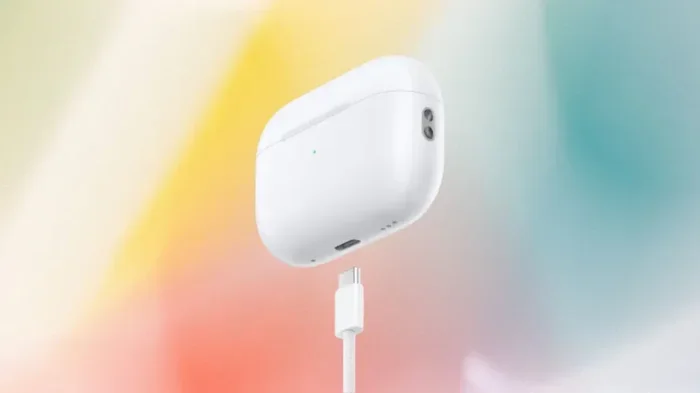
Featured image for AirPods USB-C charging case
Image source: variety.com
Yes, the newest AirPods have USB-C. Apple made the switch to USB-C starting with AirPods Pro (2nd generation) in September 2023, followed by AirPods 4 in late 2024. This change means you can now charge your AirPods using the same cable as your iPhone 15, Mac, iPad, and most modern gadgets. The move was largely driven by EU regulations requiring a universal charging standard.

Picture this: you’re rushing out the door, grab your AirPods, and realize your phone is at 10%. You reach for a charger, but now you need a Lightning cable for your earbuds and a USB-C cable for your phone. Annoying, right? Well, that frustration is officially over for many AirPods owners. Apple has finally joined the USB-C club, and the change is a big deal for anyone who loves keeping things simple.
But here’s the thing: not every AirPods model made the switch. Some still use the old Lightning connector, while the newest ones have embraced USB-C with open arms. If you’ve been eyeing a new pair or wondering whether your current ones are outdated, you’re in the right place. Let’s break it all down so you know exactly what you’re getting.
In this guide, we’ll answer the big question—do the new AirPods have USB-C?—and dig into which models got the upgrade, why Apple made the change, and what it means for your daily tech life. Whether you’re a die-hard Apple fan or just someone tired of carrying five different cables, this article has something for you.
Key Takeaways
- USB-C Arrived in 2023: Apple introduced USB-C charging on AirPods Pro (2nd generation) in September 2023, replacing the older Lightning connector.
- AirPods 4 Also Use USB-C: Both the standard AirPods 4 and AirPods 4 with Active Noise Cancellation feature USB-C charging cases.
- Older AirPods Still Use Lightning: AirPods 2, AirPods 3, and the original AirPods Pro still ship with Lightning charging cases and are not USB-C.
- EU Law Drove the Change: A European Union regulation requiring a universal charging port forced Apple’s hand on the switch to USB-C.
- One Cable for Everything: USB-C lets you charge your AirPods, iPhone, MacBook, and iPad using a single cable type, reducing clutter.
- Better Features Included: The USB-C AirPods Pro (2nd gen) case also supports lossless audio with Apple Vision Pro and has an IP54 rating for dust and water resistance.
- Same Great Battery Life: Switching to USB-C did not affect battery performance; you still get up to 6 hours of listening time per charge.
📑 Table of Contents
- The Big Question: Do the New AirPods Have USB-C?
- Why Did Apple Switch to USB-C? The Real Reasons
- USB-C AirPods vs. Lightning AirPods: What’s the Difference?
- How to Tell if Your AirPods Have USB-C or Lightning
- What About AirPods Max?
- The Bigger Picture: Apple’s USB-C Future
- Practical Tips for Living the USB-C Life
- Common Myths About AirPods and USB-C
- What the Future Holds for AirPorts and Charging
- Final Thoughts: Should You Upgrade to USB-C AirPods?
The Big Question: Do the New AirPods Have USB-C?
Let’s cut straight to the chase. Yes, the new AirPods absolutely have USB-C. But the word “new” is doing a lot of heavy lifting here. Apple didn’t flip a switch overnight and update every AirPods model on store shelves. Instead, they rolled out the change gradually, starting with their premium earbuds and eventually bringing USB-C to their entry-level options too.
Think of it like a restaurant changing its menu. They don’t toss out the entire kitchen in one night. They introduce new dishes over time, test what customers love, and slowly phase out the old favorites. That’s exactly what Apple did with AirPods and USB-C.
Which AirPods Models Have USB-C?
As of early 2026, here are the AirPods models that officially support USB-C charging:
- AirPods Pro (2nd generation) with USB-C: Released in September 2023, this was the first AirPods model to ditch Lightning for USB-C.
- AirPods 4: Launched in September 2024, both the standard and Active Noise Cancellation versions come with USB-C charging cases right out of the box.
- AirPods Max: Updated in September 2024, the over-ear headphones also made the switch to USB-C.
So if you’ve bought AirPods recently, chances are high that you’re already living the USB-C life. But if you’re holding onto older earbuds, you might still be living in the Lightning era.
Which AirPods Still Use Lightning?
Not every AirPods model got the upgrade. If you’re using any of these, you’re still stuck with Lightning:
- AirPods (1st generation): Released in 2016, these are the originals and only work with Lightning or Qi wireless charging.
- AirPods (2nd generation): Launched in 2019, these also use Lightning cables.
- AirPods (3rd generation): Released in 2021, these still feature a Lightning port.
- Original AirPods Pro (1st generation): The pre-2022 version uses Lightning, even though it was a premium product.
Did You Know? According to a 2023 Counterpoint Research report, Apple sold over 100 million AirPods worldwide in a single year. With that many devices in circulation, the shift to USB-C affects a massive number of users.
Why Did Apple Switch to USB-C? The Real Reasons
Apple is famous for doing things its own way. For years, the company insisted on its proprietary Lightning connector while the rest of the tech world moved to USB-C. So what changed? Two big things: regulators and reality.
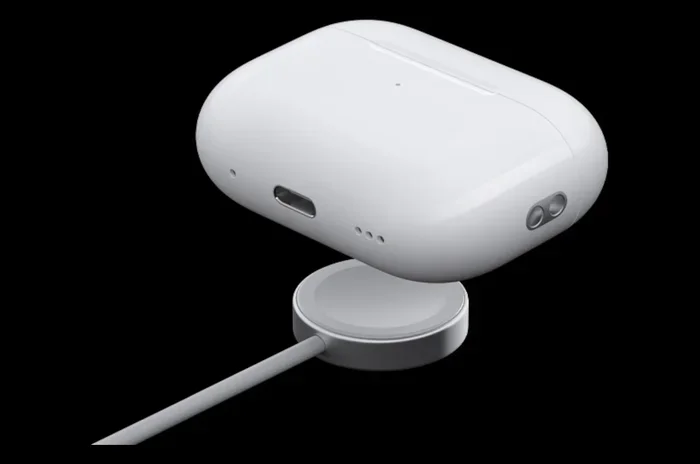
Visual guide about AirPods USB-C charging case
Image source: yankodesign.com
The EU Common Charger Directive
The biggest reason Apple switched to USB-C wasn’t a sudden love for the format. It was a European Union regulation called the Common Charger Directive. In October 2022, the EU passed a law requiring all smartphones, tablets, and headphones sold in the bloc to use USB-C by the end of 2024.
Imagine if every car in the world needed a different fuel type. That’s basically what the tech industry looked like before this law. USB-C was chosen as the universal standard because it can handle fast charging, fast data transfer, and even video output—all through one small port.
Apple had two choices: create a special Lightning version just for Europe (which would be expensive and messy) or go USB-C worldwide. They chose the latter, and honestly, it was the right call.
Consumer Demand and Convenience
Beyond the law, regular people like you and me have been begging for a universal charger for years. A 2022 survey by the European Commission found that 78% of consumers supported a common charger for all devices. People were tired of drawers full of cables that only worked with one gadget.
USB-C is like the Swiss Army knife of cables. It charges your laptop, phone, tablet, earbuds, game controller, and even some cameras. Having one cable that does it all is a dream come true for anyone who’s ever yanked the wrong cord out of a bag at the worst moment.
Better Technology and Speed
USB-C isn’t just about convenience—it’s also a technological upgrade. Compared to Lightning, USB-C offers:
- Faster charging speeds: USB-C supports higher wattage, meaning your devices can charge quicker.
- Faster data transfer: USB-C can move data at speeds up to 40 Gbps with Thunderbolt 4, compared to Lightning’s USB 2.0 speeds.
- Reversible design: Both Lightning and USB-C are reversible, but USB-C has become the global standard.
Think of it like upgrading from a dirt road to a superhighway. Both get you to your destination, but one is way faster and more efficient.
USB-C AirPods vs. Lightning AirPods: What’s the Difference?
You might be wondering: aside from the charging port, is there really any difference between the old Lightning AirPods and the new USB-C ones? The answer is yes, but the differences go beyond just the port.
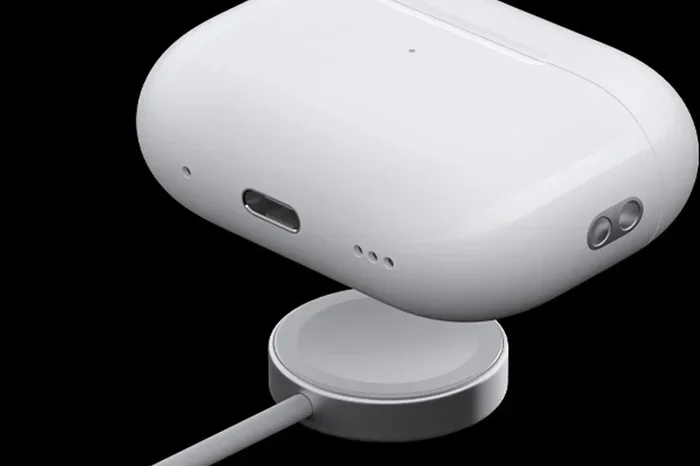
Visual guide about AirPods USB-C charging case
Image source: macworld.com
AirPods Pro (2nd Gen) Comparison
When Apple released the USB-C version of the AirPods Pro (2nd generation) in 2023, they didn’t just swap out the port. They added some pretty cool upgrades:
- Lossless Audio Support: The USB-C AirPods Pro can deliver lossless 20-bit, 48 kHz audio when paired with Apple Vision Pro. This means richer, more detailed sound.
- IP54 Dust and Water Resistance: Both the earbuds and the case now have improved resistance to dust and water splashes.
- Same H2 Chip: The internal processor is the same, so you get identical Active Noise Cancellation and Adaptive Transparency features.
So the port change came with a few bonus features, making the upgrade feel even sweeter.
AirPods 4: The New Standard
When Apple launched AirPods 4 in 2024, they didn’t sell a Lightning version at all. Both the standard AirPods 4 and the AirPods 4 with Active Noise Cancellation ship with USB-C cases. This was a clear signal that Apple considers USB-C the new normal.
Here’s what’s cool about AirPods 4:
- H2 Chip: Even the base model now has Apple’s H2 chip, enabling better sound and features.
- Personalized Spatial Audio: Dynamic head tracking comes standard.
- Voice Isolation: Your calls sound clearer, even in noisy environments.
- Up to 30 Hours of Battery Life: With the charging case, you can go days without plugging in.
Does the Charging Case Matter?
Yes! The charging case is where the USB-C port lives. Here are some things to know:
- Wired Charging: Use any USB-C cable to charge the case directly.
- Wireless Charging: The USB-C AirPods Pro (2nd gen) and AirPods 4 with ANC support Qi, MagSafe, and Apple Watch chargers.
- Battery Indicators: The status light and Find My functionality work the same way, regardless of the port type.
Pro Tip: If you’re switching from Lightning to USB-C, consider buying a couple of extra USB-C cables. They’re cheap, and you’ll want one at home, one at work, and maybe one in your car.
How to Tell if Your AirPods Have USB-C or Lightning
Not sure which version of AirPods you own? Don’t worry—you’re not alone. With so many models floating around, it can be confusing. Here are three quick ways to find out.
Look at the Charging Case
The easiest way is to just look at the bottom of your charging case:
- Small, narrow oval port: That’s Lightning.
- Wider, rounded rectangular port: That’s USB-C.
If you’ve got a USB-C port, congratulations—you’re living in the future. If it’s Lightning, you might want to consider upgrading, especially if you’re tired of carrying two types of cables.
Check the Model Number
Every AirPods case has a model number printed either on the underside of the lid or inside the case. Here’s a quick guide:
- A2968: AirPods Pro (2nd gen) with USB-C
- A3053 / A3054: AirPods 4 (depending on version)
- A3184: AirPods Max with USB-C
- A2700: AirPods Pro (2nd gen) with Lightning
- A2566 / A2565: AirPods (3rd generation)
You can also find this info in your iPhone: go to Settings > Bluetooth, tap the “i” next to your AirPods, and scroll down to see the model number.
Think About When You Bought Them
If you purchased AirPods after September 2024, there’s a very good chance they have USB-C. If you bought them before September 2023, they’re almost certainly Lightning. The in-between years are where things get tricky, so use the model number method for clarity.
What About AirPods Max?
You might be thinking, “Hey, you mentioned AirPods, but what about AirPods Max?” Great question—let’s address it.
AirPods Max are Apple’s over-ear headphones, and they got their USB-C update in September 2024, alongside the AirPods 4. Before that, they used Apple’s old Lightning port, which felt especially out of place on premium $549 headphones.
What’s New with USB-C AirPods Max?
The USB-C version isn’t a complete redesign—Apple kept the same physical design and most of the internals. But here are the key updates:
- USB-C Charging: Finally, you can use the same cable as your other Apple gear.
- New Colors: Apple introduced fresh color options to mark the update.
- Same Audio Quality: The H1 chip and 40mm drivers remain unchanged.
Honestly, the AirPods Max update was a bit underwhelming. Many fans were hoping for an H2 chip, longer battery life, or a lighter design. But at least the port situation is finally fixed.
The Bigger Picture: Apple’s USB-C Future
The AirPods USB-C transition is part of a much larger shift across Apple’s entire product lineup. Let’s zoom out and look at the bigger picture.
iPhone Finally Made the Switch
The iPhone 15, launched in September 2023, was the first iPhone to feature a USB-C port. This ended a decade of Lightning-only iPhones. Now, every new iPhone—from the budget SE models to the Pro Max—uses USB-C.
This means that for the first time ever, you can charge your iPhone, iPad, MacBook, and AirPods using the same cable. That’s huge for anyone who values simplicity.
What About Older Apple Products?
Apple still sells some Lightning accessories, but they’re slowly being phased out. You can still buy Lightning cables, but the selection is shrinking. If you have older AirPods or other Lightning devices, you might want to stock up on cables before they become hard to find.
The Environmental Angle
Apple has long talked about its commitment to the environment, and the USB-C shift actually helps in some ways. According to the European Commission, the common charger rule could save consumers €250 million annually and reduce electronic waste by about 11,000 tons per year. That’s a lot of cables that won’t end up in landfills.
Think of it like reusable shopping bags. One small change in habits can have a massive environmental impact over time.
Practical Tips for Living the USB-C Life
Making the switch to USB-C is exciting, but it does come with a small learning curve. Here are some practical tips to make the transition as smooth as possible.
Invest in Quality USB-C Cables
Not all USB-C cables are created equal. Here are a few things to look for:
- USB-IF Certified: Look for cables certified by the USB Implementers Forum. They’re safer and more reliable.
- Right Length: A 1-meter (3-foot) cable is great for travel. A 2-meter (6-foot) cable is better for your nightstand.
- Durable Materials: Braided cables last longer than plain plastic ones, especially if you toss them in bags.
Apple’s own USB-C cables work great, but third-party options from brands like Anker, Belkin, and UGREEN are often cheaper and just as reliable.
Declutter Your Cable Drawer
If you’ve got a junk drawer full of old Lightning cables, here’s your sign to clean it out. Toss or recycle the ones you don’t need, and replace them with a few good USB-C cables. Your future self will thank you.
Many electronics stores and Apple Stores offer recycling programs for old cables, so you can feel good about clearing out the clutter.
Get a Multi-Device Charger
If you want to go all-in on the one-cable life, consider a multi-device charging station. These let you charge your iPhone, AirPods, and Apple Watch simultaneously using a single power brick. It’s a small change that makes a big difference on your nightstand or desk.
Pro Tip: When traveling, bring a small power bank with a built-in USB-C cable. It can charge your AirPods case in a pinch and save you from being stranded with dead earbuds on a long flight.
Common Myths About AirPods and USB-C
Whenever a big tech change happens, myths and misconceptions spread fast. Let’s bust a few of the most common ones about AirPods and USB-C.
Myth 1: “All AirPods Have USB-C Now”
False. Only AirPods released or updated since September 2023 have USB-C. Older models still use Lightning, and Apple continues to sell some of them at discounted prices.
Myth 2: “USB-C AirPods Charge Faster Than Lightning Ones”
Mostly False. The actual charging speed of the AirPods earbuds is limited by the case’s internal circuitry, not just the cable type. While USB-C cables can support faster speeds, the AirPods case will only draw as much power as it needs. You won’t notice a huge difference in charging time.
Myth 3: “You Can Use Any USB-C Cable”
True, with a small caveat. Any working USB-C cable will charge your AirPods case. However, very cheap, uncertified cables might not be as durable or safe. Stick with reputable brands for the best experience.
Myth 4: “USB-C AirPods Sound Better”
Depends. The AirPods themselves sound the same as their Lightning counterparts, except for the AirPods Pro (2nd gen) USB-C version, which supports lossless audio when paired with Apple Vision Pro. If you’re using them with an iPhone, the sound quality is identical.
Myth 5: “Apple Forced USB-C Because They Wanted To”
Half-True. While Apple did eventually see the benefits of USB-C, the EU regulation was the primary catalyst. Without the law, Apple might have stuck with Lightning for a few more years.
What the Future Holds for AirPorts and Charging
Looking ahead, it’s clear that USB-C is here to stay—at least for the next several years. But what comes after USB-C? Some tech experts are already buzzing about completely wireless charging, where you’d just place your AirPods on a pad and forget about cables altogether.
The Wireless Power Consortium, which oversees the Qi standard, is developing Qi2, a more efficient magnetic alignment system. Apple contributed MagSafe technology to this standard, and future AirPods might rely entirely on magnetic wireless charging.
Imagine a world where you never plug in anything. You just drop your iPhone, AirPods, and Apple Watch on a charging mat, and they all juice up at once. That future isn’t far off, and the USB-C era might be a stepping stone to it.
Final Thoughts: Should You Upgrade to USB-C AirPods?
So, do the new AirPods have USB-C? Absolutely—every AirPods model released since late 2023 features the universal port. The transition was a long time coming, but it’s finally here, and it’s making life simpler for millions of users.
If you’re still using Lightning AirPods and you’re tired of juggling multiple cables, upgrading to a USB-C model is a no-brainer. You’ll get the convenience of one cable for all your devices, plus some bonus features depending on which model you choose.
On the other hand, if your current AirPods are working perfectly fine, there’s no rush. They’ll keep working, and you can upgrade when you’re ready. But the longer you wait, the more you’ll start to feel like the odd one out in a USB-C world.
At the end of the day, the shift to USB-C is about more than just a port. It’s about making technology easier, more accessible, and less wasteful. And that’s something we can all get behind.
So grab your USB-C cable, charge up those new AirPods, and enjoy the simple pleasure of using one cable for everything. Your backpack will thank you.
Frequently Asked Questions
Do all new AirPods have USB-C?
Yes, every AirPods model released or updated since September 2023 features USB-C charging. This includes AirPods Pro (2nd generation), AirPods 4, and AirPods Max. However, older AirPods models that Apple still sells may use Lightning.
Which AirPods were the first to have USB-C?
The AirPods Pro (2nd generation) with USB-C were the first AirPods to make the switch, launching in September 2023. This release coincided with the iPhone 15 lineup, which also adopted USB-C.
Can I charge USB-C AirPods with a Lightning cable?
No, USB-C AirPods require a USB-C cable to charge. They are not compatible with Lightning cables. However, you can still charge them wirelessly using any Qi or MagSafe charger.
Do USB-C AirPods charge faster than Lightning AirPods?
Not noticeably. The charging speed is limited by the AirPods case’s internal hardware, not the cable type. While USB-C technically supports faster charging, you won’t see a major difference in how quickly your AirPods power up.
Are there any benefits to USB-C AirPods besides the port?
Yes! The AirPods Pro (2nd generation) with USB-C supports lossless audio with Apple Vision Pro and has an IP54 rating for dust and water resistance. AirPods 4 also introduced the H2 chip to the base model, enabling better sound and features.
Will Apple stop making Lightning AirPods?
Apple has already phased out most Lightning AirPods models from its main lineup. However, some older models may still be available through third-party retailers or Apple’s refurbished store until stock runs out.