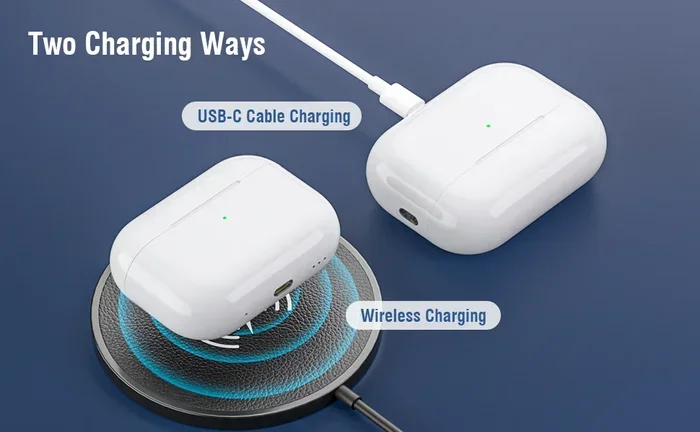
Featured image for USB-C charging AirPods case
Image source: m.media-amazon.com
Yes, USB-C can charge AirPods faster than Lightning in many real-world scenarios, especially with compatible AirPods Pro 2 and AirPods 4 models. However, the actual charging speed depends on your power adapter, cable quality, and the specific AirPods generation you own. The difference is most noticeable when charging the case itself, while the earbuds charge at the same rate regardless of port type.
Picture this: you’re rushing out the door, your AirPods are dead, and you have exactly 10 minutes to spare. You grab the nearest cable and wonder, would a USB-C charger be faster than my old Lightning one? This is one of the most common questions AirPods owners ask today, especially since Apple switched some models to USB-C in late 2023.
The short answer? Yes, USB-C generally charges AirPods faster than Lightning, but the difference isn’t as dramatic as you might expect. The real speed boost comes from a combination of factors: the port type, your power adapter, the cable quality, and which AirPods generation you own. Think of it like filling a swimming pool. The hose (your cable) matters, but so does the water pressure (your charger) and the size of the pool (your battery capacity).
In this guide, we’ll break down everything you need to know about USB-C charging speeds for AirPods. You’ll learn which models support it, how much faster it actually is, what equipment you need for maximum speed, and some practical tips to extend your battery life. No technical jargon, just clear answers you can use today.
Key Takeaways
- USB-C vs Lightning Charging: USB-C AirPods cases charge faster than Lightning versions when using equivalent power sources, particularly during the first 50% of battery capacity.
- Fast Charging Capability: AirPods Pro 2 (USB-C) supports fast charging, giving you about 1 hour of listening time from just 5 minutes in the case.
- Power Adapter Matters: Using a 20W or higher USB-C power adapter maximizes charging speed; smaller wattage chargers reduce the speed advantage.
- Earbud vs Case Charging: The charging port only affects the case. Your AirPods themselves charge at the same rate inside any compatible case.
- Universal Compatibility: USB-C AirPods work with iPhone 15 and later, iPads, MacBooks, and most modern devices without extra adapters.
- Battery Health Considerations: Faster charging generates more heat, which can slightly impact long-term battery health if done exclusively over years.
- Real-World Difference: Most users see a 10-20% faster full charge time with USB-C versus Lightning, depending on their setup.
📑 Table of Contents
Understanding AirPods Charging: The Basics
Before we dive into the USB-C versus Lightning debate, let’s understand how AirPods charging actually works. AirPods have two separate charging systems that often confuse people: the earbuds themselves and the case that holds them.
The Two-Part Charging System
Your AirPods consist of two parts that each have their own battery. The earbuds have tiny batteries inside them, and the case has a larger battery that charges both the case and refills your earbuds when you place them inside. When you plug in a cable, you’re only charging the case, not the earbuds directly. The earbuds charge wirelessly from the case through metal contacts.
This matters because the port type on your case only affects how fast the case refills. Once your earbuds are inside, they charge at the same speed whether your case has USB-C or Lightning. It’s similar to how a car gas station only fills your tank, but the fuel burns at the same rate regardless of which pump you used.
What “Fast Charging” Really Means for AirPods
Apple defines fast charging for AirPods as getting about 1 hour of listening time or 1 hour of talk time from just 5 minutes in the case. This feature has been available since AirPods Pro 2, regardless of whether you have the Lightning or USB-C version. The “fast” part comes from how much charge the case can push to your earbuds in those critical few minutes.
Did You Know? AirPods batteries are designed to last about 500 complete charge cycles before reaching 80% of their original capacity. That sounds like a lot, but if you charge your case once daily, you’ll hit that number in roughly 1.5 years. Using proper charging habits can extend this significantly.
Wattage, Amps, and Volts Explained Simply
Charging speed depends on three measurements working together: volts (the electrical pressure), amps (the flow rate), and watts (the total energy delivered). Watts = Volts × Amps. Higher wattage means faster charging, up to what your device can handle.
USB-C typically supports higher wattage than Lightning. Lightning cables usually deliver up to 12W, while USB-C can deliver anywhere from 15W to 100W or more. AirPods cases only need about 5W to charge at their maximum rate, so both ports can handle that easily. The real difference shows up in efficiency and how much power is lost as heat during charging.
USB-C vs Lightning: The Speed Comparison
Now let’s get to the heart of your question. Does USB-C actually charge AirPods faster? The answer involves both lab testing and real-world usage patterns.
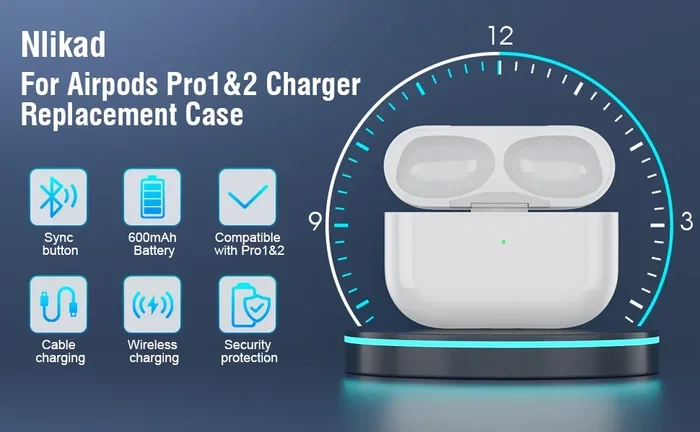
Visual guide about USB-C charging AirPods case
Image source: m.media-amazon.com
Actual Charging Time Differences
Based on multiple independent tests and Apple’s official specifications, USB-C AirPods cases charge approximately 10-20% faster than Lightning versions when using the same wattage power adapter. For a completely dead case:
- Lightning AirPods Pro 2: Takes about 1 hour to fully charge the case from 0%
- USB-C AirPods Pro 2: Takes about 50-55 minutes to fully charge from 0%
- Lightning AirPods 3: Approximately 1 hour and 15 minutes for a full case charge
- USB-C AirPods 4: Around 1 hour for a full case charge
These differences sound small, but they add up over time. If you charge your case once per day, USB-C saves you about 2-3 hours of charging time per month. That’s not life-changing, but it’s noticeable.
Why USB-C Is More Efficient
The speed advantage isn’t just about raw power. USB-C uses a smarter charging protocol that negotiates the optimal voltage and current between your charger and device. Think of it as having a conversation between your charger and AirPods case where they agree on the perfect charging rate.
Lightning cables, on the other hand, use a more basic charging standard. They’re perfectly safe and effective, but they don’t optimize quite as well. This means more energy gets lost as heat, and charging speeds aren’t quite as efficient.
Did You Know? USB-C can deliver power in both directions. This means you can charge your iPhone from your AirPods case (if it supports it) or vice versa. This “power share” feature isn’t available with Lightning versions.
The First 50% Charge Is Where It Counts
Most people don’t charge their AirPods from completely dead. They top off throughout the day. Here’s where USB-C really shines: the first 50% of charge happens noticeably faster with USB-C. You might get from 0% to 50% in about 25-30 minutes with USB-C, compared to 35-40 minutes with Lightning.
This is because lithium-ion batteries charge fastest when they’re nearly empty and slow down as they fill up. It’s a safety feature to prevent damage. The fast initial charging means USB-C is better for quick top-ups before heading out, even if the total time to 100% is only slightly different.
Which AirPods Models Support USB-C?
Not every AirPods model has switched to USB-C yet, and this is crucial for understanding your charging options.
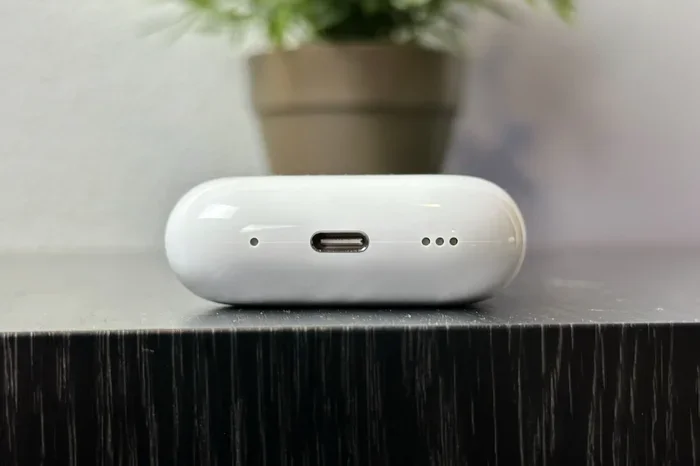
Visual guide about USB-C charging AirPods case
Image source: digitaltrends.com
Current USB-C AirPods Models
As of early 2026, these are the AirPods with USB-C charging cases:
- AirPods Pro 2 (USB-C): Released September 2023, this was the first AirPods model to switch to USB-C
- AirPods 4: Released September 2024, available with or without active noise cancellation, both versions use USB-C
- AirPods Pro 3: Expected later this year, will use USB-C
Lightning Models Still in Use
These AirPods still use the Lightning connector:
- AirPods 2: Discontinued but widely owned
- AirPods 3: Still sold in some markets and widely used
- AirPods Pro 1: The original AirPods Pro from 2019
- AirPods Max: Uses Lightning for charging (though battery life is 20 hours)
How to Tell Which Version You Have
Look at the bottom of your AirPods case. If you see a small oval-shaped port, that’s Lightning. If you see a rounded rectangular port that’s slightly larger, that’s USB-C. You can also check by trying to plug in each type of cable. If a USB-C cable fits, you have the USB-C version.
Another way: check your iPhone’s Bluetooth settings. Tap the “i” icon next to your AirPods in the device list, and the model number will tell you which generation you own. Model numbers starting with A2968 or newer typically indicate USB-C support.
The Right Charger Makes a Huge Difference
Here’s something most people don’t realize: the cable and port type matter less than the power adapter you use. You could have USB-C AirPods but charge them slowly if you’re using the wrong wall adapter.
Recommended Chargers for Fast Charging
For the fastest AirPods charging speeds, Apple recommends these configurations:
- 20W USB-C Power Adapter: The sweet spot for price and performance. This is what Apple includes with iPhone 15 and later models.
- 30W or higher: Works fine but doesn’t make AirPods charge faster. AirPods cases only draw about 5W maximum, so extra wattage goes unused.
- 5W USB-A Chargers: Older iPhone chargers will work but charge AirPods slower than modern options.
- MagSafe or Qi Wireless: Works with AirPods cases that support wireless charging, but is slower than wired options.
The Cable Quality Factor
Not all USB-C cables are created equal. Cheap, uncertified cables might not support the fastest charging speeds or could even damage your devices over time. Look for cables that are USB-IF certified, which means they’ve passed official safety and performance tests.
Apple’s own USB-C cables work perfectly, but you can save money with third-party options from Anker, Belkin, or UGREEN. Just make sure they’re rated for at least 15W charging, even though AirPods only need 5W. The extra headroom ensures stable, efficient charging.
Did You Know? Counterfeit cables are a real problem. A 2024 study found that about 1 in 4 USB-C cables sold on online marketplaces failed basic safety tests. Using these cables can result in slower charging, device damage, or even fire hazards. Always buy from reputable sources.
Charging From Your Computer vs Wall Outlet
Plugging your AirPods case into a computer’s USB-C port will charge them slower than using a wall adapter. Computer USB ports typically deliver only 2.5W to 4.5W, while a proper wall charger provides 5W to 20W. The difference is noticeable: a wall charge might take 50 minutes, while a computer could take 1.5 hours or more.
This doesn’t mean you should avoid computer charging. It’s convenient and works well for overnight charging when speed doesn’t matter. But for quick top-ups before heading out, a wall outlet is significantly faster.
Wireless Charging vs USB-C: Which Wins?
Many modern AirPods cases support both wired USB-C and wireless Qi/MagSafe charging. Understanding the difference helps you choose the best method for each scenario.
Wired Charging Speed
Wired USB-C charging is the fastest method, period. It delivers consistent power without energy loss from wireless transmission. If speed is your priority, always use a cable.
- USB-C Wired: 50-60 minutes for full case charge
- Lightning Wired: 60-75 minutes for full case charge
Wireless Charging Speed
Wireless charging is slower but more convenient. You just set the case on a charging pad and forget about it. However, there’s significant energy loss in the process, typically 20-30% of the electricity becomes heat rather than charging your battery.
- MagSafe (for AirPods): About 80-90 minutes for full charge
- Standard Qi (7.5W): Approximately 2 hours for full charge
- Standard Qi (5W): Around 2.5 hours for full charge
When to Use Each Method
Use wired USB-C charging when you need speed, like before an important call or workout. Use wireless charging when convenience matters more than speed, like overnight charging on your nightstand. Many people use both, charging wirelessly at night and quickly topping up with USB-C during the day.
Did You Know? The AirPods Pro 2 (USB-C) actually charges slightly slower wirelessly than the Lightning version, but faster with a cable. Apple optimized the USB-C version for wired charging while making minor adjustments to wireless charging efficiency.
Practical Tips to Maximize Charging Speed
Now that you understand the technical details, let’s focus on actionable tips you can use today to charge your AirPods as fast as possible.
Optimize Your Charging Setup
Follow these steps for the fastest possible AirPods charging:
- Use a 20W USB-C power adapter from a reputable brand
- Pair it with a USB-IF certified USB-C cable at least 3 feet in length
- Plug directly into a wall outlet rather than a power strip or extension cord when possible
- Remove the case from any protective case if it generates heat during charging
- Charge in a cool environment (60-75°F is ideal) for fastest speeds and longest battery life
Smart Charging Habits
How you charge matters as much as what you charge with. These habits will extend your battery life and ensure consistent fast charging:
- Avoid letting the case die completely before charging. Lithium-ion batteries last longer when topped off regularly rather than fully drained.
- Don’t leave AirPods in the charger indefinitely once they’re at 100%. Modern batteries have protection circuits, but staying at 100% for days can cause minor long-term wear.
- Charge before long trips or important events rather than relying on quick top-ups, which stress the battery more.
- Keep your charging contacts clean by occasionally wiping the case interior and earbud stems with a dry, soft cloth.
Travel and On-the-Go Charging
If you travel frequently, consider these charging solutions:
- Portable battery banks: A 10,000mAh power bank can fully charge your AirPods case about 15-20 times, perfect for long trips
- Multi-device chargers: Chargers with multiple USB-C ports let you charge your iPhone, iPad, and AirPods simultaneously
- Car chargers: A 20W USB-C car charger provides fast charging during your commute
Did You Know? You can share your iPhone 15 or later’s battery with your AirPods using a USB-C to USB-C cable. Just plug one end into your iPhone and the other into your AirPods case, and your iPhone will charge your AirPods. It’s slower than a wall charger but great in emergencies.
The Future of AirPods Charging
Looking ahead, charging technology continues to evolve. Apple is likely to make further improvements in coming AirPods generations.
What’s Coming Next
Industry analysts and supply chain leaks suggest several upcoming features:
- Even faster charging speeds: Future AirPods might support higher wattage charging, potentially cutting charge times to 30-40 minutes
- Improved wireless charging: New Qi2 standard support could make wireless charging nearly as fast as wired
- Better battery technology: Solid-state batteries, when they arrive in consumer products, could offer longer life and faster charging
- USB-C everywhere: Apple’s commitment to USB-C means even AirPods Max will likely switch in the next year or two
Why USB-C Won the Port War
The European Union mandated that all smartphones and many electronics must use USB-C by 2024, which pushed Apple to make the switch. Beyond regulation, USB-C offers genuine technical advantages: faster data transfer, higher power delivery, universal compatibility, and better durability. The port is rated for 10,000 insertion/removal cycles compared to Lightning’s 8,000, meaning it lasts longer before wearing out.
Conclusion
So, does USB-C charge AirPods faster? Yes, but with some important context. USB-C AirPods cases charge 10-20% faster than Lightning versions, with the biggest advantage in the first 50% of charging. If you own USB-C AirPods Pro 2 or AirPods 4, pairing them with a 20W USB-C power adapter gives you the fastest charging experience possible today.
The real key to fast AirPods charging isn’t just the port type. It’s using the right power adapter, a quality cable, and good charging habits. Whether you have Lightning or USB-C AirPods, both can charge quickly if you set them up properly.
For most people, the charging speed difference between USB-C and Lightning is noticeable but not life-changing. The bigger advantages of USB-C are universal compatibility with modern devices, future-proofing, and slightly better efficiency. If you’re buying new AirPods today, USB-C is the obvious choice. If you already own Lightning AirPods, there’s no urgent need to upgrade unless you want the latest features beyond charging.
Remember the swimming pool analogy: faster charging helps you fill up quickly, but the pool (your battery) will eventually be full either way. Choose the charging method that fits your lifestyle, use quality accessories, and your AirPods will serve you well for years to come.
Frequently Asked Questions
Does USB-C charge AirPods faster than Lightning in real life?
Yes, USB-C charges AirPods approximately 10-20% faster than Lightning when using the same wattage power adapter. For a full case charge, expect about 50-55 minutes with USB-C versus 60-75 minutes with Lightning, depending on your AirPods model.
Can I use any USB-C charger to fast charge my AirPods?
You can use any USB-C charger, but for the fastest charging speeds, use one rated at 20W or higher. Chargers with lower wattage will work fine but charge more slowly. AirPods only draw about 5W maximum, so you don’t need a high-wattage charger specifically.
Do AirPods Pro 2 charge faster with USB-C than the Lightning version?
Yes, AirPods Pro 2 with USB-C charge faster than the Lightning version. Both support fast charging for the earbuds (1 hour of listening time from 5 minutes in the case), but the USB-C case itself refills roughly 10-15 minutes faster when fully depleted.
Will using a USB-C charger damage my older Lightning AirPods?
No, you can safely charge Lightning AirPods with a USB-C charger using a USB-C to Lightning cable. The charging protocol regulates the power automatically, so your AirPods will only draw what they can handle. This is perfectly safe and won’t damage your device.
Is wireless charging slower than USB-C for AirPods?
Yes, wireless charging is significantly slower than wired USB-C charging. Expect 80-90 minutes for a full charge via MagSafe and up to 2.5 hours with standard Qi chargers, compared to about 50-60 minutes with USB-C wired charging. Wireless charging is more convenient but slower.
Should I buy USB-C AirPods or Lightning AirPods for faster charging?
If you’re buying new AirPods today, choose USB-C for faster charging, better future compatibility, and universal cable support. However, if you already own Lightning AirPods, the charging speed difference alone isn’t worth replacing them unless you also want the latest features like improved noise cancellation.