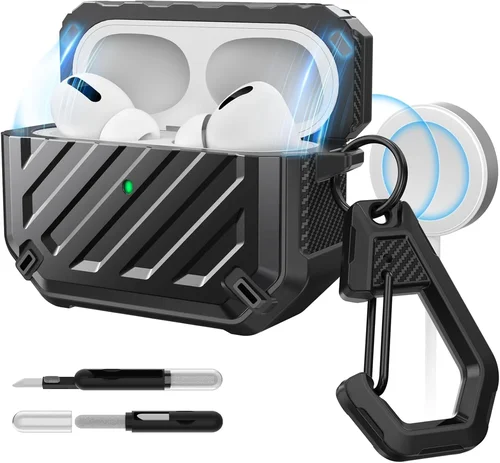
The AirPods Pro 2 are among Apple’s most advanced wireless earbuds, offering industry-leading active noise cancellation, spatial audio, and seamless integration with the Apple ecosystem. But as impressive as they are, their sleek charging case—while functional—isn’t exactly built to withstand daily wear and tear. That’s where a high-quality MagSafe-compatible case comes in. Whether you’re tossing your AirPods into a backpack, dropping them on a gym floor, or simply want to add a personal touch, a protective case with MagSafe support ensures your investment stays safe, secure, and ready to charge wirelessly with any MagSafe-compatible charger.
This comprehensive buying guide is designed for anyone who owns—or is considering buying—AirPods Pro 2 and wants to protect them without sacrificing convenience. Whether you’re a frequent traveler, a fitness enthusiast, a student, or just someone who values durability and style, we’ll walk you through everything you need to know before making a purchase. You’ll learn how to evaluate build quality, understand MagSafe compatibility, compare materials, avoid common pitfalls, and ultimately choose a case that fits your lifestyle and budget. With so many options flooding the market—from ultra-thin silicone sleeves to rugged armored shells—it’s easy to get overwhelmed. Our goal is to cut through the noise and help you make a confident, informed decision.
The market for AirPods Pro 2 cases has exploded since the earbuds’ release, with hundreds of brands offering everything from minimalist designs to heavy-duty protection. While Apple sells its own MagSafe-compatible case, third-party manufacturers have stepped up with innovative features, better materials, and often more affordable pricing. However, not all cases are created equal. Some may interfere with wireless charging, others might not fit snugly, and a few could even damage your AirPods over time. This guide will equip you with the knowledge to distinguish between gimmicks and genuine value, ensuring you get a case that enhances—not hinders—your AirPods Pro 2 experience.

What to Look for When Buying Buying Guide
1. MagSafe Compatibility & Wireless Charging Performance
One of the biggest selling points of the AirPods Pro 2 case is its built-in MagSafe compatibility, which allows it to snap securely onto MagSafe chargers and other magnetic accessories. When choosing a third-party case, this feature should be non-negotiable. A true MagSafe-compatible case will have precisely placed magnets that align perfectly with Apple’s MagSafe standard, ensuring strong attachment and reliable wireless charging at full speed (up to 15W with a compatible charger).
Look for cases that explicitly state “MagSafe certified” or “tested with MagSafe.” Avoid generic claims like “works with wireless charging”—this often means the case supports Qi charging but lacks the magnetic alignment needed for true MagSafe functionality. Poorly designed cases can cause misalignment, leading to slower charging, overheating, or complete failure to charge. Some budget cases use weaker magnets that don’t hold the AirPods firmly, risking detachment during use or while charging on a stand.
Additionally, test reviews often mention whether the case allows access to the Lightning port (for wired charging) without removing the case—a key convenience factor. The best cases maintain full MagSafe performance while preserving all original functions.
2. Build Quality & Durability
Your AirPods Pro 2 case goes everywhere you do—through pockets, bags, car cup holders, and gym lockers. It needs to withstand drops, scratches, dust, and moisture. Build quality is arguably the most important factor when selecting a protective case. High-end cases use premium materials like aerospace-grade polycarbonate, reinforced TPU (thermoplastic polyurethane), or even aluminum alloy frames for added rigidity.
Look for features such as shock absorption, drop protection ratings (e.g., MIL-STD-810G certified), and reinforced corners—these indicate thoughtful engineering. Silicone cases offer excellent grip and cushioning but may attract lint and degrade over time. Hard-shell cases provide superior scratch resistance but can crack under extreme impact. Hybrid designs—combining a soft inner layer with a rigid outer shell—often strike the best balance.
Also consider hinge durability if the case has a flip-top design. Cheap hinges can break after just a few weeks of use. Premium cases use metal or reinforced plastic hinges tested for thousands of open/close cycles. Always check user reviews for long-term durability feedback, as marketing claims don’t always reflect real-world performance.
3. Fit & Precision Engineering
A poorly fitting case is worse than no case at all. It can cause the AirPods to rattle inside, interfere with button presses (like the force sensor on the stem), or even prevent the lid from closing properly. The AirPods Pro 2 case has very tight tolerances, so even a millimeter of extra thickness can cause issues.
Top-tier manufacturers use 3D scanning and CNC machining to replicate the exact dimensions of the original case. Look for cases described as “precision-fit,” “OEM-grade,” or “laser-measured.” Many brands offer fit guarantees or free replacements if the case doesn’t sit flush. Avoid generic “universal” cases—they’re rarely optimized for specific models.
Another subtle but critical detail: ensure the case doesn’t obstruct the status LED or the speaker grille used for Find My alerts. Some bulky cases cover these elements, making it harder to diagnose charging status or locate lost AirPods.
4. Material & Aesthetic Options
Material choice affects not only protection but also feel, weight, and aesthetics. Common materials include:
- Silicone: Soft, grippy, and shock-absorbent. Great for everyday use but prone to attracting dust and yellowing over time.
- TPU (Flexible Plastic): More durable than silicone, resistant to oils and UV light, and available in translucent or colored finishes.
- Polycarbonate (Hard Shell): Lightweight yet strong, ideal for scratch resistance. Often used in clear cases to show off the original design.
- Leather/Woven Fabric: Premium look and feel, often used in luxury cases. May offer less drop protection but adds sophistication.
- Metal (Aluminum/Titanium): Ultra-durable and stylish, but heavier and can interfere with wireless signals if not properly shielded.
Aesthetics matter too. Whether you prefer minimalist black, vibrant colors, transparent designs, or custom engravings, there’s a case for every taste. Some brands even offer personalized options like monograms or artwork. Just remember: style shouldn’t compromise function. A beautifully designed case that cracks on the first drop isn’t worth it.
5. Additional Features & Functionality
Beyond basic protection, many cases offer useful extras that enhance usability:
- Carabiner or Keyring Attachment: Lets you clip your AirPods to a bag, belt loop, or keys—great for runners or commuters.
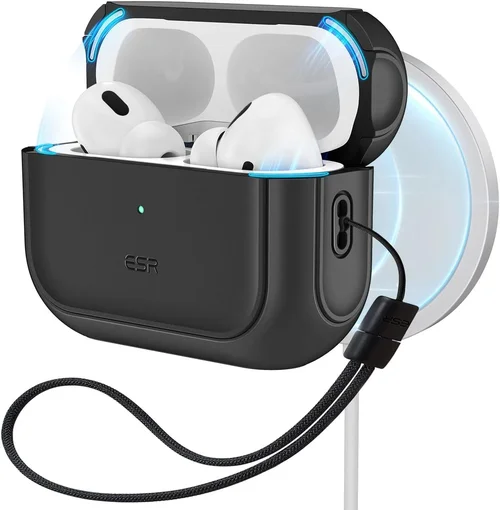
- Lanyard Compatibility: Some cases include a built-in loop or strap slot for hands-free carrying.
- Anti-Loss Features: Built-in Tile or Apple Find My integration (via a separate tracker) helps locate misplaced cases.
- Water/Dust Resistance: While not fully waterproof, some cases offer IPX4-level splash resistance for light rain or sweat.
- Kickstand Function: Rare but handy—allows the case to stand upright on a desk for easy access.
Consider your daily routine. If you’re always on the move, a carabiner might be essential. If you work at a desk, a kickstand could be a nice bonus. But don’t pay extra for features you’ll never use—simplicity often wins.
6. Brand Reputation & Customer Support
Not all brands are equal. Established names like Spigen, OtterBox, Caseology, and Pitaka have proven track records for quality and reliability. They invest in R&D, rigorous testing, and responsive customer service. Lesser-known brands may offer lower prices, but they often cut corners on materials or skip quality control.
Check for warranties—many reputable brands offer 12–24 month coverage against defects. Read recent customer reviews (especially on Amazon, Best Buy, or the brand’s own site) to gauge consistency. Watch out for red flags like frequent complaints about poor fit, broken hinges, or non-functional MagSafe.
Also consider sustainability. Some brands now use recycled materials or offer recycling programs—a growing concern for eco-conscious buyers.
7. Price vs. Value
Price alone shouldn’t dictate your choice. A $10 case might seem like a bargain, but if it breaks in a month or blocks wireless charging, it’s a false economy. Conversely, a $50 case with military-grade protection may be overkill if you’re careful with your gear.
Focus on value: what do you get for your money? A mid-range case ($20–$35) often delivers the best balance of quality, features, and longevity. Premium cases ($40+) typically offer superior materials, better aesthetics, and extended warranties. Set a budget based on how much you’re willing to spend to protect a $249 pair of earbuds—most experts recommend spending 10–15% of the device’s value on accessories.
8. User Reviews & Real-World Testing
Never rely solely on product descriptions. User reviews reveal flaws that specs sheets hide—like cases that turn yellow after sun exposure, magnets that weaken over time, or lids that don’t stay closed. Look for detailed reviews with photos or videos showing the case in action.
Pay attention to long-term feedback (“after 6 months of use…”) rather than first impressions. Also check return rates—high return percentages on retail sites can signal widespread dissatisfaction. Forums like Reddit’s r/Apple or r/AirPods are goldmines for unbiased opinions.
Different Types of Buying Guide

Common Buying Mistakes to Avoid
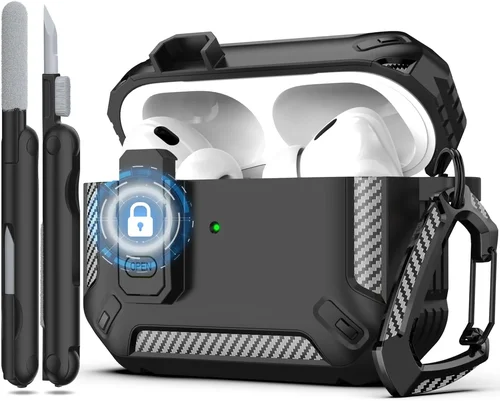
❌ Mistake: Ignoring MagSafe Certification
Why it’s bad: Many cheap cases claim “wireless charging support” but lack proper magnetic alignment. This leads to frustrating charging experiences—your AirPods may not charge consistently, or the case might detach from the charger mid-session.
What to do instead: Only buy cases that explicitly mention MagSafe compatibility and ideally have third-party testing or certification. Look for phrases like “MagSafe optimized” or “tested with Apple MagSafe charger.”
❌ Mistake: Choosing Style Over Protection
Why it’s bad: A gorgeous leather case might look great in photos, but if it offers no drop protection, your $249 AirPods could be shattered after one fall. Prioritizing aesthetics alone risks your investment.
What to do instead: Balance form and function. Choose a case that looks good and meets your protection needs. Many premium brands now offer stylish designs with robust builds.
❌ Mistake: Overlooking Fit Precision
Why it’s bad: A loose-fitting case can cause the AirPods to shift inside, potentially damaging the stems or blocking the charging pins. It may also prevent the lid from sealing properly, exposing the earbuds to dust.
What to do instead: Read fit-specific reviews and choose brands known for precision engineering. If possible, check return policies in case the fit isn’t perfect.
❌ Mistake: Buying Based Solely on Price
Why it’s bad: The cheapest option often uses low-grade materials that degrade quickly or fail to protect. Conversely, the most expensive case may include unnecessary features you’ll never use.
What to do instead: Evaluate cost per use and long-term value. A $30 case that lasts two years is better than a $10 case that breaks in two months.
❌ Mistake: Neglecting Port and Button Access
Why it’s bad: Some cases cover the Lightning port or make the force sensor hard to press. This forces you to remove the case for charging or adjusting volume—defeating the purpose of a protective cover.
What to do instead: Ensure the case has precise cutouts for all ports, buttons, and indicators. Testimonials often mention ease of use—pay attention to these details.
❌ Mistake: Skipping User Reviews
Why it’s bad: Marketing photos and descriptions are curated. Real users reveal hidden flaws like poor magnet strength, color fading, or hinge failures.
What to do instead: Spend 10 minutes reading recent, verified purchase reviews. Look for patterns—if multiple users report the same issue, it’s likely real.
❌ Mistake: Assuming All “Clear” Cases Are Equal
Why it’s bad: Low-quality clear cases turn yellow within weeks due to UV exposure and oil absorption. This ruins the aesthetic and can make the case sticky.
What to do instead: Choose clear cases made from yellowing-resistant TPU or polycarbonate. Brands like Spigen and ESR use premium materials that stay crystal clear for years.
Budget Guidelines: How Much Should You Spend?
When it comes to AirPods Pro 2 cases with MagSafe, your budget should reflect how much you value protection, convenience, and longevity. Here’s a realistic breakdown:
Entry-Level ($10 – $18): These are typically basic silicone or thin TPU sleeves. They offer minimal drop protection and may lack true MagSafe alignment. Best for users who handle their devices carefully and prioritize affordability. Expect shorter lifespan and potential fit issues.
Mid-Range ($19 – $35): This is the sweet spot for most buyers. Cases in this range often feature hybrid designs, reliable MagSafe performance, precise fit, and decent durability. Brands like ESR, Caseology, and Ringke dominate here. You get excellent value without overspending.
Premium ($36 – $50): Ideal for professionals, travelers, or anyone who wants top-tier protection and style. These cases use high-end materials (e.g., aramid fiber, reinforced polycarbonate), offer military-grade drop ratings, and include extras like carabiners or anti-loss features. Warranties are usually included.
Luxury ($50+): Reserved for collectors, gift-givers, or design enthusiasts. Think hand-stitched leather, titanium frames, or artist collaborations. While visually stunning, these may sacrifice some practicality (e.g., heavier weight, reduced grip). Only choose this tier if aesthetics are your top priority.
Expert Tips for Getting the Best Deal
- Wait for seasonal sales: Black Friday, Cyber Monday, Amazon Prime Day, and back-to-school seasons often bring 20–40% discounts on premium cases. Sign up for brand newsletters to get early access.
- Buy directly from reputable retailers: Amazon, Best Buy, Apple Store, and brand websites (like Spigen.com) offer buyer protection, easy returns, and authentic products. Avoid unknown eBay or Wish sellers.
- Check for bundle deals: Some brands sell AirPods cases with screen protectors, cleaning kits, or MagSafe chargers at a discount. Great for maximizing value.
- Read the fine print on warranties: A “lifetime warranty” might only cover manufacturing defects—not drops or wear. Understand what’s included before relying on it.
- Test return policies: Choose retailers with hassle-free returns (30 days or more). If the case doesn’t fit or perform as expected, you shouldn’t be stuck with it.
- Look for refurbished or open-box options: Certified pre-owned cases from trusted sellers can save you 20–30% with minimal risk.
- Use price tracking tools: Apps like Honey or CamelCamelCamel alert you when prices drop on Amazon or other sites.
- Consider sustainability: Some brands offer trade-in programs or use eco-friendly packaging—small steps that add up.

Frequently Asked Questions
Q: Will a third-party MagSafe case work with Apple’s official MagSafe charger?
A: Yes—if it’s truly MagSafe compatible. Look for cases that specify alignment with Apple’s MagSafe standard. Most reputable brands test their products with genuine Apple chargers to ensure seamless performance.
Q: Can I still use Find My if my AirPods are in a case?
A: Absolutely. As long as the case doesn’t block the speaker grille on the bottom of the AirPods case, Find My alerts will play normally. Avoid overly thick or sealed designs that cover this area.
Q: Do all MagSafe cases support fast wireless charging?
A: Not necessarily. While MagSafe enables alignment, charging speed depends on the charger and the case’s material thickness. Thinner cases generally allow faster charging. Check product specs for wattage compatibility.
Q: Are leather cases bad for wireless charging?
A: High-quality leather cases are designed with charging in mind. They’re thin enough not to interfere with Qi or MagSafe signals. Just avoid cases with metal backing or excessive padding.
Q: How do I clean my AirPods case cover?
A: For silicone or TPU: wipe with a damp cloth and mild soap. For leather: use a specialized leather cleaner. Avoid harsh chemicals or submerging the case in water.
Q: Will a case prevent me from using the Lightning port?
A: Only poorly designed ones. Quality cases have precise cutouts that allow full access to the port, buttons, and LED. Always verify this in reviews.
Q: Can I attach a PopSocket or phone grip to my AirPods case?
A: It’s not recommended. The small surface area and frequent handling can cause adhesives to fail. Instead, choose a case with a built-in carabiner or lanyard loop.
Q: Do clear cases really turn yellow?
A: Cheap TPU or silicone often does—especially with sun exposure or skin oils. Premium clear cases use UV-stabilized materials that resist yellowing for years.
Q: Is it worth buying an Apple-made case?
A: Apple’s official MagSafe case is well-made and guaranteed compatible, but it’s pricey ($39) and offers minimal drop protection. Third-party alternatives often provide better value and more features.
Q: How long should a good AirPods case last?
A: With proper care, a mid-to-premium case should last 1.5–3 years. Signs it’s time to replace include cracks, loose hinges, faded magnets, or poor fit.
Our Final Recommendations
Best for Budget-Conscious Buyers: ESR HaloLock Case ($17) – Offers true MagSafe alignment, slim profile, and reliable drop protection at an unbeatable price. Perfect for students or casual users.
Best Overall Value: Spigen Ultra Hybrid MagFit ($28) – Combines crystal-clear polycarbonate with a shock-absorbent TPU bumper. Military-grade certified, precise fit, and excellent MagSafe performance.
Best Premium Option: Pitaka MagEZ Case 2 ($45) – Made from ultra-light aramid fiber, this case is incredibly durable, stylish, and maintains perfect MagSafe functionality. Ideal for professionals.
Best for Beginners: Apple MagSafe Case ($39) – If you want guaranteed compatibility and don’t mind limited protection, Apple’s own case is a safe, no-fuss choice.
Best for Advanced Users: OtterBox Defender Series Pro ($42) – Rugged, multi-layer protection with a built-in carabiner. Built for adventurers who need maximum durability without sacrificing MagSafe.
Conclusion: Making the Right Choice
Choosing the right MagSafe-compatible case for your AirPods Pro 2 isn’t just about adding a splash of color or preventing scratches—it’s about preserving a significant investment and enhancing your daily experience. From ensuring seamless wireless charging to surviving the rigors of everyday life, the ideal case should align with your lifestyle, budget, and aesthetic preferences. We’ve covered the critical factors: MagSafe performance, build quality, fit precision, material choice, added features, brand trust, and real-user feedback. We’ve also highlighted common pitfalls and provided actionable tips to help you avoid them.
Remember, the best case is the one that you’ll actually use—and that means it needs to feel right in your hand, work flawlessly with your charger, and give you peace of mind. Don’t rush the decision. Take time to read reviews, compare options, and prioritize what matters most to you. Whether you’re a minimalist who values slim profiles or an outdoor enthusiast needing military-grade armor, there’s a perfect case out there waiting for you.
Now that you’re equipped with expert knowledge, go forth and protect your AirPods Pro 2 with confidence. Your ears—and your wallet—will thank you.