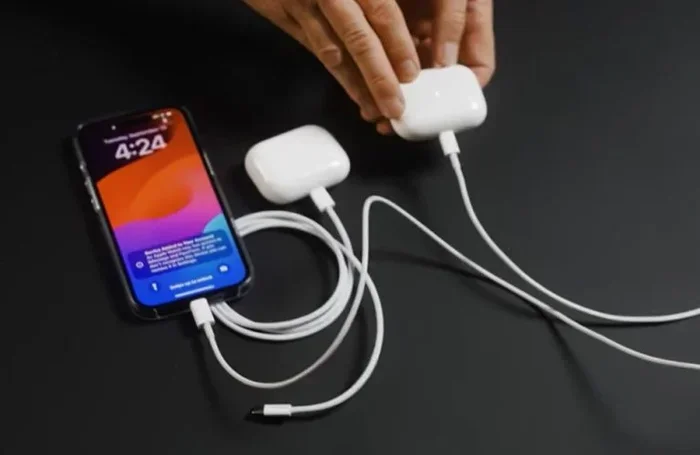
Featured image for Airpods 2 USB-C charging
Image source: applegadgetsbd.com
No, AirPods 2 do not support USB-C charging out of the box. They come with a Lightning port for the charging case and a Lightning cable in the box. However, you can use USB-C chargers through a simple Lightning-to-USB-C cable or adapter. This guide explains everything you need to know about AirPods 2 charging options, compatibility, and workarounds.
If you’re wondering whether AirPods 2 support USB-C charging, you’re not alone. With Apple gradually transitioning all its devices to USB-C, millions of AirPods 2 owners are asking the same question. The short answer is no, AirPods 2 do not have a built-in USB-C port. But the full story is more interesting and includes some helpful workarounds you should know about.
Understanding your AirPods charging options can save you frustration, money, and trips to the Apple Store. Whether you just bought AirPods 2, inherited them from a family member, or are considering a purchase, this guide covers everything you need to know. We’ll explore the hardware inside your charging case, explain why Apple made specific design choices, and show you practical ways to charge using modern USB-C cables and chargers.
Think of this article as your complete roadmap to AirPods 2 charging. By the end, you’ll know exactly what works, what doesn’t, and how to make your existing setup work with the latest technology. Let’s dive in and clear up the confusion once and for all.
Key Takeaways
- AirPods 2 use Lightning, not USB-C: The standard AirPods 2 charging case features a Lightning port, meaning it does not natively support USB-C charging.
- No USB-C AirPods 2 version exists: Apple never released a USB-C version of the AirPods 2 specifically, unlike newer AirPods models.
- You can charge via USB-C with an adapter: Using a Lightning-to-USB-C cable or adapter lets you charge AirPods 2 using any USB-C power source.
- The wireless case charges differently: The AirPods 2 Wireless Charging Case supports Qi wireless charging but still uses Lightning for wired connections.
- Charging speeds remain consistent: Using a USB-C adapter does not slow down or speed up charging compared to traditional USB-A methods.
- Future-proofing matters: Understanding your charging options helps you prepare for Apple’s eventual transition to fully USB-C ecosystems.
- Upgrading might be worth considering: If native USB-C matters to you, AirPods 3, AirPods 4, or AirPods Pro models offer built-in USB-C support.
📑 Table of Contents
- The Short Answer: AirPods 2 and USB-C Explained
- Understanding the Two AirPods 2 Charging Case Versions
- How to Charge AirPods 2 with USB-C: Practical Workarounds
- Why Apple Didn’t Include USB-C in AirPods 2
- Comparing AirPods 2 to Newer AirPods Models
- Tips and Best Practices for AirPods 2 Charging
- The Future of AirPods Charging
- Conclusion: Making AirPods 2 Work in a USB-C World
The Short Answer: AirPods 2 and USB-C Explained
Let’s start with the most important fact: AirPods 2 do not natively support USB-C charging. The charging case that comes with AirPods 2 has a Lightning port, which is Apple’s proprietary connector that powered iPhones from 2012 to 2023. This means if you look at the bottom of your AirPods 2 case, you’ll see a small Lightning port, not a USB-C port.
What You’ll Find in the AirPods 2 Box
When you unbox AirPods 2, here’s what comes included for charging:
- A Lightning to USB-A cable: This is the standard cable that connects your charging case to a power source.
- The charging case itself: Either a standard case (Lightning only) or a Wireless Charging Case (Lightning plus Qi wireless).
- Documentation: Basic setup guides and warranty information.
The included cable has a Lightning connector on one end (which plugs into the case) and a traditional USB-A connector on the other end (which plugs into older chargers and computers). This setup worked perfectly when AirPods 2 launched in March 2019, but it feels outdated now that most modern devices use USB-C.
Why This Matters in 2024 and Beyond
Here’s something interesting: Apple made USB-C the standard for iPhones starting with the iPhone 15 in September 2023. This change affected hundreds of millions of users who suddenly needed new cables. AirPods 2 owners face a similar situation because their charging case uses the older Lightning standard. The European Union actually required this transition, mandating USB-C as the common charging port for most electronic devices by the end of 2024. So if you’re in Europe, this change isn’t optional, it’s the law.
Understanding the Two AirPods 2 Charging Case Versions
Apple actually released two different versions of the AirPods 2 charging case. Knowing which one you have is important because it affects your charging options. Both versions use Lightning ports, but they offer different charging methods.

Visual guide about Airpods 2 USB-C charging
Image source: static.iphoneaddict.fr
Standard Charging Case
The basic AirPods 2 charging case includes:
- Lightning port for wired charging
- No wireless charging capability
- Same overall battery life as the wireless version
This case is the simpler option. You charge it by plugging a Lightning cable into the port on the bottom. The case then charges your AirPods whenever they’re inside. Think of it like a small power bank specifically designed for your earbuds. When AirPods are in the case and the case is plugged in, everything charges at once.
Wireless Charging Case
The upgraded AirPods 2 Wireless Charging Case offers:
- Lightning port for wired charging (same as standard case)
- Qi wireless charging compatibility
- LED indicator on the front for charging status
Did you know the Qi standard was developed by the Wireless Power Consortium in 2008? It works through electromagnetic fields, transferring energy between two coils without any physical connection. Imagine two magic wands passing energy back and forth without touching, that’s essentially how wireless charging works. The Wireless Charging Case is slightly more expensive but gives you flexibility. You can plop it on any Qi-compatible charging pad and watch it charge without plugging anything in.
However, here’s the important point: even the Wireless Charging Case still has a Lightning port. So whether you have the standard or wireless version, you’re dealing with the same Lightning connector when it comes to wired charging.
How to Charge AirPods 2 with USB-C: Practical Workarounds
Even though AirPods 2 don’t have built-in USB-C ports, you can absolutely charge them using USB-C power sources. You just need the right adapter or cable. This is great news because it means you don’t have to replace your AirPods just to use modern chargers.
Method 1: Using a Lightning to USB-C Cable
The simplest solution is buying a Lightning to USB-C cable. This cable has:
- A Lightning connector on one end (plugs into your AirPods case)
- A USB-C connector on the other end (plugs into modern chargers)
You can find these cables from Apple directly or from third-party manufacturers like Anker, Belkin, or Amazon Basics. Prices typically range from 10 to 25 dollars depending on brand and length. Apple’s official version costs about 19 dollars for a 1-meter cable. Once you have this cable, you can plug your AirPods 2 case into any USB-C power source, including:
- Modern MacBook chargers
- iPad Pro and iPad Air chargers (USB-C models)
- USB-C wall adapters
- USB-C ports on newer computers
- USB-C power banks
Method 2: Using a USB-C to USB-A Adapter
If you already have the original Lightning to USB-A cable that came with your AirPods, you can use a small adapter. These adapters convert USB-C ports to USB-A ports, essentially letting your old cable work with new ports. Think of it like a universal translator for cables. The adapter is small enough to keep on your keychain, making it convenient for travel.
Method 3: Wireless Charging (No Cable Needed)
If you have the Wireless Charging Case, you can completely bypass the Lightning port situation. Just place your case on any Qi-compatible wireless charger and it will charge. This works with:
- Apple’s MagSafe Charger (works with Qi devices)
- Third-party wireless charging pads
- Some wireless charging stands designed for phones
Wireless charging is slower than wired charging, typically taking around 3 to 4 hours for a full case charge versus about 2 hours with a cable. But it’s convenient and means you never need to plug in a cable at all.
Charging Speed and Power Considerations
Here’s something many people don’t realize: the charging speed of your AirPods 2 case doesn’t change based on the type of cable or port you use. The case has built-in charging circuitry that regulates how much power it draws. Whether you use USB-A or USB-C, the case will charge at the same rate. The only difference is the connector type, not the power delivery.
Did you know AirPods 2 cases typically charge fully in about 2 hours when empty? And just 15 minutes in the case gives your AirPods about 3 hours of listening time. That’s like getting a full movie’s worth of entertainment from the time it takes to shower and get dressed in the morning.
Why Apple Didn’t Include USB-C in AirPods 2
To understand why AirPods 2 use Lightning, you need to understand the timeline. AirPods 2 launched in March 2019. At that time, every iPhone still used Lightning. Apple’s entire ecosystem was built around this connector. The transition to USB-C was years away.
The Hardware Design Timeline
When Apple designs products, they plan years in advance. The AirPods 2 were already in development when the iPhone X (2017) launched, and the design was finalized before the iPhone 11 Pro (2019). Making a mid-cycle change to USB-C would have required redesigning the case, changing manufacturing tools, and potentially delaying the product. Apple chose to stick with Lightning for consistency with their existing product line.
The First USB-C AirPods
Apple finally introduced native USB-C support in AirPods Pro 2 (second generation) in September 2023. This coincided with the iPhone 15 launch and Apple’s broader transition to USB-C. AirPods 3 (released October 2021) still use Lightning, so if you want USB-C in AirPods, you need to look at:
- AirPods Pro 2 (2nd generation): USB-C case included
- AirPods 4: USB-C case standard
- AirPods Pro 3: USB-C (latest generation)
The European Union’s Role
The EU’s Common Charger Directive, passed in 2022, required all smartphones, tablets, and headphones sold in Europe to use USB-C by December 2024. This law pushed Apple to accelerate its transition across all products. Even Apple, a company famous for using proprietary connectors, had to comply with this regulation for products sold in EU countries.
Comparing AirPods 2 to Newer AirPods Models
If you’re deciding whether to keep your AirPods 2 or upgrade, understanding the differences helps you make an informed choice. Let’s break down what you gain and lose with each option.
AirPods 2 (Current Models)
Pros:
- Lower price point, especially refurbished or used
- Proven reliability with years of software updates
- Compatible with all Apple devices using iOS 12.2 or later
- Still receives firmware updates
Cons:
- Lightning charging requires adapters for USB-C
- No spatial audio support
- Older H1 chip (though still capable)
- Limited water resistance (no official rating)
AirPods Pro 2 (USB-C)
Pros:
- Native USB-C charging case
- Active noise cancellation
- Adaptive Transparency mode
- Spatial audio with dynamic head tracking
- Better water resistance (IP54)
- Find My with precision finding
Cons:
- Higher price (typically 200 to 250 dollars)
- Silicone tips might not fit everyone comfortably
AirPods 4
Pros:
- USB-C charging case standard
- Improved sound quality over AirPods 2
- Better fit with redesigned shape
- Voice isolation features
Cons:
- No wireless charging in base model
- More expensive than AirPods 2
According to Apple, over 100 million AirPods were sold in 2023 alone, making them the world’s most popular wireless earbuds. This massive market means Apple has to support older models while pushing new technology forward.
Tips and Best Practices for AirPods 2 Charging
Whether you keep your AirPods 2 or are just learning about them, these practical tips will help you get the most from your charging setup.
Maximizing Battery Lifespan
Lithium-ion batteries, like the ones in your AirPods case, degrade over time. To keep them healthy longer:
- Avoid extreme temperatures: Don’t leave your case in hot cars or freezing environments. Heat is particularly damaging to battery health.
- Don’t always drain to zero: Partial charges are better than full discharges for lithium-ion batteries.
- Keep the case charged: Don’t let it sit at 0% for weeks. Charge it at least monthly even if unused.
- Use quality chargers: Stick with reputable brands rather than ultra-cheap no-name chargers.
Identifying Your AirPods 2 Case
Not sure which charging case you have? Here’s how to check:
- Look at the front of the case. If there’s an LED indicator on the outside (visible when closed), you have the Wireless Charging Case.
- The standard case has no front LED, only one inside (visible when you open the lid).
- Check Settings > Bluetooth > tap the “i” next to your AirPods on your iPhone to see the model number.
Common Charging Issues and Solutions
If your AirPods 2 case isn’t charging properly, try these troubleshooting steps:
- Clean the Lightning port: Lint and debris accumulate in the port. Use a dry, soft-bristled brush or compressed air to clean it gently.
- Try a different cable: Cables fail more often than chargers. Swapping the cable often solves mysterious charging problems.
- Reset the AirPods: Hold the setup button on the back for 15 seconds until the LED flashes amber, then white.
- Check for firmware updates: Connect to your iPhone, place AirPods in your ears, and let them update automatically while connected to power.
Travel Tips for AirPods 2 Owners
Traveling with AirPods 2? Here’s how to stay charged anywhere:
- Bring a small Lightning to USB-C cable for hotel rooms with modern outlets
- Pack a wireless charging pad if you have the Wireless Charging Case
- Carry a USB-C power bank for emergency charging
- Keep a Lightning to USB-A adapter as a backup for older outlets
Think of your charging setup like packing a universal adapter kit for international travel. The more options you have, the less likely you’ll be stuck with dead AirPods at the worst possible moment.
The Future of AirPods Charging
Looking ahead, USB-C is just the beginning. The next frontier is completely wireless charging, where you never plug in anything. Apple has already explored this with MagSafe and is likely working on even more advanced wireless power solutions.
What’s Next After USB-C?
Industry experts predict that within the next 5 to 10 years, most personal electronics will charge wirelessly. The technology already exists. Your AirPods 2 Wireless Charging Case proves the concept works. The challenge is making it faster and more efficient. Some cutting-edge research even explores charging through the air, like Wi-Fi signals, using radio frequency harvesting. Imagine your AirPods charging automatically just by being in the same room as a special transmitter.
Should You Keep AirPods 2 or Upgrade?
The answer depends on your priorities. If you primarily care about charging convenience and already own USB-C chargers, the workarounds described in this guide make AirPods 2 perfectly usable. If you want native USB-C support, active noise cancellation, spatial audio, and the latest features, upgrading to AirPods Pro 2 or AirPods 4 makes sense.
From a pure financial perspective, AirPods 2 still deliver excellent value. They sound great, work reliably, and connect seamlessly with Apple devices. The charging situation is a minor inconvenience rather than a dealbreaker, especially with affordable adapters and cables widely available.
Did you know the average person keeps their wireless earbuds for about 2 to 3 years before upgrading? AirPods 2 launched in 2019, so even the original owners are approaching that replacement window. If you’re in this group, the transition to USB-C AirPods might feel natural. But if your AirPods 2 still work great and you don’t mind using an adapter occasionally, there’s no urgent need to upgrade.
Conclusion: Making AirPods 2 Work in a USB-C World
AirPods 2 don’t support USB-C charging natively, but they don’t need to be replaced because of this limitation. With a simple Lightning to USB-C cable or adapter, you can charge them using any modern USB-C power source. The Wireless Charging Case option completely eliminates the wired connection concern by using Qi wireless charging instead.
Understanding your AirPods 2 charging options empowers you to use them effectively regardless of what other devices you own. The 10 to 25 dollar investment in a Lightning to USB-C cable is far cheaper than buying new AirPods, and it works perfectly fine for daily use. Apple’s transition to USB-C across its ecosystem is inevitable and already complete for current-generation products, but older devices like AirPods 2 remain useful with the right accessories.
Whether you decide to keep your AirPods 2 with adapters, upgrade to a USB-C model, or switch to wireless charging, you now have all the information you need. The key takeaway is that AirPods 2 remain excellent earbuds that can adapt to modern charging standards with minimal effort. Your listening experience doesn’t have to suffer just because your case uses an older connector. Charge on, and enjoy your music without worrying about cable compatibility.
Frequently Asked Questions
Can I charge AirPods 2 with a USB-C cable directly?
No, you cannot plug a USB-C cable directly into AirPods 2 because the case has a Lightning port. However, you can use a Lightning to USB-C cable, which has a Lightning connector on one end and USB-C on the other. This lets you charge AirPods 2 using any USB-C power source like modern MacBook chargers or iPad chargers.
Do AirPods 2 work with iPhone 15 USB-C chargers?
Yes, AirPods 2 work with iPhone 15 chargers using a Lightning to USB-C cable. Simply connect the Lightning end to your AirPods case and the USB-C end to your iPhone 15 charger. The charging speed and quality remain identical to using older USB-A chargers. No special setup or configuration is needed.
Is there a USB-C version of AirPods 2?
Apple never released a USB-C version of AirPods 2 specifically. The first AirPods with native USB-C charging were AirPods Pro 2 (2nd generation) released in September 2023. If you want USB-C without adapters, consider AirPods Pro 2, AirPods 4, or newer models that include USB-C charging cases standard.
How long does it take to charge AirPods 2 case?
The AirPods 2 charging case takes approximately 2 hours to charge fully from empty when using a wired connection. Wireless charging takes slightly longer, typically 3 to 4 hours for a complete charge. A quick 15-minute charge in the case provides about 3 hours of listening time for the AirPods themselves.
Can I charge AirPods 2 wirelessly without a Lightning cable?
Yes, but only if you have the AirPods 2 Wireless Charging Case. Place the case on any Qi-compatible wireless charging pad and it will charge without any cable connection. The standard AirPods 2 case does not support wireless charging and requires a Lightning cable. The Wireless Charging Case works with Apple’s MagSafe charger and most third-party Qi pads.
Will AirPods 2 stop working or become obsolete?
AirPods 2 continue to work perfectly fine and Apple still provides firmware updates and support. They won’t become obsolete anytime soon. However, Apple typically supports AirPods with software updates for about 5 to 6 years after release. AirPods 2 launched in 2019, so they’re still well within their support window and will continue functioning normally.