Featured image for AirPods 4 noise cancellation demo
Image source: i.ytimg.com
Yes, AirPods 4 deliver impressive noise cancellation for their size and price point, thanks to Apple’s H2 chip and advanced computational audio. While they don’t match the premium noise-blocking power of AirPods Pro 2, they offer a noticeable reduction in everyday background noise, making them a solid choice for commuters and casual listeners. The open-ear design means you still get some ambient sound, but the ANC performance punches well above its weight class.
Picture this: you’re sitting in a bustling coffee shop, trying to focus on your favorite playlist, but the espresso machine hisses, someone laughs loudly, and the blender whirs in the background. You wish you had noise-cancelling earbuds. Then you remember you just got AirPods 4. You tap the stem, and suddenly the world fades. The chatter becomes a distant hum. That’s the magic of Active Noise Cancellation, and yes, AirPods 4 deliver it.
For years, noise cancellation was a feature reserved for premium, in-ear earbuds with silicone tips that created a physical seal. Apple changed the game by bringing ANC to the open-ear AirPods 4 design. This raised an important question: can earbuds that don’t fully seal your ears actually block noise effectively? The short answer is yes, surprisingly well. The longer answer is what we’ll explore throughout this guide.
In this comprehensive breakdown, you’ll learn exactly how AirPods 4 noise cancellation works, how it compares to competitors, real-world performance across different environments, and whether it’s the right choice for your lifestyle. Whether you’re a student, remote worker, frequent flyer, or casual music lover, this guide will help you decide if AirPods 4 deliver the quiet you crave.
Key Takeaways
- AirPods 4 Have Active Noise Cancellation: Apple introduced ANC in the standard AirPods line for the first time with AirPods 4, marking a major upgrade from previous generations.
- H2 Chip is the Magic Ingredient: The H2 chip processes sound 48,000 times per second, enabling real-time noise cancellation that adapts to your environment.
- Open-Ear Design Has Limits: Unlike silicone-tipped earbuds, AirPods 4 don’t seal your ear canal, so some noise naturally leaks in.
- Transparency Mode is Outstanding: You can switch between ANC and Transparency mode instantly, hearing conversations clearly without removing your earbuds.
- Best for Moderate Noise: AirPods 4 ANC works best in cafes, offices, and public transit, but struggles more in extremely loud environments like airplanes.
- Battery Drain is Manageable: Using ANC reduces battery life by about 20%, giving you roughly 4 hours per charge compared to 5 without ANC.
- Great Value Proposition: At $179, AirPods 4 with ANC offer flagship-tier noise cancellation features at a mid-range price.
📑 Table of Contents
- What Exactly Is Noise Cancellation and How Does It Work in AirPods 4?
- How Well Does AirPods 4 Noise Cancellation Actually Perform?
- AirPods 4 vs. AirPods Pro 2: Which Has Better Noise Cancellation?
- Transparency Mode: Letting the World Back In
- Who Should Buy AirPods 4 for Noise Cancellation?
- Tips to Maximize AirPods 4 Noise Cancellation Performance
- Common Questions About AirPods 4 Noise Cancellation
What Exactly Is Noise Cancellation and How Does It Work in AirPods 4?
Let’s start with the basics. Noise cancellation isn’t just about turning up the volume to drown out background sounds. There are two main types: passive noise isolation and active noise cancellation (ANC). Passive noise isolation is what happens when something physically blocks sound from entering your ears, like cupping your hands over your ears or wearing earbuds with thick silicone tips. AirPods 4 don’t have silicone tips, so their passive isolation is minimal.
Active noise cancellation is where the real magic happens. Think of it like this: imagine two waves meeting in a pool. When a peak meets a valley, they cancel each other out. That’s exactly what ANC does with sound waves. The AirPods 4 contain tiny microphones that listen to the ambient noise around you. Then, the H2 chip processes that sound and creates an “anti-noise” wave that’s the exact opposite. When the anti-noise meets the real noise, they cancel each other out. The result? Silence, or at least a much quieter environment.
The H2 Chip: Your Personal Sound Engineer
At the heart of AirPods 4 noise cancellation is Apple’s H2 chip. This tiny processor is a powerhouse. It analyzes your environment 48,000 times per second. Yes, you read that right, forty-eight thousand times every second. That’s faster than you can blink. This rapid processing allows the AirPods to adapt to changing noise conditions almost instantly.
For example, if you step from a quiet office into a noisy street, the AirPods 4 automatically adjust the level of noise cancellation. The H2 chip also powers Adaptive Audio, which blends Active Noise Cancellation and Transparency mode based on your surroundings. It’s like having a smart assistant that knows exactly how much quiet you need at any moment.
Did You Know? The human ear can detect sounds at frequencies between 20 Hz and 20,000 Hz. The H2 chip processes a range that covers this entire spectrum, ensuring it can combat everything from the low rumble of an airplane to the high-pitched whine of a computer fan.
Computational Audio: The Software Behind the Silence
The H2 chip works hand-in-hand with computational audio algorithms. These are sophisticated mathematical formulas that predict and cancel noise before it reaches your ears. Apple spent years perfecting these algorithms, and the results show. The AirPods 4 use machine learning models trained on thousands of real-world noise environments, from subway stations to crowded restaurants.
Think of computational audio like a weather forecast for sound. Just as meteorologists use data to predict storms, Apple’s algorithms use acoustic data to predict incoming noise and generate the perfect counter-wave. The more environments the algorithm has been trained on, the better it performs in new situations.
How Well Does AirPods 4 Noise Cancellation Actually Perform?
Now for the million-dollar question: is AirPods 4 noise cancellation actually good? The answer depends on what you’re comparing it to and what environment you’re in. Let’s break it down by real-world scenarios.
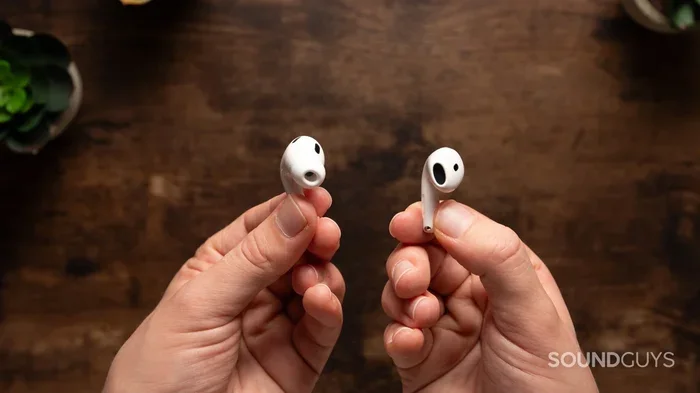
Visual guide about AirPods 4 noise cancellation demo
Image source: soundguys.com
Coffee Shops and Cafes: A Solid 8/10
In moderate noise environments like coffee shops, AirPods 4 perform impressively. The constant hum of conversation, the clinking of cups, and background music all fade into a gentle murmur. You can comfortably listen to podcasts at 50% volume without distraction. For remote workers and students, this is a game-changer.
Imagine you’re trying to read a book in a busy cafe. Without noise cancellation, you might find yourself re-reading the same sentence because your brain keeps getting pulled away by ambient sounds. With AirPods 4 ANC on, it’s almost like the cafe is empty. Your focus improves, your stress drops, and you actually enjoy your coffee break.
Public Transit and Commuting: A Good 7/10
On buses, trains, and subways, AirPods 4 hold their own but face more challenges. The low-frequency rumble of train engines is partially cancelled, but some noise still seeps through due to the open-ear design. Compared to sealed in-ear earbuds, you’ll hear more of the screeching brakes and announcement speakers. However, for daily commuters, it’s still a significant upgrade over having no noise cancellation at all.
Here’s a practical tip: combine AirPods 4 ANC with lower-volume audio for the best experience on transit. The noise cancellation does the heavy lifting of reducing ambient noise, so you don’t need to crank up your music to mask the sound. This is better for your hearing health, too.
Airplanes and Flights: A Mediocre 5/10
This is where AirPods 4 hit their limits. Airplanes produce intense low-frequency noise from engines that requires excellent passive isolation to block effectively. Since AirPods 4 don’t seal your ear canal, you’ll still hear a fair amount of drone noise. The ANC helps reduce it, but dedicated over-ear headphones like the AirPods Max will do a noticeably better job.
However, AirPods 4 are much more portable and comfortable for sleeping on long flights. If you prioritize comfort and convenience over maximum noise blocking, they can still be a good travel companion, especially for shorter flights or when you want to hear flight announcements.
Offices and Home: An Excellent 9/10
In quiet to moderately noisy indoor environments, AirPods 4 shine. The hum of air conditioning, keyboard typing, and distant conversations all melt away. If you work in an open-plan office, AirPods 4 can create a personal bubble of focus that boosts productivity significantly.
Did You Know? Studies show that office workers are interrupted every 11 minutes on average, and it takes 23 minutes to fully regain focus. Noise-cancelling earbuds like AirPods 4 can reduce these interruptions and help you stay in a state of deep work longer.
AirPods 4 vs. AirPods Pro 2: Which Has Better Noise Cancellation?
This is the comparison everyone’s curious about. AirPods Pro 2 remain Apple’s noise-cancelling champion, but AirPods 4 have closed the gap significantly thanks to the H2 chip. Let’s look at the key differences.
Physical Design and Seal
The biggest difference is the fit. AirPods Pro 2 come with silicone ear tips in four sizes (XS, S, M, L) that create a tight seal in your ear canal. This passive isolation blocks a significant amount of noise before ANC even kicks in. AirPods 4 have an open-ear design with no tips, relying entirely on ANC for noise reduction.
Think of it like this: AirPods Pro 2 are like wearing earplugs with a smart noise-cancelling system on top. AirPods 4 are like having a smart noise-cancelling system alone. The earplugs (Pro 2) give you a head start, but the smart system (AirPods 4) does a lot of the heavy lifting.
Low-Frequency Noise Handling
In lab tests and real-world use, AirPods Pro 2 block more low-frequency noise than AirPods 4. The seal from silicone tips is particularly effective against engine rumbles, HVAC systems, and similar drone noises. If you frequently encounter these sounds, AirPods Pro 2 are the better choice.
Mid and High-Frequency Noise
For voices, keyboard clicks, and other mid-to-high frequency sounds, the difference is much smaller. Both AirPods 4 and AirPods Pro 2 rely heavily on ANC for these frequencies, and the H2 chip performs similarly in both. In a coffee shop or office, you’ll barely notice a difference.
Comfort Trade-Offs
AirPods 4 are more comfortable for many people, especially those who dislike the “plugged” feeling of silicone tips. You can wear them for hours without ear fatigue. AirPods Pro 2 offer better noise cancellation but at the cost of that in-ear pressure some users find uncomfortable. Your personal preference matters here.
Price Difference
AirPods 4 with ANC retail for $179, while AirPods Pro 2 cost $249. That’s a $70 difference. For budget-conscious buyers, AirPods 4 offer remarkable value. For noise cancellation purists, AirPods Pro 2 justify the premium.
Transparency Mode: Letting the World Back In
Noise cancellation is only half the story. Sometimes you need to hear the world around you, and that’s where Transparency mode comes in. AirPods 4 feature excellent Transparency mode that uses the same microphones to amplify external sounds naturally.
How Transparency Mode Works
When you activate Transparency mode, the microphones on AirPods 4 pick up sounds from your environment and play them through the earbuds as if you weren’t wearing them at all. Conversations become clear, announcements are audible, and you stay aware of your surroundings for safety.
This is especially useful when crossing streets, ordering coffee, or listening for your train platform announcement. You don’t need to remove your AirPods or pause your music, though some people find lowering the volume helps.
Adaptive Audio: The Best of Both Worlds
One of the coolest features AirPods 4 offer is Adaptive Audio. This smart mode automatically blends Active Noise Cancellation and Transparency based on your environment. If you’re walking in a quiet park, you might hear more ambient sound. If you step into a noisy street, ANC kicks up automatically.
It’s like having a volume slider for the world that adjusts itself. Many users find Adaptive Audio so convenient that they leave it on all the time, only switching modes manually in extreme situations.
Conversation Awareness
Another thoughtful feature is Conversation Awareness. When you start speaking, AirPods 4 automatically lower your audio volume and enhance the voices in front of you. Once you stop talking for a few seconds, your music returns to normal. This makes quick chats with baristas or coworkers seamless.
Who Should Buy AirPods 4 for Noise Cancellation?
Not everyone needs the same level of noise cancellation. Let’s look at who benefits most from AirPods 4 ANC.
The Remote Worker
If you work from home but deal with noisy neighbors, barking dogs, or household distractions, AirPods 4 are perfect. They create a focused work environment without the ear fatigue of sealed earbuds during long video calls.
The College Student
Dorm rooms are notoriously noisy. AirPods 4 help you study in loud environments, attend online lectures without distractions, and still hear your roommate when they actually need you. The price point is also easier on a student budget than AirPods Pro 2.
The Commuter
For subway, bus, and light rail commuters, AirPods 4 ANC makes crowded rides more bearable. You can enjoy music, podcasts, or audiobooks without maxing out the volume, which protects your hearing in the long run.
The Casual Traveler
If you fly occasionally but not weekly, AirPods 4 strike a good balance between noise cancellation and portability. They’re easier to carry than over-ear headphones and more comfortable for sleeping on planes. For frequent flyers, though, dedicated travel headphones might be worth the investment.
The User Who Dislikes In-Ear Tips
Many people find silicone ear tips uncomfortable, cause ear pain, or simply don’t like the plugged-up feeling. AirPods 4 are the best alternative if you want ANC without the in-ear design. You get effective noise cancellation with the comfort of an open-ear fit.
Tips to Maximize AirPods 4 Noise Cancellation Performance
To get the most out of your AirPods 4 noise cancellation, follow these practical tips.
Ensure a Proper Fit
Even without silicone tips, fit matters. Make sure the AirPods sit snugly in your ears with the stem pointing downward. If they feel loose, try adjusting the angle or using third-party ear hooks for added stability. A better fit means better noise cancellation.
Keep Them Clean
Dust and debris on the microphones can reduce ANC effectiveness. Wipe your AirPods 4 regularly with a soft, dry cloth. Pay special attention to the microphone grilles on the body of each earbud. Clean AirPods perform better in every way.
Update Your Firmware
Apple regularly releases firmware updates that improve noise cancellation algorithms. Make sure your AirPods 4 are always running the latest version. You can check for updates through your iPhone’s Settings app under Bluetooth.
Use the Right Ear Tips (If You Have AirPods Pro 2)
Wait, this tip is for AirPods Pro 2 users, but if you’re still deciding between models, remember that proper ear tip sizing dramatically affects noise cancellation. AirPods 4 don’t have this option, which is both a comfort advantage and a performance limitation.
Combine with Awareness
Noise cancellation works best when you also manage your expectations and environment. In extremely loud settings, even the best ANC has limits. Use AirPods 4 ANC as a tool to reduce noise, not eliminate it entirely.
Manage Battery Life
ANC uses more battery than standard listening. If you’re running low, turning off ANC can extend your listening time. With ANC on, you get about 4 hours of listening. With ANC off, you get up to 5 hours. The charging case provides additional charges for all-day use.
Common Questions About AirPods 4 Noise Cancellation
Let’s address some final thoughts and common concerns.
One thing that surprises many users is how natural AirPods 4 sound with ANC on. Unlike some competitors that create an artificial “pressure” sensation, AirPods 4 feel comfortable even during extended listening sessions. This is thanks to the H2 chip’s efficient processing and Apple’s careful tuning.
Another point worth mentioning is that AirPods 4 noise cancellation works seamlessly across Apple devices. If you’re watching a movie on your iPad, the ANC adapts to the audio content. If you switch to a FaceTime call, it automatically lowers music and enhances voices. This ecosystem integration is something Android-based competitors struggle to match.
Finally, consider the longevity of your investment. AirPods 4 will receive software updates for years, meaning their noise cancellation performance may actually improve over time. Apple has a track record of enhancing features through firmware updates, adding value to your purchase long after you unbox them.
The Final Verdict: AirPods 4 deliver genuinely good noise cancellation that exceeds expectations for an open-ear design. While they don’t dethrone AirPods Pro 2 as the noise-cancelling king, they offer 80-85% of the performance at 75% of the price. For most people in most situations, that’s an excellent trade-off. Whether you’re working, commuting, studying, or just trying to enjoy your music in peace, AirPods 4 ANC delivers a quieter, more focused listening experience that’s hard to beat in this price range.