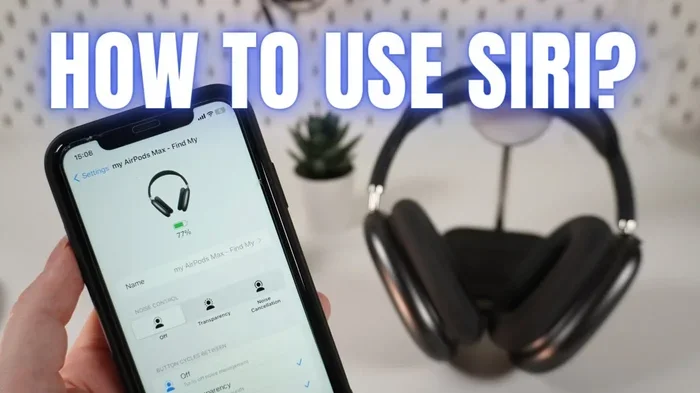
Featured image for AirPods Max Siri voice control
Image source: i.ytimg.com
Yes, AirPods Max have Siri built right in. Apple’s premium over-ear headphones come with full Siri integration, allowing hands-free voice control for calls, music, navigation, and more. You can activate Siri by saying “Hey Siri” or by pressing and holding the Digital Crown on the right ear cup. This makes AirPods Max a powerful, voice-controlled companion for iPhone, iPad, and Mac users.
Imagine putting on a pair of headphones that not only block out the world with stunning sound but also listen to your every command. Sounds like science fiction, right? Well, that’s exactly what Apple’s flagship over-ear headphones offer. The question “does Apple Max headphones have Siri” has a simple and exciting answer that many users overlook.
AirPods Max, Apple’s premium headphones launched in December 2020, are packed with smart features that go far beyond playing music. Among these features, Siri stands out as one of the most useful tools. Whether you’re jogging through a busy street, cooking dinner, or simply relaxing on your couch, Siri on AirPods Max acts like a personal assistant perched right on your ears.
This guide will walk you through everything you need to know about Siri and AirPods Max. From how to set it up to hidden tricks you probably didn’t know existed, we’ve got you covered. Let’s bust some myths and uncover the truth about Apple’s most advanced headphones.
Key Takeaways
- Siri Is Fully Integrated: AirPods Max come with built-in Siri support for hands-free commands and queries.
- Two Activation Methods: You can summon Siri by voice (“Hey Siri”) or manually using the Digital Crown button.
- Works Across Apple Devices: Siri on AirPods Max pairs seamlessly with iPhone, iPad, Mac, and Apple Watch.
- Announce Messages Feature: Siri can read incoming texts aloud, perfect for hands-free communication.
- Voice Control Beyond Music: Siri handles calls, directions, weather, reminders, and smart home controls.
- Requires Apple Ecosystem: Full Siri functionality only works when connected to Apple devices, not Android or Windows.
- Common Myth Busted: Some users wrongly believe AirPods Max lack voice features, but they have the most advanced Siri integration of any Apple headphones.
📑 Table of Contents
- The Short Answer: Yes, AirPods Max Absolutely Have Siri
- How to Activate Siri on AirPods Max
- What Can Siri Do on AirPods Max?
- Siri Compatibility: Which Devices Work with AirPods Max?
- Common Myths About Siri on AirPods Max
- Advanced Siri Tips and Tricks for AirPods Max Users
- Troubleshooting Siri Issues on AirPods Max
- The Future of Siri and AirPods Max
- Final Thoughts: Siri Makes AirPods Max Truly Special
The Short Answer: Yes, AirPods Max Absolutely Have Siri
Let’s clear the air right away. AirPods Max come with full Siri integration, just like AirPods Pro and standard AirPods. This isn’t a limited version or a stripped-down feature. You get the complete Siri experience Apple offers on its flagship devices.
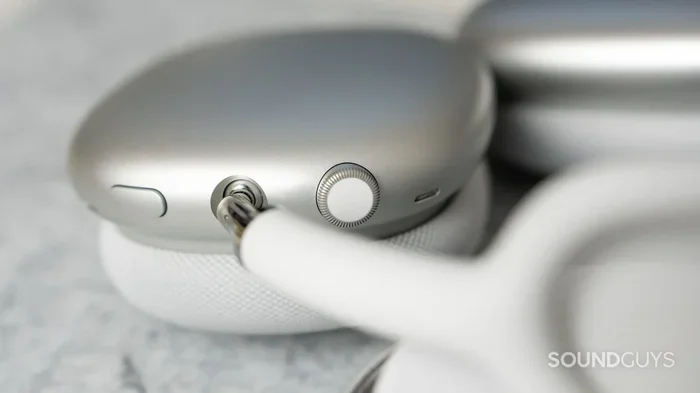
When you press the Digital Crown (that’s the small button on the right ear cup that looks like the dial on an Apple Watch), Siri activates instantly. You can ask questions, send messages, control music, get directions, and manage your smart home devices. It’s like having a tiny computer assistant whispering in your ear.
What Exactly Is Siri?
Think of Siri as a helpful friend who lives inside your Apple devices. You talk to Siri, and Siri talks back. It can read your text messages aloud, tell you the weather, set timers, play specific songs, and even tell jokes when you’re feeling down. Siri uses voice recognition and artificial intelligence to understand what you need and respond accordingly.
Why Apple Added Siri to AirPods Max
Apple designed AirPods Max for people who want the best audio experience combined with smart technology. Adding Siri makes the headphones more than just a listening device. They become a control center for your entire digital life, all without pulling out your phone.
How to Activate Siri on AirPods Max
Using Siri on AirPods Max is wonderfully simple. Apple designed the activation process to feel natural, whether you’re a tech wizard or a complete beginner. There are two main ways to wake Siri, and both work like a charm.
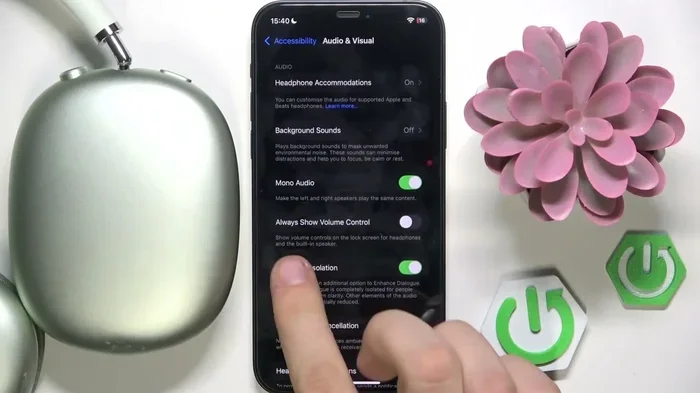
Visual guide about AirPods Max Siri voice control
Image source: i.ytimg.com
Method 1: Voice Activation with “Hey Siri”
The easiest way to use Siri is by simply saying “Hey Siri” out loud. Once you say those magic words, Siri beeps softly to let you know it’s listening. Then you can speak your command, like “Hey Siri, play my workout playlist” or “Hey Siri, what’s the weather like today?”
This hands-free method is perfect when your hands are busy. Picture this: you’re carrying groceries, wearing AirPods Max, and your phone rings. Instead of fumbling to pull out your iPhone, just say “Hey Siri, answer the call.” The headphones handle everything for you.
Method 2: Press and Hold the Digital Crown
If you’re in a quiet environment or prefer not to use voice activation, you can press and hold the Digital Crown button. This manual method works just as well and gives you more control over when Siri activates. Some people prefer this approach because it prevents accidental triggers during conversations.
To use this method, simply press the Digital Crown (located on the right ear cup) and hold it for about one second. You’ll hear a chime, and then Siri is ready for your command. Release the button and speak normally.
Setting Up “Hey Siri” for the First Time
Did You Know? Apple reports that over 500 million devices use Siri every month, making it one of the most popular voice assistants worldwide. If you haven’t set up “Hey Siri” yet, here’s how to do it:
- Connect your AirPods Max to your iPhone or iPad
- Open the Settings app on your iPhone
- Tap on “Siri & Search”
- Toggle on “Listen for ‘Hey Siri'”
- Follow the on-screen setup prompts
Once enabled, your AirPods Max will recognize your voice commands instantly, even when your phone is across the room or buried in your bag.
What Can Siri Do on AirPods Max?
Here’s where things get really exciting. Siri on AirPods Max isn’t just a basic voice command tool. It’s a full-powered assistant with capabilities that can transform how you interact with technology every day.
Visual guide about AirPods Max Siri voice control
Image source: soundguys.com
Music and Media Control
Siri takes full control of your audio experience. You can ask Siri to play specific songs, albums, or artists. Say “Hey Siri, play relaxing jazz” and watch your playlist appear instantly. Want to skip a song? Just say “Hey Siri, next song.” Need to pause? “Hey Siri, pause.”
You can also adjust volume, create new playlists, and discover new music through Siri. It’s like having a personal DJ who knows your exact mood at any moment.
Phone Calls and Messages
One of the most useful features is the ability to make and receive calls hands-free. With AirPods Max and Siri working together, you can answer calls without touching your phone. Siri can also place calls by voice command, just say “Hey Siri, call Mom” and the call connects through your headphones.
The Announce Messages feature takes this even further. When you receive a text, Siri reads it aloud through your AirPods Max. You can then dictate a reply without ever looking at your phone. This feature is incredibly useful while driving, exercising, or working.
Navigation and Directions
Need directions while walking through an unfamiliar city? Just ask Siri. Say “Hey Siri, give me directions to the nearest coffee shop” and Siri will guide you turn by turn. The directions come through your headphones, making navigation feel like having a friendly guide walking beside you.
Smart Home Control
Did You Know? Apple’s HomeKit ecosystem now controls over 1,000 different accessories from various manufacturers, and Siri is the voice that brings them all together. With AirPods Max and Siri, you can control your smart home devices from anywhere in your house.
Tell Siri to dim the lights, adjust the thermostat, lock the doors, or turn on your favorite playlist on your HomePod. All of this happens with a simple voice command while wearing your headphones.
Information and Questions
Siri answers questions on virtually any topic. Want to know the capital of France? Ask Siri. Need to convert measurements for a recipe? Siri handles that too. Looking up sports scores, stock prices, or movie times? Siri does it all without you needing to type a single word.
Siri Compatibility: Which Devices Work with AirPods Max?
Here’s an important detail many users miss. Siri on AirPods Max only works when connected to Apple devices. This includes iPhones, iPads, Macs, and Apple TVs. If you try to use AirPods Max with an Android phone or Windows computer, the Siri features won’t work at all.
Best Device Pairings
AirPods Max work best with the following Apple devices:
- iPhone: Full Siri functionality, including all voice commands
- iPad: Complete Siri support for music, calls, and apps
- Mac: Siri works through your headphones for desktop tasks
- Apple Watch: Can relay Siri commands through your AirPods Max
- Apple TV: Voice control for streaming and navigation
What About Non-Apple Devices?
If you connect AirPods Max to an Android phone or Windows PC, you’ll still get excellent audio quality. However, Siri will be completely unavailable. Your headphones will function as standard Bluetooth headphones without any voice assistant features. This is a crucial point for anyone considering AirPods Max who isn’t fully invested in the Apple ecosystem.
Common Myths About Siri on AirPods Max
Myths spread quickly, especially about premium tech products. Let’s address some of the most common misconceptions about Siri and AirPods Max.
Myth 1: “AirPods Max Don’t Have Siri”
This is completely false. AirPods Max have the most advanced Siri integration of any Apple headphones. Both “Hey Siri” voice activation and Digital Crown press activation work flawlessly. Anyone claiming otherwise simply hasn’t used the feature correctly.
Myth 2: “Siri Only Works for Music”
Wrong again. Siri on AirPods Max handles calls, messages, navigation, smart home control, reminders, timers, calculations, translations, and much more. It’s a complete voice assistant, not just a music controller.
Myth 3: “Siri Drains the Battery Too Fast”
AirPods Max offer up to 20 hours of battery life with active noise cancellation and spatial audio enabled. Using Siri has minimal impact on battery life. In fact, Apple’s H1 chips are designed to manage power efficiently even during constant Siri use.
Myth 4: “You Need Internet for Siri to Work”
While Siri needs an internet connection for most queries, some basic commands work offline. Setting timers, adjusting volume, and controlling music playback don’t require internet. However, questions and web searches obviously need a connection.
Myth 5: “Siri Doesn’t Understand Accents Well”
Apple has spent years improving Siri’s voice recognition. Today, Siri understands dozens of languages and dialects with impressive accuracy. While no voice assistant is perfect, Siri has gotten remarkably good at understanding different accents and speech patterns.
Advanced Siri Tips and Tricks for AirPods Max Users
Now that you know the basics, let’s explore some advanced techniques that will make you a Siri power user. These tips can genuinely change how you use your AirPods Max every day.
Use Siri for Language Translation
Did You Know? Siri can translate between over 40 different languages in real time. If you’re traveling or communicating with someone who speaks another language, just say “Hey Siri, translate ‘where is the train station’ to Spanish.” Siri responds with both the text and audio translation.
Create Shortcuts for Complex Tasks
Apple’s Shortcuts app lets you create custom voice commands that trigger multiple actions. For example, you could create a “Good Morning” shortcut that turns on your lights, reads your calendar, plays news, and starts your coffee maker, all with one Siri command through your AirPods Max.
Share Your Location Hands-Free
Need to let someone know where you are? Say “Hey Siri, share my location with Sarah.” Siri handles the rest. This is incredibly useful when meeting friends in crowded places or letting family members know you’re safe.
Use Siri for Health and Fitness
Siri integrates with the Health app on your iPhone. You can ask Siri to log workouts, track water intake, start meditation sessions, or check your daily activity progress. With AirPods Max, you can do all this while exercising without touching your phone.
Dictate Notes and Emails
Capture thoughts and ideas the moment they strike. Say “Hey Siri, take a note” followed by your thought. Siri saves it immediately to the Notes app. You can also dictate emails by saying “Hey Siri, send an email to John” and then speaking your message.
Troubleshooting Siri Issues on AirPods Max
Sometimes technology doesn’t cooperate. If Siri isn’t working properly on your AirPods Max, try these simple solutions before seeking professional help.
Check Your Connection
Make sure your AirPods Max are properly connected to your Apple device. Bluetooth connections can sometimes drop, especially if you’ve moved out of range. Go to your Bluetooth settings and verify the connection status.
Verify Siri Is Enabled
Open Settings, tap “Siri & Search,” and confirm that “Listen for ‘Hey Siri'” is toggled on. Also check that Siri is allowed to work when your device is locked.
Update Your Software
Apple regularly releases software updates that improve Siri’s performance. Make sure both your AirPods Max firmware and your iPhone/iPad software are up to date. Updates often fix bugs and add new Siri capabilities.
Reset Your AirPods Max
If problems persist, try resetting your AirPods Max. Press and hold the noise control button and the Digital Crown simultaneously for about 15 seconds until the LED flashes amber, then white. Reconnect to your device and try again.
The Future of Siri and AirPods Max
Apple continues investing heavily in artificial intelligence and voice technology. Future updates to AirPods Max will likely bring even more sophisticated Siri capabilities, including better natural language understanding, improved contextual awareness, and deeper app integration.
Industry experts predict that voice assistants will become the primary way people interact with technology within the next decade. AirPods Max, with their built-in Siri support, position users at the forefront of this revolution. Your headphones today might be as revolutionary as the first iPhone was back in 2007.
What This Means for You
Investing in AirPods Max isn’t just buying premium headphones. You’re investing in a voice-controlled future that’s already here. The more you use Siri now, the more natural it becomes, and the more you’ll benefit as Apple adds new features over time.
Final Thoughts: Siri Makes AirPods Max Truly Special
So, does Apple Max headphones have Siri? Absolutely, and it’s one of their standout features. The combination of premium audio quality and intelligent voice control creates an experience that few competitors can match. From hands-free calls to smart home control, Siri transforms AirPods Max from simple headphones into a powerful personal assistant.
Whether you’re a longtime Apple user or considering joining the ecosystem, Siri on AirPods Max delivers genuine value. It’s convenient, powerful, and getting smarter every day. The next time someone asks if AirPods Max have Siri, you can confidently say yes and explain all the amazing things it can do.
Try these Siri features yourself and discover how voice control can simplify your daily routine. Once you experience the freedom of hands-free assistance, you’ll wonder how you ever lived without it.
Frequently Asked Questions
Do AirPods Max come with Siri built in?
Yes, AirPods Max come with Siri fully integrated. You can activate Siri by saying “Hey Siri” or by pressing and holding the Digital Crown button on the right ear cup. The feature works seamlessly across all compatible Apple devices.
Can I use Siri on AirPods Max without an iPhone?
Siri on AirPods Max requires a connection to an Apple device like an iPhone, iPad, Mac, or Apple TV. Without an Apple device, the headphones function as standard Bluetooth headphones and Siri will not be available.
Does using Siri drain AirPods Max battery faster?
Using Siri has minimal impact on AirPods Max battery life. Apple rates the battery at up to 20 hours with active features enabled, and voice commands consume very little additional power thanks to the efficient H1 chips.
What voice commands work with Siri on AirPods Max?
Siri responds to a wide range of commands including playing music, making calls, sending messages, providing directions, controlling smart home devices, setting reminders, answering questions, and translating languages. The functionality matches what you’d experience on an iPhone.
Why isn’t “Hey Siri” working on my AirPods Max?
If “Hey Siri” isn’t working, check that the feature is enabled in Settings under “Siri & Search.” Make sure your AirPods Max firmware and iPhone software are updated, and verify a stable Bluetooth connection. Resetting the headphones can also resolve persistent issues.
Is Siri on AirPods Max better than on other AirPods?
Siri functionality is essentially the same across all AirPods models, including AirPods Max, AirPods Pro, and standard AirPods. However, AirPods Max offer the advantage of superior microphones for clearer voice recognition, especially in noisy environments, making Siri responses more accurate.