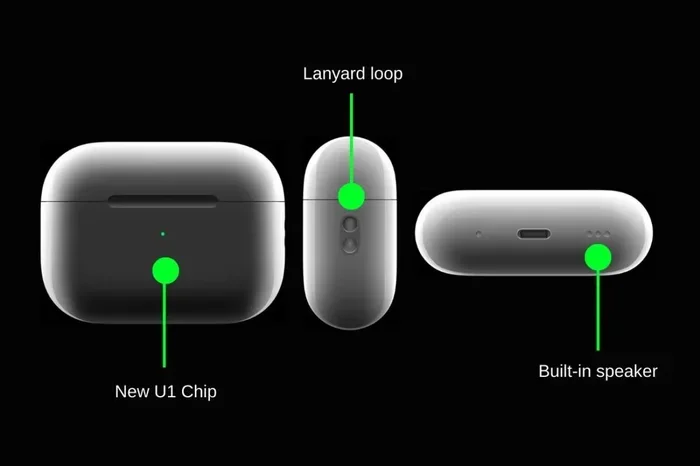
Featured image for AirPod Pro 2 case speaker close-up
Image source: images-r2.thebrag.com
Yes, the AirPods Pro 2 charging case has a built-in speaker! This small but powerful speaker plays sounds to help you locate your case, alerts you about battery status, and confirms pairing. It’s a feature that many users don’t know about until they need it. The speaker works alongside the U1 chip for Precision Finding via the Find My app, making it easier than ever to track down your misplaced case.
Have you ever wondered if your AirPods Pro 2 case makes sounds? You’re not alone. Many people use their AirPods every single day without realizing their little charging case has a hidden talent—it’s actually a speaker.
Think of it like this: imagine your case is a tiny helper that likes to talk to you. It chimes when it’s ready to pair, beeps when the battery is running low, and even shouts for help when you’ve misplaced it somewhere in your couch cushions. Pretty neat, right?
In this guide, we’re going to break down everything you need to know about the AirPods Pro 2 case speaker. We’ll cover what it does, how it works, when it plays sounds, and how to control it. By the end, you’ll know more about this little feature than most Apple fans do.
Key Takeaways
- Yes, It Has a Speaker: The AirPods Pro 2 case includes a small built-in speaker at the bottom for audio alerts and location assistance.
- Find My Integration: The speaker works with the U1 chip and Find My app to help locate your lost case using Precision Finding.
- Multiple Sound Functions: It plays tones for pairing, low battery warnings, charging status, and firmware updates.
- USB-C vs Lightning: Both the USB-C and Lightning versions of the AirPods Pro 2 case feature the speaker.
- Easy to Mute: You can disable case sounds through your iPhone’s settings if you find them annoying.
- Water Resistance Note: The speaker holes can collect debris, so gentle cleaning is recommended to maintain sound quality.
- Not on Older Models: The original AirPods Pro case does not have a speaker—this feature started with the AirPods Pro 2.
📑 Table of Contents
- Yes, the AirPods Pro 2 Case Absolutely Has a Speaker
- How the Speaker Works with Find My and Precision Finding
- What Sounds Does the AirPods Pro 2 Case Speaker Make?
- How to Control the AirPods Pro 2 Case Speaker
- Does the USB-C Version Also Have a Speaker?
- Tips for Maintaining Your AirPods Pro 2 Case Speaker
- Common Questions and Myths About the AirPods Pro 2 Case Speaker
- Comparing the AirPods Pro 2 Speaker to Other Apple Products
- The Future of AirPods Case Speakers
- Final Thoughts: The Speaker Is a Small Feature with Big Benefits
Yes, the AirPods Pro 2 Case Absolutely Has a Speaker
Let’s get the big question out of the way first. The answer is a clear and simple yes. The AirPods Pro 2 charging case comes with a built-in speaker. This speaker is tucked into the bottom of the case, right near where the charging port lives.
You might be thinking, “Wait, I’ve used AirPods for years and never heard anything from my case!” That’s totally normal. The speaker is pretty quiet compared to your AirPods themselves, and many of its sounds only play during specific moments—like when you first set up the case or when something needs your attention.
Where Exactly Is the Speaker Located?
The speaker sits at the bottom of the AirPods Pro 2 case. If you flip your case over and look near the charging port, you’ll see a small grille or mesh area. That’s the speaker. It’s tiny, but it packs enough punch to produce clear, noticeable sounds.
Think of it like the speaker on a smartwatch. It’s small, but it’s designed to be heard when it’s close to you or when you’re actively looking for your device.
Why Did Apple Add a Speaker?
Apple didn’t just add this speaker for fun. It serves some really practical purposes that make your life easier. The main reasons include:
- Helping You Find It: If you lose your case, the speaker lets out a chirping sound so you can track it down by ear.
- Status Updates: It tells you when pairing is complete or when charging starts.
- Battery Alerts: It warns you when the case battery is getting low.
- Confirmation Sounds: It confirms actions like resetting the device.
Basically, the speaker turns your case from a silent storage box into a smart little gadget that communicates with you.
How the Speaker Works with Find My and Precision Finding
One of the coolest things about the AirPods Pro 2 case speaker is how it works with Apple’s Find My network. This is where things get really interesting.
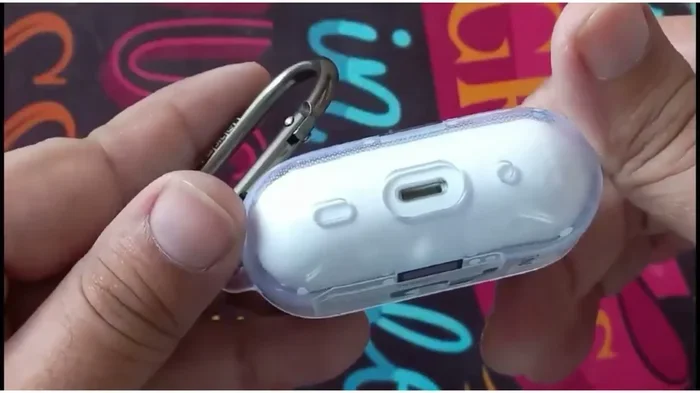
Visual guide about AirPod Pro 2 case speaker close-up
Image source: i.ytimg.com
What Is Precision Finding?
Precision Finding is like a game of “hot and cold” but with technology. It uses the U1 chip inside the AirPods Pro 2 case to communicate with your iPhone. The U1 chip uses ultra-wideband technology—basically a super-precise GPS that works at short distances.
Here’s a simple way to picture it: imagine you’re trying to find your keys in a messy room. Normally, you’d just wander around until you spot them. With Precision Finding, your iPhone acts like a guide, pointing you in the right direction and telling you exactly how far away you are. It even shows an arrow on your screen!
How the Speaker Helps You Locate the Case
When you use Precision Finding to track your case, the speaker plays a chirping sound that gets louder as you get closer. It’s like the case is calling out, “Hey, I’m over here!”
This feature is a lifesaver when your case slides between couch cushions or hides under a pile of laundry. Instead of tearing your house apart, you just open the Find My app on your iPhone and follow the directions.
Did you know that according to a 2023 survey by Statista, about 1 in 4 people lose their AirPods or charging case at least once a year? The Precision Finding feature with the speaker was basically designed to solve this very common problem.
What Happens If You’re Out of Bluetooth Range?
Here’s where Apple’s Find My network really shines. Even if your case is far away—like at a coffee shop you visited yesterday—other Apple devices can help. When someone with an iPhone or iPad walks near your lost case, their device anonymously pings your case’s location and sends it to your Find My app.
The speaker doesn’t play in this scenario because you’re too far away to hear it. But the speaker does chime once when it’s first separated from you, helping you notice that you’ve left it behind.
What Sounds Does the AirPods Pro 2 Case Speaker Make?
The speaker isn’t constantly making noise. It only plays sounds at specific moments. Let’s walk through each one so you know what to expect.
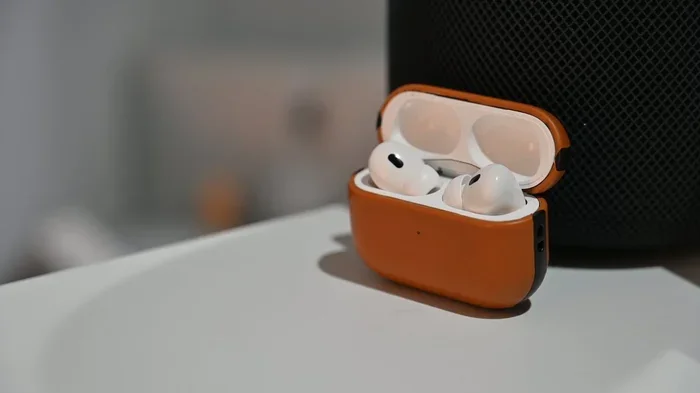
Visual guide about AirPod Pro 2 case speaker close-up
Image source: photos5.appleinsider.com
Pairing and Setup Sounds
When you first pair your AirPods Pro 2 with a new device, the case plays a friendly tone to confirm the connection. It’s a soft chime that says, “All set! We’re connected now.”
If you’ve ever set up AirPods before, you might remember hearing a little sound during the process. That’s the speaker doing its job.
Battery Low Warning
Nobody likes running out of battery unexpectedly. The case speaker helps you avoid this by playing a sound when the battery is getting low. It’s like a little reminder saying, “Hey, charge me soon!”
This alert happens when the case battery drops below a certain level. It’s not super annoying, just a gentle heads-up.
Charging Start Sound
When you plug in your case to charge—whether with a Lightning cable, USB-C cable, or a wireless charger—the speaker plays a quick tone. This lets you know that charging has started successfully.
Think of it like the click sound when you turn on a lamp. It confirms that things are working as they should.
Find My Sound
When you use the Find My app to locate your case, the speaker plays a series of chirps. These chirps are designed to be loud enough to hear across a room but not so loud that they annoy everyone around you.
Reset Confirmation
If you ever need to reset your AirPods Pro 2, the case speaker plays a sound to confirm that the reset worked. It’s Apple’s way of saying, “Done! You’re starting fresh.”
Did you know that Apple’s AirPods Pro 2 launched in September 2022, and this speaker feature was one of the most underrated additions at the time? Many tech reviewers didn’t even mention it in their first impressions!
How to Control the AirPods Pro 2 Case Speaker
Maybe you love the sounds. Maybe you find them a little annoying. Either way, Apple gives you the power to control them.
How to Turn Off Case Sounds
If you want to silence your case speaker, here’s what to do:
- Step 1: Open the Settings app on your iPhone.
- Step 2: Tap on your AirPods Pro 2 (they need to be connected and in your ears).
- Step 3: Scroll down and toggle off “Enable Charging Case Sounds.”
Once you turn this off, the case will stop playing most alert sounds. However, the Find My chirping sound will still play if you’re actively trying to locate your case. That’s because that sound is super important for finding lost devices.
Can You Adjust the Volume?
Unfortunately, you can’t adjust the volume of the case speaker directly. It’s set at a level that Apple thinks works best—not too loud, not too quiet. But you can always mute it completely through the settings mentioned above.
What About the Find My Sound?
Even if you turn off charging case sounds, the Find My chirp will still play. This is by design. Apple knows that this sound is critical for helping you find your case, so they made sure it always works.
Does the USB-C Version Also Have a Speaker?
Great question! Apple released an updated version of the AirPods Pro 2 in September 2023 that switched from a Lightning port to a USB-C port. So, does this newer version still have a speaker?
The answer is yes! Both versions of the AirPods Pro 2—the original with Lightning and the updated one with USB-C—have the same built-in speaker. Apple didn’t remove this feature when they updated the charging port.
What’s the Same Between the Two Versions?
The speaker feature is identical in both versions. You get the same pairing sounds, battery alerts, and Find My chirps regardless of whether your case has a Lightning or USB-C port.
What’s Different Between the Two Versions?
The main differences are:
- Charging Port: Lightning vs. USB-C
- Dust and Water Resistance: The USB-C version has slightly improved IP54 rating
- Lossless Audio Support: The USB-C version supports lossless audio with the Vision Pro headset
But the speaker? Same great speaker in both versions.
Tips for Maintaining Your AirPods Pro 2 Case Speaker
Like any piece of technology, your case speaker needs a little care to keep working well. Here are some easy tips.
Keep It Clean
The speaker grille at the bottom of your case can collect dust, lint, and other debris over time. This is especially true if you carry your case in your pocket or bag. To clean it:
- Use a soft, dry brush: A clean toothbrush or small paintbrush works great.
- Gently brush the grille: Don’t push too hard—you don’t want to damage the speaker.
- Avoid liquids: Never spray anything directly on the case. If you need to use a slightly damp cloth, make sure it’s barely wet.
Think of it like cleaning a window screen. You want to remove the gunk without damaging the mesh underneath.
Watch Out for Water
While the AirPods Pro 2 case has some water resistance, the speaker is one of the more vulnerable parts. If water gets into the speaker grille, it can muffle the sound or cause temporary issues.
If your case gets wet, let it air dry completely before using it. Don’t use heat sources like hair dryers, as they can damage the internal components.
Don’t Drop It Too Often
The speaker is built tough, but it’s not indestructible. Repeated drops can damage the speaker or loosen its connection to the internal components. Try to handle your case with care.
Update Your Firmware
Apple sometimes releases firmware updates that can improve the speaker’s performance or add new sounds. To make sure your case is up to date:
- Keep your AirPods Pro 2 in their case.
- Place the case near your iPhone.
- Make sure your iPhone has a strong Wi-Fi connection.
- Wait for the update to happen automatically (it usually does overnight).
Did you know that Apple has released multiple firmware updates for AirPods since launch, with several specifically focused on improving Find My functionality? Keeping your firmware current ensures you get the best speaker experience possible.
Common Questions and Myths About the AirPods Pro 2 Case Speaker
Let’s clear up some confusion and bust a few myths.
Myth: “The Speaker Is Only for Marketing”
Some people think the speaker is just a flashy feature that doesn’t do much. In reality, it serves several practical purposes, especially for Find My. If you’ve ever lost your case, you know how valuable that chirping sound is.
Myth: “All AirPods Cases Have Speakers”
This isn’t true. The original AirPods Pro case doesn’t have a speaker. Neither do the AirPods 1, 2, or 3 cases. The speaker is a feature that started with the AirPods Pro 2.
Myth: “The Speaker Drains the Battery”
The speaker uses a tiny amount of power, but it’s so small that it won’t noticeably affect your battery life. The battery drain from playing sounds is minimal compared to the power needed to charge your AirPods.
Fact: The Speaker Works Without Internet
The chirping sound for Find My works through Bluetooth, not the internet. So even if you’re offline, you can still play a sound to help locate your case nearby.
Comparing the AirPods Pro 2 Speaker to Other Apple Products
How does the AirPods Pro 2 case speaker stack up against other Apple devices with built-in speakers?
AirTag Comparison
Apple’s AirTag also has a small speaker that plays sounds when you’re trying to find it. The AirPods Pro 2 case speaker is similar in function but slightly quieter. Both use the Find My network for tracking.
Think of them as cousins—they share the same family trait (the speaker) but have different personalities.
iPhone Comparison
Your iPhone speaker is obviously much louder and more powerful. But the AirPods Pro 2 case speaker doesn’t need to be loud. It’s designed for close-range use, like finding your case in a room or hearing alerts when you’re nearby.
Apple Watch Comparison
The Apple Watch has a speaker for calls, Siri, and alerts. It’s similar in size to the AirPods Pro 2 case speaker but has different purposes. The Apple Watch speaker is for communication, while the AirPods case speaker is mostly for location and status alerts.
The Future of AirPods Case Speakers
Where might Apple go next with this technology? Let’s look at some possibilities.
Potential Improvements
In future AirPods models, we might see:
- Louder Speakers: Making the speaker easier to hear from across a room.
- More Sound Options: Different tones for different notifications.
- Voice Feedback: The speaker might one day announce things like “Battery at 20%” out loud.
- Better Water Resistance: Improving the speaker’s ability to handle water exposure.
While these are just predictions, Apple has a history of improving small features with each new product generation.
What Users Want
Based on online forums and customer feedback, here are some things people hope to see:
- A louder speaker that’s easier to hear.
- The ability to customize which sounds play.
- More visible indicator lights alongside the speaker.
Did you know that Apple typically keeps AirPods Pro models in production for 2-3 years before discontinuing them? This means the current AirPods Pro 2 will likely get software updates and improvements for years to come.
Final Thoughts: The Speaker Is a Small Feature with Big Benefits
So, does the AirPods Pro 2 case have a speaker? Absolutely yes. And while it might seem like a tiny detail, it actually makes a huge difference in how you use and locate your AirPods.
From helping you find a lost case under your bed to alerting you when the battery is low, this little speaker is always working in the background. Once you know it exists and what it does, you’ll appreciate it every time it chimes.
Whether you love the sounds or prefer to mute them, the choice is yours. But at least now you know the truth: your AirPods Pro 2 case isn’t just a charging box—it’s a smart little communicator that keeps you connected to your gear.
If you haven’t explored all the features of your AirPods Pro 2 yet, now’s the perfect time. Open up the Settings app, check out what your case can do, and make the most of every feature Apple has packed into this tiny but mighty device.