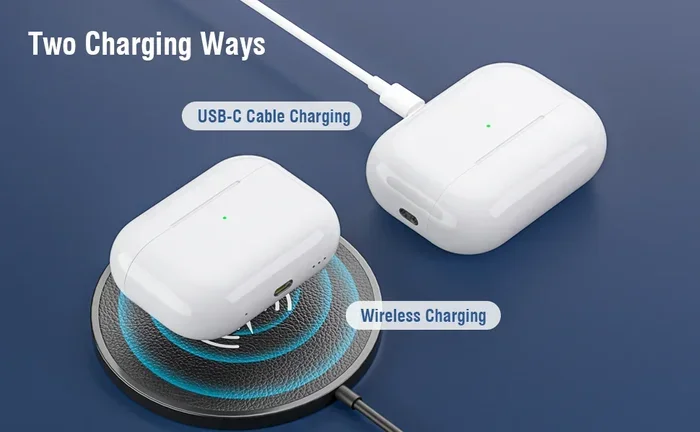
Featured image for AirPods Pro USB-C charging case
Image source: m.media-amazon.com
Yes, AirPods Pro can charge with USB—but the method depends on your model. AirPods Pro 2 (USB-C version) features a USB-C charging case that works with any USB-C cable. AirPods Pro 1 and earlier AirPods Pro 2 (Lightning version) require a Lightning cable or Qi/MagSafe wireless charging instead. Understanding your case type ensures you always have the right cable on hand for fast, reliable charging.
Picture this: you’re rushing out the door, grab your AirPods Pro, and realize they’re dead. You pat your pockets looking for a cable—any cable—and wonder, “Can I just use that random USB cord I have lying around?” If you’ve ever asked yourself whether AirPods Pro charge with USB, you’re not alone. It’s one of the most common questions Apple users ask, especially as the tech world shifts toward universal USB-C standards.
The short answer is yes, but there’s a catch. Which USB depends entirely on which AirPods Pro model you own. Apple released the original AirPods Pro in 2019 with a Lightning charging case. Then in September 2022, they launched AirPods Pro 2 with a Lightning case. Fast forward to September 2023, and Apple finally introduced the AirPods Pro 2 with a USB-C charging case—a major upgrade that aligned with the iPhone 15’s switch to USB-C and European Union regulations demanding a universal charging port.
This guide breaks down everything you need to know about charging your AirPods Pro with USB. We’ll cover which models work with which cables, charging speeds, safety tips, and what to do when your case won’t charge. By the end, you’ll be the most informed AirPods Pro owner in any room.
Key Takeaways
- USB-C Charging Case Exists: Only AirPods Pro 2 (released September 2023) comes with a USB-C charging case, allowing direct USB-C cable charging.
- Older Models Need Lightning: AirPods Pro 1 and the original AirPods Pro 2 use a Lightning port and require Apple’s Lightning cable.
- Wireless Charging Always Works: All AirPods Pro models support Qi and MagSafe wireless charging, regardless of port type.
- USB-A Chargers Won’t Work Directly: You cannot plug a USB-A cable into any AirPods Pro case—you need USB-C or Lightning.
- USB-C Enables Lossless Audio: The USB-C AirPods Pro 2 supports 20-bit/48 kHz lossless audio with Vision Pro when charged via USB-C.
- Charging Speed is Fast: A 5-minute charge provides roughly 1 hour of listening time across all AirPods Pro generations.
- Any USB-C Cable Works: You don’t need an Apple-branded USB-C cable—any certified USB-C cable will charge your case safely.
📑 Table of Contents
- Understanding AirPods Pro Charging Ports: The Basics
- Can AirPods Pro Charge with USB-C? A Detailed Answer
- Can AirPods Pro Charge with USB-A? The Surprising Truth
- Wireless Charging: The Universal Option
- Charging Your AirPods Pro: Practical Tips and Best Practices
- Troubleshooting: When Your AirPods Pro Won’t Charge
- The Future of AirPods Pro Charging
- Final Thoughts: Charging Your AirPods Pro with USB Made Simple
Understanding AirPods Pro Charging Ports: The Basics
Let’s start with the foundation. Think of your AirPods Pro charging case like a tiny treasure chest. Inside that chest is a battery, and to refill that battery, you need to plug into a specific type of “faucet.” Some treasure chests have a round Lightning faucet, others have an oval USB-C faucet, and some can be refilled wirelessly without any plug at all.
The Three AirPods Pro Models and Their Ports
Apple has released three distinct AirPods Pro configurations, and each one has different charging capabilities:
- AirPods Pro 1st Generation (2019): Lightning port only. Released October 30, 2019, this model uses Apple’s proprietary Lightning connector at the bottom of the case.
- AirPods Pro 2nd Generation with Lightning (2022): Lightning port only. Released September 23, 2022, this updated version kept the Lightning connector but added better noise cancellation and longer battery life.
- AirPods Pro 2nd Generation with USB-C (2023): USB-C port. Released September 22, 2023, this is the first AirPods Pro to feature a USB-C charging port, matching the iPhone 15 lineup.
Here’s a quick way to identify your case: look at the bottom of your AirPods Pro charging case. If you see a small, rectangular port with rounded edges, that’s USB-C. If you see a thin, smaller port, that’s Lightning. It’s that simple.
Why Apple Made the Switch to USB-C
You might wonder why Apple finally made the jump to USB-C. The answer involves both innovation and regulation. In October 2022, the European Union passed a law requiring all smartphones, tablets, and headphones sold in EU countries to use USB-C by the end of 2024. Since Apple sells the same products globally, they switched worldwide rather than make region-specific versions.
Beyond regulations, USB-C offers real benefits. It supports faster data transfer, higher power delivery (up to 100 watts in some devices), and a reversible design—meaning you can plug it in either way without fumbling. Think of it like a door that opens from both sides instead of just one.
Can AirPods Pro Charge with USB-C? A Detailed Answer
Yes—if you have the right model. Let’s dive deeper into USB-C charging specifics because this is where most people get confused.
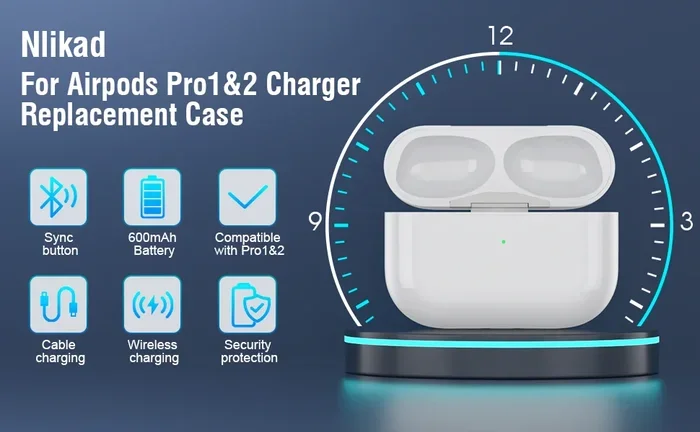
Visual guide about AirPods Pro USB-C charging case
Image source: m.media-amazon.com
AirPods Pro 2 USB-C: The Full Picture
The AirPods Pro 2 with USB-C case is a powerhouse. It supports charging via any USB-C cable connected to a compatible power adapter or USB-C port on a computer. Here are the key facts:
- Charging port: USB-C (located on the bottom of the case)
- Input power: 5V/1A recommended (5 watts)
- Cable type: Any USB-C cable with USB-C on both ends
- Power source compatibility: Wall adapters, laptops, power banks, car chargers, and even other devices with USB-C ports
Did you know? The USB-C AirPods Pro 2 case has an IP54 rating for dust and water resistance, while the Lightning version only has an IPX4 rating. That means the USB-C version is better protected against dust particles—a small but meaningful upgrade.
Charging Speed: How Fast Does USB-C Charge AirPods Pro?
Speed matters, especially when you’re in a hurry. Here’s the good news: AirPods Pro charge remarkably fast regardless of which USB standard you use.
According to Apple’s official specifications, a 5-minute charge in the case provides approximately 1 hour of listening time or 1 hour of talk time. A full charge takes about 1 hour, and the case itself can hold multiple full charges—giving you more than 24 hours of total listening time before you need to plug in the case.
One important note: AirPods Pro do not support fast charging in the way that iPhones do. There’s no “50% in 30 minutes” marketing claim. Instead, the case uses a steady, gentle charging curve that’s optimized for battery longevity. Think of it like filling a pool with a garden hose instead of a fire hydrant—slower but healthier for the long run.
What About USB-C to Lightning Cables?
Here’s where things get tricky. If you have an older AirPods Pro with a Lightning case, you might think a USB-C to Lightning cable would work. You’re right! USB-C to Lightning cables can charge the Lightning-case versions of AirPods Pro. You just need to plug the USB-C end into a power source and the Lightning end into your case.
This is actually a common point of confusion. Many people think “USB-C charging” means the case has a USB-C port. But in reality, the cable type and the port type are two different things. Your AirPods Pro case either has a Lightning port OR a USB-C port, and you need a cable that matches that port.
Can AirPods Pro Charge with USB-A? The Surprising Truth
Here’s the direct answer: No, AirPods Pro cannot charge with a standard USB-A cable. But let’s explore why and what your options are.
Why USB-A Doesn’t Work Directly
USB-A is the old, rectangular USB port you’ve been using for decades—the one you have to plug in “the right way.” AirPods Pro cases have never featured a USB-A port because of size constraints. The cases are too small to fit that bulky connector.
To use a USB-A power source (like an older computer or wall adapter), you’d need a special adapter or cable. For example:
- A USB-A to Lightning cable for older AirPods Pro models
- A USB-A to USB-C cable for the USB-C AirPods Pro 2
These cables have a USB-A plug on one end and either Lightning or USB-C on the other. They work perfectly fine and charge your AirPods Pro without any issues. The charging speed might be slightly slower than USB-C to USB-C, but the difference is negligible for such a small device.
Power Output Considerations
USB-A ports typically output 5V/0.5A (2.5 watts) on computers or 5V/1A (5 watts) on wall chargers. USB-C ports can output much more, but AirPods Pro only draw what they need—around 5 watts maximum. So even if you plug into a 100-watt USB-C charger, your AirPods Pro will only take 5 watts.
Think of it like a water tap. You can attach a tiny cup or a massive bucket to the tap, but the cup only fills at its own pace. The tap can deliver more water, but the cup limits how much it takes.
Wireless Charging: The Universal Option
Here’s the best-kept secret: every AirPods Pro model supports wireless charging, regardless of whether it has a Lightning or USB-C port. This means you have a backup option whenever you forget your cable.
Qi and MagSafe Compatibility
All AirPods Pro charging cases work with:
- Qi wireless chargers: The universal wireless charging standard used by most wireless charging pads
- MagSafe chargers: Apple’s magnetic alignment system that snaps your case into the perfect charging position
- Apple Watch chargers: Interestingly, the USB-C AirPods Pro 2 case can also charge on Apple Watch charging pucks—a unique feature not found on Lightning versions
Wireless charging is slower than wired charging—typically taking about 2 hours for a full case charge versus 1 hour with a cable. But the convenience factor is huge. Just set your case on a charging pad and forget about it.
Did You Know? Wireless Charging Efficiency
Wireless charging is about 50-60% efficient compared to wired charging. That means more energy is lost as heat. However, for small devices like AirPods Pro, this difference is minimal. You’re only losing a tiny fraction of a watt, which costs pennies per year in extra electricity.
Charging Your AirPods Pro: Practical Tips and Best Practices
Now that you understand the basics, let’s talk about how to keep your AirPods Pro charged efficiently and safely. These tips will extend your battery life and prevent damage.
Tip 1: Use Certified Cables and Chargers
Not all cables are created equal. Cheap, uncertified USB-C cables can deliver inconsistent power, overheat, or even damage your AirPods Pro case over time. Look for cables that are USB-IF certified or MFi (Made for iPhone) certified for Lightning cables.
Apple’s own cables are reliable, but you don’t need to buy Apple-branded cables. Third-party options from Anker, Belkin, and UGREEN are excellent and often cheaper. The key is certification.
Tip 2: Avoid Extreme Temperatures
Batteries hate extremes. Apple recommends charging AirPods Pro in environments between 0°C and 35°C (32°F to 95°F). Charging in freezing cold or scorching heat can permanently damage the battery cells.
Did you know? Lithium-ion batteries—the type in your AirPods Pro—lose capacity faster when regularly charged in high heat. If you leave your AirPods Pro in a hot car while charging, you’re slowly killing the battery.
Tip 3: Don’t Always Charge to 100%
This might sound counterintuitive, but keeping your battery between 20% and 80% extends its overall lifespan. Most modern devices, including AirPods Pro, don’t have user-accessible battery settings to limit charging. However, you can develop habits:
- Don’t leave your case plugged in for days at a time
- Charge when the battery drops below 20%
- Unplug once fully charged
Tip 4: Keep the Charging Port Clean
Pocket lint, dust, and debris love to collect in charging ports. A clogged Lightning or USB-C port can prevent proper connection and slow charging. Use a wooden toothpick or soft brush to gently clean the port every few weeks.
Never use metal objects like pins or paperclips—they can damage the delicate connectors inside the port.
Tip 5: Charge the Case Regularly
Even if you don’t use your AirPods Pro daily, charge the case at least once a month. Letting a lithium-ion battery sit at 0% for extended periods can cause it to enter a deep discharge state, which may permanently damage it.
Troubleshooting: When Your AirPods Pro Won’t Charge
Sometimes things go wrong. If your AirPods Pro case refuses to charge, here’s a systematic approach to diagnose and fix the issue.
Step 1: Check the Basics
Before diving deep, verify the obvious:
- Is the charging cable properly plugged in?
- Is the power source turned on?
- Is the case lid closed? (AirPods Pro only charge when the lid is closed)
- Are the AirPods properly seated in the case?
Step 2: Try a Different Cable and Power Source
Cables fail more often than chargers. If your AirPods Pro won’t charge, swap the cable first. Then try a different power adapter or USB port. This simple step solves about 80% of charging issues.
Step 3: Reset Your AirPods Pro
A software glitch can prevent charging. To reset AirPods Pro:
- Place the AirPods in the case and close the lid
- Wait 30 seconds
- Open the lid
- Press and hold the setup button on the back of the case for about 15 seconds until the status light flashes amber, then white
- Reconnect to your devices
Step 4: Check for Firmware Updates
Apple occasionally releases firmware updates that fix charging bugs. Make sure your AirPods Pro are connected to your iPhone and have at least 50% battery, then check Settings > Bluetooth > tap the “i” next to your AirPods > scroll down to see the firmware version. Compare it to the latest version on Apple’s website.
Step 5: Contact Apple Support
If nothing works, your case might have a hardware issue. The battery could be degraded, the charging port could be damaged, or there could be an internal fault. Apple offers out-of-warranty battery service for around $49-$69, which is often cheaper than buying new AirPods Pro.
The Future of AirPods Pro Charging
Looking ahead, what can we expect from future AirPods Pro models? Based on Apple’s trajectory, here are some educated predictions.
USB-C is Here to Stay
With the EU mandate and Apple’s commitment to USB-C across iPhones, iPads, and MacBooks, it’s almost certain that all future AirPods Pro will use USB-C. The Lightning era is officially over for new Apple products.
Faster Charging Speeds?
Battery technology is advancing rapidly. Future AirPods Pro might support faster wired charging—perhaps 15 minutes for a full charge instead of an hour. However, Apple tends to prioritize battery longevity over speed, so dramatic changes are unlikely soon.
Could We See Reverse Wireless Charging?
Imagine placing your AirPods Pro case on the back of your iPhone to charge them. This technology exists in some Android phones, but Apple hasn’t implemented it yet. If Apple ever adds reverse wireless charging to iPhones, AirPods Pro cases could be among the first beneficiaries.
Did You Know? Environmental Impact
According to a 2022 report by the European Commission, switching to a universal USB-C charger could reduce electronic waste by approximately 11,000 tons annually in Europe alone. That’s the weight of about 2,200 elephants. By using USB-C AirPods Pro, you’re contributing to a greener planet.
Final Thoughts: Charging Your AirPods Pro with USB Made Simple
Let’s wrap this up with the key points you need to remember. AirPods Pro can absolutely charge with USB, but the specific USB type depends on your model. If you have the AirPods Pro 2 with USB-C case (released September 2023), you’re golden—any USB-C cable will work. If you have an older model with a Lightning port, you’ll need a Lightning cable or a USB-C to Lightning cable.
Remember these essential facts:
- USB-A cables won’t work directly—you need USB-C or Lightning
- All AirPods Pro support wireless charging via Qi and MagSafe
- A 5-minute charge gives you about 1 hour of listening
- Use certified cables to avoid damage
- Keep the charging port clean
- Charge in moderate temperatures
Charging your AirPods Pro doesn’t have to be complicated. Once you know your case type, you can confidently grab the right cable and power up anywhere—whether at home, in the office, or on the go. The shift to USB-C across Apple’s ecosystem means future-proofing is easier than ever.
Now that you’re armed with this knowledge, you’ll never be caught with dead AirPods Pro again. Happy listening!
Frequently Asked Questions
Can AirPods Pro 1 charge with USB-C?
No, AirPods Pro 1st generation has a Lightning port and cannot charge directly with a USB-C cable. You’ll need a Lightning cable or a USB-C to Lightning cable to charge the case. Alternatively, you can charge them wirelessly using any Qi or MagSafe charger.
Which AirPods Pro has a USB-C case?
Only the AirPods Pro 2nd Generation released in September 2023 features a USB-C charging case. This model is sometimes called “AirPods Pro 2 USB-C” or “AirPods Pro (2nd generation) with USB-C.” The original AirPods Pro 2 from 2022 still uses a Lightning port.
Can I charge AirPods Pro with my iPhone charger?
Yes, you can charge your AirPods Pro with any iPhone charger as long as you have the correct cable. For USB-C AirPods Pro 2, use a USB-C to USB-C cable with any USB-C iPhone charger. For Lightning AirPods Pro, use a Lightning cable with a USB-A or USB-C charger.
How long does it take to fully charge AirPods Pro?
A full charge of your AirPods Pro case takes about 1 hour using a wired connection. Wireless charging takes approximately 2 hours. However, just 5 minutes of charging provides roughly 1 hour of listening time, making quick top-ups very convenient.
Can I use any USB-C cable to charge AirPods Pro?
Yes, any certified USB-C cable will safely charge your AirPods Pro 2 USB-C case. You don’t need an Apple-branded cable—third-party options from reputable brands like Anker, Belkin, or UGREEN work perfectly. Just ensure the cable is USB-IF certified for safety.
Do AirPods Pro charge faster with USB-C or Lightning?
Charging speed is essentially the same between USB-C and Lightning cables—both deliver about 5 watts to the AirPods Pro case. The port type doesn’t significantly affect charging speed. The real difference is convenience and compatibility with modern devices and chargers.