Yes, you can absolutely charge your AirPods Pro with a USB cable. The charging case features a Lightning port that works with standard Lightning to USB cables. Newer AirPods Pro (2nd gen) even include a USB-C port. Charging is safe, fast, and simple whether you’re using a wall adapter, computer, or power bank.
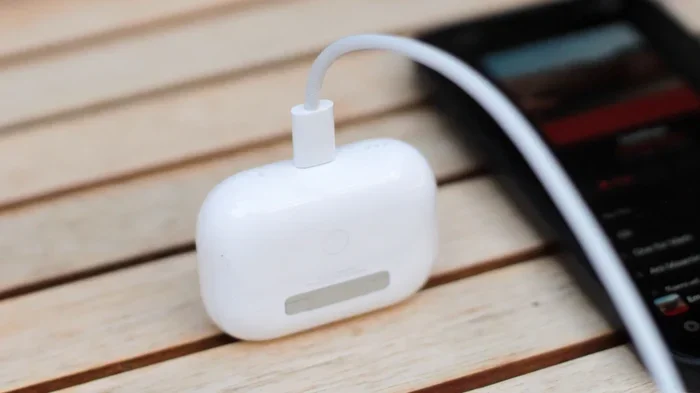
Featured image for AirPods Pro USB charging
Image source: sm.mashable.com
Picture this: you’re about to head out for a run, you grab your AirPods Pro, and… nothing. Dead battery. You scramble for a charger, but there’s a tangled mess of cables on your desk. Which one fits? Will it work? Will it damage your expensive earbuds?
If you’ve ever asked yourself, “Can I charge AirPod Pro with USB?” then take a deep breath. The answer is a resounding yes. Apple designed these little marvels to be incredibly user-friendly when it comes to power. Whether you have the original AirPods Pro, the 2nd generation, or the latest USB-C version, charging them is as simple as plugging in a cable.
This guide will walk you through everything you need to know about charging your AirPods Pro with USB. We’ll cover which cables work, how long charging takes, safety tips, and some insider tricks to make your battery last longer. By the end, you’ll be a charging expert, and those dead battery moments will be a thing of the past.
Key Takeaways
- Yes, USB charging works: AirPods Pro cases use Lightning (most models) or USB-C (2nd gen, 2022+) ports for charging.
- Cable type matters: You need a Lightning to USB or USB-C to USB cable, depending on your case model.
- Any USB power source works: Wall adapters, laptops, power banks, and car chargers all provide safe charging.
- 5W minimum recommended: Lower power sources charge slower but won’t damage your AirPods Pro.
- Full charge takes about 1 hour: A quick 5-minute charge provides roughly 1 hour of listening time.
- Wireless charging also available: All AirPods Pro models support Qi or MagSafe wireless charging as an alternative.
- Battery longevity tip: Avoid constant 100% charges to extend your battery’s overall lifespan.
📑 Table of Contents
- Understanding AirPods Pro Charging Basics
- What Type of USB Cable Do You Need?
- Where Can You Charge AirPods Pro with USB?
- How Long Does It Take to Charge AirPods Pro with USB?
- Tips for Safe and Efficient AirPods Pro Charging
- Troubleshooting Common Charging Issues
- Wireless Charging vs. USB Charging: Which Is Better?
- Battery Health and Long-Term Care
- The Environmental Angle: USB Charging and Sustainability
- Final Thoughts: Embracing the Simplicity of USB Charging
Understanding AirPods Pro Charging Basics
Let’s start with the fundamentals. Before we dive into the specifics of USB charging, it helps to understand what makes your AirPods Pro tick when it comes to power.
What Kind of Charging Port Do AirPods Pro Have?
Here’s where it gets interesting, because the answer depends on which AirPods Pro you own.
The original AirPods Pro (1st generation), released in October 2019, came with a wireless charging case that had a Lightning port. That’s the same small port you’d find on older iPhones. The Lightning port looks like a thin, oval-shaped slot. If you’ve ever charged an iPhone before 2023, you know exactly what this looks like.
The AirPods Pro (2nd generation), released in September 2022, initially came with a Lightning port case too. However, Apple quietly switched things up in September 2023. They released a new version of the AirPods Pro 2 that features a USB-C charging port instead of Lightning. This change happened because Apple was transitioning all its products to USB-C, largely due to European Union regulations requiring a universal charging standard.
Did you know that as of 2024, Apple has fully transitioned its iPhone lineup to USB-C? The iPhone 15 series, released in September 2023, was the first iPhone family to ditch Lightning completely. This means if you buy a new iPhone today, you already have USB-C cables lying around that can charge your AirPods Pro.
So, to put it simply: most AirPods Pro cases use Lightning, but newer ones use USB-C. Both can be charged with a USB cable. You just need the right cable for your specific model.
Why USB Charging Is the Standard
USB has become the universal language of charging for good reason. Think of it like a common language that all your gadgets speak. Whether it’s your phone, tablet, e-reader, or wireless earbuds, USB has become the go-to way to power up.
USB stands for Universal Serial Bus, and the name says it all. The first version appeared in 1996, and since then, it’s become the most widely used charging standard in the world. As of 2023, there are over 10 billion USB devices in circulation globally. That’s a lot of cables!
When Apple launched the original iPod in 2001, they used FireWire. But by 2003, Apple switched to the 30-pin connector, and eventually to Lightning in 2012. The move to USB-C represents the biggest shift yet, bringing Apple devices in line with the rest of the tech world.
For AirPods Pro users, this is great news. You probably already have multiple USB cables in your home, car, and office. That means charging your AirPods Pro is almost always convenient.
The Short Answer: Yes, You Can Charge AirPods Pro with USB
Let’s not bury the lede here. If you came to this article looking for a quick answer, here it is: yes, you can charge AirPods Pro with a USB cable. This is actually the primary way Apple intends for you to charge them.
Every AirPods Pro charging case, regardless of generation, comes with a USB cable in the box. Plug that cable into any USB power source, connect the other end to your charging case, and you’re good to go. The status light on the front of the case will turn amber (orange) while charging and green when fully charged.
What Type of USB Cable Do You Need?
Now that we’ve established USB charging is the way, let’s get specific about cables. This is where many people get confused, but don’t worry—it’s simpler than you think.
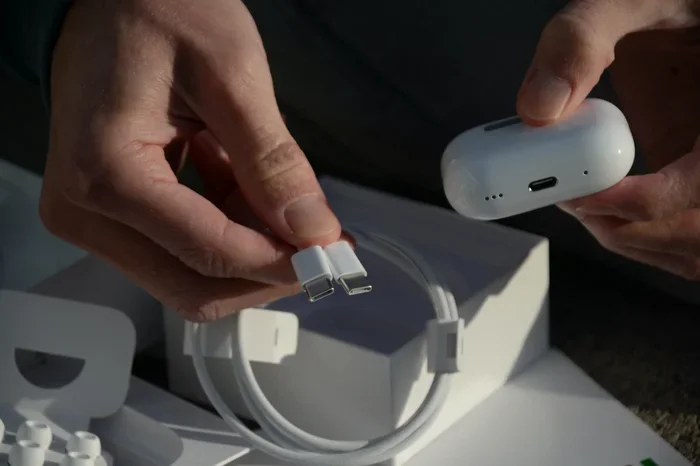
Visual guide about AirPods Pro USB charging
Image source: mobile-pixels.com
For AirPods Pro with Lightning Port
If your AirPods Pro case has a Lightning port (the small, oval-shaped slot), you need a Lightning to USB cable. This cable has a Lightning connector on one end and a standard USB-A connector on the other.
Apple includes a Lightning to USB-C cable in newer AirPods Pro boxes, while older models came with Lightning to USB-A. Both work fine; you just need the appropriate power source. If you have a Lightning to USB-C cable, you’ll need a USB-C wall adapter or a USB-C port on your computer. If you have Lightning to USB-A, any traditional USB port will work.
Don’t have the original cable? No problem. Lightning cables are everywhere. You can find them at electronics stores, online retailers, and even gas stations. Just make sure you’re buying from a reputable brand. Cheap, knockoff Lightning cables can sometimes cause charging issues or, in rare cases, damage your device. Stick with Apple’s official cable or MFi-certified (Made for iPhone) third-party options.
For AirPods Pro with USB-C Port
If your AirPods Pro case has a USB-C port (the small, rounded rectangle slot), you’ll need a USB-C to USB cable. This cable has a USB-C connector on one end and either USB-A or USB-C on the other end.
USB-C is becoming the new standard, and you likely already have several USB-C cables in your home. The one that came with your iPhone 15 or later will work perfectly. The one that charges your MacBook? That works too. Even the cable from your Nintendo Switch or many Android phones will do the job.
USB-C cables come in different versions and support different charging speeds. For AirPods Pro, any standard USB-C cable will work. You don’t need a special “fast charging” cable because the AirPods Pro case can’t accept fast charging anyway. The battery is small, and Apple has built-in limitations to prevent overcharging.
How to Identify Your AirPods Pro Model
Not sure which version you have? Here’s a quick way to find out. Go to Settings on your iPhone, tap Bluetooth, and look for your AirPods Pro in the list. Tap the “i” icon next to them, and you’ll see the model number. You can also check the bottom of your charging case for the model number printed in tiny text.
Model numbers break down like this: AirPods Pro 1st generation includes A2083, A2084. AirPods Pro 2nd generation with Lightning includes A2700, A2968. AirPods Pro 2nd generation with USB-C includes A2968, A3047, A3048, A3049.
Still confused? Just look at the port. Lightning is a thin, oval slot. USB-C is a slightly wider, rounded rectangle. That’s the easiest way to tell.
Where Can You Charge AirPods Pro with USB?
The beauty of USB charging is flexibility. Let’s explore all the places you can power up your AirPods Pro.
Wall Outlets and Power Adapters
The most common way to charge AirPods Pro is by plugging them into a wall outlet using a USB power adapter. Apple recommends using at least a 5W adapter, but higher-wattage adapters work fine too. The AirPods Pro case will only draw the power it needs, so using a 20W iPhone charger won’t damage anything. It just won’t charge faster than a 5W charger would.
Apple no longer includes wall adapters in iPhone boxes, but you might have one lying around from an older device. Alternatively, you can pick up a multi-port USB charger that can handle your phone, tablet, and AirPods Pro all at once. These are great for travel or keeping your nightstand clutter-free.
Computers and Laptops
Your computer’s USB ports are another excellent charging source. Whether you’re using a MacBook, Windows PC, or even a Chromebook, plugging your AirPods Pro into a USB port will charge them. This is handy when you’re working at your desk and want to top off your case.
One thing to note: some computers might not provide enough power through their USB ports, especially older machines or those in sleep mode. If your AirPods Pro aren’t charging when plugged into your computer, try a different port or make sure your computer is awake.
Power Banks and Portable Chargers
Power banks are a lifesaver when you’re on the go. The good news is that any power bank with a USB output can charge your AirPods Pro. Since the AirPods Pro case has such a small battery (around 1,000 mAh for the case itself), even a small power bank can charge it multiple times over.
If you’re traveling, hiking, or just commuting, tossing your AirPods Pro case and a small power bank in your bag means you’ll never run out of juice. Some power banks even have built-in Lightning or USB-C cables, making things even more convenient.
Car Chargers
Long road trip? Your car’s USB port can charge your AirPods Pro case while you drive. Most modern vehicles come with built-in USB ports, and there are countless car charger adapters available if your car doesn’t have one.
Just be careful with cheap car chargers. Some lower-quality models don’t regulate power well and could potentially damage sensitive electronics. Stick with reputable brands like Anker, Belkin, or Apple’s own adapters.
Other USB Power Sources
Pretty much anything with a USB port can charge your AirPods Pro. This includes:
- Gaming consoles (PlayStation, Xbox)
- Smart TVs with USB ports
- Airplane seatback USB ports
- Hotel room USB outlets
- USB hubs and docking stations
This universal compatibility is one of the best things about USB charging. You’re rarely far from a power source.
How Long Does It Take to Charge AirPods Pro with USB?
Charging speed matters, especially when you’re in a hurry. Let’s break down the timing.
Charging the Case from Empty
If your AirPods Pro case is completely dead, expect it to take about an hour to fully charge using a standard 5W USB adapter. The case has a small battery, so it fills up relatively quickly compared to your phone or tablet.
With a higher-wattage adapter (like the 20W charger that comes with newer iPhones), the charging time is about the same. That’s because the AirPods Pro case limits its power intake. Don’t expect faster charging just because you’re using a more powerful adapter.
Charging the Earbuds Inside the Case
Here’s where things get interesting. Your AirPods Pro earbuds also need charging, and they charge while sitting in the case. If your earbuds are completely dead, expect them to take about 30 minutes to an hour to fully charge inside the case.
The great thing is that you can charge the case and the earbuds simultaneously. Just plug the case in with the earbuds inside, and both will charge at the same time. The case will prioritize charging the earbuds first, then top off its own battery.
Quick Charge: 5 Minutes for 1 Hour of Listening
Did you know that just 5 minutes of charging gives you about 1 hour of listening time? This is one of the most useful features of AirPods Pro. If you’re rushing out the door and your earbuds are dead, a quick 5-minute charge while you grab your keys and put on shoes is enough to get you through your commute or workout.
This fast-charging capability has been a staple of AirPods since the original model. It’s a game-changer for those moments when you forget to charge and need a quick boost.
Tips for Safe and Efficient AirPods Pro Charging
Charging your AirPods Pro with USB is straightforward, but a few tips can help you get the most out of your battery and avoid potential issues.
Use Quality Cables and Adapters
We’ve touched on this already, but it’s worth repeating. Cheap, uncertified cables can cause problems. They might not regulate power correctly, leading to inconsistent charging or, in worst cases, damage to your device.
MFi-certified cables (Made for iPhone) have been tested by Apple and meet their standards. For USB-C cables, look for cables that comply with USB-IF standards. Yes, they cost a bit more, but the peace of mind is worth it.
Avoid Extreme Temperatures
Batteries don’t like extreme heat or cold. Apple recommends using and charging AirPods Pro in environments between 32°F and 95°F (0°C to 35°C). Charging in extreme cold can reduce battery capacity temporarily, while charging in extreme heat can permanently damage the battery.
Don’t leave your AirPods Pro case in a hot car or direct sunlight while charging. And if it’s freezing outside, let your case warm up to room temperature before plugging it in.
Don’t Always Charge to 100%
Here’s a tip that can extend your battery’s overall lifespan. Lithium-ion batteries, which AirPods Pro use, last longer when they’re not constantly charged to 100%. Ideally, try to keep the battery between 20% and 80% for daily use.
Of course, this isn’t always practical. But if you’re charging overnight or for extended periods, consider unplugging once the case is full. The case has overcharge protection, so leaving it plugged in won’t damage it immediately, but long-term, it can degrade the battery faster.
Keep the Charging Port Clean
Dust, lint, and debris can accumulate in the charging port over time. This is especially true if you carry your AirPods Pro case in pockets or bags. A dirty port can prevent proper contact between the cable and the case, leading to slow or failed charging.
Periodically inspect the charging port and gently clean it with a dry, soft-bristled brush. A clean toothbrush works well. Avoid using anything metallic that could damage the port’s pins.
Check the Status Light
The small LED on the front of your AirPods Pro case tells you a lot. Here’s a quick guide:
- Green: Fully charged (or has more than one full charge remaining)
- Amber/Orange: Charging or less than one full charge remaining
- White (flashing): Ready to pair
- Off: No charge left in the case
If the status light doesn’t come on when you plug in your case, there might be an issue. Check the cable, adapter, and port to make sure everything is connected properly.
Troubleshooting Common Charging Issues
Sometimes things don’t go as planned. Let’s tackle some common AirPods Pro charging problems and their solutions.
AirPods Pro Case Won’t Charge
If your case isn’t charging, try these steps:
- Make sure the cable is firmly plugged into both the case and the power source.
- Try a different cable. Cables can fail over time, especially if they’re bent or stressed.
- Try a different power source. The issue might be with your adapter or USB port, not the case.
- Clean the charging port on the case.
- Reset your AirPods Pro by holding the setup button on the back for about 15 seconds until the status light flashes amber, then white.
If none of these work, your case might have a hardware issue. Contact Apple Support or visit an Apple Store for assistance.
Charging Is Slow
If charging seems slower than usual, check your power source. A 5W adapter will charge slower than a 10W or 20W adapter, even though the AirPods Pro case won’t actually draw more than 5W. Also, check the cable. Damaged or low-quality cables can reduce charging speed.
Background processes on your devices can also affect things. If you’re charging via a laptop that’s doing intensive tasks (video rendering, large downloads), the USB port might provide less power than usual.
One Earbud Charges but the Other Doesn’t
If only one earbud is charging, the issue is usually with the earbud itself, not the case. Try these steps:
- Clean the metal contacts on both the earbud and inside the case. Use a dry cotton swab or soft cloth.
- Reset your AirPods Pro.
- Try pairing the problematic earbud with a different device to see if the issue persists.
If the problem continues, the earbud might have a battery issue. AirPods Pro batteries do degrade over time, and after a couple of years, you might notice one earbud holding less charge than the other.
Status Light Doesn’t Turn On
If the status light doesn’t illuminate when you plug in the case, the case might be completely dead. Leave it plugged in for at least 30 minutes to see if it responds. Sometimes deeply discharged batteries need time to recover.
If it still doesn’t respond after 30 minutes, try a different cable and power source. If that fails, the case likely needs service.
Wireless Charging vs. USB Charging: Which Is Better?
AirPods Pro support both USB and wireless charging. Let’s compare the two methods.
Convenience
Wireless charging is more convenient in some scenarios. Just set your case on a Qi or MagSafe charger and walk away. There’s no cable to plug in or fumble with. However, wireless charging requires you to have a charging pad, which is another thing to buy and keep plugged in.
USB charging, on the other hand, works with cables you already have. It’s portable, requires no special equipment beyond a cable and power source, and is generally more reliable.
Speed
USB charging is faster than wireless charging. With a USB connection, you can fully charge the case in about an hour. Wireless charging typically takes 1.5 to 2 hours due to energy loss in the wireless transfer process.
If speed matters, USB is the way to go. If convenience matters more, wireless might be your preference.
Efficiency
USB charging is more energy-efficient. Wireless charging generates heat, which wastes energy. According to the Department of Energy, wireless charging is roughly 50% less efficient than wired charging. Over time, this can add up on your electricity bill.
For the eco-conscious or those watching their energy usage, USB is the greener choice.
Which Should You Use?
Both methods are perfectly fine for AirPods Pro. Use USB when you need a quick charge or when you’re traveling. Use wireless when you have a charging pad on your desk or nightstand and want the convenience of just dropping the case down. Many people use both methods depending on the situation.
Battery Health and Long-Term Care
Your AirPods Pro battery won’t last forever, but proper care can extend its life significantly.
Understanding Battery Degradation
All rechargeable batteries degrade over time. After about 500 full charge cycles, lithium-ion batteries typically retain only 80% of their original capacity. For AirPods Pro, that means after about 1.5 to 2 years of regular use, you might notice shorter battery life.
This is normal and happens to every rechargeable device. The good news is that you can slow this degradation with proper care.
Best Practices for Battery Longevity
Here are some habits that will help your AirPods Pro battery last longer:
- Avoid extreme temperatures: Don’t leave them in hot cars or freezing environments.
- Don’t let them sit at 0% for long periods: Deeply discharged batteries can become unstable. If you’re storing them for a while, charge them to about 50% first.
- Use them regularly: Batteries last longer when used. If you haven’t used your AirPods Pro in months, give them a charge.
- Avoid constant 100% charges: Unplug when full, or at least don’t leave them plugged in for days at a time.
Think of your battery like a muscle. It needs regular exercise (use and charging), but overdoing it (constant 100% charges or extreme conditions) can wear it out faster.
When to Replace Your AirPods Pro Battery
Apple offers battery service for AirPods Pro. If your battery health has degraded significantly and you’re not ready to buy new earbuds, you can get the battery replaced. The cost varies by region, but it’s typically less than buying a new pair.
However, if your AirPods Pro are more than three years old and showing battery issues, it might make more sense to upgrade. The AirPods Pro 2 with USB-C is a significant improvement over the original, with better noise cancellation, longer battery life, and improved sound quality.
The Environmental Angle: USB Charging and Sustainability
Let’s talk about something that affects all of us: the environment.
The E-Waste Problem
Electronic waste is one of the fastest-growing waste streams in the world. In 2022, the world generated 62 million tonnes of e-waste, and only 22.3% was recycled properly. Many old cables and chargers end up in landfills, where they leach toxic chemicals into the soil and water.
By using USB charging for your AirPods Pro, you’re already part of the solution. USB is a universal standard, which means fewer proprietary cables end up in landfills. When you upgrade your devices, you can often reuse the same cables.
Recycling Old Cables
When you do need to get rid of old cables, don’t throw them in the trash. Many electronics stores and recycling centers accept cables for recycling. Apple also has a recycling program where you can trade in old devices and cables for credit toward new purchases.
Some creative people even repurpose old cables into art, charging stands, or other useful items. A quick search on Pinterest will give you plenty of ideas if you’re crafty.
Energy Consumption
As mentioned earlier, USB charging is more energy-efficient than wireless charging. Over the lifetime of your AirPods Pro, this difference is small, but multiplied across millions of users, it adds up. If everyone switched from wireless to wired charging, we could save enough electricity to power thousands of homes.
Final Thoughts: Embracing the Simplicity of USB Charging
So, can you charge AirPods Pro with USB? Absolutely. It’s the primary charging method Apple designed for these earbuds, and it’s incredibly easy to do.
Whether you have an original AirPods Pro with a Lightning port or the newer version with USB-C, charging is as simple as plugging a cable into the case and the other end into any USB power source. You don’t need special equipment, expensive chargers, or technical know-how.
The beauty of USB charging lies in its universality. The cables are everywhere, the power sources are plentiful, and the process is intuitive. In a world where technology sometimes feels overly complicated, AirPods Pro charging is refreshingly simple.
As we move further into 2024 and beyond, USB-C will become the standard across all Apple devices. This means your AirPods Pro, iPhone, iPad, and Mac will all use the same cable. That’s one less thing to worry about, one less cable to lose, and one step closer to a more sustainable tech ecosystem.
So go ahead, grab that USB cable, plug in your AirPods Pro, and enjoy the freedom of wireless listening. With a full charge in about an hour and a 1-hour boost from just 5 minutes of charging, you’ll never be without your favorite music, podcasts, or calls for long. Happy listening!
Frequently Asked Questions
Can I charge AirPods Pro with any USB cable?
You need a cable that matches your case’s port. AirPods Pro with Lightning ports need Lightning to USB cables, while USB-C versions need USB-C cables. As long as the connector fits and the cable is in good condition, any quality cable will work safely.
Is it safe to charge AirPods Pro with a phone charger?
Yes, it’s completely safe. AirPods Pro charging cases regulate power intake and won’t be damaged by higher-wattage chargers. A 20W iPhone charger is perfectly fine, though your case will only draw the 5W it actually needs.
How do I know if my AirPods Pro are charging?
Check the status light on the front of the case. It shows amber (orange) while charging and turns green when fully charged. If the light is off, your case has no charge. You can also check battery levels on your iPhone’s Batteries widget.
Can I charge AirPods Pro from a power bank?
Absolutely! Any power bank with a USB output can charge your AirPods Pro case. Since the case has a small battery, even a compact power bank can charge it multiple times. This makes power banks perfect for travel and outdoor activities.
Why is my AirPods Pro case charging slowly?
Slow charging usually results from a low-power source, a damaged cable, or a dirty charging port. Try using a different cable, a different power adapter, and gently clean the port with a soft brush. If problems persist, the case battery may need service.
Do AirPods Pro charge faster with USB-C than Lightning?
No, charging speeds are essentially the same for both Lightning and USB-C AirPods Pro cases. Both take about an hour for a full charge. The cable type doesn’t affect speed as much as the power output of your charging adapter does.