You can charge many AirPods models with USB-C, but it depends on which case you own. AirPods Pro 2 and AirPods 4 come with built-in USB-C charging cases, while older models use different cables. If you have the right case, any standard USB-C cable will power up your earbuds quickly and safely.
Featured image for AirPods USB-C charging case
Image source: media.techietech.tech
If you’ve ever grabbed your AirPods case only to realize the cable in your hand doesn’t fit, you’re not alone. For years, Apple earbuds came with Lightning cables, which meant hunting for the right charger in a drawer full of random cords. Now, with USB-C becoming the universal standard, things have gotten much simpler. But can you charge AirPods with USB C? The short answer is yes, but only if you have the right case.
This guide breaks down everything you need to know about charging AirPods with USB-C. You’ll learn which models support it, which ones don’t, and what your options are if you’re stuck with an older case. Think of it like this: USB-C is the new “fits everything” cable, kind of like how all home appliances eventually switched to the same outlet style. Once you understand the differences, charging becomes a no-brainer.
By 2026, USB-C is essentially the universal language of charging cables. Laptops, phones, tablets, game consoles, and yes, AirPods all speak it. According to the International Electrotechnical Commission, USB-C handles up to 240 watts of power, which is more than enough for tiny earbuds. So whether you’re at home, in a coffee shop, or traveling abroad, finding a compatible charger is easier than ever.
Key Takeaways
- USB-C Compatibility Varies by Model: Only AirPods Pro 2 (2023) and AirPods 4 feature native USB-C charging cases.
- Older AirPods Need Adapters: AirPods 1, 2, 3, and original AirPods Pro use Lightning or USB-A cables.
- Same Cable as iPhone 15 and Beyond: Starting with iPhone 15, Apple uses USB-C across most devices.
- Faster Charging Speeds: USB-C supports quicker power delivery than older cable types.
- Wireless Charging Still Works: MagSafe and Qi wireless options remain available on supported cases.
- Standard Cable Works Fine: You don’t need a special Apple-branded USB-C cable.
- EU Regulations Drove the Change: A European Union rule pushed Apple toward USB-C in 2024.
📑 Table of Contents
- Which AirPods Models Support USB-C Charging?
- How to Charge AirPods with USB-C: Step-by-Step Guide
- Charging Times and Battery Life Explained
- What You Need to Charge AirPods with USB-C
- Why Apple Switched to USB-C for AirPods
- Troubleshooting: What If Your AirPods Won’t Charge with USB-C?
- Can You Use Wireless Charging with USB-C AirPods?
- Comparing USB-C AirPods Across Models
- Adapters and Workarounds for Older AirPods
- Travel Tips: Charging AirPods with USB-C on the Go
- Common Myths About Charging AirPods with USB-C
- The Future of AirPods Charging
- Final Thoughts: Embracing the USB-C Life
Which AirPods Models Support USB-C Charging?
The first question most people ask is whether their specific AirPods case even has a USB-C port. Apple didn’t switch all models at once. Instead, they rolled out USB-C gradually, starting with premium products and newer releases.
AirPods Pro 2 (USB-C Version, Released September 2023)
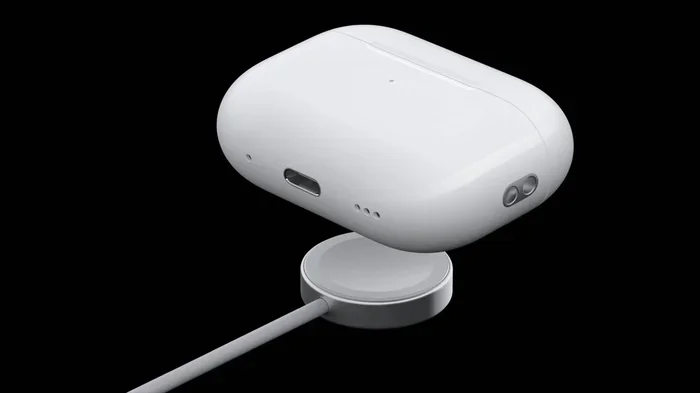
This is the model that changed everything. Apple released a refreshed version of the AirPods Pro 2 in September 2023, and it came with a USB-C charging case right out of the box. If you bought AirPods Pro 2 after that date, you have the USB-C version. The case looks nearly identical to the Lightning version, but the port on the bottom is oval-shaped instead of narrow and rectangular.
Did you know? The AirPods Pro 2 USB-C case also supports lossless audio when paired with the Apple Vision Pro headset. That’s a feature the Lightning case simply can’t handle because it doesn’t have the bandwidth.
AirPods 4 (Released September 2024)
Apple launched two versions of AirPods 4 in late 2024: a standard model and one with Active Noise Cancellation. Both come with USB-C charging cases. The standard AirPods 4 case does not support wireless charging, but the ANC version does include wireless and MagSafe charging alongside the USB-C port.
AirPods 4 (ANC Version Only)
If you splurged for the noise-cancelling version of AirPods 4, you get the best of everything: USB-C wired charging, MagSafe, Qi wireless charging, and even an Apple Watch charger compatibility. It’s basically the Swiss Army knife of AirPods cases.
AirPods Pro 3 (Released September 2025)
The newest AirPods Pro model continues the USB-C trend. If you’re buying AirPods Pro today, you’re getting a USB-C case by default. There’s no Lightning version available anymore from Apple directly.
Models That Do NOT Support USB-C
Here’s the list of AirPods that still use Lightning cables:
- AirPods 1st generation (2016)
- AirPods 2nd generation (2019)
- AirPods 3rd generation (2021)
- AirPods Pro 1st generation (2019)
- AirPods Max (headphones, use Lightning)
If your AirPods case has a small, narrow port at the bottom, it’s Lightning. If it’s a wider oval shape, it’s USB-C. It takes about two seconds to check, and it saves you a lot of frustration later.
How to Charge AirPods with USB-C: Step-by-Step Guide
Charging your AirPods with USB-C is honestly one of the easiest things you’ll do all day. If you can plug in a phone, you can charge AirPods. But let’s walk through the steps so you know exactly what to expect.
Visual guide about AirPods USB-C charging case
Image source: m.media-amazon.com
Step 1: Check Your Case Has a USB-C Port
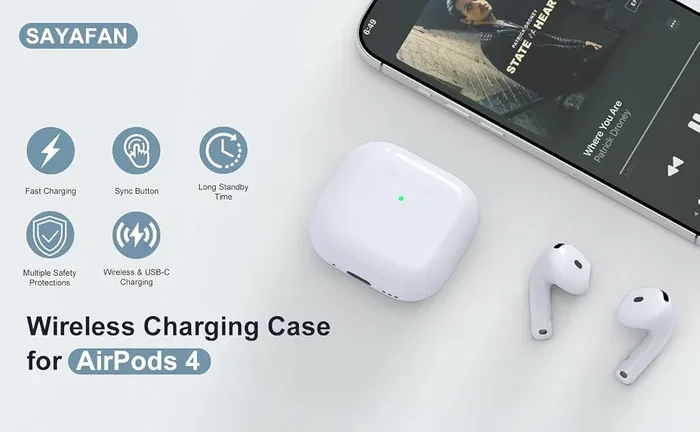
Flip your AirPods case over and look at the bottom. If you see a small oval-shaped port, you’re good to go. If it’s a narrow rectangular slot, you have a Lightning case and will need a different cable or an adapter.
Step 2: Grab a USB-C Cable
Any standard USB-C cable will work. You don’t need to buy a special Apple-branded one. A cable from Anker, Belkin, UGREEN, or even the one that came with your Android phone will charge your AirPods just fine. Think of USB-C like a universal key. As long as it fits, it works.
Step 3: Connect the Cable to a Power Source
Plug the other end of the USB-C cable into a power source. This could be:
- A wall adapter (5W minimum recommended)
- A laptop or computer
- A portable power bank
- A car charger
- A USB-C hub or docking station
Step 4: Place Your AirPods in the Case
Make sure your AirPods are properly seated in the case. You’ll feel a small magnetic click when they’re secure. If they’re not seated correctly, they won’t charge.
Step 5: Check the Status Light
Once plugged in, the status light on the front of the case will turn on. If it’s amber or orange, your AirPods are charging. If it’s green, they’re fully charged. If no light appears, try a different cable or power source.
Did you know? A 5-minute charge in the case gives you about 1 hour of listening time. AirPods charge incredibly fast because the batteries are so small. This is like filling a thimble with water versus filling a swimming pool.
Charging Times and Battery Life Explained
One of the best things about AirPods is how quickly they charge. You can pop them in the case for a few minutes and get hours of use. Let’s break down the exact numbers.
AirPods Pro 2 (USB-C) Charging Times
- 5 minutes in the case: About 1 hour of listening time
- 15 minutes in the case: Around 3 hours of listening time
- Full charge: Provides up to 6 hours of listening time (ANC on)
- Case fully charged: Provides up to 30 hours of total listening time
AirPods 4 Standard Charging Times
- 10 minutes in the case: Up to 1.5 hours of listening time
- Full earbud charge: About 5 hours of listening time
- Case provides: Up to 24 hours of total listening time
AirPods 4 (ANC) Charging Times
- 10 minutes in the case: Up to 2 hours of listening time
- Full earbud charge: About 5 hours with ANC on
- Case provides: Up to 30 hours of total listening time
These numbers come straight from Apple’s official specs and have been tested by multiple review sites. The bottom line is this: AirPods charge fast, and the case holds plenty of backup power for multiple full charges.
Does USB-C Charge Faster Than Lightning?
In real-world use, the difference is minimal for AirPods because the batteries are so small. However, USB-C cables and ports are designed to handle higher wattage, which means faster potential charging speeds. With USB-C, you can charge your case in about 1 hour from empty. Lightning charging takes roughly the same time, but USB-C is more efficient overall.
Think of it this way: USB-C is like a fire hose. It’s capable of delivering a lot of power quickly, but for tiny AirPods batteries, you don’t need that much. The extra capacity just means the cable is future-proof for bigger devices.
What You Need to Charge AirPods with USB-C
Good news: you probably already have everything you need. Here’s a simple checklist.
Required Items
- AirPods with a USB-C charging case: AirPods Pro 2 (2023+), AirPods 4, or AirPods Pro 3
- A USB-C cable: Any standard USB-C to USB-C cable works
- A power source: Wall adapter, computer, or power bank with USB-C output
Optional Items
- A higher-wattage wall adapter: 20W or higher for fastest charging speeds
- MagSafe charger: For wireless charging on supported models
- Apple Watch charger: Works with AirPods 4 ANC and AirPods Pro 2 USB-C
What If You Don’t Have a USB-C Cable?
If you have an older AirPods case with Lightning, you’ll need a Lightning cable instead. Apple still includes Lightning cables with older AirPods models. You can also buy them from the Apple Store, Amazon, or any electronics retailer. They’re about $15-$20 for an official Apple cable, or much cheaper from third-party brands.
Can You Use USB-C to Lightning?
Yes, but only if your case has a Lightning port. This cable has USB-C on one end and Lightning on the other. It lets you charge an older AirPods case from a modern USB-C power adapter. So even if you have mixed devices, you can make them work together.
Why Apple Switched to USB-C for AirPods
The move to USB-C wasn’t random. It was driven by a combination of consumer demand, industry trends, and government regulations. Understanding why helps explain why this change is permanent.
The European Union Mandate
In October 2022, the European Union passed a law requiring all smartphones, tablets, and headphones sold in EU countries to use USB-C charging by the end of 2024. The rule aimed to reduce electronic waste by creating a universal charging standard. Apple, which had been using Lightning since 2012, had no choice but to comply.
Did you know? The EU estimates that this single rule will save consumers around €250 million per year on unnecessary cable purchases. It will also prevent about 11,000 tons of electronic waste annually, according to the European Parliament.
Consumer Convenience
Beyond the law, consumers have been asking for USB-C across Apple products for years. One cable for your phone, laptop, tablet, and earbuds just makes life easier. You can travel with a single cable and charger for everything. Apple even includes a USB-C cable with the iPhone 15 and newer models, signaling their commitment to the standard.
Technical Advantages
USB-C isn’t just about convenience. It’s technically superior in several ways:
- Faster data transfer: Up to 40 Gbps with Thunderbolt 4 support
- Higher power delivery: Up to 240W with USB4
- Reversible connector: No more fumbling to plug it in the right way
- Universal compatibility: Works with thousands of devices
For AirPods specifically, USB-C enables features like lossless audio when paired with the Apple Vision Pro. The Lightning cable simply doesn’t have the bandwidth for that.
Troubleshooting: What If Your AirPods Won’t Charge with USB-C?
Sometimes things don’t work the way they should. If your AirPods case isn’t charging with USB-C, here are the most common fixes.
Check the Cable
Cables wear out, especially at the connectors. Try a different USB-C cable to see if that’s the issue. If the new cable works, your old one is likely damaged. This is the most common cause of charging problems.
Clean the Charging Port
Dust and debris can collect inside the USB-C port on your AirPods case. Use a soft, dry brush (like a clean toothbrush) to gently remove any gunk. Compressed air also works well. Don’t use anything metal or wet, as you could damage the contacts.
Think of it like cleaning a keyhole. A little bit of dirt can prevent the key from going in properly. The same applies to charging ports.
Try a Different Power Source
Not all USB-C ports are created equal. Some older computers have low-power USB ports that might not charge AirPods efficiently. Try plugging into a wall adapter instead, or a different computer.
Reset Your AirPods
If the case still isn’t charging, try resetting your AirPods:
- Put your AirPods in the case and close the lid
- Wait 30 seconds
- Open the lid
- Press and hold the setup button on the back of the case for about 15 seconds, until the status light flashes amber then white
- Reconnect your AirPods to your device
Check for Software Updates
Sometimes firmware bugs can cause charging issues. Make sure your AirPods are running the latest firmware by connecting them to your iPhone and going to Settings > Bluetooth > tap the “i” next to your AirPods. If there’s an update available, it will install automatically when the AirPods are charging and in range.
Contact Apple Support
If none of these fixes work, your AirPods case might have a hardware issue. Apple offers battery service for AirPods, and if your device is under warranty or covered by AppleCare+, the repair might be free. Otherwise, a replacement case costs around $59-$79 depending on the model.
Can You Use Wireless Charging with USB-C AirPods?
Absolutely! Having a USB-C port doesn’t mean you have to use a cable. Most modern AirPods cases support multiple charging methods simultaneously.
Wireless Charging Options
- MagSafe: Magnetically snaps to compatible chargers for easy alignment
- Qi wireless charging: Works with any Qi-certified wireless charger
- Apple Watch charger: The AirPods Pro 2 USB-C case and AirPods 4 ANC case can charge on an Apple Watch charging puck
This flexibility is one of the best things about newer AirPods. You can charge them with a cable at your desk, then drop them on a wireless charger at night. It’s like having a car that runs on both gas and electricity. Pick whichever method is easiest at the moment.
Charging Speeds: Wired vs. Wireless
Wired USB-C charging is still the fastest method. A wired charge from empty takes about an hour. Wireless charging typically takes 90 minutes to 2 hours for a full case charge, depending on the wireless charger you use. Both are perfectly fine for overnight charging, but if you’re in a hurry, go wired.
Comparing USB-C AirPods Across Models
Let’s look at how the different USB-C-enabled AirPods stack up against each other. This comparison can help if you’re trying to decide which model to buy.
AirPods Pro 2 USB-C vs. AirPods Pro 3
The AirPods Pro 3 are the newest model with improved noise cancellation, longer battery life, and better water resistance. However, the AirPods Pro 2 USB-C are still excellent and often available at a discount now. Both support USB-C, MagSafe, Qi, and Apple Watch charging.
AirPods 4 Standard vs. AirPods 4 ANC
The standard AirPods 4 are the budget option. They have USB-C charging but no wireless charging, no noise cancellation, and a slightly shorter battery life. The ANC version adds active noise cancellation, transparency mode, wireless charging, and conversation awareness. Both use USB-C for wired charging.
Which Should You Buy?
If you want the best audio quality and noise cancellation, go with AirPods Pro 3 or AirPods Pro 2 USB-C. If you want a basic pair for casual listening, AirPods 4 standard is fine. If you want a balance of features and price, AirPods 4 ANC hits a sweet spot.
Adapters and Workarounds for Older AirPods
What if you love your older AirPods but want to use USB-C cables for everything? You have a few options.
Lightning to USB-C Cable
Apple sells these cables directly. One end is Lightning, the other is USB-C. You plug the USB-C end into a modern power adapter and the Lightning end into your older AirPods case. It costs around $19 from Apple, or less from third-party sellers. This is the simplest solution.
USB-C Hub with Multiple Ports
If you have a lot of mixed devices, a USB-C hub can be a lifesaver. These hubs have multiple ports including USB-A, HDMI, SD card readers, and sometimes Lightning. You can charge older AirPods and newer devices from a single hub.
Replace the Case
Did you know you can buy replacement AirPods cases? Apple sells them, and so do many third-party manufacturers. If you have working AirPods but an old case, you could buy a new USB-C case separately. For AirPods Pro 2, the USB-C case replacement costs around $99. For AirPods 4, it’s about $79.
Buy New AirPods
Sometimes the most cost-effective option is to just upgrade. If your AirPods are more than three years old, the battery life has likely degraded. New AirPods with USB-C cases start at $129 for AirPods 4 standard, which is a great value considering the improved sound quality and features.
Travel Tips: Charging AirPods with USB-C on the Go
Traveling with AirPods is a breeze with USB-C. Here’s how to make it even easier.
Pack One Cable for Everything
Since USB-C works with most modern devices, you can pack a single cable and charger for your phone, laptop, tablet, and AirPods. This is a game-changer for light packers. Imagine having one key that opens every door.
Use a Multi-Port Charger
A GaN (Gallium Nitride) charger with multiple USB-C ports is perfect for travel. You can charge your MacBook, iPhone, and AirPods all at once from a single wall outlet. These chargers are small, lightweight, and powerful. Brands like Anker, UGREEN, and Belkin make excellent options.
Bring a Power Bank
A portable power bank with USB-C output ensures you can charge your AirPods anywhere. Most modern power banks support USB-C PD (Power Delivery), which charges devices quickly. Look for one with at least 10,000 mAh capacity for multiple charges.
Use Airplane Charging Ports
Many airplanes now have USB-C ports at each seat. You can charge your AirPods during a flight without needing an adapter. Just plug the USB-C cable directly into the seat’s port.
Common Myths About Charging AirPods with USB-C
There are a few misconceptions floating around. Let’s clear them up.
Myth 1: You Need Apple’s Official USB-C Cable
False. Any USB-C cable that fits will work. The cable doesn’t need to be Apple-branded, MFi-certified, or expensive. As long as it physically fits and isn’t damaged, it will charge your AirPods just fine.
Myth 2: USB-C Charges AirPods Faster Than Lightning
Technically true, but in practice, the difference is negligible. AirPods have tiny batteries, so both cable types charge them in roughly the same amount of time. The bigger advantage of USB-C is convenience, not speed.
Myth 3: All New AirPods Have USB-C
Mostly true, but be careful when buying refurbished or older stock. Some retailers may still have Lightning-version AirPods in inventory. Always check the product description or look at the case before buying.
Myth 4: You Can’t Use Your Old Charger
Not true. If your AirPods case has a USB-C port, any USB-C charger works. Old USB-A chargers won’t fit, but USB-C chargers are now everywhere: at work, at home, in coffee shops, at airports, and in cars.
Myth 5: Wireless Charging Is Always Better
It depends. Wireless charging is more convenient (just drop the case on a pad), but it’s slower and less efficient. For quick top-ups, wired USB-C charging is better. For overnight charging, wireless is fine.
The Future of AirPods Charging
Where is charging technology heading? Here’s what to expect in the coming years.
Faster Wireless Charging
Apple is reportedly working on faster wireless charging for AirPods. The next generation might support 15W or even 25W wireless charging, which would significantly reduce charging times. This could come to AirPods Pro 4 or future models.
Reverse Wireless Charging
Imagine charging your AirPods by placing the case on the back of your iPhone. This technology exists on some Android phones and could come to iPhones in the future. Apple has patented similar concepts, so don’t be surprised if it shows up in a future iOS update.
USB-C on All Apple Devices
By 2026, nearly every Apple product uses USB-C. The MacBook lineup switched years ago, the iPad switched in 2018, the iPhone switched in 2023, and AirPods are catching up. The only holdouts are some older accessories, but those are being phased out.
Even Smaller Batteries, Same Great Life
Battery technology is improving. Future AirPods might have even longer battery life in smaller packages. Silicon-anode batteries, which are more energy-dense, could power the next generation of AirPods. This means less time charging and more time listening.
Final Thoughts: Embracing the USB-C Life
Charging AirPods with USB-C is simple, fast, and convenient. If you have AirPods Pro 2 (2023+), AirPods 4, or AirPods Pro 3, you’re all set with a USB-C cable. Just plug in, wait for the amber light, and you’re good to go. No special accessories, no expensive adapters, no fuss.
The shift to USB-C is a positive change for everyone. One cable for all your devices means less clutter, less waste, and less frustration. Plus, USB-C is future-proof. Whatever devices you buy in the next decade will likely use the same cable. So investing in a few good USB-C cables now will pay off for years to come.
If you have older AirPods with a Lightning case, don’t worry. You can still use them with a Lightning to USB-C cable, or upgrade when you’re ready. There’s no rush. But when you do upgrade, you’ll love how seamless the experience becomes. One cable, one charger, all your devices. That’s the promise of USB-C, and it’s finally here for AirPods.
Frequently Asked Questions
Can you charge AirPods with a USB-C cable?
Yes, if your AirPods case has a USB-C port. AirPods Pro 2 (2023 version), AirPods 4, and AirPods Pro 3 all support USB-C charging out of the box. Simply plug a USB-C cable into the case and connect it to any power source. Older AirPods models use Lightning cables instead.
Do all AirPods come with USB-C now?
Most new AirPods sold since late 2023 come with USB-C cases. However, you might find older Lightning-version stock at some retailers, especially refurbished models. Always check the product description to confirm before purchasing. As of 2026, AirPods Pro 3 and AirPods 4 are the main models available, both with USB-C.
Can I charge AirPods with my iPhone 15 USB-C cable?
Absolutely! Any USB-C cable works with any USB-C AirPods case. The iPhone 15 cable is the same standard used by AirPods, iPads, MacBooks, and thousands of other devices. This is one of the biggest advantages of USB-C: one cable truly does work for almost everything.
How long does it take to fully charge AirPods with USB-C?
A completely empty AirPods case takes about 60 to 90 minutes to fully charge via USB-C. The earbuds themselves charge much faster: just 5 minutes in the case gives you about an hour of listening time. Wireless charging takes a bit longer, usually around 90 minutes to 2 hours for a full case charge.
Can I charge AirPods Pro 2 with USB-C and use lossless audio?
Yes, but lossless audio with the Apple Vision Pro requires the USB-C version of AirPods Pro 2 (released September 2023). The Lightning version does not support this feature because it lacks the necessary bandwidth. The USB-C version delivers 20-bit, 48 kHz lossless audio when paired with the Vision Pro.
What if my AirPods case doesn’t have a USB-C port?
If your AirPods case has a Lightning port, you cannot charge it directly with a USB-C cable. However, you can use a Lightning to USB-C cable, which has USB-C on one end and Lightning on the other. Alternatively, you can replace the case with a USB-C version or upgrade to newer AirPods altogether.