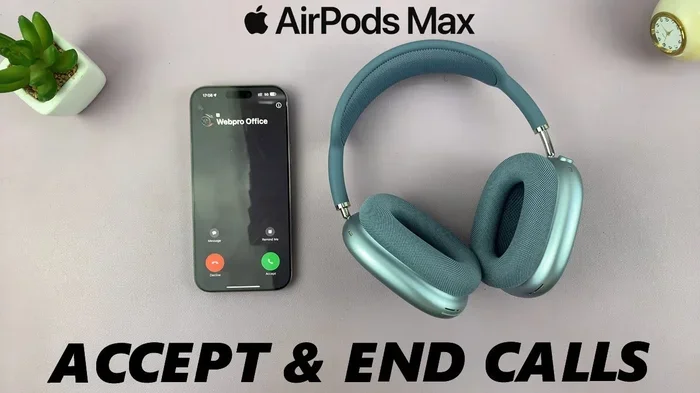
Featured image for AirPods Max phone call
Image source: i.ytimg.com
Yes, you can absolutely make calls with AirPods Max. These premium over-ear headphones come equipped with built-in microphones and Apple-designed technology that delivers clear voice quality during phone calls, FaceTime, and video conferences. Whether you’re using an iPhone, iPad, or Mac, AirPods Max seamlessly integrate for a hands-free calling experience with impressive audio performance.
Picture this: you’re working from your favorite coffee shop, the world buzzing around you, but somehow the person on the other end of your call hears every word you say as clearly as if you were sitting in a quiet library. That’s the magic of AirPods Max. These over-ear headphones from Apple aren’t just about listening to music or watching movies—they’re powerful communication tools designed to make your calls sound professional and crystal clear.
Whether you’re a busy professional juggling back-to-back Zoom meetings, a student taking online classes, or someone who simply prefers the comfort of over-ear headphones during long phone conversations, AirPods Max can handle it all. But how exactly do they work for calls? Are there any limitations you should know about? And how do they compare to using your iPhone directly?
In this comprehensive guide, we’ll walk you through everything you need to know about making calls with AirPods Max. From the technology inside these headphones to practical tips for the best call quality, consider this your complete resource for mastering phone calls with your premium Apple headphones.
Key Takeaways
- Built-in Microphones: AirPods Max feature multiple beam-forming microphones that isolate your voice from background noise during calls.
- Easy Call Controls: You can answer, end, or reject calls using the Digital Crown and noise control button on the headphones.
- Cross-Device Compatibility: AirPods Max work for calls across iPhone, iPad, Mac, and even non-Apple devices via Bluetooth.
- Noise Cancellation During Calls: Active Noise Cancellation and Transparency mode both work during phone calls for clearer conversations.
- Exceptional Audio Quality: Callers hear you clearly thanks to advanced algorithms that reduce wind and ambient noise.
- Battery Life for Calls: You get roughly 20 hours of talk time on a single charge, making them reliable for long conversations.
- Limitations Exist: Some Android devices may not support all call features like Siri or automatic switching.
📑 Table of Contents
- How AirPods Max Handle Phone Calls: The Basics
- Setting Up AirPods Max for Your First Call
- Call Quality: What to Expect from AirPods Max
- Advanced Features for Power Users
- Using AirPods Max for Calls on Different Devices
- Battery Life and Practical Tips for Long Calls
- Troubleshooting Common Call Issues
- Comparing AirPods Max to Other Headphones for Calls
- Final Thoughts: Are AirPods Max Worth It for Calls?
How AirPods Max Handle Phone Calls: The Basics
Let’s start with the most important question: can you actually make phone calls with AirPods Max? The answer is a resounding yes. AirPods Max are fully equipped for making and receiving calls across multiple devices and platforms. Think of them like a high-quality headset you’d find in a professional call center, but wrapped in a sleek, premium design that looks just as good on the subway as it does in a boardroom.
The Microphone System Explained
AirPods Max come with a sophisticated array of microphones—specifically, eight microphones total. Out of these, three are dedicated beam-forming microphones that focus specifically on picking up your voice while ignoring surrounding noise. The remaining microphones handle the Active Noise Cancellation feature that makes your music sound so immersive.
Here’s a simple analogy: imagine you’re trying to have a conversation with a friend at a loud concert. A beam-forming microphone works like a flashlight beam pointed at your mouth—it “zooms in” on your voice and ignores the chaos happening in every other direction. This is why people on the other end of your calls can hear you so clearly, even when you’re in a noisy environment.
What Types of Calls Are Supported?
AirPods Max support virtually every type of call you can imagine, including:
- Traditional phone calls through your iPhone’s cellular connection
- FaceTime audio and video calls on Apple devices
- Third-party app calls like WhatsApp, Zoom, Microsoft Teams, Skype, and Google Meet
- VoIP calls through various messaging and business applications
- Emergency calls when needed
Did You Know? According to Apple’s technical specifications, AirPods Max use computational audio with a custom acoustic design to process your voice over 200 times per second during calls. This real-time processing is what makes your voice sound so natural and clear to the person you’re talking to.
Setting Up AirPods Max for Your First Call
Getting started with calls on AirPods Max is surprisingly straightforward, especially if you’re already in the Apple ecosystem. Let’s walk through the setup process step by step.
Visual guide about AirPods Max phone call
Image source: descriptive.audio
Pairing with Your iPhone
First things first—your AirPods Max need to be paired with your device. If you’ve just unboxed them, here’s what to do:
- Remove your AirPods Max from the Smart Case and hold them near your iPhone
- Wait for the setup animation to appear on your phone screen
- Tap “Connect” when prompted
- Follow any additional on-screen instructions, including signing into iCloud if desired
Once paired, your AirPods Max will automatically connect to any device signed into your Apple ID with the same iCloud account. This seamless switching is one of Apple’s most celebrated features and makes moving between your iPhone, iPad, and Mac incredibly smooth.
Making Your First Call
Now that you’re paired, making a call is as simple as using Siri or your phone directly:
- Using Siri: Say “Hey Siri, call [contact name]” and your AirPods Max will initiate the call hands-free
- Manual dialing: Simply dial on your iPhone as usual—the audio will automatically route through your AirPods Max
- From your contacts list: Tap a contact and select their phone number to call
You’ll hear the call audio in both ears, and your voice will be picked up through the built-in microphones. It’s that easy!
Answering and Ending Calls
AirPods Max give you physical controls right on the headphones themselves, which is incredibly convenient when you’re walking or your hands are full.
To answer a call: Press the Digital Crown once. You’ll hear a gentle chime indicating the call has connected.
To end a call: Press the Digital Crown once again.
To reject an incoming call: Press and hold the Digital Crown for about two seconds. You’ll hear a low-pitched tone confirming the rejection.
Think of the Digital Crown as your personal call assistant—it’s always within reach and gives you tactile feedback so you know exactly what you’ve pressed without looking.
Call Quality: What to Expect from AirPods Max
Now let’s talk about the most important aspect of using any headphones for calls—how well they actually perform during conversations. AirPods Max deliver exceptional call quality, but understanding what makes them so good helps you appreciate the engineering behind them.
Voice Clarity for the Person on the Other End
The person you’re talking to will likely notice how clear your voice sounds. AirPods Max use advanced algorithms to process your voice in real-time, reducing background noise and emphasizing the frequencies most important for speech intelligibility. Whether you’re typing on a keyboard, walking down a busy street, or sitting near an air conditioner, the microphones do an impressive job of filtering out distractions.
Did You Know? Independent tests have shown that AirPods Max reduce ambient noise by up to 10 times compared to standard smartphone microphones during calls. This dramatic reduction is what makes them stand out from cheaper alternatives.
Audio Quality for the Wearer
On your end, call audio sounds rich and full thanks to the high-fidelity drivers inside AirPods Max. You’ll hear subtle details in the other person’s voice—almost like they’re right there in the room with you. Spatial Audio even works during FaceTime calls on supported devices, creating an immersive experience where voices seem to come from the direction of the person speaking on your screen.
Noise Cancellation and Transparency Mode During Calls
Here’s where AirPods Max really shine compared to many other headphones. You have two listening modes available during calls:
Active Noise Cancellation (ANC): When ANC is enabled, you’ll hear the call clearly without distractions from your environment. This is perfect for noisy offices, coffee shops, or public transportation. The other person hears you through the beam-forming microphones while you hear them without any background interference.
Transparency Mode: This mode lets you hear your surroundings while still focusing on the call. It’s ideal for situations where you need to stay aware—perhaps waiting for an announcement at an airport or keeping an ear out for coworkers. You can switch between modes by pressing the noise control button on your right ear cup.
Imagine ANC as building a soundproof bubble around your ears, while Transparency mode is like having a window in that bubble that lets in exactly the right amount of outside sound.
Advanced Features for Power Users
Beyond basic call functionality, AirPods Max offer several advanced features that power users will appreciate. These features elevate your calling experience from simply functional to genuinely enjoyable.
Siri Integration for Hands-Free Calling
One of the most powerful features is deep Siri integration. With “Hey Siri” always listening, you can make calls without ever touching your phone or headphones. Here are some commands that work beautifully with AirPods Max:
- “Hey Siri, call Mom”
- “Hey Siri, call the last number”
- “Hey Siri, redial”
- “Hey Siri, answer the call”
- “Hey Siri, hang up”
This is incredibly useful when you’re driving, cooking, working out, or simply want to keep your phone in your pocket. It’s like having a personal assistant dedicated to managing your calls.
Automatic Device Switching
If you own multiple Apple devices, you’ll love the automatic switching feature. Imagine you’re taking a call on your iPhone while working on your MacBook. When your iPhone rings, AirPods Max automatically connect to it. When the call ends, they switch back to your Mac for whatever you were doing. No manual reconnection required.
This works seamlessly because of the H1 chip inside AirPods Max (one in each ear cup), which maintains simultaneous connections to all your Apple devices and intelligently routes audio where it’s needed.
Announce Notifications and Calls
Siri can announce who’s calling before you answer, which is surprisingly helpful when your phone is buried in a bag or you’re focused on something else. When enabled, Siri will say something like “Incoming call from John Smith” right in your ears, giving you a moment to decide whether to answer or let it go to voicemail.
To enable this feature, go to Settings > Phone > Announce Calls on your iPhone and select “Always” or “Headphones Only.”
Live Listen Feature
Although primarily designed for accessibility, Live Listen can be useful in certain calling scenarios. It uses your iPhone’s microphone as a remote mic and routes the audio to your AirPods Max. While not directly a calling feature, it demonstrates the versatility of these headphones in communication situations.
Using AirPods Max for Calls on Different Devices
AirPods Max are designed primarily for the Apple ecosystem, but they also work with other devices via standard Bluetooth. Let’s explore how they perform across various platforms.
Calls on iPhone and iPad
This is where AirPods Max truly shine. The integration is so seamless that you’ll barely think about it—just make or receive a call, and everything works perfectly. The H1 chip enables fast connection times, stable audio quality, and access to all the advanced features we’ve discussed.
Calls on Mac
For FaceTime, Zoom, Teams, and other Mac apps, AirPods Max work wonderfully. Just make sure Bluetooth is enabled on your Mac and that AirPods Max are selected as your audio input and output device. The call quality is excellent for both casual conversations and professional meetings.
Calls on Android Devices
Here’s where things get a bit more limited. While AirPods Max can connect to Android phones via Bluetooth, you won’t get the full feature set. Basic call functionality works—you can make and receive calls with audio routed through the headphones. However, you won’t have access to Siri, automatic switching, or the seamless pairing experience.
The microphone quality remains good on Android, but you won’t get the same level of integration. Think of it like driving a luxury car on a bumpy road—it still works, but you’re not getting the full experience the vehicle was designed for.
Calls on Windows PCs
Similar to Android, AirPods Max connect to Windows PCs as standard Bluetooth headphones. They’ll work for calls in apps like Skype, Teams, and Zoom, but without the deep integration you get on Mac. Some users report that switching audio input/output in Windows can be slightly less convenient than on Mac.
Battery Life and Practical Tips for Long Calls
One concern many people have about wireless headphones for calls is battery life. After all, you don’t want your headphones dying in the middle of an important business call. Let’s address this directly.
Battery Life Specifications
Apple rates AirPods Max at approximately 20 hours of talk time on a single charge. This is impressive for over-ear headphones and means you can get through a full day of back-to-back meetings without worry. For comparison, many competing over-ear headphones offer only 15-18 hours of talk time.
For mixed usage (listening to music, watching videos, and occasional calls), AirPods Max can last even longer. The Smart Case puts them in an ultra-low power state to preserve battery when not in use.
Charging Tips
AirPods Max charge via Lightning cable (included in the box). A quick 5-minute charge provides approximately 1.5 hours of talk time, which is perfect when you’re running low before an important call. To charge, simply plug the Lightning cable into the bottom of the right ear cup.
Did You Know? You can use AirPods Max while they’re charging, so you never have to stop a call because of low battery. Just plug in and keep talking.
Best Practices for Call Battery Management
- Keep them in the Smart Case when not in use to preserve battery
- Charge regularly rather than letting them drain completely
- Turn off when not needed for extended periods by holding the noise control button and Digital Crown together
- Monitor battery level through your iPhone’s battery widget or by asking Siri “Hey Siri, what’s my battery level?”
Troubleshooting Common Call Issues
Even with premium headphones like AirPods Max, you might occasionally encounter issues with calls. Here are solutions to the most common problems.
The Other Person Can’t Hear You
If callers report that your voice is missing or very quiet, try these steps:
- Check that AirPods Max are selected as the audio input on your device
- Make sure the microphone openings (small black dots on the ear cups) aren’t blocked
- Restart both your AirPods Max and your phone
- Update your iPhone or device to the latest iOS version
- Try the call with another app to see if the issue is app-specific
Audio Cutting Out During Calls
If audio is choppy or cutting out, the issue is usually Bluetooth interference. Move away from other Bluetooth devices, Wi-Fi routers, or microwaves. Also, try staying closer to your phone—the standard Bluetooth range is about 30 feet, but obstacles can reduce this significantly.
Call Audio in Only One Ear
This occasionally happens due to software glitches. The fix is usually simple:
- Put both AirPods Max in the Smart Case for 10 seconds
- Take them out and reconnect
- If the issue persists, reset AirPods Max by holding the noise control button and Digital Crown until the LED flashes amber, then white
Echo or Feedback During Calls
If you hear echo or feedback, it might be due to Active Noise Cancellation interacting with your environment. Try switching to Transparency mode during the call to see if that resolves it. If not, the issue might be on the other caller’s end.
Comparing AirPods Max to Other Headphones for Calls
How do AirPods Max stack up against other popular options for making calls? Let’s take an honest look at where they excel and where alternatives might serve you better.
AirPods Max vs. AirPods Pro
Both Apple headphones work wonderfully for calls, but they serve different needs. AirPods Pro are more portable and better for active use, while AirPods Max offer superior audio quality and longer battery life. For pure call quality, both perform similarly, but AirPods Max provide a more immersive experience thanks to over-ear design and better noise isolation.
AirPods Max vs. Other Premium Over-Ear Headphones
Compared to competitors like Sony WH-1000XM5 or Bose 700, AirPods Max hold their own for call quality. Apple’s beam-forming microphone technology is genuinely excellent, often outperforming competitors in noisy environments. However, AirPods Max come at a higher price point, which may not be justifiable if calling isn’t your primary use case.
AirPods Max vs. Dedicated Office Headsets
For all-day call center work, dedicated office headsets with boom microphones might still have an edge in pure voice clarity. However, they lack the versatility and premium feel of AirPods Max. For most professionals who take occasional calls mixed with music listening, AirPods Max offer the best of both worlds.
Final Thoughts: Are AirPods Max Worth It for Calls?
After exploring every aspect of calling with AirPods Max, the answer is clear: yes, these headphones are exceptional for calls. They combine premium audio quality, advanced microphone technology, and seamless Apple ecosystem integration into a package that’s hard to beat.
The biggest advantages are the crystal-clear voice quality that callers experience, the seamless integration with Apple devices, and the ability to switch between ANC and Transparency modes mid-call. Battery life is more than sufficient for long conversations, and the comfort of over-ear design means you can wear them for hours without fatigue.
That said, AirPods Max represent a significant investment. If calls are your primary use case and you’re deeply embedded in the Apple ecosystem, they’re absolutely worth considering. However, if you need calling features on Android devices or are looking for a more budget-friendly option, you might find better value elsewhere.
Ultimately, AirPods Max succeed because they don’t feel like headphones optimized for calls—they feel like premium headphones that happen to be excellent at calls. That versatility is their greatest strength. Whether you’re closing a business deal, catching up with family, or attending a virtual class, AirPods Max deliver a calling experience that’s consistently clear, comfortable, and convenient.
So yes—you can absolutely make calls with AirPods Max, and once you try it, you might wonder how you ever managed without them.
Frequently Asked Questions
Do AirPods Max work for phone calls on iPhone?
Yes, AirPods Max work seamlessly for phone calls on iPhone. Once paired, calls automatically route through the headphones, and you can answer, end, or reject calls using the Digital Crown. The built-in microphones ensure your voice comes through clearly during conversations.
Can you answer calls with AirPods Max?
Absolutely. To answer an incoming call, simply press the Digital Crown on the right ear cup once. You’ll hear a chime confirming the call has connected. To end the call, press the Digital Crown again, or press and hold it to reject an incoming call.
How long does the battery last during calls?
AirPods Max provide approximately 20 hours of talk time on a single charge, according to Apple’s specifications. A quick 5-minute charge gives you about 1.5 hours of talk time, making them reliable for long conversations and back-to-back meetings.
Do AirPods Max have good microphone quality for calls?
Yes, AirPods Max feature excellent microphone quality. They use three beam-forming microphones that isolate your voice from background noise, combined with advanced algorithms that reduce ambient sound. Callers typically report hearing your voice clearly even in noisy environments like cafes or busy streets.
Can you use AirPods Max for Zoom or Teams calls?
Yes, AirPods Max work perfectly with video conferencing apps like Zoom, Microsoft Teams, Google Meet, and Skype. On Mac, the integration is seamless. On Windows PCs, they connect via Bluetooth and function well, though you may need to manually select them as your audio device.
Are AirPods Max good for calls on Android devices?
AirPods Max work for basic calls on Android devices via Bluetooth, but you won’t get the full feature set available on Apple products. The microphone quality remains good, but features like Siri, automatic device switching, and announce notifications are not available on Android.