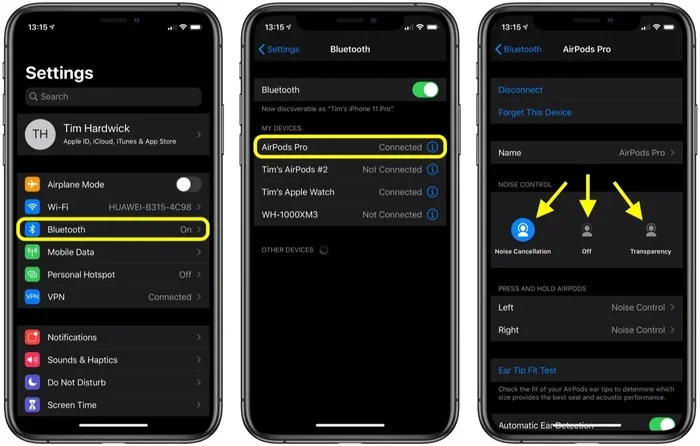
Featured image for AirPods noise cancellation feature
Image source: images.macrumors.com
Yes, you can make AirPods noise cancelling work—but only on certain models. AirPods Pro, AirPods Pro 2, AirPods 4, and AirPods Max come with active noise cancellation (ANC) built in. Older AirPods like the 1st, 2nd, and 3rd generation do not have this feature and cannot be upgraded. To turn on noise cancelling, use the force sensor, Control Center, or your iPhone settings. This guide explains everything you need to know.
Ever been on a noisy train or in a loud coffee shop and wished you could just block it all out with your AirPods? You’re not alone. Noise cancellation has become one of the most wanted features in wireless earbuds, and Apple users often wonder if they can make their AirPods noise cancelling.
Here’s the short answer: yes, you can—but only if you have the right model. Some AirPods come with noise cancelling built right in, while others simply can’t do it no matter what you try. Think of it like trying to add a sunroof to a car that wasn’t built for one. You can tape a piece of plastic on top, but it won’t be a real sunroof.
In this guide, we’ll break down which AirPods support noise cancelling, how it actually works, and how to turn it on. We’ll also share some tips to get the most out of the feature, plus answer the most common questions people ask.
Key Takeaways
- Only Premium Models Support ANC: AirPods Pro, AirPods Pro 2, AirPods 4 (with ANC), and AirPods Max have built-in noise cancelling.
- Older AirPods Lack the Feature: AirPods 1st, 2nd, and 3rd generation cannot be modified to add noise cancelling.
- Three Listening Modes: Most supported models offer Noise Cancellation, Transparency, and Adaptive Audio modes.
- Easy Activation Methods: Turn ANC on via the force sensor, Control Center, Siri, or iOS settings.
- Microphones Are the Key: ANC uses outward and inward-facing microphones to detect and cancel unwanted sound.
- Not a Software Trick: Noise cancelling requires hardware that base AirPods simply don’t have.
- Max Battery Drain: Using ANC reduces battery life, so plan your listening time accordingly.
📑 Table of Contents
Which AirPods Have Noise Cancelling Built In?
Before you try to turn on noise cancelling, you need to know if your AirPods even have the feature. Apple doesn’t include it in every model, and there’s no app or software update that can add it later.
AirPods Pro (1st and 2nd Generation)
The AirPods Pro line was Apple’s first earbud with active noise cancellation. The original AirPods Pro launched in 2019, and the second generation came out in 2022. Both models feature excellent ANC that uses two microphones per earbud to listen to the world around you. Then they create a mirror sound wave to “cancel out” the noise before it hits your ears.
Did You Know? The AirPods Pro 2 can cancel up to 2x more noise than the first generation, according to Apple’s testing.
AirPods 4 (With ANC)
In September 2024, Apple released the AirPods 4 in two versions. The higher-end version includes active noise cancellation. This was a big deal because standard AirPods had never offered ANC before. If you have the regular AirPods 4 without ANC, you can’t add it.
AirPods Max
The AirPods Max are Apple’s over-ear headphones released in December 2020. They have some of the best noise cancelling on the market, thanks to eight microphones working together. They also offer Spatial Audio and a premium build, but they cost a lot more than earbuds.
AirPods Without Noise Cancelling
The following AirPods do NOT have noise cancelling and cannot be modified to get it:
- AirPods 1st Generation (2016)
- AirPods 2nd Generation (2019)
- AirPods 3rd Generation (2021)
- AirPods 4 (basic version, 2024)
These models only offer basic sound isolation. That means they block some noise just by sitting in your ears, like putting your hands over your ears. But they can’t actively cancel sounds the way ANC does.
How Does Active Noise Cancellation Work?
Understanding how ANC works will help you see why you can’t add it to AirPods that don’t have it. The technology is surprisingly simple when you break it down.
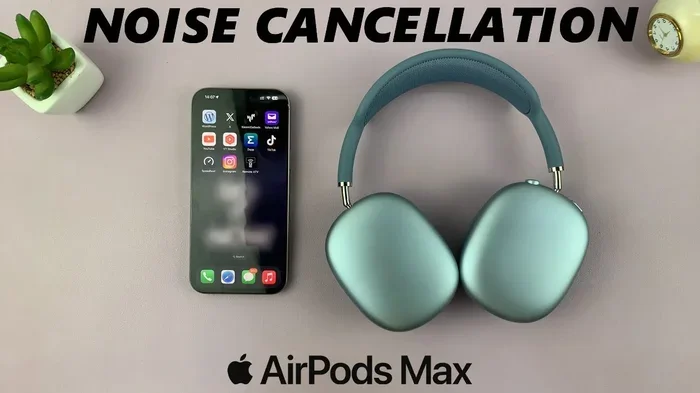
Visual guide about AirPods noise cancellation feature
Image source: i.ytimg.com
The Basic Science
Sound travels in waves, kind of like ripples in a pond. When you throw a rock into water, the ripples spread out. Noise cancelling works in a similar way, but in reverse.
Your AirPods listen to the sounds around you using tiny microphones. Then they create a sound wave that’s the exact opposite—a mirror image. When the two waves meet, they cancel each other out. It’s like adding +2 and -2 to get zero. The result? Silence, or at least much quieter sound.
The Two Types of Microphones
ANC uses two sets of microphones working together:
- Outward-facing microphones: These sit on the outside of the earbud and listen to the noise around you. They detect things like airplane engines, traffic, and chatty coworkers.
- Inward-facing microphones: These sit inside your ear and listen to the sound that’s making it past the seal. They help your AirPods fine-tune the cancellation in real time.
Active vs. Passive Noise Cancellation
There’s a big difference between active and passive noise cancellation. Passive noise cancellation just means something physically blocks sound—like earplugs or the silicone tips on AirPods Pro. Active noise cancellation uses technology and power to fight sound waves.
Think of passive like putting a wall in front of you. Active is like having a magic shield that eats the sound before it reaches you. Active is much better at handling low, constant noises like airplane hum or air conditioners.
How to Turn On Noise Cancelling on AirPods
Now let’s get to the practical part. If you have ANC-capable AirPods, here’s how to actually use the feature.
Method 1: Using the Force Sensor
AirPods Pro and AirPods 4 with ANC have a small button-like area on the stem called the force sensor. You press it to control playback, but it also switches between noise modes.
- Put your AirPods in your ears
- Press and hold the force sensor on either stem
- You’ll hear a chime as it switches modes
- Keep holding to cycle through Noise Cancellation, Transparency, and Adaptive Audio (if available)
It’s that simple. Once you feel the sound change, you’ll know it worked.
Method 2: Using Control Center on iPhone
Your iPhone makes it easy to control noise cancelling without touching your AirPods.
- Swipe down from the top-right corner of your screen (or up from the bottom on older iPhones)
- Press and hold the volume slider
- Tap the Noise Control icon at the bottom-left
- Choose Noise Cancellation, Transparency, or Off
Method 3: Using Siri
You can just ask Siri to do it for you. Try saying:
- “Hey Siri, turn on noise cancellation”
- “Hey Siri, switch to Transparency mode”
- “Hey Siri, turn off noise cancelling”
This is super handy when your hands are full or you’re wearing gloves.
Method 4: Through Settings
You can also customize how the force sensor works:
- Open the Settings app on your iPhone
- Tap your AirPods at the top
- Scroll down to Noise Control
- Pick which modes you want to cycle through when you press and hold
This way, you can choose only two modes—like Noise Cancellation and Transparency—if you don’t want all three.
What Are the Different Noise Control Modes?
Apple gives you more than just “on” and “off.” Each mode is designed for different situations.
Noise Cancellation Mode
This is the big one. It actively blocks outside noise so you can focus on your music, podcast, or audiobook. It’s perfect for:
- Airplanes and trains
- Loud offices
- Busy coffee shops
- Gyms with loud music
- Studying in noisy environments
Transparency Mode
Transparency does the opposite. It lets outside sound in while still playing your audio. It’s like you’re not wearing earbuds at all. This is great for:
- Walking in cities where you need to hear traffic
- Listening for announcements at airports
- Having quick conversations without removing your AirPods
- Running outdoors for safety
Adaptive Audio (AirPods Pro 2 and AirPods 4)
Adaptive Audio is a newer feature that blends both modes. It automatically switches between Noise Cancellation and Transparency based on your surroundings. If you’re walking past a construction site, it blocks the noise. If someone starts talking to you, it lets their voice in.
It’s like having a smart assistant decide what you should hear. You can also use Conversation Awareness, which lowers your music and boosts voices when you start talking.
Tips to Get the Best Noise Cancellation
Just turning on ANC isn’t enough. Here are some tips to make sure you’re getting the most out of it.
Make Sure You Have a Good Seal
ANC works best when your AirPods fit snugly in your ears. If air is leaking in, the noise cancellation won’t work as well. Try different ear tip sizes—AirPods Pro comes with small, medium, and large. The right size should feel secure without being painful.
You can test your fit on your iPhone by going to Settings > Bluetooth > tap your AirPods > Ear Tip Fit Test.
Keep Your AirPods Clean
Dirt and earwax can block the microphones and reduce noise cancelling performance. Wipe your AirPods regularly with a dry, soft cloth. For the mesh parts, use a dry cotton swab. Never use water or cleaning sprays directly on them.
Update Your Firmware
Apple regularly improves ANC through software updates. Make sure your AirPods have the latest firmware by keeping them connected to your iPhone. You can check by going to Settings > Bluetooth > tap the “i” next to your AirPods.
Manage Your Battery
ANC uses more power than regular listening. AirPods Pro 2 with ANC on gets about 6 hours of listening time, compared to 7 hours with it off. AirPods Max gets about 20 hours with ANC on. Plan your charging if you have a long trip.
Did You Know? Turning off ANC can extend your AirPods’ battery life by up to 15-20%, depending on the model.
Use One Earbud at a Time
If you want to save battery, you can use just one AirPod at a time. ANC still works in a single earbud, though the effect is less powerful. This is a great trick for long flights or workdays.
Combine with Lower Volume
With ANC on, you don’t need to crank up the volume to drown out noise. Lower volumes are better for your hearing. Many users find they listen at 30-40% volume with ANC on, versus 70-80% without it.
Common Questions About AirPods Noise Cancelling
Let’s tackle some questions that come up often when people ask about making AirPods noise cancelling.
Can I Add Noise Cancelling to My Old AirPods?
No. There’s no app, software update, or accessory that can add true active noise cancellation to AirPods that don’t have it. The hardware—microphones, processors, and design—just isn’t there. If you want ANC, you’ll need to upgrade to a newer model.
Is Noise Cancelling Bad for Your Ears?
No, ANC is safe for most people. It doesn’t use anything harmful. Some people feel slight pressure in their ears, similar to being in an airplane, but this is normal and goes away. If you feel pain, dizziness, or headaches, turn ANC off and see a doctor if it continues.
Does Noise Cancelling Work Without Music?
Yes! You can use ANC without playing anything. Many people use their AirPods just to block out noise while working, sleeping on planes, or studying. This uses less battery than playing music with ANC on.
Can I Use ANC During Phone Calls?
Yes, ANC works during phone calls. In fact, it helps you hear the other person better in noisy places. Your voice will still come through clearly to the other person, though, because the microphones pick up your voice and reduce background noise.
Why Does My Noise Cancelling Sound Weird?
If ANC sounds strange—like hissing, popping, or whooshing—it could be due to:
- Poor ear tip fit
- Dirty microphones
- Low battery
- Bluetooth interference
- Outdated firmware
Try cleaning your AirPods, adjusting the fit, and updating firmware before assuming the feature is broken.
The Bottom Line
So, can you make AirPods noise cancelling? Yes, but only if your AirPods were built with the feature. AirPods Pro, AirPods Pro 2, AirPods 4 (with ANC), and AirPods Max all support active noise cancellation. Older models and the basic AirPods 4 do not.
If you’re shopping for AirPods and noise cancelling matters to you, go for one of the supported models. The AirPods Pro 2 offer the best balance of price and performance, especially with the newer Adaptive Audio features. If you prefer over-ear headphones and want premium sound, the AirPods Max is the way to go.
For those who already have ANC-capable AirPods, take a few minutes to learn the different modes and try the force sensor or Control Center. You’ll be amazed at how much noise you can block out—and how much better your music sounds in a quiet bubble.
Now put those AirPods in, turn on noise cancellation, and enjoy some peace and quiet. Your ears will thank you.