You cannot “upgrade” AirPods Pro to AirPods Pro 2 in the traditional sense—they are completely separate hardware products, not software-upgradable devices. Your options are to trade in your old AirPods Pro for credit toward a new pair, sell them independently, or simply buy AirPods Pro 2 alongside your existing set. The good news is that AirPods Pro 2 offer meaningful improvements like the H2 chip, better noise cancellation, and longer battery life that make upgrading worthwhile for most users.
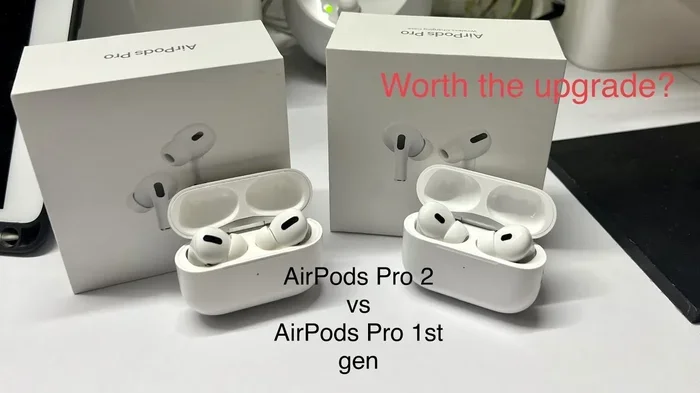
Featured image for AirPods Pro 2 upgrade comparison
Image source: i.ytimg.com
If you’ve been eyeing the AirPods Pro 2 but aren’t sure what to do with your current AirPods Pro, you’re definitely not alone. This is one of the most common questions Apple fans ask, and the answer is simpler than you might think.
Here’s the short version: AirPods Pro cannot be “upgraded” to AirPods Pro 2 the way you might update an iPhone. They are two distinct products with different internal chips, drivers, and features. Think of it like trying to turn a Honda Civic into a Honda Accord by pressing a button on the dashboard—it’s just not how the hardware works.
But that doesn’t mean you’re stuck! You have several practical paths forward, including trade-in programs, resale options, and even a clever trick using AppleCare+ coverage. In this guide, we’ll walk through exactly what “upgrading” really means, what you gain by moving to AirPods Pro 2, and how to make the switch as affordable and eco-friendly as possible.
Key Takeaways
- No software upgrade exists: AirPods Pro and AirPods Pro 2 are different generations of hardware and cannot be converted through firmware updates alone.
- Trade-in programs save money: Apple’s Trade In program and third-party services like Best Buy offer credit toward AirPods Pro 2 when you surrender your old pair.
- The H2 chip is the biggest leap: AirPods Pro 2 feature Apple’s H2 processor, enabling 2x more active noise cancellation and Adaptive Transparency mode.
- Battery life nearly doubles: AirPods Pro 2 deliver up to 6 hours of listening per charge versus 4.5 hours on the original Pro.
- USB-C vs Lightning matters: The latest AirPods Pro 2 (2023) use USB-C, while the original AirPods Pro use Lightning for charging.
- Ear tip fitting differs: AirPods Pro 2 ship with XS ear tips that the original AirPods Pro never included, potentially improving fit for smaller ears.
- Resale value is reasonable: Used original AirPods Pro in good condition typically sell for $80–$120 on secondary markets.
📑 Table of Contents
- What Does “Upgrading” AirPods Actually Mean?
- Can You Trade In AirPods Pro for AirPods Pro 2?
- What About Selling AirPods Pro Independently?
- What’s New in AirPods Pro 2?
- Should You Upgrade? Making the Decision
- Practical Steps to Make the Switch
- Frequently Asked Questions About Upgrading AirPods Pro
- Final Thoughts
What Does “Upgrading” AirPods Actually Mean?
Let’s clear up the confusion right away, because this is where most people get tripped up. When you “upgrade” an iPhone, you’re installing a new version of iOS that adds features and improves performance. AirPods don’t work that way.
Hardware vs. Software
AirPods Pro and AirPods Pro 2 are physical products with different internal components. The original AirPods Pro contain the H1 chip, while AirPods Pro 2 contain the newer H2 chip. That H2 chip is the brain that powers features like Adaptive Transparency, Personalized Spatial Audio, and the improved noise cancellation you keep hearing about. No amount of software tweaking can add a new processor to your existing earbuds.
To put it in everyday terms: imagine your earbuds are like a small computer. You can install new apps on a computer, but you can’t install a faster processor. AirPods “upgrades” are really just firmware updates that improve connectivity or battery management—but they cannot transform first-generation AirPods Pro into second-generation ones.
What Firmware Updates Actually Do
Apple does release firmware updates for AirPods that can improve things like:
- Connection stability when switching between Apple devices
- Battery calibration for more accurate percentage readings
- Bug fixes for audio glitches or pairing issues
- New features in some cases (like spatial audio improvements)
These updates are great, but they cannot add the H2 chip’s capabilities to your existing AirPods Pro. The hardware simply isn’t there to support it.
Can You Trade In AirPods Pro for AirPods Pro 2?
Yes, absolutely! Trade-in is probably the easiest and most popular path to “upgrading” your AirPods Pro. Several programs make this process painless.
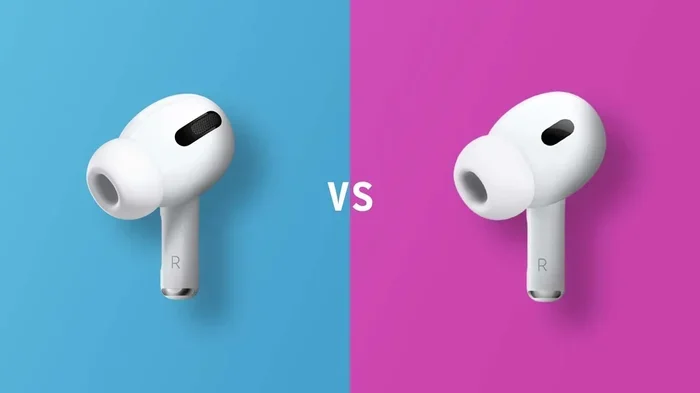
Visual guide about AirPods Pro 2 upgrade comparison
Image source: iphonewired.com
Apple’s Official Trade In Program
Apple runs a Trade In program that accepts old AirPods in exchange for credit toward a new purchase. Here’s how it works:
Step 1: Visit Apple’s Trade In website and select “AirPods” as your device type.
Step 2: Answer a few questions about condition (working, cracked, etc.) and model.
Did You Know? Apple will accept AirPods that don’t even work anymore, though the payout will be lower. Working AirPods Pro typically receive around $50–$65 in credit, depending on current promotions.
Step 3: Apple mails you a prepaid shipping label (or you can drop them at an Apple Store).
Step 4: Once Apple receives and inspects your AirPods Pro, the credit is applied to your payment method or as a gift card.
The whole process usually takes 1–2 weeks, and the credit can be used immediately toward your AirPods Pro 2 purchase if you’re buying directly from Apple.
Best Buy and Other Retailers
Best Buy also runs a trade-in program that accepts AirPods Pro. The trade-in values are often similar to Apple’s, and you can sometimes find promotional deals that boost the credit amount. Other retailers like Amazon and Walmart occasionally offer trade-in bonuses as well.
Third-Party Trade-In Services
Websites like Decluttr, Gazelle, and Swappa specialize in buying used electronics, including AirPods. These services often pay slightly more than Apple’s trade-in, especially if your AirPods Pro are in excellent condition with all original accessories and packaging.
What About Selling AirPods Pro Independently?
If you want to maximize your return, selling independently is usually the way to go. You can often get $80–$120 for used AirPods Pro in good condition, which is more than Apple’s trade-in value.
Best Platforms for Selling Used AirPods
- Swappa: A trusted marketplace specifically for tech. Listings get approved quickly, and buyers know they’re getting legitimate products.
- eBay: The biggest audience, but be aware of fees and potential scams. Always ship with tracking and insurance.
- Facebook Marketplace: Great for local sales where you can meet in person and avoid shipping hassles. Cash transactions are immediate.
- Craigslist: Similar to Facebook Marketplace but with an older user base. Local pickup only is recommended.
Tips for Getting the Best Price
Include all accessories: The charging case, original ear tips, Lightning cable, and documentation all add value. Buyers love a complete package.
Clean them thoroughly: A quick wipe-down with a slightly damp microfiber cloth makes AirPods look nearly new. Don’t forget the charging case.
Take great photos: Natural lighting and a clean background help your listing stand out. Show the earbuds, case, and any serial numbers if requested.
Reset before selling: Unpair your AirPods Pro from your Apple ID so the new owner can set them up easily. This is a small but important step that builds buyer trust.
What’s New in AirPods Pro 2?
Now that we’ve covered the “how,” let’s talk about the “why.” AirPods Pro 2 bring several meaningful improvements that make upgrading worthwhile for many users.
The H2 Chip: A Genuine Leap Forward
The H2 chip is the star of the show. It enables:
- 2x more active noise cancellation compared to the original AirPods Pro
- Adaptive Transparency mode that dynamically reduces loud environmental sounds while letting other audio through
- Personalized Spatial Audio with dynamic head tracking for a more immersive listening experience
- Better battery efficiency across all use cases
Think of the H2 chip like a more powerful engine in a car. The body might look similar, but the performance is dramatically better. Music sounds richer, calls are clearer, and the world gets quieter when you want it to.
Battery Life Improvements
Battery life is another big win. Here’s how the two generations compare:
AirPods Pro (1st gen): Up to 4.5 hours of listening time with ANC on, up to 3.5 hours of talk time.
AirPods Pro 2: Up to 6 hours of listening time with ANC on, up to 4.5 hours of talk time.
That’s roughly a 33% improvement in listening time, which is significant for long flights, workdays, or study sessions. The charging case also holds more total charge, giving you around 30 hours of total listening time versus 24 hours on the original Pro.
The USB-C Charging Case (2023 Model)
Apple released an updated AirPods Pro 2 in 2023 that features a USB-C charging case instead of Lightning. This is a huge convenience if you’ve already moved to USB-C for your other devices. You can now charge your iPhone 15, iPad, MacBook, and AirPods Pro 2 with the same cable.
Did You Know? The USB-C AirPods Pro 2 case even supports lossless audio when paired with the Apple Vision Pro headset, delivering the first-ever wireless lossless connection between two Apple devices.
Improved Find My Integration
Both the earbuds and the case have a built-in speaker that plays loud sounds when you’re trying to locate them through the Find My app. The case also has a lanyard loop, which the original AirPods Pro case lacks. These small additions make a real difference if you’re prone to misplacing things.
Better Touch Controls
AirPods Pro 2 introduced swipe-based volume controls on the stems. You can swipe up or down to adjust volume without reaching for your phone. The original AirPods Pro require you to use Siri or your phone for volume changes.
Extra Small Ear Tip Included
One small but meaningful change: AirPods Pro 2 now include an XS (extra small) ear tip in the box. The original AirPods Pro only came with S, M, and L tips. If you have smaller ear canals, this could be the difference between a secure fit and constant readjustment.
Should You Upgrade? Making the Decision
Now for the big question: is upgrading worth it for you specifically? Let’s break it down.
Upgrade If…
- Your AirPods Pro are 2+ years old and the battery life has noticeably degraded.
- You commute or fly frequently and would benefit from the improved noise cancellation.
- You’re hard on earbuds and need the better water/sweat resistance (IP54 on AirPods Pro 2 vs IPX4 on original).
- You want USB-C charging to match your other Apple devices.
- Battery anxiety is real for you and the extra 1.5 hours per charge would make a difference.
Maybe Wait If…
- Your AirPods Pro still work great and you’re happy with the sound quality.
- You’re on a tight budget and the upgrade cost doesn’t feel justified right now.
- You primarily use AirPods for calls rather than music, where the differences are less noticeable.
- AirPods Pro 3 might be coming soon, and you’d rather wait for the next generation.
Consider AirPods Pro 2 USB-C for Future-Proofing
If you do decide to upgrade, the USB-C version (released September 2023) is the better long-term choice. It future-proofs your investment as Apple continues moving its entire lineup to USB-C. The price difference is usually minimal, so there’s little reason to choose the older Lightning version unless you find it deeply discounted.
Practical Steps to Make the Switch
Ready to upgrade? Here’s a step-by-step plan to make the transition smooth and affordable.
Step 1: Assess Your Current AirPods Pro
Check the condition of your AirPods Pro. Are they fully functional? Is the charging case intact? Do you have all the original accessories? Honest answers to these questions will help you choose the right trade-in or resale option.
Step 2: Decide Your Disposal Method
Compare trade-in value versus private sale. Trade-in is faster and easier but typically pays less. Private sale takes more effort but usually nets more money. Pick whichever fits your schedule and comfort level.
Step 3: Time Your Purchase
Apple and major retailers often run promotions around Black Friday, back-to-school season, and Prime Day. If you can wait a few weeks for a deal, you might save $30–$50 on AirPods Pro 2. Refurbished units from Apple’s Refurbished Store also come with full warranties and cost 15–20% less.
Step 4: Set Up Your New AirPods Pro 2
Once your AirPods Pro 2 arrive, pairing them with your iPhone is almost magical. Just open the case near your iPhone, and a setup animation appears automatically. From there, you can:
- Run the Ear Tip Fit Test to find the perfect size
- Enable Personalized Spatial Audio by scanning your ears with your iPhone’s TrueDepth camera
- Set up touch controls through Settings > AirPods Pro
- Add them to Find My for easy tracking
Step 5: Don’t Forget to Unpair Your Old AirPods
Before selling or trading in your old AirPods Pro, unpair them from your Apple ID. Go to Settings > Bluetooth, tap the “i” next to your AirPods, and choose “Forget This Device.” Then place them in the charging case and hold the setup button until the light flashes amber, then white. This resets them for the next owner.
Frequently Asked Questions About Upgrading AirPods Pro
Can AirPods Pro be upgraded to AirPods Pro 2 with a software update?
No, AirPods Pro cannot be upgraded to AirPods Pro 2 through software alone. They are different hardware products with different chips (H1 vs H2). Firmware updates can improve performance and add minor features, but they cannot change the physical capabilities of the original AirPods Pro.
How much does Apple give you for AirPods Pro trade-in?
Apple typically offers $50–$65 in credit for working AirPods Pro, though the exact amount varies based on condition and current promotions. Non-working AirPods Pro may receive less credit or be recycled for free.
Is it worth upgrading from AirPods Pro to AirPods Pro 2?
For most users, yes—especially if your current AirPods Pro are 2+ years old. The H2 chip delivers significantly better noise cancellation, longer battery life, and new features like Adaptive Transparency. The upgrade is most worthwhile for frequent travelers, commuters, and music lovers.
Should I get AirPods Pro 2 with Lightning or USB-C?
The USB-C version is generally the better choice for long-term use, especially if you own other USB-C devices like the iPhone 15, modern iPads, or MacBooks. The USB-C case also supports lossless audio with Apple Vision Pro. The price difference is usually minimal.
What should I do with my old AirPods Pro?
You have three main options: trade them in for credit toward AirPods Pro 2, sell them privately for more money (typically $80–$120), or recycle them through Apple’s recycling program if they’re damaged. Apple accepts non-working AirPods for free recycling.
Can I use my old AirPods Pro ear tips on AirPods Pro 2?
The ear tips from original AirPods Pro are physically compatible with AirPods Pro 2. If you found a perfect fit with the original tips, you can reuse them. However, AirPods Pro 2 include a new XS size that wasn’t available with the original AirPods Pro.
Final Thoughts
So, can you upgrade your AirPods Pro to AirPods Pro 2? Not in the literal sense—but the spirit of the question is really about whether moving to the newer model makes sense for you. And for most people, the answer is a resounding yes.
The combination of the H2 chip, dramatically better noise cancellation, longer battery life, and USB-C charging makes AirPods Pro 2 a meaningful upgrade. The trade-in programs from Apple and other retailers make the financial leap easier, and if you’re willing to sell privately, you can offset even more of the cost.
Just remember: there’s no shame in keeping your original AirPods Pro if they still serve you well. AirPods are built to last several years, and a working pair is better than a fancy pair sitting in a drawer. Upgrade when the time feels right for your budget and your needs, not just because a new model exists.
Take a moment to assess your current earbuds, consider how much you’d really benefit from the new features, and choose the disposal method that works best for you. With a little planning, you’ll be enjoying the AirPods Pro 2 experience without breaking the bank.