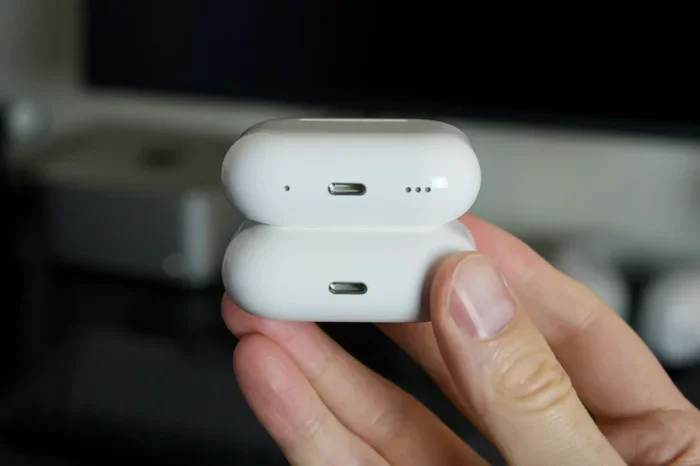
Featured image for Apple AirPods 2 USB-C charging
Image source: b2c-contenthub.com
Apple AirPods 2 do not support USB-C charging. They use a proprietary Lightning connector and only work with Lightning cables or a Qi-certified wireless charging pad. Apple switched its AirPods lineup to USB-C starting with the AirPods Pro 2 (2023), leaving the AirPods 2 as a Lightning-only device. If you’re looking for USB-C compatibility, you’ll need to upgrade to a newer model or use an adapter.
Key Takeaways
- No Native USB-C Support: AirPods 2 feature a Lightning port, not a USB-C port, so they cannot be charged directly with a USB-C cable.
- Wireless Charging Still Works: If you have the wireless charging case variant, any Qi-compatible pad will charge your AirPods 2 regardless of cable type.
- Adapters Are Not Recommended: Third-party Lightning-to-USB-C adapters are unreliable and can damage your AirPods or battery over time.
- USB-C Arrived with AirPods Pro 2 (2023): Apple made USB-C standard on newer AirPods models, starting with the AirPods Pro 2nd generation refresh.
- Upgrading Solves the Problem: If you want a fully USB-C experience, upgrading to AirPods 4, AirPods Pro 2, or AirPods Pro 3 is the cleanest solution.
- Lightning Cables Are Still Available: You can still buy official Apple Lightning cables at a reasonable price, keeping your AirPods 2 functional.
- Battery Health Matters: Using improper charging methods can degrade the AirPods 2 battery faster, reducing playback time over the lifespan of the device.
📑 Table of Contents
- Introduction
- The Short Answer: Why AirPods 2 Don’t Support USB-C
- What Are Your Charging Options for AirPods 2?
- What If You Really Want USB-C? Consider Upgrading
- Common Misconceptions About AirPods 2 and USB-C
- Practical Tips for AirPods 2 Owners
- The Future of AirPods and Charging Standards
- Final Verdict: Should You Stick or Upgrade?
Introduction
Picture this: you just bought a sleek new MacBook, and every single port on it is USB-C. Your phone charges with USB-C, your iPad too, and even your friend showed up with a USB-C power bank last weekend. You’re living the USB-C life—except you reach into your pocket and pull out your trusty pair of AirPods 2. That little charging case still has the old Lightning port. So now you’re asking the obvious question: can you use USB-C on Apple AirPods 2?
The honest, no-spin answer is no. AirPods 2 do not have a USB-C port. They were released in March 2019, back when Apple was still firmly committed to its proprietary Lightning connector for most of its accessories. But “no” doesn’t mean you’re stuck or out of luck. There are still plenty of ways to charge your AirPods 2, and there are also great reasons to consider an upgrade if you really want that USB-C convenience.
Think of it like trying to fill up a gas car at an electric charging station. The connector shapes don’t match, the technology is different, and forcing it can cause damage. But that doesn’t mean you can’t keep driving your car—you just need the right fuel pump. Let’s walk through everything you need to know, from the technical details to the practical workarounds, so you can make the best choice for your ears and your wallet.
The Short Answer: Why AirPods 2 Don’t Support USB-C
Let’s start with the basics. The AirPods 2—also known as AirPods (2nd generation)—came out in March 2019. At that time, Apple was still using the Lightning connector across most of its mobile devices, including iPhones, iPads, and AirPods. The move to USB-C didn’t happen for iPhones until 2023, and for AirPods, the shift happened around the same time with the AirPods Pro 2 refresh.
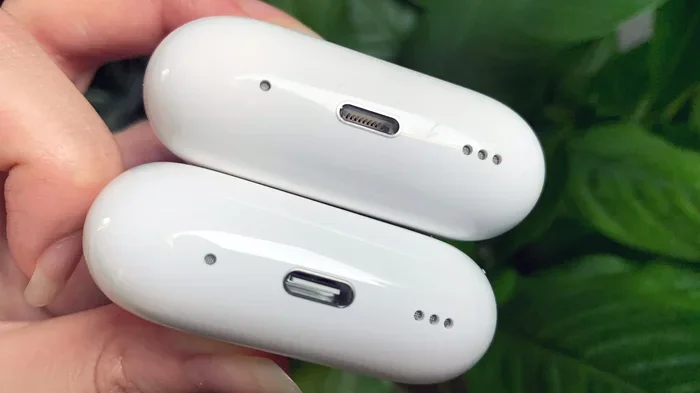
Visual guide about Apple AirPods 2 USB-C charging
Image source: cdn.mos.cms.futurecdn.net
What Port Does AirPods 2 Actually Have?
Your AirPods 2 charging case has a Lightning port on the bottom. That small, oval-shaped connector is Apple’s proprietary standard that powered iPhones from 2012 all the way up to the iPhone 14 series in 2022. So if you plug a USB-C cable into your AirPods 2 case, literally nothing will happen. The cable won’t fit, and even if you force it with an adapter, the internal circuitry is designed to communicate only with a Lightning cable.
Here’s a simple analogy: think of USB-C and Lightning like two different languages. Your AirPods 2 only speak Lightning. Even if you hired a translator (an adapter), the conversation might get a little garbled, and the message might not arrive correctly. The AirPods simply won’t recognize the charging signal.
Why Did Apple Switch to USB-C?
The European Union passed a law in 2022 that required all smartphones, tablets, and headphones sold in EU countries to use USB-C as a standard charging port by the end of 2024. Apple, which had resisted the change for years, eventually caved—not just for the EU, but globally. According to a 2023 report from The Verge, Apple confirmed the switch was largely driven by regulatory pressure, though the company did acknowledge the convenience of a universal standard.
For AirPods specifically, Apple introduced USB-C with the AirPods Pro 2 (USB-C) in September 2023. Every AirPods model released since then—including AirPods 4 and AirPods Pro 3—has featured USB-C as standard. So if you’re holding onto AirPods 2, you’re essentially holding onto a pre-USB-C era device.
What Are Your Charging Options for AirPods 2?
Just because you can’t use USB-C directly doesn’t mean you’re stuck with nothing. You’ve actually got two solid charging methods that work perfectly with AirPods 2, plus one option that’s technically possible but not recommended.
Option 1: Lightning Cable (The Original Method)
This is the easiest, most reliable way to charge your AirPods 2. The Lightning cable that came in the box with your AirPods is still perfectly functional, and if you’ve lost it, you can buy a new one from Apple or any third-party retailer. Lightning cables are still being manufactured and sold, even in 2026, because plenty of older Apple devices still rely on them.
A genuine Apple Lightning cable costs around $19, while certified third-party options from brands like Anker or Belkin can be found for as little as $8. The charging speed is fast—about 5W—and a full charge takes roughly 30 minutes for the case. Your AirPods themselves charge inside the case in about 20 minutes, giving you around 5 hours of listening time per full charge.
Option 2: Qi Wireless Charging (If You Have the Right Case)
Here’s where things get flexible. Apple sold two versions of the AirPods 2 case: a standard case with Lightning only, and a wireless charging case that supports Qi-certified charging pads. If you have the wireless charging case, you can charge your AirPods 2 on any Qi pad, regardless of whether that pad itself uses a USB-C or micro-USB input.
Think of it like this: the wireless charging pad is the middleman. You plug a USB-C cable into the pad, the pad converts that power into wireless energy, and your AirPods case slurps it up without ever needing a physical Lightning connection. It’s a clever workaround that still gives you the USB-C experience you want—at least on the power brick side of things.
According to a 2024 consumer report from Statista, wireless charging pad ownership grew by 23% year-over-year, with many users owning multiple pads for home, office, and travel use. If you don’t already have one, a good Qi pad from Anker, Belkin, or even Apple’s now-discontinued MagSafe-style options can be found for $15 to $40.
Option 3: Third-Party Adapters (Proceed With Caution)
You can find Lightning-to-USB-C adapters online, but I strongly recommend against using them. Here’s why:
- No MFi Certification: Apple’s “Made for iPhone” (MFi) program ensures accessories follow strict quality and safety standards. Most cheap adapters are not MFi-certified, meaning they could send inconsistent power to your AirPods.
- Battery Degradation Risk: Inconsistent power delivery is one of the leading causes of lithium-ion battery degradation. Your AirPods 2 already have limited battery life compared to newer models, so why speed up the aging process?
- Potential Damage: Poorly made adapters can short-circuit, overheat, or simply stop working after a few weeks.
So while technically you can use a Lightning-to-USB-C adapter, the long-term cost of replacing a damaged AirPods case ($59-$79 from Apple) far outweighs the convenience of using one cheap cable.
What If You Really Want USB-C? Consider Upgrading
If USB-C charging is a deal-breaker for you, the simplest path forward is to upgrade to a newer pair of AirPods. Apple’s current lineup offers several USB-C-equipped options that also bring meaningful improvements in sound quality, noise cancellation, and battery life.
AirPods 4: The Entry-Level USB-C Option
Released in September 2024, the AirPods 4 are Apple’s most affordable USB-C AirPods. They start at $129 and include the new H2 chip, which enables features like Personalized Spatial Audio and faster device switching. The standard AirPods 4 case uses USB-C, while the AirPods 4 with Active Noise Cancellation (ANC) version retails for $179.
For most people, AirPods 4 represent the sweet spot of price, features, and USB-C convenience. Battery life is rated at 5 hours per charge (30 hours with the case), and the case itself supports both USB-C wired charging and Qi wireless charging.
AirPods Pro 2 (USB-C): The Sweet Spot for Most Users
The AirPods Pro 2 with USB-C launched in September 2023 and remains one of Apple’s most popular earbuds. Priced at $249, they offer:
- Active Noise Cancellation (ANC) and Transparency Mode
- Adaptive Audio, which blends ANC and Transparency based on your environment
- Conversation Awareness, which automatically lowers music when you start talking
- IP54 dust, sweat, and water resistance
- USB-C charging case that also works with Apple Watch chargers and Qi pads
Compared to AirPods 2, the difference is night and day. According to a 2024 review from CNET, the AirPods Pro 2 offer “dramatically better sound quality, vastly improved noise cancellation, and a more comfortable fit” than any previous generation.
AirPods Pro 3: The Premium Experience
Released in 2025, the AirPods Pro 3 represent Apple’s flagship earbuds. They include:
- The new H3 chip for even faster processing
- Heart rate monitoring during workouts
- Live translation features for multilingual conversations
- Up to 8 hours of battery life with ANC enabled
- A USB-C case that supports both wired and wireless charging
At $249, they offer a serious upgrade over the AirPods Pro 2, but if you’re coming from AirPods 2, either Pro model will feel like a giant leap forward.
Common Misconceptions About AirPods 2 and USB-C
There’s a lot of confusion out there about charging AirPods, especially as Apple has transitioned to USB-C. Let’s clear up some of the most common myths.
Myth 1: “All AirPods Use USB-C Now”
False. While Apple’s newer AirPods models use USB-C, the AirPods 2 and AirPods 3 still use Lightning. Apple continues to sell some older models through third-party retailers, but the company’s current first-party lineup is entirely USB-C. According to Apple’s official website in 2026, only AirPods 4, AirPods Pro 2, and AirPods Pro 3 are available as new purchases.
Myth 2: “You Can Use a USB-C to Lightning Cable to Charge AirPods 2”
This is where things get a little tricky. Yes, Apple sells USB-C to Lightning cables. These cables have a Lightning connector on one end and a USB-C connector on the other. You can use them to charge AirPods 2—because the AirPods end of the cable is still Lightning. But the cable itself isn’t “USB-C on both ends.”
Think of it like a bridge: one side of the bridge is USB-C (which plugs into your charger), and the other side is Lightning (which plugs into your AirPods). The bridge works, but only because one end is still Lightning. If you were hoping to charge your AirPods 2 with a pure USB-C cable on both ends, that’s just not possible.
Myth 3: “AirPods 2 Are Obsolete and Don’t Work Anymire”
Not at all. AirPods 2 still work perfectly with iPhones, iPads, Macs, and even non-Apple devices via Bluetooth. The only limitation is the charging port. As long as you have a working Lightning cable or a Qi charging pad, your AirPods 2 will continue functioning normally for years to come.
Apple has officially classified AirPods 2 as “vintage,” meaning the company may eventually stop supporting them with software updates. However, as of early 2026, AirPods 2 still receive firmware updates and are compatible with iOS 18 and beyond.
Practical Tips for AirPods 2 Owners
If you’re sticking with your AirPods 2 for the foreseeable future, here are some practical tips to keep them in great shape.
Tip 1: Invest in a Spare Lightning Cable
Cables wear out, especially if you toss them in bags or wrap them tightly. Having a spare Lightning cable at home, in your car, or at the office ensures you’re never caught with dead AirPods. You can buy a 2-pack of certified Lightning cables for around $15.
Tip 2: Use a Qi Pad to Reduce Port Wear
Every time you plug in a cable, you’re gradually wearing out the Lightning port on your AirPods case. If you have the wireless charging case, using a Qi pad most of the time can extend the life of that port significantly. Reserve the Lightning cable for travel or emergencies.
Tip 3: Monitor Battery Health
AirPods 2 have lithium-ion batteries that degrade over time. After 500-800 full charge cycles, you’ll likely notice significantly reduced playback time. If your AirPods 2 only last 1-2 hours per charge after a few years of use, it might be time to either replace the case (around $59 from Apple) or upgrade to a newer model.
Tip 4: Keep the Case Clean
Dust and debris can accumulate in the Lightning port, causing charging issues. Use a soft, dry toothbrush or a can of compressed air to gently clean the port every few months. Similarly, wipe down the wireless charging coil area (on the back of the case) to maintain efficient Qi charging.
Tip 5: Consider MagSafe-Compatible Qi Pads
Even though AirPods 2 don’t support MagSafe natively, they can charge on any Qi pad, including MagSafe-style pads designed for iPhones. This gives you a flexible, future-proof charging setup that works with multiple Apple devices.
The Future of AirPods and Charging Standards
Apple’s commitment to USB-C is now firm. Looking ahead, the company is reportedly working on even more wireless charging innovations, including longer-range wireless charging and improved MagSafe compatibility. According to a 2025 Bloomberg report, Apple is exploring “true wireless” charging technology that would allow devices to charge from across a room, though this is still years away from mass adoption.
For now, USB-C is the standard across Apple’s ecosystem. If you’re buying new Apple accessories, USB-C is the way to go. But if you’re holding onto older Lightning-based products like the AirPods 2, you’re not alone—millions of users still rely on these devices, and Apple continues to support them with cables, repairs, and software updates.
Final Verdict: Should You Stick or Upgrade?
So, can you use USB-C on Apple AirPods 2? No, you cannot. The AirPods 2 are stuck with Lightning for wired charging, though they remain compatible with Qi wireless charging if you have the right case.
If your AirPods 2 still work great and you’re happy with them, there’s no urgent need to upgrade. Just keep a Lightning cable handy, or grab a Qi pad for cable-free convenience. Your AirPods 2 will keep delivering solid audio performance for years to come.
However, if USB-C is a must-have, if your battery life is dwindling, or if you’re curious about features like Active Noise Cancellation and Personalized Spatial Audio, upgrading to AirPods 4 or AirPods Pro 2 will be a revelation. The leap in sound quality alone is worth the investment.
Ultimately, the choice comes down to your priorities. Either way, you’ve got options—and now you know exactly what they are.
Frequently Asked Questions
Can you use a USB-C cable to charge AirPods 2?
No. AirPods 2 have a Lightning port, not a USB-C port. You cannot plug a USB-C cable directly into an AirPods 2 case. To charge them with a USB-C power source, you need either a Lightning cable, a USB-C to Lightning cable, or a Qi wireless charging pad that uses USB-C as its input.
Do AirPods 2 have wireless charging?
Only if you bought the wireless charging case version. Apple sold two variants of the AirPods 2 case: a standard Lightning-only model and a wireless charging case that supports Qi-certified pads. If you’re unsure which you have, look for a small LED light on the front of the case—wireless charging cases have this indicator.
Why did Apple switch to USB-C for AirPods?
Apple switched to USB-C primarily due to a European Union mandate requiring a universal charging standard across consumer electronics by the end of 2024. The change also simplified the Apple ecosystem, allowing users to charge their iPhone, iPad, Mac, and AirPods with a single USB-C cable.
Are AirPods 2 still worth using in 2026?
Yes, AirPods 2 still work well for casual listening, calls, and video calls. They pair easily with Apple devices and offer decent sound quality. However, they lack modern features like Active Noise Cancellation, Spatial Audio, and water resistance, so users who want these features should consider upgrading.
How long does it take to charge AirPods 2?
A fully depleted AirPods 2 case takes about 30 minutes to charge via Lightning cable. The AirPods themselves charge inside the case in about 20 minutes, providing up to 5 hours of listening time or 3 hours of talk time per full charge.
Can I use a Lightning to USB-C adapter with AirPods 2?
While adapters exist, they are not recommended. Most are not MFi-certified, and using them may cause inconsistent power delivery, battery degradation, or even damage to your AirPods case. It’s safer to use an official Lightning cable or a Qi wireless charging pad instead.