Yes, you can charge AirPods Pro using a USB cable, but only if you have the right type. AirPods Pro (1st generation) comes with a Lightning cable, while AirPods Pro (2nd generation) and later models use a USB-C cable. Using the wrong or damaged cable can cause charging issues, slower speeds, or even damage to your device. This guide explains which USB cable works, how to charge correctly, and what to avoid for safe, efficient charging.
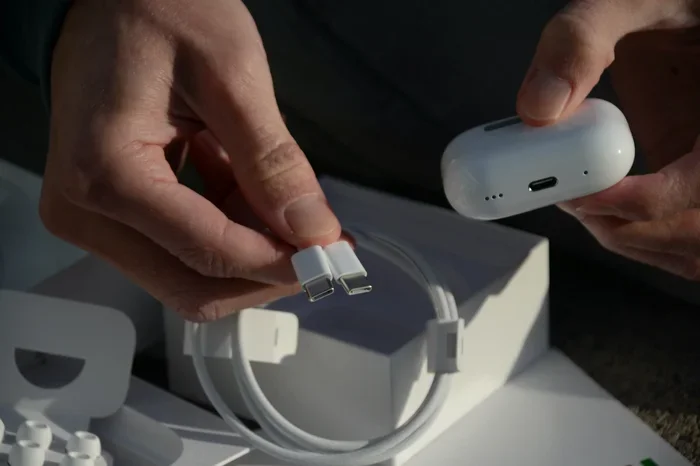
Featured image for AirPods Pro USB charging cable
Image source: mobile-pixels.com
Imagine this: you’re about to head out for a jog, but your AirPods Pro are dead. You grab a random USB cable lying around, plug it in, and… nothing happens. Frustrating, right? You’re not alone. Many people wonder if they can just use any USB cable to charge their AirPods Pro, and the answer is both simple and a little tricky.
The truth is, yes, you can charge AirPods Pro with a USB cable—but the type of cable depends entirely on which generation of AirPods Pro you own. Using the wrong cable might mean your earbuds simply won’t charge, or worse, it could lead to long-term battery damage.
This guide is your one-stop resource for understanding AirPods Pro charging cables. Whether you’re a new owner, upgrading from an older model, or just trying to figure out why your current cable isn’t working, we’ve got you covered. By the end, you’ll know exactly which cable to use, how to charge safely, and how to keep your AirPods Pro battery healthy for years to come.
Key Takeaways
- USB-C Compatibility: AirPods Pro 2nd generation and newer use a USB-C to USB-C or USB-C to Lightning cable, depending on the charging case version.
- Lightning for Older Models: AirPods Pro 1st generation charges only via a Lightning cable.
- Charge Time: A full AirPods Pro charge takes about one hour, with quick 5-minute boosts giving around one hour of listening time.
- Wireless Charging: Most AirPods Pro cases support Qi or MagSafe wireless charging, but wired USB remains faster and more reliable.
- Wrong Cable Risks: Using incompatible or low-quality cables may result in no charging, slow charging, or battery damage.
- Power Source Matters: Use a 5W or higher USB power adapter for optimal charging speeds.
- Battery Health: Avoid letting your AirPods Pro fully drain to 0% regularly to extend battery lifespan.
📑 Table of Contents
- Understanding AirPods Pro Charging Basics
- Which USB Cable Do You Need for AirPods Pro?
- How to Charge AirPods Pro Using a USB Cable: Step-by-Step
- How Long Does It Take to Charge AirPods Pro?
- Common Charging Problems and Solutions
- USB Cable vs. Wireless Charging: Which Is Better?
- Tips to Extend AirPods Pro Battery Life
- What Happens If You Use the Wrong Cable?
- Charging AirPods Pro Without a Cable: Wireless Options
- Final Thoughts: Charging Your AirPods Pro with USB Made Simple
Understanding AirPods Pro Charging Basics
Let’s start with the basics. AirPods Pro come with a charging case, and this case is what actually holds the battery and charges your earbuds. The case itself needs to be charged, and that’s where USB cables come into play. Think of the charging case like a tiny power bank specifically designed for your earbuds. Just like you wouldn’t charge a smartphone with a cable meant for a laptop, you can’t just grab any USB cable and expect it to work.
The Two Generations Matter
Apple released the AirPods Pro 1st generation in October 2019 and the AirPods Pro 2nd generation in September 2022. The big difference for charging purposes? The charging port on the case.
- AirPods Pro 1st Gen: Uses a Lightning port on the bottom of the case.
- AirPods Pro 2nd Gen: Uses a USB-C port (if you bought the version released after September 2023) or a Lightning port (for versions sold earlier).
This is the single most important thing to understand. Your cable must match the port on the case. It’s like trying to put a square peg in a round hole—no matter how hard you push, it just won’t fit.
Why Apple’s Shift to USB-C?
In 2022, the European Union passed a law requiring all smartphones, tablets, and headphones sold in the EU to use USB-C charging ports by the end of 2024. Apple, which had been using its proprietary Lightning connector for years, had to adapt. As a result, Apple switched to USB-C for most new devices, including the updated AirPods Pro 2.
Did You Know? Apple sells over 150 million AirPods every year, making it one of the most popular wireless earbuds in the world. With so many users, getting the charging cable right is crucial for millions of people.
Which USB Cable Do You Need for AirPods Pro?
Now that you know which generation you have, let’s break down exactly which cable you need.
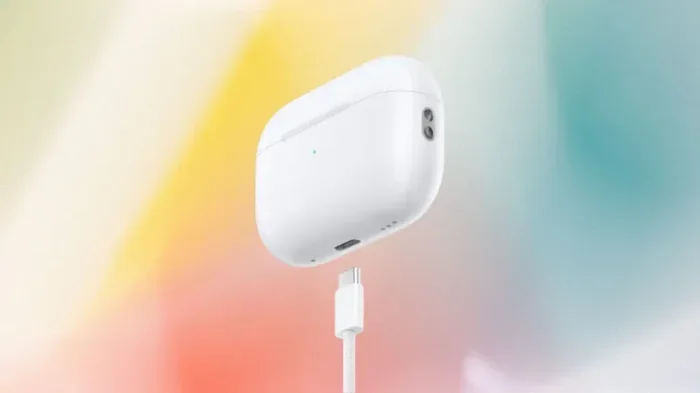
Visual guide about AirPods Pro USB charging cable
Image source: variety.com
For AirPods Pro 1st Generation
The original AirPods Pro comes with a Lightning to USB-C cable in the box. Yes, even the first generation moved away from USB-A. This means:
- You need a Lightning to USB-C cable or a Lightning to USB-A cable.
- Any Apple-certified Lightning cable should work.
- The cable plugs into the bottom of the case, just like charging an iPhone before the iPhone 15.
If you already own an iPhone (iPhone 14 or earlier), you likely have compatible cables lying around. This was one of Apple’s strategic moves—to reduce cable clutter and reuse accessories across devices.
For AirPods Pro 2nd Generation (Lightning Version)
The original AirPods Pro 2 release in September 2022 came with a Lightning to USB-C cable. This is the same setup as the first generation. If you own this version, follow the same cable guidelines as above.
For AirPods Pro 2nd Generation (USB-C Version)
In September 2023, Apple updated the AirPods Pro 2 to include a USB-C port instead of Lightning. This version comes with a USB-C to USB-C cable in the box. To charge these:
- You need a USB-C to USB-C cable or a USB-C to USB-A cable.
- Any USB-C cable that supports charging should work, but Apple-certified is recommended.
- This is the same cable type used for Android phones, iPads, and MacBooks.
This shift is a game-changer for people who own multiple devices. If you have an iPhone 15 or later, a modern iPad, or a MacBook, you can use the same cable to charge your AirPods Pro, your phone, and your laptop. One cable to rule them all!
What About AirPods Pro 3?
Apple released the AirPods Pro 3 in September 2025. Like the newer AirPods Pro 2, this model uses a USB-C charging port. If you have the latest model, you’ll need a USB-C cable—just like the updated AirPods Pro 2.
How to Charge AirPods Pro Using a USB Cable: Step-by-Step
Charging your AirPods Pro with a USB cable is straightforward once you have the right cable. Here’s exactly how to do it:
Step 1: Check Your Cable
Before plugging in, take a moment to inspect your cable. Look for:
- Visible damage: Frayed wires, bent connectors, or exposed wiring.
- MFi certification: “Made for iPhone” or Apple-certified logos.
- Connector type: Lightning or USB-C, depending on your AirPods Pro model.
Using a damaged cable is like driving a car with bald tires—it’s only a matter of time before something goes wrong. Damaged cables can overheat, cause short circuits, or fail to charge your device properly.
Step 2: Connect the Cable to the AirPods Pro Case
Flip your AirPods Pro case upside down. You’ll see a small port on the bottom—this is where the cable plugs in.
- For Lightning models: Insert the Lightning connector gently but firmly.
- For USB-C models: Insert the USB-C connector the same way.
It should click into place. If it feels loose or doesn’t go in smoothly, don’t force it. You might have the wrong cable type.
Step 3: Plug the Other End into a Power Source
You can plug the USB end of the cable into several things:
- Wall adapter: Any USB power adapter with at least 5W output.
- Computer: The USB ports on a laptop or desktop will charge your case, but slower.
- Power bank: Great for charging on the go.
- Car charger: Perfect for long road trips.
For the fastest charging, use a 5W or higher wall adapter. Apple’s official 5W USB power brick works perfectly, but any reputable third-party adapter will do the job too.
Step 4: Check the Charging Light
Your AirPods Pro case has a small LED indicator light on the front (for wired charging cases) or inside (when the lid is open). Here’s what the colors mean:
- Green light: Fully charged.
- Amber/orange light: Charging (less than 100% charged).
- No light: Not connected to power, or the battery is dead.
You can also check the charging status on your iPhone or iPad. Open the case near your Apple device, and a pop-up will show the battery percentage for both the case and the earbuds.
How Long Does It Take to Charge AirPods Pro?
Time is money, and no one wants to wait around for their earbuds to charge. Here’s how long you can expect charging to take.
Charging the Case from 0% to 100%
Using a USB cable with a 5W or higher power adapter, a full charge takes about one hour. However, most people never let their case drop to 0%. In typical use, a 30-minute charge will bring the case from empty to about 80%.
Charging the Earbuds in the Case
Placing the earbuds in the case charges them quickly. Just 5 minutes in the case gives you around 1 hour of listening time. A full charge for the earbuds takes about 30 minutes.
Total Listening Time
A fully charged case provides up to 24 hours of total listening time across multiple earbud charges. The earbuds themselves last up to 6 hours on a single charge (with Active Noise Cancellation enabled).
Did You Know? AirPods Pro batteries are designed to retain up to 80% of their original capacity after 500 complete charge cycles. With normal use, that’s about 2-3 years before you might notice a drop in battery life.
Common Charging Problems and Solutions
Even with the right cable, things can sometimes go wrong. Here are the most common charging problems and how to fix them.
Problem 1: AirPods Pro Not Charging
If your AirPods Pro aren’t charging, try these troubleshooting steps:
- Check the cable connection: Unplug and replug both ends firmly.
- Inspect the port: Lint and debris can get stuck in the charging port. Use a dry, soft-bristled brush (like a clean toothbrush) to gently remove any buildup.
- Try a different cable: Cables wear out over time. Swap in another certified cable to see if that’s the issue.
- Try a different power source: Some USB ports on computers provide very little power. Switch to a wall adapter.
- Reset your AirPods Pro: Press and hold the setup button on the back of the case for 15 seconds until the light flashes amber, then white.
Problem 2: Slow Charging
If charging seems slower than usual, the culprit is often the power source. Charging from a computer USB port can take twice as long as using a wall adapter. Also, using a damaged or low-quality cable can reduce charging speed.
Problem 3: Case Not Holding a Charge
If your case loses battery quickly even when not in use, the internal battery might be worn out. Lithium-ion batteries degrade over time. Unfortunately, this isn’t user-replaceable. You’d need to contact Apple Support or visit an Apple Store for a battery service.
Problem 4: One Earbud Charges, the Other Doesn’t
If only one AirPod is charging, clean the metal charging contacts on the earbud and inside the case with a dry cotton swab. Dirt and oxidation can prevent a proper connection.
USB Cable vs. Wireless Charging: Which Is Better?
You might be wondering: if AirPods Pro cases support wireless charging (on most models), why bother with a USB cable? Let’s compare.
USB Cable Charging Pros
- Faster charging: Wired charging is typically quicker than wireless.
- More reliable: No alignment issues or charging interruptions.
- Works anywhere: No need for a charging pad.
- Better for travel: A cable takes up less space than a charging mat.
USB Cable Charging Cons
- Wear and tear: Cables wear out, and the charging port can become loose over time.
- Less convenient: You have to physically plug it in.
Wireless Charging Pros
- Convenience: Just set the case on a charging pad.
- Less port wear: No need to constantly plug and unplug.
- MagSafe compatibility: AirPods Pro 2 (USB-C) works with MagSafe chargers.
Wireless Charging Cons
- Slower: Wireless charging generates heat, which slows down the process.
- Less efficient: Some energy is lost as heat.
- Requires the right hardware: You need a Qi or MagSafe-compatible charger.
The verdict? USB cable charging is best for speed and reliability, while wireless charging is great for convenience. Most AirPods Pro users keep both options available for different situations.
Tips to Extend AirPods Pro Battery Life
Your AirPods Pro battery will degrade over time no matter what, but you can slow the process significantly with these tips.
Avoid Extreme Temperatures
Lithium-ion batteries hate extreme heat and cold. Don’t leave your AirPods Pro in a hot car or outside in freezing weather. The ideal operating temperature is between 0°C and 35°C (32°F to 95°F).
Don’t Let Them Fully Drain
It’s a myth that you need to fully drain lithium-ion batteries before charging. In fact, doing this regularly shortens battery lifespan. Try to keep your AirPods Pro charged between 20% and 80% when possible.
Use Optimized Battery Charging
AirPods Pro have a feature called Optimized Battery Charging, which learns your daily routine and delays charging past 80% until you need to use them. This reduces battery aging. To enable it, go to Settings > Bluetooth > tap the “i” next to your AirPods Pro > toggle on Optimized Battery Charging.
Store Them Properly
If you won’t use your AirPods Pro for a while, store them with about 50% charge in a cool, dry place. Storing them at 0% or 100% for extended periods can damage the battery.
Turn Off Unnecessary Features
Active Noise Cancellation and Transparency mode use more battery. If you don’t need them, switch them off to extend listening time. You can do this from Control Center on your iPhone or by pressing and holding the force sensor on the AirPods stem.
Did You Know? The global wireless earbuds market was valued at over $45 billion in 2024 and is expected to grow to more than $100 billion by 2030. As more people rely on wireless earbuds like AirPods Pro, knowing how to charge them properly becomes more important than ever.
What Happens If You Use the Wrong Cable?
We’ve established that you need the right cable type, but what actually happens if you use the wrong one?
Using a USB-C Cable on a Lightning Port
If you try to plug a USB-C cable into an AirPods Pro case with a Lightning port, it simply won’t fit. The connectors are physically different shapes. You won’t damage anything, but you won’t charge your device either.
Using a Lightning Cable on a USB-C Port
Same result—it’s a physical mismatch. The cable won’t insert into the port.
Using a Damaged or Non-Certified Cable
This is where real problems can occur. Cheap, knockoff cables may not meet Apple’s standards for power regulation. Risks include:
- Overheating: Poor power regulation can cause the case or cable to overheat.
- Slow or no charging: Poor-quality wires can fail to deliver consistent power.
- Battery damage: Voltage fluctuations can degrade the battery over time.
- Safety hazards: In rare cases, faulty cables can pose a fire risk.
The solution? Always use Apple-certified cables (look for “Made for iPhone” or “MFi” certification) or cables from reputable third-party brands like Anker, Belkin, or UGREEN.
Charging AirPods Pro Without a Cable: Wireless Options
While this article focuses on USB cable charging, it’s worth mentioning your wireless options if you prefer that method.
Qi Wireless Charging
Both AirPods Pro generations (with wireless charging case) work with any Qi-certified charging mat. Just place the case on the mat with the lid closed and the status light facing up. The light will turn on briefly to confirm charging.
MagSafe Charging
The AirPods Pro 2 (USB-C version) and AirPods Pro 3 are compatible with MagSafe chargers. MagSafe uses magnets to align the case perfectly on the charger, making it more efficient than standard Qi charging.
Apple Watch Charger
Surprisingly, the AirPods Pro 2 (USB-C version) and AirPods Pro 3 can also charge on an Apple Watch magnetic charger. This is a handy backup when you don’t have a Lightning or USB-C cable available.
Final Thoughts: Charging Your AirPods Pro with USB Made Simple
So, can you use a USB cable to charge AirPods Pro? Absolutely. The key is knowing which cable you need based on your AirPods Pro generation. If you own the first generation or the original AirPods Pro 2, you’ll need a Lightning cable. If you have the updated AirPods Pro 2 (released September 2023 or later) or the AirPods Pro 3, a USB-C cable is the way to go.
Using the right cable ensures fast, safe, and efficient charging. Pair your cable with a quality 5W or higher power adapter, and you’ll have a fully charged case in about an hour. Remember to inspect your cables regularly for damage, keep the charging port clean, and follow the battery health tips to extend the life of your AirPods Pro.
Wireless charging is a nice convenience, but wired USB charging remains the fastest and most reliable method. Whether you’re at home, in the car, or at the office, a USB cable ensures your AirPods Pro are always ready when you need them.
Now that you know everything about charging your AirPods Pro with USB, you can confidently power up your earbuds and enjoy your music, podcasts, and calls without interruption. Happy listening!
Frequently Asked Questions
Can you charge AirPods Pro with any USB cable?
No, you can only charge AirPods Pro with a USB cable that matches the port on the charging case. AirPods Pro 1st gen uses Lightning, while AirPods Pro 2 (USB-C version) and AirPods Pro 3 use USB-C. Using the wrong cable type simply won’t fit the port.
How long does it take to fully charge AirPods Pro with a USB cable?
It takes about one hour to fully charge an AirPods Pro case from 0% to 100% using a USB cable and a 5W or higher power adapter. The earbuds themselves charge to full in about 30 minutes when placed in the case.
Can I charge AirPods Pro with an Android phone charger?
Yes, as long as the cable connector matches your AirPods Pro case. If your AirPods Pro have a USB-C port, any USB-C phone charger (including most Android chargers) will work. If they have a Lightning port, you’ll need a Lightning cable.
Is it safe to charge AirPods Pro with a non-Apple cable?
Yes, as long as the cable is certified by Apple (MFi-certified) or made by a reputable brand. Avoid cheap, uncertified cables, as they may cause overheating, slow charging, or battery damage over time.
Can I charge AirPods Pro and iPhone with the same cable?
If you have AirPods Pro 2 (USB-C version) or AirPods Pro 3 and an iPhone 15 or later, you can use the same USB-C cable for both devices. If you have older AirPods Pro with a Lightning port, you can use the same Lightning cable as older iPhones.
What should I do if my AirPods Pro won’t charge with a USB cable?
First, check that you’re using the correct cable type (Lightning or USB-C). Then inspect the cable for damage, clean the charging port on the case with a dry brush, try a different power source, and reset your AirPods Pro by holding the setup button for 15 seconds.