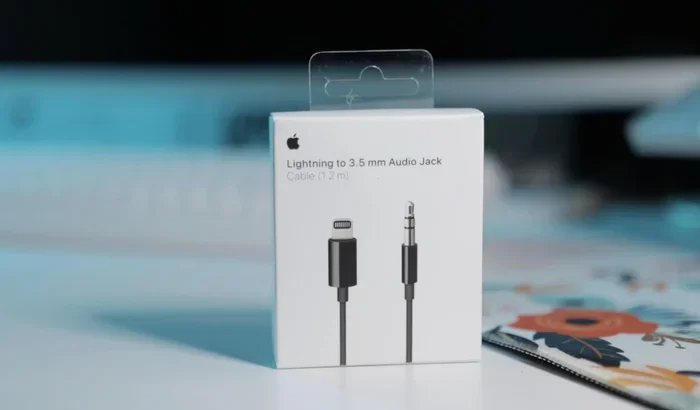
Featured image for AirPods Max wired connection
Image source: cultofmac.com
Yes, you can absolutely use AirPods Max with a wired connection! Apple includes a USB-C to Lightning or 3.5mm audio cable option for these premium headphones. A wired connection can actually improve audio quality, reduce latency, and save battery life. Whether you’re a gamer, musician, or audiophile, going wired with your AirPods Max opens up new possibilities for how you use them.
Imagine this: you’re settling in for a long flight, ready to enjoy your favorite album on your AirPods Max. But then you remember that Bluetooth isn’t allowed during takeoff. Or maybe you’re a music producer who needs zero latency while laying down tracks. Or perhaps you’re just an audiophile chasing the purest sound possible.
If any of these scenarios sound familiar, you’re probably wondering: can you wire AirPods Max for those moments when wireless just won’t cut it? The short answer is a resounding yes! Apple’s premium over-ear headphones actually come with built-in support for wired listening, a feature that many users overlook.
In this comprehensive guide, we’ll explore everything you need to know about using your AirPods Max in wired mode. From the cables you’ll need to the audio quality benefits and practical use cases, we’re covering it all. Think of this as your complete roadmap to unlocking the full potential of your AirPods Max, cable and all.
Key Takeaways
- Wired Connection is Officially Supported: Apple designed AirPods Max to work with wired connections through a Lightning to 3.5mm audio cable or USB-C to 3.5mm cable, depending on your model.
- Audio Quality Can Improve: A wired connection bypasses Bluetooth compression, potentially delivering higher fidelity sound with support for lossless audio formats.
- Battery Life Gets a Boost: When wired, your AirPods Max don’t need to use Bluetooth, which significantly extends battery life during long listening sessions.
- Latency Drops Dramatically: Wired connections offer near-zero latency, making them ideal for gaming, music production, and video editing.
- You Need the Right Cable: AirPods Max don’t include a wired audio cable in the box, so you’ll need to purchase one separately from Apple or a third party.
- Some Features Still Work: Even in wired mode, you can still use active noise cancellation and Transparency mode, though the headphones still need some battery power for these features.
- Not All Devices Are Compatible: Wired AirPods Max work with most devices with a 3.5mm jack, but some features may be limited on non-Apple products.
📑 Table of Contents
- Understanding AirPods Max Wired Connectivity
- What Cables Do You Need for Wired AirPods Max?
- Why Would You Want to Wire Your AirPods Max?
- How to Connect AirPods Max in Wired Mode
- Wired AirPods Max Audio Quality: What to Expect
- Common Wired AirPods Max Issues and Solutions
- Wired vs. Wireless: Making the Right Choice
Understanding AirPods Max Wired Connectivity
Let’s start with the basics. AirPods Max were designed from the ground up to support both wireless and wired listening experiences. This dual functionality sets them apart from many competitors in the premium headphone market.
The Two Ports You’ll Find
Depending on when you purchased your AirPods Max, you’ll have one of two versions:
Original AirPods Max (2020-2024): These feature a Lightning port on the bottom of the right ear cup. This was Apple’s standard charging port before the company transitioned to USB-C across its product lineup.
Updated AirPods Max (2024-Present): These models use a USB-C port instead of Lightning, matching the industry standard and Apple’s newer devices like the iPhone 15 and later.
The type of port on your headphones determines which cable you’ll need for wired listening. It’s like having two different keys for two different locks, you need the right one to make everything work.
What Apple Intended for Wired Use
Apple didn’t just add wired support as an afterthought. The company specifically engineered AirPods Max to deliver exceptional audio quality through both wireless and wired connections. In fact, when you use AirPods Max wired with compatible Apple devices, you can access lossless audio and ultra-low latency audio, features that aren’t available over Bluetooth.
Did you know? Apple introduced lossless audio support for AirPods Max via wired connection in September 2021, over a year after the headphones launched. This shows how seriously Apple takes the wired listening experience for serious audio enthusiasts.
What Cables Do You Need for Wired AirPods Max?
Here’s the slightly frustrating part: Apple doesn’t include a wired audio cable in the AirPods Max box. You only get the headphones themselves, a Smart Case, and a charging cable. To go wired, you’ll need to make a separate purchase.
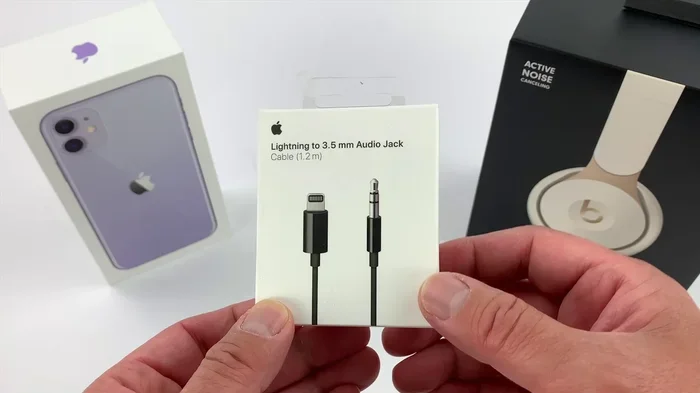
Visual guide about AirPods Max wired connection
Image source: i.ytimg.com
The Apple-Branded Cable Options
For Lightning AirPods Max: You’ll need Apple’s Lightning to 3.5mm Audio Cable. This cable has a Lightning connector on one end (which plugs into your headphones) and a standard 3.5mm audio jack on the other end. The cable is about 1.2 meters long, giving you plenty of room to move around.
For USB-C AirPods Max: You’ll need Apple’s USB-C to 3.5mm Audio Cable. This works the same way but uses USB-C instead of Lightning. The advantage here is that you might already have other USB-C cables lying around, though Apple’s official cable is recommended for best compatibility.
Both cables typically retail for around $35 to $39 from Apple’s website. They’re built with high-quality materials and designed specifically for audio transmission, not just charging.
Third-Party Alternatives
Can you use non-Apple cables? Generally, yes, but with some caveats. Many third-party manufacturers make Lightning or USB-C to 3.5mm cables that work with AirPods Max. However, quality can vary significantly. Think of it like buying generic vs. name-brand coffee, both might give you caffeine, but the experience can be quite different.
When shopping for third-party cables, look for:
- MFi Certification (Made for iPhone) for Lightning cables, which ensures Apple compatibility
- High-purity copper conductors for better audio transmission
- Braided or reinforced designs for durability
- Reviews from other AirPods Max users to confirm compatibility
Why Would You Want to Wire Your AirPods Max?
You might be thinking, “These are wireless headphones, why would I want to use a cable?” Great question! There are actually several compelling reasons why going wired can be beneficial.
Superior Audio Fidelity
Bluetooth audio, no matter how advanced, involves some level of digital compression. Even with codecs like AAC and the newer LC3, you’re not getting the full quality of your music files. A wired connection skips all that compression entirely.
Think of it like this: Bluetooth audio is like looking at a photograph through a window, while wired audio is like removing the window entirely. Both show you the image, but one has an extra barrier between you and the source.
When you use AirPods Max wired with Apple Music’s lossless tier, you’re hearing music exactly as the artist intended, with all the subtle details and nuances preserved.
Ultra-Low Latency for Creators
If you’re a musician, video editor, or gamer, latency is your enemy. Bluetooth introduces a delay between when audio is sent and when you hear it, typically around 100-300 milliseconds. That’s enough to notice when watching videos and definitely problematic for music production.
Wired connections reduce latency to virtually zero. This is why studio monitors are always wired. When you’re playing a virtual piano on your iPad, you need to hear the note the instant you press the key, not a fraction of a second later.
Extended Battery Life
AirPods Max deliver about 20 hours of listening time on a single charge with active noise cancellation enabled. That’s pretty good, but what if you’re on a transatlantic flight or working a 12-hour shift? A wired connection means your headphones aren’t constantly streaming audio over Bluetooth, which uses significant battery power.
With a wired connection, you can listen indefinitely as long as you have power to charge the headphones. Some users report getting days of use from a single charge when primarily using wired mode with ANC occasionally enabled.
Compatibility with In-Flight Entertainment
Many airlines still don’t allow Bluetooth during takeoff and landing, and some older in-flight entertainment systems require a wired headphone connection. Having a wired option means you’re covered no matter what situation you encounter at 35,000 feet.
How to Connect AirPods Max in Wired Mode
Setting up your AirPods Max for wired listening is straightforward. Here’s a step-by-step walkthrough.
Step 1: Identify Your Port Type
Look at the bottom of the right ear cup. Do you see a Lightning port (small, rectangular with rounded corners) or a USB-C port (oval-shaped)? This determines which cable you need.
Step 2: Connect the Cable
Plug the Lightning or USB-C end into your AirPods Max. You’ll feel a satisfying click when it’s properly seated. The connection is snug but not overly tight.
Step 3: Connect to Your Source Device
Plug the 3.5mm end into your device’s headphone jack. This could be:
- An iPhone or iPad (though most modern ones don’t have headphone jacks, so you’d need an adapter)
- A Mac computer
- A traditional audio source like an amplifier or DAC
- An in-flight entertainment system
- A gaming console controller
- A musical instrument or audio interface
Step 4: Power On Your AirPods Max
Here’s something many people don’t realize: even in wired mode, AirPods Max need to be powered on. They’re not truly passive headphones like some traditional wired options. You need to press and hold the noise control button to turn them on.
Once powered on, the headphones will automatically route audio through the wired connection instead of Bluetooth. You’ll hear a subtle tone confirming the connection is active.
Step 5: Adjust Your Settings (Optional)
On Apple devices, you can enable lossless audio by going to Settings > Bluetooth > AirPods Max > Audio Information. From there, you can choose between “Off” and “Lossless Audio.” The headphones also remember your last connection preference, so you won’t need to adjust this every time.
Wired AirPods Max Audio Quality: What to Expect
Now for the big question: does wiring your AirPods Max actually sound better? The answer depends on what you’re comparing it to and what source material you’re using.
Lossless Audio Benefits
Apple Music offers lossless audio in two tiers: standard lossless (up to 24-bit/48kHz) and hi-res lossless (up to 24-bit/192kHz). When you use AirPods Max wired with a compatible Apple device, you can access the standard lossless tier, which is already a significant upgrade from Bluetooth streaming.
What does this actually mean for your ears? You might notice:
- More detail in complex passages where multiple instruments play simultaneously
- Better separation between different elements of a song
- More accurate bass response without bloating
- Improved soundstage that feels more three-dimensional
Of course, these improvements are subtle. If you’re listening to podcasts or heavily compressed music, you probably won’t notice much difference. But for critical listening with high-quality recordings, the upgrade is meaningful.
Active Noise Cancellation in Wired Mode
Good news: ANC still works when you’re wired! This is because the noise-cancelling microphones and processing happen within the headphones themselves, not over the Bluetooth connection. Press the noise control button on your AirPods Max to cycle between ANC on, Transparency mode, and ANC off.
Did you know? Transparency mode is particularly useful when wired because it lets you hear announcements, conversations, or your environment without removing your headphones. This is great for office workers who need to stay aware of their surroundings.
Volume and EQ Limitations
One thing to be aware of: volume control on AirPods Max only works in wireless mode. When wired, you’ll need to adjust volume from your source device. Similarly, any custom EQ settings you’ve configured through your Apple device should still apply, but third-party EQ apps may behave differently.
Common Wired AirPods Max Issues and Solutions
Even though wired connectivity is well-supported, you might occasionally run into hiccups. Here are the most common issues and how to solve them.
No Sound After Connecting
If you plug in your cable but hear nothing, try these troubleshooting steps:
- Make sure AirPods Max are powered on by pressing the noise control button
- Check that the cable is fully inserted on both ends
- Try a different cable if you have one available
- Restart your AirPods Max by holding the Digital Crown and noise control button until the LED flashes amber
- Test with a different source device to isolate the issue
Sound Only Coming from One Side
This is usually a cable issue rather than a headphone problem. Check the connection points for debris, try reseating the cable firmly, or test with another cable. If the problem persists, the 3.5mm connector on your source device might be dirty or damaged.
Audio Quality Sounds Worse Than Bluetooth
If wired audio sounds worse, you might be comparing a high-bitrate Bluetooth stream to a low-quality wired source. Make sure you’re using a quality source device and, if possible, enable lossless audio in your settings. Also, check that the cable isn’t damaged, as a faulty cable can introduce interference.
Headphones Won’t Turn On in Wired Mode
If your AirPods Max are completely dead, they won’t work wired either. The headphones need at least some battery power to function, even with a cable connected. Charge them for at least 10-15 minutes before trying again.
Wired vs. Wireless: Making the Right Choice
So should you go wired or stick with wireless? The answer depends on your situation and priorities.
Choose Wired When:
- You’re doing critical listening and want the best possible audio quality
- You’re producing music or editing video and need zero latency
- You’re on a long flight or trip where battery life matters
- You’re using equipment that requires a wired connection
- You want to preserve battery for when you really need wireless
Choose Wireless When:
- You’re moving around and need freedom of movement
- You’re taking phone calls or using Siri
- You want the seamless Apple ecosystem experience with automatic device switching
- You’re working out or doing activities where cables would get in the way
- You’re listening casually and don’t need audiophile-grade quality
The beauty of AirPods Max is that you don’t have to choose one or the other permanently. Having both options available means you can pick the right tool for each situation, like having both an umbrella and sunglasses in your bag depending on the weather.
So, can you wire AirPods Max? Absolutely, and now you have everything you need to do it successfully. Whether you’re chasing perfect audio fidelity, gaming without delay, or just want a backup connection option, the wired capability of AirPods Max adds tremendous value to an already impressive pair of headphones. Grab the right cable, power up your headphones, and enjoy a whole new dimension of what your AirPods Max can do.
Frequently Asked Questions
Do AirPods Max come with a wired audio cable in the box?
No, AirPods Max do not include a wired audio cable in the box. You’ll need to purchase Apple’s Lightning to 3.5mm cable or USB-C to 3.5mm cable separately, depending on your model. Only the headphones, Smart Case, and a charging cable come included.
Can I use any USB-C or Lightning cable to wire my AirPods Max?
Not all cables will work for audio. You specifically need a cable designed for audio transmission, not just charging. Apple’s official cables are the safest bet, but MFi-certified third-party options can also work reliably for wired audio.
Does noise cancellation work when AirPods Max are wired?
Yes, active noise cancellation and Transparency mode both work in wired mode. However, your AirPods Max still need to be powered on and have sufficient battery life, as the noise-cancelling features require power to function even when using a wired connection.
Is wired audio quality better than Bluetooth on AirPods Max?
Wired audio can be better, especially when using Apple Music’s lossless tier or playing high-resolution audio files. Bluetooth involves compression, while a wired connection delivers audio directly without any wireless transmission, preserving more detail and dynamic range.
Can I use wired AirPods Max with non-Apple devices?
Yes, wired AirPods Max work with any device that has a standard 3.5mm headphone jack, including Android phones, laptops, gaming consoles, and audio equipment. However, some Apple-specific features like lossless audio and seamless device switching won’t be available on non-Apple devices.
Do AirPods Max work wired when the battery is dead?
No, AirPods Max require battery power to function even in wired mode. Unlike traditional passive headphones, they need power for their internal amplifiers, DAC, and noise-cancelling processors. If the battery is completely dead, you’ll need to charge them before they work with a cable.