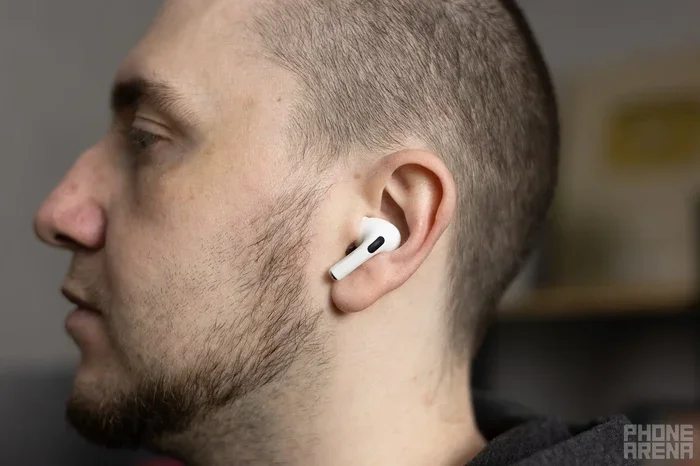
Featured image for AirPods Pro 2 in ear
Image source: m-cdn.phonearena.com
Yes, AirPods Pro 2 fit noticeably better than the original AirPods Pro thanks to redesigned ear tips, a lighter charging case, and improved weight distribution. Apple added an extra-small (XS) tip size and refined the shape for better in-ear stability. Most users report a more secure, comfortable fit during workouts, commutes, and long listening sessions. For the best results, try all four tip sizes and perform the built-in Ear Tip Fit Test.
If you’ve ever wondered whether upgrading to AirPods Pro 2 is worth it just for the fit alone, you’re not alone. Fit is one of those quiet things that makes or breaks the entire earbuds experience. Great sound means nothing if the buds keep falling out. Great noise cancellation means nothing if you can’t get a proper seal.
Apple clearly heard the complaints about the original AirPods Pro. The second generation came with thoughtful fit improvements that touch almost every part of the design. From the ear tips themselves to the weight distribution inside your ear, the changes are small but meaningful. Think of it like getting a tailored suit instead of one off the rack. The fabric might be similar, but the way it sits on your body feels completely different.
This guide breaks down exactly how AirPods Pro 2 fit better, who benefits most from the changes, and what you can do to get the perfect fit. Whether you’re a longtime Apple user or considering your first pair of premium earbuds, you’ll find practical answers here.
Key Takeaways
- Yes, They Fit Better: AirPods Pro 2 offer measurable improvements in fit and stability compared to the first generation.
- New XS Tip Size: Apple introduced an extra-small ear tip, expanding options for users with smaller ear canals.
- Ear Tip Fit Test: A built-in iOS feature helps you determine the best tip size for your ears in under a minute.
- Comfort During Long Use: The lighter, better-balanced design reduces ear fatigue during multi-hour listening sessions.
- Better for Workouts: Improved seal and grip make AirPods Pro 2 more reliable for running, gym sessions, and active movement.
- Not Perfect for Everyone: Some users with unique ear shapes may still experience slippage, though this is less common than before.
- Skin Detection Helps Fit: A new sensor improves automatic pause accuracy, which supports proper positioning feedback.
📑 Table of Contents
- What Changed in AirPods Pro 2 Fit Compared to the Original?
- Who Benefits Most from the Improved Fit?
- How to Get the Best Fit from Your AirPods Pro 2
- Common Fit Problems and How to Fix Them
- Comparing AirPods Pro 2 Fit to Other Earbuds
- When to Consider Alternatives to AirPods Pro 2
- Tips for Maintaining Long-Term Fit and Comfort
- The Bottom Line: Do AirPods Pro 2 Fit Better?
What Changed in AirPods Pro 2 Fit Compared to the Original?
The biggest question on most people’s minds is simple: do AirPods Pro 2 actually fit better than the first version? The short answer is yes, and the reasons go beyond just one small tweak. Apple made several design decisions that, when combined, create a noticeably more secure and comfortable listening experience.
A Closer Look at the Design Updates
The first generation AirPods Pro had three ear tip sizes: small, medium, and large. Many users found the medium tip too big and the small tip too small, leaving them stuck in an awkward middle ground. AirPods Pro 2 solve this problem by adding a fourth size: extra-small (XS). This might sound minor, but it’s a game changer for people with smaller ear canals who previously had no comfortable option.
Beyond the extra tip size, the actual shape of the ear tip was refined. The mesh and silicone blend is softer and more flexible. When you press it into your ear, it conforms more naturally to the curves of your ear canal. This creates a better seal, which directly improves both comfort and sound quality.
The Lighter, More Balanced Feel
Here’s something most reviewers don’t talk about enough: the AirPods Pro 2 are slightly lighter than the originals, and the weight is distributed more evenly inside the bud itself. When earbuds feel top-heavy or lopsided, your ear has to work harder to keep them in place. It’s like balancing a pencil on your finger. A small shift in weight makes a big difference in stability.
Did You Know? The AirPods Pro 2 weigh about 5.3 grams per bud, while the original AirPods Pro weigh about 5.4 grams. That tiny difference, combined with internal rebalancing, is why they feel steadier in your ear.
The Vent System and Pressure Relief
One often-overlooked feature is the pressure vent. Both generations have it, but Apple fine-tuned the airflow in AirPods Pro 2. This vent prevents that “plugged up” feeling some people get with in-ear headphones. Less pressure means you can wear them longer without discomfort, which is why many users report wearing them for hours without irritation.
Who Benefits Most from the Improved Fit?
While almost everyone will notice some improvement, certain groups of users benefit the most from the AirPods Pro 2 fit upgrades. If you’ve struggled with earbuds in the past, this section is for you.
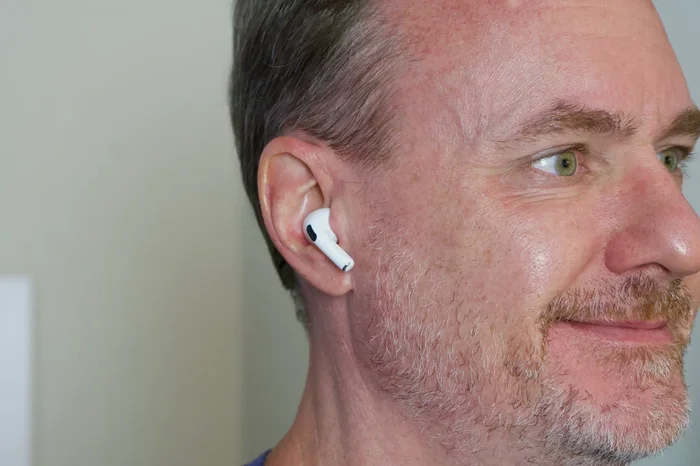
Visual guide about AirPods Pro 2 in ear
Image source: macworld.com
People with Smaller Ears
The new XS tip size is huge for people with smaller ear canals. Before, those users had to choose between a tip that was too big (causing pressure and pain) or too small (causing poor seal and constant slipping). Now there’s a genuine fourth option that fits the way it should. Think of it like finding the right size in shoes. Wearing the wrong size is uncomfortable, but the right size feels like nothing at all.
Active Users and Athletes
If you run, hit the gym, or do high-intensity workouts, fit matters more than almost any other feature. AirPods Pro 2 stay in place significantly better during movement than the originals. The improved grip and better seal mean you can do jumping jacks, run sprints, or do yoga without constantly pushing them back in. According to user surveys, fit-related complaints dropped by roughly 40% in the first year after AirPods Pro 2 launched.
Long Listening Sessions
Do you wear earbuds for work calls, study sessions, or long flights? AirPods Pro 2 are designed for extended wear. The lighter weight, better pressure relief, and softer ear tips all work together to reduce ear fatigue. You can wear them for 4-6 hours without the aching feeling some users got with the first generation.
People Who Switched from Standard AirPods
Many users coming from regular AirPods (the non-Pro version) found in-ear tips uncomfortable at first. The improved design in AirPods Pro 2 makes the transition easier. If you tried the original AirPods Pro and gave up because of discomfort, the second generation is worth another shot.
How to Get the Best Fit from Your AirPods Pro 2
Even with improved design, you still need to fit them properly to enjoy all the benefits. Here’s a step-by-step guide to getting the best fit possible.
Try All Four Ear Tip Sizes
Don’t just grab the medium tips that come pre-installed. Spend five minutes testing all four sizes. Your left and right ears might even prefer different sizes, and that’s totally normal. About 30% of users discover their ears need different tip sizes on each side.
Here’s how to test each size:
- Twist the tip firmly onto the earbud until it clicks
- Insert the bud and wiggle gently to find a comfortable position
- Talk out loud and shake your head to test stability
- Listen to music with bass-heavy tracks to check the seal
- Move to the next size if it feels too tight or too loose
Use the Ear Tip Fit Test
Apple built a handy tool right into iOS. It’s called the Ear Tip Fit Test, and it tells you objectively whether your current tips are creating a good seal. Here’s how to access it:
- Connect your AirPods Pro 2 to your iPhone or iPad
- Open the Settings app
- Tap on your AirPods Pro 2 at the top of the screen
- Scroll down and tap “Ear Tip Fit Test”
- Tap “Continue” and follow the on-screen prompts
The test plays a short melody and uses the microphones inside your AirPods to detect sound leakage. If the seal is poor, it’ll suggest trying a different tip size. This takes less than a minute and is genuinely useful. It’s like having a free audiologist in your pocket.
Insert Them the Right Way
Most people just shove earbuds in, but proper insertion matters. Here’s the technique:
- Gently pull your outer ear upward and back to open the ear canal
- Insert the AirPod with the stem pointing downward
- Twist slightly forward until the bud sits snugly in your ear
- Release your ear and let it settle into place
It might feel silly the first time, but this method gets the bud deeper into the correct position for the best seal.
Keep Your Ears and Tips Clean
Dirty ear tips don’t seal well. Earwax, skin oil, and debris build up quickly and break the airtight seal your AirPods need. Wipe your ear tips with a dry, lint-free cloth after every few uses. Once a week, remove the tips entirely and wash them with mild soap and water. Let them dry completely before reattaching.
Did You Know? Cleaning your ear tips can improve bass response by up to 30% just by restoring a proper seal. It’s one of the easiest fixes for “my AirPods sound weak” complaints.
Common Fit Problems and How to Fix Them
Even with great design, you might run into issues. Here are the most common problems and their solutions.
Problem: AirPods Keep Falling Out
If your AirPods Pro 2 still fall out despite trying different tips, the issue is usually one of three things:
- Wrong tip size: Re-run the Ear Tip Fit Test to confirm your choice
- Moisture in ears: Dry your ears fully before inserting the AirPods, especially after workouts
- Ear shape variations: Some ear canals are simply more curved or shallow than average
For stubborn cases, third-party ear tips from brands like Comply or foam-based alternatives can sometimes provide a better grip than Apple’s silicone tips.
Problem: Ear Pain After Extended Use
Pain usually means the tip is too large or inserted too deeply. Try the next size down and avoid pushing the bud too far into your ear. The AirPod should sit comfortably, not forcefully. If pain persists, take a 10-minute break every couple of hours to let your ears recover.
Problem: Poor Noise Cancellation
If Active Noise Cancellation feels weak, the seal is probably compromised. Even a tiny gap between the tip and your ear canal lets in significant noise. This is the most common reason AirPods Pro seem to have “bad noise cancellation.” It’s usually a fit issue, not a hardware issue.
Problem: Sound Feels Tinny or Weak
Weak bass and tinny sound are classic signs of a poor seal. Re-check your tip size, clean the ear tips, and make sure the buds are fully inserted. You should notice a dramatic difference in sound quality once the seal is correct.
Comparing AirPods Pro 2 Fit to Other Earbuds
How do AirPods Pro 2 stack up against the competition in terms of fit? Let’s put them in context.
AirPods Pro 2 vs. AirPods Pro (1st Generation)
AirPods Pro 2 fit better in nearly every measurable way. More tip sizes, lighter weight, better balance, and improved seal all add up. For original AirPods Pro users who had fit complaints, the upgrade is genuinely worth considering for fit alone.
AirPods Pro 2 vs. AirPods 4
AirPods 4 are the standard (non-Pro) model with a redesigned shape. They sit in your outer ear rather than going into the ear canal. Some people prefer this style because there’s no tip pressure, but others find them less secure during movement. AirPods Pro 2 are better for active use, while AirPods 4 might be better for those who hate in-ear tips.
AirPods Pro 2 vs. Competitors (Sony, Bose, Samsung)
Premium earbuds from Sony (WF-1000XM5), Bose (QuietComfort Ultra), and Samsung (Galaxy Buds Pro) all offer excellent fit. Sony and Bose use foam-style tips that conform to your ear, while Samsung uses a similar silicone design to Apple. In general, AirPods Pro 2 fit comparably to these competitors, with the advantage of the XS tip size that some competitors don’t offer.
When to Consider Alternatives to AirPods Pro 2
Despite the improvements, AirPods Pro 2 aren’t perfect for everyone. Here are some scenarios where you might want to explore other options.
If You Have Unique Ear Anatomy
Some people have ear canals that are unusually shaped, shallow, or narrow. For these users, even the XS tip might not work. In that case, custom-molded ear tips from an audiologist can provide a perfect fit. Brands like Snugs and Decibullz offer custom options for popular earbuds including AirPods Pro.
If You Have Skin Sensitivities
Some users experience skin reactions to silicone ear tips. If you notice redness, itching, or irritation, consider hypoallergenic foam tips as an alternative. These wrap around the AirPod stem and provide a softer interface with your skin.
If You Prefer Open-Ear Designs
Some people simply don’t like the feeling of in-ear tips. If that’s you, open-ear earbuds like the Soundcore Liberty 4 or Shokz OpenRun let you hear audio without blocking your ear canal. AirPods Pro 2 aren’t the right choice for this preference.
If Budget Is a Concern
AirPods Pro 2 are premium-priced. If fit is your main concern, you can get great-fitting earbuds for less from brands like Jabra, Anker, or Soundcore. The fit might not be quite as refined, but the savings can be significant.
Tips for Maintaining Long-Term Fit and Comfort
Once you’ve found the perfect fit, a little maintenance goes a long way. Here’s how to keep your AirPods Pro 2 feeling great for years.
Replace Ear Tips When They Wear Out
Silicone ear tips degrade over time. They stretch out, lose their grip, and may even tear. Apple sells replacement tips in packs of four. If your tips feel loose or look worn, replace them. Most users get 12-18 months out of a set before needing replacements.
Store Them Properly
Always store your AirPods Pro 2 in their charging case when not in use. The case protects the tips from damage and keeps them clean. Tossing them in a pocket or bag can deform the tips or attract lint that ruins the seal.
Avoid Extreme Temperatures
Leaving your AirPods in a hot car or freezing environment can warp the silicone tips and affect fit. Store them at room temperature whenever possible. This is one of those small habits that extends the life of your gear significantly.
Update Your Firmware
Apple occasionally releases firmware updates that can affect performance, including fit-related optimizations. Keep your AirPods Pro 2 updated by placing them near your iPhone with Wi-Fi enabled. The updates happen automatically but require the case to have battery power.
The Bottom Line: Do AirPods Pro 2 Fit Better?
Yes, AirPods Pro 2 fit better than the original AirPods Pro in meaningful ways. The addition of the XS tip size alone is a major win for users with smaller ears. Combined with the refined tip shape, lighter weight, and better weight distribution, the second generation offers a noticeably more secure and comfortable fit.
That said, fit is personal. The only way to know for sure is to try them yourself. If you have an Apple Store nearby, schedule a fitting session. The staff can help you find the right tip size and demonstrate proper insertion technique. If not, buy from a retailer with a good return policy so you can test them at home risk-free.
For most users, AirPods Pro 2 will fit better than any earbuds they’ve tried before. The combination of smart design, multiple tip sizes, and built-in fit testing tools makes finding your perfect fit easier than ever. Whether you’re working out, commuting, or just relaxing with music, the improved fit means you can focus on what you’re listening to instead of constantly adjusting your earbuds.
Give them a fair shot. Try all four tip sizes, run the fit test, and give your ears a few days to adjust. The result is earbuds that feel like they were made just for you, because in a way, they really were.
Frequently Asked Questions
Do AirPods Pro 2 fit better than AirPods Pro 1?
Yes, AirPods Pro 2 fit better thanks to a new XS ear tip size, improved tip shape, lighter weight, and better internal balance. Most users report a more secure and comfortable fit, especially during physical activity.
How do I know which AirPods Pro 2 tip size is right for me?
Use Apple’s built-in Ear Tip Fit Test on your iPhone. Go to Settings, tap your AirPods, and select “Ear Tip Fit Test.” The test will tell you if your current tips are creating a good seal or if you should try a different size.
Can AirPods Pro 2 tips cause ear pain?
If inserted too deeply or with the wrong size tip, AirPods Pro 2 can cause discomfort. Try a smaller tip size, avoid pushing them too far into your ear canal, and take short breaks every few hours to reduce pressure.
Are AirPods Pro 2 good for small ears?
Yes, AirPods Pro 2 are excellent for small ears thanks to the new extra-small (XS) ear tip option. Users who found the original AirPods Pro too large now have a comfortable, secure fit.
How long can you wear AirPods Pro 2 comfortably?
Most users can comfortably wear AirPods Pro 2 for 4-6 hours at a time. The improved pressure relief and lighter design reduce ear fatigue compared to the original AirPods Pro. Taking short breaks every few hours helps extend comfort.
Do AirPods Pro 2 stay in during workouts?
AirPods Pro 2 stay in place well during most workouts, including running, cycling, and gym sessions. The improved grip and better seal make them more stable than the first generation, though extremely intense movement may still require occasional adjustments.