Featured image for AirPods Pro microphone detail
Image source: wiredclip.com
Yes, AirPods 3 Pro have built-in microphones that deliver exceptional voice clarity for calls, voice commands, and video recordings. Apple’s premium earbuds feature dual beamforming microphones in each earbud, along with an inward-facing microphone that improves call quality and enables advanced features like Adaptive Audio and Conversation Awareness. Whether you’re taking business calls in a noisy café or whispering “Hey Siri” on a windy jog, the AirPods 3 Pro mic system is engineered to capture your voice clearly while filtering out distractions.
Picture this: you’re walking down a bustling city street, dodging honking taxis, chatting friends, and blaring storefront music. You pull out your AirPods 3 Pro and take a call. The person on the other end hears you crystal clear, as if you’re standing in a quiet library. That’s not magic; it’s microphone engineering at its finest.
If you’ve been wondering whether AirPods 3 Pro have a microphone, the short answer is a resounding yes. But the real story goes much deeper. Apple’s third-generation Pro earbuds pack a sophisticated multi-microphone array that rivals dedicated headset systems costing significantly more. Understanding how these microphones work can help you get the most out of your investment and appreciate the technology tucked inside those tiny white stems.
In this comprehensive guide, we’ll explore everything you need to know about AirPods 3 Pro microphones. From the number of mics and their locations to the advanced processing that makes your voice sound professional, you’ll discover why these tiny components make such a massive difference in your daily audio experience.
Key Takeaways
- Yes, They Have Mics: AirPods 3 Pro come equipped with multiple high-quality microphones built into each earbud for calls, voice commands, and audio recording.
- Dual Beamforming Mics: Each earbud houses two external beamforming microphones that focus on your voice while reducing background noise, similar to how a spotlight isolates a performer on stage.
- Inward-Facing Microphone: A third internal microphone listens to the sound inside your ear canal, helping the earbuds understand what you’re hearing and adjust audio processing accordingly.
- Exceptional Call Quality: Thanks to computational audio and the H2 chip, AirPods 3 Pro deliver studio-quality voice transmission that rivals professional headsets.
- Siri and Voice Control: The microphones enable hands-free “Hey Siri” activation and support for voice commands across Apple devices.
- Noise and Wind Reduction: Advanced algorithms work with the microphones to minimize wind noise and ambient sounds during calls, even in challenging outdoor environments.
- Versatile Use Cases: From FaceTime calls and Zoom meetings to voice memos, video recordings, and gaming chat, the AirPods 3 Pro microphones handle virtually any audio input task.
📑 Table of Contents
- Yes, AirPods 3 Pro Have Microphones — Here’s the Full Picture
- The Technology Behind AirPods 3 Pro Microphones
- Microphone Performance for Calls and Voice Commands
- Comparing AirPods 3 Pro Microphones to Other AirPods Models
- Common Microphone Issues and Troubleshooting Tips
- Best Practices for Getting the Most from Your AirPods 3 Pro Microphones
- Final Thoughts on AirPods 3 Pro Microphones
Yes, AirPods 3 Pro Have Microphones — Here’s the Full Picture
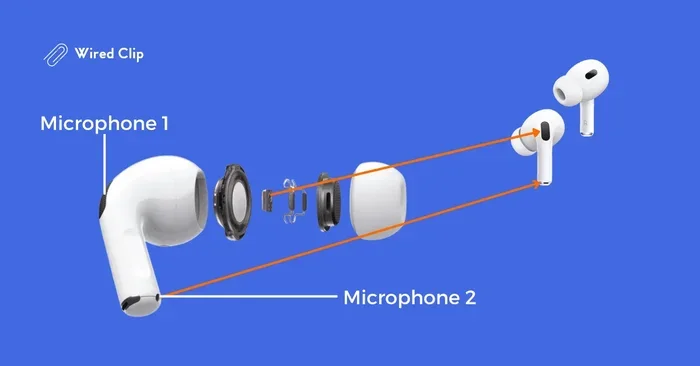
Let’s start with the fundamentals. AirPods 3 Pro absolutely have microphones, and they’re some of the most advanced mics you’ll find in any consumer earbuds. Each earbud contains two beamforming microphones on the outside, plus an additional inward-facing microphone inside the ear canal. That adds up to six microphones working together across both earbuds.
Why so many? Think of it like having multiple cameras at a security checkpoint. Each one captures a different angle, and together they create a complete picture. Apple uses this same principle: multiple microphones capture sound from different directions, then the H2 chip processes all that audio data in real-time to isolate your voice and cancel unwanted noise.
How Many Microphones Are in AirPods 3 Pro?
Each AirPod 3 Pro earbud contains three microphones total:
- Two external beamforming microphones: Located on the stem and body of each earbud, these work together to detect your voice while rejecting sounds from other directions.
- One inward-facing microphone: Positioned inside the earbud, this mic listens to what you’re actually hearing, helping the earbuds optimize sound and detect when you’re speaking.
Combined, both earbuds give you six microphones working as a coordinated system. This setup is standard across Apple’s premium AirPods lineup, including the AirPods Pro 2 and AirPods 4 with Active Noise Cancellation.
Where Exactly Are the Microphones Located?
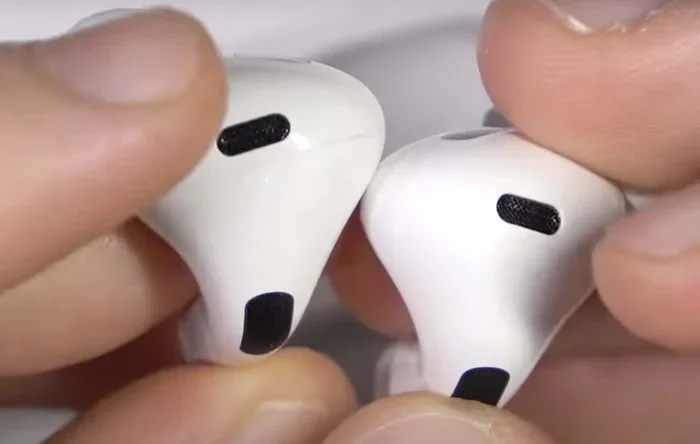
Apple has strategically placed the microphones for maximum performance. If you look closely at your AirPods 3 Pro, you’ll notice small mesh-covered openings. The main beamforming microphone sits at the bottom of the stem, positioned closer to your mouth when you’re speaking. The second beamforming mic sits on the body of the earbud, facing outward. The inward-facing microphone is hidden inside the ear tip area, pointing toward your ear canal.
This thoughtful placement isn’t accidental. The stem microphone is designed to pick up your voice with minimal interference from your head and body, while the body microphone helps detect environmental noise that should be cancelled. The inward-facing mic serves a completely different purpose — it helps the earbuds understand what you’re actually hearing, which enables features like personalized spatial audio and in-ear detection.
The Technology Behind AirPods 3 Pro Microphones
Having multiple microphones is one thing, but making them work together intelligently is where Apple truly shines. The AirPods 3 Pro use the powerful H2 chip, which acts like a tiny supercomputer for your ears. This chip processes audio at incredibly fast speeds, making thousands of calculations per second to deliver clean, clear sound.
Visual guide about AirPods Pro microphone detail
Image source: wiredclip.com
Did you know? The H2 chip in AirPods 3 Pro performs over a billion operations per second just for audio processing. That’s faster than most computers from the early 2000s, all packed into a chip smaller than your thumbnail.
What Is Beamforming Technology?
Beamforming is one of the most important microphone technologies in your AirPods. Imagine you’re at a crowded party, and you want to hear just one person speaking. Naturally, you’d cup your hand behind your ear and turn toward them. Beamforming microphones do something similar, but electronically.
Here’s the simple version: when sound reaches the two external microphones on your AirPod, there’s a tiny time difference between when it hits each mic. Sound coming from your mouth reaches the lower mic first, while background noise hits both mics at roughly the same time. The H2 chip analyzes these time differences and uses them to create a “beam” of sensitivity pointing toward your mouth. Sounds within this beam get amplified, while sounds outside it get reduced.
The result? Your voice comes through clearly even when there’s significant background noise. Whether you’re in a coffee shop, on a busy street, or in an office with chatty coworkers, beamforming helps isolate your speech.
The Role of the Inward-Facing Microphone
While the external microphones focus outward, the inward-facing microphone looks inward — literally. This unique microphone sits inside the ear tip and listens to the sound inside your ear canal. Why does this matter?
First, it enables Adaptive Audio, a feature that adjusts the noise cancellation and transparency settings based on your environment automatically. The inward mic helps the system understand what you’re hearing so it can respond appropriately. Second, it powers Conversation Awareness, which automatically lowers your audio volume and boosts voices when you start speaking to someone nearby. Third, it helps with personalized spatial audio by measuring how sound bounces around inside your specific ear shape.
Think of the inward-facing microphone as a quality control inspector. While the external mics capture the world around you, this internal mic makes sure the audio experience matches what your ears actually need.
Microphone Performance for Calls and Voice Commands
Now let’s talk about the practical stuff: how well do these microphones actually perform in real-world situations? Spoiler alert — really, really well. Apple’s investment in microphone technology has made AirPods 3 Pro among the best earbuds for call quality on the market.
Voice Call Quality
Whether you’re using FaceTime, Zoom, Microsoft Teams, Google Meet, or a standard phone call, AirPods 3 Pro microphones deliver consistent, high-quality audio. Multiple reviewers and tech publications have tested these earbuds against dedicated conference call headsets, and the AirPods often come out on top for voice clarity.
The secret lies in computational audio. Rather than just recording raw sound like a traditional microphone, the AirPods process your voice through advanced algorithms that reduce noise, eliminate echo, and enhance speech frequencies. It’s like having a professional audio engineer cleaning up your voice in real-time.
Did you know? According to Apple’s testing, AirPods Pro microphones can reduce background noise by up to 25 decibels during calls. That’s like turning a noisy restaurant into a quiet office.
“Hey Siri” and Voice Commands
AirPods 3 Pro support hands-free “Hey Siri” activation, which means the microphones are always listening for that wake phrase. This requires extremely sensitive microphones that can pick up your voice while ignoring other sounds. Apple has trained the system to recognize your specific vocal patterns and the unique acoustic signature of the wake phrase.
Beyond “Hey Siri,” the microphones support a wide range of voice commands. You can ask Siri to play music, send messages, make calls, get directions, check the weather, and control smart home devices — all without touching your earbuds or phone. The microphones also work with dictation features, letting you compose emails and messages using just your voice.
Wind Noise Reduction
If you’ve ever tried taking a call outside on a windy day, you know how frustrating wind noise can be. It creates that awful whooshing sound that makes conversation impossible. AirPods 3 Pro address this problem with a sophisticated mesh covering on the microphones and advanced processing algorithms that identify and suppress wind noise.
The system can distinguish between wind and voice, then reduce the wind component while preserving your speech. You might still hear some wind during extremely gusty conditions, but the improvement over basic microphones is dramatic.
Comparing AirPods 3 Pro Microphones to Other AirPods Models
Not all AirPods have the same microphone setup. Understanding the differences can help you decide which model best fits your needs, especially if call quality and voice commands are priorities.
AirPods 3 Pro vs. AirPods Pro (2nd Generation)
The AirPods Pro 2 and AirPods 3 Pro share a similar microphone architecture. Both use dual beamforming arrays plus an inward-facing mic, and both are powered by the H2 chip. In practice, call quality and voice command performance are nearly identical between these two models.
The main differences lie in the form factor and features. AirPods Pro 2 have silicone ear tips and a slightly shorter stem, while AirPods 3 Pro feature an open-ear design with a longer stem. The microphone placement is optimized for each design, but both deliver excellent voice quality.
AirPods 3 Pro vs. Standard AirPods 3
The standard AirPods 3 also have microphones, but they use a slightly older architecture. They feature dual beamforming microphones in each earbud but lack the inward-facing microphone found in the Pro models. They also use the H1 chip rather than the H2.
For basic calls and Siri commands, standard AirPods 3 work well. However, the AirPods 3 Pro offer superior noise reduction and more advanced features like Adaptive Audio and Conversation Awareness, which rely heavily on that third inward-facing microphone.
AirPods 3 Pro vs. AirPods Max
AirPods Max, Apple’s over-ear headphones, take microphone technology to another level with eight microphones total — six for active noise cancellation and two for voice pickup. Despite having more microphones, real-world call quality is comparable to AirPods 3 Pro, though the Max may perform slightly better in extremely noisy environments due to their larger size and more aggressive noise cancellation capabilities.
For most users, AirPods 3 Pro provide more than enough microphone performance. The convenience of earbuds usually outweighs the marginal quality difference you might get from the over-ear Max.
Common Microphone Issues and Troubleshooting Tips
Even with premium technology, sometimes AirPods microphones don’t work perfectly. Here are the most common issues and how to solve them.
Issue 1: Other People Can’t Hear You Clearly
If people complain that your voice sounds muffled or distant during calls, the most likely culprit is a blocked microphone. Earwax, dust, and debris can clog the small mesh openings on your AirPods, muffling the sound.
Solution: Clean the microphone openings gently using a soft, dry, lint-free cloth. For stubborn debris, use a dry soft-bristled brush to carefully dislodge particles. Avoid using water, solvents, or sharp objects, as these can damage the delicate components.
Issue 2: Siri Can’t Hear You
If “Hey Siri” stops working, the microphones might be struggling to pick up your voice. This could be due to obstruction, software issues, or settings that need adjustment.
Solution: First, check that “Hey Siri” is enabled in your iPhone settings under Siri & Search. Then, clean the microphones as described above. If the problem persists, try resetting your AirPods by holding the setup button on the case until the status light flashes amber, then white. Finally, make sure your iOS is updated to the latest version.
Issue 3: Audio Cutting In and Out During Calls
Intermittent audio during calls usually points to a Bluetooth connectivity issue rather than a microphone problem. However, weak signals can affect microphone transmission.
Solution: Keep your iPhone within reasonable range (ideally within 30 feet with no obstacles). Move away from other Bluetooth devices that might cause interference. Restart both your AirPods and your iPhone. If problems continue, try forgetting the AirPods in your Bluetooth settings and pairing them again.
Issue 4: Microphone Sounds Too Sensitive or Picks Up Background Noise
Sometimes the opposite problem occurs: the microphone seems too sensitive and transmits sounds you don’t want others to hear. This is rarely a defect — it’s usually the beamforming and noise reduction working exactly as designed.
Solution: Position yourself in quieter environments when possible. Speak directly toward the lower stem microphone for best results. Remember that AirPods 3 Pro are designed to pick up your voice even in noisy places, which means they’ll always capture some ambient sound. If privacy is critical, consider muting yourself when not speaking.
Best Practices for Getting the Most from Your AirPods 3 Pro Microphones
Want to maximize your microphone performance? Follow these simple tips to ensure consistently clear audio whether you’re on calls, recording voice memos, or commanding Siri.
Keep Your AirPods Clean
This can’t be emphasized enough. Clean AirPods sound better and last longer. Wipe them down regularly with a soft cloth, and pay special attention to the microphone openings. A quick weekly cleaning routine takes just seconds and prevents most audio issues.
Update Your Software Regularly
Apple continuously improves AirPods performance through firmware updates. These updates often include enhancements to microphone processing, noise reduction algorithms, and Siri recognition. Make sure your iPhone, iPad, or Mac is updated to the latest operating system, and your AirPods will automatically receive firmware improvements when they’re charging in their case.
Use One Earbud for Calls When Possible
If you’re in a quiet environment and want to extend battery life, using a single earbud for calls works perfectly well. The microphones in each earbud function independently, so you’ll get the same call quality with one earbud as with two. This is a great trick for long calls or when you want to stay aware of your surroundings.
Take Advantage of Voice Isolation Features
Recent iOS updates introduced Voice Isolation mode for AirPods, which prioritizes your voice during calls and aggressively reduces background noise. When using compatible apps like FaceTime and phone calls, you can toggle this feature in Control Center during a call. It’s like having a noise-canceling shield around your voice.
Similarly, Wide Spectrum mode does the opposite — it captures more ambient sound along with your voice, which is useful for group calls or when you want others to hear your environment.
Test Your Microphones Regularly
If you want to verify your microphones are working correctly, record a quick voice memo using your iPhone while wearing the AirPods. Listen back to check for clarity, volume, and any unusual sounds. You can also make a test call to a friend or family member and ask for feedback on your voice quality. Catching problems early means you can address them before they become major frustrations.
Final Thoughts on AirPods 3 Pro Microphones
AirPods 3 Pro absolutely have microphones — and not just any microphones. They’re sophisticated, multi-array systems powered by Apple’s H2 chip and years of audio engineering expertise. From the dual beamforming microphones that isolate your voice in noisy environments to the inward-facing microphone that enables intelligent features like Adaptive Audio, every component serves a purpose.
For everyday users, these microphones deliver reliable performance for phone calls, video conferences, voice commands, and audio recording. For professionals who depend on clear communication, AirPods 3 Pro offer quality that rivals dedicated headsets costing twice as much. And for casual listeners, the microphones work so seamlessly that you might forget they’re even there — which is exactly the point.
The next time someone asks you, “Do AirPods 3 Pro have a mic?” you’ll know the complete answer. Yes, they have three microphones per earbud. Yes, they deliver exceptional voice quality. And yes, they’re one of the best reasons to choose AirPods 3 Pro over less advanced wireless earbuds.
Whether you’re taking an important business call, asking Siri for directions, recording a voice memo on the go, or chatting with friends during a workout, trust that your AirPods 3 Pro microphones are working tirelessly to make sure your voice comes through loud and clear. That’s the kind of technology you can count on, day after day, in virtually any environment.
Frequently Asked Questions
Do AirPods 3 Pro have a built-in microphone?
Yes, AirPods 3 Pro have multiple built-in microphones. Each earbud contains two external beamforming microphones plus one inward-facing microphone, giving you a total of six microphones working together to capture your voice clearly and reduce background noise.
How many microphones does each AirPod 3 Pro have?
Each AirPod 3 Pro earbud has three microphones: two beamforming microphones positioned externally to capture your voice while filtering out background noise, and one inward-facing microphone inside the ear tip that helps with audio optimization and advanced features.
Can I use AirPods 3 Pro for phone calls?
Absolutely! AirPods 3 Pro are excellent for phone calls, FaceTime, Zoom, and other voice applications. The dual beamforming microphones isolate your voice and reduce background noise, while the H2 chip processes your audio in real-time for crystal-clear call quality even in noisy environments.
Do AirPods 3 Pro microphones work with Siri?
Yes, AirPods 3 Pro support hands-free “Hey Siri” activation. The microphones continuously listen for the wake phrase and can pick up your voice commands clearly. You can use Siri to make calls, send messages, control music, get directions, and more without touching your earbuds or phone.
How do I clean my AirPods 3 Pro microphone?
To clean your AirPods 3 Pro microphones, use a soft, dry, lint-free cloth to gently wipe the mesh openings. For stubborn debris, carefully use a dry soft-bristled brush. Avoid water, liquids, and sharp objects, as these can damage the sensitive microphone components.
Why does my voice sound muffled on AirPods 3 Pro calls?
Muffled voice during calls usually indicates blocked microphone openings. Earwax, dust, and debris can accumulate on the mesh covers and reduce sound clarity. Clean the microphone openings carefully with a soft cloth and brush. If the problem continues, try resetting your AirPods or updating your device software.