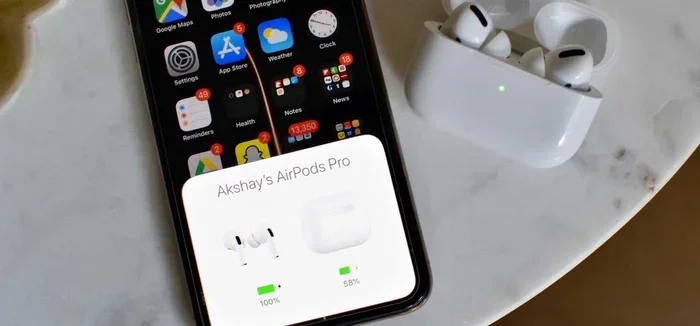
Featured image for AirPods noise cancellation feature
Image source: img.mensxp.com
Yes, certain AirPods models feature background noise cancellation—but not all of them. AirPods Pro, AirPods Pro 2, and AirPods Max come equipped with Active Noise Cancellation (ANC) technology that uses microphones and advanced algorithms to block out unwanted sounds. Standard AirPods (1st through 4th generation) only offer passive noise isolation, meaning they physically block some noise but don’t actively cancel it. Understanding which model you own determines whether you get true noise cancellation or just basic sound dampening.
Imagine sitting in a crowded coffee shop, trying to focus on your favorite podcast, but the barista’s blender, chatty customers, and street traffic keep interrupting. Frustrating, right? Now imagine pressing a single button and suddenly, the world goes quiet. That’s the magic of background noise cancellation. But here’s the big question: do AirPods have this feature? And if so, which models actually deliver it?
If you’ve ever wondered whether your AirPods can silence the world around you, you’re not alone. Millions of people buy wireless earbuds every year hoping for that “bubble of silence” experience. Apple’s AirPods lineup has grown significantly since 2016, and not every model offers the same noise-canceling capabilities. Some AirPods actively fight noise with smart technology, while others simply rely on how well they fit in your ears.
In this guide, we’ll break down everything you need to know about background noise cancellation in AirPods. You’ll learn which models have it, how the technology actually works, and tips to get the most out of it. Think of this as your friendly roadmap to understanding AirPods noise cancellation—no tech jargon overload, just clear answers.
Key Takeaways
- Not All AirPods Cancel Noise: Only AirPods Pro, AirPods Pro 2, and AirPods Max have Active Noise Cancellation. Standard AirPods rely solely on passive noise isolation.
- ANC Uses Advanced Technology: Active Noise Cancellation works by detecting outside sounds with microphones and creating “anti-noise” sound waves to cancel them out.
- Transparency Mode Is the Opposite: Most AirPods with ANC also offer Transparency Mode, which lets outside sounds in so you can hear your surroundings naturally.
- Adaptive Audio (Newer Models): AirPods Pro 2 introduced Adaptive Audio, which automatically blends ANC and Transparency based on your environment.
- Battery Impact Is Real: Using ANC drains battery faster. Turning it off can extend listening time by roughly 30-60 minutes.
- AirPods Max Stands Out: AirPods Max uses eight microphones for noise cancellation, making it the most powerful option in the lineup.
- Firmware Updates Matter: Apple’s noise cancellation algorithms improve through software updates, so keeping your AirPods updated boosts performance.
📑 Table of Contents
- Understanding Background Noise Cancellation: The Basics
- Which AirPods Have Background Noise Cancellation?
- The Technology Behind AirPods Noise Cancellation
- Transparency Mode and Adaptive Audio: The Flip Side
- Practical Tips to Maximize AirPods Noise Cancellation
- Common Misconceptions About AirPods Noise Cancellation
- AirPods Noise Cancellation vs. Competitors
- When to Use (and Not Use) AirPods Noise Cancellation
- Frequently Asked Questions About AirPods Noise Cancellation
- Final Thoughts: Is AirPods Noise Cancellation Worth It?
Understanding Background Noise Cancellation: The Basics
Let’s start with the fundamentals. What exactly is background noise cancellation? In simple terms, it’s a technology designed to reduce or eliminate unwanted ambient sounds so you can focus on what you want to hear—your music, podcast, phone call, or silence.
There are two main types of noise reduction in headphones:
- Passive Noise Isolation: This is the physical blocking of sound. Think of it like putting your hands over your ears. Earbuds with a snug fit naturally block some outside noise simply by sealing your ear canal. Standard AirPods use this method, but it’s limited.
- Active Noise Cancellation (ANC): This is the smart, electronic method. Tiny microphones listen to the world around you, and the earbuds generate an “anti-noise” signal to cancel out those sounds. It’s like throwing a bucket of paint at another bucket of paint mid-air—they cancel each other out.
How Active Noise Cancellation Works (The Simple Version)
Picture yourself standing in a room with a loud fan. The fan creates sound waves that travel to your ears. Now imagine you had a magic device that creates the exact opposite sound wave at the exact same time. When these two waves meet, they cancel each other out, leaving silence. That’s essentially how ANC works.
AirPods with ANC use built-in microphones (both inside and outside the ear) to detect incoming noise. A tiny processor inside the AirPods then generates an inverse sound wave in real-time. When the original noise and the anti-noise meet, they effectively neutralize each other. The result? You hear more of your audio and less of the world.
Did You Know? The concept of noise cancellation dates back to the 1930s when it was developed for airplane cockpits. Pilots needed a way to protect their hearing from engine noise. Today, that same principle is built into your earbuds.
Which AirPods Have Background Noise Cancellation?
This is the most important question, and the answer depends on which AirPods model you own. Let’s break it down model by model.
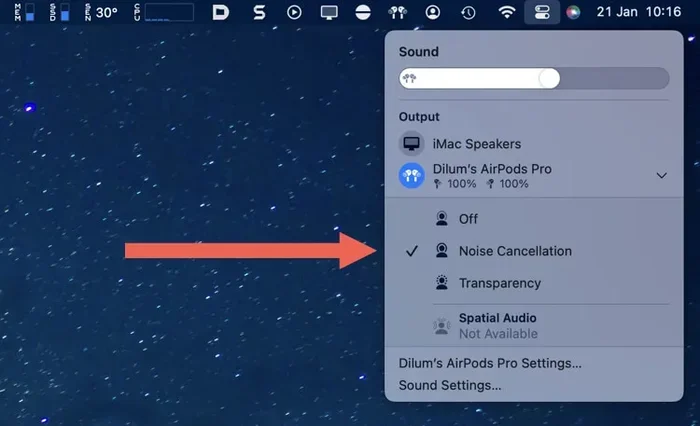
Visual guide about AirPods noise cancellation feature
Image source: switchingtomac.com
AirPods (1st, 2nd, and 3rd Generation)
Standard AirPods—meaning the non-Pro versions—do not have Active Noise Cancellation. These models rely entirely on passive noise isolation. Because they don’t have silicone ear tips that seal your ear canal, they let in a fair amount of outside noise.
The 3rd generation AirPods improved slightly with a better in-ear fit, but they still don’t actively cancel noise. If you own basic AirPods, you’ll hear background sounds like conversations, traffic, and appliance hum.
AirPods Pro (1st Generation)
Released in October 2019, the first AirPods Pro introduced Active Noise Cancellation to the AirPods lineup. They feature two microphones (one outward-facing, one inward-facing) that work together to detect and cancel noise. The silicone ear tips also create a tight seal, improving passive noise isolation alongside ANC.
According to Apple, AirPods Pro can cancel noise continuously at a rate of 200 times per second. That means the system is constantly adapting to changing sounds around you.
AirPods Pro 2 (2nd Generation)
The AirPods Pro 2, launched in September 2022, took noise cancellation to the next level. Apple claims the H2 chip inside delivers up to 2x more noise cancellation compared to the original AirPods Pro. They also introduced Adaptive Audio, Conversation Awareness, and Personalized Volume.
Adaptive Audio is a game-changer. It dynamically blends Active Noise Cancellation and Transparency Mode based on your environment. Walk into a loud subway station? ANC kicks in. Stop at a coffee shop to order? Transparency Mode activates so you can hear the barista without removing your earbuds.
AirPods Max
AirPods Max, Apple’s over-ear headphones released in December 2020, feature some of the most advanced noise cancellation in the lineup. They use eight microphones dedicated to Active Noise Cancellation, along with the H1 chip (in each ear cup) for real-time processing.
For frequent flyers or office workers, AirPods Max is the gold standard in the Apple ecosystem. The over-ear design naturally blocks more noise, and the ANC system amplifies that effect dramatically.
AirPods 4 (Released 2024)
Apple’s AirPods 4, announced in September 2024, come in two versions: a standard model and one with Active Noise Cancellation. This is the first time ANC has been available outside the Pro and Max lines. The ANC-enabled AirPods 4 offer noise cancellation at a more affordable price point.
The Technology Behind AirPods Noise Cancellation
Now that you know which AirPods have it, let’s peek under the hood and see how Apple makes it happen.
The Role of the H1 and H2 Chips
Apple designed custom silicon chips specifically for AirPods. The H1 chip (used in AirPods Pro 1st gen and AirPods Max) handles Bluetooth connections, audio processing, and noise cancellation algorithms. The H2 chip, found in AirPods Pro 2, is even more powerful and efficient.
These chips process audio at lightning speed. In fact, the H2 chip can perform 48,000 operations per second related to noise cancellation. That’s faster than you can blink.
Microphone Placement Matters
AirPods with ANC use multiple microphones strategically placed:
- Outer Microphones: Capture noise from outside your ear before it reaches your ear canal.
- Inner Microphones: Listen to the sound reaching your ear and fine-tune the cancellation in real-time.
This dual-microphone system ensures that ANC adapts to both your environment and how the earbuds fit in your ears.
The Seal: Why Ear Tip Fit Matters
Active Noise Cancellation works best when there’s a good seal between the ear tip and your ear canal. That’s why AirPods Pro and AirPods 4 (ANC version) come with multiple ear tip sizes. If the seal is weak, outside noise leaks in, and the ANC system has to work harder.
Apple includes an “Ear Tip Fit Test” in iOS settings that uses the AirPods’ microphones to check your seal. It plays a few seconds of sound and analyzes how well the tips fit. If the seal is poor, it suggests trying a different ear tip size.
Did You Know? Apple offers four sizes of silicone ear tips with AirPods Pro 2 (XS, S, M, L), giving users more customization than ever before.
Transparency Mode and Adaptive Audio: The Flip Side
Active Noise Cancellation silences the world, but sometimes you actually want to hear it. That’s where Transparency Mode and Adaptive Audio come in.
What Is Transparency Mode?
Transparency Mode uses the same microphones as ANC but does the opposite—it lets outside sounds in naturally. It feels like you’re not wearing earbuds at all, but your audio still plays.
This mode is perfect for:
- Hearing traffic while walking near roads
- Listening for announcements at airports or train stations
- Having quick conversations without removing your AirPods
- Staying aware of your surroundings during workouts
Adaptive Audio: The Smart Blend
Introduced with AirPods Pro 2, Adaptive Audio is like having a smart assistant for your ears. It automatically adjusts noise control based on your surroundings. If you enter a noisy environment, ANC ramps up. If you start chatting with someone, Transparency Mode kicks in.
You can also use Conversation Awareness, which automatically lowers your music volume and enhances the voice in front of you when you start speaking. It’s like a polite butler who knows when to mute the TV.
Personalized Volume
Another feature in AirPods Pro 2 is Personalized Volume, which uses machine learning to understand your listening preferences over time. If you consistently turn up the volume in noisy places, it learns to do that automatically.
Practical Tips to Maximize AirPods Noise Cancellation
Owning AirPods with ANC is one thing. Getting the best performance is another. Here are some practical tips to make sure you’re getting the most out of your noise cancellation.
1. Get the Right Ear Tip Fit
This is the single most important tip. If your ear tips don’t seal properly, ANC won’t work well. Try different sizes and run the Ear Tip Fit Test in your iPhone settings.
2. Keep Your AirPods Clean
Dirt, earwax, and debris can block microphones and reduce ANC effectiveness. Clean your AirPods regularly with a soft, dry cloth. For ear tips, remove them and rinse with water (no soap), then let them dry completely before reattaching.
3. Update Your Firmware
Apple frequently releases firmware updates that improve noise cancellation algorithms. Make sure your AirPods are up to date by connecting them to your iPhone and checking Settings > Bluetooth > AirPods > About.
4. Use the Right Mode for the Right Environment
ANC works best with low, constant sounds like airplane engines, HVAC systems, or traffic. For sudden, sharp noises (like a dog barking or a door slamming), Transparency Mode or even turning ANC off might work better, because ANC is designed for steady-state noise.
5. Manage Battery Life
ANC uses extra power. AirPods Pro 2 offer about 6 hours of listening with ANC on, and up to 7 hours with ANC off. If you need to extend battery life, turn off ANC when you don’t need it.
6. Try Noise Cancellation with One AirPod
AirPods Pro support ANC even when using a single earbud. This is handy for calls or when you want to stay partially aware of your surroundings. Simply wear one AirPod and enable ANC in settings.
Common Misconceptions About AirPods Noise Cancellation
Let’s clear up some confusion. There are several myths floating around about AirPods and noise cancellation.
Myth 1: All AirPods Have Noise Cancellation
False. Only specific models (AirPods Pro 1, Pro 2, AirPods Max, and AirPods 4 ANC) have Active Noise Cancellation. Standard AirPods do not.
Myth 2: Noise Cancellation Blocks All Sound
False. ANC works best on consistent, low-frequency sounds. It won’t completely silence everything—human voices, sudden noises, and high-frequency sounds may still come through, just at reduced volume.
Myth 3: ANC Is Bad for Your Ears
False. There’s no scientific evidence that Active Noise Cancellation damages hearing. In fact, ANC can protect your hearing by allowing you to listen at lower volumes in noisy environments.
Myth 4: AirPods Noise Cancellation Is the Best in the Industry
Debatable. While AirPods Pro 2 and AirPods Max are excellent, some competitors like Sony WF-1000XM5 and Bose QuietComfort Earbuds II are often considered industry leaders in pure ANC performance. However, AirPods integrate seamlessly with Apple devices, which is a major advantage.
AirPods Noise Cancellation vs. Competitors
How do AirPods stack up against the competition? Let’s take a quick look.
Sony WF-1000XM5
Sony’s flagship earbuds are widely regarded as having the best noise cancellation on the market. They use an Integrated Processor V2 and eight microphones for exceptional ANC. However, AirPods Pro 2 win in terms of Apple ecosystem integration and spatial audio features.
Bose QuietComfort Ultra Earbuds
Bose has been a pioneer in noise cancellation for decades. Their QuietComfort Ultra Earbuds offer superb ANC, especially for low rumbles like airplane engines. They rival AirPods Pro 2 in raw noise-canceling power.
Sennheiser Momentum True Wireless 4
Sennheiser focuses on audiophile-grade sound quality. Their ANC is good but not class-leading. If sound quality is your top priority, Sennheiser is worth considering, but AirPods Pro 2 are more versatile.
The Apple Advantage
AirPods don’t always win in pure ANC specs, but they excel in:
- Seamless pairing with iPhone, iPad, and Mac
- Automatic device switching
- Spatial Audio with Dolby Atmos
- Find My integration
- Hands-free “Hey Siri” support
For users deeply invested in the Apple ecosystem, these features often outweigh minor differences in ANC performance.
When to Use (and Not Use) AirPods Noise Cancellation
Noise cancellation is fantastic, but it’s not always the right choice. Here’s a quick guide.
Great Times to Use ANC
- Airplanes and airports
- Public transportation (buses, trains, subways)
- Open offices or coffee shops
- Studying in noisy environments
- Focusing on tasks that require concentration
- Reducing anxiety from overwhelming sounds
Times to Use Transparency Mode
- Walking or running near traffic
- Cycling in urban areas
- Hearing announcements or conversations
- Working out in shared spaces
- Listening to kids or pets
Times to Turn Off Both
- When you need to extend battery life significantly
- When you want a more natural sound experience
- When using AirPods for sleep or relaxation audio
Frequently Asked Questions About AirPods Noise Cancellation
Below are answers to some of the most common questions about AirPods and background noise cancellation. For quick reference, these FAQs cover model compatibility, features, and practical usage tips.
Do all AirPods have Active Noise Cancellation?
No, only AirPods Pro (1st and 2nd generation), AirPods Max, and AirPods 4 (ANC version) have Active Noise Cancellation. Standard AirPods (1st, 2nd, and 3rd generation) do not have this feature and rely only on passive noise isolation.
How do I turn on noise cancellation on my AirPods?
On iPhone or iPad, open Control Center, long-press the volume slider while wearing your AirPods, and tap the Noise Control icon. You can switch between Active Noise Cancellation, Transparency Mode, and Off. On AirPods Pro 2, you can also press and hold the stem to cycle through modes.
Is AirPods noise cancellation better than over-ear headphones?
Generally, over-ear headphones like AirPods Max offer slightly better noise cancellation because their larger ear cups create a stronger physical seal. However, AirPods Pro 2 are remarkably close in performance and far more portable.
Can I use noise cancellation with just one AirPod?
Yes, AirPods Pro and AirPods 4 (ANC version) support Active Noise Cancellation even when wearing a single earbud. This is useful for phone calls or when you want partial noise reduction without full isolation.
Does noise cancellation drain AirPods battery faster?
Yes, ANC uses additional processing power and drains the battery faster. AirPods Pro 2 offer about 6 hours of listening with ANC on versus 7 hours with it off. AirPods Max provide about 20 hours with ANC enabled.
Does firmware update improve noise cancellation?
Yes, Apple regularly releases firmware updates that refine ANC algorithms and fix bugs. Keeping your AirPods updated ensures you get the best possible noise cancellation performance over time.
Final Thoughts: Is AirPods Noise Cancellation Worth It?
So, do AirPods have background noise cancellation? The answer is a resounding yes—if you choose the right model. AirPods Pro, AirPods Pro 2, AirPods Max, and AirPods 4 (ANC) all deliver excellent Active Noise Cancellation that can transform your listening experience. Whether you’re commuting, working, traveling, or just trying to find some peace at home, these AirPods create a personal oasis of sound.
That said, not everyone needs ANC. If you mainly use AirPods in quiet environments or you’re happy with basic sound isolation, standard AirPods might be enough. But if you’re frequently surrounded by noise, ANC is a game-changer.
Before you buy, think about how and where you’ll use them. For Apple users especially, AirPods with ANC offer a level of integration that’s hard to beat. Pair them with your iPhone, and features like Adaptive Audio, Transparency Mode, and seamless device switching make life easier.
Ultimately, background noise cancellation is one of those features you don’t know you need until you try it. Once you experience that first moment of pure silence in a chaotic world, it’s hard to go back. So yes, AirPods can absolutely cancel background noise—and they do it beautifully.