Yes, you can do noise cancellation on AirPods, but only on specific models. Apple offers Active Noise Cancellation (ANC) on AirPods Pro, AirPods Pro 2, AirPods 4, and AirPods Max. The standard AirPods (1st, 2nd, and 3rd generation) do not support noise cancellation, though they provide basic sound isolation through their in-ear or earbud design. Understanding which model you own and how to activate the feature is key to enjoying a quieter, more immersive listening experience.
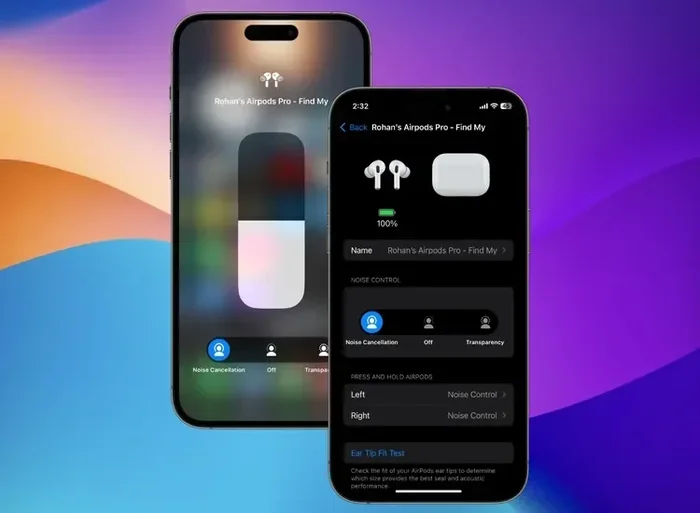
Featured image for Airpods noise cancellation feature
Image source: static.beebom.com
Picture this: you’re on a crowded subway, the hum of the train is loud, someone next to you is on a phone call, and a baby is crying three rows away. You just want to hear your podcast. This is exactly where noise cancellation on AirPods becomes a game-changer. But here’s the thing: not every pair of AirPods can do it.
Apple has built different levels of sound control into its AirPods lineup. Some models silence the world around you with advanced technology, while others simply rely on how they fit in your ears. Knowing the difference can save you money, frustration, and the disappointment of buying the wrong pair.
In this guide, we’ll break down everything you need to know. You’ll learn which AirPods have noise cancellation, how the technology actually works, how to turn it on, and tips to get the most out of it. Whether you’re a first-time buyer or a longtime Apple fan, this article will help you make sense of it all.
Key Takeaways
- Not All AirPods Support Noise Cancellation: Only AirPods Pro, AirPods Pro 2, AirPods 4, AirPods 4 with Active Noise Cancellation, and AirPods Max feature built-in ANC technology.
- Two Types of Noise Control: AirPods with ANC offer Active Noise Cancellation, Transparency mode, and Adaptive Audio, giving you flexible control over what you hear.
- Easy Activation Methods: You can turn noise cancellation on or off using the stem controls, Siri voice commands, or your iPhone’s settings.
- Battery Impact: Using ANC drains the battery faster, but the trade-off is a significantly improved listening experience in noisy environments.
- Firmware and iOS Matter: Keeping your AirPods and connected device updated ensures optimal ANC performance and access to the latest features.
- Not the Same as Noise Isolation: Standard AirPods block sound passively through their fit, but they do not electronically cancel noise like ANC-equipped models.
- Great for Travel and Focus: ANC is especially useful on airplanes, in cafes, or while working in shared spaces where background noise can distract you.
📑 Table of Contents
- What Is Noise Cancellation and How Does It Work on AirPods?
- Which AirPods Models Have Noise Cancellation?
- How to Turn On Noise Cancellation on AirPods
- Noise Cancellation vs. Transparency Mode vs. Adaptive Audio
- Tips to Get the Best Noise Cancellation Performance
- Common Myths and Misconceptions About AirPods Noise Cancellation
- When Should You Use Noise Cancellation on AirPods?
- Final Thoughts
What Is Noise Cancellation and How Does It Work on AirPods?
Let’s start with the basics. Noise cancellation is a technology that reduces unwanted background sounds. Think of it like a volume knob for the world around you. Instead of turning up your music to drown out noise, the AirPods actively remove that noise before it reaches your ears.
Active Noise Cancellation (ANC) Explained Simply
Active Noise Cancellation uses tiny microphones both inside and outside the earbuds. These mics listen to the sounds around you. Then, the AirPods create a mirror sound wave, called “anti-noise,” that plays at the exact opposite frequency. When the two waves meet, they cancel each other out. It’s like adding a positive number and a negative number; they balance to zero.
Imagine you’re standing near a busy road. The constant hum of traffic is a low-frequency sound. Your AirPods detect that hum and create an opposite sound wave. When you put them in, the traffic noise becomes much quieter, almost like someone turned the world down to a whisper.
The Difference Between ANC and Passive Noise Isolation
Not all noise blocking is created equal. Passive noise isolation simply means the physical design of the earbuds blocks some sound. It’s like putting your hands over your ears. Standard AirPods (without silicone tips) don’t seal your ear canal tightly, so they block very little noise.
Active Noise Cancellation, on the other hand, is electronic. It uses power, processors, and microphones to actively fight sound. This is why ANC works so much better in noisy places like airplanes or coffee shops.
Did You Know? The concept of noise cancellation has been around since the 1930s. It was originally developed for pilots to reduce engine noise in airplane cockpits. Today, the same science fits inside your tiny earbuds.
Which AirPods Models Have Noise Cancellation?
This is the big question. Apple has spread noise cancellation across several models, but not all of them. Let’s break it down clearly.
Visual guide about Airpods noise cancellation feature
Image source: cdn.mos.cms.futurecdn.net
AirPods Pro (1st and 2nd Generation)
Both the original AirPods Pro and the AirPods Pro 2 come with Active Noise Cancellation. They use silicone ear tips that seal your ear canal, which helps the ANC work even better. The AirPods Pro 2 took things further with the H2 chip, which cancels up to twice as much noise compared to the first generation.
If you want the best noise cancellation experience from Apple, the AirPods Pro 2 is currently the top pick. It’s like comparing a regular umbrella to a high-tech storm shield; both protect you, but one does it far more effectively.
AirPods 4 and AirPods 4 with Active Noise Cancellation
Apple introduced the AirPods 4 in late 2024. There are two versions: a standard model and a premium version that includes Active Noise Cancellation. This is the first time Apple brought ANC to its non-Pro AirPods line.
The AirPods 4 with ANC is a great option if you prefer the open-ear design of classic AirPods but still want noise-cancelling power. It’s a middle ground between the standard AirPods and the Pro models.
AirPods Max
AirPods Max are Apple’s over-ear headphones. They feature Active Noise Cancellation, Transparency mode, and Spatial Audio. Because they cover your entire ear, they provide excellent passive isolation on top of the ANC technology.
Think of AirPods Max as a luxury option. They’re heavier, more expensive, and designed for people who want the best sound quality and noise control in a premium package.
Standard AirPods (1st, 2nd, and 3rd Generation)
The original AirPods, AirPods 2, and AirPods 3 do not have Active Noise Cancellation. They also lack Transparency mode and Adaptive Audio. They rely on their shape to block a small amount of sound, but they are not designed for serious noise control.
If you own one of these models, you cannot add noise cancellation through a software update. The hardware simply isn’t there. It’s like trying to add a turbo engine to a bicycle; the parts just don’t exist in the design.
Quick Model Comparison
- AirPods 1st/2nd/3rd Gen: No ANC, no Transparency mode
- AirPods 4: No ANC (standard version)
- AirPods 4 with ANC: Yes, includes Active Noise Cancellation
- AirPods Pro 1st Gen: Yes, ANC with H1 chip
- AirPods Pro 2nd Gen: Yes, improved ANC with H2 chip
- AirPods Max: Yes, premium ANC with H1 chip
How to Turn On Noise Cancellation on AirPods
So, you’ve got a pair of AirPods that support noise cancellation. Great! Now, how do you actually turn it on? There are a few ways, and all of them are pretty simple.
Method 1: Using the Force Sensor on the Stem
On AirPods Pro and AirPods 4 with ANC, you can press and hold the force sensor on the stem of either earbud. By default, this switches between Active Noise Cancellation and Transparency mode. You’ll hear a soft chime when the mode changes.
This is the fastest way to control noise cancellation without taking out your phone. It’s perfect for when you’re walking and need to quickly hear an announcement or talk to someone.
Method 2: Using the Digital Crown on AirPods Max
If you’re using AirPods Max, press the noise control button on the top right ear cup. This button cycles through ANC, Transparency mode, and Off. The H1 chip inside processes the sound instantly.
Method 3: Using Your iPhone or iPad Settings
You can also control noise cancellation through your device. Here’s how:
- Open the Settings app on your iPhone or iPad.
- Tap on Bluetooth and find your AirPods in the list.
- Tap the “i” icon next to your AirPods.
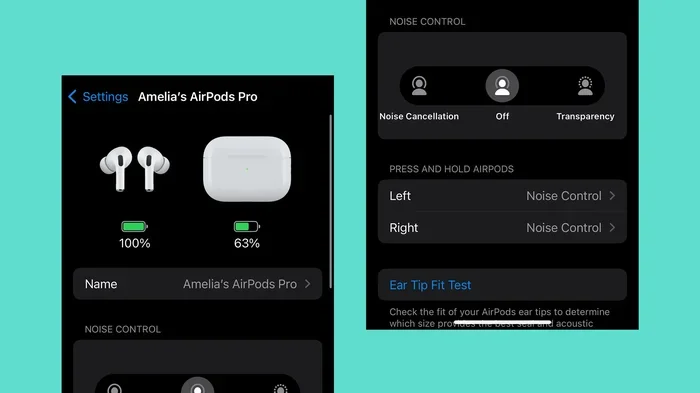
- Scroll down to Noise Control and choose between Noise Cancellation, Transparency, or Off.
Another quick way is to swipe down from the top right of your screen to open Control Center. Press and hold the volume slider, and you’ll see noise control options appear.
Method 4: Using Siri Voice Commands
If your hands are busy, just ask Siri. You can say things like:
- “Hey Siri, turn on noise cancellation.”
- “Hey Siri, switch to Transparency mode.”
- “Hey Siri, turn off noise cancellation.”
Siri will instantly switch modes. It’s like having a personal assistant for your ears.
Customizing Your Noise Control Settings
You can also customize what the press-and-hold gesture does. For example, you might want it to only cycle between ANC and Transparency, or add “Off” as a third option. To change this, go to Settings, find your AirPods, and look for the “Press and Hold” section.
Did You Know? Apple introduced Adaptive Audio with iOS 17. This smart feature blends Active Noise Cancellation and Transparency mode automatically. It adjusts in real time based on your environment. If you start talking to someone, it lowers the music and lets their voice in. When you’re alone, it cranks the ANC back up.
Noise Cancellation vs. Transparency Mode vs. Adaptive Audio
Apple gives you three main listening modes on supported AirPods. Each one is designed for a different situation. Let’s look at what each does and when to use it.
Active Noise Cancellation (ANC)
This mode blocks as much outside sound as possible. It’s perfect for noisy environments like airplanes, trains, busy offices, or loud cafes. When you want to focus on your music, podcast, or simply enjoy silence, ANC is your best friend.
Imagine you’re trying to read a book in a waiting room with a TV blaring in the background. ANC turns that TV down to a whisper, giving you peace.
Transparency Mode
Transparency mode does the opposite. It lets outside sounds in, so you can hear traffic, announcements, or conversations without taking your AirPods out. It uses the microphones to pipe in ambient sound naturally.
Think of Transparency mode as a window. You keep your AirPods in, but you can still hear the world. It’s great for walking in the city, listening for your train stop, or ordering coffee at a cafe.
Adaptive Audio
Adaptive Audio is a newer feature available on AirPods Pro 2, AirPods 4 with ANC, and AirPods Max with the latest firmware. It intelligently blends ANC and Transparency based on your surroundings. If you’re sitting in a quiet room, it might reduce the noise cancellation. If you step outside into traffic, it ramps ANC back up automatically.
It’s like having a smart thermostat for your ears. The AirPods constantly adjust so you don’t have to fiddle with controls.
Conversation Mode
When you’re wearing AirPods Pro 2 with Adaptive Audio, the AirPods can detect when you start speaking. They automatically lower the music and let in the sound of the person you’re talking to. Once you stop talking, the music fades back in. This is a hidden gem for people who hate taking their earbuds out for quick chats.
Did You Know? According to Apple, the AirPods Pro 2 can cancel up to 48,000 times per second. That’s how often the processors adjust the anti-noise signal to match your environment.
Tips to Get the Best Noise Cancellation Performance
Having noise-cancelling AirPods is one thing. Getting the most out of them is another. Here are some practical tips to maximize your ANC experience.
1. Get the Right Fit
The fit of your AirPods matters more than you think. If the silicone tips are too small, sound leaks in and the ANC has to work harder. If they’re too big, they’ll be uncomfortable and might not seal properly either.
Apple includes multiple tip sizes in the box. Try each one and pick the one that feels snug but comfortable. You can also use the Ear Tip Fit Test on your iPhone. Go to Settings, Bluetooth, tap the “i” next to your AirPods Pro, and select “Ear Tip Fit Test.” It will tell you if your seal is good.
2. Keep Your AirPods Clean
Dirt, earwax, and debris can block the microphones and reduce ANC performance. Wipe your AirPods with a soft, dry cloth regularly. Use a dry cotton swab to gently clean the microphone grilles and speaker mesh.
Think of it like cleaning a camera lens. If it’s dirty, the picture gets fuzzy. If your AirPods are dirty, the sound gets fuzzy too.
3. Update Your Firmware
Apple regularly updates AirPods firmware to fix bugs and improve performance. ANC improvements often come through these updates. To update, make sure your AirPods are in their case, connected to power, and near your iPhone. The update happens automatically over Wi-Fi or Bluetooth.
You can check your firmware version by going to Settings, Bluetooth, tapping the “i” next to your AirPods, and scrolling down.
4. Manage Battery Life
Active Noise Cancellation uses extra power. If you’re running low on battery, you can turn off ANC to save energy. AirPods Pro 2 give you about 6 hours of listening time with ANC on, and up to 7 hours with it off.
It’s like driving a car with the AC on; it works great, but it uses more fuel.
5. Use One AirPod at a Time
If you don’t need stereo sound, you can use just one AirPod. ANC doesn’t work with a single earbud on most models, but you can save battery by alternating. This is a good trick for long flights or workdays.
6. Avoid Extreme Temperatures
Very hot or cold conditions can affect battery performance and ANC. Don’t leave your AirPods in a hot car or out in freezing weather. Treat them like a pet; keep them in comfortable conditions.
Common Myths and Misconceptions About AirPods Noise Cancellation
There are a lot of myths floating around about AirPods and noise cancellation. Let’s clear up the most common ones.
Myth 1: All AirPods Have Noise Cancellation
False. Only specific models support ANC. As we covered earlier, the standard AirPods 1, 2, and 3 do not have it. Before buying, always check the model name to make sure it says “Active Noise Cancellation” in the specs.
Myth 2: Noise Cancellation Blocks All Sound
False. ANC works best on constant, low-frequency sounds like airplane engines, AC units, and traffic hum. It does not block sudden, sharp noises like a car horn or someone shouting. For those, Transparency mode or simply removing an AirPod is better.
Think of ANC as a great filter for steady noise, but not a magic eraser for everything.
Myth 3: Noise Cancellation Damages Your Hearing
False. ANC does not damage hearing. In fact, it can protect your hearing because you don’t need to crank up the volume to overcome outside noise. Many audiologists actually recommend ANC for people who listen to music in loud environments.
Myth 4: You Can Add Noise Cancellation Through Software
False. Noise cancellation requires specific hardware, including microphones, processors, and the H1 or H2 chip. A software update cannot add these components to an older model. If your AirPods don’t have ANC, they never will.
Myth 5: ANC and Transparency Mode Drain Battery Equally
Mostly false. ANC uses more processing power than Transparency mode, so it drains the battery slightly faster. However, both use more power than having noise control turned off.
Did You Know? A study by the Journal of the Acoustical Society of America found that using noise-cancelling headphones can reduce listener fatigue. By lowering background noise, your brain doesn’t have to work as hard to focus on your audio.
When Should You Use Noise Cancellation on AirPods?
Noise cancellation is amazing, but it’s not always the right choice. Here’s a quick guide on when to use it and when to skip it.
Best Times to Use ANC
- Airplanes and trains: The constant engine noise is exactly what ANC is designed to fight.
- Open offices: Reduce chatter and keyboard clicks to focus on your work.
- Coffee shops: Block out the espresso machine and crowd noise.
- Studying or reading: Create a quiet bubble anywhere you go.
- Sleeping on long flights: Pair ANC with soft music or white noise for better rest.
Times to Use Transparency Mode Instead
- Walking in the city: You need to hear traffic, bikes, and cars for safety.
- Running outdoors: Stay aware of your surroundings to avoid accidents.
- At the airport: Hear announcements for your flight or gate changes.
- Conversations: Talk to people without removing your AirPods.
Times to Turn Off Noise Control
- When you need to save battery: ANC uses more power.
- When you want to hear everything naturally: Sometimes you just want to listen to the world.
- During phone calls in quiet rooms: You don’t need ANC, and it can cause odd feedback.
Knowing when to switch modes makes your AirPods feel like a complete audio toolkit. It’s not just about blocking the world; it’s about choosing what you want to hear.
Final Thoughts
So, can you do noise cancellation on AirPods? The answer is a clear yes, but only on certain models. If you own AirPods Pro, AirPods Pro 2, AirPods 4 with ANC, or AirPods Max, you have access to some of the best noise-cancelling technology on the market. If you own standard AirPods, you’re limited to passive sound isolation.
The beauty of Apple’s system is its simplicity. With a quick press on the stem, a Siri command, or a swipe on your iPhone, you can switch between silence, the world, or a smart blend of both. Once you experience true Active Noise Cancellation, it’s hard to go back.
If you’re in the market for new AirPods and noise cancellation matters to you, choose your model wisely. Think about where you’ll use them, how important battery life is, and whether you prefer in-ear or over-ear designs. With the right pair, you’ll enjoy clearer music, deeper focus, and a much more peaceful listening experience, no matter where life takes you.
Frequently Asked Questions
Can you do noise cancellation on all AirPods models?
No, only AirPods Pro, AirPods Pro 2, AirPods 4 with Active Noise Cancellation, and AirPods Max support noise cancellation. Standard AirPods (1st, 2nd, and 3rd generation) do not have this feature and cannot get it through software updates.
How do I turn on noise cancellation on AirPods Pro?
You can turn on noise cancellation on AirPods Pro by pressing and holding the force sensor on the stem of either earbud. You can also use Siri by saying, “Hey Siri, turn on noise cancellation,” or adjust it through your iPhone’s Bluetooth settings under the “i” icon next to your AirPods.
Does noise cancellation on AirPods work without music playing?
Yes, Active Noise Cancellation works even when you’re not playing music. You can use it to enjoy silence or block out background noise while reading, working, or relaxing. Just turn on ANC and enjoy the quiet.
Is noise cancellation on AirPods worth it for flying?
Absolutely. Airplanes are one of the best use cases for noise cancellation. The constant hum of jet engines is exactly the type of low-frequency sound that ANC is designed to reduce. Many travelers consider noise-cancelling AirPods a must-have for long flights.
Does using noise cancellation drain AirPods battery faster?
Yes, Active Noise Cancellation uses extra processing power and drains the battery faster than having it off. AirPods Pro 2, for example, offer about 6 hours of listening time with ANC on, compared to 7 hours with it off. Turning off ANC when you don’t need it can extend your listening time.
Can I use noise cancellation on AirPods with an Android phone?
Yes, noise cancellation works on AirPods even when paired with Android devices or other Bluetooth sources. However, you won’t get Siri voice control or easy settings customization. You’ll need to use the stem controls to switch between ANC, Transparency, and Off modes.