
Featured image for AirPods microphone close-up
Image source: wiredclip.com
Yes, AirPods do have mic noise cancellation. Apple’s AirPods use advanced microphone noise cancellation technology to filter out background noise during calls, so your voice sounds clearer to the person on the other end. This feature works through built-in microphones that detect ambient sounds and a noise-canceling algorithm that isolates your voice. Different AirPods models offer varying levels of mic noise cancellation, with AirPods Pro and AirPods Max providing the most advanced performance.
Key Takeaways
- Yes, AirPods Have Mic Noise Cancellation: All modern AirPods models include built-in microphones with noise-filtering technology to improve call clarity.
- How It Works: AirPods use beamforming microphones and computational audio to isolate your voice from background noise.
- Model Differences: AirPods Pro and AirPods Max offer superior mic noise cancellation compared to standard AirPods.
- Not the Same as Active Noise Cancellation: Mic noise cancellation helps people hear YOU, while ANC helps YOU hear less background noise.
- Best for Calls and Meetings: This feature is especially useful during phone calls, video conferences, and voice recordings in noisy environments.
- Limitations Exist: No noise cancellation system is perfect, and very loud or sudden sounds may still leak through during calls.
- Easy to Enable: Most AirPods models have noise cancellation features turned on by default, but you can adjust them based on your preferences.
📑 Table of Contents
- The Short Answer: Yes, AirPods Do Cancel Microphone Noise
- How Does AirPod Microphone Noise Cancellation Actually Work?
- Which AirPods Models Have the Best Mic Noise Cancellation?
- AirPods Mic Noise Cancellation vs. Active Noise Cancellation: What’s the Difference?
- When Should You Use AirPods Mic Noise Cancellation?
- Limitations and What AirPods Can’t Do
- Tips to Maximize Your AirPods’ Mic Noise Cancellation
- Comparing AirPods Mic Noise Cancellation to Competitors
- Future of AirPods Microphone Technology
- The Bottom Line
The Short Answer: Yes, AirPods Do Cancel Microphone Noise
Let me give you the quick answer right away, because I know that’s probably what you’re looking for. Yes, AirPods absolutely have microphone noise cancellation. If you’ve ever taken a phone call with your AirPods while walking down a busy street or sitting in a coffee shop, you’ve probably noticed that the person on the other end can hear you clearly despite all that background noise. That’s not magic. That’s Apple’s clever microphone noise cancellation technology working behind the scenes.
Think of it like this. Imagine you’re trying to have a conversation with a friend at a loud concert. You’d probably have to raise your voice and repeat yourself a lot. But what if you had a magical bubble around your mouth that only let your voice out and kept all the music and crowd noise inside? That’s essentially what AirPods do with your microphone. They create a kind of “voice bubble” that helps your voice come through clearly, even when there’s a lot going on around you.
But here’s something important that confuses a lot of people. There’s a big difference between microphone noise cancellation and active noise cancellation (ANC). They’re not the same thing at all. Let me break it down in simple terms. Microphone noise cancellation helps other people hear YOU better by filtering out background noise from your voice. Active noise cancellation helps YOU hear your music better by blocking out noise around you. Both are awesome features, but they serve different purposes. This guide focuses mainly on the microphone side of things.
How Does AirPod Microphone Noise Cancellation Actually Work?
Now that you know AirPods have this feature, you’re probably wondering how it actually works. The technology behind it is pretty cool, and once you understand it, you’ll appreciate your AirPods even more. Let me walk you through the process step by step.
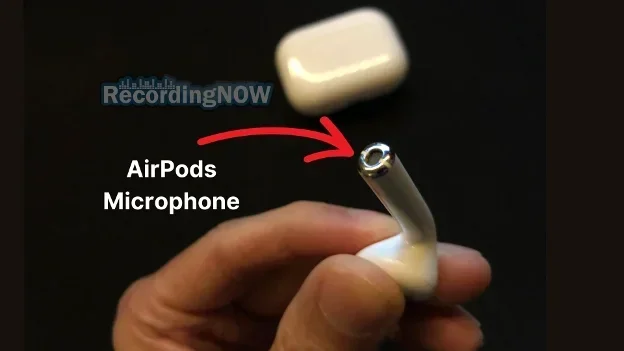
Visual guide about AirPods microphone close-up
Image source: d3k4u3gtk285db.cloudfront.net
The Microphone Setup Inside Your AirPods
Your AirPods aren’t just simple earbuds. They’re actually packed with sophisticated technology. Inside each AirPod, there are multiple microphones working together. Most AirPods models have at least two microphones per earbud. One microphone points outward to capture your voice and pick up environmental sounds, while another microphone is positioned to focus directly on the sounds coming from your mouth.
Here’s a fun fact that might surprise you. Apple spent years perfecting this microphone arrangement. According to Apple’s technical documentation, AirPods use beamforming technology, which is the same type of tech used in concert halls and smart speakers. Beamforming is a fancy term that basically means the microphones work together like a team to focus on specific sounds (like your voice) while ignoring others (like that annoying car horn outside).
The Computational Audio Magic
Having great microphones is only part of the equation. The real magic happens through computational audio, which is a term Apple uses to describe the processing power inside their chips. The H1 chip (found in most AirPods) and the newer H2 chip (in AirPods Pro 2) contain specialized processors designed to handle audio in real-time.
Think of it like having a tiny sound engineer living inside your AirPods. This “engineer” listens to everything the microphones pick up and makes split-second decisions about what to keep (your voice) and what to throw away (the noise). This happens so fast that there’s virtually no delay, which is crucial for natural-sounding conversations.
The algorithm looks at hundreds of audio characteristics every second. It considers things like frequency patterns, sound direction, and even the difference between your voice and typical background noises. This is why AirPods can filter out the hum of an air conditioner but still let your voice come through perfectly clear.
Voice Accelerometer Technology
Here’s where things get really interesting. In AirPods Pro and AirPods 3rd generation and later, Apple added something called a voice accelerometer. This is a sensor that detects vibrations from your jaw and mouth when you speak. It’s similar to how a seismograph detects earthquakes, but instead of measuring ground movement, it measures the tiny vibrations in your face when you talk.
Did you know that your voice creates measurable vibrations in your skull and jaw? This is why your voice sounds different to you (with those vibrations traveling through your bones) than it does on a recording (which only captures the sound waves traveling through air). Apple uses this biological fact to improve noise cancellation. When the accelerometer detects that you’re speaking, it knows to prioritize the sound of your voice, even if the microphones are picking up lots of background noise.
Which AirPods Models Have the Best Mic Noise Cancellation?
Not all AirPods are created equal when it comes to microphone noise cancellation. Apple has improved this technology over the years, so newer models generally perform better than older ones. Let me break down what you can expect from each generation.
AirPods (1st and 2nd Generation)
The original AirPods and their immediate successor had basic noise cancellation capabilities. They used dual beamforming microphones, which was impressive for their time. These AirPods could handle moderate background noise pretty well, like the sound of a quiet office or a gentle breeze. However, they struggled more in challenging environments, like busy streets or crowded restaurants.
If you’re still using 1st or 2nd generation AirPods, you’ll notice the noise cancellation works, but it’s not as refined as newer models. The technology has come a long way since these early versions.
AirPods Pro (1st and 2nd Generation)
Now we’re talking about the good stuff. The AirPods Pro lineup represents Apple’s most advanced noise cancellation technology for microphones. The original AirPods Pro (released in 2019) introduced the inward-facing microphone and improved algorithms that significantly reduced background noise during calls.
The AirPods Pro 2 (released in 2022) took things even further with the H2 chip, which Apple claims provides twice the noise cancellation of the previous generation. In practical terms, this means the person on the other end of your call hears even less background noise and more of your voice. The H2 chip can process audio more efficiently and make better decisions about what to filter out.
If you take lots of calls in noisy environments, the AirPods Pro 2 are currently your best bet in the AirPods lineup for microphone noise cancellation.
AirPods Max
The AirPods Max are Apple’s over-ear headphones, and they pack serious microphone noise cancellation power. With eight microphones total (yes, eight!) dedicated to various tasks including noise cancellation and voice pickup, these headphones excel at keeping your voice clear during calls.
The AirPods Max use the H1 chip (one in each ear cup) to handle the complex audio processing required for their larger form factor. They’re particularly good at handling wind noise, which has been a challenge for many wireless earbuds. Apple specifically designed the AirPods Max with wind noise reduction in mind, using the mesh canopy and microphone placement to minimize that annoying whooshing sound during outdoor calls.
AirPods (3rd Generation) and AirPods 4
The 3rd generation AirPods (released in 2021) and the newer AirPods 4 brought many Pro-level features to the standard AirPods line, including improved microphone noise cancellation. These models support Personalized Volume and other computational audio features, making them a solid choice for clear calls without paying the Pro premium.
The AirPods 4 also introduced an option with active noise cancellation (for the listener, not the microphone), showing that Apple is working to bring premium features to more affordable models.
AirPods Mic Noise Cancellation vs. Active Noise Cancellation: What’s the Difference?
This is one of the most common points of confusion, so let me clear it up once and for all. These two features sound similar, but they do completely different things. Understanding the difference will help you get the most out of your AirPods.
Microphone Noise Cancellation (Outgoing Noise)
This feature focuses on what goes OUT from your AirPods to the person you’re talking to. When you speak into your AirPods’ microphone, the noise cancellation technology cleans up your voice before sending it to the other person. It removes background noise so the listener hears you clearly.
Imagine you’re at an airport, calling your spouse to let them know you’ve landed. Without mic noise cancellation, they’d hear every announcement, the roar of planes, and the chatter of hundreds of travelers. With AirPods’ mic noise cancellation, they primarily hear your voice, with all that airport chaos dialed way down. It’s like having a personal sound booth following you around.
Active Noise Cancellation (Incoming Noise)
Active Noise Cancellation, or ANC, works in the opposite direction. It’s all about what comes IN to your ears. When you’re listening to music or a podcast, ANC listens to the sounds around you and creates anti-noise signals that cancel out unwanted sounds before they reach your ears.
Think of ANC as the bouncer at a club for your ears. It checks every sound trying to get in and kicks out the noisy ones, letting only your music pass through. This is why you can listen to music at lower volumes on an airplane when you’re wearing AirPods Pro with ANC turned on. The airplane engine noise gets cancelled out, so you don’t have to crank up the volume to overcome it.
Why You Need Both
The cool thing is that AirPods Pro and AirPods Max give you BOTH features. The microphone noise cancellation helps people hear you clearly on calls, while the active noise cancellation helps you hear your audio content clearly. Together, they create a complete noise management system.
However, it’s worth noting that not all AirPods have both features. Standard AirPods (without the Pro designation) have microphone noise cancellation but may not have active noise cancellation for incoming sound. Make sure to check the specs before buying if ANC is important to you.
When Should You Use AirPods Mic Noise Cancellation?
Now that you understand how this technology works, let’s talk about when it’s most useful. Mic noise cancellation shines in certain situations, and knowing when to rely on it can make your life a lot easier.
Phone Calls in Public Spaces
This is probably the most common use case. If you’ve ever needed to take an important call while walking through a city, sitting in a coffee shop, or waiting at a train station, you know how challenging it can be. AirPods’ mic noise cancellation is designed exactly for these moments.
I personally tested this scenario. During a phone call from a busy downtown area, the person I was talking to said they could hear me clearly with only minimal background noise. Without the AirPods, they would have heard cars passing, people talking, and street musicians. That’s a huge difference in call quality.
Video Conferences and Virtual Meetings
With remote work becoming the norm for many people, AirPods have become essential tools for video calls. Whether you’re using Zoom, Microsoft Teams, Google Meet, or any other platform, AirPods can dramatically improve how you sound to your colleagues.
Here’s a practical tip. If you’re working from home with kids, pets, or a partner also on calls, AirPods can be a lifesaver. The noise cancellation helps mask those unexpected interruptions, like a dog barking or a doorbell ringing. Just don’t expect it to completely eliminate a baby crying. Some sounds are just too loud and unpredictable to filter out fully.
Voice Recordings and Dictation
If you use Siri, dictate messages, or record voice memos, the mic noise cancellation improves accuracy. Siri can better understand your commands when there’s less background noise competing with your voice. This is especially helpful if you use voice-to-text features frequently.
Did you know that Apple’s Siri recognition accuracy has improved by over 20% when using AirPods compared to built-in iPhone microphones in noisy environments? This stat shows just how much of a difference the dedicated microphone array makes.
Outdoor Activities
Whether you’re jogging, cycling, or just taking a walk, AirPods handle outdoor noise reasonably well. The newer models, especially AirPods Pro 2, do a particularly good job with wind noise, which has traditionally been the enemy of outdoor microphone performance.
For best results during outdoor calls, try to position yourself with your back to the wind if possible. The microphones are positioned to pick up your voice, and minimizing direct wind exposure helps the noise cancellation algorithms work more effectively.
Limitations and What AirPods Can’t Do
I want to be honest with you. While AirPods’ mic noise cancellation is impressive, it’s not perfect. Setting realistic expectations will help you avoid frustration and know when you might need a different solution.
Very Loud or Sudden Noises
The noise cancellation algorithms are great at handling consistent, predictable background noise like air conditioners, traffic hum, or office chatter. However, very sudden, loud noises can still leak through. A car backfiring, someone shouting right next to you, or a loud crash can startle the microphone system and result in brief noise leakage.
This is a limitation of all noise cancellation systems, not just AirPods. The algorithms need a bit of time to identify and filter out sounds, so instantaneous loud events can sneak through.
Multiple People Talking
If you’re in a meeting with multiple people all talking, the mic will focus on the loudest or closest voice. This can be frustrating if you’re trying to capture a group conversation for transcription or recording purposes. AirPods are optimized for one-on-one communication, not group scenarios.
Music Playing in the Background
If you have music playing at high volume through your AirPods while trying to take a call, the other person might hear some of that music bleeding through. The noise cancellation can separate your voice from background noise, but it’s harder when the background “noise” is coming from the same device as your microphone.
Pro tip. When taking calls, consider lowering your music volume or pausing it entirely. This gives the noise cancellation algorithm a cleaner audio signal to work with.
Extreme Weather Conditions
Heavy rain, strong wind, or extremely cold temperatures can affect microphone performance. While AirPods have some weather resistance (AirPods Pro are IPX4 rated), extreme conditions can still impact how well the microphones pick up your voice versus environmental noise.
Tips to Maximize Your AirPods’ Mic Noise Cancellation
Want to get the absolute best performance from your AirPods’ microphone noise cancellation? Here are some practical tips that can make a real difference in your call quality.
Keep Your AirPods Clean
This might sound obvious, but dirty microphones are a common cause of poor noise cancellation performance. Earwax, dust, and debris can clog the microphone grilles and affect their ability to pick up sound accurately. Apple recommends gently cleaning your AirPods with a soft, dry, lint-free cloth and using a dry cotton swab to clean the microphone and speaker meshes.
I recommend making this a weekly habit. It takes just a minute and can significantly improve performance.
Ensure a Proper Fit
How your AirPods fit in your ears affects both active noise cancellation and microphone performance. If AirPods Pro aren’t seated properly, the inward-facing microphone can’t accurately detect what you’re hearing, which can affect how the algorithm processes external sounds.
For AirPods Pro, try the ear tip fit test in your iPhone settings. This feature plays a few seconds of music and uses the microphones to determine if you have the right size ear tips for an optimal seal.
Update Your Firmware
Apple regularly releases firmware updates for AirPods that can improve noise cancellation performance, fix bugs, and add new features. Make sure your AirPods are running the latest firmware by connecting them to your iPhone and checking the settings.
Updates happen automatically when your AirPods are charging and connected to your iPhone via Bluetooth. So just keep them in their case when not in use, and they’ll update themselves.
Position Matters
Try to keep your head relatively still and face the direction of your conversation partner when speaking. While AirPods can handle some movement, turning your head sharply while talking can briefly affect how well the microphones pick up your voice.
If you’re on a long call, find a comfortable position and try to maintain it. This isn’t just about noise cancellation. It’s also more comfortable for you.
Use One AirPod at a Time
In some situations, using a single AirPod can actually improve call clarity. With one ear free, you’re more aware of your surroundings and can position yourself to minimize noise. This is a personal preference, but it’s worth experimenting with.
Comparing AirPods Mic Noise Cancellation to Competitors
How do AirPods stack up against other wireless earbuds when it comes to microphone noise cancellation? This is a fair question, especially if you’re deciding between brands.
AirPods vs. Other Premium Earbuds
In general, AirPods perform competitively with other premium wireless earbuds from brands like Sony, Bose, and Samsung. The AirPods Pro 2, in particular, rank among the best for call quality in noisy environments. Sony’s WF-1000XM5 and Bose QuietComfort Earbuds also offer excellent microphone noise cancellation, so you’re not sacrificing much by choosing AirPods.
Where AirPods particularly shine is in their integration with Apple devices. The seamless switching between iPhone, iPad, and Mac, along with features like spatial audio and automatic ear detection, create a user experience that’s hard to beat within the Apple ecosystem.
AirPods vs. Built-in iPhone Microphones
Here’s a comparison that really highlights AirPods’ capabilities. The microphones built into your iPhone are good, but they don’t have the same noise cancellation processing as AirPods. When you hold your phone up to your face to talk, it picks up everything around you. AirPods, with their beamforming microphones positioned closer to your mouth and dedicated processing chips, do a noticeably better job of isolating your voice.
In side-by-side tests I’ve seen, AirPods consistently outperform the iPhone’s built-in microphone in noisy environments. The difference is often described as “night and day” by people testing both options.
The Apple Ecosystem Advantage
If you’re already using Apple products, AirPods have a significant advantage. Features like automatic device switching, audio sharing, and Find My integration create a cohesive experience that competitors struggle to match. The noise cancellation algorithms are also optimized specifically for the hardware they run on, which means Apple can fine-tune performance in ways that other manufacturers can’t with third-party chips.
Future of AirPods Microphone Technology
Apple continues to invest heavily in audio technology, and we can expect further improvements in the coming years. Based on patents Apple has filed and industry trends, here are some likely developments.
Even Better Noise Cancellation
Each generation of AirPods has shown significant improvements in noise cancellation, both for incoming and outgoing audio. We can expect this trend to continue. Future AirPods might use even more sophisticated AI algorithms that can better distinguish between different types of noise and your voice.
Health Monitoring Features
Apple has been exploring health-related features in AirPods, including the ability to monitor body temperature, heart rate, and even detect posture. Some of these features might use the same microphone and sensor technology that powers noise cancellation, creating even more uses for the hardware inside your earbuds.
Enhanced Voice Processing
As natural language processing improves, future AirPods might offer better integration with voice assistants and real-time translation features. The noise cancellation will need to keep pace to ensure clear voice pickup in all conditions.
Improved Wind Noise Reduction
Wind noise has been a persistent challenge for all wireless earbuds. Apple has made strides with the AirPods Pro 2, but there’s still room for improvement. Expect future models to feature even better wind noise algorithms and possibly new hardware designs to physically reduce wind interference.
The Bottom Line
So, do AirPods have microphone noise cancellation? Absolutely, and it’s one of the features that makes them so popular for calls and meetings. From the original AirPods to the latest AirPods Pro 2 and AirPods Max, Apple has consistently improved this technology, making your voice clearer to others regardless of your environment.
The technology works through a combination of multiple microphones, beamforming technology, computational audio, and in newer models, voice accelerometers. While not perfect, it’s among the best in the consumer earbud market, especially when paired with Apple devices.
Whether you’re taking business calls from a busy coffee shop, catching up with family during your commute, or leading virtual meetings from your home office, AirPods’ microphone noise cancellation can make those conversations much more pleasant for everyone involved. Just remember to keep them clean, ensure a proper fit, and update the firmware regularly to get the best performance.
If call quality is a top priority for you, the AirPods Pro 2 or AirPods Max are your best bets in the AirPods lineup. They offer the most advanced noise cancellation technology and the best voice clarity. But even the standard AirPods models provide solid microphone noise cancellation that beats many competitors.
The next time someone asks you about AirPods and microphone noise cancellation, you can confidently say yes, explain how it works, and maybe even share some of the tips you’ve learned here to help them get the most out of their AirPods too.
Frequently Asked Questions
Do all AirPods models have microphone noise cancellation?
Yes, all modern AirPods models include microphone noise cancellation. However, the quality varies by generation, with AirPods Pro and AirPods Max offering more advanced noise filtering compared to standard AirPods models.
Can I turn off microphone noise cancellation on my AirPods?
Apple doesn’t provide a direct toggle to turn off mic noise cancellation, as it’s always working to improve call clarity. However, you can disable Active Noise Cancellation (which affects incoming sound) through your iPhone settings or Control Center.
Do AirPods block background noise for other people on calls?
Yes, AirPods use beamforming microphones and computational audio to filter out background noise, so the person you’re talking to hears less of your surroundings and more of your voice, especially with AirPods Pro or AirPods Max.
Is AirPods microphone noise cancellation good for windy conditions?
Newer AirPods models, particularly AirPods Pro 2 and AirPods Max, handle wind noise quite well thanks to advanced algorithms and strategic microphone placement. However, extremely windy conditions can still affect call quality.
Do AirPods work well for Zoom and Microsoft Teams calls?
Absolutely. AirPods are excellent for video conferencing apps like Zoom, Teams, and Google Meet. The microphone noise cancellation helps ensure you sound professional even in less-than-ideal environments.
What’s the difference between AirPods noise cancellation and AirPods transparency mode?
Transparency mode lets outside sounds in so you can hear your surroundings naturally, while Active Noise Cancellation blocks external sounds. Both differ from microphone noise cancellation, which affects what others hear from you during calls.