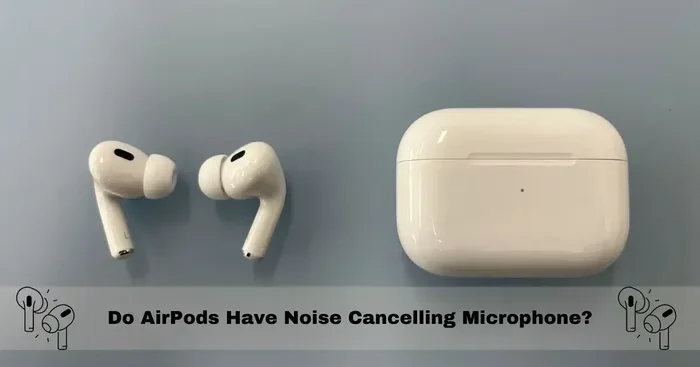
Featured image for AirPods noise cancelling microphone
Image source: micgurus.com
Yes, most modern AirPods come equipped with noise cancelling microphones that actively block background noise during calls and recordings. Apple uses advanced beamforming technology and dual microphones in AirPods Pro, AirPods Pro 2, and AirPods 4 to isolate your voice from surrounding sounds. The premium AirPods Pro models add Active Noise Cancellation (ANC) for your ears too, while even base models offer decent call quality in noisy environments through smart software processing.
If you’ve ever taken a phone call in a coffee shop or tried to dictate a message in a busy street, you know how frustrating background noise can be. AirPods have become one of the most popular earbuds worldwide, with Apple selling over 100 million pairs in recent years. But do AirPods have noise cancelling microphones that actually work? The short answer is yes, and the technology behind it is fascinating.
Apple has packed sophisticated microphone arrays into these tiny earbuds. Each AirPod contains multiple microphones that work together using software smarts to make your voice sound crystal clear. Think of it like having a personal sound engineer in your ear, constantly cleaning up your audio before it reaches the person on the other end of your call.
Whether you’re a remote worker hopping between Zoom calls, a student recording lectures, or someone who just wants clearer phone conversations, understanding AirPods’ noise cancelling mic capabilities can help you choose the right pair. This guide breaks down everything you need to know about AirPods microphones, from the basic tech to the differences between models.
Key Takeaways
- Multiple Microphones in Every AirPod: Each AirPod contains dual beamforming microphones designed to focus on your voice while reducing background noise.
- Active Noise Cancellation Varies by Model: Only AirPods Pro, AirPods Pro 2, and AirPods 4 (with ANC) offer active noise cancellation for listening, but all recent models have noise-cancelling mic technology for calls.
- Beamforming Technology Explained: AirPods use directional microphones that work like a spotlight, picking up sounds from your mouth while ignoring sounds from other directions.
- Transparency Mode for Awareness: Premium AirPods let you switch between full noise cancellation and hearing your surroundings, perfect for conversations or crossing streets.
- Computational Audio Enhances Calls: Apple uses algorithms and the H1/H2 chip to process your voice in real-time, making calls clearer than the microphones alone would allow.
- Best for Calls: AirPods Pro 2: The latest AirPods Pro 2 offer the best call quality thanks to the H2 chip, adaptive audio, and conversation awareness features.
- Wired Earbuds vs AirPods Mics: AirPods microphones outperform most wired alternatives thanks to their dual-mic array and noise reduction algorithms.
📑 Table of Contents
- What “Noise Cancelling Microphone” Actually Means
- How Do AirPods Noise Cancelling Microphones Work?
- Which AirPods Have the Best Noise Cancelling Microphones?
- Real-World Performance: How Well Do AirPods Mics Actually Work?
- Comparing AirPods Mics to Other Wireless Earbuds
- Tips for Getting the Best Microphone Performance from Your AirPods
- The Future of AirPods Microphone Technology
- Frequently Asked Questions About AirPods Microphones
- Final Thoughts
What “Noise Cancelling Microphone” Actually Means
Before diving into AirPods specifically, let’s clear up a common point of confusion. The term “noise cancelling” gets used for two different things in headphones and earbuds.
Active Noise Cancellation (ANC) for Your Ears
This is the feature most people think of when they hear “noise cancelling.” ANC plays anti-noise sound waves through the earbuds to cancel out ambient sounds before they reach your eardrums. Imagine wearing earplugs, but with magical sound waves making the world go silent. This is the technology that lets AirPods Pro users sit on a loud airplane and still hear their music clearly.
Microphone Noise Cancellation for Your Voice
This is a completely different feature, and it’s what we mean when we ask about “noise cancelling mics.” Here, the microphones and software work together to remove background noise from your voice during calls or recordings. So when you’re talking on the phone in a windy park, the person on the other end hears your voice clearly without the wind noise. The earbuds aren’t cancelling noise for your ears; they’re cancelling noise from your microphone signal.
Apple’s AirPods include both types of noise cancellation in their premium models. The base models focus primarily on microphone noise cancellation, while the Pro versions add full ANC for listening.
Why Both Matter for AirPods Users
When you take a phone call with ANC enabled, you can hear the other person clearly even in a noisy environment. At the same time, your voice sounds clear to them because the microphones are filtering out background noise. This two-way noise management is what makes AirPods feel magical during calls in challenging environments.
How Do AirPods Noise Cancelling Microphones Work?
The technology inside AirPods is more sophisticated than you might expect from something so small. Apple has engineered a system combining hardware and software to deliver clear voice quality.
Visual guide about AirPods noise cancelling microphone
Image source: wiredclip.com
The Dual Microphone Array
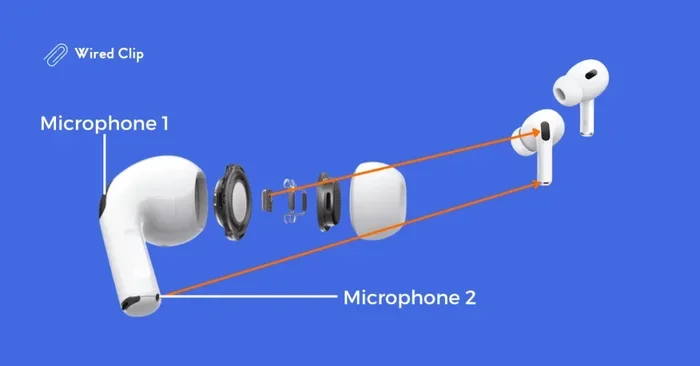
Each AirPod contains two microphones, and each one has a specific job. The first microphone sits on the outside of the earbud, facing the world. It picks up ambient sounds like traffic, conversations, or air conditioning. The second microphone sits inside the earbud, closer to your mouth, and captures your voice more directly.
Think of it like having two reporters covering the same story. One is standing in the crowd capturing all the background noise, while the other is right next to the main speaker capturing just their words. By comparing what these two microphones hear, the AirPods can identify which sounds are your voice and which are background noise.
Beamforming Technology
Beamforming is a fancy word for a clever trick. The AirPods microphones are designed to be most sensitive to sounds coming from the direction of your mouth. Just like a flashlight beam focuses light in one direction, beamforming focuses the microphone’s “listening” toward your voice while ignoring sounds from other directions.
This directional pickup pattern means that even before any software processing happens, your voice comes through louder and clearer relative to background noise. It’s like the microphones have built-in blinders that make them ignore distractions.
The H1 and H2 Chips
Apple’s custom-designed chips do the heavy lifting for noise processing. The original H1 chip (in AirPods 2, AirPods Pro 1) and the newer H2 chip (in AirPods Pro 2 and AirPods 4 with ANC) contain specialized audio processing circuits. These chips analyze the microphone signals 48,000 times per second, identifying and subtracting background noise in real-time.
The processing happens so fast that there’s no lag between when you speak and when the other person hears you. It’s like having a translator who instantly removes unwanted sounds from your words without you even noticing.
Computational Audio Magic
Beyond simple noise reduction, AirPods use computational audio to enhance voice quality further. The system can:
- Reduce wind noise specifically using algorithms trained to recognize wind patterns
- Boost voice frequencies while suppressing lower rumbles like traffic
- Adapt to changing environments as you move from a quiet office to a busy street
- Combine signals from both AirPods for even better noise rejection
Which AirPods Have the Best Noise Cancelling Microphones?
Not all AirPods are created equal when it comes to microphone quality and noise cancellation. Here’s the breakdown by model.
AirPods Pro 2 (Latest Generation)
The AirPods Pro 2 with the H2 chip offer the best microphone noise cancellation in the AirPods lineup. The H2 chip is significantly more powerful than its predecessor, processing audio with more precision and speed. These AirPods feature:
- Adaptive Audio that automatically adjusts noise cancellation based on your environment
- Conversation Awareness that lowers music volume when you start talking
- Voice Isolation technology that prioritizes your voice during calls
- Personalized Volume that learns your listening preferences
If taking clear calls in noisy environments is your top priority, the AirPods Pro 2 are the gold standard. They’re particularly good at handling wind noise, which has traditionally been challenging for wireless earbuds.
AirPods Pro (1st Generation)
The original AirPods Pro still offer excellent microphone noise cancellation thanks to the H1 chip and dual microphone array. While they don’t have the advanced features of the Pro 2, they handle most call situations well, including moderate background noise.
For most users, the original AirPods Pro provide more than enough microphone quality for phone calls, Zoom meetings, and voice recordings. The noise cancelling is noticeably better than standard AirPods.
AirPods 4 with Active Noise Cancellation
The newest base-model AirPods introduced ANC, which previously was only available on Pro models. The AirPods 4 with ANC include noise cancelling microphones that perform similarly to the AirPods Pro for voice calls. They’re a great middle-ground option if you want noise cancellation without the premium price of the Pro models.
AirPods 4 (Standard)
The standard AirPods 4 still include noise cancelling microphones for calls, even though they don’t offer ANC for listening. The beamforming microphones and H1 chip processing help your voice sound clear on calls, though the experience isn’t quite as refined as the Pro models in very noisy environments.
AirPods 3
The AirPods 3 feature the same dual microphone array with beamforming as the Pro models. They handle voice calls well in moderate noise but may struggle more than the Pro versions in very loud environments like concerts or busy airports.
AirPods 2 and Original AirPods
The older AirPods models have basic noise cancelling microphones using beamforming technology. They work fine for calls in quiet environments but don’t perform as well in noisy settings compared to newer models. If you’re still using these, upgrading will noticeably improve your call quality.
Real-World Performance: How Well Do AirPods Mics Actually Work?
Specs and features are one thing, but how do AirPods perform in actual everyday situations? Let’s break down common scenarios.
Taking Calls in a Coffee Shop
This is where AirPods shine. Background chatter, espresso machine hissing, and music playing in the background are significantly reduced. Most people on the other end of your call won’t even realize you’re in a busy café. The AirPods Pro 2 perform best here, but even standard AirPods 4 do a respectable job.
Walking Down a Windy Street
Wind has traditionally been the enemy of earbud microphones. AirPods use specific algorithms to detect wind noise based on its distinctive sound patterns, and the system works to minimize it. The AirPods Pro 2 handle wind better than any previous model, though strong gusts can still cause some audio artifacts.
Working from Home with Background Distractions
Whether it’s a dog barking, kids playing, or construction noise outside, AirPods do an excellent job of isolating your voice. The computational audio adapts to whatever sounds are present, constantly adjusting the noise reduction profile.
Recording Voice Memos
For quick voice memos or podcast recording in a pinch, AirPods produce surprisingly good audio quality. The microphone captures your voice with clarity, and background noise is kept to a minimum. Professional podcasters wouldn’t rely on them, but they’re more than adequate for notes and rough recordings.
Video Conferencing on Zoom and Teams
AirPods work excellently with video conferencing apps. Your colleagues will hear you clearly, and you’ll hear them through the noise cancelling for your ears. The combination makes virtual meetings much more pleasant, especially when working from noisy home environments or shared spaces.
Comparing AirPods Mics to Other Wireless Earbuds
How do AirPods stack up against the competition? Apple consistently ranks among the top performers for call quality.
AirPods vs. Samsung Galaxy Buds
Both brands offer excellent microphone quality. Galaxy Buds Pro and Buds2 Pro have comparable noise cancelling capabilities. However, AirPods tend to integrate more seamlessly with iPhones, with features like automatic device switching and Siri integration.
AirPods vs. Sony WF-1000XM Series
Sony’s flagship earbuds are renowned for their listening noise cancellation, but AirPods generally match or beat them for microphone call quality. Sony has improved microphone performance in recent generations, but Apple’s computational audio gives them an edge for voice calls.
AirPods vs. Budget Wireless Earbuds
Budget earbuds often have single microphones without sophisticated noise processing. The difference in call quality is night and day. If clear calls matter to you, AirPods justify their premium price compared to cheap alternatives.
Tips for Getting the Best Microphone Performance from Your AirPods
Even with great technology, how you use your AirPods affects performance. Here are practical tips to maximize call quality.
Keep Your AirPods Clean
Microphones get clogged with earwax, dust, and debris over time. Gently cleaning the microphone openings with a dry, soft-bristled brush can dramatically improve performance. A clogged microphone has to work harder to pick up your voice and may miss certain frequencies.
Ensure a Proper Fit
If your AirPods are loose or falling out, the microphones aren’t optimally positioned to capture your voice. For AirPods Pro and AirPods 4, try different ear tip sizes to find the best fit. A secure fit means the beamforming microphones are properly oriented toward your mouth.
Update Your Firmware
Apple regularly releases firmware updates that improve microphone performance and noise reduction algorithms. Make sure your AirPods are running the latest firmware by connecting them to your iPhone and checking the settings. These updates often include meaningful audio improvements.
Use One AirPod at a Time for Calls
If you’re in a very noisy environment and call quality is critical, using just one AirPod can sometimes improve performance. This is counterintuitive, but with one AirPod, you can position it optimally, and the other microphone array doesn’t interfere with signal processing.
Mind the Wind
In windy conditions, cupping your hand slightly over the AirPod microphone can reduce wind noise. Some people also find that turning their head so the AirPod is sheltered from the wind helps significantly.
Take Advantage of Voice Isolation
On AirPods Pro 2, you can enable Voice Isolation during calls from Control Center. This feature prioritizes your voice even more aggressively, making it perfect for the noisiest environments. Look for the microphone icon in your call controls and select “Voice Isolation” for maximum clarity.
Position Matters
The microphone works best when your AirPods are seated properly in your ears with the stem pointing toward your mouth. Don’t let the stems dangle loosely or angle away from your face, as this affects how well the beamforming works.
The Future of AirPods Microphone Technology
Apple continues to invest heavily in AirPods audio technology. Looking ahead, we can expect even more impressive microphone capabilities.
Better AI Integration
Future AirPods will likely include more advanced on-device AI processing, potentially offering real-time language translation through the microphones. This would require even more sophisticated background noise management to work reliably in various environments.
Health Monitoring Features
Apple has filed patents for health monitoring features in AirPods, including heart rate and body temperature sensors. These features would coexist with microphones, potentially using them for health-related audio measurements like breathing patterns.
Improved Hearing Assistance
Apple already markets AirPods Pro 2 as hearing aids, and future models may expand this functionality. Better microphone arrays could help users with hearing loss in challenging listening environments, functioning as sophisticated hearing assistance devices.
Enhanced Spatial Audio
Microphones play a role in spatial audio by capturing how sound interacts with your environment. Future AirPods may use microphones for more immersive spatial audio experiences, including features like personalized sound profiles based on your ear shape.
Frequently Asked Questions About AirPods Microphones
Now that we’ve covered the comprehensive details about AirPods noise cancelling microphones, let’s address some common questions that often come up.
Do all AirPods have noise cancelling microphones?
All AirPods from the 2nd generation onward include noise cancelling microphones with beamforming technology. Even the base models use dual microphones and software processing to reduce background noise during calls. However, only the Pro models and AirPods 4 with ANC offer Active Noise Cancellation for your listening experience.
Can AirPods block out background noise for the person I’m calling?
Yes, this is exactly what the noise cancelling microphones do. The dual microphone array with beamforming focuses on your voice while algorithms work to subtract background noise before your voice is transmitted. The person on the other end of your call hears your voice clearly with minimal background distraction.
Do AirPods work well for phone calls in noisy environments?
Modern AirPods perform excellently in noisy environments, especially the AirPods Pro 2 with the H2 chip. They handle typical challenging situations like coffee shops, busy streets, and home environments with background distractions. For extremely loud environments like concerts, they may struggle but still perform better than most competitors.
Which AirPods are best for making calls?
The AirPods Pro 2 currently offer the best call quality thanks to the H2 chip, Voice Isolation feature, and advanced computational audio. They handle wind noise particularly well and adapt to changing environments automatically. The AirPods Pro (1st gen) and AirPods 4 with ANC are also excellent choices for clear calls.
Do AirPods microphones work with Android phones?
Yes, AirPods microphones work with any device that supports Bluetooth audio, including Android phones. However, you won’t get the advanced features like automatic device switching, Siri integration, or the latest computational audio enhancements. The basic noise cancelling microphone functionality still works well on Android, though.
How do I turn on noise cancelling for calls on AirPods?
For Active Noise Cancellation during calls, you need AirPods Pro, AirPods Pro 2, or AirPods 4 with ANC. Press and hold the force sensor on the stem to switch between ANC, Transparency Mode, and Off. For the microphone noise cancellation, it’s always working automatically in the background whenever you’re on a call or recording audio.
Final Thoughts
AirPods absolutely have noise cancelling microphones, and the technology has evolved significantly since the original release. From basic beamforming in early models to the sophisticated H2 chip-powered computational audio in the latest AirPods Pro 2, Apple has made clear call quality a priority.
For most users, any modern AirPods model will provide excellent microphone performance for phone calls, video conferencing, and voice recordings. The Pro models stand out for their ability to handle the noisiest environments while also providing Active Noise Cancellation that makes your own listening experience better too.
Whether you’re choosing your first pair of AirPods or considering an upgrade, the microphone technology is genuinely impressive. It’s one of those features that you might not notice when it works well, but you’d definitely miss if it weren’t there. The next time someone tells you they can’t hear you clearly on a call despite being in a noisy environment, you’ll know that good noise cancelling microphones make all the difference.
If call quality is your top priority and you frequently take calls in challenging environments, the AirPods Pro 2 represent the best investment. For everyday use in moderately quiet settings, standard AirPods 4 or AirPods 3 will serve you well. Either way, you’re getting some of the best microphone technology available in true wireless earbuds today.