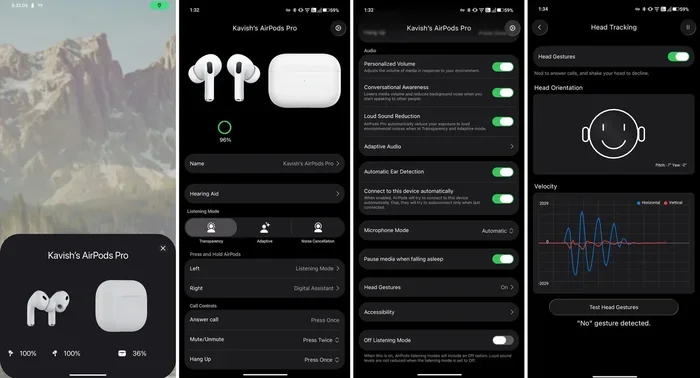
Featured image for AirPods Pro smartphone app
Image source: iphoneislam.com
No, you do not need a separate app to use AirPods Pro. Apple designed them to work seamlessly with your iPhone, iPad, or Mac right out of the box. However, downloading one of several free or paid third-party apps can unlock extra features like custom EQ settings, battery monitoring, and hearing tests that go beyond what Apple’s native settings offer.
Picture this: you just unboxed your shiny new AirPods Pro, and you’re staring at your phone wondering, “Do I need an app for AirPods Pro to make these things work?” It’s one of the most common questions new AirPods owners ask, and the good news is refreshingly simple.
You do not need to download any app to start using your AirPods Pro. Apple built them to pair instantly with your iPhone the moment you flip open the lid. The connection happens almost magically, like your phone recognizes an old friend. All the core features, including music playback, phone calls, and Siri activation, work right out of the box without installing a single thing.
That said, the world of AirPods Pro apps is surprisingly rich. While your iPhone’s built-in Settings app handles most functions beautifully, a handful of third-party apps can supercharge your experience with features Apple didn’t include by default. Think of it like buying a new car: it drives perfectly fine from the dealership, but adding premium floor mats and a better sound system makes the ride even sweeter.
Key Takeaways
- Zero Apps Required: AirPods Pro work perfectly with your iPhone, iPad, and Mac using only built-in iOS, iPadOS, and macOS settings.
- iOS Unlocks Full Potential: You need at least iOS 13.2 (or later) to access features like Active Noise Cancellation, Transparency Mode, and Spatial Audio.
- Android Limitations: AirPods Pro function as basic Bluetooth earbuds on Android devices, with no app needed but also no premium features.
- Third-Party Apps Add Value: Apps like AirPods Pro Manager, AssistiveEQ, and Wunderfind offer extra customization, battery stats, and Find My enhancements.
- Settings App is Your Control Center: Apple’s native Settings app handles firmware updates, ear tip fit tests, and noise control modes.
- Firmware Updates are Automatic: Your AirPods Pro update themselves while charging near your iPhone, no manual app downloads required.
- Hearing Health Features: Newer AirPods Pro 2 models offer built-in hearing tests and clinical-grade hearing aid functionality through iOS settings.
📑 Table of Contents
- Understanding AirPods Pro Basics: What Works Without an App
- Where to Find AirPods Pro Settings on Your iPhone
- Why Firmware Updates Happen Automatically
- AirPods Pro on Android: What You Need to Know
- Best Third-Party Apps Worth Considering
- Common Questions About AirPods Pro Apps and Compatibility
- The Future of AirPods Pro: What’s Coming Next
- Final Verdict: Do You Need an App for AirPods Pro?
Understanding AirPods Pro Basics: What Works Without an App
Let’s start with the fundamentals. AirPods Pro are wireless earbuds made by Apple, and they were first released on October 30, 2019. The second generation, AirPods Pro 2, launched on September 23, 2022, with a USB-C version arriving in September 2023. Both generations connect to your devices using Bluetooth 5.0 or higher.
When Apple designed AirPods Pro, the goal was frictionless setup. Here’s what happens the first time you open the case near your iPhone:
- Automatic Pairing: A setup animation appears on your iPhone screen within seconds
- iCloud Sync: Your AirPods automatically connect to all your Apple devices signed into the same iCloud account
- Quick Settings Access: Tapping the “Connect” button links them to your Apple ID
After this one-time setup, your AirPods Pro remember every Apple device you own. Pop them in your ears near your MacBook, and they switch automatically. It’s like having a universal remote for all your Apple gadgets, except there’s no remote to lose.
What You Can Do Without Downloading Anything
The native iOS experience covers about 90% of what most users need. Here’s a breakdown of features available without third-party apps:
1. Active Noise Cancellation (ANC)
Press and hold the force sensor on the stem of either AirPod to switch between Active Noise Cancellation and Transparency Mode. ANC uses two microphones and advanced algorithms to block out background noise. According to Apple’s testing, ANC continuously adapts to the geometry of your ear and the fit of the ear tips, blocking out sound 200 times per second.
2. Transparency Mode
Need to hear a train announcement or chat with a barista? Transparency Mode lets outside sound in naturally, so you can have conversations without removing your AirPods. It sounds almost like you’re not wearing earbuds at all.
3. Spatial Audio
Available on AirPods Pro 1st and 2nd generation, Spatial Audio creates an immersive, theater-like sound experience. It tracks your head movement using built-in gyroscopes and accelerometers. Did you know Spatial Audio works with Dolby Atmos content from Apple Music, Netflix, Disney+, and many other streaming services?
4. Adaptive Audio (AirPods Pro 2 Only)
Introduced in iOS 17, Adaptive Audio automatically blends Active Noise Cancellation and Transparency Mode based on your environment. Walking past a construction site? It kicks in ANC. Someone starts talking to you? It switches to Transparency. It’s like having a sound assistant in your ears.
5. Conversation Awareness
Also new with iOS 17, this feature detects when you start speaking and automatically lowers your media volume. Once you stop talking for a few seconds, your audio returns to normal volume.
6. Personalized Volume
Your AirPods Pro can learn your preferred volume levels over time and automatically adjust based on your environment. It’s a subtle feature you’ll probably appreciate more than notice.
7. Find My Integration
Lost an AirPod under the couch cushion? The Find My app (pre-installed on every iPhone) can play a sound, show the last known location, or use Precision Finding to guide you to them with on-screen directions. The AirPods Pro 2 case even has a built-in speaker that chirps to help you locate it.
Where to Find AirPods Pro Settings on Your iPhone
One of the most common points of confusion is where to access AirPods Pro controls if there’s no dedicated app. The answer: it’s all baked into your iPhone’s Settings app. Think of Settings as the hidden control room for your AirPods Pro.
Visual guide about AirPods Pro smartphone app
Image source: play-lh.googleusercontent.com
Here’s how to find it:
- Open the Settings app on your iPhone
- Make sure your AirPods Pro are connected and in your ears (or open the case lid)
- Tap on your AirPods Pro name near the top of the Settings menu (just below your Apple ID banner)
- You’ll see a dedicated menu with all available options
Key Settings Available in iOS
Noise Control: Switch between Active Noise Cancellation, Transparency Mode, and Off. You can also set which earbud the press-and-hold gesture controls.
Ear Tip Fit Test: This clever feature plays a short audio clip and uses the inward-facing microphones to check if your ear tips are creating a proper seal. If the seal isn’t great, iOS suggests trying a different size ear tip. Apple includes four sizes in the box: XS, S, M, and L.
Audio Settings: Toggle Spatial Audio, adjust balance, enable Personalized Spatial Audio (which uses your ear shape via the TrueDepth camera), and customize the press speed for stem controls.
Microphone: Choose whether the left, right, or automatic AirPod handles calls. Most people leave this on automatic, but it’s handy if one AirPod’s mic starts acting up.
Name Your AirPods: Want to rename them something fun like “Darth Vader’s Pods”? You can do that here.
Automatic Switching: Decide whether your AirPods Pro automatically hop between your iPhone, iPad, and Mac. Most people love this feature, but it can occasionally cause confusion when devices get confused about which one you want to use.
Firmware Version: See what software version your AirPods are running. This information is passive; you can’t manually update, but knowing the version helps when troubleshooting.
Why Firmware Updates Happen Automatically
Here’s something many people don’t realize: AirPods Pro firmware updates themselves automatically. There’s no app to open or button to press. Your AirPods update while they’re charging in their case near your iPhone with a Wi-Fi connection.
Think of it like watering a plant in the background. You don’t need to do anything special; it just happens when conditions are right. Apple rolls out firmware updates periodically to fix bugs, improve sound quality, and add new features. For example:
- Firmware 4E71 (June 2022) added battery improvements
- Firmware 5B58 (September 2022) launched with AirPods Pro 2
- Firmware 6A300 (October 2023) improved ANC and Adaptive Audio
Apple doesn’t always announce what each firmware update includes, which can be frustrating. However, the updates typically take just 30-60 minutes while your AirPods sit in their case. According to Apple’s support documentation, you cannot manually force a firmware update, but you can check your current version in Settings > Bluetooth > tap the “i” next to your AirPods.
AirPods Pro on Android: What You Need to Know
Here’s where things get interesting. If you’re an Android user, you might be wondering if you need an app for AirPods Pro on your non-Apple device. The short answer: no app is required, but you’re also missing out on most of the premium features.
AirPods Pro connect to Android phones via standard Bluetooth pairing:
- Open Settings on your Android phone
- Go to Bluetooth settings
- Open your AirPods Pro case with the AirPods inside
- Press and hold the setup button on the back of the case until the LED flashes white
- Select “AirPods Pro” from the list of available devices
Once connected, your AirPods will play music, handle phone calls, and work with Google Assistant. However, you’ll lose access to:
- Active Noise Cancellation control (though ANC still works, you just can’t switch modes easily)
- Spatial Audio
- Adaptive Audio and Conversation Awareness
- Ear Tip Fit Test
- Find My integration (you’ll need Google’s Find My Device network instead)
- Automatic device switching
Did you know that according to Statista, Android holds about 72% of the global smartphone market share? That means a lot of people who buy AirPods Pro are Android users. While AirPods work fine on Android for basic listening, they’re really designed to shine within the Apple ecosystem.
Workarounds for Android Users
A few third-party apps try to bridge the gap between AirPods Pro and Android, though results vary:
AirBattery: A free Android app that shows your AirPods battery level in your phone’s notification bar, similar to how iOS handles it.
MaterialPods: An open-source app that brings ANC toggle, ear detection, and battery stats to Android. It’s been downloaded over 1 million times on the Google Play Store.
PodsCompanion: Offers similar features with a focus on Pixel devices.
These apps use Android’s accessibility services to detect when AirPods are connected, so they don’t have the same deep integration as Apple’s native experience. Still, they’re better than nothing if you primarily use Android.
Best Third-Party Apps Worth Considering
Even iPhone users might want extra features beyond what Apple provides. The following apps enhance your AirPods Pro experience in meaningful ways. Think of them as optional upgrades, like adding apps to a new smartphone.
1. AirPods Pro Manager (iOS)
This free app provides a detailed dashboard for your AirPods Pro. It shows real-time battery levels for each AirPod and the case, firmware version history, and noise reduction statistics. It also lets you test which ear tip size creates the best seal, with a more detailed analysis than Apple’s built-in test.
2. AssistiveEQ (iOS)
Price: $4.99 one-time purchase. While Apple’s Settings app lets you adjust Spatial Audio and a few other things, it doesn’t offer a true custom equalizer. AssistiveEQ fills that gap with a full parametric EQ. You can fine-tune bass, mids, and treble to match your hearing profile or music preferences. It’s particularly popular among users with mild hearing loss who want to optimize audio for their specific needs.
3. Wunderfind (iOS)
Price: Free with optional premium features. While Apple’s Find My app locates your AirPods, Wunderfind offers a more visual experience. It shows a radar-style interface with directional guidance, signal strength meters, and historical location data. The app is also great for finding other Bluetooth devices, not just AirPods.
4. HearingOS (iOS)
Price: Free. This app turns your AirPods Pro 2 into a hearing test tool. It uses Apple’s built-in audiometry features to create a personalized hearing profile, which can then be applied to your music and calls. According to the CDC, about 15% of American adults have some degree of hearing loss, so apps like this serve a real purpose.
5. AirDroid Parental Control & Family Locator
If you want to monitor whether your kids are actually wearing their AirPods (and where they are), this app adds family-friendly tracking. It works alongside Apple’s Family Sharing setup.
6. Shortcuts App (Built into iOS)
This is technically not a third-party app since it comes pre-installed, but it’s worth mentioning. The Shortcuts app lets you create custom automations involving your AirPods Pro. For example, you could create a shortcut that automatically plays your favorite playlist, opens a meditation app, and turns on Do Not Disturb when you put in your AirPods at a specific time of day. The possibilities are nearly endless.
Common Questions About AirPods Pro Apps and Compatibility
Let’s address some specific scenarios that often trip up new users.
Do I Need an App to Connect AirPods Pro to a Mac?
No app needed. If you’re signed into the same Apple ID on your Mac and iPhone, your AirPods Pro should automatically appear in your Mac’s Bluetooth menu. Click the Bluetooth icon in your menu bar, select your AirPods, and you’re connected. If automatic switching doesn’t work, you can also manually pair them through System Settings > Bluetooth.
Do I Need an App to Update AirPods Pro Firmware?
No, firmware updates happen automatically. However, Apple recommends keeping your AirPods in their case, connected to power (or with at least 50% battery), near your iPhone, and on Wi-Fi. The update typically completes within 30 minutes to an hour, though you won’t see a progress bar or notification confirming completion.
Do I Need an App for AirPods Pro Hearing Test?
If you have AirPods Pro 2, you can take a clinical-grade hearing test built right into iOS 18. No third-party app required. The feature is FDA-cleared and creates a hearing profile that can be used as a hearing aid. This is a huge deal in the hearing health space, as traditional hearing aids can cost thousands of dollars. With AirPods Pro 2, you essentially get hearing aid functionality for around $249.
Can I Use AirPods Pro with PC or Chromebook?
Yes, but with limitations. AirPods Pro connect to any Bluetooth-enabled device, including Windows PCs and Chromebooks. You’ll get basic audio and microphone functionality, but you won’t have access to ANC mode switching (though ANC will still work passively), Spatial Audio, or any other iOS-specific features. A small tip: on Windows, you can install third-party tools like Bluetooth Tweaker to enable AAC codec support for better audio quality.
Do I Need an App for AirPods Pro to Make Calls?
No. Once connected, your AirPods Pro work as a headset for phone calls, FaceTime, Zoom, Microsoft Teams, and any other communication app. The microphones use beamforming technology to focus on your voice while reducing background noise. In our experience, call quality is excellent, and most people on the other end can’t tell you’re using wireless earbuds.
The Future of AirPods Pro: What’s Coming Next
Apple continues to invest heavily in AirPods Pro. The company introduced several groundbreaking features in 2024:
Clinical-Grade Hearing Aid Functionality: AirPods Pro 2 received FDA clearance in September 2024 to function as over-the-counter hearing aids. This is the first time Apple has positioned AirPods as a medical device, and it represents a massive shift in the hearing health industry.
Hearing Protection: iOS 18 added a feature that reduces loud environmental sounds while preserving audio clarity. This is particularly useful for concertgoers, construction workers, or anyone exposed to noisy environments regularly.
AirPods Pro 3 Rumors: While nothing is confirmed, industry analysts predict the next AirPods Pro generation will include built-in cameras for AI-powered spatial awareness, improved health sensors (potentially including heart rate monitoring), and even better active noise cancellation. Bloomberg’s Mark Gurman has reported that Apple is exploring health features that could turn AirPods into multipurpose health devices.
Did you know that Apple sold an estimated 80-90 million AirPods in 2023 alone? That’s a lot of tiny computers sitting in people’s ears. With that level of market dominance, third-party developers continue to build innovative apps and accessories, ensuring the AirPods Pro ecosystem will keep growing.
Final Verdict: Do You Need an App for AirPods Pro?
Let’s bring it all home. The straightforward answer to “do I need an app for AirPods Pro?” is a resounding no. Your iPhone, iPad, or Mac handles everything you need through the built-in Settings app and Find My integration. Pairing takes seconds, firmware updates happen automatically, and all the premium features like Active Noise Cancellation, Transparency Mode, and Spatial Audio work without downloading anything.
However, if you’re the kind of person who loves tinkering and customizing every detail, a handful of third-party apps can enhance your experience. Apps like AssistiveEQ unlock true custom equalization, Wunderfind improves Find My capabilities, and AirPods Pro Manager provides deeper battery and usage statistics. These are nice-to-haves rather than must-haves.
For Android users, the situation is more complex. While no app is technically required, apps like MaterialPods and AirBattery significantly improve the experience by bringing iOS-like features to the Android platform. Just don’t expect full feature parity; AirPods Pro were designed with Apple devices in mind.
The bottom line? AirPods Pro represent one of the most polished and seamless wireless earbud experiences available today. The lack of a required app is actually a feature, not a limitation. Apple eliminated friction by building everything into the operating system. Pop open the case, pair once, and enjoy. That’s the magic of AirPods Pro.
If you have questions about specific AirPods Pro features or want recommendations tailored to your device setup, feel free to explore more of our guides. We’ve tested every generation, every major firmware update, and dozens of third-party apps to bring you the most accurate, helpful information possible.