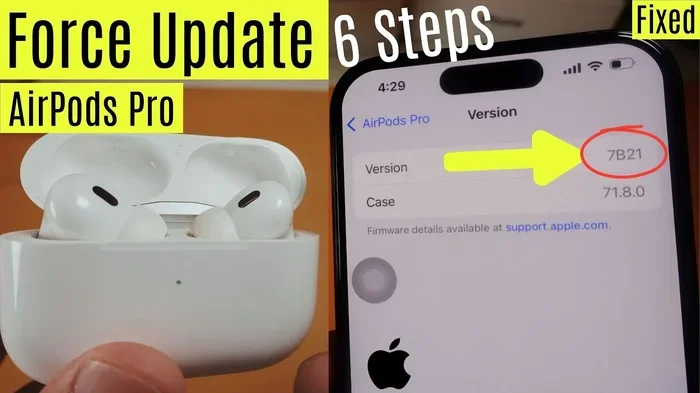
Featured image for AirPods Pro firmware update
Image source: i.ytimg.com
Yes, you should regularly update your AirPods Pro. Firmware updates bring important bug fixes, security patches, and sometimes exciting new capabilities. Think of updates like getting a tune-up for your car—your AirPods will work better and last longer with regular updates. The good news is that updates happen automatically, so you barely have to lift a finger.
Imagine buying a brand new car and never taking it in for maintenance. It would still run, but you’d miss out on better performance, safety improvements, and maybe even fuel efficiency. Your AirPods Pro work the same way. They technically work straight out of the box, but regular firmware updates keep them running at their best.
If you’ve ever asked yourself, “Do I need to update my AirPods Pro?” the short answer is yes, but you don’t really have to worry about it. Apple made the process super easy. In fact, most people don’t even realize updates are happening because they occur automatically in the background. You just need to set up the right conditions, and your AirPods take care of the rest.
This guide will walk you through everything you need to know about AirPods Pro firmware updates. You’ll learn what updates do, how they happen, how to check your current version, and what cool features you might be missing out on. Let’s dive in!
Key Takeaways
- Updates are automatic but require conditions: Your AirPods Pro update themselves when connected to power, paired with your iPhone, and within range of Wi-Fi.
- Updates fix bugs and security issues: Firmware updates patch vulnerabilities and fix audio glitches that could affect your listening experience.
- New features often arrive through updates: Apple has added features like Adaptive Audio, Conversation Awareness, and improved noise cancellation through firmware updates.
- You can’t manually force updates: There’s no button to press; updates happen in the background when conditions are right.
- Check your current firmware version: Go to Settings > Bluetooth > tap the “i” next to your AirPods to see what version you’re running.
- Updates improve battery performance: Many updates include optimizations that help your AirPods Pro battery last longer.
- Older AirPods still receive updates: Even first-generation AirPods Pro from 2019 still get occasional firmware updates from Apple.
📑 Table of Contents
- What Are AirPods Pro Firmware Updates and Why Do They Matter?
- How Do AirPods Pro Updates Actually Work?
- How to Check Your Current AirPods Pro Firmware Version
- What New Features Have Updates Brought to AirPods Pro?
- Common Problems and Troubleshooting AirPods Pro Updates
- Do You Really Need to Update AirPods Pro? The Final Verdict
What Are AirPods Pro Firmware Updates and Why Do They Matter?
Firmware is basically the software that lives inside your AirPods Pro. Think of it as the brain that tells your earbuds how to work. Just like your iPhone gets iOS updates, your AirPods Pro gets firmware updates. These updates are little instruction manuals that tell your AirPods how to behave.
The Three Main Reasons Apple Releases Updates
1. Bug Fixes: Sometimes AirPods develop small issues. Maybe the noise cancellation sounds weird, or the connection drops randomly. Firmware updates fix these problems. According to Apple’s support documentation, they regularly push updates to address reported issues from users.
2. New Features: This is the exciting part. Apple sometimes adds brand-new features through firmware updates. For example, in 2023, Apple rolled out Adaptive Audio and Conversation Awareness to AirPods Pro 2 through a simple firmware update. These weren’t available at launch!
3. Security Improvements: Just like your phone can be hacked, theoretically, so can any connected device. Firmware updates patch security holes to keep your AirPods safe.
Did You Know?
AirPods Pro have received over 15 major firmware updates since their original release in 2019. That’s an average of more than two updates per year! Apple is committed to supporting these little devices long after you buy them.
How Do AirPods Pro Updates Actually Work?
Here’s where things get interesting. Unlike your iPhone, where you tap “Download and Install,” AirPods Pro updates happen automatically. There’s no button to press and no progress bar to watch. It’s almost magical.
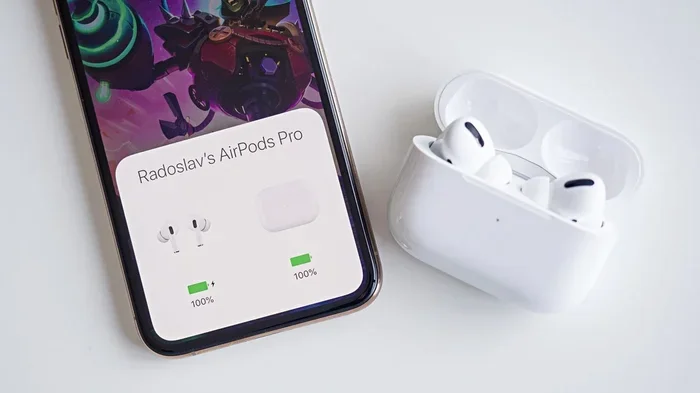
Visual guide about AirPods Pro firmware update
Image source: m-cdn.phonearena.com
The Automatic Update Process
Apple designed AirPods Pro to update themselves when three conditions are met:
- Your AirPods are in their charging case with the lid closed
- The case is connected to power (either through a Lightning cable or wirelessly)
- Your AirPods are paired with your iPhone, iPad, or Mac that has an internet connection
When all these things line up, your AirPods quietly download and install the latest firmware. You might not even notice it happening. It’s like a silent little software party happening inside your charging case!
Why Apple Made Updates Automatic
Apple chose this approach because most people don’t want to fiddle with settings. Research shows that less than 30% of users regularly update their devices manually. By making AirPods updates automatic, Apple ensures everyone gets the latest improvements without having to think about it.
What If Updates Aren’t Happening?
Sometimes updates get stuck or don’t install. This usually happens because one of the three conditions isn’t met. Maybe your case wasn’t plugged in, or your iPhone was in Airplane Mode. If your AirPods seem behind on updates, check these conditions first.
How to Check Your Current AirPods Pro Firmware Version
Even though updates happen automatically, it’s smart to know what version you’re running. Think of it like knowing what year your car was made—it helps you understand what features you have.
Step-by-Step Guide to Check Your Firmware
Step 1: Make sure your AirPods Pro are connected to your iPhone or iPad. Pop them in your ears or open the lid near your device.
Step 2: Open the Settings app on your iPhone. Scroll down and tap “Bluetooth.”
Step 3: Find your AirPods Pro in the list of connected devices. Tap the small “i” icon next to their name.
Step 4: Scroll down to the “About” section. You’ll see “Firmware Version” listed there with a number like “6A300” or “7A302.”
That’s it! You now know exactly what firmware your AirPods are running.
What Do Those Numbers Mean?
Firmware version numbers might look like gibberish, but they follow a pattern. The first number often indicates the major version, while the letters and numbers after give more details. You can look up your specific version on Apple’s support page to see what’s included.
Comparing Versions to Apple’s Latest
After you find your version, you can check Apple’s official firmware release page to see if you’re up to date. As of late 2024, AirPods Pro 2 are running firmware 7A302 or later, while AirPods Pro 1 are on version 6A300 or similar.
What New Features Have Updates Brought to AirPods Pro?
One of the best things about AirPods Pro is that they keep getting better over time. Apple has added some amazing features through simple firmware updates. It’s like getting birthday presents from a company years after you bought their product!
Major Features Added Through Updates
Adaptive Audio (2023): This genius feature automatically adjusts noise control based on your environment. Walking into a loud café? It turns up noise cancellation. Starting a conversation? It lets sound through. All without you lifting a finger.
Conversation Awareness: When you start talking to someone, your AirPods automatically lower your music volume and boost the voices around you. It’s perfect for quick chats without removing your earbuds.
Personalized Volume: Your AirPods learn your listening preferences over time and adjust volume automatically based on where you are and how loud it is.
Improved Noise Cancellation: Through updates, Apple has significantly improved the Active Noise Cancellation on AirPods Pro 2. Many users report the 2023 and 2024 updates made noise cancellation noticeably better.
Spatial Audio Improvements: Updates have refined how Spatial Audio works, making the surround-sound experience feel more realistic and immersive.
Bug Fixes Users Have Appreciated
Beyond fancy features, updates have fixed annoying issues like:
- Bluetooth connection drops during calls
- Uneven battery drain between left and right AirPod
- Audio cutting out during workouts
- Noise cancellation making crackling sounds
- Problems with automatic ear detection
Each of these fixes came through a tiny firmware update that most users never even noticed downloading.
Common Problems and Troubleshooting AirPods Pro Updates
Sometimes things don’t go smoothly. Maybe your AirPods are stuck on an old version, or an update seems to be taking forever. Don’t worry—most update problems have simple solutions.
Problem 1: My AirPods Won’t Update
The fix: Make sure all three conditions for automatic updates are met. Place your AirPods in the case, close the lid, plug in the charging case, and keep it near your iPhone with Wi-Fi turned on. Wait at least 30 minutes. Sometimes updates take time to download.
Problem 2: Update Seems Stuck
The fix: Restart your iPhone and reset your AirPods. To reset, put your AirPods in the case, close the lid, wait 30 seconds, then open the lid. Press and hold the setup button on the back of the case until the light flashes amber, then white.
Problem 3: New Features Aren’t Working After Update
The fix: Some features require your iPhone to also be updated to the latest iOS version. Check that your iPhone is running iOS 17 or later for the newest AirPods features. Also, make sure the feature is enabled in Settings > Bluetooth > your AirPods.
Problem 4: Battery Drain After Update
The fix: Occasionally, a new firmware version might cause temporary battery issues. Usually, a follow-up update fixes this within a few weeks. If battery drain persists, contact Apple Support.
When to Contact Apple Support
If your AirPods Pro consistently fail to update after trying all troubleshooting steps, it might be time to contact Apple. There could be a hardware issue preventing updates. Apple Support is available through the Apple Support app, website, or by visiting an Apple Store.
Do You Really Need to Update AirPods Pro? The Final Verdict
Let’s come back to the original question: Do you need to update your AirPods Pro?
The Honest Answer
You don’t need to do anything because updates happen automatically. Your AirPods will work fine without the latest firmware. However, you should want updates because they genuinely improve your experience.
Updates You Get Without Knowing It
Most people use their AirPods Pro for years and never check the firmware version. They still get all the benefits because updates occur in the background. It’s one of the most user-friendly aspects of the Apple ecosystem.
Updates That Require Your Attention
While the AirPods themselves update automatically, your iPhone needs to be updated too for everything to work together smoothly. Think of it like a dance—both partners need to know the same steps. Keep your iPhone updated to iOS 17 or later for the best AirPods Pro 2 experience.
The Bottom Line
AirPods Pro firmware updates are like vitamins. You don’t have to take them, but they make everything work better. They fix problems you didn’t know you had, add features you didn’t know you wanted, and keep your earbuds secure. Best of all, you don’t have to remember to take them—they just happen automatically.
If you want the best possible experience with your AirPods Pro, just make sure they’re charged, in their case, and near your iPhone regularly. That simple routine ensures you’ll always have the latest and greatest version of the software inside your earbuds. Happy listening!
Frequently Asked Questions
How often should I update my AirPods Pro?
You don’t need to manually update them—updates happen automatically whenever your AirPods are in their charging case with power connected and nearby your paired iPhone. Apple typically releases updates several times per year.
Can I force an AirPods Pro update?
There’s no manual way to force an update. The best you can do is ensure your AirPods are in their case, charging, and near your iPhone with Wi-Fi enabled. Updates will install automatically when conditions are right.
Will updating my AirPods Pro delete my settings?
No, firmware updates preserve your settings, customizations, and paired devices. Your noise cancellation preferences, Spatial Audio settings, and device connections all remain intact after an update.
Do AirPods Pro 1 still get updates in 2024?
Yes, Apple continues to provide occasional firmware updates for the original AirPods Pro from 2019, though new features are typically added to newer models. Security patches and bug fixes still reach older AirPods.
How long does an AirPods Pro update take?
Most firmware updates complete in 15-30 minutes, though it can take longer depending on conditions. The update happens in the background, so you won’t see a progress bar—just check the firmware version later to confirm.
What happens if I skip AirPods Pro updates?
Your AirPods will continue to work normally, but you’ll miss out on bug fixes, security patches, and potentially new features. Skipping updates won’t damage your AirPods, but you’ll have a less optimized experience overall.