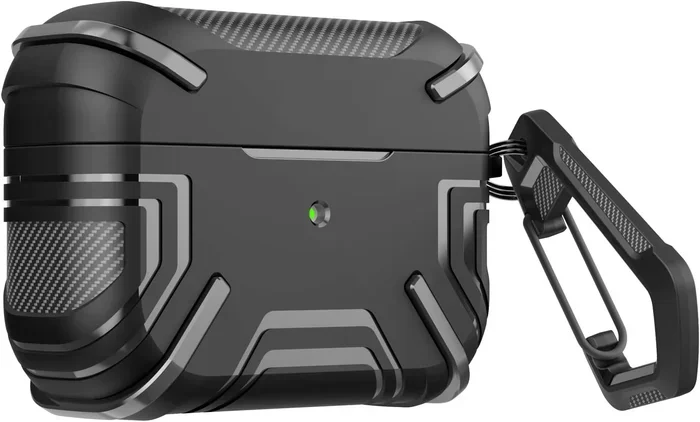
Featured image for Airpod Pro 2 USB C case
Image source: m.media-amazon.com
Yes, the AirPods Pro 2 does have USB-C! Apple made the switch from Lightning to USB-C starting with the September 2023 release. This change affects the charging case, bringing faster charging speeds and better compatibility with modern devices. If you’re buying new ones today, you’ll get the USB-C version, but older models still use Lightning.
Let’s talk about something that confuses a lot of people: the charging port on AirPods Pro 2. You might have heard different things, seen mixed reviews, or just want to make sure you’re buying the right version. The good news? The answer is actually pretty simple once you understand what happened.
The AirPods Pro 2 absolutely does have a USB-C charging port. But here’s the twist: it depends on when you bought them. Apple released the original AirPods Pro 2 in 2022 with a Lightning port (that’s Apple’s old charging connector). Then, in September 2023, they quietly released an updated version with USB-C instead. So if you’re shopping today or wondering about a pair you already own, there are some important details to know.
This guide will clear up all the confusion. We’ll walk through what changed, how to tell which version you have, why Apple made the switch, and what it means for your daily life. Think of this as your complete roadmap to AirPods Pro 2 charging in the USB-C era.
Key Takeaways
- USB-C Arrived in September 2023: Apple launched the AirPods Pro 2 with a USB-C charging case in September 2023, replacing the older Lightning connector.
- Two Versions Exist: There are now two AirPods Pro 2 models: the original Lightning version (2022) and the newer USB-C version (2023).
- Same Price, Better Charging: The USB-C version costs the same as the original but offers improved dust resistance (IP54) and faster charging capabilities.
- Universal Cable Compatibility: You can now charge your AirPods Pro 2 with the same cable you use for your Mac, iPad, Android phone, or any modern device.
- Lossless Audio Support: The USB-C version works with the Apple Vision Pro headset for 20-bit, 48 kHz lossless audio with ultra-low latency.
- Easy Identification: You can tell which version you have by checking the bottom of the charging case for either a USB-C port or Lightning port.
- Future-Proof Investment: Buying the USB-C version means you’re ready for the universal charging standard that’s becoming standard worldwide.
📑 Table of Contents
- The Big Switch: Lightning to USB-C Explained
- How to Tell Which AirPods Pro 2 Version You Have
- What’s Different About the USB-C Version?
- Charging Your AirPods Pro 2: What You Need to Know
- Buying AirPods Pro 2 in 2024 and Beyond: What to Choose
- Common Questions and Troubleshooting
- The Environmental and Practical Impact
- Final Thoughts: The USB-C AirPods Pro 2 Story
The Big Switch: Lightning to USB-C Explained
Imagine if every gas station in the country used a different fuel pump shape. That’s kind of what the charging world looked like for years. Different phones, tablets, and gadgets all needed their own special cables. Apple used Lightning, Android phones mostly used USB-C, laptops had various ports, and it was a mess.
Then something started happening. Countries in Europe passed laws saying all phones and small electronics must use the same charging port: USB-C. The deadline was December 2024. Even though Apple fought against this for years, they eventually gave in because it made sense.
Why USB-C Won the Battle
USB-C is like the Swiss Army knife of charging ports. It can:
- Charge devices faster because it handles more power
- Transfer data quicker for things like syncing music
- Work both ways (you can plug it in upside down and it still works)
- Fit in tiny spaces while still being super durable
- Connect almost everything from phones to laptops to game consoles
Think of Lightning like a specialized key that only opens certain doors. USB-C is like a master key that opens most doors. Once you start using it, you’ll wonder how you ever lived with multiple cables.
When Did AirPods Pro 2 Get USB-C?
Apple announced the AirPods Pro 2 with USB-C on September 12, 2023, at their annual iPhone event. They started selling them on September 22, 2023, alongside the iPhone 15 lineup (which also made the switch to USB-C).
Did you know? Apple didn’t make a big announcement about this change. They just quietly updated the product listing. Many people didn’t even realize there were now two versions of the AirPods Pro 2 until they started shopping around.
How to Tell Which AirPods Pro 2 Version You Have
This is the part that trips people up the most. You might be looking at your AirPods right now wondering, “Which one do I have?” Don’t worry, there are some easy ways to find out.
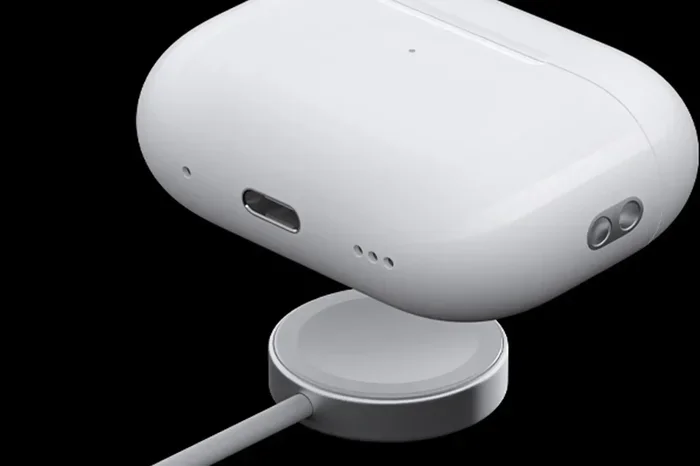
Visual guide about Airpod Pro 2 USB C case
Image source: macworld.com
Check the Charging Case Port
The simplest way is to look at the bottom of your charging case. Flip it over and you’ll see a small oval-shaped port.
- USB-C version: The port is a rounded rectangle shape, wider than it is tall
- Lightning version: The port is smaller, more like a tiny rounded slot
It’s kind of like telling the difference between a new smartphone charging port and an old iPhone port. Once you see them both, you’ll never mix them up.
Check the Model Number
If you want to be 100% sure, you can check the model number. Here’s how:
- Connect your AirPods Pro 2 to your iPhone or iPad
- Open the Settings app
- Tap on Bluetooth
- Find your AirPods in the list and tap the “i” icon next to them
- Look for the model number
The model numbers break down like this:
- A2968: USB-C version (released 2023)
- A2700: Original Lightning version (released 2022)
Look at the Box
If you still have the original packaging, the box will clearly say “USB-C” on the back near the specifications. The Lightning version won’t mention USB-C at all because that’s just the standard cable it came with.
Check When You Bought Them
This isn’t foolproof, but it can give you a clue:
- Bought before September 2023: Almost certainly the Lightning version
- Bought after September 2023: Most likely the USB-C version (unless you bought old stock)
What’s Different About the USB-C Version?
You might be thinking, “So they just changed the port, right?” Actually, there’s more to it than that. The USB-C version came with several meaningful upgrades that make it worth considering.
Visual guide about Airpod Pro 2 USB C case
Image source: m.media-amazon.com
Improved Durability and Dust Protection
The USB-C AirPods Pro 2 have an IP54 rating, while the original had IPX4. That extra “5” might not sound like much, but it makes a real difference.
Here’s a way to think about it: imagine a raincoat. IPX4 means you can walk through light rain without getting soaked. IP54 means you’re also protected from dust and sand. If you’ve ever taken your AirPods to the beach or on a dusty hike, you’ll appreciate that upgrade.
Lossless Audio with Apple Vision Pro
Here’s something cool that only works with the USB-C version. When paired with the Apple Vision Pro headset (Apple’s new spatial computer), the AirPods Pro 2 can deliver lossless audio. This means the sound quality is essentially identical to what came out of the recording studio. No compression, no quality loss.
The original Lightning version can’t do this because the Lightning connector couldn’t handle the data speeds needed. The USB-C port can transfer data much faster, making high-quality audio streaming possible.
Faster Charging Speeds
While both versions charge pretty fast, the USB-C version has slightly improved charging efficiency. You can get about an hour of listening time with just 5 minutes in the case. It’s not a massive difference, but every little bit helps when you’re rushing out the door.
Same Great Sound Quality
Here’s the thing: the actual audio drivers, noise cancellation, and sound quality are identical between both versions. Apple didn’t change the speaker components at all. So if you’re choosing based purely on sound, you won’t notice a difference.
The improvements are all about the charging case and connectivity, not the listening experience itself.
Charging Your AirPods Pro 2: What You Need to Know
Now let’s talk about the practical stuff. How do you actually charge these things, and what do you need?
What Cable Do You Need?
For the USB-C version, you need a USB-C to USB-C cable or a USB-C to USB-A cable (if you’re plugging into an older computer or charger). The box comes with a USB-C to USB-C cable, so you’re ready to go right away.
For the Lightning version, you need a Lightning cable. Most Apple products from before 2023 used this, so you probably already have several lying around.
Can You Use Any USB-C Cable?
Yes! This is one of the best parts about the switch. Any USB-C cable that works with another device will work with your AirPods Pro 2. That means:
- Your MacBook charger works
- Your iPad Pro cable works
- Your Android phone cable works
- Your Nintendo Switch cable works
- That random USB-C cable you found in your drawer? Yep, that works too
It’s like finally having one key that opens all your locks. So much simpler than the old days when you needed different cables for different devices.
Wireless Charging Still Works
Both versions support wireless charging with any Qi-certified charger or MagSafe charger. You just place the case on the charging pad, and it fills up. No cables required.
The USB-C version also works with Apple Watch chargers, which is a nice bonus. The original version doesn’t support that.
Charging Times
Here’s a quick breakdown of how long charging takes:
- 5 minutes in the case: About 1 hour of listening time
- Full charge for AirPods: About 1 hour
- Full charge for case: About 1 hour
- Total battery life: Up to 30 hours with the case (6 hours per charge in the earbuds)
Buying AirPods Pro 2 in 2024 and Beyond: What to Choose
If you’re shopping for AirPods Pro 2 today, you have some decisions to make. Let’s break down your options.
Buying New from Apple
When you buy directly from Apple’s website or stores, you’ll get the USB-C version. Apple stopped selling the Lightning version through their main channels. The price is $249, same as before.
Buying from Other Retailers
Here’s where it gets tricky. Some retailers might still have old Lightning version stock. The price might be lower because they’re trying to clear inventory. Before you buy, check the model number or ask which version it is.
Did you know? Some retailers don’t even know they’re selling the old model. They might think all AirPods Pro 2 are the same. It’s worth double-checking.
Should You Buy USB-C Even If You Have Older Apple Devices?
Absolutely. Here’s why:
- The world is moving to USB-C. Even Apple is using it on iPhones now.
- You’ll have one less cable to worry about. Most new gadgets use USB-C.
- It’s more durable. USB-C ports typically last longer than Lightning ports.
- Future compatibility. You won’t be stuck with an outdated connector in a few years.
Think of it like buying a house with the modern electrical system versus an older one. The modern one costs about the same but saves you headaches later.
What About AirPods Pro 3?
You might be wondering about the next generation. Apple released AirPods Pro 3 in September 2025 with even more features. But if you’re looking at the AirPods Pro 2, you’re getting a great product at a potentially lower price now that the newer model is out.
Common Questions and Troubleshooting
Let’s address some real-world scenarios you might run into.
My AirPods Won’t Charge. What’s Wrong?
Before panicking, try these steps:
- Make sure the cable is fully plugged in on both ends
- Try a different USB-C cable (cables do wear out)
- Clean the port gently with a dry, soft brush
- Try a different charger or power outlet
- Reset your AirPods by holding the setup button on the back for 15 seconds
Think of the port like a keyhole. Sometimes dust and pocket lint get packed in there and block the connection. A gentle cleaning often fixes the issue.
Can I Use My iPhone to Charge My AirPods?
Yes! If you have an iPhone 15 or newer (with USB-C), you can plug one end of a USB-C cable into your iPhone and the other into your AirPods case. Your iPhone will share its battery power. It’s not super fast, but it’s a lifesaver when you’re traveling and don’t have a wall outlet nearby.
This works with the Lightning version too if you have a Lightning to Lightning cable, but most people don’t carry those around anymore.
What If I Lost My Cable?
Any USB-C cable will work. You can grab one from:
- Another device in your house
- A friend or family member (most people have extras)
- Any electronics store (they’re very common now)
- A dollar store or gas station in a pinch
USB-C cables have become so universal that they’re almost easier to find than Lightning cables these days.
The Environmental and Practical Impact
Let’s zoom out and think about why this change matters beyond just charging your earbuds.
Less Electronic Waste
Did you know? The average household has at least 3-5 different charging cables lying around. When everything uses the same cable, you need fewer cables overall. That means less manufacturing, less packaging, and less stuff ending up in landfills.
The European Union estimated that switching to universal chargers would save consumers about €250 million per year and significantly reduce electronic waste. That’s a big deal.
Travel-Friendly
If you travel, the USB-C switch is amazing. You can now carry one cable for your phone, tablet, laptop, and AirPods. That’s less weight in your bag and fewer things to forget at hotel rooms.
Industry-Wide Change
Apple wasn’t first to USB-C. Android phones had been using it for years. But Apple switching was huge because Apple sells so many devices. This essentially sealed USB-C as the universal standard for the foreseeable future.
Final Thoughts: The USB-C AirPods Pro 2 Story
So, does the AirPods Pro 2 have USB-C? The answer is a clear yes, especially if you’re buying them new today. Apple made a smart move by updating this product to USB-C in September 2023, and the change brings real benefits beyond just convenience.
If you already own the Lightning version, don’t stress about it. Your AirPods still work perfectly fine. Lightning cables are still sold everywhere, and your charging experience is basically the same. The only real downside is if you lose your cable and everyone around you only has USB-C.
If you’re buying new, definitely get the USB-C version. It’s the same price, it’s more durable, it works with more devices, and it’s future-proof. You’ll thank yourself when you’re using the same cable for your iPhone, iPad, MacBook, and AirPods.
The shift to USB-C isn’t just a tech trend. It’s a simplification of our digital lives. One cable for everything. That’s the dream Apple, and the rest of the tech industry, is finally making reality.
Whether you’re a longtime Apple user or someone considering their first pair of AirPods, the USB-C AirPods Pro 2 represent the sweet spot of features, quality, and convenience. They’re proof that sometimes the best changes are the ones that make everyday life just a little bit easier.