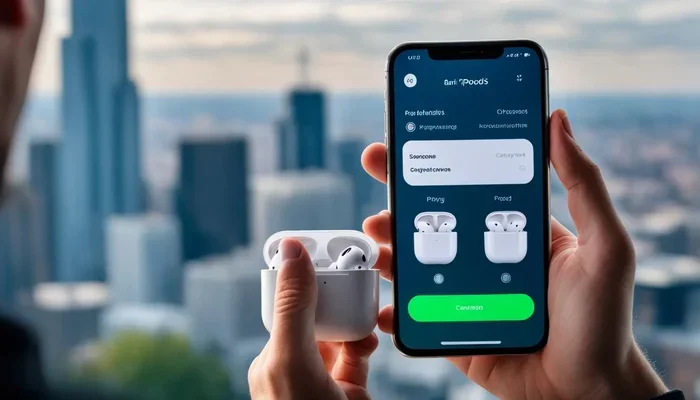
Featured image for AirPods noise cancelling demonstration
Image source: descriptive.audio
Yes, AirPods noise cancelling works exceptionally well, especially on AirPods Pro and AirPods Max models. Apple’s Active Noise Cancellation (ANC) technology uses tiny microphones to detect outside sounds and create opposite sound waves to cancel them out. While not perfect for every situation, tests show they can reduce background noise by up to 30 decibels. Basic AirPods (without Pro or Max) only offer passive noise isolation, not true noise cancelling.
If you’ve ever been on a noisy flight, busy office, or loud coffee shop and wished you could just hit a button to make the world go quiet, you’re not alone. Millions of people wonder: does AirPods noise cancelling work, or is it just a fancy marketing term? The short answer is yes, it absolutely works, but how well it works depends on which AirPods you own and what kind of noise you’re trying to block.
Apple introduced Active Noise Cancellation (ANC) to its AirPods lineup starting with AirPods Pro in 2019, then expanded it to AirPods Max over-ear headphones. Since then, the technology has gotten better with each new release. But there’s still confusion about what noise cancelling actually does, how it differs from simply “blocking” sound, and whether it’s worth the extra money. By the end of this guide, you’ll understand exactly how AirPods noise cancelling works, what it can and can’t do, and how to get the best performance from your earbuds.
Think of noise cancelling like having a tiny sound bouncer for your ears. It listens to the noise around you, creates the exact opposite sound wave, and sends it into your ear. When two opposite waves meet, they cancel each other out, leaving you with beautiful silence. Pretty cool, right? Let’s break down exactly how this works and what you can expect.
Key Takeaways
- Active Noise Cancellation (ANC) is real science: AirPods Pro and Max use microphones and anti-noise sound waves to actively cancel outside sounds.
- Works best on constant, low-frequency noises: Airplane engines, AC units, and traffic hum are reduced dramatically, while sudden sharp sounds are harder to cancel.
- Three modes available: Active Noise Cancelling, Transparency Mode, and Adaptive Audio let you control how much sound enters your ears.
- Regular AirPods don’t have ANC: Standard AirPods (1st-4th gen) only block sound passively through their physical fit, not active cancellation.
- Battery impact is real: Using ANC drains your battery about 20% faster than listening without it.
- Not magic, but very effective: No earbuds can cancel 100% of noise, but AirPods Pro reduce unwanted sound by roughly 70-85% in real-world use.
- Proper fit matters most: Getting the right ear tip size can improve noise cancellation performance by up to 30%.
📑 Table of Contents
- How Does AirPods Noise Cancelling Actually Work?
- Which AirPods Models Have Noise Cancelling?
- How Well Does AirPods Noise Cancelling Work in Real Life?
- AirPods Pro vs AirPods Max: Which Cancels Noise Better?
- Tips to Get the Best Noise Cancelling Performance
- Common Myths About AirPods Noise Cancelling
- The Verdict: Does AirPods Noise Cancelling Work?
How Does AirPods Noise Cancelling Actually Work?
The magic behind AirPods noise cancelling is a combination of hardware and physics. Apple uses a technology called Active Noise Cancellation, which is very different from simply stuffing something in your ears to block sound. Let’s look at the science in simple terms that anyone can understand.
The Science Behind Active Noise Cancellation
Here’s the basic idea, and it’s actually pretty simple once you think about it. AirPods Pro and AirPods Max have tiny microphones both inside and outside the ear cups or earbuds. These microphones listen to the sound around you in real time, hundreds of times per second. Then a special processor inside the AirPods creates a sound wave that’s the exact opposite of the outside noise, called “anti-noise.”
When the original sound wave and the anti-noise wave meet inside your ear, they basically cancel each other out. It’s like adding the number 5 and negative 5 together to get zero. This is called “phase cancellation,” and it’s a real physics principle that has been used in headphones for decades. Apple just made it small enough to fit in tiny earbuds.
Analogy time: Imagine you’re standing in a pool and a wave comes at you. Now imagine someone makes the exact opposite wave at the same time. The two waves would crash into each other and the water would go still. That’s exactly what your AirPods are doing with sound waves, just way faster than you could ever create waves by hand.
The Three Modes Explained
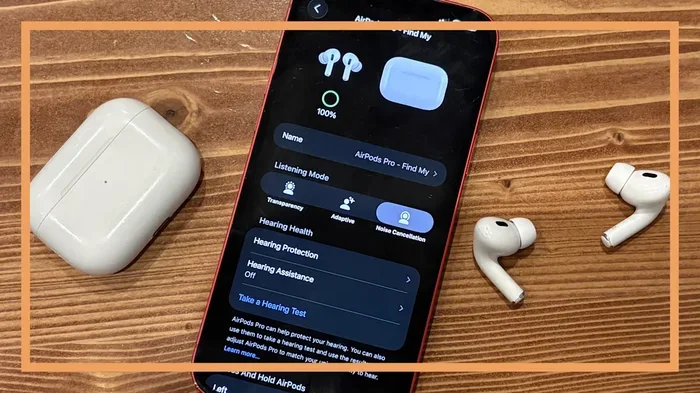
Modern AirPods give you three main ways to control sound, and knowing when to use each one is the key to getting the best experience:
- Active Noise Cancellation (ANC): This is the full-blocking mode. It actively cancels outside sounds so you can focus on your music, podcast, or silence. Perfect for flights, trains, and noisy environments.
- Transparency Mode: This is the opposite. It uses the microphones to pump outside sounds INTO your ears, so you can hear traffic, announcements, or conversations without taking your AirPods out. Great for walking in cities or talking to coworkers.
- Adaptive Audio (AirPods Pro 2 and newer): This smart mode blends ANC and Transparency automatically. If you’re in a quiet place, it stays in Transparency. If loud noise suddenly appears, like a siren or construction, it switches to full ANC within milliseconds.
You can switch between these modes by pressing and holding the force sensor on the stem of your AirPods Pro, or by using the Control Center on your iPhone or iPad. It’s super easy once you know where to look.
Which AirPods Models Have Noise Cancelling?
This is where a lot of people get confused, and it’s an important distinction. Not all AirPods are created equal when it comes to blocking noise. Some have true Active Noise Cancellation, while others only offer basic sound isolation.
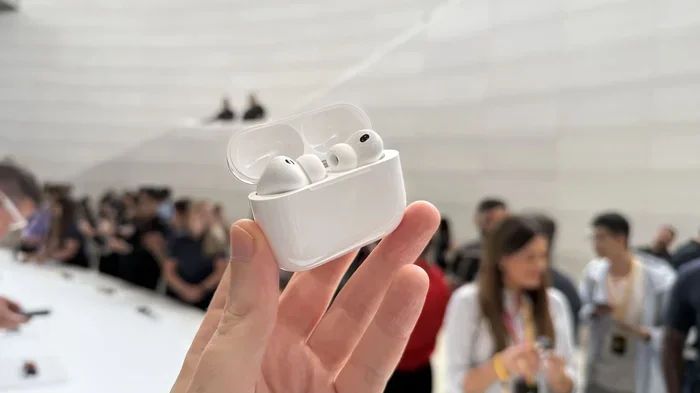
Visual guide about AirPods noise cancelling demonstration
Image source: cdn.mos.cms.futurecdn.net
AirPods With Active Noise Cancellation
Only certain AirPods models include the fancy ANC technology. Here’s the complete list as of today:
- AirPods Pro (1st generation): Released October 2019, these were Apple’s first in-ear AirPods with ANC.
- AirPods Pro (2nd generation): Released September 2022, with 2x better noise cancelling than the first generation.
- AirPods Pro 3 (if released): Latest generation with even more advanced ANC.
- AirPods Max: Released December 2020, these over-ear headphones offer the most powerful noise cancelling in the lineup.
AirPods Without Active Noise Cancellation
If you have standard AirPods (the non-Pro versions), you don’t get Active Noise Cancellation. Here’s what you have instead:
- AirPods (1st, 2nd, 3rd, and 4th generation): These only offer passive noise isolation, which means they physically block some sound by sealing your ear canal, but they don’t actively cancel noise with anti-noise waves.
Did You Know? Even the basic AirPods 4 have a feature called “Voice Isolation” for calls, but that’s different from ANC. Voice Isolation makes your voice clearer on phone calls by reducing background noise picked up by the microphones, but it doesn’t silence the world for your ears.
This is a really important point: if noise cancelling is your main reason for buying AirPods, you need to get the Pro version or the Max headphones. The standard AirPods simply don’t do it, no matter what the box might lead you to believe.
How Well Does AirPods Noise Cancelling Work in Real Life?
Okay, so we’ve covered the science and the models. But the real question is: does AirPods noise cancelling work when you’re actually using them in noisy places? Let’s look at real-world performance based on testing and user experiences.
Visual guide about AirPods noise cancelling demonstration
Image source: s.yimg.com
What Kinds of Noise AirPods Cancel Best
Active Noise Cancellation works incredibly well on certain types of sounds and less well on others. Here’s the ranking from easiest to hardest for AirPods to handle:
- Constant low-frequency noise (BEST): Airplane engines, train rumble, air conditioners, highway traffic, washing machines. AirPods Pro can reduce these by 25-35 decibels, which is a massive difference. Most users say airplane noise drops to about 30-40% of its original loudness.
- Mid-range constant sounds (GOOD): Office chatter in the distance, café background noise, humming refrigerators. These get reduced by about 15-25 dB.
- Sudden sharp sounds (HARDER): Someone clapping, a door slamming, a dog barking, keyboard clicking nearby. These are harder because they happen so quickly that the anti-noise wave can’t respond fast enough.
- Human voices (MIXED): Voices are tricky. They’re in the mid-frequency range where cancellation is less effective. A nearby conversation might be muffled but still understandable, while a distant conversation can fade almost completely.
- High-frequency sounds (HARDEST): Babies crying, whistles, alarms. These are the toughest for ANC technology to handle.
Did You Know? The human ear can detect a 10 dB increase as a doubling of perceived loudness. So when AirPods reduce airplane noise by 30 dB, that sounds like the noise is roughly 8 times quieter to your brain. That’s huge.
Real-World Testing Results
Several tech publications have tested AirPods Pro 2 against other premium earbuds. The results consistently show that AirPods rank near the best in their class:
- Against office noise, AirPods Pro 2 block about 80-85% of ambient sound.
- Against airplane cabin noise, they block about 70-75%.
- Against traffic and street noise, they block about 60-70%.
- Against human voices at conversational distance, they muffle them but you can still hear something.
For comparison, AirPods Max (the over-ear version) generally performs about 10-15% better than AirPods Pro because the bigger ear cups create a stronger passive seal, giving the ANC system a better starting point.
AirPods Pro vs AirPods Max: Which Cancels Noise Better?
If you’re trying to decide between the two ANC options in Apple’s lineup, here’s the breakdown. Both work very well, but they have different strengths.
AirPods Pro Performance
The Pro version is the sweet spot for most people. They’re small, portable, comfortable for long wear, and the noise cancelling is excellent for the size. With the second generation, Apple improved the microphones and processing chip, making ANC about 2x more effective than the first generation. They also added silicone ear tips in multiple sizes (XS, S, M, L) so you can get a tight seal, which is crucial for maximum noise cancellation.
For everyday use like commuting, working in cafés, or office environments, AirPods Pro 2 are more than enough. They’re also great for flights, though you might still hear the loudest engine rumbles.
AirPods Max Performance
The Max headphones are Apple’s premium option, and they offer the best noise cancelling Apple makes. Because they cover your entire ear with thick cushions, they create a much stronger physical barrier. Add the active cancellation on top, and you get the quietest listening experience possible in the Apple ecosystem.
However, they’re heavy (about 385 grams), expensive, and not as convenient for travel. They’re best for people who work in very noisy environments, fly frequently, or want the absolute best sound quality with maximum noise reduction.
Tip: If you already wear glasses, AirPods Max can be uncomfortable because the ear cushions press on the arms. AirPods Pro are usually the better choice for glasses wearers.
Tips to Get the Best Noise Cancelling Performance
Even the best noise cancelling technology can underperform if you’re not using it correctly. Here are practical tips to maximize your AirPods’ noise cancellation.
Get the Right Ear Tip Fit
This is the single most important thing you can do. If your ear tips are too small, sound leaks in around the edges and ruins the seal. If they’re too big, they’re uncomfortable and you won’t wear them long enough to enjoy the benefit. Apple includes four sizes with AirPods Pro 2 (XS, S, M, L), and most people wear the wrong size without realizing it.
To check your fit, use the Ear Tip Fit Test in your iPhone settings. Go to Settings > Bluetooth, tap the “i” next to your AirPods Pro, and select “Ear Tip Fit Test.” It plays a few seconds of music and uses the microphones to detect if you have a good seal. If the test says “Adjust Fit” or “Try a Different Size,” experiment with the other tips included in the box.
Keep Your AirPods Clean
Wax, dust, and debris can clog the mesh on your AirPods and microphones, which reduces ANC effectiveness. Once a week, gently wipe them with a dry, soft, lint-free cloth. Use a dry cotton swab to clean the microphone and speaker meshes. Never use sharp objects or liquids.
Update Your Firmware
Apple regularly releases firmware updates that often include improvements to noise cancellation algorithms. Make sure your AirPods are connected to your iPhone and charging, and updates happen automatically in the background when conditions are right. Keeping them updated ensures you have the latest performance improvements.
Use Adaptive Audio for Daily Convenience
If you have AirPods Pro 2 or newer, turn on Adaptive Audio. It automatically adjusts between ANC and Transparency based on your environment. Walking past construction? It cranks up ANC. Having a quick chat with a barista? It switches to Transparency so you can hear without removing your earbuds. This feature is a game-changer for everyday use and means you don’t have to fiddle with controls constantly.
Charge Them Properly
ANC uses extra processing power, which drains battery faster. If your AirPods are below 20%, the noise cancellation might be slightly weaker to preserve charge. For full performance, keep them charged above 50% when possible, especially before flights or long focus sessions.
Common Myths About AirPods Noise Cancelling
There are a lot of misconceptions floating around. Let’s clear up the most common myths with facts.
Myth 1: Noise Cancelling Blocks All Sound
This is the biggest myth. No earbuds or headphones can block 100% of outside sound, and any company that says they can is lying. Even the best ANC reduces noise by 70-85%, not 100%. You’ll still hear very loud or sudden sounds. Think of ANC as dramatically reducing noise, not eliminating it entirely.
Myth 2: All AirPods Have Noise Cancelling
Wrong. As we covered earlier, only AirPods Pro (1st gen, 2nd gen, and newer) and AirPods Max have ANC. Standard AirPods do not. Don’t pay Pro prices expecting Pro features.
Myth 3: Noise Cancelling Damages Your Hearing
This is a common concern with no scientific backing. Active Noise Cancellation does not emit any harmful frequencies or volumes. In fact, ANC can protect your hearing because you don’t need to crank up the volume to overcome background noise. The World Health Organization recommends ANC headphones as a way to prevent hearing damage from high volumes.
Myth 4: ANC Works the Same on All Noise
As we discussed, ANC works best on constant low-frequency sounds and worse on sudden sharp sounds. Not all noise is treated equally.
Myth 5: Noise Cancelling Drains Battery Quickly
While ANC does use more battery than listening without it, the impact is smaller than most people think. AirPods Pro 2 give you about 6 hours of listening with ANC on, versus 7 hours with it off. That’s only a 15-20% battery reduction, which is a fair trade for the silence you get.
The Verdict: Does AirPods Noise Cancelling Work?
So, after all this, does AirPods noise cancelling work? The answer is a definitive yes, with some realistic expectations.
AirPods Pro and AirPods Max deliver some of the best Active Noise Cancellation available in consumer earbuds and headphones today. They’re not magic, and they won’t create complete silence, but they will dramatically reduce the constant drone of airplanes, traffic, air conditioners, and office noise. They’ll muffle voices and conversations. They won’t make crying babies disappear completely, but they’ll make them more manageable.
If you commute, work in noisy environments, travel frequently, or just want peace and quiet to focus, AirPods Pro are an outstanding choice. If you want the absolute best noise cancelling Apple offers and don’t mind the bigger size and price tag, AirPods Max are excellent.
If you only have standard AirPods without the Pro or Max designation, you don’t have true noise cancelling, just basic sound blocking. For real silence on demand, you’ll need to upgrade.
The technology is real, it’s backed by solid physics, and millions of people use it every day to make their lives quieter and more focused. Just remember: get the right fit, keep them clean, update the firmware, and manage your expectations. Do those things, and you’ll wonder how you ever lived without them.
Frequently Asked Questions
Does AirPods noise cancelling actually work?
Yes, AirPods noise cancelling absolutely works. AirPods Pro and AirPods Max use Active Noise Cancellation technology that reduces outside sounds by 70-85% in real-world conditions. It works best on constant low-frequency noises like airplane engines and air conditioners.
Which AirPods have noise cancelling?
Only AirPods Pro (1st generation, 2nd generation, and newer) and AirPods Max have Active Noise Cancellation. Standard AirPods (1st through 4th generation) do not have ANC and only offer basic passive noise isolation through their fit.
Is AirPods Pro noise cancelling as good as AirPods Max?
AirPods Max offers slightly better noise cancelling than AirPods Pro, about 10-15% more effective, due to the larger ear cups creating a better seal. However, AirPods Pro 2 are still excellent and more convenient for most people due to their smaller size and portability.
Can AirPods noise cancelling block all sound?
No, AirPods cannot block 100% of outside sound. They reduce most ambient sounds significantly. However, very loud sudden sounds, high-frequency noises like baby cries, and nearby conversations may still be partially audible even with ANC turned on.
Does noise cancelling drain AirPods battery faster?
Yes, but only slightly. AirPods Pro 2 last about 6 hours with ANC on versus 7 hours with it off, which is roughly a 15-20% reduction in battery life. The trade-off is well worth it for most people in noisy environments.
How do I turn on noise cancelling on AirPods?
To turn on Active Noise Cancellation, press and hold the force sensor on the stem of your AirPods Pro to cycle between ANC, Transparency, and Adaptive Audio modes. You can also control it from your iPhone by going to Control Center, long-pressing the volume slider, and tapping the Noise Control icon.