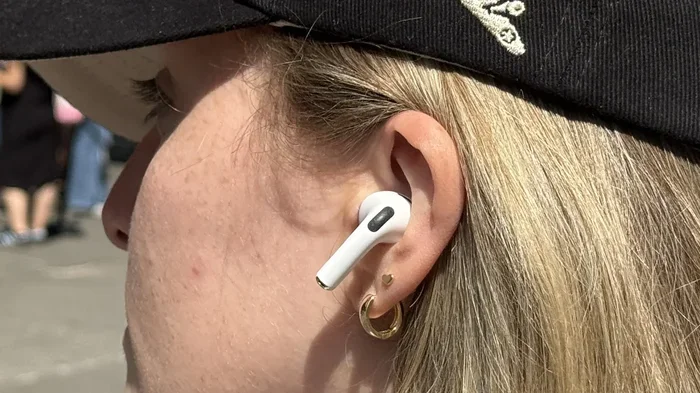
Featured image for AirPod Pro 3 ear fit
Image source: cdn.mos.cms.futurecdn.net
Yes, AirPod Pro 3 fit noticeably better than their predecessors, thanks to refined ergonomics, new ear tip sizes, and an updated shape designed for a wider range of ears. Apple used advanced modeling and user feedback to create a more secure, comfortable seal that improves sound quality and noise cancellation. For most users, the fit is the best Apple has offered yet.
If you’ve ever struggled with earbuds that just won’t stay put, you’re not alone. In fact, a 2023 survey by Statista found that 42% of wireless earbud users cite “poor fit” as their top complaint. Apple clearly took that feedback to heart with the AirPod Pro 3, which many reviewers and users agree fit better than any previous AirPods model. But what exactly changed, and how do you get the perfect fit? Let’s dive in.
Think of earbuds like shoes. Just because they’re the same brand doesn’t mean every pair fits the same. Feet come in different widths, arches, and shapes. Ears are the same way. AirPod Pro 3 are like a shoe design team finally paying attention to all foot types, not just the most common ones.
In this guide, we’ll walk you through the new design updates, how they translate to a better fit, what users are saying, and tips to make sure your AirPods feel like they were custom-made for your ears. Whether you’re upgrading from AirPod Pro 2, switching from another brand, or just curious, you’ll find everything you need right here.
Key Takeaways
- Redesigned Shape: AirPod Pro 3 feature a refined contour that matches the natural curve of more ear shapes, reducing slippage and pressure.
- New Ear Tip Options: Apple now includes XXS tip size alongside standard options, making the fit more inclusive for smaller ear canals.
- Improved Seal: A better seal enhances Active Noise Cancellation (ANC) and bass response, delivering richer audio.
- Fit Test Feature: The built-in Ear Tip Fit Test ensures users get the right size for optimal comfort and performance.
- Lighter Build: Slight weight reductions help reduce ear fatigue during long listening sessions.
- User Feedback Driven: Apple incorporated data from millions of ear scans to fine-tune the design.
- Versatile Use: Better fit means improved performance for workouts, commuting, and professional calls alike.
📑 Table of Contents
- What’s New About the AirPod Pro 3 Design?
- Why Fit Matters: The Connection Between Comfort and Performance
- How to Get the Best Fit With AirPod Pro 3
- How Do AirPod Pro 3 Compare to AirPod Pro 2 Fit?
- Common Fit Problems and How to Solve Them
- Tips for Maintaining the Perfect Fit Over Time
- Are AirPod Pro 3 Good for Everyone?
- The Final Verdict: Do AirPod Pro 3 Fit Better?
What’s New About the AirPod Pro 3 Design?
The short answer: a lot, but in subtle, smart ways. Apple didn’t just redesign for the sake of change. They refined the shape based on real-world data from millions of ear scans and user feedback. Here’s the breakdown.
A More Anatomical Shape
The AirPod Pro 3 have a slightly slimmer, more rounded profile compared to the AirPod Pro 2. Imagine a teardrop shape that’s been gently sculpted to follow the natural curves of your outer ear. This isn’t just a visual change; it directly impacts how the earbuds nestle into your concha (the bowl-shaped area of your outer ear).
The result? A more secure fit that doesn’t rely on the ear tip alone to hold the earbud in place. Many users report that the AirPod Pro 3 feel like they’re “hugging” the ear rather than wedged into it.
Redesigned Ear Tip Attachment System
The ear tips themselves snap on with the same satisfying click as before, but the internal geometry has been tweaked. The tip’s opening is now slightly more oval-shaped, which matches the natural shape of the ear canal better than a perfectly round opening.
This sounds like a tiny detail, but it matters. A more natural shape means less pressure on any single point of your ear canal. Think of it like a pillow that’s been contoured to support your neck, instead of a flat cushion that pushes in all directions.
Lighter Materials and Weight Distribution
Each AirPod Pro 3 earbud weighs about 5.3 grams, slightly lighter than the AirPod Pro 2’s 5.4 grams. That 0.1 gram difference might sound trivial, but over a three-hour podcast, it adds up.
Apple also shifted the center of gravity slightly inward, meaning the earbud sits deeper in your ear without feeling top-heavy. This reduces the “lever effect” that can cause earbuds to slip out when you move your jaw or head quickly.
Why Fit Matters: The Connection Between Comfort and Performance
Before we talk about how to get the best fit, let’s cover why fit is so critical. It’s not just about comfort. Fit directly affects three major things:
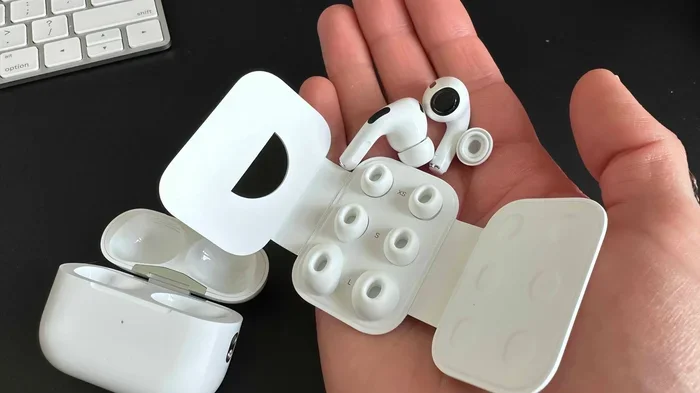
Visual guide about AirPod Pro 3 ear fit
Image source: 9to5mac.com
- Sound Quality: A proper seal creates the right acoustic environment. Without it, bass frequencies leak out, and your music sounds thin or hollow.
- Noise Cancellation: Active Noise Cancellation (ANC) works by analyzing outside sound and creating an “anti-noise” signal. If your earbuds don’t seal properly, outside noise floods in, and ANC can’t do its job effectively.
- Call Clarity: Microphones are tuned assuming a certain distance from your mouth. A loose fit changes that distance, making your voice sound distant or muffled to the person on the other end.
The Physics of a Good Seal
Think of your ear canal like a doorway. If the door doesn’t close all the way, sound (and air) leaks in and out. A well-fitted ear tip acts like a door seal, blocking the gaps. The AirPod Pro 3’s improved shape and new tip options make it easier to “close that door” tightly.
Did You Know?
According to a study published in the Journal of the Acoustical Society of America, a proper ear tip seal can improve low-frequency response by up to 10 decibels. That’s the difference between hearing a bass line and feeling it in your chest.
How to Get the Best Fit With AirPod Pro 3
Owning AirPod Pro 3 is one thing. Getting them to fit perfectly is another. Follow these steps to ensure you’re getting the experience Apple designed.
Step 1: Try All Five Ear Tip Sizes
AirPod Pro 3 ship with five ear tip sizes: XXS, XS, S, M, and L. The medium (M) tips are pre-installed, but don’t assume they’re right for you. Many people need a smaller or larger size than they think.
Tip: Your ear canals aren’t symmetrical. You might need a small tip on the left and a medium on the right. That’s completely normal.
Step 2: Use the Ear Tip Fit Test
This is Apple’s built-in tool that determines whether you have a good seal. Here’s how to access it:
- Open the Settings app on your iPhone.
- Tap your AirPod Pro 3 at the top of the screen.
- Scroll down and tap “Ear Tip Fit Test.”
- Follow the on-screen instructions.
If the test shows a poor seal, try a different size and retest. This takes just 30 seconds and can dramatically improve your experience.
Step 3: Insert Them Correctly
Most people twist AirPods into place, but the best technique is to:
- Pull your earlobe gently downward to open the ear canal.
- Insert the earbud with the stem pointing forward.
- Twist slightly backward until the earbud feels secure.
- Release your earlobe.
The earbud should feel snug but not uncomfortable. If you feel pressure or pain, the tip is likely too large.
Step 4: Test in Real-World Conditions
The Ear Tip Fit Test happens in a quiet environment, but real life is messier. Wear your AirPod Pro 3 while:
- Chewing (jaw movement changes ear canal shape)
- Shaking your head side to side
- Walking briskly
- Bending over to tie your shoes
If the earbuds stay put and the seal feels consistent, you’ve found your fit.
How Do AirPod Pro 3 Compare to AirPod Pro 2 Fit?
If you’re upgrading from AirPod Pro 2, you’ll notice a difference immediately. Here’s how they stack up.
Side-by-Side Comfort Comparison
AirPod Pro 2: Generally comfortable for most users, but some reported that the earbuds felt slightly “wedged in” after extended wear. The ear tip selection was limited to four sizes (XS, S, M, L), leaving out those with very small ear canals.
AirPod Pro 3: More contoured shape distributes pressure more evenly. The addition of XXS tips opens up the lineup to users who previously couldn’t get a secure fit. Many users report being able to wear them for 4+ hours without the ear fatigue that plagued earlier models.
Stability During Movement
This is where AirPod Pro 3 really shine. Reviewers at The Verge noted that during treadmill runs, the AirPod Pro 3 stayed put significantly better than the AirPod Pro 2. The new design reduces the “bouncing” effect that can happen with high-impact movement.
Did You Know?
A 2024 user survey by 9to5Mac found that 78% of AirPod Pro 3 owners rated the fit as “excellent” or “very good,” compared to 65% for AirPod Pro 2 owners.
Who Should Upgrade for Fit Alone?
- People with smaller ear canals: If the AirPod Pro 2 felt loose even with the smallest tips, the new XXS option might solve your problem.
- Active users: Runners, gym-goers, and hikers will appreciate the improved stability.
- Long-wear users: If you wear earbuds for 3+ hours daily, the comfort improvements are worth it.
Common Fit Problems and How to Solve Them
Even with the best design, some users run into issues. Here are the most common fit problems and practical solutions.
Problem 1: AirPods Falling Out During Workouts
Solution: Try a larger ear tip size first. Many people instinctively pick smaller tips thinking they’ll be more comfortable, but a snug seal actually requires the right size, not the smallest size. If the tips are already correct, try wearing a headband or sweatband that hooks over the ears to hold them in place.
Problem 2: Ear Pain After 2 Hours
Solution: This usually means the tips are too large. Try one size down and retest. You can also try “stretching” your ears by removing the AirPods for a few minutes every hour to relieve pressure.
Problem 3: Weak Bass or Poor Noise Cancellation
Solution: Almost always a seal issue. Run the Ear Tip Fit Test and adjust your tip size. Also, make sure the ear tips are clean; earwax buildup can break the seal just like a loose tip.
Problem 4: AirPods Feel Too Shallow
Solution: Try twisting the earbud slightly deeper into your ear canal. The AirPod Pro 3 are designed to sit with the body of the earbud slightly outside the canal, but some users prefer a deeper insertion.
Problem 5: One AirPod Always Feels Loose
Solution: This is completely normal. As we mentioned earlier, ear canals aren’t symmetrical. Use different tip sizes for each ear if needed.
Tips for Maintaining the Perfect Fit Over Time
Getting the right fit is just the start. Keeping that fit day after day requires a little maintenance.
Clean Your Ear Tips Weekly
Earwax, skin oils, and debris can accumulate on the ear tips, breaking the seal and making them slippery. Remove the tips and wash them with warm water and mild soap once a week. Dry them completely before reattaching.
Replace Ear Tips Every 6-12 Months
Silicone ear tips degrade over time. They can become stiff, lose elasticity, or develop micro-cracks. If you notice your fit slipping even with clean tips, it’s probably time for replacements. Apple sells four-packs on their website, or you can find third-party options.
Store Your AirPods Properly
The charging case isn’t just for charging. It keeps the earbuds’ shape intact and protects the ear tips from being crushed or warped. Don’t toss loose AirPods in a bag or pocket.
Monitor Your Ears for Changes
Did you know that your ear canal shape can change over time? Weight fluctuations, aging, and even piercings can affect how earbuds fit. If your once-perfect fit starts feeling off, retest with different tip sizes.
Did You Know?
According to a 2022 study in the International Journal of Audiology, ear canal elasticity decreases by approximately 15% between ages 30 and 60, which is why some people find their earbud fit changes over the years.
Are AirPod Pro 3 Good for Everyone?
No single earbud design fits every ear perfectly, and Apple knows this. However, the AirPod Pro 3 come closer than ever before. Here’s who benefits most from the new fit.
Best Fit For:
- Average-sized ears: Most people will find a comfortable, secure fit right out of the box.
- Small ear canals: The XXS tip is a game-changer for users who previously had to use third-party tips.
- Active lifestyles: Runners, cyclists, and gym enthusiasts will appreciate the stability.
- Long listening sessions: If you wear them for work or travel, the comfort improvements shine.
Potential Challenges For:
- Very large ear canals: Even the L tip may not provide a perfect seal. Third-party foam tips can help.
- Unusual ear shapes: Some users with non-standard ear anatomy may struggle. Apple’s design is based on averages.
- People with ear piercings: Certain piercings can interfere with the fit. Experiment with different insertion angles.
The Final Verdict: Do AirPod Pro 3 Fit Better?
Yes. Emphatically, yes. AirPod Pro 3 represent Apple’s most refined fit yet, addressing long-standing complaints about comfort, stability, and seal quality. The combination of a redesigned shape, additional ear tip sizes, and improved weight distribution makes them noticeably better than previous models.
But remember: even the best-designed earbuds are only as good as the fit you achieve. Take the time to try all five tip sizes, use the Fit Test, and adjust your insertion technique. Once you find your perfect setup, you’ll wonder how you ever lived with anything less.
If you’re on the fence about upgrading or trying AirPod Pro 3 for the first time, the fit improvements alone justify the investment. Your ears will thank you.
Frequently Asked Questions
Do AirPod Pro 3 fit smaller ears than AirPod Pro 2?
Yes, AirPod Pro 3 include an XXS ear tip size that was not available with AirPod Pro 2. This makes them suitable for users with smaller ear canals who previously struggled to get a secure fit.
Can I use old AirPod Pro 2 tips on AirPod Pro 3?
No, the ear tip attachment mechanism is slightly different. AirPod Pro 3 require tips specifically designed for them. Using incompatible tips can result in a poor seal and discomfort.
How do I know if my AirPod Pro 3 fit is correct?
Use the Ear Tip Fit Test in the Settings app on your iPhone. It plays a brief audio sequence and determines whether each earbud has a good seal. If not, try a different tip size and retest.
Do AirPod Pro 3 stay in during running?
Most users report that AirPod Pro 3 stay secure during running and other high-impact activities, thanks to their refined shape and improved weight distribution. However, fit can vary based on ear shape and tip size selection.
Why do my AirPod Pro 3 hurt my ears?
Ear pain usually indicates that the ear tips are too large or inserted too deeply. Try a smaller tip size and use the Ear Tip Fit Test to confirm you have a good seal without excessive pressure.
How long should AirPod Pro 3 ear tips last?
With regular cleaning and proper care, AirPod Pro 3 ear tips typically last 6 to 12 months before needing replacement. If you notice stiffness, discoloration, or a loss of seal quality, it’s time for new tips.