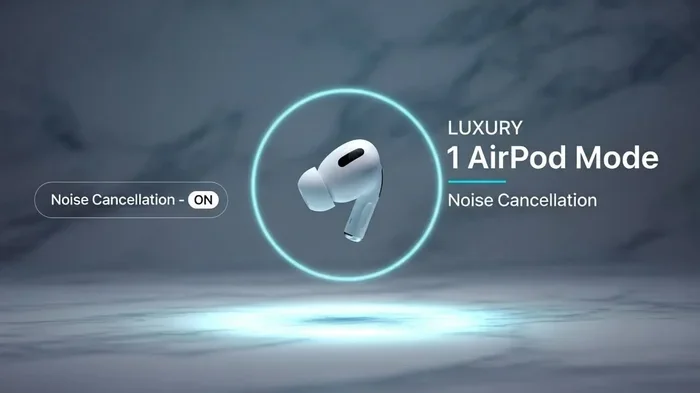
Featured image for single airpod noise cancellation
Image source: i.ytimg.com
Yes, you can use noise cancellation with a single AirPod, but the experience depends on your AirPod model. Active Noise Cancellation (ANC) and Transparency mode work with one AirPod on AirPods Pro, AirPods Pro 2, AirPods 4, and AirPods Max. However, the effect is reduced compared to using both earbuds. Older AirPods models without ANC cannot cancel noise in any configuration.
Picture this: you’re at a coffee shop, and one of your AirPods dies. Or maybe you just prefer wearing a single earbud while walking outside. Either way, you’ve probably wondered whether your fancy noise cancellation still works when only one AirPod is in your ear. It’s a great question, and the answer is more interesting than you might think.
Apple’s noise cancellation technology is pretty amazing. It uses tiny microphones to listen to the world around you, then creates “anti-noise” waves to cancel out the sound. Think of it like throwing a pebble into a calm pond, then throwing another pebble at just the right time to flatten the ripples. That’s basically what your AirPods do with sound waves, but they do it 48,000 times per second.
Here’s the thing: noise cancellation was designed to work with both earbuds. Your brain combines sound from both ears to figure out what’s happening around you. Cover up one ear, and suddenly your brain only has half the picture. So even if your single AirPod is canceling noise, the open ear will let in plenty of sound. Let’s break down exactly how this works, which models support it, and what you can expect.
Key Takeaways
- Single-Earbud ANC Is Possible: AirPods Pro, AirPods Pro 2, AirPods 4, and AirPods Max support noise cancellation with one AirPod in your ear.
- Effectiveness Is Reduced: With only one AirPod, noise cancellation covers one ear, leaving the other ear fully exposed to ambient sound.
- Adaptive Audio Changes Behavior: AirPods Pro 2 automatically switches to Transparency mode when only one earbud is detected, for safety reasons.
- Older Models Cannot Cancel Noise: AirPods 1, 2, 3, and original AirPods Pro 1 only offer noise cancellation when both earbuds are worn.
- Transparency Mode Works Better Solo: For hearing your surroundings clearly with one AirPod, Transparency mode is often more practical than ANC.
- Battery Life Considerations: Using one AirPod with ANC active drains the single earbud faster than using both in standard mode.
- Call Quality Differs: Single AirPod use during calls relies on one microphone, which can affect voice clarity in noisy environments.
📑 Table of Contents
- How Noise Cancellation Actually Works
- Which AirPod Models Support Single-Earbud Noise Cancellation?
- Why Single-Earbud Noise Cancellation Feels Different
- When Single-AirPod Noise Cancellation Makes Sense
- How to Enable Noise Cancellation with a Single AirPod
- Battery Life and Performance Considerations
- Troubleshooting Single-AirPod Noise Cancellation
- The Future of Single-Earbud Noise Cancellation
- Final Thoughts on Single-AirPod Noise Cancellation
How Noise Cancellation Actually Works
Before we dive into single-AirPod scenarios, let’s quickly cover how noise cancellation works in general. It’s actually pretty simple once you understand the basic concept.
The Science Behind the Silence
Sound travels in waves, kind of like ripples in water. Every sound has a frequency (how high or low it sounds) and an amplitude (how loud it is). Your AirPods contain tiny microphones that listen to the sound around you. Then, a processor inside the AirPod creates a mirror-image sound wave, flipped upside down. When this “anti-noise” wave meets the original sound wave, they cancel each other out. Scientists call this “destructive interference.”
Imagine you’re pushing a swing forward, and your friend pushes it backward at the exact same time with the same force. The swing doesn’t move. That’s destructive interference in action. Your AirPods do this with sound thousands of times every second.
Active vs. Passive Noise Cancellation
There are actually two types of noise cancellation, and they work differently:
- Passive Noise Cancellation: This is just the physical blocking of sound. Like putting your hands over your ears, or wearing earplugs. Any AirPod you put in your ear provides this automatically.
- Active Noise Cancellation (ANC):strong> This is the electronic magic we just described. It requires batteries, microphones, and processors. Only certain AirPod models have ANC.
When you wear a single AirPod, you still get passive noise cancellation from that one earbud blocking your ear canal. But active noise cancellation is where things get interesting, and a bit limited.
Which AirPod Models Support Single-Earbud Noise Cancellation?
Not all AirPods are created equal when it comes to ANC. Some models can handle single-earbud noise cancellation beautifully, while others simply can’t. Here’s the full breakdown.
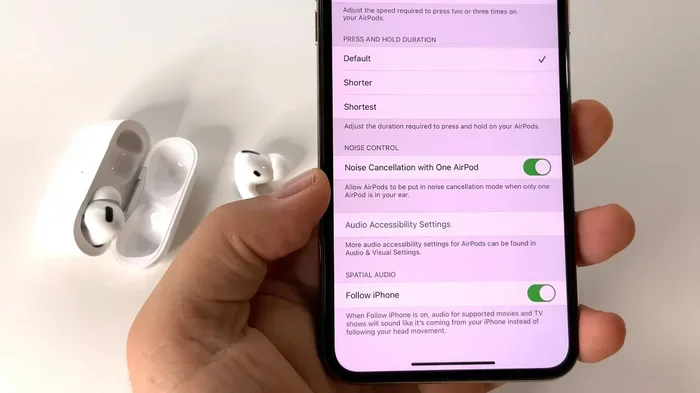
Visual guide about single airpod noise cancellation
Image source: i.ytimg.com
AirPods Pro and AirPods Pro 2
Both generations of AirPods Pro support noise cancellation with a single AirPod. This is one of the standout features of these premium earbuds. The H1 chip (in AirPods Pro) and H2 chip (in AirPods Pro 2) are powerful enough to handle ANC processing even when only one earbud is active.
With AirPods Pro, when you put just one in your ear, you’ll notice that noise cancellation still works. The earbud will continue to analyze ambient sound and produce anti-noise waves. However, there’s a catch with AirPods Pro 2: Apple’s Adaptive Audio feature may automatically switch the mode based on your environment.
Here’s something cool: AirPods Pro 2 introduced a feature that detects when you’re only wearing one earbud. In many cases, it automatically shifts to Transparency mode instead of ANC. Why? Because Apple realized that if you’re only wearing one earbud, you probably want to hear what’s happening around you. Maybe you’re crossing a street, or someone is talking to you. Safety first, right?
AirPods 4 with Active Noise Cancellation
Apple released the AirPods 4 in late 2024, and this model is special. It’s the first non-Pro AirPods to offer active noise cancellation. Yes, the regular AirPods 4 (not just the Pro version) now have ANC.
The AirPods 4 with ANC support single-earbud noise cancellation, just like the Pro models. You can wear just one AirPod 4 and still enjoy reduced background noise in that ear. The H2 chip inside makes this possible.
However, the noise cancellation in AirPods 4 isn’t quite as strong as in AirPods Pro 2. Apple’s Pro models use silicone ear tips that create a better seal in your ear canal. The AirPods 4 use an open design, which means some sound leaks in naturally. So even with ANC on, you’ll hear more background noise compared to the Pro models.
AirPods Max
AirPods Max are Apple’s over-ear headphones, and they’re a different beast entirely. They’re a single unit, not two separate earbuds. When you wear them, both ears are covered, so the noise cancellation question becomes a bit different.
However, AirPods Max do support single-ear listening in some scenarios. If you’re using them for a call and only need one ear free, or if you’re experiencing “ear fatigue,” you can technically use just one ear cup. But this isn’t really a typical use case since they’re over-ear headphones designed to cover both ears.
The good news: AirPods Max have excellent noise cancellation powered by the H1 chip (in the original version) and the Apple H2 chip (in the USB-C version released in 2024). Eight microphones work together to cancel noise effectively. But again, wearing just one ear cup defeats much of the purpose.
Older AirPods Models Without ANC
If you have AirPods 1, 2, or 3, or the original AirPods Pro, here’s the disappointing news: they don’t have active noise cancellation at all. These models rely entirely on passive noise isolation, which is just the physical blocking of sound by the earbud sitting in your ear.
Did you know that AirPods 1 and 2 don’t have any noise cancellation features? They were designed before Apple introduced ANC to the AirPods lineup. The original AirPods Pro (released in 2019) was the first AirPod with active noise cancellation.
For these older models, wearing a single AirPod means you get zero noise cancellation, whether you have one in or both in. The earbud physically blocks some sound, but that’s about it.
Why Single-Earbud Noise Cancellation Feels Different
Even if your AirPods technically support ANC with one earbud, the experience is noticeably different from using both. Let’s explore why.
Your Brain Needs Both Ears
Humans have two ears for a reason. Your brain uses sound from both ears to figure out where sounds are coming from, how far away they are, and what they mean. This is called binaural hearing, and it’s a survival trait we developed over millions of years.
When you cover one ear, your brain loses half of its audio information. Even if your single AirPod is doing a perfect job canceling noise, the open ear is still picking up everything. Your brain then mixes the silent signal from the AirPod with the noisy signal from the open ear. The result? You still hear noise.
Think of it like this: imagine you’re in a room with a noisy air conditioner. If you cover one ear with your hand, the air conditioner still sounds just as loud. The hand didn’t change the noise at all; it just blocked one ear. The same principle applies to single-AirPod ANC.
The Open Ear Problem
There’s also a physical issue. Your ear canal is shaped to funnel sound toward your eardrum. When you put in an AirPod, it blocks this funnel partially. But when only one ear is covered, the other ear’s canal is wide open, capturing sound efficiently.
Studies on hearing have shown that your open ear can pick up sounds as quiet as a pin dropping in a quiet room. That’s incredibly sensitive. So even with ANC working in one ear, the open ear will still let in plenty of background noise.
How Much Noise Reduction Can You Expect?
Apple’s AirPods Pro 2 are advertised to reduce noise by up to 48 decibels when both earbuds are worn. That’s a huge reduction. A typical office is around 50-60 decibels, so with both AirPods Pro 2, you’d hear almost nothing.
With one AirPod Pro 2 and ANC active, the noise reduction in that single ear is still significant. But because the other ear is open, your brain perceives the overall noise level as much higher. Some users report that single-ear ANC feels about 30-40% as effective as dual-ear ANC. The exact number depends on the type of noise and your environment.
When Single-AirPod Noise Cancellation Makes Sense
There are actually several scenarios where using one AirPod with ANC is genuinely useful. Let’s talk about real-world situations.
Walking or Running Outside
Safety experts almost universally recommend keeping one ear open when walking, running, or cycling outdoors. You need to hear cars, cyclists, dog walkers, and other potential hazards. Wearing both AirPods with full ANC is dangerous in many urban environments.
This is where single-AirPod use shines. You can wear one AirPod with ANC active, keeping the other ear free to hear traffic and announcements. You get reduced noise in one ear, plus full awareness in the other. It’s the best of both worlds.
Many commuters prefer this setup on public transportation. You can listen to music or podcasts with one ear while remaining aware of station announcements and conversations around you.
Office Environments
If you work in an open office, you’ve probably struggled with chatty coworkers. Single-AirPod ANC can help. You can keep one ear “free” for when your boss approaches, while the other ear enjoys reduced background noise.
This setup is also great for phone calls in the office. You can hear the caller clearly in your AirPod ear, while still hearing your surroundings in the open ear. It’s a productivity hack many remote workers swear by.
Sleep and Relaxation
Some people use AirPods to help them sleep, especially in noisy environments like apartments near busy streets or with snoring partners. Single-AirPod use can be more comfortable for side sleepers, since you don’t have a hard earbud pressing into your pillow on both sides.
With ANC active in one ear, you’ll still get some noise reduction, though not as much as both earbuds. For white noise or calming sounds, this setup can be quite effective.
Hearing Accessibility
For people with hearing loss in one ear, single-AirPod use is essential. Apple’s AirPods Pro 2 and AirPods 4 include features specifically designed for hearing assistance. The Conversation Boost and accessibility features can amplify sounds for users with hearing challenges.
Apple has actually marketed AirPods Pro 2 as a hearing aid alternative, with FDA-cleared hearing test features. For users with single-sided hearing, using one AirPod with ANC and accessibility features can be life-changing.
How to Enable Noise Cancellation with a Single AirPod
If you’ve got a compatible model, enabling noise cancellation with one AirPod is straightforward. Here’s how to do it.
Using Your iPhone or iPad
First, put your single AirPod in your ear. Then, on your connected iPhone or iPad, follow these steps:
- Open the Settings app
- Tap on your AirPods name (at the top of Settings)
- Look for “Noise Control” or “Noise Cancellation”
- Select your preferred mode (ANC, or Transparency)
You can also use the Control Center. Swipe down from the top-right corner of your screen (on newer iPhones) to access Control Center. Press and hold the volume slider to see audio options. You’ll see your AirPods listed there with noise control options.
Using the Force Sensor
AirPods Pro and AirPods Pro 2 have a force sensor built into the stem. You can press and hold the stem to cycle through noise control modes. This works even with one AirPod in your ear.
Press and hold for about a second, and you’ll hear a little chime as the mode switches between Noise Cancellation, Transparency, and Off. You can customize which modes cycle through in your Bluetooth settings.
Using Siri
You can also ask Siri to switch modes. Just say, “Hey Siri, turn on noise cancellation” or “Hey Siri, switch to Transparency mode.” Siri will handle the rest. This works with a single AirPod in your ear, as long as the AirPod is connected to your device.
Adaptive Audio on AirPods Pro 2
AirPods Pro 2 have a feature called Adaptive Audio that automatically adjusts noise control based on your environment. With one earbud in, Adaptive Audio might switch between ANC and Transparency based on the sounds around you.
To customize this behavior, go to Settings, then your AirPods, and look for “Adaptive Audio.” You can turn it on or off depending on your preferences. Some users find it annoying, while others love the automatic adjustments.
Battery Life and Performance Considerations
Using one AirPod with noise cancellation affects battery life in interesting ways. Let’s talk about what to expect.
Battery Drain Patterns
Active noise cancellation is power-hungry. The microphones, processors, and anti-noise generators all consume battery. With one AirPod active and ANC on, that single earbud is doing the work of two earbuds in some ways.
AirPods Pro 2 are rated for about 6 hours of listening time with ANC on (both earbuds). With one AirPod and ANC active, you can expect roughly 4-5 hours before the battery dies. The exact number depends on volume, environment, and features.
Did you know that using Transparency mode actually uses more battery than ANC? Transparency mode requires the microphones to actively pick up and pass through external sounds, plus the processing to mix them with your audio. ANC only needs to generate anti-noise waves, which is slightly less computationally intensive.
Charging Considerations
When you use one AirPod, the other one sits in the charging case. If you’re using one AirPod while the other charges, you can essentially have unlimited listening time. Just swap them when the active one gets low.
Many AirPods users adopt a “single AirPod rotation” strategy. They listen with one earbud until it gets low, then swap to the other. This effectively doubles your total listening time compared to using both earbuds continuously.
Impact on Sound Quality
Here’s something interesting: with one AirPod, the sound profile changes. Stereo audio becomes mono when only one earbud is active. Your music might sound a bit different, especially songs that rely heavily on stereo separation.
Apple handles this gracefully on most apps. Music apps, podcasts, and most audio sources will simply combine left and right channels into mono when only one AirPod is detected. You won’t miss any content, but the spatial effect is gone.
Troubleshooting Single-AirPod Noise Cancellation
Sometimes noise cancellation with one AirPod doesn’t work as expected. Here are common issues and fixes.
Noise Cancellation Won’t Turn On
If you’re trying to enable ANC with a single AirPod and it’s not working, try these steps:
- Check your model: Only AirPods Pro, AirPods Pro 2, AirPods 4 with ANC, and AirPods Max support noise cancellation.
- Clean your AirPod: Dirt and earwax can block the microphones, preventing ANC from working properly. Apple recommends cleaning with a dry cotton swab.
- Update your firmware: Make sure your AirPods have the latest firmware. Connect them to your iPhone, go to Settings, then General, then About, then AirPods.
- Reset your AirPods: Sometimes a reset fixes weird issues. Hold the setup button on the case for about 15 seconds until the light flashes amber, then white.
Sound Is Quieter Than Expected
If single-AirBud ANC seems weak, it might be working fine; you might just be perceiving it as weak due to the open ear. Try testing in a quieter environment first to gauge effectiveness.
You can also try pushing the AirPod deeper into your ear canal to create a better seal. With AirPods Pro, try different ear tip sizes for the best fit. A poor seal dramatically reduces both passive and active noise cancellation.
Adaptive Audio Switching Unexpectedly
If your AirPods Pro 2 keep switching to Transparency mode when you want ANC, you can disable Adaptive Audio. Go to Settings, find your AirPods, and toggle off Adaptive Audio. You’ll then have manual control over noise cancellation modes.
The Future of Single-Earbud Noise Cancellation
Apple continues to improve AirPods technology with each generation. What might the future hold for single-earbud noise cancellation?
Smarter Adaptive Features
Future AirPods might use AI to better understand your environment and adjust noise cancellation accordingly. Imagine AirPods that know you’re at a coffee shop versus on a plane, and adjust settings automatically. Some of this technology is already in AirPods Pro 2 with Adaptive Audio.
Apple has filed patents for earbuds that can detect specific environments and optimize noise cancellation for each. This could lead to dramatic improvements in single-earbud ANC effectiveness.
Bone Conduction and Advanced Sensors
Some researchers are exploring bone conduction technology that could pick up sound through your skull, not just your ears. Combined with advanced sensors, future AirPods might be able to provide better single-ear noise cancellation by understanding how sound reaches your inner ear through different pathways.
Health monitoring features are also expanding. Future AirPods might track heart rate, body temperature, and even posture. These sensors could also inform how noise cancellation adapts to your specific situation.
Improved Battery Efficiency
Future AirPods will likely have better battery life, making single-earbud use even more practical. Apple’s H3 chip (or whatever they call the next generation) will likely be more power-efficient, allowing longer ANC use on a single charge.
Final Thoughts on Single-AirPod Noise Cancellation
So, can you have noise cancellation with one AirPod? The answer is yes, but with important caveats. Modern AirPods like the Pro, Pro 2, AirPods 4 with ANC, and AirPods Max all support single-earbud noise cancellation. However, the experience is fundamentally different from using both earbuds.
Single-earbud ANC works best when you need to maintain awareness of your surroundings. It’s perfect for walking outside, working in offices, or sleeping. It’s less effective when you need complete silence, since your open ear will always let in some sound.
If you’re buying AirPods primarily for noise cancellation, the AirPods Pro 2 are the best choice. They offer the strongest ANC, longest battery life, and most features. AirPods 4 with ANC are a good budget option, while AirPods Max are best for home or office use.
For older AirPods without ANC, you’ll need both earbuds in your ears to get any noise reduction at all, and even then, it’s just passive isolation. If noise cancellation is important to you, upgrading to a Pro model is worth considering.
Remember: single-earbud use is a tool, not a compromise. Many people prefer it for safety, comfort, and battery life reasons. Now that you understand how it works, you can make an informed choice about when and how to use it.
Frequently Asked Questions
Does noise cancellation work with only one AirPod in?
Yes, on supported models including AirPods Pro, AirPods Pro 2, AirPods 4 with ANC, and AirPods Max, noise cancellation can work with a single AirPod in your ear. However, the effect is reduced compared to using both earbuds, since your open ear will still pick up ambient sounds.
Which AirPods have noise cancellation?
AirPods Pro (1st generation), AirPods Pro 2, AirPods 4 with Active Noise Cancellation, and AirPods Max all feature active noise cancellation. Standard AirPods 1, 2, 3, and AirPods 4 without ANC do not have this feature and rely only on passive noise isolation.
Why does my AirPod Pro switch to Transparency mode when I use one earbud?
AirPods Pro 2 use Adaptive Audio, which can automatically switch between ANC and Transparency based on your environment. When only one earbud is detected, Apple often defaults to Transparency mode for safety reasons, allowing you to hear your surroundings clearly through both ears.
Is single AirPod noise cancellation good for sleeping?
Single-AirPod use can be helpful for sleeping, especially for side sleepers who find two earbuds uncomfortable. However, the noise reduction won’t be as effective as using both earbuds. Many sleep better with white noise or calming sounds playing through the single AirPod, which can mask disturbances.
Can I use AirPods Max with just one ear cup?
Technically yes, but it’s not a typical use case. AirPods Max are over-ear headphones designed to cover both ears. Using just one ear cup significantly reduces noise cancellation effectiveness and can be uncomfortable since the headband isn’t balanced properly with only one cup in use.
How long does a single AirPod battery last with ANC on?
Battery life with one AirPod and ANC active depends on the model. AirPods Pro 2 typically last about 4-5 hours with ANC on in a single earbud. AirPods Pro 1 lasts around 3-4 hours. AirPods 4 with ANC lasts roughly 3-4 hours per earbud with noise cancellation enabled.