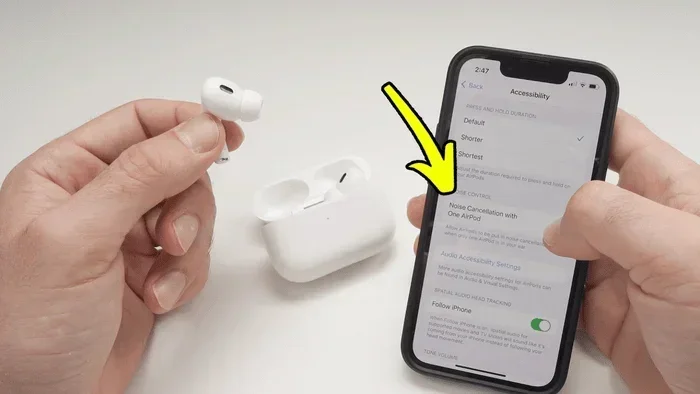
Featured image for AirPods A2031 noise cancelling
Image source: gsmchina.com
AirPods A2031 do not have active noise cancellation (ANC). The A2031 is a model number associated with AirPods 2, which only offer basic sound isolation through their in-ear fit. If you’re seeking true noise cancellation, you’ll need to look at the AirPods Pro (model numbers A2083, A2084) or AirPods Max (model A2096).
Picture this: you’re on a crowded subway, desperately trying to hear your favorite podcast, but the screeching wheels and chatter drown everything out. You wish your earbuds could just… silence the world. This is where noise cancellation becomes a game-changer—but does the AirPods model A2031 offer this magical feature?
If you’ve been eyeing a pair of used AirPods and spotted the cryptic “A2031” stamped on the case, you’re not alone in wondering what this alphanumeric code actually means. Apple uses these model numbers to identify specific products, and they hold the key to understanding exactly what your earbuds can (and cannot) do.
In this article, we’ll decode the mystery of A2031, explain what noise cancellation really means, and help you decide whether these AirPods match your needs. By the end, you’ll be an AirPods model expert—even if you started as a complete novice.
Key Takeaways
- No Active Noise Cancellation: AirPods A2031 (AirPods 2) lack ANC but offer passive sound isolation through their physical design.
- Model Numbers Matter: A2031 is specifically AirPods 2 (right earbud), while A2032 is the left earbud of the same generation.
- ANC Requires Specific Models: Only AirPods Pro (1st and 2nd gen) and AirPods Max feature built-in active noise cancellation.
- Model Number Location: You can find your model number printed inside the charging case lid or in your iPhone’s settings.
- Cost Difference: AirPods Pro typically cost $80-$150 more than AirPods 2, reflecting the ANC technology.
- Battery Considerations: ANC drains battery faster—AirPods Pro offer 4.5 hours with ANC on, versus 5 hours for AirPods 2 without ANC.
- Alternatives Exist: Third-party ear tips and apps can improve passive isolation for non-ANC AirPods.
📑 Table of Contents
- What Exactly Is AirPods A2031?
- Do AirPods A2031 Have Noise Cancelling? The Direct Answer
- Which AirPods Models Do Have Noise Cancelling?
- How Does Active Noise Cancellation Actually Work?
- Maximizing Your AirPods A2031 Without Noise Cancellation
- Should You Buy AirPods A2031 in 2025?
- Final Verdict: AirPods A2031 and Noise Cancellation
What Exactly Is AirPods A2031?
Let’s start with the basics. The AirPods A2031 is a specific model number that Apple uses to identify one particular earbud in the AirPods family. Think of model numbers like license plates—they tell you exactly what vehicle (or in this case, what device) you’re dealing with.
Decoding the Model Number System
Apple assigns unique model numbers to each component of their products. For AirPods, this means each earbud (left and right) gets its own number, as does the charging case. Here’s the breakdown for the A2031:
- A2031 = Right AirPod (AirPods 2nd generation)
- A2032 = Left AirPod (AirPods 2nd generation)
- A1602 = Charging case for AirPods 2
So when you see “A2031” on a listing or stamped inside the case, you’re looking at the right earbud from the AirPods 2 lineup—released in March 2019 as the successor to the original AirPods.
What Generation Does A2031 Belong To?
The AirPods 2 (model A2031/A2032) were a modest upgrade over the original AirPods. The main improvements included:
- The H1 chip (replacing the W1 chip) for faster connectivity
- “Hey Siri” voice activation (no need to tap)
- 50% faster connection speed to devices
- Optional wireless charging case
- 30% lower latency for gaming
Sounds nice, right? But here’s the catch—none of these upgrades included noise cancellation. Apple saved that premium feature for a different product line.
How to Confirm Your AirPods Model
Not sure if you have A2031 or another model? Try these quick methods:
1. Check Inside the Case: Flip open your AirPods charging case lid. On the underside of the lid, you’ll see tiny text with the model number. Grab a magnifying glass—it helps!
2. Use Your iPhone: Go to Settings > Bluetooth, tap the “i” icon next to your connected AirPods, and scroll down to find the model number.
3. Check the Original Box: If you still have the packaging, the model appears on the back near the barcode.
Do AirPods A2031 Have Noise Cancelling? The Direct Answer
The short and definitive answer is: No, AirPods A2031 do not have active noise cancellation.
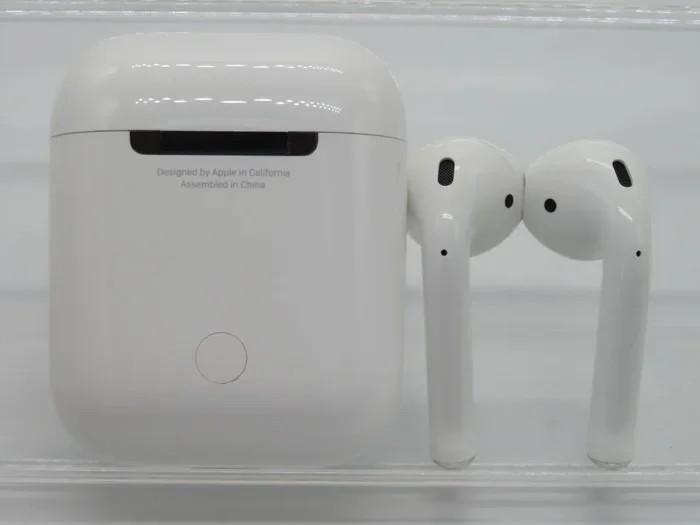
Visual guide about AirPods A2031 noise cancelling
Image source: auctions.c.yimg.jp
But wait—does that mean they offer zero noise reduction? Not exactly. There’s an important distinction between two types of noise management: active noise cancellation (ANC) and passive sound isolation.
Active Noise Cancellation vs. Passive Isolation
Imagine you’re sitting next to a noisy air conditioner. You have two options:
Option 1 (Passive Isolation): You put a thick pillow against your ear. The physical barrier blocks some sound, but you can still hear the hum.
Option 2 (Active Noise Cancellation): A device produces an “anti-sound” wave that cancels out the hum electronically. The result is near-silence.
AirPods A2031 rely on passive isolation only. Their hard plastic design blocks some ambient noise simply by sitting in your ear canal. However, because they don’t create a complete seal (unlike silicone-tipped earbuds), external sounds leak through more easily.
What You’re Missing Without ANC
To put this in perspective, here’s what proper noise cancellation does:
- Reduces low-frequency sounds (airplane engines, HVAC systems) by up to 30 decibels
- Minimizes consistent background hum from trains, buses, and traffic
- Creates a quieter environment for focus in cafes and offices
- Reduces listening fatigue at lower volumes
Without ANC, you’ll likely need to crank up the volume to drown out ambient noise—which isn’t great for your hearing long-term.
Did You Know? According to the World Health Organization, over 1 billion young people worldwide are at risk of hearing loss due to exposure to loud sounds. Active noise cancellation helps protect your ears by letting you listen at safer volumes.
Which AirPods Models Do Have Noise Cancelling?
Now that you know A2031 isn’t the noise-cancelling option, let’s explore which AirPods actually offer this feature. Think of this as your official guide to Apple’s noise-cancelling lineup.
AirPods Pro (1st Generation)
Released in October 2019, the AirPods Pro was Apple’s first in-ear model with ANC.
- Model Numbers: A2083 (left), A2084 (right), A2190 (case)
- Noise Cancellation Type: Active (with Transparency mode)
- Design: Silicone ear tips for better seal
- Battery Life: 4.5 hours with ANC on, 5 hours with ANC off
- Current Price: Around $199 (new), often less refurbished
AirPods Pro (2nd Generation)
The 2022 upgrade brought significant improvements to ANC performance.
- Model Numbers: A2968 (left), A2969 (right), A2700 (case)
- Noise Cancellation Type: Active (2x better than 1st gen, according to Apple)
- New Features: Adaptive Transparency, touch controls on the stem, U1 chip in the case
- Battery Life: 6 hours with ANC on
- Current Price: Around $229
AirPods Max
For those who prefer over-ear headphones, Apple offers the AirPods Max.
- Model Number: A2096
- Noise Cancellation Type: Active (with Transparency and Spatial Audio)
- Design: Over-ear with memory foam cushions
- Battery Life: 20 hours with ANC on
- Current Price: Around $549 (often discounted)
Quick Comparison: At a Glance
Here’s a simple breakdown of which models have ANC:
- AirPods (1st gen) – Model A1722/A1523 – No ANC
- AirPods (2nd gen) – Model A2031/A2032 – No ANC
- AirPods (3rd gen) – Model A2564/A2565 – No ANC
- AirPods Pro (1st gen) – Model A2083/A2084 – Yes, ANC
- AirPods Pro (2nd gen) – Model A2968/A2969 – Yes, ANC
- AirPods Max – Model A2096 – Yes, ANC
Notice a pattern? ANC is reserved for the “Pro” and “Max” tiers. Apple positions basic AirPods as everyday earbuds, while Pro and Max versions target audiophiles and frequent travelers.
How Does Active Noise Cancellation Actually Work?
Ever wondered what’s happening inside those tiny AirPods Pro when ANC kicks in? It’s not magic—it’s physics. Let’s break down the science in plain English.
The Core Concept: Wave Interference
Sound travels in waves, like ripples in a pond. Now, imagine throwing two stones into a pond at the same time. Where the ripples meet, they either add up (louder) or cancel each other out (quieter). This is called wave interference.
ANC headphones use this principle. They have tiny microphones that listen to incoming sounds, then generate an “anti-wave” that’s the exact opposite. When the two waves meet, they cancel out—resulting in silence.
The Step-by-Step Process
- External Mics Listen: Microphones on the outside of the earbuds capture ambient noise.
- The Chip Analyzes: In less than a millisecond, the H1/H2 chip analyzes the sound frequency and waveform.
- Anti-Noise is Generated: The speaker emits a sound wave that’s 180 degrees out of phase with the original noise.
- Waves Collide: The original noise and anti-noise cancel each other out before reaching your eardrum.
What ANC Can and Cannot Do
ANC is brilliant at reducing:
- Airplane engine hum
- Train and bus rumbles
- Air conditioner drones
- Office chatter (mostly)
ANC struggles with:
- Sudden, sharp sounds (car horns, shouts)
- High-frequency noises (baby crying, alarms)
- Wind noise (can actually get worse with ANC)
Did You Know? The concept of noise cancellation dates back to the 1930s when it was first used in aviation headsets for pilots. Today, the technology has shrunk to fit inside tiny earbuds weighing just 5 grams each!
Maximizing Your AirPods A2031 Without Noise Cancellation
Just because A2031 lacks ANC doesn’t mean you’re stuck with subpar audio. Here are practical tips to get the best experience from your non-noise-cancelling AirPods.
Improve the Fit for Better Isolation
While AirPods A2031 don’t come with ear tips, you can find third-party silicone covers that add grip and improve the seal. Better fit means better passive isolation—it’s that simple.
Pro Tip: Look for “memory foam earbud covers” designed specifically for AirPods 2. They expand to fit your ear canal and block more noise than stock AirPods.
Use Your iPhone’s Audio Features
Your iPhone has built-in settings that can help compensate for the lack of ANC:
- Headphone Accommodations: Settings > Accessibility > Audio/Visual > Headphone Accommodations. This boosts soft sounds and clarifies speech.
- Balance Audio: Adjust the left/right balance for optimal listening.
- Reduce Loud Sounds: Set a maximum decibel limit to protect your hearing.
Try These Volume-Saving Tricks
Since you can’t cancel noise, you might be tempted to blast the volume. Don’t! Try these safer alternatives:
- Use white noise or instrumental music to mask background sounds
- Switch to noise-isolating podcasts or audiobooks in loud environments
- Enable “Conversation Boost” on iOS 15+ for clearer voice audio
- Take listening breaks every hour to rest your ears
Apps That Simulate Noise Cancellation
While not as effective as true ANC, some apps can help:
- Noise Cancelling Apps: Apps like “Noise Cancelling” use your device’s mic to analyze sound and generate anti-noise (requires earbuds with mic support, which AirPods A2031 have).
- Equalizer Settings: Apps like “Boom” let you customize audio frequencies to reduce perceived background noise.
Should You Buy AirPods A2031 in 2025?
With newer models available, is it worth picking up AirPods A2031? The answer depends on your needs and budget. Let’s weigh the pros and cons.
Reasons to Consider Buying A2031
- Affordable: Often available for $50-$80 used or refurbished—significantly cheaper than AirPods Pro.
- Reliable: Proven technology with years of software updates.
- Lightweight: Each earbud weighs just 4 grams—barely noticeable.
- Apple Ecosystem: Seamless pairing with iPhone, iPad, and Mac.
- Good Enough Sound: For casual listening at home or quiet offices, audio quality is solid.
Reasons to Skip A2031
- No ANC: If you commute, travel, or work in noisy environments, you’ll miss this feature.
- No Water Resistance: Unlike AirPods Pro, these aren’t rated for sweat or rain.
- Older Chip: The H1 chip is still good, but newer H2 offers better efficiency.
- No Spatial Audio: Missing the immersive surround sound feature.
- Limited Future Support: As Apple releases newer models, software support may eventually diminish.
Who Should Buy A2031?
These AirPods are ideal for:
- Budget-conscious Apple fans
- Students needing reliable earbuds for studying
- Casual listeners who don’t need premium features
- People who lose or break earbuds often (less financial pain!)
Who Should Upgrade to AirPods Pro?
Consider spending more if you:
- Commute daily on public transit
- Travel frequently by plane
- Work in open-plan offices or cafes
- Exercise outdoors and need sweat resistance
- Want the latest features and longest software support
Did You Know? Apple’s refurbished store often offers AirPods Pro at 15-20% discounts with full warranties. It’s worth checking before buying new!
Final Verdict: AirPods A2031 and Noise Cancellation
Let’s bring everything together. AirPods A2031—your friendly right earbud from the AirPods 2 generation—does not have active noise cancellation. This model relies solely on passive sound isolation, which works okay for quiet environments but falls short in noisy settings.
If noise cancellation is a must-have feature for your lifestyle, you’ll need to invest in AirPods Pro or AirPods Max. The Pro models offer excellent ANC in a compact earbud form, while the Max delivers premium over-ear performance.
However, if you’re on a tight budget and primarily use earbuds in calm environments, A2031 remains a solid choice. They’re reliable, comfortable, and integrate beautifully with Apple devices.
The bottom line? Know your model number, understand your needs, and choose accordingly. Whether you go with A2031 or upgrade to Pro, you’ll enjoy quality audio—just with different levels of noise management.
Now that you’re armed with this knowledge, you can make an informed decision. Happy listening!
Frequently Asked Questions
Can AirPods A2031 be used for phone calls?
Yes, AirPods A2031 have built-in microphones and support phone calls, FaceTime, and voice assistants. They also support “Hey Siri” voice activation thanks to the H1 chip, making hands-free calling easy.
How long do AirPods A2031 last on a single charge?
AirPods A2031 offer about 5 hours of listening time or 3 hours of talk time per charge. The charging case provides multiple additional charges, totaling around 24 hours of listening time before needing a power outlet.
Are AirPods A2031 water resistant?
No, AirPods A2031 (AirPods 2) do not have any official water or sweat resistance rating. They should be kept dry and away from rain. For workouts, consider AirPods Pro, which offer IPX4 water resistance.
Can I use AirPods A2031 with Android devices?
Yes, AirPods A2031 work with Android phones and any Bluetooth-enabled device. However, you’ll lose some features like automatic ear detection, Siri integration, and battery notifications that are exclusive to Apple devices.
What’s the difference between A2031 and A2032?
A2031 is the right AirPod, and A2032 is the left AirPod from the AirPods 2 generation. They’re sold together as a pair but have separate model numbers because they’re technically individual components with slight hardware differences.
Is it worth upgrading from A2031 to AirPods Pro for noise cancellation?
If you frequently use earbuds in noisy environments like commutes, planes, or busy offices, upgrading is worth it. AirPods Pro offer significantly better noise reduction, water resistance, and sound quality. For quiet home use, your A2031 may be sufficient.