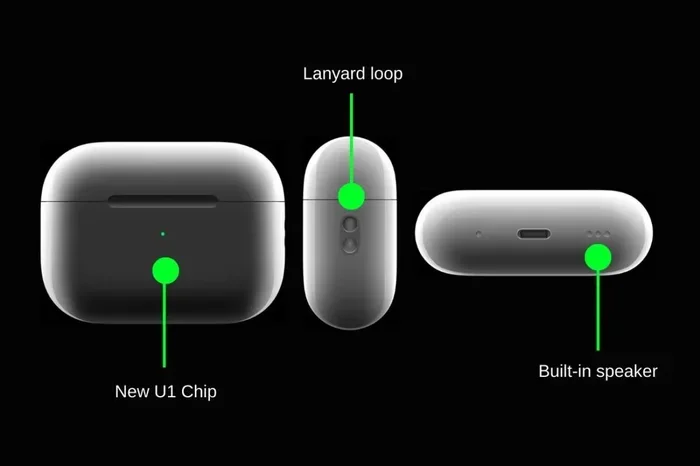
Featured image for AirPods USB-C charging case
Image source: tradelinestores.s3.amazonaws.com
Yes, some AirPods models charge using USB-C, but not all of them. Apple introduced USB-C charging with the AirPods Pro (2nd generation) in September 2023, and has since expanded USB-C support to other models. Older AirPods and certain current models still rely on Lightning cables for charging. This guide breaks down exactly which AirPods work with USB-C, how to charge them properly, and what to do if your cable isn’t working.
Picture yourself rushing out the door, grabbing your AirPods, and realizing the battery is dead. You dig through drawers looking for the right cable, and suddenly a thought hits you: “Wait, can I just use my phone charger?” If you’ve ever asked yourself, “Do AirPods charge with USB-C?” you’re not alone. This question has become more common since Apple made the switch from its proprietary Lightning connector to the universal USB-C standard.
The answer isn’t a simple yes or no. It depends entirely on which AirPods model you own and which version of the charging case came with it. Some AirPods charge beautifully with USB-C, while others stubbornly stick with Apple’s older Lightning technology. Think of it like different generations of phones, where some use the new charging port and others use the old one.
In this guide, we’ll walk you through everything you need to know. You’ll learn which AirPods support USB-C charging, how to identify your model, how to actually charge them step by step, and what to do when things don’t work as expected. By the end, you’ll be a USB-C and AirPods expert, ready to charge your earbuds with confidence using any cable you have lying around.
Key Takeaways
- USB-C AirPods Exist: Apple released its first USB-C AirPods in September 2023 with the AirPods Pro (2nd generation) refresh.
- Limited Model Support: Only specific AirPods models come with USB-C cases; older and entry-level models still use Lightning connectors.
- Same Charging Speed: USB-C doesn’t make your AirPods charge faster than Lightning, but it offers more convenience.
- Cable Compatibility: Any standard USB-C cable works, so you likely already own one from another device.
- Magnetic Charging: You can still charge the case wirelessly using Qi or MagSafe chargers regardless of the port type.
- EU Regulations: Apple switched to USB-C partly due to European Union laws requiring a universal charging standard.
- Adapter Solution: If you have Lightning AirPods, you can still use USB-C cables with a Lightning-to-USB-C adapter.
📑 Table of Contents
- The Short Answer: Yes, Some AirPods Do Charge with USB-C
- How to Identify if Your AirPods Use USB-C
- How to Charge AirPods with USB-C: Step-by-Step Guide
- Wireless Charging Still Works Too
- What About Older AirPods with Lightning?
- Troubleshooting: When USB-C Charging Doesn’t Work
- The Future Is USB-C (and Possibly Beyond)
The Short Answer: Yes, Some AirPods Do Charge with USB-C
Let’s start with the quick answer because we know you might be in a hurry. Yes, certain AirPods models absolutely charge with USB-C. But here’s the catch, not every AirPods model works this way. It’s a bit like how some laptops charge with USB-C while older ones still need those chunky proprietary chargers.
Which AirPods Have USB-C?
As of early 2026, the following AirPods models come with USB-C charging cases:
- AirPods Pro (2nd generation) with USB-C – Released September 2023
- AirPods 4 with USB-C Case – Released September 2024
- AirPods 4 with Active Noise Cancellation and USB-C Case – Released September 2024
- AirPods Max (USB-C version) – Released September 2024
The standard AirPods (2nd and 3rd generation) and the original AirPods Pro still use Lightning connectors. If you bought AirPods before September 2023, there’s a very good chance your case has a Lightning port instead of USB-C.
Why the Switch Happened
Apple didn’t make this change just to be trendy. The European Union passed a law in 2022 requiring all small electronic devices to use USB-C charging by the end of 2024. Think of it like a rule that says all coffee shops must accept the same size cup, it makes life easier for everyone. Since iPhones sold in Europe needed to comply, Apple decided to switch AirPods globally too. This meant fewer cables cluttering your drawer and one charger for your phone, tablet, and earbuds.
How to Identify if Your AirPods Use USB-C
Before you start plugging cables into your AirPods case, you need to know what kind of port it has. Plugging the wrong cable can damage the charging port or simply not work at all, which is frustrating when you’re trying to enjoy your music.
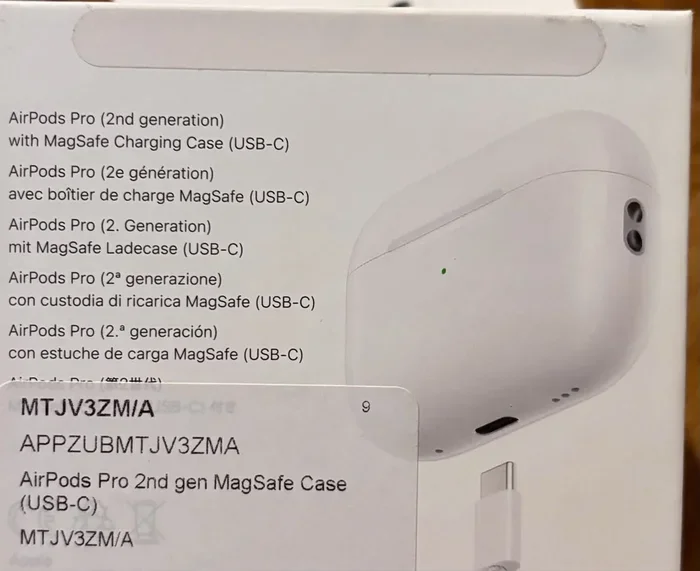
Visual guide about AirPods USB-C charging case
Image source: img.ricardostatic.ch
Check the Charging Case Directly
The easiest way is to simply look at the bottom of your AirPods charging case. Flip it over and you’ll see a small port.
- USB-C port: It’s a small, oval-shaped opening, similar to what you see on modern Android phones, iPads, and MacBooks.
- Lightning port: It’s smaller and more rectangular with curved sides, like the port on older iPhones.
If you have a USB-C port, congratulations! You can use any USB-C cable to charge your AirPods. If you see Lightning, you’ll need either a Lightning cable or an adapter (which we’ll discuss later).
Look at Your Model Number
Every AirPods case has a model number printed in tiny letters either on the back of the case or inside the lid. This number tells you exactly which version you have.
- A2968: AirPods Pro (2nd generation) with USB-C case
- A3053, A3054, A3055: AirPods 4 variants with USB-C
- A3184: AirPods Max USB-C version
- A2700, A2967: Older AirPods Pro with Lightning or MagSafe case
You can also check this through your iPhone. Go to Settings, then Bluetooth, tap the “i” icon next to your AirPods, and you’ll see the model name listed there.
The Original Box and Documentation
If you still have the original packaging, the box usually has a small icon or label indicating the charging type. Look for a USB-C symbol or the words “USB-C” printed somewhere on the packaging. This is especially helpful if you’re buying used AirPods and want to verify what you’re getting before purchasing.
How to Charge AirPods with USB-C: Step-by-Step Guide
Once you’ve confirmed your AirPods have a USB-C port, charging them is incredibly simple. It’s actually easier than charging most other devices because USB-C cables are everywhere these days.
What You’ll Need
Here’s the beautiful part: you only need one thing, a USB-C cable. That’s it. No special adapters, no proprietary chargers, no expensive accessories.
- A USB-C cable: The same one that charges your Android phone, iPad, MacBook, Nintendo Switch, or countless other devices works perfectly.
- A power source: This can be a wall adapter, your computer’s USB-C port, a power bank, or even another device with USB-C output.
Did You Know? The USB-C connector is reversible, meaning there’s no “wrong way” to plug it in. You can flip the connector either way and it will still work. This is a small detail but a huge quality-of-life improvement over older USB types.
The Charging Process
- Locate the USB-C port on the bottom of your AirPods charging case.
- Plug one end of the USB-C cable into the port on the case. It should slide in smoothly with a satisfying click.
- Connect the other end to a power source. This could be a wall adapter plugged into an outlet, your laptop, or a portable battery pack.
- Check the status light on the front of the case. If it’s amber or orange, your AirPods are charging. If it’s green, they’re fully charged.
That’s really all there is to it. The whole process takes about five seconds to set up, and then you can walk away while your AirPods juice up.
How Long Does Charging Take?
Charging times vary depending on which AirPods model you have and how depleted the battery is. Here’s a general breakdown:
- AirPods Pro (2nd gen) USB-C: About 1 hour for a full case charge, with 5 minutes in the case giving roughly 1 hour of listening time.
- AirPods 4 USB-C: Approximately 1 hour and 30 minutes for a full case charge.
- AirPods Max USB-C: About 1 hour and 30 minutes for a full charge from empty.
These numbers are pretty similar to the Lightning versions because the battery capacity hasn’t changed much. The port type doesn’t affect charging speed significantly because both standards support similar power delivery.
Wireless Charging Still Works Too
Here’s something many people don’t realize: even with a USB-C port on the bottom, your AirPods case can still charge wirelessly. You get the best of both worlds, plug it in when you want, or drop it on a charging pad when you don’t.
Qi Wireless Charging
All AirPods cases with USB-C support Qi wireless charging. This is the same standard used by most wireless charging phones and accessories. Just place your case on any Qi-compatible charging pad, and it will start charging automatically. The status light will come on briefly to confirm charging has begun.
MagSafe Compatibility
If you have AirPods Pro (2nd generation) with USB-C, the case also works with MagSafe chargers. The magnets will snap the case into perfect alignment on the charging pad, just like they do with iPhones. This is super convenient because you don’t have to fiddle with positioning, the magnets do the work for you.
Apple Watch Charger Trick
Here’s a fun fact: you can actually charge your USB-C AirPods Pro case using an Apple Watch charging puck. The puck delivers enough power to top off your case, though it charges slower than a dedicated wireless charger. It’s not the fastest method, but it’s handy in a pinch when that’s the only charger available.
What About Older AirPods with Lightning?
If you have older AirPods with a Lightning port, don’t feel left out. You still have several options for charging, and one of them actually involves using that USB-C cable you already own.
Using a Lightning Cable
The traditional method still works perfectly. Plug a Lightning cable into the port on your case, then connect the other end to any USB power source, including a USB-C port on your computer using a USB-C to Lightning cable. Apple sells these cables, and many third-party options exist too.
The Adapter Solution
Here’s where things get interesting. If you want to use a standard USB-C cable to charge your Lightning AirPods, you can buy a Lightning to USB-C adapter. These small dongles plug into your Lightning port and give you a USB-C connection on the other end. They’re relatively inexpensive and solve the “I only have USB-C cables” problem.
However, it’s worth noting that this isn’t the most elegant solution. You’d still need the adapter with you, which defeats some of the convenience. Most people with Lightning AirPods just keep a Lightning cable handy or charge their case wirelessly.
Time to Upgrade?
If your AirPods are several years old and you’re tired of juggling Lightning cables, upgrading to a USB-C model might make sense. You’ll get the convenience of a universal cable plus typically better audio quality, improved battery life, and active noise cancellation on newer models.
Troubleshooting: When USB-C Charging Doesn’t Work
Sometimes things don’t work as smoothly as they should. If your AirPods aren’t charging with USB-C, don’t panic. Most issues have simple solutions that don’t require a trip to the Apple Store.
Check the Basics First
Before diving into complex troubleshooting, make sure you’ve covered the fundamentals. Is the cable firmly plugged into both the case and the power source? Is the power outlet working? Try a different outlet or USB port to rule out a power supply issue.
Clean the Charging Port
This is the most common fix and the one people overlook. Your AirPods case goes everywhere with you, pockets, bags, gym floors, and all sorts of debris can accumulate in the charging port. Lint, dust, and pocket fuzz can block the connection.
Use a dry, soft-bristled brush (an anti-static brush works best, but a clean, dry toothbrush will do in a pinch) to gently clean out the port. Be careful not to use anything metal or wet, as this can damage the contacts. After cleaning, try charging again.
Try a Different Cable
Cables fail more often than people realize. The internal wires can break from bending, especially near the connectors. Try a different USB-C cable to see if that’s the issue. If your AirPods charge with a new cable, you’ve found your culprit.
Reset Your AirPods
Sometimes the software gets confused and needs a fresh start. Here’s how to reset your AirPods:
- Put your AirPods in the case and close the lid. Wait 30 seconds.
- Open the lid, but don’t remove the AirPods.
- Press and hold the setup button on the back of the case for about 15 seconds until the status light flashes amber, then white.
- Reconnect your AirPods to your devices.
This often resolves mysterious charging issues and other glitches.
Check for Firmware Updates
Apple occasionally releases firmware updates that can fix charging bugs and improve performance. Make sure your AirPods are connected to your iPhone, then go to Settings, then Bluetooth, tap the “i” next to your AirPods, and check if a firmware update is available. If your AirPods are up to date and still won’t charge, it might be a hardware issue.
Contact Apple Support
If none of these solutions work, there might be a hardware problem with the charging case. The battery could be completely dead, the port could be physically damaged, or there could be an internal component failure. Apple Support can diagnose the issue and discuss repair or replacement options. If your AirPods are still under warranty or covered by AppleCare+, you might get a free fix.
The Future Is USB-C (and Possibly Beyond)
USB-C is currently the standard, but technology never stays still. Looking ahead, wireless charging is becoming more efficient and widespread, and some companies are experimenting with truly wireless charging, where devices charge over the air without any contact at all. Think of it like Wi-Fi, but for power.
For now, though, USB-C is the port of choice for almost all new electronics. It’s fast, universal, and convenient. Apple has embraced it across nearly its entire product lineup, from iPhones to iPads to MacBooks to AirPods. The days of hunting for a specific cable are becoming a distant memory.
When you ask “do AirPods charge with USB-C?” you’re really asking whether we’ve entered a world of universal charging standards. The answer is increasingly yes, and that’s good news for everyone who hates cable clutter. Your AirPods, phone, tablet, and laptop can all share the same charger, making life simpler and reducing electronic waste.
So grab that USB-C cable, plug in your AirPods, and enjoy your music. The future of charging is here, and it’s wonderfully simple.
Frequently Asked Questions
Can I charge AirPods Pro with a USB-C iPhone charger?
Yes, absolutely! Any USB-C cable and power adapter that works with your iPhone 15 or newer will also charge your AirPods Pro (2nd generation) with USB-C. The charging case accepts the same power delivery, so you can use the same charger for both devices without any issues.
Do all AirPods cases have wireless charging?
No, not all AirPods cases support wireless charging. The standard AirPods 4 come with a USB-C case that only supports wired charging. However, the AirPods Pro (2nd generation) with USB-C and AirPods 4 with Active Noise Cancellation support both USB-C wired charging and Qi/MagSafe wireless charging.
Will Apple make a USB-C adapter for older AirPods?
Apple hasn’t released an official Lightning to USB-C adapter specifically for AirPods. While third-party adapters exist that convert Lightning to USB-C, they’re not officially supported by Apple. Your best bet for older AirPods is to use a Lightning cable or upgrade to a newer model with USB-C.
Is USB-C charging faster than Lightning for AirPods?
No, the charging speeds are essentially identical because the batteries inside AirPods haven’t changed significantly. USB-C and Lightning both support similar power delivery for small devices like AirPods. The real benefit of USB-C is convenience, not speed.
Can I charge my AirPods case without the AirPods inside?
Yes, you can charge the case by itself without the AirPods inside. The case has its own battery that charges independently. In fact, many people prefer to charge the case separately so they can keep using their AirPods while the case refills.
Why did Apple switch AirPods from Lightning to USB-C?
Apple made the switch primarily because of European Union regulations requiring a universal charging standard for small electronics by the end of 2024. Apple decided to implement USB-C globally rather than make different versions for different markets. This benefits consumers by reducing cable clutter and electronic waste.