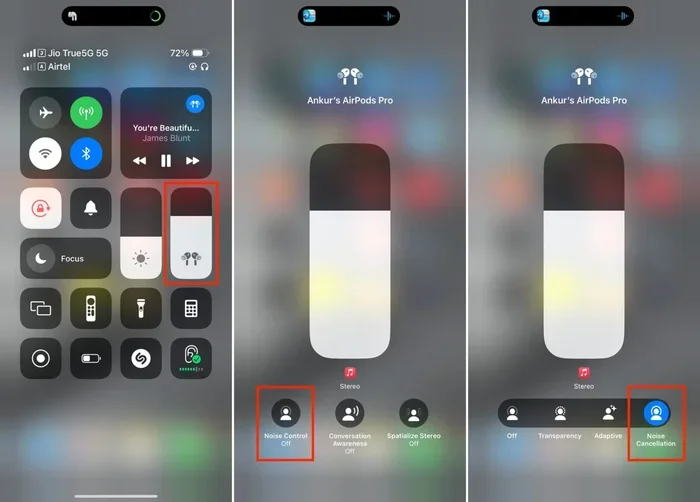
Featured image for AirPods noise cancellation feature
Image source: media.idownloadblog.com
AirPods do filter background noise, but how well they do it depends on the model and technology inside. Standard AirPods use passive noise isolation through their in-ear fit, while AirPods Pro and AirPods Max add Active Noise Cancellation (ANC) that actively blocks outside sounds. Transparency mode does the opposite, letting important sounds through so you stay aware of your surroundings.
Ever been on a noisy subway and still managed to enjoy a podcast? Or held a phone call in a coffee shop without yelling? If so, you’ve experienced background noise filtering—something AirPods are surprisingly good at. But how exactly do they pull off this everyday magic?
Think of background noise like a crowded room full of chatter. Now imagine you have a magical pair of earbuds that can either muffle that chatter or amplify just the parts you want to hear. That’s essentially what modern AirPods do, using a mix of clever physical design and tiny computers inside each earbud.
Whether you’re a daily commuter, a remote worker in a busy home, or someone who just wants better focus, understanding how AirPods handle background noise can change the way you use them. Let’s break it all down in plain language.
Key Takeaways
- Two types of noise filtering exist: passive noise isolation (physical seal) and Active Noise Cancellation (electronic sound waves).
- Not all AirPods have ANC: AirPods Pro 1, 2, and AirPods Max feature it, while base AirPods 1–4 rely only on passive isolation.
- Transparency mode flips the script: it lets outside sound in intentionally for safety and conversations.
- Adaptive Audio (Pro 2) adjusts automatically: the earbuds detect your environment and switch modes in real time.
- Microphones play a key role: outward-facing mics listen to the world, while inward mics monitor what reaches your ear.
- Fit dramatically affects performance: even great ANC fails if the ear tip seal is poor.
- Battery drains faster with ANC on: expect 20–30% less listening time when noise cancellation is active.
📑 Table of Contents
- How AirPods Handle Background Noise: The Basics
- Which AirPods Models Actually Filter Background Noise?
- The Science Behind Active Noise Cancellation
- Transparency Mode: The Opposite of Noise Cancellation
- Practical Tips to Get the Best Noise Filtering
- Common Myths About AirPods and Noise Filtering
- Conclusion: The Smart Way to Use AirPods for Noise Filtering
How AirPods Handle Background Noise: The Basics
AirPods use two main strategies to deal with background noise. The first is called passive noise isolation. The second is called Active Noise Cancellation (ANC). Think of these like two layers of protection.
Passive noise isolation is the simpler of the two. It’s just the physical barrier your earbuds create when they sit in your ears. Like putting your hands over your ears at a concert, a snug-fitting earbud blocks some sound simply by being there. Standard AirPods (the non-Pro versions) rely mostly on this method. Their hard plastic design sits in your outer ear and reduces noise through fit alone.
Active Noise Cancellation is where things get clever. Tiny microphones on the AirPods listen to the world around you. The AirPods then create a sound wave that is the exact opposite—or “anti-phase”—of the incoming noise. When these two waves meet, they cancel each other out. It’s like adding a negative number to a positive number and getting zero. This is the same physics principle used in high-end headphones and even some car cabins.
Did You Know? The science behind ANC dates back to the 1930s. It was first developed for airplane cockpit communications and aviation headsets. Today, it fits inside earbuds smaller than a coin.
The result? Low-frequency sounds like airplane engines, HVAC hum, or traffic noise fade into silence. Higher-pitched sounds—like voices or a baby crying—are harder to cancel, but they do get reduced.
What’s the Difference Between Passive and Active?
Here’s a simple way to remember it: passive isolation is like closing a door. Active cancellation is like actively silencing the noise on the other side. You need both for the best results, which is why AirPods Pro models combine silicone ear tips (passive) with electronic ANC (active).
Which AirPods Models Actually Filter Background Noise?
Not every AirPod model is created equal when it comes to blocking the world out. Apple offers different noise-handling features depending on the product line.
Visual guide about AirPods noise cancellation feature
Image source: descriptive.audio
AirPods (Standard Lineup)
The base AirPods—1st, 2nd, 3rd, and 4th generation—do not have Active Noise Cancellation. They offer only passive noise isolation through their open-ear design. Because they don’t seal your ear canal, you can still hear a fair amount of your surroundings. This is intentional. Apple designed them for casual listeners who want awareness, like joggers or office workers who still need to hear announcements.
AirPods Pro (1st and 2nd Generation)
This is where noise filtering gets serious. Both AirPods Pro generations feature Active Noise Cancellation, Transparency mode, and (on the 2nd gen) Adaptive Audio. They use silicone ear tips in three or four sizes to create a tight seal, which boosts passive isolation. Then the ANC kicks in to handle the rest.
The AirPods Pro 2 takes things further with the H2 chip, which processes noise faster and adapts to environmental changes in real time. Apple claims it cancels up to 2x more noise than the original AirPods Pro.
AirPods Max
Apple’s over-ear headphones also offer premium Active Noise Cancellation. Because they cover your entire ear with cushioned cups, they already block a lot of sound passively. The ANC adds another layer. They also feature Transparency mode and (with firmware updates) Adaptive Audio.
Comparison at a Glance
- AirPods 4 (Standard): Passive only
- AirPods 4 (ANC version): First base model with ANC
- AirPods Pro 1: ANC + Transparency
- AirPods Pro 2: ANC + Transparency + Adaptive Audio + Conversation Awareness
- AirPods Max: ANC + Transparency + Adaptive Audio
Did You Know? The AirPods 4 introduced ANC to the non-Pro lineup for the first time in late 2024. It’s a major shift for Apple’s entry-level earbuds.
The Science Behind Active Noise Cancellation
Let’s dig a little deeper into how ANC actually works. Don’t worry—we’ll keep it simple.
Every sound is a wave. It travels through the air as a series of compressions and rarefactions, kind of like ocean waves. When an ANC microphone picks up an outside sound—say, the rumble of a bus—your AirPods analyze that wave and instantly create a mirror image of it. But the mirror is flipped upside down. When the original wave and the flipped wave meet inside your ear, they cancel each other out. This is called destructive interference.
Think of it like this: imagine you’re pushing a swing forward at the same time someone else is pushing it backward with equal force. The swing doesn’t move. That’s what ANC does to sound waves.
Why ANC Works Better for Some Sounds
ANC is most effective against steady, low-frequency sounds. Think airplane engines, train rumble, air conditioners, and the hum of electronics. These sounds have predictable, repeating wave patterns, which makes them easier to cancel.
High-frequency and sudden sounds—like a horn blast, a dog barking, or someone shouting—are harder to cancel. They change too quickly for the system to respond. However, the silicone ear tip seal helps reduce these higher-pitched sounds passively.
Feedforward vs. Feedback Microphones
Apple uses two types of microphones for ANC:
- Feedforward mics sit on the outside of the earbud. They listen to the world before the sound reaches your ear.
- Feedback mics sit inside, near your ear canal. They listen to the sound that’s actually reaching your eardrum.
By comparing the two signals, the AirPods can fine-tune the anti-noise in real time. The H2 chip in AirPods Pro 2 processes this information incredibly fast—adjusting thousands of times per second.
Did You Know? The H2 chip inside AirPods Pro 2 performs around 48,000 operations per second just for noise cancellation. That’s faster than most laptop processors were a decade ago.
Transparency Mode: The Opposite of Noise Cancellation
Sometimes you want to hear the world around you. That’s where Transparency mode comes in. Think of it like opening a window in a soundproof room.
When you switch to Transparency mode, the microphones that normally detect noise for cancellation now let that sound through to your ears. You hear your surroundings as if you weren’t wearing earbuds at all. It’s perfect for situations like:
- Listening for airport announcements
- Ordering coffee without removing your AirPods
- Staying aware of traffic while walking
- Chatting briefly with a coworker
Adaptive Audio (AirPods Pro 2)
This is where Apple pushed the concept even further. Adaptive Audio blends Active Noise Cancellation and Transparency mode automatically. The AirPods detect what’s happening around you and adjust on the fly.
For example, if you’re walking past a construction site, the AirPods might increase ANC. When you walk into a quiet park, they might lower it. When someone starts talking to you, Conversation Awareness can automatically lower your audio and boost voices.
It’s like having a volume knob for reality—one that turns itself.
Customizing Transparency Mode
Did You Know? You can boost certain sounds in Transparency mode? On AirPods Pro 2 and AirPods Max, head to Settings > Accessibility > Audio & Visual > Headphone Accommodations. From there, you can amplify soft sounds or specific frequencies. This is great for people with mild hearing difficulties.
Practical Tips to Get the Best Noise Filtering
Even the best ANC technology won’t help if your earbuds don’t fit right. Here are some practical tips to maximize background noise filtering on your AirPods.
1. Get the Right Ear Tip Fit
If you own AirPods Pro, try all the included ear tip sizes. A proper seal is the foundation of both passive isolation and ANC performance. Apple even includes an Ear Tip Fit Test in the Settings app that plays a short sound and tells you if your seal is good.
2. Keep Your AirPods Clean
Dust, earwax, and debris can block microphones and reduce ANC effectiveness. Wipe your AirPods regularly with a dry, soft cloth. For stubborn buildup, use a dry cotton swab. Avoid water or cleaning sprays directly on the earbuds.
3. Update Your Firmware
Apple often improves ANC performance through software updates. Make sure your AirPods are running the latest firmware. You can check by going to Settings > Bluetooth > AirPods > About while connected to your iPhone.
4. Use the Right Mode for the Right Moment
Don’t leave ANC on all the time. Use it when you need focus or quiet. Use Transparency mode when you need awareness. Your ears and your battery will thank you.
5. Mind the Wind
Strong wind can interfere with ANC microphones and cause a rumbling sound. If you’re cycling or running in heavy wind, switch to Transparency mode or turn ANC off temporarily.
Did You Know? ANC can use up to 30% more battery than standard listening. If you’re on a long flight, plan to charge or use one earbud at a time to extend battery life.
Common Myths About AirPods and Noise Filtering
Let’s bust a few myths that often confuse people.
Myth 1: “AirPods cancel all noise.”
No. AirPods don’t create silence. They reduce certain frequencies—mostly steady low-frequency sounds. Voices, alarms, and sudden noises are reduced but not eliminated.
Myth 2: “Transparency mode is just turning ANC off.”
Not exactly. Transparency mode actively uses microphones to pass sound through. Turning ANC off simply stops the cancellation. The two are different experiences.
Myth 3: “ANC damages your hearing.”
There’s no scientific evidence that ANC harms hearing. However, listening at high volumes for long periods—regardless of ANC—can damage your ears. Keep the volume at safe levels.
Myth 4: “All wireless earbuds have the same noise cancellation.”
Far from it. ANC quality varies widely. Apple’s H1 and H2 chips are highly optimized, but competitors like Sony, Bose, and Sennheiser also produce excellent ANC. The “best” depends on fit, algorithm tuning, and chip speed.
Conclusion: The Smart Way to Use AirPods for Noise Filtering
So, do AirPods filter background noise? Absolutely—but with some nuance. Base AirPods use only passive isolation, while AirPods Pro and AirPods Max combine physical sealing with powerful Active Noise Cancellation. Transparency mode flips the script when you need awareness, and Adaptive Audio does the switching for you automatically.
The best experience comes from understanding which model you own, choosing the right fit, and using the right mode for your environment. With the right setup, AirPods can turn a chaotic commute into a calm listening session—or keep you fully aware when safety matters.
Now that you know how the magic works, try experimenting with the modes on your own AirPods. Listen to the difference. Test the Ear Tip Fit Test. Try Adaptive Audio on a busy street. Once you experience it, you’ll never look at earbuds the same way again.
Frequently Asked Questions
Do regular AirPods filter background noise?
Standard AirPods (1st–3rd gen) only use passive noise isolation from their open-ear fit. They reduce some ambient sound but don’t actively cancel noise. The AirPods 4 ANC version, however, adds Active Noise Cancellation for the first time in the non-Pro lineup.
How does Active Noise Cancellation work on AirPods Pro?
AirPods Pro use outward and inward microphones to detect surrounding sound, then create an opposite sound wave called anti-noise. When the two waves meet, they cancel each other out, reducing unwanted background noise—especially low-frequency hums and rumbles.
Is Transparency mode the same as turning off ANC?
No. Turning off ANC simply stops noise cancellation. Transparency mode actively uses microphones to pass outside sound into your ears, making it sound like you’re not wearing earbuds at all. It feels more natural than just disabling ANC.
Can AirPods block voices and talking?
AirPods reduce voices but don’t eliminate them completely. ANC works best on low, steady sounds like engines or fans. Human voices are higher-pitched and changeable, so they’re harder to cancel—though passive seal from silicone tips helps reduce them significantly.
Does noise cancellation drain AirPods battery faster?
Yes. Using ANC can reduce listening time by roughly 20–30%. AirPods Pro 2, for example, offer around 6 hours with ANC on and up to 7 hours with it off. Transparency mode has similar battery impact as ANC.
Do AirPods work for noise cancellation without music playing?
Yes. You can activate ANC or Transparency mode without audio. Many people use AirPods Pro for silence during focus sessions, meditation, or just to reduce environmental noise while waiting in loud places.