Featured image for AirPods noise cancellation
Image source: media.idownloadblog.com
AirPods do filter out background noise, but the level of filtering depends on the model and technology used. Standard AirPods use physical ear seal design and beamforming microphones to reduce ambient sound during calls, while AirPods Pro and AirPods Max feature Active Noise Cancellation (ANC) that uses advanced algorithms to block external noise. For the best noise-filtering experience, ANC-enabled AirPods are the top choice, especially in loud environments like airplanes, cafes, or busy offices.
Imagine sitting in a crowded coffee shop, the espresso machine hissing, people chatting around you, and a blender whirring in the background. Now imagine pressing play on your favorite playlist and suddenly, the world goes quiet. That magic happens because of a tiny piece of technology inside your AirPods. But how exactly does it work? Can AirPods really filter out background noise, or is it just marketing hype?
If you’ve ever wondered whether AirPods can truly block out the chaos of daily life, you’re not alone. Millions of people rely on these little white earbuds for work calls, workouts, and travel. The truth is, AirPods do filter out background noise, but the way they do it depends on which model you own and what you’re trying to accomplish. Some AirPods use clever physical design, while others use cutting-edge digital wizardry.
In this guide, we’ll break it all down in plain English. You’ll learn the difference between passive noise isolation and Active Noise Cancellation, how Transparency Mode flips the script, and which AirPods are best for noisy environments. Whether you’re a remote worker, a frequent flyer, or just someone who wants better focus, this article will help you get the most out of your AirPods.
Key Takeaways
- Not All AirPods Filter Noise Equally: Standard AirPods offer passive noise reduction, while AirPods Pro and AirPods Max include Active Noise Cancellation (ANC).
- ANC Uses Real-Time Sound Processing: Tiny microphones detect outside sounds, and the AirPods produce “anti-noise” waves to cancel them out.
- Transparency Mode Lets Sound In: When you want to hear your surroundings, Transparency Mode uses the same mics to amplify outside sounds naturally.
- Microphone Quality Matters for Calls: Beamforming mics focus on your voice and reduce background noise during phone calls, even on older AirPods models.
- Fit Affects Performance: A proper seal with the right ear tip size dramatically improves noise filtering on AirPods Pro.
- Battery Drain Is Real: ANC and Transparency Mode consume more battery than passive listening, so plan charging accordingly.
- They Are Not Soundproof: AirPods reduce noise significantly but cannot eliminate 100% of all sounds, especially sudden or high-frequency noises.
📑 Table of Contents
- How AirPods Handle Background Noise: The Basics
- Which AirPods Models Filter Background Noise Best?
- How Active Noise Cancellation Works (The Science Made Simple)
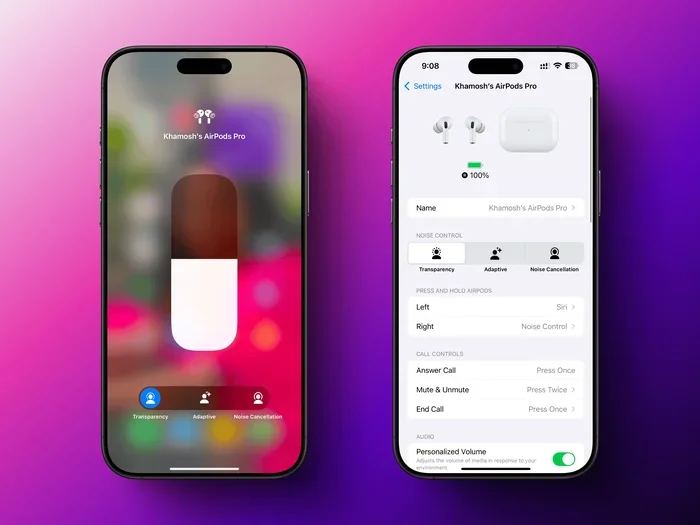
- Transparency Mode and Adaptive Audio: The Flip Side
- How AirPods Filter Noise During Phone Calls
- Tips to Maximize Background Noise Filtering on AirPods
- Common Myths About AirPods and Noise Filtering
- When AirPods Filtering Is Not Enough: Alternatives to Consider
- The Future of Noise Filtering in AirPods
- Final Verdict: Do AirPods Filter Out Background Noise?
How AirPods Handle Background Noise: The Basics
Let’s start with the simplest question: do AirPods filter out background noise? The short answer is yes, but the method varies. Think of background noise like water pouring into a bucket. Your AirPods can either block the water with a lid (passive isolation) or pump the water back out as fast as it pours in (active noise cancellation). Both methods work, but one is much more powerful.
Passive Noise Isolation: The Foundation
Even the most basic AirPods use passive noise isolation. This simply means the earbuds physically block your ear canal, like putting your fingers in your ears during a loud concert. The silicone or plastic tips create a seal that muffles outside sounds. It’s not fancy, but it works reasonably well for mid-range frequencies like human voices and air conditioners.
Standard AirPods (the non-Pro versions) rely heavily on this passive approach. They sit loosely in your ears, so they don’t seal as tightly as in-ear models. As a result, they filter out maybe 10-20% of background noise on their own. If you’re in a quiet room, that’s plenty. If you’re on a subway, not so much.
Active Noise Cancellation (ANC): The Heavy Lifter
Here’s where things get interesting. AirPods Pro and AirPods Max feature Active Noise Cancellation, a technology that uses microphones and speakers to “cancel” outside sounds in real time. Picture this: outside noise is a wave traveling toward your ear. ANC listens to that wave and creates an exact opposite wave that crashes into it, neutralizing both. The result? Silence, or at least a much quieter version of reality.
According to Apple, the H1 chip inside AirPods Pro processes outside sound 200 times per second. That’s faster than you can blink. This constant processing means the anti-noise stays accurate even as sounds change, like a car horn or a barking dog.
Which AirPods Models Filter Background Noise Best?
Not all AirPods are created equal. If noise filtering is your top priority, the model you choose matters a lot. Let’s compare the lineup.
Visual guide about AirPods noise cancellation
Image source: lifehacker.com
AirPods (1st, 2nd, 3rd, and 4th Generation)
Standard AirPods offer basic noise reduction through their shape and fit. They have microphones that help reduce background noise during phone calls, but they don’t have ANC. If you’re using them to listen to music in a quiet environment, they’ll sound great. In a noisy place, you’ll hear a lot of leakage.
AirPods Pro (1st and 2nd Generation)
The Pro models are where noise filtering gets serious. They feature in-ear silicone tips that create a tight physical seal, plus Active Noise Cancellation. In fact, Apple claims AirPods Pro 2 cancel up to twice as much noise as the first generation. Reviewers and users consistently report that these earbuds dramatically reduce airplane engine hum, office chatter, and street noise.
AirPods Max
These over-ear headphones are the kings of noise filtering in Apple’s lineup. The cushioned ear cups create a massive physical seal, and the ANC uses eight microphones (yes, eight!) to detect and cancel ambient sound. If you want the ultimate quiet experience and don’t mind the higher price tag, AirPods Max deliver.
Quick Comparison Table (In Text)
- AirPods (Standard): Passive noise reduction, best for quiet rooms
- AirPods Pro: ANC + silicone seal, best for travel and offices
- AirPods Max: Over-ear design + advanced ANC, best for audiophiles and frequent flyers
How Active Noise Cancellation Works (The Science Made Simple)
Let’s pull back the curtain on ANC. It sounds complicated, but the concept is beautifully simple. Here’s a step-by-step breakdown.
Step 1: Listening to the Outside World
Inside each AirPod Pro or AirPods Max ear cup, there are tiny microphones. These mics face outward and constantly listen to the sounds around you, like airplane engines, air conditioners, or crowd noise.
Step 2: Analyzing the Sound Wave
The H1 or H2 chip inside the AirPods takes that sound and analyzes it almost instantly. It figures out the frequency, amplitude, and waveform of the noise. Think of it like a translator decoding a foreign language in milliseconds.
Step 3: Creating the “Anti-Noise”
The chip then generates a sound wave that’s exactly opposite to the outside noise. This is called “phase inversion.” When the original noise wave and the anti-noise wave meet inside your ear, they cancel each other out. It’s like adding +1 and -1 to get zero.
Step 4: Real-Time Adjustment
The magic doesn’t stop there. As the outside noise changes (say, a plane’s engine speed shifts), the AirPods adjust the anti-noise 200 times per second. This keeps the cancellation smooth and effective, even in dynamic environments.
Did you know? ANC is most effective on low, consistent sounds like airplane engines or HVAC systems. Sudden, sharp noises like a dog barking or a door slamming are harder to cancel because they happen too quickly.
Transparency Mode and Adaptive Audio: The Flip Side
Sometimes you don’t want to block noise. Sometimes you need to hear it, like when a cashier asks you a question or a car honks at you while crossing the street. That’s where Transparency Mode comes in.
What Is Transparency Mode?
Transparency Mode uses the same microphones as ANC, but instead of canceling outside sounds, it lets them in. It amplifies ambient noise slightly and plays it through your AirPods as if you weren’t wearing them at all. It’s like having a transparent window in a soundproof room.
This is incredibly useful for runners who need to hear traffic, office workers who want to listen for their name, or anyone walking through busy streets.
Adaptive Audio: The Smart Hybrid
Apple introduced Adaptive Audio with iOS 17, and it’s a game-changer. This feature automatically switches between ANC and Transparency Mode based on your environment. If you’re in a quiet cafe, it might lower the noise cancellation. If you step outside into traffic, it ramps ANC back up. You don’t have to touch a button, your AirPods figure it out for you.
This is especially handy for people who move through different environments throughout the day. It’s like having a personal sound assistant that adjusts your audio settings on the fly.
Conversation Awareness
Another clever feature is Conversation Awareness. When you start talking to someone while wearing AirPods, the music automatically lowers and Transparency Mode kicks in. Once you stop talking, your music returns to normal volume. It’s perfect for quick chats without removing your earbuds.
How AirPods Filter Noise During Phone Calls
Filtering noise while listening to music is one thing, but what about phone calls? This is where many earbuds fail. Background noise during calls makes you sound unprofessional and hard to understand. Fortunately, AirPods handle this impressively well.
Beamforming Microphones
AirPods use beamforming microphones, which work like a highly focused spotlight for sound. Instead of picking up everything equally, these mics focus on the sound coming directly from your mouth while rejecting sounds from other directions.
Imagine you’re at a concert trying to talk to a friend. A regular mic would capture the music, the crowd, and your voice all at once. A beamforming mic zeroes in on just your voice, like a camera zooming in on your face. The result is clearer calls, even in noisy places.
Noise Suppression Algorithms
Beyond beamforming, AirPods run real-time algorithms that identify and suppress background noise. Things like wind, traffic, and typing are filtered out digitally. Apple has gotten so good at this that many remote workers rely on AirPods for client calls from cafes and co-working spaces.
The Mesh and Wind Noise Reduction
AirPods Pro 2 introduced an acoustic mesh over the microphones to reduce wind noise. If you’ve ever tried to take a call on a windy day, you know how annoying that whooshing sound can be. This mesh, combined with internal filters, dramatically cuts down wind interference.
Tips to Maximize Background Noise Filtering on AirPods
Owning AirPods with ANC is one thing, but using them effectively is another. Here are some pro tips to get the most noise filtering possible.
1. Choose the Right Ear Tip Size
This is the single most important factor. If your AirPods Pro don’t seal properly, ANC performance drops dramatically. Apple includes multiple ear tip sizes (XS, S, M, L) in the box. Try each one and do the Ear Tip Fit Test in your iPhone settings. A good seal feels snug but comfortable and doesn’t let outside noise leak in.
2. Keep Your AirPods Clean
Earwax and debris block the microphones and speaker mesh. This reduces both ANC and Transparency Mode effectiveness. Wipe your AirPods regularly with a dry, soft cloth and use a small brush to clean the mesh.
3. Update Your Firmware
Apple frequently releases firmware updates that improve ANC performance. Make sure your AirPods are running the latest version by connecting them to your iPhone and checking Settings > Bluetooth > AirPods > About.
4. Use Adaptive Audio
If your AirPods support it, enable Adaptive Audio. This AI-powered feature adjusts noise cancellation automatically, so you don’t have to fiddle with settings throughout the day.
5. Charge Before Long Sessions
ANC drains battery faster than passive listening. AirPods Pro last about 6 hours with ANC on, compared to 7 hours without. AirPods Max last around 20 hours with ANC. Plan your charging accordingly, especially for long flights.
6. Combine with Software Features
On your iPhone or Mac, enable features like “Background Sounds” to play white noise alongside your music. This can further mask distractions in open offices or while studying.
Common Myths About AirPods and Noise Filtering
Let’s clear up some confusion. There are several myths floating around about what AirPods can and can’t do.
Myth 1: AirPods Are Soundproof
False. No earbuds or headphones can make your ears 100% soundproof. Even AirPods Max, Apple’s most powerful noise-canceling headphones, don’t block every sound. Sudden noises like alarms or screaming will still get through. ANC is best at canceling steady, low-frequency sounds.
Myth 2: ANC Damages Your Hearing
False. Active Noise Cancellation actually protects your hearing in noisy environments. Instead of cranking up the volume to drown out background noise, you can listen at lower, safer volumes. This is one of the biggest benefits of ANC for people who use headphones daily.
Myth 3: All Wireless Earbuds Filter Noise the Same Way
False. Different brands use different ANC technology. Some budget earbuds claim ANC but barely filter any noise. Apple’s implementation is among the best, especially for the price, but competitors like Sony, Bose, and Sennheiser also offer excellent noise cancellation.
Myth 4: Transparency Mode Just Lowers Your Music
False. Transparency Mode actually pipes in outside sound using the microphones. It’s not just a volume adjustment; it’s real-time audio mixing that makes conversations feel natural.
When AirPods Filtering Is Not Enough: Alternatives to Consider
AirPods are fantastic, but they aren’t perfect for every situation. Here are some scenarios where you might need something more.
Construction Sites and Industrial Settings
If you work around heavy machinery, AirPods won’t cut it. You need industrial-grade hearing protection like 3M WorkTunes or similar products that meet OSHA safety standards. These often have built-in speakers for music while protecting your ears from damaging noise levels.
Sleeping with a Partner Who Snores
AirPods aren’t comfortable to wear all night, and ANC isn’t designed to block snoring specifically (it’s better at consistent low-frequency noise). White noise machines or specialized sleep headphones might work better.
Recording Audio or Music
If you’re recording a podcast or music, AirPods’ microphones aren’t professional-grade. Use dedicated microphones and soundproof your recording environment.
Budget Constraints
If AirPods Pro are out of your budget, consider older AirPods Pro (refurbished), or alternatives from Anker, JLab, or Soundcore that offer decent ANC at lower prices.
The Future of Noise Filtering in AirPods
Apple is constantly improving its noise-cancellation technology. With each generation, ANC gets smarter, more efficient, and more adaptive. So what does the future hold?
AI-Powered Personalization
Future AirPods may use AI to learn your specific hearing profile and the environments you frequent. Imagine AirPods that automatically adjust ANC strength based on whether you’re in a library, a gym, or an airplane, without you lifting a finger.
Health Monitoring Integration
Apple has been adding health features to AirPods, like hearing aid functionality and hearing tests. Future versions may include heart rate monitoring, body temperature sensing, and even posture alerts. Combined with ANC, this could make AirPods a comprehensive wellness device.
Better Battery Life
ANC is power-hungry. As battery technology improves, future AirPods will likely offer longer listening times with ANC enabled, making them more practical for long-haul travel and full workdays.
Improved Transparency Mode
Apple may add features like selective hearing, where you can choose which sounds to let in. Imagine amplifying a friend’s voice in a crowd while still canceling background music. This level of customization is likely coming within a few years.
Final Verdict: Do AirPods Filter Out Background Noise?
So, do AirPods filter out background noise? Absolutely, but with a few caveats. Standard AirPods offer minimal passive noise reduction, which works fine for quiet environments. AirPods Pro and AirPods Max, on the other hand, deliver excellent Active Noise Cancellation that can dramatically reduce ambient sound in noisy places like airplanes, offices, and city streets.
If noise filtering is a priority for you, invest in AirPods Pro or AirPods Max. Make sure to choose the right ear tip size, keep your AirPods clean, and take advantage of features like Adaptive Audio and Transparency Mode. These tools can transform how you work, travel, and relax.
While AirPods aren’t perfect, they represent some of the best consumer noise-cancellation technology available today. Whether you’re a professional on endless Zoom calls, a student trying to focus in a busy dorm, or a traveler seeking peace on a long flight, there’s an AirPod model that can help you tune out the world and tune into what matters.
The world is loud, but with the right AirPods, you get to decide what you hear.
Frequently Asked Questions
Do all AirPods have Active Noise Cancellation?
No, only AirPods Pro (1st and 2nd generation) and AirPods Max have Active Noise Cancellation. Standard AirPods rely on passive noise isolation from their physical fit, which is much less effective at blocking background noise.
Can AirPods block out airplane noise?
Yes, AirPods Pro and AirPods Max are excellent at canceling airplane engine noise because it’s a steady, low-frequency sound. Many travelers report significant noise reduction on flights, though they won’t completely silence crying babies or loud conversations.
How do I turn on noise cancellation on my AirPods?
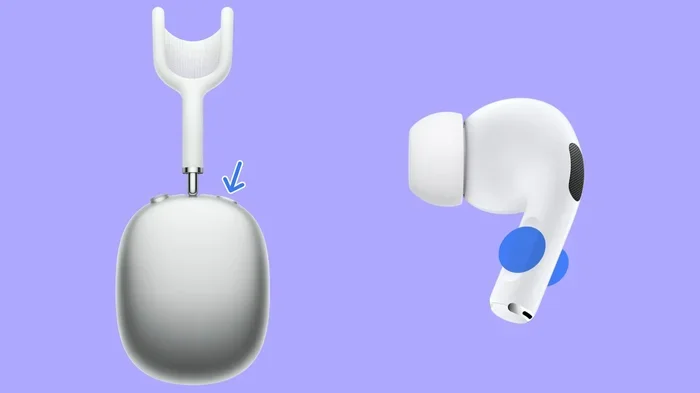
On AirPods Pro or AirPods Max, press and hold the force sensor (Pro) or the noise control button (Max) to switch between Active Noise Cancellation, Transparency Mode, and Off. You can also control this from your iPhone’s Control Center or Settings.
Does Transparency Mode block any noise?
Transparency Mode is designed to let outside sound in, not block it. However, your music still plays, which can mask some ambient noise. It’s the opposite of Active Noise Cancellation.
Do AirPods filter noise during phone calls?
Yes, AirPods use beamforming microphones and noise suppression algorithms to isolate your voice during calls. This significantly reduces background noise, making your voice clearer to the person on the other end.
Will using ANC drain my AirPods battery faster?
Yes, Active Noise Cancellation uses more battery than passive listening. AirPods Pro last about 6 hours with ANC on versus 7 hours with it off. AirPods Max last around 20 hours with ANC enabled.