Featured image for AirPods noise cancellation feature
Image source: groovypost.com
Yes, several AirPods models include Active Noise Cancellation (ANC), but not all of them do. Apple’s premium AirPods Pro, AirPods Pro 2, and AirPods Max come equipped with ANC technology, while the base AirPods (1st through 4th generation) and AirPods with Charging Case do not. ANC uses tiny microphones and advanced algorithms to detect and cancel out surrounding noise, letting you enjoy music, calls, and podcasts with crystal-clear sound even in loud environments.
Imagine sitting in a crowded coffee shop, trying to enjoy your favorite playlist, but the loud chatter, clinking cups, and buzzing espresso machine make it nearly impossible. Now imagine pressing a tiny button and—suddenly—silence. The world melts away, and it’s just you and your music. That’s the magic of Active Noise Cancellation, or ANC. But here’s the big question many people ask: do AirPods have ANC?
The short answer is yes, but only on certain models. Apple makes several different AirPods, and not all of them include this premium feature. Understanding which AirPods offer ANC, how the technology works, and how to get the most out of it can completely transform your listening experience. Whether you’re a frequent flyer, a remote worker, or just someone who loves great audio, knowing the ins and outs of AirPods ANC is essential.
In this guide, we’ll break down everything you need to know in plain, simple language. You’ll learn which AirPods have ANC, how the feature works, what makes it different from basic noise blocking, and practical tips for using it every day. Let’s dive in.
Key Takeaways
- ANC Availability Varies by Model: Only AirPods Pro, AirPods Pro 2, and AirPods Max feature Active Noise Cancellation; standard AirPods rely on passive noise isolation only.
- How ANC Works: Tiny microphones listen to outside sounds, and the earbuds produce opposite sound waves to “cancel” the noise before you hear it.
- Transparency Mode: ANC AirPods also offer a Transparency mode that lets outside sounds in, perfect for conversations or staying aware of traffic.
- Adaptive Audio: Newer AirPods Pro 2 models include Adaptive Audio, which automatically blends ANC and Transparency based on your environment.
- Battery Impact: Using ANC drains battery more quickly, so turning it off can extend listening time by up to 30%.
- Best for Travel: ANC AirPods are especially valuable on planes, trains, and busy offices where background noise can be overwhelming.
- Price Difference: ANC AirPods typically cost $80–$200 more than non-ANC versions, reflecting the advanced hardware and software inside.
📑 Table of Contents
- What Does ANC Mean and How Does It Work?
- Which AirPods Models Have ANC?
- ANC vs. Passive Noise Isolation: What’s the Difference?
- How to Use ANC on AirPods
- Bonus Features: Transparency Mode and Adaptive Audio
- When Should You Use ANC? Practical Tips and Scenarios
- How ANC Affects Battery Life
- Common Myths About AirPods ANC
- Who Should Buy ANC AirPods?
- How to Choose the Right AirPods for Your Needs
- Caring for Your ANC AirPods
- Final Thoughts: Do AirPods Have ANC?
What Does ANC Mean and How Does It Work?
ANC stands for Active Noise Cancellation. It’s a technology designed to reduce unwanted background sounds using a clever combination of hardware and software. If you’ve ever wondered how some headphones can make a loud airplane cabin feel whisper-quiet, ANC is the secret.
The Basic Science Behind ANC
Think of ANC as a noise-canceling superhero. Here’s how it works, step by step:
- Listening Phase: Tiny microphones built into the AirPods listen to the sounds around you.
- Analysis Phase: A special processor inside the AirPods analyzes those sounds in real time, figuring out their frequency and amplitude (basically, how loud and how high- or low-pitched they are).
- Counter Phase: The AirPods then create a “mirror” sound wave that’s the exact opposite of the noise.
- Canceling Phase: When the original noise and the mirror sound wave meet, they cancel each other out. It’s like adding +5 and -5 to get zero.
This whole process happens in milliseconds, faster than you can blink. By the time the noise reaches your ear, it’s dramatically reduced—or even gone entirely.
A Simple Analogy
Imagine you’re pushing a heavy box across the floor. Now imagine a friend pushes the box from the other side with the exact same force. The box doesn’t move. That’s how ANC works: it pushes back against the noise with equal force, so you don’t “hear” it.
What ANC Is Good At Cancelling
ANC works best on low, constant sounds, such as:
- Airplane engine hum
- Train or bus rumble
- Air conditioners and fans
- Office chatter
It is less effective against sudden, sharp noises like a dog barking, a door slamming, or someone shouting. For those, a good seal (like the silicone tips on AirPods Pro) helps a lot.
Did You Know?
The concept of ANC was first developed in the 1930s by inventor Paul Lueg, but it wasn’t used in headphones until the late 1980s, when Bose created the first commercial ANC headsets for pilots. Today, it’s a standard feature in premium earbuds and headphones.
Which AirPods Models Have ANC?
Here’s where things get interesting. Apple makes it a bit confusing because not every AirPods model has ANC. Let’s break it down clearly.
Visual guide about AirPods noise cancellation feature
Image source: media.idownloadblog.com
AirPods That DO Have ANC
Three AirPods models currently include Active Noise Cancellation:
- AirPods Pro (1st Generation): Released in October 2019, these were Apple’s first in-ear AirPods with ANC. They introduced Transparency mode and silicone ear tips for a better seal.
- AirPods Pro (2nd Generation): Released in September 2022, these upgraded ANC with the H2 chip, offering up to 2x more noise cancellation than the first generation. They also added Adaptive Audio and Conversation Awareness.
- AirPods Max: Released in December 2020, these are Apple’s over-ear headphones with ANC. They use eight microphones for noise cancellation and premium materials like memory foam ear cushions.
AirPods That DO NOT Have ANC
These models rely only on passive noise isolation (the natural blocking from a good fit):
- AirPods (1st Generation): Released in 2016, no ANC.
- AirPods (2nd Generation): Released in 2019, no ANC.
- AirPods (3rd Generation): Released in 2021, no ANC.
- AirPods (4th Generation): Released in 2024, no ANC. However, Apple introduced a higher-tier AirPods 4 with Active Noise Cancellation as a separate variant.
Quick Reference Chart
Here’s a simple way to remember:
- Has ANC: AirPods Pro, AirPods Pro 2, AirPods Max, AirPods 4 (ANC version)
- No ANC: AirPods 1, 2, 3, AirPods 4 (base version)
ANC vs. Passive Noise Isolation: What’s the Difference?
Many people confuse ANC with passive noise isolation, but they’re very different. Let’s clear that up.
What Is Passive Noise Isolation?
Passive noise isolation simply means physically blocking sound. Think of it like earplugs. If you put your fingers in your ears, you’re using passive isolation. The shape, fit, and materials of the earbuds determine how much sound they block.
Standard AirPods use passive noise isolation. Their hard plastic design sits in your ear but doesn’t create a tight seal, so a lot of outside noise leaks in.
What Makes ANC Special?
ANC actively fights noise with sound waves. It doesn’t just block noise—it fights it with technology. That’s why ANC earbuds feel almost magical in noisy environments.
Which Is Better?
For the best experience, you want both. AirPods Pro and AirPods Max combine passive isolation (thanks to silicone or memory foam seals) with active cancellation. This combo delivers the most peaceful listening experience possible.
A Helpful Comparison
Think of passive isolation as closing a window to block noise. ANC is like adding a noise-canceling machine on top. Together, they make your listening bubble super quiet.
How to Use ANC on AirPods
If you’ve got ANC AirPods, using the feature is super easy. Here’s how.
On iPhone or iPad
- Open the Settings app.
- Tap Bluetooth and find your AirPods.
- Tap the “i” next to your AirPods.
- Choose Noise Control.
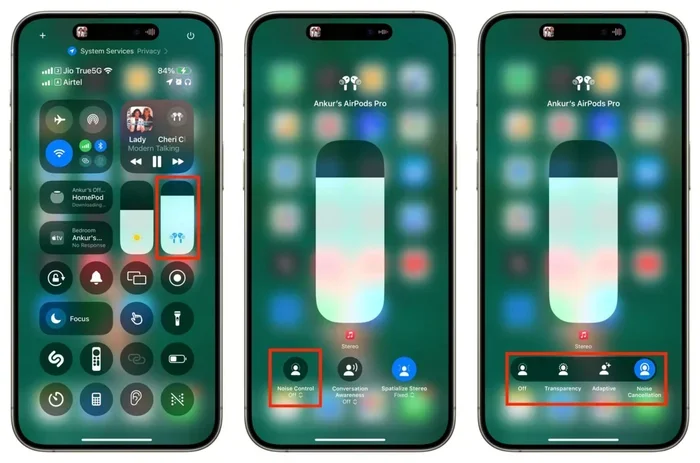
- Select Noise Cancellation, Transparency, or Off.
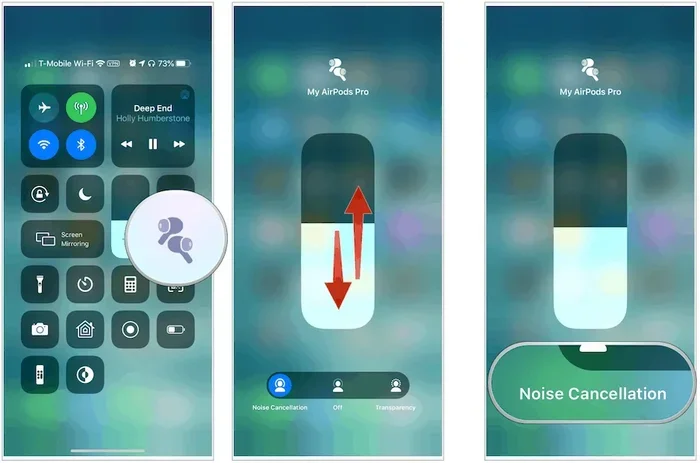
You can also switch modes directly from the Control Center. Swipe down from the top-right corner of your screen, long-press the volume slider, and tap the Noise Control icon.
On Mac
Click the AirPods icon in the menu bar while wearing your AirPods, then choose your noise control mode. If you don’t see the icon, go to System Settings > Bluetooth and enable “Show Bluetooth in menu bar.”
Using the Force Sensor (AirPods Pro)
AirPods Pro have a small force sensor on the stem. You can squeeze and hold the stem to switch between ANC and Transparency mode. This is handy when you’re on the go and don’t want to pull out your phone.
Pro Tip
If you find ANC too “pressure-like” (some people describe the sensation as feeling like your ears need to pop), try Transparency mode or Adaptive Audio. These modes feel more natural while still reducing noise.
Bonus Features: Transparency Mode and Adaptive Audio
ANC isn’t just about blocking noise. Modern AirPods also let you control how much of the world you let in. Here’s what you need to know.
What Is Transparency Mode?
Transparency mode is the opposite of ANC. Instead of blocking outside sounds, it lets them in. This is super useful when you need to:
- Talk to someone without removing your AirPods
- Hear announcements at the airport
- Stay aware of traffic while walking
- Listen for your coffee order at a café
AirPods Pro and AirPods Max use their microphones to capture outside sounds and play them through the earbuds as if you weren’t wearing anything at all.
What Is Adaptive Audio?
Adaptive Audio is a newer feature (introduced with AirPods Pro 2 in iOS 17) that automatically switches between ANC and Transparency based on your environment. Here’s how it works:
- If you’re walking past a construction site, ANC cranks up.
- If someone starts talking to you, Transparency kicks in.
- If you’re in a quiet room, it might turn off entirely to save battery.
It’s like having a smart assistant for your ears, always making sure you hear what matters most.
Conversation Awareness
Another cool feature on AirPods Pro 2 is Conversation Awareness. When you start speaking, your AirPods automatically lower the music and boost the voices in front of you. It’s perfect for quick chats at the checkout counter.
Did You Know?
According to Apple, AirPods Pro 2 can cancel up to 2x more noise than the first-generation AirPods Pro, thanks to the more powerful H2 chip.
When Should You Use ANC? Practical Tips and Scenarios
ANC is amazing, but knowing when to use it makes a big difference. Here are the best situations to turn it on.
Airplane and Train Travel
The hum of engines is exactly the kind of low-frequency noise ANC excels at canceling. Slip on your AirPods Pro during takeoff, and you’ll arrive at your destination feeling more refreshed. Many frequent flyers say ANC AirPods are a game-changer.
Working in a Noisy Office
If you work in an open office or a busy café, ANC helps you focus. Pair it with a focus playlist or white noise, and you’ll get into “deep work” mode faster.
Studying or Reading
Background chatter can ruin concentration. ANC turns a noisy library or dorm room into a peaceful study zone.
Working Out at the Gym
Gyms are filled with loud music, clanging weights, and grunting. ANC plus your pump-up playlist is a powerful combo.
Commuting
Whether you’re on a bus, subway, or bike, ANC helps you enjoy your favorite podcasts or audiobooks without cranking the volume to dangerous levels.
When to Turn ANC OFF
There are times when ANC isn’t ideal:
- Walking in traffic: You need to hear cars and surroundings.
- Listening for announcements: At airports, train stations, or while waiting in line.
- Saving battery: Turning off ANC can extend listening time by 1–2 hours.
- Reducing ear pressure: Some people feel discomfort with ANC on for long periods.
Pro Tip
If you’re new to ANC, try using it for short periods at first. Some people experience a slight “vacuum” sensation in their ears. This usually goes away as you get used to the technology.
How ANC Affects Battery Life
Using ANC requires extra processing power, which drains the battery faster. Here’s what to expect.
Battery Estimates (AirPods Pro 2)
- With ANC ON: Up to 6 hours of listening time
- With ANC OFF: Up to 7 hours of listening time
- With Transparency Mode: Up to 6 hours of listening time
Battery Estimates (AirPods Max)
- With ANC ON: Up to 20 hours of listening, talk time, or movie playback
- With ANC OFF: Similar, but slightly longer
Tips to Save Battery
- Turn off ANC when you don’t need it.
- Use one AirPod at a time for calls or podcasts.
- Keep your AirPods in their case when not in use.
- Avoid extreme temperatures, which can damage the battery.
Did You Know?
A fully charged AirPods Pro case provides about 24 hours of total listening time, even with ANC enabled.
Common Myths About AirPods ANC
Let’s bust some myths you might have heard.
Myth 1: “ANC Blocks All Noise”
False. ANC reduces most noise, especially low-frequency hums, but it doesn’t make your world completely silent. You’ll still hear sudden, sharp sounds like sirens or a baby crying.
Myth 2: “ANC Is Bad for Your Ears”
Mostly false. ANC is safe for most people. However, some users feel ear pressure or dizziness at first. If you experience discomfort, take breaks or use Transparency mode.
Myth 3: “ANC AirPods Sound Worse Than Standard AirPods”
False. In fact, AirPods Pro and AirPods Max often sound better than non-ANC versions because of their custom drivers and acoustic design.
Myth 4: “ANC Drains Battery So Fast It’s Not Worth It”
Partially true. ANC does use more battery, but the difference is small. You can still enjoy 5–6 hours of listening on a single charge.
Myth 5: “You Can’t Hear Anything with ANC On”
False. With Transparency mode or Adaptive Audio, you can choose how much of the world you hear. You don’t have to be completely cut off.
Who Should Buy ANC AirPods?
ANC AirPods aren’t for everyone. Here’s a quick guide to help you decide.
ANC AirPods Are Great For:
- Frequent travelers: Flights, trains, and long commutes.
- Remote workers: Focus in noisy environments.
- Students: Better concentration in libraries or dorms.
- Commuters: Enjoy music without raising the volume.
- Anyone with sensory sensitivities: ANC can reduce overwhelming sounds.
You Might Skip ANC If:
- You mostly listen in quiet environments.
- You’re on a tight budget.
- You want the smallest, lightest AirPods.
- You prefer earbuds without silicone tips.
Did You Know?
According to a 2023 survey by Statista, around 40% of headphone buyers say noise cancellation is a “must-have” feature when shopping for new earbuds.
How to Choose the Right AirPods for Your Needs
With all these options, picking the right AirPods can feel overwhelming. Here’s a simple decision-making process.
Step 1: Decide If You Want ANC
Ask yourself: Do I often listen in loud places? If yes, ANC is worth the investment.
Step 2: Choose Your Form Factor
Apple offers two main styles:
- In-ear (AirPods Pro): Small, portable, great seal, silicone tips.
- Over-ear (AirPods Max): Larger, premium materials, best sound quality.
Step 3: Consider Your Lifestyle
- For workouts: AirPods Pro 2 (sweat-resistant, secure fit).
- For travel: AirPods Max (long battery life, premium comfort).
- For everyday use: AirPods Pro 2 (versatile, lightweight).
- For budget buyers: AirPods 4 with ANC (cheapest ANC option).
Step 4: Check Compatibility
All AirPods work with Apple devices, but ANC features work best with iPhones, iPads, and Macs running the latest software. Android users can still use AirPods, but some advanced features (like Adaptive Audio) may be limited.
Pro Tip
Buy from authorized Apple retailers or directly from Apple to ensure you get genuine products with full warranty coverage.
Caring for Your ANC AirPods
To keep your ANC AirPods working like new, follow these care tips.
Cleaning Tips
- Wipe the earbuds with a soft, dry, lint-free cloth.
- Use a dry cotton swab to clean the microphone and speaker meshes.
- Don’t use water or cleaning solutions directly on the AirPods.
- Clean the charging case regularly with a soft brush.
Storage Tips
- Always store AirPods in their charging case.
- Keep the case away from extreme heat or cold.
- For AirPods Max, use the included Smart Case to preserve battery.
Software Updates
Apple frequently releases firmware updates that improve ANC performance. Keep your AirPods updated by placing them in their case near your iPhone and ensuring your phone is connected to Wi-Fi.
Did You Know?
Apple recommends replacing AirPods Pro ear tips every 6–12 months for the best noise-canceling performance, since worn-out tips lose their seal.
Final Thoughts: Do AirPods Have ANC?
So, do AirPods have ANC? Yes—but only on certain models. AirPods Pro, AirPods Pro 2, and AirPods Max all feature Active Noise Cancellation, while standard AirPods rely on passive noise isolation alone. If you frequently find yourself in noisy environments or simply want the best audio experience Apple offers, ANC is well worth the investment.
ANC is more than a fancy feature—it’s a lifestyle upgrade. From drowning out airplane engine noise to staying focused at a busy café, ANC AirPods give you control over your sound environment like never before. And with features like Transparency mode and Adaptive Audio, you can decide exactly how much of the world you want to hear.
Before making your purchase, think about where and how you’ll use your AirPods most. If quiet, focused listening matters to you, go with ANC. If you mostly listen in calm environments, standard AirPods might be enough. Either way, you’re getting one of the most popular earbuds on the planet.
Now that you know the answer, the next step is yours. Choose the AirPods that fit your life, and enjoy every beat, word, and silence in between.
Frequently Asked Questions
Do all AirPods have Active Noise Cancellation?
No, only certain AirPods models have ANC. AirPods Pro, AirPods Pro 2, AirPods Max, and the higher-tier AirPods 4 feature Active Noise Cancellation. Standard AirPods (1st, 2nd, 3rd, and base 4th generation) do not include ANC.
How do I turn ANC on or off on my AirPods?
You can turn ANC on or off through your iPhone or iPad by going to Settings > Bluetooth > tap the “i” next to your AirPods > Noise Control. You can also use the Control Center or squeeze and hold the force sensor on AirPods Pro to toggle between ANC and Transparency mode.
Does ANC drain AirPods battery faster?
Yes, using ANC uses more processing power, which slightly reduces battery life. AirPods Pro 2 lasts about 6 hours with ANC on and around 7 hours with it off. Turning off ANC when you don’t need it can extend listening time by 1–2 hours.
Can I use ANC AirPods with Android phones?
Yes, AirPods work with Android devices via Bluetooth, but some advanced ANC features (like Adaptive Audio and Conversation Awareness) are limited because they rely on Apple’s iOS integration. Basic ANC and Transparency mode still work fine.
What’s the difference between ANC and Transparency mode?
ANC blocks outside noise using sound-canceling technology, while Transparency mode lets outside sounds in so you can hear your surroundings. Many ANC AirPods let you switch between the two with a simple tap or squeeze.
Are AirPods Pro worth it for ANC?
If you often listen in noisy environments like airplanes, cafés, or busy offices, AirPods Pro are absolutely worth it. The combination of ANC, Transparency mode, silicone ear tips, and excellent sound quality makes them one of the best ANC earbuds available today.