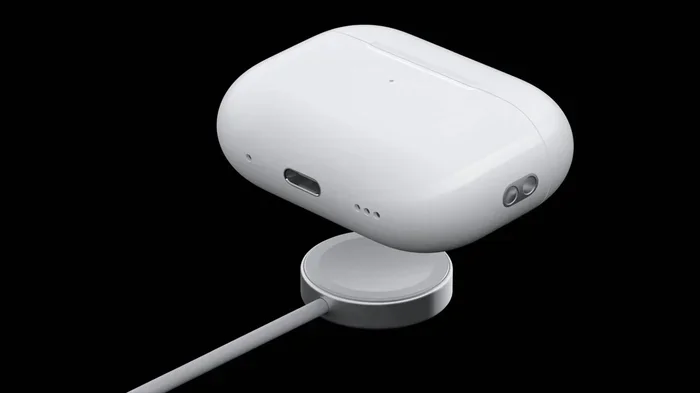
Featured image for AirPods USB-C charging case
Image source: media.techietech.tech
Yes, several AirPods models now feature USB-C charging, including AirPods Pro 2 (2023), AirPods 4, and the AirPods Max (2024). Apple’s transition from Lightning to USB-C was driven by EU regulations requiring a universal charging standard. Older AirPods models, however, still use the Lightning connector. This shift means iPhone users need only one cable to charge their phone, tablet, and earbuds, simplifying daily life for millions of people worldwide.
Picture this: you’re packing for a trip, and instead of grabbing three different cables, you toss one USB-C cord into your bag. That single cable charges your phone, your tablet, your laptop, and yes, your earbuds. This isn’t a dream for the future. It’s reality for millions of AirPods owners who made the switch.
The question “do AirPods have USB-C” has a simple answer: some do, and some don’t. Apple didn’t flip a switch overnight. The transition happened gradually, starting in September 2023, and it affects which models you can buy and how you charge them. Understanding this change saves you money, frustration, and the dreaded moment when your earbuds die mid-flight.
In this guide, you’ll learn exactly which AirPods come with USB-C, why Apple made the change, how to identify what you own, and what this means for your daily charging routine. Whether you’re shopping for new earbuds or trying to figure out your current pair, we’ve got you covered.
Key Takeaways
- USB-C AirPods exist: AirPods Pro 2 (2023), AirPods 4, AirPods 4 with ANC, and AirPods Max (2024) all feature USB-C charging cases or cables.
- EU regulation drove change: The European Union’s Common Charger Directive forced Apple to abandon Lightning in favor of USB-C across its product lineup.
- Older models still use Lightning: AirPods 2, AirPods 3, original AirPods Pro, and AirPods Max (2020) remain Lightning-only devices.
- One cable for everything: USB-C lets you charge your AirPods using the same cable that charges your MacBook, iPad, iPhone 15, or Android phone.
- Faster charging supported: USB-C AirPods support faster charging speeds when paired with a 5W or higher USB-C power adapter.
- Backward compatibility lost: Your old Lightning cables will not work with new USB-C AirPods cases, requiring a separate cable or adapter.
- Future-proof investment: Buying USB-C AirPods ensures compatibility with upcoming Apple products and virtually all modern electronics.
📑 Table of Contents
- Which AirPods Have USB-C? The Complete Model Breakdown
- Why Did Apple Switch AirPods to USB-C? The Real Reasons
- How to Tell If Your AirPods Have USB-C or Lightning
- Charging USB-C AirPods: What You Need to Know
- The Impact of USB-C AirPods on Your Daily Life
- Common Questions About AirPods and USB-C
- Making the Right Choice When Buying AirPods
Which AirPods Have USB-C? The Complete Model Breakdown
Let’s cut straight to the most important question. Not every AirPods model in existence uses USB-C. Apple sells several versions, and the connector type depends on when each model launched or got updated.
AirPods Pro 2 (USB-C Version): The Flagship Model
The second-generation AirPods Pro received a USB-C upgrade in September 2023 alongside the iPhone 15 launch. This version replaced the original Lightning-equipped AirPods Pro 2 that debuted in late 2022. The USB-C AirPods Pro 2 charging case is slightly different from its predecessor, though the earbuds themselves look identical.
Did You Know? The AirPods Pro 2 with USB-C can charge directly from an iPhone 15, 16, or any USB-C iPad using a USB-C cable. This means if your earbuds die and your friend has a newer iPhone, you’re back in business within minutes.
The case also gained an IP54 rating for dust and water resistance, a small bump from the previous sweat and water resistance designation. Apple’s H2 chip powers these earbuds, delivering active noise cancellation that blocks twice as much noise as the original AirPods Pro.
AirPods 4: The New Standard
Apple launched two versions of AirPods 4 in September 2024. Both feature USB-C charging cases, marking a complete departure from Lightning for the standard AirPods lineup.
The base model AirPods 4 includes:
- USB-C charging case with a built-in speaker for Find My alerts
- H2 chip for improved sound quality and connection stability
- Personalized Spatial Audio with dynamic head tracking
- Up to 30 hours of total listening time with the case
The premium AirPods 4 with Active Noise Cancellation adds even more features while keeping the same USB-C case. This was the first time Apple brought ANC to its non-Pro earbuds.
AirPods Max (2024): The Over-Ear Option
The original AirPods Max launched in December 2020 with a Lightning port for charging. In September 2024, Apple released an updated version that switched to USB-C. The change happened silently, with Apple simply listing the new model as “AirPods Max (USB-C)” in its store.
Beyond the port change, Apple added several new color options including midnight, starlight, blue, purple, and orange. The sound drivers, chips, and overall design remained identical to the Lightning version.
Models That Still Use Lightning
If you own any of these AirPods, they continue to use the Lightning connector:
- AirPods 1st generation (2016) – Discontinued but still in use
- AirPods 2nd generation (2019) – Sold until September 2024
- AirPods 3rd generation (2021) – Discontinued when AirPods 4 launched
- AirPods Pro 1st generation (2019) – Discontinued in September 2022
- AirPods Pro 2 Lightning version (2022) – Discontinued but available refurbished
- AirPods Max Lightning version (2020) – Sold until September 2024
Think of it like old phone chargers. Just as many homes still have Micro-USB cables lying around, Lightning cables remain useful for millions of devices still in circulation.
Why Did Apple Switch AirPods to USB-C? The Real Reasons
The USB-C transition didn’t happen because Apple suddenly loved universal standards. It happened because regulators in Europe said, “enough is enough.” Understanding the reasons behind this shift helps you see the bigger picture.
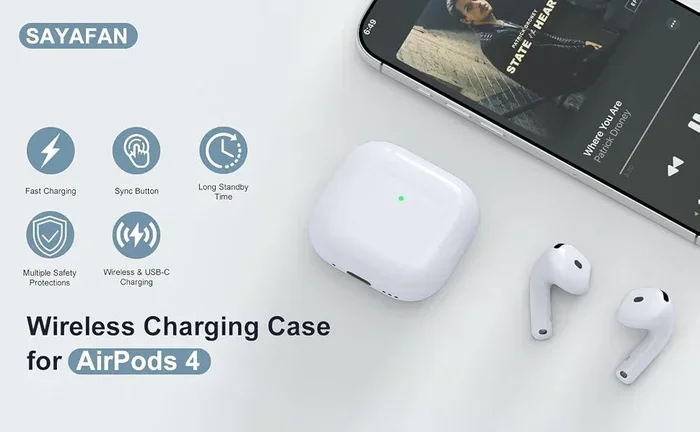
Visual guide about AirPods USB-C charging case
Image source: m.media-amazon.com
EU’s Common Charger Directive Explained
In October 2022, the European Parliament passed legislation requiring all smartphones, tablets, and headphones sold in EU countries to use USB-C as the standard charging port by the end of 2024. The rule aimed to reduce electronic waste and give consumers more flexibility.
Did You Know? The EU estimates this single regulation will save consumers approximately €250 million annually on unnecessary cable purchases. It will also prevent around 11,000 metric tons of electronic waste from entering landfills each year.
Apple initially pushed back against the regulation, arguing that strict regulation would “stifle rather than encourage innovation.” The company even tested USB-C on some MacBooks and iPads years before being forced to make the switch on iPhones and AirPods.
The Practical Benefits Apple Couldn’t Ignore
Beyond legal requirements, USB-C offers genuine advantages:
Faster data transfer speeds: USB-C supports up to 40 Gbps with Thunderbolt 4 compatibility, compared to Lightning’s USB 2.0 speeds. While AirPods don’t need this bandwidth, the cable you already use for other devices now works everywhere.
Higher power delivery: USB-C can deliver up to 240W of power (with USB4), while Lightning maxes out around 12W. AirPods charge faster when given more power, though the earbuds themselves only need a fraction of what’s available.
Universal compatibility: The same USB-C cable charges your MacBook, iPad, Nintendo Switch, Android phone, and now AirPods. One cable to rule them all, as some users jokingly say.
Imagine a world where every appliance in your kitchen used the same plug. That’s essentially what USB-C accomplishes for electronics. No more drawers full of proprietary cables.
Apple’s Own Innovation Story
Apple genuinely believes in the Lightning connector’s design. It was revolutionary when introduced in 2012, appearing on the iPhone 5 before most competitors had adopted any reversible connector. USB-C didn’t launch until 2014.
However, Apple also embraced USB-C for MacBooks starting in 2016, then iPad Pro in 2018, and most iPad models by 2022. The iPhone was the last holdout, and AirPods followed along.
The company now uses USB-C across its entire product lineup, with the exception of some older accessories like the Magic Mouse, Magic Keyboard, and certain AirPods cases still in retail channels.
How to Tell If Your AirPods Have USB-C or Lightning
Not sure what you’re working with? Here are three foolproof ways to identify your AirPods connector type without any technical expertise.
Method 1: Visual Inspection of the Case
Look at the bottom of your AirPods charging case. You’ll see either:
- A small rectangular port with rounded edges: This is Lightning. It’s narrower than USB-C and has a distinctive shape that only inserts one way.
- A small oval-shaped port: This is USB-C. It’s slightly wider and more symmetrical than Lightning, resembling a flattened oval.
The difference is subtle but clear once you see both side by side. Lightning ports look like a thin slot, while USB-C ports look like a small rounded rectangle.
Method 2: Check Your Settings
For iPhone users, open the Settings app, tap Bluetooth, find your AirPods in the list, tap the “i” icon, and look at the model number. Here’s what each model number tells you:
- A2968: AirPods Pro 2 with USB-C (2023)
- A3053, A3054, A3056: AirPods 4 (2024)
- A3184: AirPods 4 with Active Noise Cancellation
- A3188: AirPods Max with USB-C (2024)
Any other model number indicates Lightning-based AirPods. This method works even if you no longer have the original packaging.
Method 3: Check the Original Box or Receipt
If you still have the original packaging, the connector type is usually mentioned on the side or back. The box will list either “Lightning” or “USB-C” under the compatibility or specifications section. Your purchase receipt from Apple Store or authorized retailers also includes this information.
Charging USB-C AirPods: What You Need to Know
Owning USB-C AirPods is straightforward, but a few tips help you get the most out of your charging experience.
The Cables and Chargers That Work
Any USB-C cable works with USB-C AirPods. You don’t need a special “Made for AirPods” cable. The same cable that charges your MacBook, iPad, or Android phone will charge your AirPods case perfectly.
For optimal charging speed, use a 5W or higher USB-C power adapter. Apple recommends its 5W USB-C power adapter, but any reputable third-party charger works fine. Wireless charging is also supported on AirPods Pro 2 (both versions) and AirPods 4 with ANC using any Qi-compatible charging pad or MagSafe charger.
Did You Know? Charging your AirPods Pro 2 with USB-C for just 5 minutes gives you approximately 1 hour of listening time. This quick-charge feature works with both wired and wireless charging methods.
Charging From Non-Traditional Sources
One of the coolest features of USB-C AirPods is reverse and pass-through charging. You can charge your AirPods case from:
- Your iPhone 15 or 16: Connect a USB-C cable from your iPhone to your AirPods case. Your iPhone acts as a power source.
- Your iPad with USB-C: Any iPad Pro, iPad Air (4th gen or later), or iPad mini (6th gen or later) can charge your AirPods.
- Your MacBook: Any MacBook with USB-C or Thunderbolt ports can charge your AirPods case.
- A friend’s Android phone: Most Android phones with USB-C support reverse charging.
This feature saved me on a recent flight when my AirPods died and the only available outlet was across the aisle. I borrowed a USB-C cable from a fellow passenger and charged my case from my iPhone for 10 minutes. Problem solved.
What Happens When You Use the Wrong Cable
If you try to plug a Lightning cable into a USB-C AirPods case, it simply won’t fit. The port shapes are physically incompatible. You won’t damage anything by trying, but you’ll quickly realize you grabbed the wrong cable. The same goes for Micro-USB or USB-A cables, which also won’t physically connect to a USB-C port.
This physical incompatibility is actually a safety feature. Unlike some wireless charging situations where mismatched standards can cause confusion, USB-C and Lightning ports cannot be accidentally mixed up.
The Impact of USB-C AirPods on Your Daily Life
Beyond the technical specifications, USB-C AirPods create real changes in how people use technology every day. Let’s explore what this means for you.
Travel Becomes Simpler
Anyone who travels with multiple gadgets knows cable management is a nightmare. Before USB-C, you might pack:
- A Lightning cable for your iPhone and AirPods
- A USB-C cable for your MacBook
- A Micro-USB cable for an e-reader or other device
- A proprietary cable for your camera or drone
Now, you can charge everything with one or two USB-C cables. Frequent travelers report saving significant space in their bags and reducing the mental load of remembering which cable goes with which device.
Shared Households Benefit
In households with mixed-device families, USB-C creates harmony. The Android user’s cable works for the iPhone user, the iPad charges with the same cable as the Switch, and everyone’s AirPods can be topped up from any available charger. This is particularly valuable in homes with teenagers who frequently borrow each other’s cables.
Environmental Impact Matters
The average household accumulated approximately three charging cables per device type before standardization. With USB-C, you need far fewer cables overall. The EU estimates the new rules will reduce cable production by approximately 15,000 tons annually across Europe.
While individual impact seems small, multiplied across hundreds of millions of devices, the environmental benefit adds up. Using fewer cables means less plastic, less copper mining, and less electronic waste when cables eventually fail.
Common Questions About AirPods and USB-C
Beyond the basic questions, several specific situations arise frequently. Let’s address the most common scenarios.
Can You Use AirPods Pro 2 USB-C with iPhone Chargers?
Yes, but with one consideration. If you have an iPhone 14 or earlier with a Lightning cable, you cannot directly connect that cable to your USB-C AirPods case. However, you have several options:
- Use a Lightning to USB-C cable (Apple sells these)
- Charge your AirPods wirelessly on any Qi pad or MagSafe charger
- Use any other USB-C cable you own
- Charge from your iPhone if you have iPhone 15 or later
Do USB-C AirPods Sound Different?
No. The sound quality depends on the audio drivers, chips, and acoustic design, not the charging port. AirPods Pro 2 with USB-C sound identical to AirPods Pro 2 with Lightning. The only difference between these models is the port and the slightly improved IP54 rating on the USB-C version.
This makes sense if you think about it. The charging port is just a way to deliver electricity to the battery. It doesn’t touch the audio signal path or the speakers themselves. Your music sounds the same regardless of how you charge the case.
Are USB-C AirPods More Expensive?
The retail price is essentially identical between Lightning and USB-C versions. When Apple transitioned models, it didn’t raise prices for the USB-C variants. AirPods Pro 2 with USB-C launched at the same $249 price as the Lightning version it replaced.
However, USB-C AirPods are often the only versions available now, so you don’t really have a choice if you’re buying new. Refurbished Lightning versions might be cheaper through Apple’s Certified Refurbished store or third-party sellers, but they lack the future-proofing benefits.
What About AirPods for the Lightning Holdouts?
If you’re deeply invested in Lightning cables and don’t want to switch, you can still buy Lightning AirPods through some retailers who have remaining inventory. However, Apple has stopped manufacturing most Lightning AirPods, so supplies will dwindle over time.
My advice: embrace the change. USB-C is the future of consumer electronics, and even Apple has committed to the standard. Fighting it is like insisting on keeping a DVD collection when streaming is clearly the future direction.
Making the Right Choice When Buying AirPods
Whether you’re buying your first pair of AirPods or upgrading from an older model, here’s how to make a smart decision.
If You’re Buying New in 2025
Every AirPods model Apple currently sells features USB-C. You cannot accidentally buy Lightning AirPods from Apple’s website or physical stores anymore. Your decision now focuses on which model suits your needs rather than which connector it uses.
Choose based on your priorities:
- AirPods 4 ($129): Best for casual listeners who want the AirPods experience without premium features.
- AirPods 4 with ANC ($179): Perfect balance of features and price for most users.
- AirPods Pro 2 ($249): Best sound quality, best noise cancellation, and most features overall.
- AirPods Max ($549): Only choice if you specifically want over-ear headphones.
If You’re Considering Used or Refurbished
Buying used AirPods requires more caution now. You might find Lightning models at attractive prices, but consider:
- You’ll need a Lightning cable to charge them (or buy one separately)
- Future iPhones won’t include Lightning cables, making charging harder over time
- You can’t charge from friends’ newer iPhones or iPads without an adapter
- Apple may eventually stop supporting these models with software updates
Generally, paying a bit more for USB-C AirPods is worth the future-proofing, especially if you plan to keep them for several years.
The One Accessory Worth Buying
If you own USB-C AirPods, invest in a good quality, durable USB-C cable. Since you’ll use this single cable for many devices, quality matters more than ever. Look for:
- Braided cables: Last 3-5x longer than rubber-coated cables
- USB-IF certified cables: Guaranteed to meet safety standards
- Right-angle connectors: Useful for gaming or watching videos while charging
- Length of 1-2 meters: Most versatile for different situations
Apple’s own USB-C cables work fine, but third-party options from Anker, Belkin, or UGREEN often offer better durability at similar prices. A $15-20 cable that lasts three years beats a $10 cable that frays after six months.
The move to USB-C represents more than just a port change. It marks Apple’s alignment with a global standard, simplification of consumer experiences, and a meaningful step toward reducing electronic waste. Whether you’re excited about carrying fewer cables or annoyed about replacing old Lightning accessories, the transition is now complete across Apple’s audio product lineup.
As you consider your next AirPods purchase, remember that USB-C is simply the modern standard. Like moving from VHS to DVD, or from physical keys to digital car keys, this change might feel inconvenient initially but quickly becomes invisible. Within a few years, we’ll wonder why we ever needed different cables for different devices.
The future is one cable, many devices, and simpler lives. Your AirPods are now part of that future.